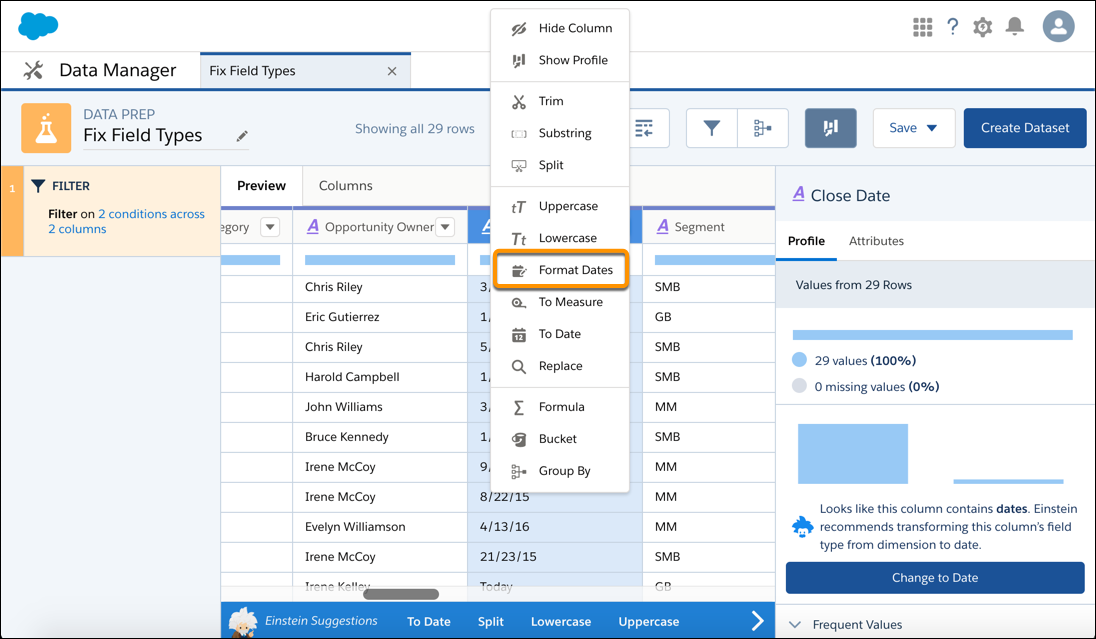
If a dimension field contains dates in different formats, use the Format Dates recipe
transformation to standardize the format for all values in the field. A consistent format enables
you to correctly filter and group records by date, including filtering by date component, such as
month. It also ensures that you can successfully convert the field type from dimension to
date.
Required Editions
| User Permissions Needed |
| To create a recipe: |
Edit Analytics Dataflows OR Edit Dataset Recipes |
- On the column header of the dimension field, click
 .
.
- Select Format Dates.
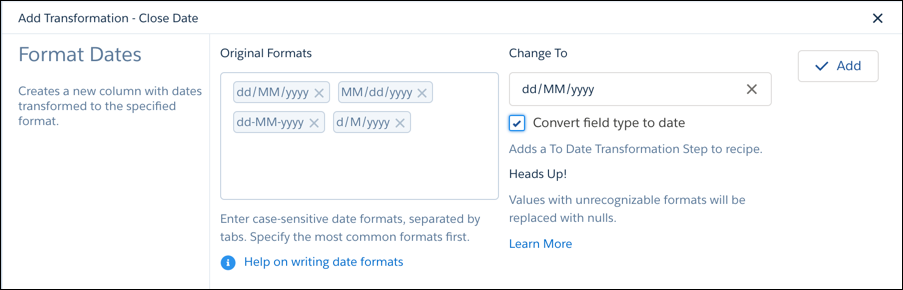
Analytics detects the formats of the dates in the field.
- If a date format isn’t detected, enter it in the Original Formats box.
- To convert a dimension field with dates to a date field type, select Convert
field type to date.
- Select the desired date format in the Change To field.
- Click Add and save the recipe.
When you run the recipe, the transformation creates a field with the dates standardized in the
selected format. If CRM Analytics can’t determine the original format or the date doesn’t have a
value for a date component, the transformation replaces the date with null. For example, if you
standardize on the MM/dd/yyyy: hh:mm:sssz format and a date value doesn’t
have the seconds date component (sssz), CRM Analytics replaces the date
with null.