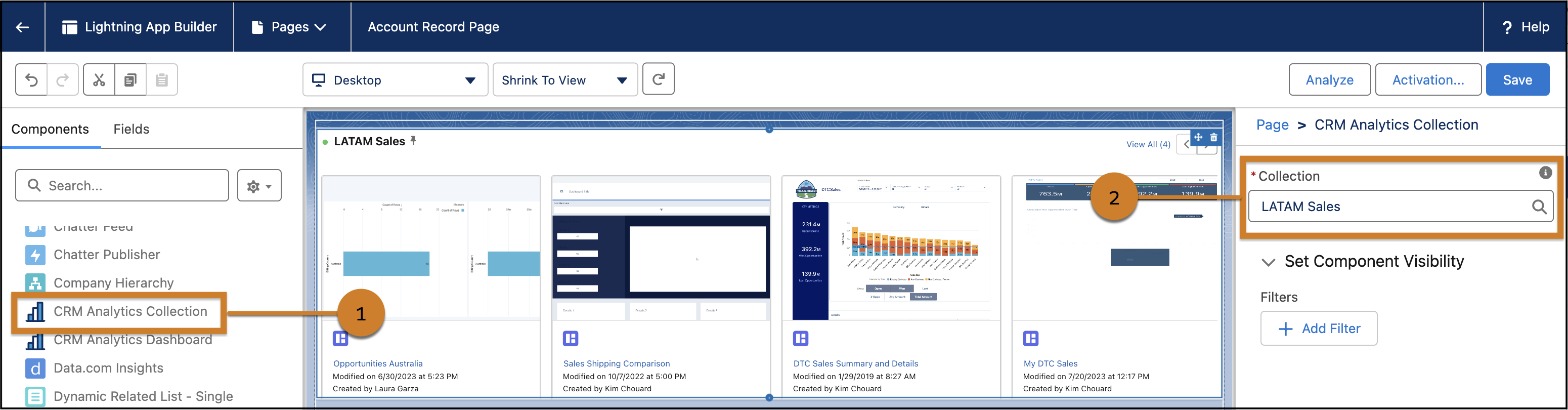
Insert and display collections to your Lightning pages using the CRM Analytics Collection component.
Required Editions
| Available in: Lightning Experience |
| Available in: Essentials, Group, Enterprise, Professional, Unlimited, and Developer Editions. |
| Also available with CRM Analytics, which is available for an extra cost in Performance, Enterprise, Unlimited, and Developer Editions. |
| User Permissions Needed | |
|---|---|
| To add a collection to a Lightning page: | Use CRM Analytics |
- In the Lightning App Builder, drag the CRM Analytics Collection component to the canvas.
- Select an available collection from the Collection lookup in the configuration panel.
- Use the carousel buttons to navigate through the collection.
- Save the page when finished.