Exploring your data can lead you down many paths. Not all of them are fruitful, and
that’s OK. CRM Analytics keeps a full history of your activity in a lens. If you’ve changed your
lens in undesired ways, or just want to see those nifty animations again, use history to backtrack
quickly to a previous state in your visualization.
Required Editions
| Available in Salesforce Classic and Lightning Experience. |
| Available with CRM Analytics, which is available for an extra cost in
Enterprise, Performance, and Unlimited Editions. Also available in
Developer Edition.
|
| User Permissions Needed |
| To view visualizations: |
Use CRM Analytics |
-
Click the View History button
 in the
header.
in the
header.
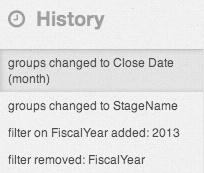
A sidebar lists a history of all the actions that you’ve taken in the lens.
-
Select any item in the list to view the exploration at that point. Or use the undo and redo
buttons (1) step backward and forward through the list.