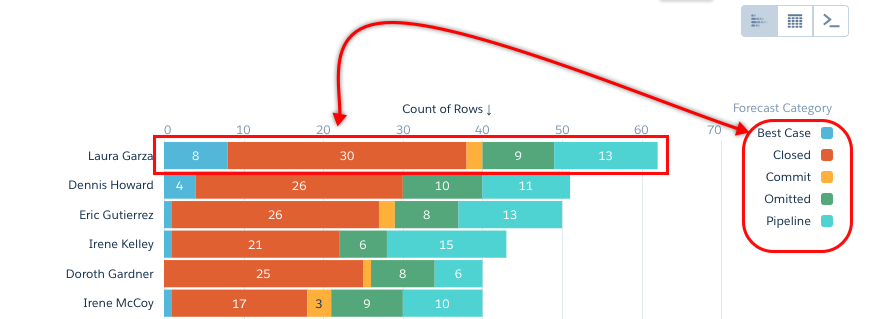
Choose whether data in your chart visualization is sorted ascending, sorted descending, or unsorted.
Required Editions
| Available in Salesforce Classic and Lightning Experience. |
| Available with CRM Analytics, which is available for an extra cost in Enterprise, Performance, and Unlimited Editions. Also available in Developer Edition. |
| User Permissions Needed | |
|---|---|
| To view visualizations: | Use CRM Analytics |
-
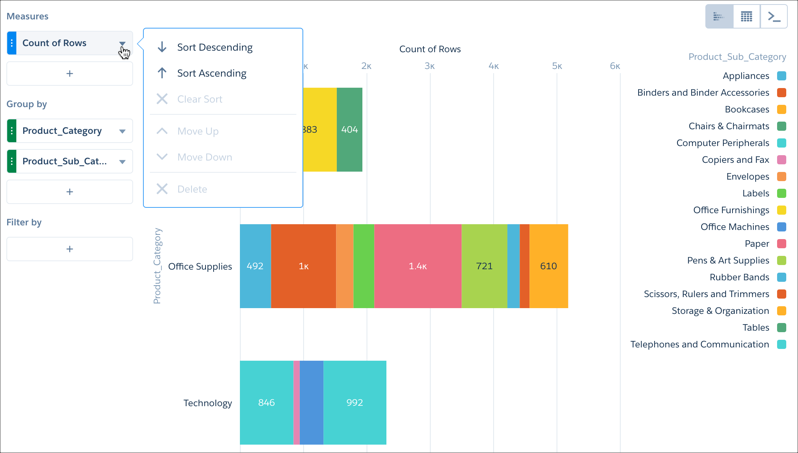
Click the actions menu for the measure you want to sort. For dimensions, click the actions
menu in chart, compare table, or pivot table mode.
-
Select Sort descending or Sort ascending.
If the measure or dimension is already sorted, you can unsort it by selecting Clear sort.

Note To show consistency across multiple bars in stacked charts, the stacked segments are always
sorted alphabetically within each bar. Stacked charts include stacked bar, stacked column,
stacked pyramid, and stacked waterfall. To help you locate a segment in a bar, the legend uses
the same sort order as the bar segments.