
Your analytics are now together in an intuitive and personalized home page that you can experience in Analytics Studio and the Analytics Tab. On this centralized home page, you can see the latest changes for your CRM Analytics assets, and dashboards and reports. You can also customize the home page with items you build for quick access, along with better organization, and a powerful search experience.
Required Editions
| Available in: Lightning Experience |
| Available in: Essentials, Group, Enterprise, Professional, Unlimited, and Developer Editions. |
| Also available with CRM Analytics, which is available for an extra cost in Performance, Enterprise, Unlimited, and Developer Editions. |
| User Permissions Needed | |
|---|---|
| To access Analytics home: |
|
| To access CRM Analytics items in Analytics home: | Use CRM Analytics |
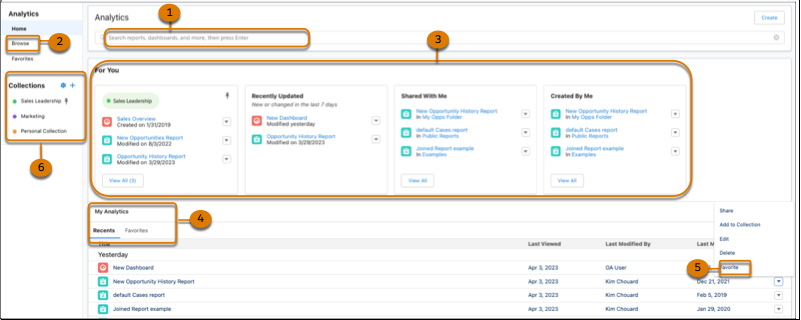
Use search (1) and browse (2) to locate your items through keyword search and filters. For You (3) organizes analytics to help you find what you’re looking for quickly. Go to My Analytics (4) to access content from a chronological listing or go to Favorites (5) to open commonly used items. Use Collections (6) to curate and organize analytics across different apps and folders and share them with other users.
- What’s the Difference Between Analytics Tab and Analytics Studio?
With CRM Analytics, you can take either a business user path or a builder path, depending on what you want to do, and you can switch paths at any time. - Browse and Find Analytics Assets
The analytics home page provides easy access to all of your apps, dashboards, lenses, reports, and more. With a variety of filter and search options, you can find those assets fast. - Run a CRM Analytics App to View Dashboards and Lenses
You can run an app in the Analytics tab or Analytics Studio. - Favorite Your Analytics
Your analytics can be favorited for quick access. - Set and Send Smart Notifications
Set up CRM Analytics to notify you about changes to your important business metrics, when and where you choose. Attach notification criteria to widgets in dashboards, and select when to run the queries. You can see notifications in CRM Analytics, Lightning Experience, CRM Analytics for iOS, and email. Add recipients from your org to the email’s distribution list to notify colleagues at the same time as yourself. - Get Scheduled Updates with Email Subscriptions
Subscribe to lenses and dashboard widgets and receive a daily or weekly email with updates on your most important charts and metrics, and table data in.csvattachments. - Monitor Important Metrics with the CRM Analytics Watchlist
The CRM Analytics Watchlist gives users the advantage of capturing and tracking up to 20 KPIs across different dashboards, plus historical trending. No more switching between dashboards to see what has changed, and track your metrics all in one place.