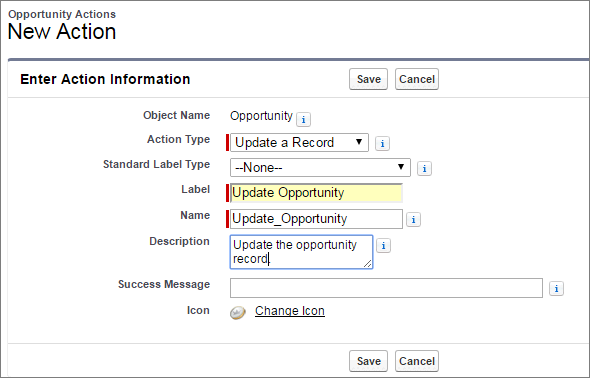
This example adds the predefined Update a Record action to the Opportunities
object.
Required Editions
| Available in Salesforce Classic and Lightning Experience. |
| Available with CRM Analytics, which is available for an extra cost in
Enterprise, Performance, and Unlimited Editions. Also available in
Developer Edition.
|
| User Permissions Needed |
| To view visualizations: |
Use CRM Analytics |
| To create actions: |
Customize Application |
- In Setup, in the Quick Find box, enter the name of the object that you want to add actions
to. For this example, enter Opportunities, then select
Buttons, Links, and Actions.
- Click New Action to see which types of actions are available.
- From the Action Type dropdown list, select the action to add. In this case, select
Update a Record.
- Enter a label and description for the action.
- Click Save.
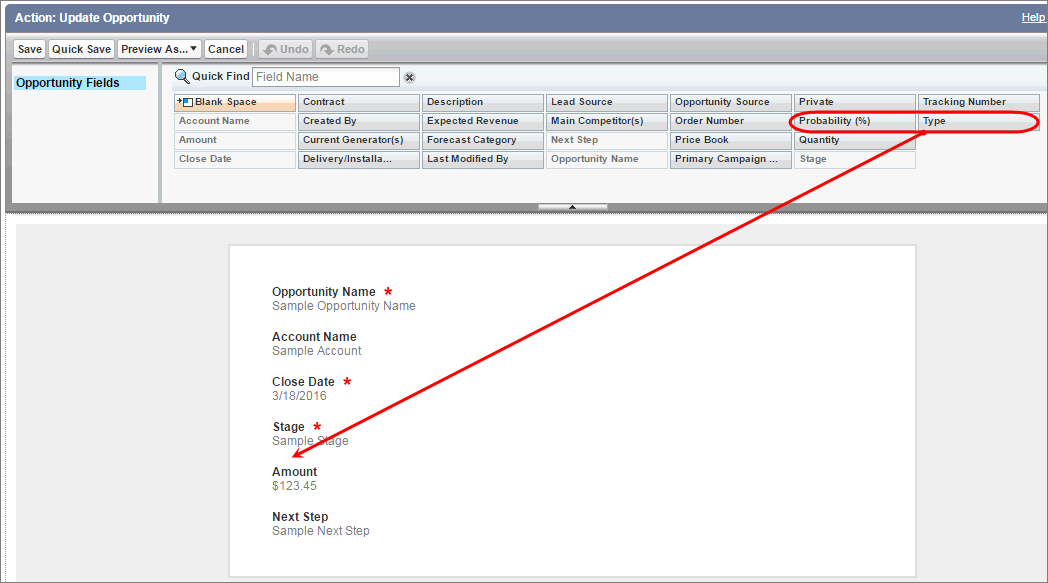
The next page shows the default fields that you can update. For the example, add the
Probability (%) and Type fields.
- Drag Probability (%) and Type below the Stage
field in the workspace. To select multiple fields, hold down Ctrl (for
Windows) or Cmd (for macOS).
- Click Save.
You added the Update Opportunity action to the Opportunities object. Next, you add
it to a page layout to determine which users can see the action.