
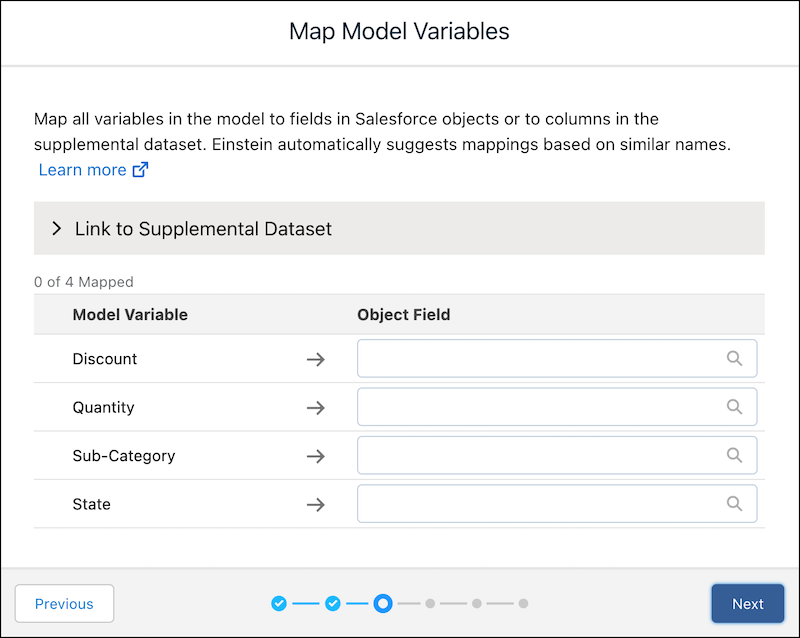
Define the mapping between variables in the model to fields in the Salesforce object or to columns in the supplemental dataset.

Note Einstein Discovery stories are now models. We wish we could snap our fingers to update
the name everywhere, but you can expect to see the previous name in a few places until we
replace it.
-
If you want to include external data or computed fields in queries associated with this
model, click Add Supplemental Dataset and fill in the following
fields.
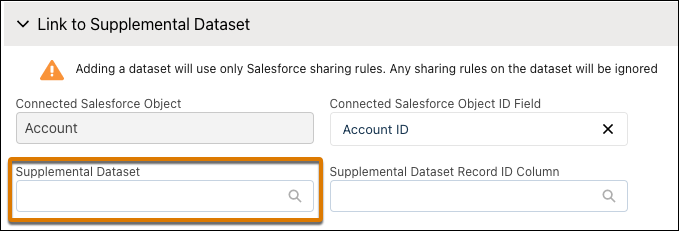
Field Description Connected Salesforce Object Name of the selected Salesforce object. Read only. Connected Salesforce Object ID Field Name of the Object ID field in the selected Salesforce object. Einstein automatically selects a default field. If you want to change this setting, click the x and select a different field.
Note Einstein displays object fields to which you have access. If you don't see the object ID field you expect, check the field-level security settings for your user account to ensure that you have at least read access to that field in the Salesforce object.Supplemental Dataset Name of the supplemental dataset that contains the additional data to use when scoring records.
Note Adding a dataset uses only Salesforce sharing rules. Any sharing rules on the dataset are ignored.- Use supplemental datasets for predictive models that require information
that’s not found in Salesforce objects.
- External data. You can use data that’s stored outside of Salesforce
for your model. For example, a model predicting likelihood to win an
opportunity can use advertising history that’s stored in another
system as an explanatory variable.
- To map predictions to live Google BigQuery data, create a live connection to Google BigQuery. For more information and instructions, see Gain Insights on Data Directly in Google BigQuery.
- To map predictions to live Snowflake data, create a live connection to Snowflake. For more information and instructions, see Gain Insights on Data Directly in Snowflake.
- Data Prep datasets. You can use datasets created in Data Prep for
your model. For example, a model that scores opportunities can use the
calculated variable of task total which was created in a Data Prep
recipe. Using a recipe, you can calculate and save the task total
value in a supplemental CRM Analytics dataset. Then, when Einstein
scores opportunity records, it retrieves this calculated value from
the row of the supplemental dataset corresponding to the record in the
Salesforce object.Note Predictions that connect to a dataset depend on the frequency with which the dataset is refreshed.
- External data. You can use data that’s stored outside of Salesforce
for your model. For example, a model predicting likelihood to win an
opportunity can use advertising history that’s stored in another
system as an explanatory variable.
Supplemental Dataset Record ID Column Record ID field in the selected supplemental dataset that corresponds to the selected Object ID field in the Salesforce object. - Use supplemental datasets for predictive models that require information
that’s not found in Salesforce objects.
-
For a field in the dataset, select its corresponding field in the Salesforce
object.
Note
- If you want to deploy this model using automated prediction fields (see Display Einstein Predictions Using Automated Prediction Writeback), you must map all fields.
- If you deploy this model without automated prediction fields, then you don’t need to map all fields.
- If you want to use this model for the prediction Transformation in CRM Analytics data flows, then you don’t need to map fields.
Field Description Model Variable Name of the variable in the model. Object Field Name of the field in the Salesforce object. Dataset Column Name of the corresponding column in the supplemental dataset, if applicable. -
If the model is configured with a projected prediction, be sure to map the projected
prediction variable, and map the Record ID variable to the unique identifier column in
the trending dataset.

To learn more, see Configure Projected Predictions.
- Click Next.