
Define an Apex controller class and methods that generate a list of accounts shown in the table widget, create an opportunity for each account, and return the progress of each task.
- From setup, enter Apex Classes in the Quick Find box.
- Select Apex Classes.
-
Click New.
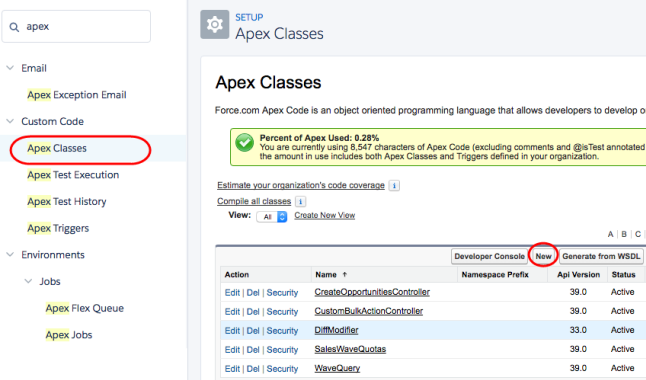
-
Add the following code.
public class CreateOpportunitiesController { public string query{get; set;} /* To determine the records to perform the bulk action on, extract the SAQL query */ public PageReference init() { query = ApexPages.currentPage().getParameters().get('query'); return null; } /* Takes the account records from the SAQL query, creates an opportunity for each account, and then returns a map between account ID and new opportunity name. Note: Account.Name and AccountId referenced below refer to the dataset field names. Update them to match your dataset fields. */ @RemoteAction public static Map<String, String> create(List <Map<String, String>> accountRecords) { Map<String, String> result = new Map<String, String>(); List<Opportunity> opps = new List<Opportunity>(); for (Map<String, String> accountRecord : accountRecords) { String name = accountRecord.get('Account.Name') + ' - Sprint Review - 12/2'; String accountId = accountRecord.get('AccountId'); result.put(accountId, name); Opportunity opp = new Opportunity( /* You can set different fields from the Opportunity object than those listed below, like Amount. */ Name = name, Type ='New Customer', AccountId = Id.valueOf(accountId), CloseDate=Date.valueOf('2016-12-31'), StageName='Prospecting'); opps.add(opp); } insert opps; return result; } } - Click Save.