
Salesforce created the Service Analytics template to make it easy for service managers and agents to use data to drive the success of your service business. Learn the app’s benefits before you create and use the app to explore your Service Cloud data.
Required Editions
| Available in Salesforce Classic and Lightning Experience. |
| Available with CRM Analytics, which is available for an extra cost in Enterprise, Performance, and Unlimited Editions. Also available in Developer Edition. |
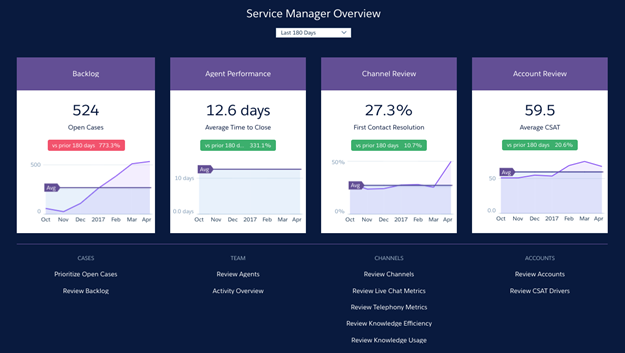
Service Analytics dashboards give you best-practice key performance indicators (KPIs) about your Salesforce service data in a single place. We’ve based the app’s dashboards on learnings from many years of helping businesses manage customer relationships. The goal is to provide the right amount of information at the right time to help both managers and agents make the right decision.
Service managers get a complete view of service customer data that includes trending as well as historical and peer benchmarks. Agents can quickly view a snapshot of each case and customer to help them make quick decisions about their next customer interactions.
We’ve done a lot of the hard work: Our team has built complex queries, formulas, and ratios that draw from your service and sales data and assembled them into easy-to-read visualizations. You create the app: using a built-in configurator, answer a few questions about the data and fields you want to see, and CRM Analytics takes care of the rest. When you’ve created the app, use its prebuilt datasets and dashboards to explore Service Cloud data from any device that supports CRM Analytics.
You get actionable insights fast from your data using the intuitive CRM Analytics interface. And you can drill deeper into key aspects of your business by customizing Service Analytics around your needs.

Your organization can use Service Analytics without CRM Analytics platform by purchasing a Service Analytics license. A Service Analytics license is included with the CRM Analytics platform license.