
Get a snapshot of an account, including its average sales cycle, opportunity amount, and win rate. The dashboard is intended for use when embedded in a Salesforce account or opportunity page.
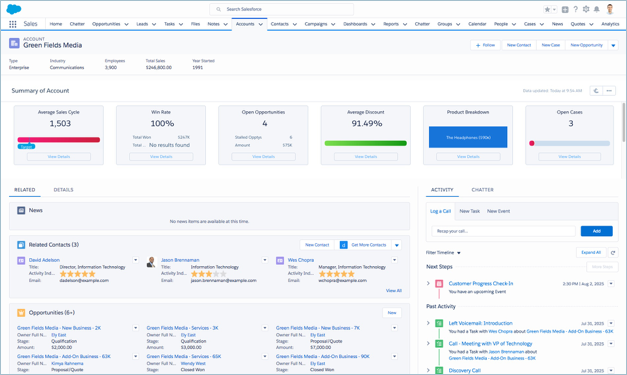
Default Behavior and Recommended Options
Embed the dashboard in either Lightning and Aloha page layouts.
Edit the dashboard to set target lines and set the upper bounds for gauges. With the
dashboard open in CRM Analytics Studio, click the edit icon  to open
the designer, then click the widget you want to edit. Then look for the value you want to
change in the properties panel on the right and change it there. Save the dashboard.
to open
the designer, then click the widget you want to edit. Then look for the value you want to
change in the properties panel on the right and change it there. Save the dashboard.
Wizard and Other Setup Options
Average Discount and Breakdown by Product widgets. Only included if you select Products on the wizard page that lets you add objects to the app. Otherwise it includes two activities widgets.
Cases widget. Only included if you select Cases on the wizard page that lets you add objects to the app.
If your org uses account hierarchy, the dashboard can be embedded so that all child account KPIs roll up into KPIs for the parent.
Embedding Syntax
Here’s the syntax for embedding the dashboard in either Salesforce Classic or Lightning
Experience pages. Note the difference between using a filter for single accounts or account
hierarchy. Opportunity is the developer name for the
opportunity dataset. Use the exact developer name of the dataset when embedding the
dashboard.
Salesforce Classic
Embedding the dashboard in the Account page layout.
Here’s the syntax to filter by a single account:
{"datasets": { "opportunity": [{"fields": ["AccountId"] ,"filter": { "operator": "in", "values": ["$Id"] }
          } ]}}
Here’s the syntax to filter using account hierarchy. Roll ups include KPIs for the account and its child accounts:
{"datasets": { "opportunity": [{"fields": ["Account.Parent.AccountParents"] ,"filter": { "operator": "in",
          "values": ["$Id"] } } ]}}
Embedding the dashboard in the Opportunity page layout.
Here’s the syntax to filter by a single account:
{"datasets": { "opportunity": [{"fields": ["AccountId"] ,"filter": { "operator": "in", "values":
          ["$AccountId"] } } ]}}
Here’s the syntax to filter using account hierarchy. Roll ups include KPIs for the account and its child accounts:
{"datasets": { "opportunity": [{"fields": ["Account.Parent.AccountParents"] ,"filter": { "operator": "in",
          "values": ["$AccountId"] } } ]}}
Lightning Experience

Embedding the dashboard in the Account page layout.
Here’s the syntax to filter by a single account:
{'datasets': { 'opportunity': [{'fields': ['AccountId'] ,'filter': { 'operator': 'in', 'values': ['$Id'] } }
      ]}}
Here’s the syntax to filter using account hierarchy. Roll ups include KPIs for the account and its child accounts:
{'datasets': { 'opportunity': [{'fields': ['Account.Parent.AccountParents'] ,'filter': { 'operator': 'in', 'values':
          ['$Id'] } } ]}}
Embedding the dashboard in the Opportunity page layout.
Here’s the syntax to filter by a single account:
{'datasets': { 'opportunity': [{'fields': ['AccountId'] ,'filter': { 'operator': 'in', 'values': ['$AccountId'] } }
        ]}}
Here’s the syntax to filter using account hierarchy. Roll ups include KPIs for the account and its child accounts:
{'datasets': { 'opportunity': [{'fields': ['Account.Parent.AccountParents'] ,'filter': { 'operator': 'in', 'values':
          ['$AccountId'] } } ]}}
KPI Calculations
Default Widgets
- Average Sales Cycle. Average of opportunity close date - Created date for won opportunities for life of account.
- Win Rate. Total won/ Total closed (won or lost) for life of account.
- Total Won. Total won for life of account.
- Total Lost. Total lost for life of account.
- Open Opportunities. Open opportunities with any close date for the account.
- Count. Total count of open opportunities with any close date for the account.
- Push. Total number of open opportunities for the account that have been pushed at least once.
Optional Widgets
Analytics creates these widgets depending on selections you make on the wizard page that lets you add objects to the app.
- Average Discount. 1 - (Product total price for all products sold to account / Product list price). Only appears if you add Products.
- Product Breakdown. Sum of product total price grouped by product. Only appears if you add Products.
- Number of Open Activities. (Not shown.) Count of open tasks and events related to account. Only appears if you add Products.
- Number of Overdue Activities. (Not shown.) Count of overdue tasks related to account. Only appears if you do not add Products.
- Open Cases. Number of open cases related to account. Only appears if you add Cases.