
Sales executives get instant insight into customer service performance. See average case duration for a selected period compared with previous periods and case duration by account, service channel, and geography.
Default Behavior and Recommended Options

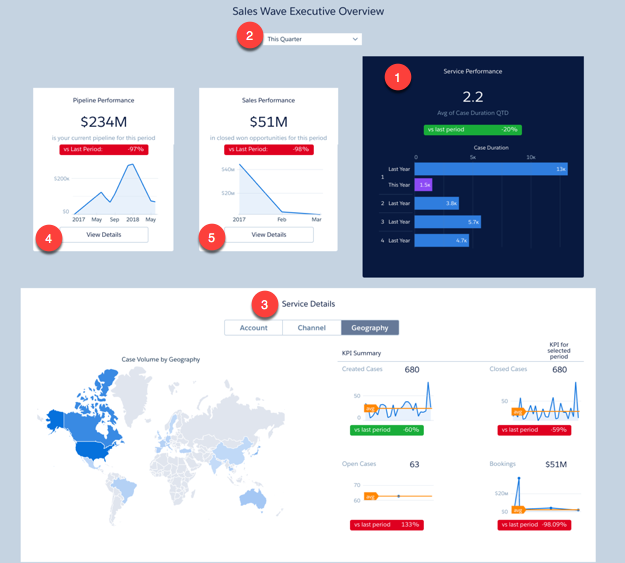
Service Performance chart (1) shows results for the current quarter. View results from a different period by changing the selection in the filter at top (2).
Service Details chart (3) defaults to showing cases by Parent Account. Select Channel from toggle at top to view cases according to the channels where they came from (for example, email, chat, and phone). Select Geography to view cases by locale.
To view pipeline and sales performance overviews, click Details buttons in Pipeline Performance (4) and Sales Performance (5) charts.
Wizard and Other Setup Options
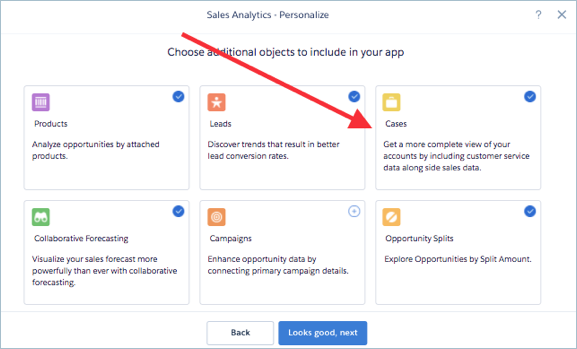
To add this dashboard to your app, select Cases on the wizard page that lets you add objects to the app.
Datasets Used
- Cases
- Accounts
KPI Calculations
Service Performance
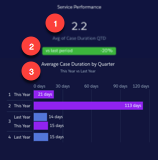
- Service performance (1). Average days to close cases during selected period.
- Comparison to prior period (2). (Average time to close to date in selected period - Average time to close in prior period) / Average time to close in prior period.
- Average case duration by quarter (3). Average time to close for cases per quarter, this year and last year.
Service Details (at bottom)
- Account. Average case duration by total amount closed won by account.
- Channel. Average duration and number of closed cases by channel
- Geography. Number of cases created by region. Region uses the answer for the primary field from the Accounts object selected in wizard.
- Created Cases. Total number of cases created in selected period.
- Created Cases vs last period. (Number of cases created in current period - Number of cases created in previous period) / Number of cases created in previous period.
- Closed Cases. Total number of cases closed within selected period.
- Cases Closed vs last period. (Number of cases closed in current period - Number of cases closed in previous period) / Number of cases closed in previous period.
- Open cases. Total number of cases currently open. (Not impacted by selected period.)
- Open Cases vs last period. (Number of open cases today - Number of open cases at the start of the previous period) / Number of open cases at the start of the previous period. (Number of open cases at the start of previous period is estimated based on number of cases created and closed since the beginning of the previous period.)
- Bookings. Total amount closed won in selected period.
- Bookings vs last period. (Total amount closed won in current period - Total amount closed won in previous period) / Total amount closed won in previous period).
Pipeline Performance
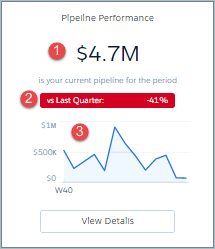
- (1) Pipeline Performance. Total open opportunity amount for selected period.
- (2) Comparison to prior period (quarter, year, month, depending on selected period). (Total open opportunity amount to date this period - Total open opportunity amount in prior period) / Total open opportunity amount in prior period. Prior period uses historical open pipeline amount.
- (3) Open deals over time. Open deals by week of close date.
Sales Performance
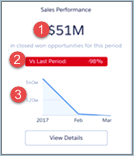
- (1) Sales performance. Total closed won in selected period.
- (2) Comparison to prior period (quarter, year, month, depending on selected period). (Total closed won in current period - total closed won prior period) / Total closed won prior period.
- (3) Total closed over time. Total closed won by week.