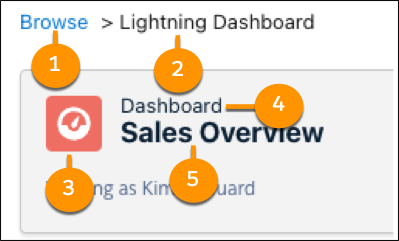
Use the navigation breadcrumb to guide you back to where you started when opening items in the Analytics tab.
Required Editions
| Available in: Lightning Experience |
| Available in: Essentials, Group, Enterprise, Professional, Unlimited, and Developer Editions. |
| User Permissions Needed | |
|---|---|
| To access the Analytics tab: |
|
| To access the Analytics tab with CRM Analytics items: | Use CRM Analytics |
Navigation breadcrumbs are activated when you open a report or dashboard. Use the navigation breadcrumb to guide you back to where you started, whether from home, search, or browse. In addition to helping you know where you started, the navigation breadcrumb also identifies the item and type you’re currently viewing.
This breadcrumb begins with the location where the item was opened (1). In this example, the dashboard was opened from Browse. Next, is the item type (2). Within the opened dashboard it shows its icon (3), type (4), and saved name (5).