Use pre-built flows to automate the process of sending email notifications for specific content quality issues or user feedback thresholds or conditions. For example, you can be alerted if the percentage of toxicity in the responses is over the specified threshold.
Required Editions
The flows use the data stored in Data 360 if the generative AI audit and feedback collection is turned on.
| Available in: Enterprise, Performance, and Unlimited Editions with an Einstein for Sales, Einstein for Platform, Einstein for Service, Einstein 1 Service, or Einstein GPT Service add-on. To purchase add-ons, contact your Salesforce account executive. |
| To create flows: | Manage Flows |
Use these steps to use a pre-built flow template and customize it to send email notifications based on your requirements.
- From Setup, type flows and select Flows under Process Automation to launch the Flow Builder.
- In the Flow Builder, click New Flow.
- Select Use a Template and click Next.
- In the left panel, select Autolaunch Flows. You'll see a list of available flow templates. Select the template you want to use and click Create.
- Set the schedule to specify the start date, time, and the frequency.
-
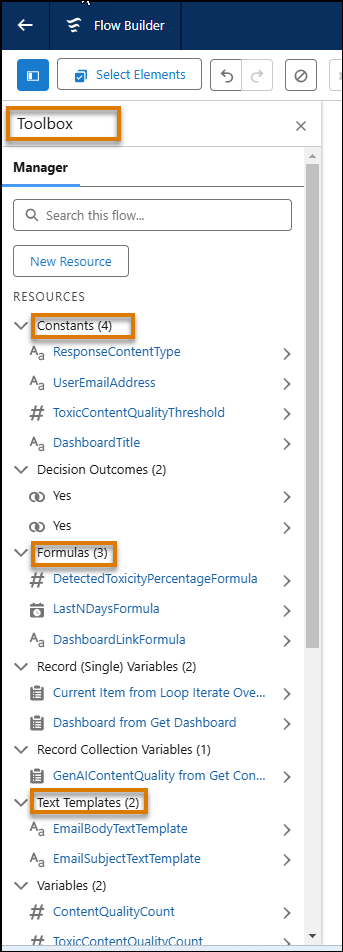
Modify the resources to suit your needs. Some resources to consider.
- Use constraints to modify thresholds
- Use formulas to calculate the conditions
- Use text templates to edit the body of the email message
- Cick Save.
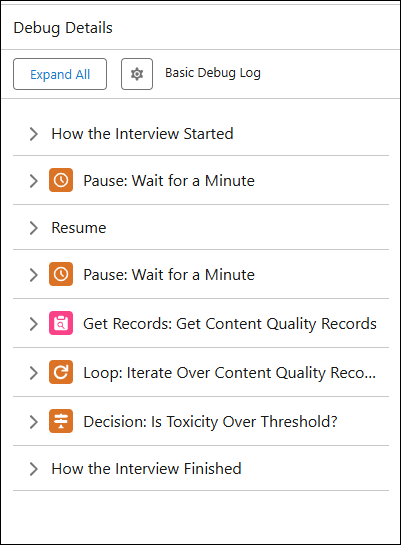
- To test the flow before activating, click Debug and in the Debug Flow dialog box, click Run. Click Continue the Debug Run. In the debug details panel, you can review the details of each step.
- Click Activate to deploy the flow.