Let artificial intelligence help you and your team focus on the right opportunities so
you can close more deals. Each opportunity is given a score, from 1 to 99, which is available on
opportunity records and list views. If you use forecasts in Salesforce, opportunity scores are
also available on the forecasts page. Plus, use scores with reports, Process Builder, and
workflows. Einstein Opportunity Scoring is available to users with or without a Sales Cloud
Einstein license.
Required Editions
| Available in: Lightning Experience and Salesforce Classic. |
| Available with Sales Cloud Einstein, which is available in Performance and
Unlimited Editions, and for an extra cost in Enterprise
Edition
|
| Available to eligible customers for no extra cost in: Enterprise,
Performance, and Unlimited Editions
|
Watch a Demo:  Einstein Opportunity
Scoring (English only)
Einstein Opportunity
Scoring (English only)
Opportunity scores tell you the likelihood that an opportunity will be won. For each
opportunity score, Einstein shows the factors that have contributed the most to the score,
both positively and negatively.
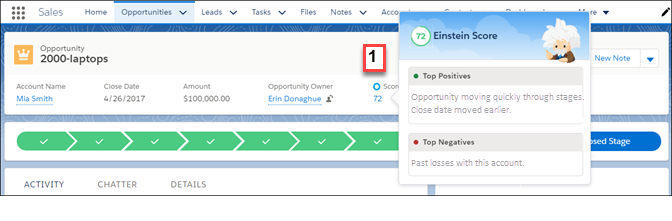
In Lightning Experience, the score is shown on the compact layout of opportunity records (1)
or on the Details tab. Hover over the score to see a list of factors that contribute to the
score. For example, a score could be relatively high because the opportunity is moving quickly
through the stages compared to other opportunities.
In Salesforce Classic, the score is shown on the record detail of opportunity records. The
contributing factors are shown.
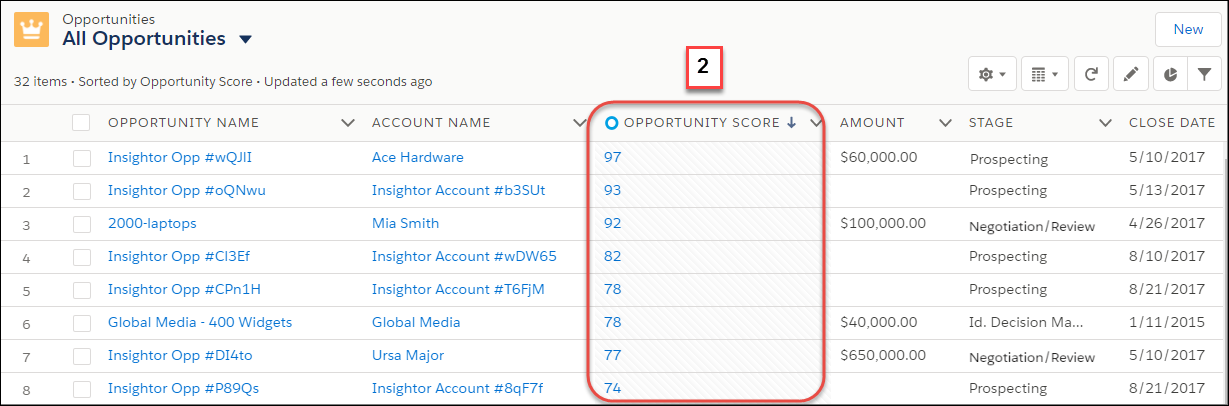
You can add the Opportunity Score field to any of your opportunity list views (2). If you
don’t see the score on public list views, ask your Salesforce admin to add it. In Lightning
Experience, hover over the score in the list view to see the factors that contribute to the
score. In Salesforce Classic, the contributing factors aren’t available from the list views.
Instead, navigate to the opportunity record detail page.
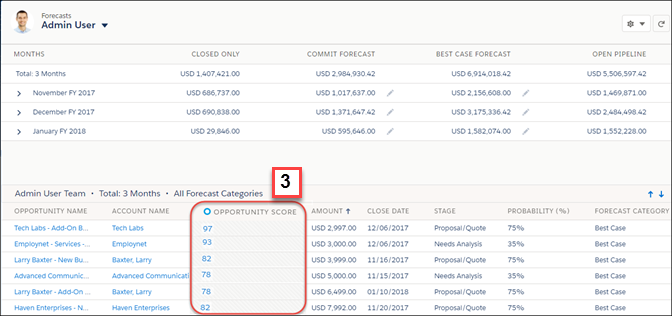
If you use forecasts, admins can add opportunity scores to the opportunity list on the
forecasts page (3).
