
Enable Agent Memory at the agent level so the agent can recall relevant details from your users' conversations and personalize future responses. Enabling memory applies to all of your agent's users, and for Agentforce Employee agents in Lightning Experience, each user then individually chooses whether to opt in.
Required Editions
To use Agent Memory, your agent must use Agent Script in Agentforce Builder. Legacy agents don't support Agent Memory.
| Available in: Lightning Experience |
| Available in: Enterprise, Performance, Unlimited, and Developer Editions. Required add-on licenses vary by agent type. |
| User Permissions Needed | |
|---|---|
| To enable Agent Memory: | Manage AI Agents AND the required permissions for your agent type |
- From the App Launcher, enter Agent, select Agentforce Studio, and click Agents.
- Open the agent that you want to enable memory for, or create a new agent.
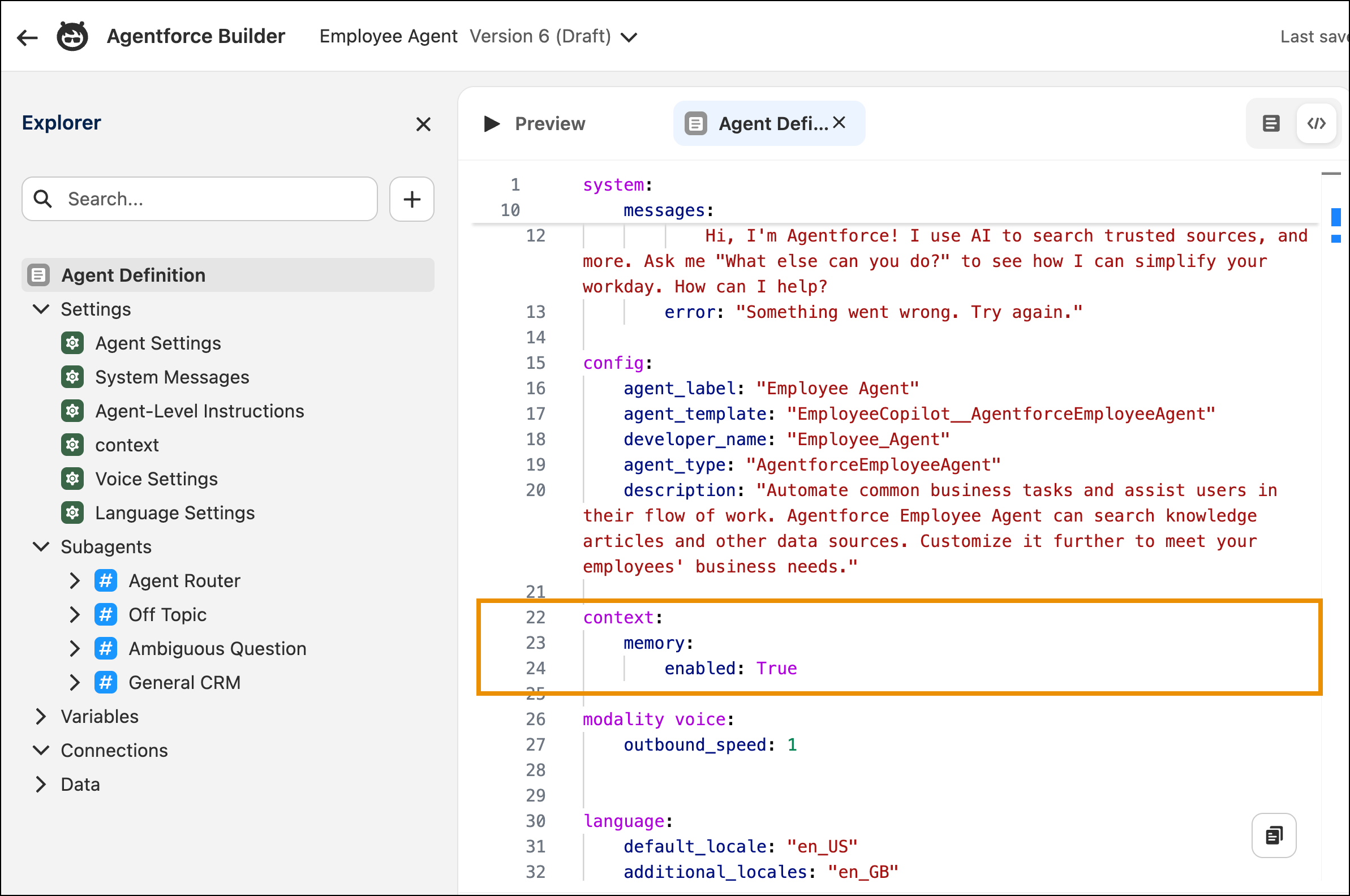
- In Agentforce Builder, toggle to Script view.
-
In the Agent Script, add memory: enabled: True in the context
block.
Agent Script autocompletes the property as you type. Values are case-sensitive. Use True or False.
- Save your changes.
- Start a preview conversation to validate that memory is retained across interactions.
-
Commit and activate your agent.
Committed versions can't be edited. To make changes, create a new version. See Versioning and Editing Agents.
To disable Agent Memory, set memory: enabled: False in the same context block, save, and commit a new version. When Agent Memory is disabled, the agent stops creating and using memories, and existing memories are preserved.
Agent Memory also depends on an org-level setting that is on by default. If your org turns off conversational memory, no agent creates or uses memories, even when memory is enabled in its Agent Script. See Turn Off Conversational Memory for Your Org.
For Agentforce Employee agents in Lightning Experience, users must also opt in before the agent begins creating memories for them. See Manage Agent Access to Your Memories.