A workbook contains one or more sheets, each of which can be a worksheet, dashboard or story. You can use workbooks to organise, save, share and publish your results.
Create or open a workbook
When you open Tableau, a new, blank workbook opens automatically.
To create a new workbook, select File > New
To open an existing workbook, click the thumbnail image of the workbook on the start page.
You can open multiple workbooks simultaneously. Each workbook appears in its own window.
Note: When you open multiple workbooks in Tableau Desktop on the Mac, multiple instances of the application are created, each with its own icon in the Dock. This differs from typical Mac application behaviour, where one instance of the application handles all open documents.
Open a workbook that has an unsupported data connection on the Mac
When working in Tableau Desktop on the Mac, you might need to open a Windows workbook that contains data sources that are not supported in Tableau Desktop on the Mac. To do so, follow the steps below:
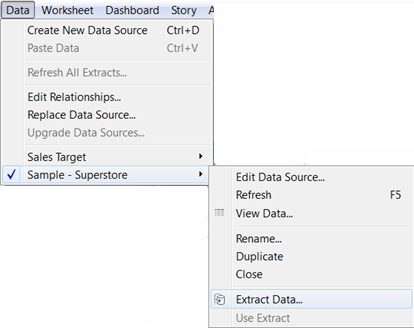
- In Tableau Desktop on Windows, save the workbook as an extract. To create and save an extract, on the Data menu, select a data source, and then select Extract Data.
- Open the extract file (.hyper) you saved in Tableau Desktop on your Mac.