---
schema_version: "1"
id: 07aa459bf35cb7eab3ae43118f75889e0e7b5e710721568e60e1984672284bc0
title: Veeva Vault Connector 1.2 リファレンス
collection: mulesoft
version: current
locale: ja-jp
portal_url: https://docs.salesforce.com/mulesoft/current/ja-jp/veevavault-connector/1.2/veevavault-connector-reference.md
canonical_url: https://docs.mulesoft.com/jp/veevavault-connector/1.2/veevavault-connector-reference
source_site: docs.mulesoft.com
content_type: documentation
content_hash: cec2b3106464d9d9424f0ab4343e6595b95e97f29c37dfd0ac7dfb795b59f372
description: MuleSoft Documentation Site
release: "1.2"
latest: false
---
# Veeva Vault Connector 1.2 リファレンス

設定する操作に応じて、Veeva Vault 用 Anypoint Connector (Veeva Vault Connector) は [Veeva Vault REST API、Bulk API、ストリーミング API](https://developer.veevavault.com/api/19.1/#authentication)​ と連動します。

## [](#connection_configuration)接続設定

<table class="tableblock frame-all grid-all fit-content spread">
<colgroup>
<col>
<col>
<col>
<col>
<col>
</colgroup>
<thead>
<tr>
<th class="tableblock halign-left valign-top"><strong>名前</strong></th>
<th class="tableblock halign-left valign-top"><strong>型</strong></th>
<th class="tableblock halign-left valign-top"><strong>説明</strong></th>
<th class="tableblock halign-left valign-top"><strong>デフォルト値</strong></th>
<th class="tableblock halign-left valign-top"><strong>必須</strong></th>
</tr>
</thead>
<tbody>
<tr>
<td class="tableblock halign-left valign-top"><p class="tableblock">Name (名前)</p></td>
<td class="tableblock halign-left valign-top"><p class="tableblock">String (文字列)</p></td>
<td class="tableblock halign-left valign-top"><p class="tableblock">この設定の名前。コネクタはこの名前の設定を参照します。</p></td>
<td class="tableblock halign-left valign-top"></td>
<td class="tableblock halign-left valign-top"><p class="tableblock">X</p></td>
</tr>
<tr>
<td class="tableblock halign-left valign-top"><p class="tableblock">Vault URL</p></td>
<td class="tableblock halign-left valign-top"><p class="tableblock">String (文字列)</p></td>
<td class="tableblock halign-left valign-top"><p class="tableblock">接続に必要な Veeva Vault インスタンスの URL。</p></td>
<td class="tableblock halign-left valign-top"></td>
<td class="tableblock halign-left valign-top"><p class="tableblock">X</p></td>
</tr>
<tr>
<td class="tableblock halign-left valign-top"><p class="tableblock">Username (ユーザー名)</p></td>
<td class="tableblock halign-left valign-top"><p class="tableblock">String (文字列)</p></td>
<td class="tableblock halign-left valign-top"><p class="tableblock">セッションの初期化に使用するユーザー名。</p></td>
<td class="tableblock halign-left valign-top"></td>
<td class="tableblock halign-left valign-top"><p class="tableblock">X</p></td>
</tr>
<tr>
<td class="tableblock halign-left valign-top"><p class="tableblock">Password (パスワード)</p></td>
<td class="tableblock halign-left valign-top"><p class="tableblock">String (文字列)</p></td>
<td class="tableblock halign-left valign-top"><p class="tableblock">ユーザーの認証に使用するパスワード。</p></td>
<td class="tableblock halign-left valign-top"></td>
<td class="tableblock halign-left valign-top"><p class="tableblock">X</p></td>
</tr>
<tr>
<td class="tableblock halign-left valign-top"><p class="tableblock">Version (バージョン)</p></td>
<td class="tableblock halign-left valign-top"><p class="tableblock">String (文字列)</p></td>
<td class="tableblock halign-left valign-top"><p class="tableblock">Veeva Vault API バージョン。</p></td>
<td class="tableblock halign-left valign-top"><p class="tableblock">v20.1</p></td>
<td class="tableblock halign-left valign-top"></td>
</tr>
<tr>
<td class="tableblock halign-left valign-top"><p class="tableblock">Client Id (クライアント ID)</p></td>
<td class="tableblock halign-left valign-top"><p class="tableblock">String (文字列)</p></td>
<td class="tableblock halign-left valign-top"><p class="tableblock">追跡の目的で各リクエストヘッダーと共に Veeva Vault インスタンスに送信するクライアント ID。形式は ​<code>{organization}-{component/team}</code>​ です (例: <code>abcpharma-clinicalprod</code>​)。要求を送信する前に、クライアント ID の先頭に ​<code>mulesoft</code>​、末尾に ​<code>client-vaultconnector</code>​ が付けられます (例: <code>mulesoft-abcpharma-clinicalprod-client-vaultconnector</code>​)。</p></td>
<td class="tableblock halign-left valign-top"></td>
<td class="tableblock halign-left valign-top"><p class="tableblock">X</p></td>
</tr>
</tbody>
</table>

### [](#応答タイムアウト-advanced-詳細-タブ)応答タイムアウト (\[Advanced (詳細)\] タブ)

<table class="tableblock frame-all grid-all fit-content spread">
<colgroup>
<col>
<col>
<col>
<col>
<col>
</colgroup>
<thead>
<tr>
<th class="tableblock halign-left valign-top"><strong>名前</strong></th>
<th class="tableblock halign-left valign-top"><strong>型</strong></th>
<th class="tableblock halign-left valign-top"><strong>説明</strong></th>
<th class="tableblock halign-left valign-top"><strong>デフォルト値</strong></th>
<th class="tableblock halign-left valign-top"><strong>必須</strong></th>
</tr>
</thead>
<tbody>
<tr>
<td class="tableblock halign-left valign-top"><p class="tableblock">Response Timeout (応答タイムアウト)</p></td>
<td class="tableblock halign-left valign-top"><p class="tableblock">Integer (整数)</p></td>
<td class="tableblock halign-left valign-top"><p class="tableblock">コネクタが Veeva Vault の応答を待機する最大時間 (ミリ秒単位)。この時間が経過すると、​<code>Response Timeout</code>​ 例外がスローされます。</p></td>
<td class="tableblock halign-left valign-top"><p class="tableblock"><code>30000 ms</code></p></td>
<td class="tableblock halign-left valign-top"><p class="tableblock">X</p></td>
</tr>
</tbody>
</table>

### [](#burst-api-limit-profile-バースト-api-制限プロファイル-advanced-詳細-タブ)Burst API Limit Profile (バースト API 制限プロファイル) (\[Advanced (詳細)\] タブ)

`<veevavault:burst-api-limit-profile/>`

\[Burst API Limit Profile (バースト API 制限プロファイル)\] 設定は、Veeva Vault API の指定されたバースト API 制限が、設定されたしきい値に達するか、超えた場合に機能します。

**\[Burst API limit config (バースト API 制限の設定)\]**​ が有効になっている場合 (デフォルト)、コネクタは、指定された API 制限しきい値に対して Veeva Vault API のレスポンスヘッダー (​`X-VaultAPI-BurstLimitRemaining`​) 値を評価します。残りのバースト API 制限がこのしきい値に達するかこのしきい値を超えた場合、コネクタは指定された時間待機して ​**\[Burst Limit Remaining (残りのバースト制限)\]**​ の計数を再開します。

詳細は、 [「API Rate Limit Headers (API レート制限ヘッダー)」](https://developer.veevavault.com/docs/#api-rate-limits)​を参照してください。

<table class="tableblock frame-all grid-all fit-content spread">
<colgroup>
<col>
<col>
<col>
<col>
<col>
</colgroup>
<thead>
<tr>
<th class="tableblock halign-left valign-top"><strong>名前</strong></th>
<th class="tableblock halign-left valign-top"><strong>型</strong></th>
<th class="tableblock halign-left valign-top"><strong>説明</strong></th>
<th class="tableblock halign-left valign-top"><strong>デフォルト値</strong></th>
<th class="tableblock halign-left valign-top"><strong>必須</strong></th>
</tr>
</thead>
<tbody>
<tr>
<td class="tableblock halign-left valign-top"><p class="tableblock">API Limit Threshold (API 制限しきい値)</p></td>
<td class="tableblock halign-left valign-top"><p class="tableblock">Integer (整数)</p></td>
<td class="tableblock halign-left valign-top"><p class="tableblock">Veeva Vault API しきい値制限を入力します。このしきい値に達するかこのしきい値を超えた場合、コネクタは指定された時間待機します。</p></td>
<td class="tableblock halign-left valign-top"><p class="tableblock"><code>200</code></p></td>
<td class="tableblock halign-left valign-top"><p class="tableblock">X</p></td>
</tr>
<tr>
<td class="tableblock halign-left valign-top"><p class="tableblock">Wait Time (待機時間)</p></td>
<td class="tableblock halign-left valign-top"><p class="tableblock">Integer (整数)</p></td>
<td class="tableblock halign-left valign-top"><p class="tableblock">しきい値に達したか、しきい値が残りの API コール数を超えた場合にコネクタが待機する時間。</p></td>
<td class="tableblock halign-left valign-top"><p class="tableblock"><code>5</code></p></td>
<td class="tableblock halign-left valign-top"><p class="tableblock">X</p></td>
</tr>
<tr>
<td class="tableblock halign-left valign-top"><p class="tableblock">Time Unit (時間単位)</p></td>
<td class="tableblock halign-left valign-top"><div class="content"><div class="ulist">
<ul>
<li>
<p>DAYS</p>
</li>
<li>
<p>HOURS</p>
</li>
<li>
<p>MINUTES</p>
</li>
<li>
<p>SECONDS</p>
</li>
<li>
<p>MILLISECONDS</p>
</li>
<li>
<p>NANOSECONDS</p>
</li>
</ul>
</div></div></td>
<td class="tableblock halign-left valign-top"></td>
<td class="tableblock halign-left valign-top"><p class="tableblock"><code>MINUTES</code></p></td>
<td class="tableblock halign-left valign-top"><p class="tableblock">X</p></td>
</tr>
</tbody>
</table>

### [](#daily-api-limit-profile-1-日の-api-制限プロファイル-advanced-詳細-タブ)Daily API Limit Profile (1 日の API 制限プロファイル) (\[Advanced (詳細)\] タブ)

`<veevavault:daily-api-limit-profile/>`

\[Daily API Limit Profile (1 日の API 制限プロファイル)\] では、1 日の残りの API 制限コール数を評価するための API 制限しきい値を設定します。1 日の API 制限コール数が、指定されたしきい値制限に達するかしきい値制限を超えた場合、例外がスローされます。デフォルトでは、これは無効になっています。詳細は、​**[「API Rate Limit Headers (API レート制限ヘッダー)」](https://developer.veevavault.com/docs/#api-rate-limits)​を参照してください。**

<table class="tableblock frame-all grid-all fit-content spread">
<colgroup>
<col>
<col>
<col>
<col>
<col>
</colgroup>
<thead>
<tr>
<th class="tableblock halign-left valign-top"><strong>名前</strong></th>
<th class="tableblock halign-left valign-top"><strong>型</strong></th>
<th class="tableblock halign-left valign-top"><strong>説明</strong></th>
<th class="tableblock halign-left valign-top"><strong>デフォルト値</strong></th>
<th class="tableblock halign-left valign-top"><strong>必須</strong></th>
</tr>
</thead>
<tbody>
<tr>
<td class="tableblock halign-left valign-top"><p class="tableblock">API Limit Threshold (API 制限しきい値)</p></td>
<td class="tableblock halign-left valign-top"><p class="tableblock">Integer (整数)</p></td>
<td class="tableblock halign-left valign-top"><p class="tableblock">[API Limit Threshold (API 制限しきい値)] では、許容される 1 日の API コール数の制限を設定します。しきい値に達すると、コネクタは、API コールを呼び出す要求ごとに ​<code>API_LIMIT_EXCEED</code>​ 例外をスローします。</p></td>
<td class="tableblock halign-left valign-top"><p class="tableblock"><code>10000</code></p></td>
<td class="tableblock halign-left valign-top"><p class="tableblock">X</p></td>
</tr>
</tbody>
</table>

## [](#操作)操作

- [Create Documents](#create_documents)
- [Create Document Renditions](#create_document_renditions)
- [Create Object Records](#create_object_records)
- [Delete Document Renditions](#delete_document_renditions)
- [Delete Documents](#delete_documents)
- [Delete Object Records](#delete_object_records)
- [Export Documents](#export_documents)
- [Get Audit Details](#get_audit_details)
- [Get Document Renditions](#get_document_renditions_types)
- [Get Documents](#get_documents)
- [Get Object Records](#get_object_records)
- [Get Picklists](#get_picklists)
- [Invoke REST API](#invoke_rest_api)
- [Query](#query)
- [Spark Validator](#spark_validator)
- [Update Documents](#update_documents)
- [Update Object Records](#update_object_records)

### [](#create_documents)Create Documents

`<veevavault:create-documents>`

この操作では、CSV または JSON 形式で提供されたドキュメントメタデータを使用して Veeva Vault でドキュメントを作成します。

#### [](#パラメーター)パラメーター

<table class="tableblock frame-all grid-all fit-content spread">
<colgroup>
<col>
<col>
<col>
<col>
<col>
</colgroup>
<thead>
<tr>
<th class="tableblock halign-left valign-top"><strong>名前</strong></th>
<th class="tableblock halign-left valign-top"><strong>型</strong></th>
<th class="tableblock halign-left valign-top"><strong>説明</strong></th>
<th class="tableblock halign-left valign-top"><strong>デフォルト値</strong></th>
<th class="tableblock halign-left valign-top"><strong>必須</strong></th>
</tr>
</thead>
<tbody>
<tr>
<td class="tableblock halign-left valign-top"><p class="tableblock">Metadata Format (メタデータ形式)</p></td>
<td class="tableblock halign-left valign-top"><div class="content"><div class="paragraph">
<p>Enum (列挙) (文字列):</p>
</div>
<div class="ulist">
<ul>
<li>
<p>CSV</p>
</li>
<li>
<p>JSON</p>
</li>
</ul>
</div></div></td>
<td class="tableblock halign-left valign-top"><p class="tableblock">メタデータ形式 (CSV または JSON)。</p></td>
<td class="tableblock halign-left valign-top"></td>
<td class="tableblock halign-left valign-top"><p class="tableblock">X</p></td>
</tr>
<tr>
<td class="tableblock halign-left valign-top"><p class="tableblock">Document Metadata (ドキュメントメタデータ)</p></td>
<td class="tableblock halign-left valign-top"><p class="tableblock">Input Stream (入力ストリーム)</p></td>
<td class="tableblock halign-left valign-top"><div class="content"><div class="paragraph">
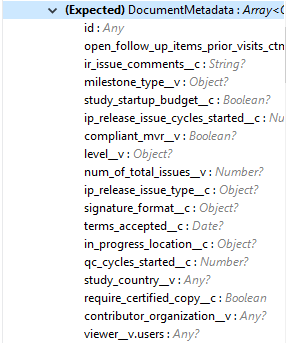
<p>CSV または JSON 形式の入力ストリームとしてのドキュメントメタデータ。次にメタデータを示します。</p>
</div>
<div class="imageblock">
<div class="content">
<img src="https://docs.mulesoft.com/jp/veevavault-connector/1.2/_images/veevavault-connector-create-documents-input.png" alt="veevavault connector create documents input">
</div>
</div></div></td>
<td class="tableblock halign-left valign-top"></td>
<td class="tableblock halign-left valign-top"><p class="tableblock">X</p></td>
</tr>
</tbody>
</table>

#### [](#設定)設定

[Connection Configuration (接続設定)](#connection_configuration)

#### [](#スロー)スロー

- VEEVAVAULT:API\_LIMIT\_EXCEEDED
- VEEVAVAULT:ATTRIBUTE\_NOT\_SUPPORTED
- VEEVAVAULT:INACTIVE\_USER
- VEEVAVAULT:INVALID\_DATA
- VEEVAVAULT:INVALID\_DOCUMENT
- VEEVAVAULT:INSUFFICIENT\_ACCESS
- VEEVAVAULT:MALFORMED\_URL
- VEEVAVAULT:METHOD\_NOT\_SUPPORTED
- VEEVAVAULT:NO\_PERMISSION
- VEEVAVAULT:OPERATION\_NOT\_ALLOWED
- VEEVAVAULT:PARAMETER\_REQUIRED

### [](#create_document_renditions)Create Document Renditions

`<veevavault:create-document-renditions>`

CSV または JSON 形式で提供されたメタデータを使用して Vault でドキュメントレンディションを作成します。

#### [](#パラメーター-2)パラメーター

<table class="tableblock frame-all grid-all fit-content spread">
<colgroup>
<col>
<col>
<col>
<col>
<col>
</colgroup>
<thead>
<tr>
<th class="tableblock halign-left valign-top"><strong>名前</strong></th>
<th class="tableblock halign-left valign-top"><strong>型</strong></th>
<th class="tableblock halign-left valign-top"><strong>説明</strong></th>
<th class="tableblock halign-left valign-top"><strong>デフォルト値</strong></th>
<th class="tableblock halign-left valign-top"><strong>必須</strong></th>
</tr>
</thead>
<tbody>
<tr>
<td class="tableblock halign-left valign-top"><p class="tableblock">Metadata Format (メタデータ形式)</p></td>
<td class="tableblock halign-left valign-top"><div class="content"><div class="paragraph">
<p>Enum (列挙) (文字列)</p>
</div>
<div class="ulist">
<ul>
<li>
<p>CSV</p>
</li>
<li>
<p>JSON</p>
</li>
</ul>
</div></div></td>
<td class="tableblock halign-left valign-top"><p class="tableblock">メタデータ形式 (CSV または JSON)。</p></td>
<td class="tableblock halign-left valign-top"></td>
<td class="tableblock halign-left valign-top"><p class="tableblock">X</p></td>
</tr>
<tr>
<td class="tableblock halign-left valign-top"><p class="tableblock">Document Metadata (ドキュメントメタデータ)</p></td>
<td class="tableblock halign-left valign-top"><p class="tableblock">Input Stream (入力ストリーム)</p></td>
<td class="tableblock halign-left valign-top"><div class="content"><div class="paragraph">
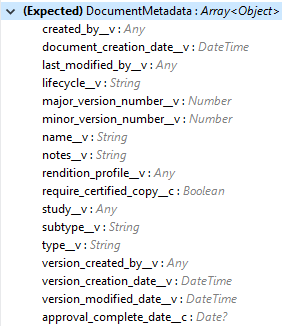
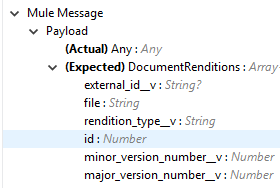
<p>選択された [Metadata Format (メタデータ形式)] オプションに対応する CSV または JSON 形式の入力ストリームとしてのドキュメントメタデータ。次にメタデータを示します。</p>
</div>
<div class="paragraph">
<p><span class="image"><img src="https://docs.mulesoft.com/jp/veevavault-connector/1.2/_images/veevavault-connector-create-document-renditions-input.png" alt="veevavault connector create document renditions input"></span></p>
</div></div></td>
<td class="tableblock halign-left valign-top"></td>
<td class="tableblock halign-left valign-top"><p class="tableblock">X</p></td>
</tr>
</tbody>
</table>

#### [](#設定-2)設定

[Connection Configuration (接続設定)](#connection_configuration)

#### [](#スロー-2)スロー

- VEEVAVAULT:API\_LIMIT\_EXCEEDED
- VEEVAVAULT:ATTRIBUTE\_NOT\_SUPPORTED
- VEEVAVAULT:INACTIVE\_USER
- VEEVAVAULT:INVALID\_DATA
- VEEVAVAULT:INVALID\_DOCUMENT
- VEEVAVAULT:INSUFFICIENT\_ACCESS
- VEEVAVAULT:MALFORMED\_URL
- VEEVAVAULT:METHOD\_NOT\_SUPPORTED
- VEEVAVAULT:NO\_PERMISSION
- VEEVAVAULT:OPERATION\_NOT\_ALLOWED
- VEEVAVAULT:PARAMETER\_REQUIRED

### [](#create_object_records)Create Object Records

`<veevavault:create-object-records>`

Create Object Records では、CSV または JSON 形式のオブジェクトメタデータを使用して、Vault でオブジェクトレコードを一括で作成します。

#### [](#パラメーター-3)パラメーター

<table class="tableblock frame-all grid-all stretch">
<colgroup>
<col style="width: 20%;">
</colgroup>
<tbody>
<tr>
<td class="tableblock halign-left valign-top"><p class="tableblock"><strong>名前</strong></p></td>
<td class="tableblock halign-left valign-top"><p class="tableblock"><strong>型</strong></p></td>
<td class="tableblock halign-left valign-top"><p class="tableblock"><strong>説明</strong></p></td>
<td class="tableblock halign-left valign-top"><p class="tableblock"><strong>デフォルト値</strong></p></td>
<td class="tableblock halign-left valign-top"><p class="tableblock"><strong>必須</strong></p></td>
</tr>
<tr>
<td class="tableblock halign-left valign-top"><p class="tableblock">Object Name (オブジェクト名)</p></td>
<td class="tableblock halign-left valign-top"><p class="tableblock">String (文字列)</p></td>
<td class="tableblock halign-left valign-top"><div class="content"><div class="paragraph">
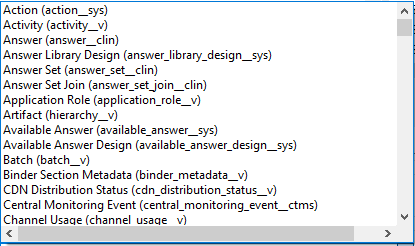
<p>リストから選択可能なすべての Vault オブジェクトのリスト。次に例を示します。</p>
</div>
<div class="imageblock">
<div class="content">
<img src="https://docs.mulesoft.com/jp/veevavault-connector/1.2/_images/veevavault-connector-create-object-records-object-name.png" alt="veevavault connector create object records object name">
</div>
</div></div></td>
<td class="tableblock halign-left valign-top"></td>
<td class="tableblock halign-left valign-top"><p class="tableblock">X</p></td>
</tr>
<tr>
<td class="tableblock halign-left valign-top"><p class="tableblock">Metadata Format (メタデータ形式)</p></td>
<td class="tableblock halign-left valign-top"><div class="content"><div class="paragraph">
<p>String (文字列)</p>
</div></div></td>
<td class="tableblock halign-left valign-top"><p class="tableblock">メタデータ形式 (CSV または JSON)。</p></td>
<td class="tableblock halign-left valign-top"></td>
<td class="tableblock halign-left valign-top"><p class="tableblock">X</p></td>
</tr>
<tr>
<td class="tableblock halign-left valign-top"><p class="tableblock">Object Metadata (オブジェクトメタデータ)</p></td>
<td class="tableblock halign-left valign-top"><p class="tableblock">Input Stream (入力ストリーム)</p></td>
<td class="tableblock halign-left valign-top"><div class="content"><div class="paragraph">
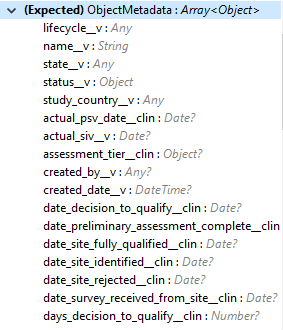
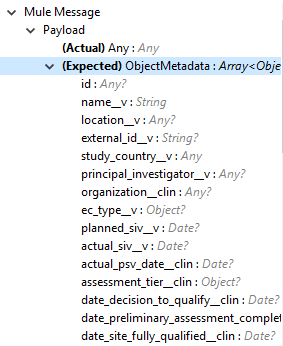
<p>選択された [Metadata Format (メタデータ形式)] オプションに対応する CSV または JSON 形式の入力ストリームとしてのオブジェクトメタデータ。次の画像でメタデータを示します。</p>
</div>
<div class="imageblock">
<div class="content">
<img src="https://docs.mulesoft.com/jp/veevavault-connector/1.2/_images/veevavault-connector-create-object-records-input.png" alt="veevavault connector create object records input">
</div>
</div></div></td>
<td class="tableblock halign-left valign-top"></td>
<td class="tableblock halign-left valign-top"><p class="tableblock">X</p></td>
</tr>
</tbody>
</table>

#### [](#設定-3)設定

[Connection Configuration (接続設定)](#connection_configuration)

#### [](#スロー-3)スロー

- VEEVAVAULT:API\_LIMIT\_EXCEEDED
- VEEVAVAULT:ATTRIBUTE\_NOT\_SUPPORTED
- VEEVAVAULT:INACTIVE\_USER
- VEEVAVAULT:INVALID\_DATA
- VEEVAVAULT:INVALID\_DOCUMENT
- VEEVAVAULT:INSUFFICIENT\_ACCESS
- VEEVAVAULT:MALFORMED\_URL
- VEEVAVAULT:METHOD\_NOT\_SUPPORTED
- VEEVAVAULT:NO\_PERMISSION
- VEEVAVAULT:OPERATION\_NOT\_ALLOWED
- VEEVAVAULT:PARAMETER\_REQUIRED

### [](#delete_document_renditions)Delete Document Renditions

`<veevavault:delete-document-renditions>`

CSV または JSON 形式で提供されたドキュメントレンディションメタデータに基づいて Vault からドキュメントレンディションを削除します。

#### [](#パラメーター-4)パラメーター

<table class="tableblock frame-all grid-all fit-content spread">
<colgroup>
<col>
<col>
<col>
<col>
<col>
</colgroup>
<thead>
<tr>
<th class="tableblock halign-left valign-top"><strong>名前</strong></th>
<th class="tableblock halign-left valign-top"><strong>型</strong></th>
<th class="tableblock halign-left valign-top"><strong>説明</strong></th>
<th class="tableblock halign-left valign-top"><strong>デフォルト値</strong></th>
<th class="tableblock halign-left valign-top"><strong>必須</strong></th>
</tr>
</thead>
<tbody>
<tr>
<td class="tableblock halign-left valign-top"><p class="tableblock">Metadata Format (メタデータ形式)</p></td>
<td class="tableblock halign-left valign-top"><div class="content"><div class="paragraph">
<p>Enum (列挙) (文字列)</p>
</div>
<div class="ulist">
<ul>
<li>
<p>CSV</p>
</li>
<li>
<p>JSON</p>
</li>
</ul>
</div></div></td>
<td class="tableblock halign-left valign-top"><p class="tableblock">CSV または JSON のメタデータ形式。</p></td>
<td class="tableblock halign-left valign-top"></td>
<td class="tableblock halign-left valign-top"><p class="tableblock">X</p></td>
</tr>
<tr>
<td class="tableblock halign-left valign-top"><p class="tableblock">Document Metadata (ドキュメントメタデータ)</p></td>
<td class="tableblock halign-left valign-top"><p class="tableblock">Input Stream (入力ストリーム)</p></td>
<td class="tableblock halign-left valign-top"><div class="content"><div class="paragraph">
<p>選択された [Metadata Format (メタデータ形式)] オプションに対応する CSV または JSON 形式の入力ストリームとしてのドキュメントメタデータ。</p>
</div></div></td>
<td class="tableblock halign-left valign-top"></td>
<td class="tableblock halign-left valign-top"><p class="tableblock">X</p></td>
</tr>
</tbody>
</table>

#### [](#設定-4)設定

[Connection Configuration (接続設定)](#connection_configuration)

#### [](#スロー-4)スロー

- VEEVAVAULT:API\_LIMIT\_EXCEEDED
- VEEVAVAULT:ATTRIBUTE\_NOT\_SUPPORTED
- VEEVAVAULT:INACTIVE\_USER
- VEEVAVAULT:INVALID\_DATA
- VEEVAVAULT:INVALID\_DOCUMENT
- VEEVAVAULT:INSUFFICIENT\_ACCESS
- VEEVAVAULT:MALFORMED\_URL
- VEEVAVAULT:METHOD\_NOT\_SUPPORTED
- VEEVAVAULT:NO\_PERMISSION
- VEEVAVAULT:OPERATION\_NOT\_ALLOWED
- VEEVAVAULT:PARAMETER\_REQUIRED

### [](#delete_documents)Delete Documents

`<veevavault:delete-documents>`

この操作では、CSV または JSON 形式で提供されたメタデータドキュメント ​**ID**​ に基づいて Vault からドキュメントを削除します。

#### [](#パラメーター-5)パラメーター

<table class="tableblock frame-all grid-all fit-content spread">
<colgroup>
<col>
<col>
<col>
<col>
<col>
</colgroup>
<thead>
<tr>
<th class="tableblock halign-left valign-top"><strong>名前</strong></th>
<th class="tableblock halign-left valign-top"><strong>型</strong></th>
<th class="tableblock halign-left valign-top"><strong>説明</strong></th>
<th class="tableblock halign-left valign-top"><strong>デフォルト値</strong></th>
<th class="tableblock halign-left valign-top"><strong>必須</strong></th>
</tr>
</thead>
<tbody>
<tr>
<td class="tableblock halign-left valign-top"><p class="tableblock">Metadata Format (メタデータ形式)</p></td>
<td class="tableblock halign-left valign-top"><div class="content"><div class="paragraph">
<p>Enum (列挙) (文字列)</p>
</div>
<div class="ulist">
<ul>
<li>
<p>CSV</p>
</li>
<li>
<p>JSON</p>
</li>
</ul>
</div></div></td>
<td class="tableblock halign-left valign-top"><p class="tableblock">CSV または JSON のメタデータ形式。</p></td>
<td class="tableblock halign-left valign-top"></td>
<td class="tableblock halign-left valign-top"><p class="tableblock">X</p></td>
</tr>
<tr>
<td class="tableblock halign-left valign-top"><p class="tableblock">Document Metadata (ドキュメントメタデータ)</p></td>
<td class="tableblock halign-left valign-top"><p class="tableblock">Input Stream (入力ストリーム)</p></td>
<td class="tableblock halign-left valign-top"><div class="content"><div class="paragraph">
<p>選択された [Metadata Format (メタデータ形式)] オプションに対応する CSV または JSON 形式の入力ストリームとしてのドキュメントメタデータ。次にメタデータを示します。</p>
</div>
<div class="imageblock">
<div class="content">
<img src="https://docs.mulesoft.com/jp/veevavault-connector/1.2/_images/veevavault-connector-delete-documents-input.png" alt="veevavault connector delete documents input">
</div>
</div></div></td>
<td class="tableblock halign-left valign-top"></td>
<td class="tableblock halign-left valign-top"><p class="tableblock">X</p></td>
</tr>
</tbody>
</table>

#### [](#設定-5)設定

[Connection Configuration (接続設定)](#connection_configuration)

#### [](#スロー-5)スロー

- VEEVAVAULT:API\_LIMIT\_EXCEEDED
- VEEVAVAULT:ATTRIBUTE\_NOT\_SUPPORTED
- VEEVAVAULT:INACTIVE\_USER
- VEEVAVAULT:INVALID\_DATA
- VEEVAVAULT:INVALID\_DOCUMENT
- VEEVAVAULT:INSUFFICIENT\_ACCESS
- VEEVAVAULT:MALFORMED\_URL
- VEEVAVAULT:METHOD\_NOT\_SUPPORTED
- VEEVAVAULT:NO\_PERMISSION
- VEEVAVAULT:OPERATION\_NOT\_ALLOWED
- VEEVAVAULT:PARAMETER\_REQUIRED

### [](#delete_object_records)Delete Object Records

`<veevavault:delete-object-records>`

この操作では、CSV または JSON 形式のオブジェクト ID メタデータを使用して、Vault でオブジェクトレコードを一括で削除します。

#### [](#パラメーター-6)パラメーター

<table class="tableblock frame-all grid-all fit-content spread">
<colgroup>
<col>
<col>
<col>
<col>
<col>
</colgroup>
<thead>
<tr>
<th class="tableblock halign-left valign-top"><strong>名前</strong></th>
<th class="tableblock halign-left valign-top"><strong>型</strong></th>
<th class="tableblock halign-left valign-top"><strong>説明</strong></th>
<th class="tableblock halign-left valign-top"><strong>デフォルト値</strong></th>
<th class="tableblock halign-left valign-top"><strong>必須</strong></th>
</tr>
</thead>
<tbody>
<tr>
<td class="tableblock halign-left valign-top"><p class="tableblock">Object Name (オブジェクト名)</p></td>
<td class="tableblock halign-left valign-top"><p class="tableblock">String (文字列)</p></td>
<td class="tableblock halign-left valign-top"><div class="content"><div class="paragraph">
<p>リストから選択可能なすべての Vault オブジェクトのリスト。次に例を示します。</p>
</div>
<div class="imageblock">
<div class="content">
<img src="https://docs.mulesoft.com/jp/veevavault-connector/1.2/_images/veevavault-connector-create-object-records-object-name.png" alt="veevavault connector create object records object name">
</div>
</div></div></td>
<td class="tableblock halign-left valign-top"></td>
<td class="tableblock halign-left valign-top"><p class="tableblock">X</p></td>
</tr>
<tr>
<td class="tableblock halign-left valign-top"><p class="tableblock">Metadata Format (メタデータ形式)</p></td>
<td class="tableblock halign-left valign-top"><div class="content"><div class="paragraph">
<p>Enum (列挙) (文字列)</p>
</div>
<div class="paragraph">
<p>CSV</p>
</div>
<div class="paragraph">
<p>JSON</p>
</div></div></td>
<td class="tableblock halign-left valign-top"><p class="tableblock">CSV または JSON のメタデータ形式。</p></td>
<td class="tableblock halign-left valign-top"></td>
<td class="tableblock halign-left valign-top"><p class="tableblock">X</p></td>
</tr>
<tr>
<td class="tableblock halign-left valign-top"><p class="tableblock">Object Metadata (オブジェクトメタデータ)</p></td>
<td class="tableblock halign-left valign-top"><p class="tableblock">Input Stream (入力ストリーム)</p></td>
<td class="tableblock halign-left valign-top"><div class="content"><div class="paragraph">
<p>選択された [Metadata Format (メタデータ形式)] オプションに対応する CSV または JSON 形式の入力ストリームとしてのオブジェクトメタデータ。</p>
</div></div></td>
<td class="tableblock halign-left valign-top"></td>
<td class="tableblock halign-left valign-top"><p class="tableblock">X</p></td>
</tr>
</tbody>
</table>

#### [](#設定-6)設定

[Connection Configuration (接続設定)](#connection_configuration)

#### [](#スロー-6)スロー

- VEEVAVAULT:API\_LIMIT\_EXCEEDED
- VEEVAVAULT:ATTRIBUTE\_NOT\_SUPPORTED
- VEEVAVAULT:INACTIVE\_USER
- VEEVAVAULT:INVALID\_DATA
- VEEVAVAULT:INVALID\_DOCUMENT
- VEEVAVAULT:INSUFFICIENT\_ACCESS
- VEEVAVAULT:MALFORMED\_URL
- VEEVAVAULT:METHOD\_NOT\_SUPPORTED
- VEEVAVAULT:NO\_PERMISSION
- VEEVAVAULT:OPERATION\_NOT\_ALLOWED
- VEEVAVAULT:PARAMETER\_REQUIRED

### [](#export_documents)Export Documents

`<veevavault:export-documents>`

この操作を使用すると、Vault の FTP ステージングサーバーにエクスポートするための一連のドキュメントを照会できます。

#### [](#パラメーター-7)パラメーター

<table class="tableblock frame-all grid-all fit-content spread">
<colgroup>
<col>
<col>
<col>
<col>
<col>
</colgroup>
<thead>
<tr>
<th class="tableblock halign-left valign-top"><strong>名前</strong></th>
<th class="tableblock halign-left valign-top"><strong>型</strong></th>
<th class="tableblock halign-left valign-top"><strong>説明</strong></th>
<th class="tableblock halign-left valign-top"><strong>デフォルト値</strong></th>
<th class="tableblock halign-left valign-top"><strong>必須</strong></th>
</tr>
</thead>
<tbody>
<tr>
<td class="tableblock halign-left valign-top"><p class="tableblock">Metadata Format (メタデータ形式)</p></td>
<td class="tableblock halign-left valign-top"><div class="content"><div class="paragraph">
<p>Enum (列挙) (文字列)</p>
</div>
<div class="ulist">
<ul>
<li>
<p>CSV</p>
</li>
<li>
<p>JSON</p>
</li>
</ul>
</div></div></td>
<td class="tableblock halign-left valign-top"><p class="tableblock">CSV または JSON のメタデータ形式。</p></td>
<td class="tableblock halign-left valign-top"></td>
<td class="tableblock halign-left valign-top"><p class="tableblock">X</p></td>
</tr>
<tr>
<td class="tableblock halign-left valign-top"><p class="tableblock">Document Metadata (ドキュメントメタデータ)</p></td>
<td class="tableblock halign-left valign-top"><p class="tableblock">Input Stream (入力ストリーム)</p></td>
<td class="tableblock halign-left valign-top"><div class="content"><div class="paragraph">
<p>選択された ​<strong>[Metadata Format (メタデータ形式)]</strong>​ オプションに対応する CSV または JSON 形式の入力ストリームとしてのドキュメントメタデータ (ドキュメント ID)。次の画像でメタデータを示します。</p>
</div>
<div class="imageblock">
<div class="content">
<img src="https://docs.mulesoft.com/jp/veevavault-connector/1.2/_images/veevavault-connector-export-documents-input.png" alt="veevavault connector export documents input">
</div>
</div></div></td>
<td class="tableblock halign-left valign-top"><p class="tableblock">#[payload]</p></td>
<td class="tableblock halign-left valign-top"><p class="tableblock">X</p></td>
</tr>
<tr>
<td class="tableblock halign-left valign-top"><p class="tableblock">Source (ソース)</p></td>
<td class="tableblock halign-left valign-top"><p class="tableblock">Boolean (ブール)</p></td>
<td class="tableblock halign-left valign-top"><p class="tableblock">ソースファイルを除外します。</p></td>
<td class="tableblock halign-left valign-top"><p class="tableblock"><code>True</code></p></td>
<td class="tableblock halign-left valign-top"></td>
</tr>
<tr>
<td class="tableblock halign-left valign-top"><p class="tableblock">Renditions (レンディション)</p></td>
<td class="tableblock halign-left valign-top"><p class="tableblock">Boolean (ブール)</p></td>
<td class="tableblock halign-left valign-top"><p class="tableblock">レンディションを含めます。</p></td>
<td class="tableblock halign-left valign-top"><p class="tableblock"><code>False</code></p></td>
<td class="tableblock halign-left valign-top"></td>
</tr>
<tr>
<td class="tableblock halign-left valign-top"><p class="tableblock">All Versions (すべてのバージョン)</p></td>
<td class="tableblock halign-left valign-top"><p class="tableblock">Boolean (ブール)</p></td>
<td class="tableblock halign-left valign-top"><p class="tableblock">すべてのバージョンまたは最新バージョンを含めます。</p></td>
<td class="tableblock halign-left valign-top"><p class="tableblock"><code>False</code></p></td>
<td class="tableblock halign-left valign-top"></td>
</tr>
<tr>
<td class="tableblock halign-left valign-top"><p class="tableblock">Polling Interval (ポーリング間隔)</p></td>
<td class="tableblock halign-left valign-top"><p class="tableblock">Integer (整数)</p></td>
<td class="tableblock halign-left valign-top"><p class="tableblock">ジョブが正常に終了するまで、指定した間隔 (秒単位) で Vault をポーリングします。</p></td>
<td class="tableblock halign-left valign-top"><p class="tableblock"><code>30</code></p></td>
<td class="tableblock halign-left valign-top"></td>
</tr>
</tbody>
</table>

#### [](#設定-7)設定

[Connection Configuration (接続設定)](#connection_configuration)

#### [](#スロー-7)スロー

- VEEVAVAULT:API\_LIMIT\_EXCEEDED
- VEEVAVAULT:ATTRIBUTE\_NOT\_SUPPORTED
- VEEVAVAULT:INACTIVE\_USER
- VEEVAVAULT:INVALID\_DATA
- VEEVAVAULT:INVALID\_DOCUMENT
- VEEVAVAULT:INSUFFICIENT\_ACCESS
- VEEVAVAULT:MALFORMED\_URL
- VEEVAVAULT:METHOD\_NOT\_SUPPORTED
- VEEVAVAULT:NO\_PERMISSION
- VEEVAVAULT:OPERATION\_NOT\_ALLOWED
- VEEVAVAULT:PARAMETER\_REQUIRED

#### [](#get_audit_details)Get Audit Details

`<veevavault:get-audit-details>`

Get Audit Details 操作では、指定した監査種別の監査の詳細を取得します。

#### [](#パラメーター-8)パラメーター

<table class="tableblock frame-all grid-all fit-content spread">
<colgroup>
<col>
<col>
<col>
<col>
<col>
</colgroup>
<thead>
<tr>
<th class="tableblock halign-left valign-top"><strong>名前</strong></th>
<th class="tableblock halign-left valign-top"><strong>型</strong></th>
<th class="tableblock halign-left valign-top"><strong>説明</strong></th>
<th class="tableblock halign-left valign-top"><strong>デフォルト値</strong></th>
<th class="tableblock halign-left valign-top"><strong>必須</strong></th>
</tr>
</thead>
<tbody>
<tr>
<td class="tableblock halign-left valign-top"><p class="tableblock">Audit Type (監査種別)</p></td>
<td class="tableblock halign-left valign-top"><p class="tableblock">String (文字列)</p></td>
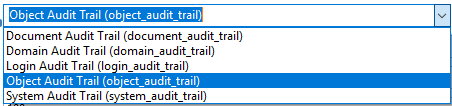
<td class="tableblock halign-left valign-top"><div class="content"><div class="paragraph">
<p>Vault での選択可能な監査種別のリスト。次に例を示します。</p>
</div>
<div class="imageblock">
<div class="content">
<img src="https://docs.mulesoft.com/jp/veevavault-connector/1.2/_images/veevavault-connector-get-audit-details-audit-types.png" alt="image" width="299" height="106">
</div>
</div></div></td>
<td class="tableblock halign-left valign-top"></td>
<td class="tableblock halign-left valign-top"><p class="tableblock">X</p></td>
</tr>
<tr>
<td class="tableblock halign-left valign-top"><p class="tableblock">Start Date (開始日)</p></td>
<td class="tableblock halign-left valign-top"><p class="tableblock">String (文字列)</p></td>
<td class="tableblock halign-left valign-top"><p class="tableblock">監査情報の取得を開始する日付。日付は ​<code>YYYY-MM-DDTHH:MM:SSZ</code>​ 形式である必要があります。</p></td>
<td class="tableblock halign-left valign-top"></td>
</tr>
<tr>
<td class="tableblock halign-left valign-top"><p class="tableblock">End Date (終了日)</p></td>
<td class="tableblock halign-left valign-top"><p class="tableblock">String (文字列)</p></td>
<td class="tableblock halign-left valign-top"><p class="tableblock">監査情報の取得を停止する日付。日付は ​<code>YYYY-MM-DDTHH:MM:SSZ</code>​ 形式である必要があります。</p></td>
<td class="tableblock halign-left valign-top"></td>
</tr>
<tr>
<td class="tableblock halign-left valign-top"><p class="tableblock">Fetch Size (フェッチサイズ)</p></td>
<td class="tableblock halign-left valign-top"><p class="tableblock">Integer (整数)</p></td>
<td class="tableblock halign-left valign-top"><p class="tableblock">1 ページあたりのレコード数をこのフェッチサイズに制限します。</p></td>
<td class="tableblock halign-left valign-top"><p class="tableblock"><code>100</code></p></td>
<td class="tableblock halign-left valign-top"></td>
</tr>
<tr>
<td class="tableblock halign-left valign-top"><p class="tableblock">Batch Size (バッチサイズ)</p></td>
<td class="tableblock halign-left valign-top"><p class="tableblock">Integer (整数)</p></td>
<td class="tableblock halign-left valign-top"><p class="tableblock">指定されたバッチ数でのページ数に対応するバッチサイズ。</p></td>
<td class="tableblock halign-left valign-top"><p class="tableblock"><code>10</code></p></td>
<td class="tableblock halign-left valign-top"></td>
</tr>
</tbody>
</table>

#### [](#設定-8)設定

[Connection Configuration (接続設定)](#connection_configuration)

#### [](#スロー-8)スロー

- VEEVAVAULT:API\_LIMIT\_EXCEEDED
- VEEVAVAULT:ATTRIBUTE\_NOT\_SUPPORTED
- VEEVAVAULT:INACTIVE\_USER
- VEEVAVAULT:INVALID\_DATA
- VEEVAVAULT:INVALID\_DOCUMENT
- VEEVAVAULT:INSUFFICIENT\_ACCESS
- VEEVAVAULT:MALFORMED\_URL
- VEEVAVAULT:METHOD\_NOT\_SUPPORTED
- VEEVAVAULT:NO\_PERMISSION
- VEEVAVAULT:OPERATION\_NOT\_ALLOWED
- VEEVAVAULT:PARAMETER\_REQUIRED

### [](#get_document_renditions_types)Get Document Renditions Types

`<veevavault:get-document-renditions>`

Get Document Renditions Types では、ドキュメントレンディションの詳細を取得します。

#### [](#パラメーター-9)パラメーター

<table class="tableblock frame-all grid-all fit-content spread">
<colgroup>
<col>
<col>
<col>
<col>
<col>
</colgroup>
<thead>
<tr>
<th class="tableblock halign-left valign-top"><strong>名前</strong></th>
<th class="tableblock halign-left valign-top"><strong>型</strong></th>
<th class="tableblock halign-left valign-top"><strong>説明</strong></th>
<th class="tableblock halign-left valign-top"><strong>デフォルト値</strong></th>
<th class="tableblock halign-left valign-top"><strong>必須</strong></th>
</tr>
</thead>
<tbody>
<tr>
<td class="tableblock halign-left valign-top"><p class="tableblock">Document Metadata (ドキュメントメタデータ)</p></td>
<td class="tableblock halign-left valign-top"><p class="tableblock">Input Stream (入力ストリーム)</p></td>
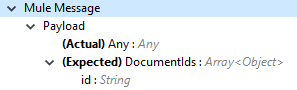
<td class="tableblock halign-left valign-top"><div class="content"><div class="paragraph">
<p>ドキュメントメタデータには、CSV または JSON 形式の ​<strong>documentID</strong>​ のみが入力ストリームとして含まれます。次にメタデータを示します。</p>
</div>
<div class="imageblock">
<div class="content">
<img src="https://docs.mulesoft.com/jp/veevavault-connector/1.2/_images/veevavault-connector-get-document-renditions-types-input.png" alt="image" width="293" height="38">
</div>
</div></div></td>
<td class="tableblock halign-left valign-top"></td>
<td class="tableblock halign-left valign-top"><p class="tableblock">X</p></td>
</tr>
</tbody>
</table>

#### [](#設定-9)設定

[Connection Configuration (接続設定)](#connection_configuration)

#### [](#スロー-9)スロー

- VEEVAVAULT:API\_LIMIT\_EXCEEDED
- VEEVAVAULT:ATTRIBUTE\_NOT\_SUPPORTED
- VEEVAVAULT:INACTIVE\_USER
- VEEVAVAULT:INVALID\_DATA
- VEEVAVAULT:INVALID\_DOCUMENT
- VEEVAVAULT:INSUFFICIENT\_ACCESS
- VEEVAVAULT:MALFORMED\_URL
- VEEVAVAULT:METHOD\_NOT\_SUPPORTED
- VEEVAVAULT:NO\_PERMISSION
- VEEVAVAULT:OPERATION\_NOT\_ALLOWED
- VEEVAVAULT:PARAMETER\_REQUIRED

### [](#get_documents)Get Documents

`<veevavault:get-documents>`

Get Documents では、選択したドキュメント種別、サブタイプ、分類の各オプションに基づいて Vault からドキュメントの詳細を取得します。VQL クエリのビルドの基盤となるドキュメントプロパティを提供するオプションがありますが、提供しない場合、ドキュメントプロパティは種別、サブタイプ、分類に基づいてフェッチされます。

#### [](#パラメーター-10)パラメーター

<table class="tableblock frame-all grid-all fit-content spread">
<colgroup>
<col>
<col>
<col>
<col>
<col>
</colgroup>
<thead>
<tr>
<th class="tableblock halign-left valign-top"><strong>名前</strong></th>
<th class="tableblock halign-left valign-top"><strong>型</strong></th>
<th class="tableblock halign-left valign-top"><strong>説明</strong></th>
<th class="tableblock halign-left valign-top"><strong>デフォルト値</strong></th>
<th class="tableblock halign-left valign-top"><strong>必須</strong></th>
</tr>
</thead>
<tbody>
<tr>
<td class="tableblock halign-left valign-top"><p class="tableblock">型</p></td>
<td class="tableblock halign-left valign-top"><p class="tableblock">String (文字列)</p></td>
<td class="tableblock halign-left valign-top"><p class="tableblock">選択可能なすべてのドキュメント種別のリスト。</p></td>
<td class="tableblock halign-left valign-top"></td>
</tr>
<tr>
<td class="tableblock halign-left valign-top"><p class="tableblock">Subtype (サブタイプ)</p></td>
<td class="tableblock halign-left valign-top"><p class="tableblock">String (文字列)</p></td>
<td class="tableblock halign-left valign-top"><p class="tableblock">Vault での選択可能なすべてのドキュメントサブタイプのリスト。</p></td>
<td class="tableblock halign-left valign-top"></td>
</tr>
<tr>
<td class="tableblock halign-left valign-top"><p class="tableblock">Classification (分類)</p></td>
<td class="tableblock halign-left valign-top"><p class="tableblock">String (文字列)</p></td>
<td class="tableblock halign-left valign-top"><p class="tableblock">Vault での選択可能なすべてのドキュメント分類のリスト。</p></td>
<td class="tableblock halign-left valign-top"></td>
</tr>
<tr>
<td class="tableblock halign-left valign-top"><p class="tableblock">Document Properties (ドキュメントプロパティ)</p></td>
<td class="tableblock halign-left valign-top"><p class="tableblock">List&lt;String&gt;</p></td>
<td class="tableblock halign-left valign-top"><p class="tableblock">ビジネス要件に基づいてドキュメントプロパティをリストに挿入します。提供されていない場合、すべてのクエリ可能なドキュメントプロパティが選択されて VQL クエリがビルドされ、内部的に呼び出されてドキュメントの詳細が取得されます。</p></td>
<td class="tableblock halign-left valign-top"></td>
</tr>
<tr>
<td class="tableblock halign-left valign-top"><p class="tableblock">WHERE Clause (Where 句)</p></td>
<td class="tableblock halign-left valign-top"><p class="tableblock">String (文字列)</p></td>
<td class="tableblock halign-left valign-top"><p class="tableblock">WHERE 句を VQL クエリに追加して VQL クエリを動的にビルドできます。</p></td>
<td class="tableblock halign-left valign-top"></td>
</tr>
<tr>
<td class="tableblock halign-left valign-top"><p class="tableblock">Fetch Size (フェッチサイズ)</p></td>
<td class="tableblock halign-left valign-top"><p class="tableblock">Integer (整数)</p></td>
<td class="tableblock halign-left valign-top"><p class="tableblock">1 ページあたりのレコード数をこのフェッチサイズに制限します。</p></td>
<td class="tableblock halign-left valign-top"><p class="tableblock"><code>100</code></p></td>
<td class="tableblock halign-left valign-top"></td>
</tr>
<tr>
<td class="tableblock halign-left valign-top"><p class="tableblock">Batch Size (バッチサイズ)</p></td>
<td class="tableblock halign-left valign-top"><p class="tableblock">Integer (整数)</p></td>
<td class="tableblock halign-left valign-top"><p class="tableblock">指定されたバッチ数でのページ数に対応するバッチサイズ。</p></td>
<td class="tableblock halign-left valign-top"><p class="tableblock"><code>10</code></p></td>
<td class="tableblock halign-left valign-top"></td>
</tr>
</tbody>
</table>

#### [](#設定-10)設定

[Connection Configuration (接続設定)](#connection_configuration)

#### [](#スロー-10)スロー

- VEEVAVAULT:API\_LIMIT\_EXCEEDED
- VEEVAVAULT:ATTRIBUTE\_NOT\_SUPPORTED
- VEEVAVAULT:INACTIVE\_USER
- VEEVAVAULT:INVALID\_DATA
- VEEVAVAULT:INVALID\_DOCUMENT
- VEEVAVAULT:INSUFFICIENT\_ACCESS
- VEEVAVAULT:MALFORMED\_URL
- VEEVAVAULT:METHOD\_NOT\_SUPPORTED
- VEEVAVAULT:NO\_PERMISSION
- VEEVAVAULT:OPERATION\_NOT\_ALLOWED
- VEEVAVAULT:PARAMETER\_REQUIRED

### [](#get_object_records)Get Object Records

`<veevavault:get-object-records>`

Get Object Records では、CSV または JSON 形式のオブジェクト ID メタデータを使用して、Vault でオブジェクトレコードを一括で取得します。

#### [](#パラメーター-11)パラメーター

<table class="tableblock frame-all grid-all fit-content spread">
<colgroup>
<col>
<col>
<col>
<col>
<col>
</colgroup>
<thead>
<tr>
<th class="tableblock halign-left valign-top"><strong>名前</strong></th>
<th class="tableblock halign-left valign-top"><strong>型</strong></th>
<th class="tableblock halign-left valign-top"><strong>説明</strong></th>
<th class="tableblock halign-left valign-top"><strong>デフォルト値</strong></th>
<th class="tableblock halign-left valign-top"><strong>必須</strong></th>
</tr>
</thead>
<tbody>
<tr>
<td class="tableblock halign-left valign-top"><p class="tableblock">Object Name (オブジェクト名)</p></td>
<td class="tableblock halign-left valign-top"><p class="tableblock">String (文字列)</p></td>
<td class="tableblock halign-left valign-top"><div class="content"><div class="paragraph">
<p>選択可能なすべての Vault オブジェクトのリスト。次に例を示します。</p>
</div>
<div class="imageblock">
<div class="content">
<img src="https://docs.mulesoft.com/jp/veevavault-connector/1.2/_images/veevavault-connector-create-object-records-object-name.png" alt="image" width="323" height="246">
</div>
</div></div></td>
<td class="tableblock halign-left valign-top"></td>
<td class="tableblock halign-left valign-top"><p class="tableblock">X</p></td>
</tr>
<tr>
<td class="tableblock halign-left valign-top"><p class="tableblock">Object Fields (オブジェクト項目)</p></td>
<td class="tableblock halign-left valign-top"><p class="tableblock">List&lt;String&gt;</p></td>
<td class="tableblock halign-left valign-top"><p class="tableblock">ビジネス要件に基づいてオブジェクト項目をリストに挿入できます。提供されていない場合、使用可能なすべてのアクティブなオブジェクト項目が選択されて VQL クエリがビルドされ、内部的に呼び出されてオブジェクトレコードの詳細が取得されます。</p></td>
<td class="tableblock halign-left valign-top"></td>
</tr>
<tr>
<td class="tableblock halign-left valign-top"><p class="tableblock">WHERE Clause (Where 句)</p></td>
<td class="tableblock halign-left valign-top"><p class="tableblock">String (文字列)</p></td>
<td class="tableblock halign-left valign-top"><p class="tableblock">WHERE 句を VQL クエリに追加して VQL クエリを動的にビルドします。</p></td>
<td class="tableblock halign-left valign-top"></td>
</tr>
<tr>
<td class="tableblock halign-left valign-top"><p class="tableblock">Fetch Size (フェッチサイズ)</p></td>
<td class="tableblock halign-left valign-top"><p class="tableblock">Integer (整数)</p></td>
<td class="tableblock halign-left valign-top"><p class="tableblock">1 ページあたりのレコード数のフェッチサイズ制限。</p></td>
<td class="tableblock halign-left valign-top"><p class="tableblock">100</p></td>
<td class="tableblock halign-left valign-top"></td>
</tr>
<tr>
<td class="tableblock halign-left valign-top"><p class="tableblock">Batch Size (バッチサイズ)</p></td>
<td class="tableblock halign-left valign-top"><p class="tableblock">Integer (整数)</p></td>
<td class="tableblock halign-left valign-top"><p class="tableblock">指定したバッチ数でのページ数に対応するバッチサイズ。</p></td>
<td class="tableblock halign-left valign-top"><p class="tableblock">10</p></td>
<td class="tableblock halign-left valign-top"></td>
</tr>
</tbody>
</table>

#### [](#設定-11)設定

[Connection Configuration (接続設定)](#connection_configuration)

#### [](#スロー-11)スロー

- VEEVAVAULT:API\_LIMIT\_EXCEEDED
- VEEVAVAULT:ATTRIBUTE\_NOT\_SUPPORTED
- VEEVAVAULT:INACTIVE\_USER
- VEEVAVAULT:INVALID\_DATA
- VEEVAVAULT:INVALID\_DOCUMENT
- VEEVAVAULT:INSUFFICIENT\_ACCESS
- VEEVAVAULT:MALFORMED\_URL
- VEEVAVAULT:METHOD\_NOT\_SUPPORTED
- VEEVAVAULT:NO\_PERMISSION
- VEEVAVAULT:OPERATION\_NOT\_ALLOWED
- VEEVAVAULT:PARAMETER\_REQUIRED

#### [](#get_picklists)Get Picklists

`<veevavault:get-picklists>`

Get Picklists 操作では、選択リストで設定されているすべての使用可能な値を取得します。

#### [](#パラメーター-12)パラメーター

<table class="tableblock frame-all grid-all fit-content spread">
<colgroup>
<col>
<col>
<col>
<col>
<col>
</colgroup>
<thead>
<tr>
<th class="tableblock halign-left valign-top"><strong>名前</strong></th>
<th class="tableblock halign-left valign-top"><strong>型</strong></th>
<th class="tableblock halign-left valign-top"><strong>説明</strong></th>
<th class="tableblock halign-left valign-top"><strong>デフォルト値</strong></th>
<th class="tableblock halign-left valign-top"><strong>必須</strong></th>
</tr>
</thead>
<tbody>
<tr>
<td class="tableblock halign-left valign-top"><p class="tableblock">Picklist Name (選択リスト名)</p></td>
<td class="tableblock halign-left valign-top"><p class="tableblock">String (文字列)</p></td>
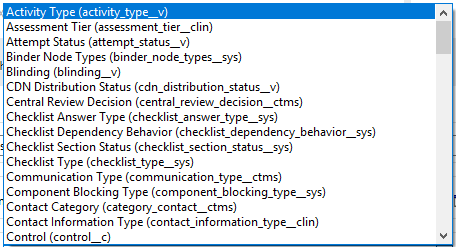
<td class="tableblock halign-left valign-top"><div class="content"><div class="paragraph">
<p>Vault での選択可能な監査種別のリスト。次に例を示します。</p>
</div>
<div class="imageblock">
<div class="content">
<img src="https://docs.mulesoft.com/jp/veevavault-connector/1.2/_images/veevavault-connector-get-picklists-name.png" alt="image" width="293" height="249">
</div>
</div></div></td>
<td class="tableblock halign-left valign-top"></td>
<td class="tableblock halign-left valign-top"><p class="tableblock">X</p></td>
</tr>
</tbody>
</table>

#### [](#設定-12)設定

[Connection Configuration (接続設定)](#connection_configuration)

#### [](#スロー-12)スロー

- VEEVAVAULT:API\_LIMIT\_EXCEEDED
- VEEVAVAULT:ATTRIBUTE\_NOT\_SUPPORTED
- VEEVAVAULT:INACTIVE\_USER
- VEEVAVAULT:INVALID\_DATA
- VEEVAVAULT:INVALID\_DOCUMENT
- VEEVAVAULT:INSUFFICIENT\_ACCESS
- VEEVAVAULT:MALFORMED\_URL
- VEEVAVAULT:METHOD\_NOT\_SUPPORTED
- VEEVAVAULT:NO\_PERMISSION
- VEEVAVAULT:OPERATION\_NOT\_ALLOWED
- VEEVAVAULT:PARAMETER\_REQUIRED

### [](#invoke_rest_api)Invoke REST API

<veevavault:invoke-rest-api>

Invoke REST API 操作は、 [Veeva Vault Rest API](https://developer.veevavault.com/api/20.1/#documents)​ を呼び出し、ヘッダーで指定されている ​**Accept**​ 値に応じて JSON (デフォルト) または XML 形式で応答を返します。 [API レート制限](https://developer.veevavault.com/docs/#api-rate-limits)​を超過しないように、REST API を個別に使用するのではなく、可能な限り一括で使用することが重要です。

#### [](#パラメーター-13)パラメーター

<table class="tableblock frame-all grid-all fit-content spread">
<colgroup>
<col>
<col>
<col>
<col>
<col>
</colgroup>
<thead>
<tr>
<th class="tableblock halign-left valign-top"><strong>名前</strong></th>
<th class="tableblock halign-left valign-top"><strong>型</strong></th>
<th class="tableblock halign-left valign-top"><strong>説明</strong></th>
<th class="tableblock halign-left valign-top"><strong>デフォルト値</strong></th>
<th class="tableblock halign-left valign-top"><strong>必須</strong></th>
</tr>
</thead>
<tbody>
<tr>
<td class="tableblock halign-left valign-top"><p class="tableblock">Method (メソッド)</p></td>
<td class="tableblock halign-left valign-top"><p class="tableblock">String (文字列)</p></td>
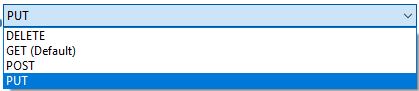
<td class="tableblock halign-left valign-top"><div class="content"><div class="paragraph">
<p>REST API を呼び出すメソッドのリスト。</p>
</div>
<div class="paragraph">
<p><span class="image"><img src="https://docs.mulesoft.com/jp/veevavault-connector/1.2/_images/veevavault-connector-invoke-rest-api-method.png" alt="image" width="419" height="91"></span></p>
</div></div></td>
<td class="tableblock halign-left valign-top"><p class="tableblock"><code>GET</code></p></td>
<td class="tableblock halign-left valign-top"><p class="tableblock">X</p></td>
</tr>
<tr>
<td class="tableblock halign-left valign-top"><p class="tableblock">Path (パス)</p></td>
<td class="tableblock halign-left valign-top"><p class="tableblock">String (文字列)</p></td>
<td class="tableblock halign-left valign-top"><p class="tableblock">要求を送信する URL パス</p>
<p class="tableblock"><span class="image"><img src="https://docs.mulesoft.com/jp/veevavault-connector/1.2/_images/veevavault-connector-invoke-rest-api-path.png" alt="image" width="625" height="31"></span></p></td>
<td class="tableblock halign-left valign-top"></td>
<td class="tableblock halign-left valign-top"><p class="tableblock">X</p></td>
</tr>
<tr>
<td class="tableblock halign-left valign-top"><p class="tableblock">Body (本文)</p></td>
<td class="tableblock halign-left valign-top"><p class="tableblock">Input Stream (入力ストリーム)</p></td>
<td class="tableblock halign-left valign-top"><p class="tableblock">要求 (GET メソッド要求以外) と一緒に送信される要求メッセージの本文。デフォルトはペイロードです。</p></td>
<td class="tableblock halign-left valign-top"><p class="tableblock">#[payload]</p></td>
<td class="tableblock halign-left valign-top"></td>
</tr>
<tr>
<td class="tableblock halign-left valign-top"><p class="tableblock">ヘッダー</p></td>
<td class="tableblock halign-left valign-top"><p class="tableblock">Map (マップ)</p></td>
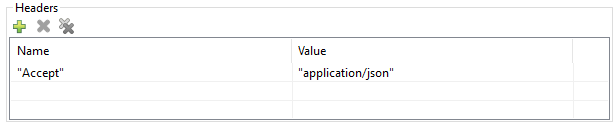
<td class="tableblock halign-left valign-top"><p class="tableblock">要求と一緒に送信するキー-値形式のヘッダー。要求でヘッダーが必要ない場合は空白 (デフォルト) にしてください。</p>
<p class="tableblock"><span class="image"><img src="https://docs.mulesoft.com/jp/veevavault-connector/1.2/_images/veevavault-connector-invoke-rest-api-headers.png" alt="image" width="616" height="126"></span></p></td>
<td class="tableblock halign-left valign-top"></td>
</tr>
<tr>
<td class="tableblock halign-left valign-top"><p class="tableblock">URI パラメーター</p></td>
<td class="tableblock halign-left valign-top"><p class="tableblock">Map (マップ)</p></td>
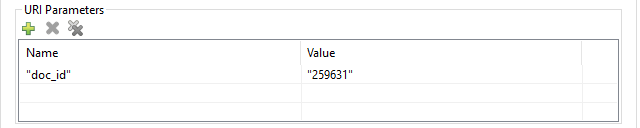
<td class="tableblock halign-left valign-top"><p class="tableblock">パスの値を解決するためのキー-値形式の URI パラメーター。パスに URI パラメーターがない場合は空白 (デフォルト) にしてください。</p>
<p class="tableblock"><span class="image"><img src="https://docs.mulesoft.com/jp/veevavault-connector/1.2/_images/veevavault-connector-invoke-rest-api-uri-parameters.png" alt="image" width="640" height="128"></span></p></td>
<td class="tableblock halign-left valign-top"></td>
</tr>
<tr>
<td class="tableblock halign-left valign-top"><p class="tableblock">クエリパラメーター</p></td>
<td class="tableblock halign-left valign-top"><p class="tableblock">Map (マップ)</p></td>
<td class="tableblock halign-left valign-top"><p class="tableblock">要求と一緒に送信するキー-値形式のクエリパラメーター。要求でクエリパラメーターが必要ない場合は空白 (デフォルト) にしてください。</p>
<p class="tableblock"><span class="image"><img src="https://docs.mulesoft.com/jp/veevavault-connector/1.2/_images/veevavault-connector-invoke-rest-api-query-parameters.png" alt="image" width="640" height="126"></span></p></td>
<td class="tableblock halign-left valign-top"></td>
</tr>
<tr>
<td class="tableblock halign-left valign-top"><p class="tableblock">Request Streaming Mode (要求ストリーミングモード)</p></td>
<td class="tableblock halign-left valign-top"><p class="tableblock">Stream (ストリーム)</p></td>
<td class="tableblock halign-left valign-top"><div class="content"><div class="paragraph">
<p>ストリーミングモードで送信する要求。デフォルトでは、ペイロードの種別がストリームの場合、ストリーミングを使用して要求が送信されます。ドロップダウンリストから次のいずれかを選択します。</p>
</div>
<div class="ulist">
<ul>
<li>
<p>ALWAYS</p>
</li>
<li>
<p>AUTO</p>
</li>
<li>
<p>NEVER</p>
</li>
</ul>
</div></div></td>
<td class="tableblock halign-left valign-top"></td>
</tr>
</tbody>
</table>

#### [](#設定-13)設定

[Connection Configuration (接続設定)](#connection_configuration)

#### [](#スロー-13)スロー

- VEEVAVAULT:API\_LIMIT\_EXCEEDED
- VEEVAVAULT:ATTRIBUTE\_NOT\_SUPPORTED
- VEEVAVAULT:INACTIVE\_USER
- VEEVAVAULT:INVALID\_DATA
- VEEVAVAULT:INVALID\_DOCUMENT
- VEEVAVAULT:INSUFFICIENT\_ACCESS
- VEEVAVAULT:MALFORMED\_URL
- VEEVAVAULT:METHOD\_NOT\_SUPPORTED
- VEEVAVAULT:NO\_PERMISSION
- VEEVAVAULT:OPERATION\_NOT\_ALLOWED
- VEEVAVAULT:PARAMETER\_REQUIRED

### [](#query)Query

`<veevavault:query>`

Query 操作を使用して、指定した VQL クエリを Vault で実行し、ページネーション形式で結果を取得します。ページネーションは Veeva Vault の API に基づきます。

#### [](#パラメーター-14)パラメーター

<table class="tableblock frame-all grid-all fit-content spread">
<colgroup>
<col>
<col>
<col>
<col>
<col>
</colgroup>
<thead>
<tr>
<th class="tableblock halign-left valign-top"><strong>名前</strong></th>
<th class="tableblock halign-left valign-top"><strong>型</strong></th>
<th class="tableblock halign-left valign-top"><strong>説明</strong></th>
<th class="tableblock halign-left valign-top"><strong>デフォルト値</strong></th>
<th class="tableblock halign-left valign-top"><strong>必須</strong></th>
</tr>
</thead>
<tbody>
<tr>
<td class="tableblock halign-left valign-top"><p class="tableblock">VQL Query (VQL クエリ)</p></td>
<td class="tableblock halign-left valign-top"><p class="tableblock">String (文字列)</p></td>
<td class="tableblock halign-left valign-top"><div class="content"><div class="paragraph">
<p>Veeva Vault の VQL 仕様に従って、実行する VQL クエリを定義します。詳細は、​ <a href="https://developer.veevavault.com/api/19.1/#vault-query-language-vql">VQL クエリのドキュメント</a>​を参照してください。次に例を示します。</p>
</div>
<div class="paragraph">
<p><code>SELECT id, name​<em>v, study</em>​v FROM :table</code>​</p>
</div></div></td>
<td class="tableblock halign-left valign-top"></td>
<td class="tableblock halign-left valign-top"><p class="tableblock">X</p></td>
</tr>
<tr>
<td class="tableblock halign-left valign-top"><p class="tableblock">Input parameters (入力パラメーター)</p></td>
<td class="tableblock halign-left valign-top"><p class="tableblock">Map&lt;String, Object&gt;</p></td>
<td class="tableblock halign-left valign-top"><div class="content"><div class="paragraph">
<p>文字列とオブジェクトのマップ。この中の各項目が、挿入される行を表します。マップにはパラメーター名がキーとして含まれ、値はバインド先のパラメーターです。次に例を示します。</p>
</div>
<div class="listingblock">
<div class="content">
<pre>{

'table': 'site__v'

}</pre>
</div>
</div></div></td>
<td class="tableblock halign-left valign-top"><p class="tableblock">#[{}]</p></td>
<td class="tableblock halign-left valign-top"></td>
</tr>
<tr>
<td class="tableblock halign-left valign-top"><p class="tableblock">Fetch Size (フェッチサイズ)</p></td>
<td class="tableblock halign-left valign-top"><p class="tableblock">Integer (整数)</p></td>
<td class="tableblock halign-left valign-top"><p class="tableblock">1 ページあたりのレコード数のフェッチサイズ制限。</p></td>
<td class="tableblock halign-left valign-top"><p class="tableblock">100</p></td>
<td class="tableblock halign-left valign-top"></td>
</tr>
<tr>
<td class="tableblock halign-left valign-top"><p class="tableblock">Batch Size (バッチサイズ)</p></td>
<td class="tableblock halign-left valign-top"><p class="tableblock">Integer (整数)</p></td>
<td class="tableblock halign-left valign-top"><p class="tableblock">指定されたバッチ数でのページ数に対応するバッチサイズ。</p></td>
<td class="tableblock halign-left valign-top"><p class="tableblock">10</p></td>
<td class="tableblock halign-left valign-top"></td>
</tr>
</tbody>
</table>

#### [](#設定-14)設定

[Connection Configuration (接続設定)](#connection_configuration)

#### [](#スロー-14)スロー

- VEEVAVAULT:API\_LIMIT\_EXCEEDED
- VEEVAVAULT:ATTRIBUTE\_NOT\_SUPPORTED
- VEEVAVAULT:INACTIVE\_USER
- VEEVAVAULT:INVALID\_DATA
- VEEVAVAULT:INVALID\_DOCUMENT
- VEEVAVAULT:INSUFFICIENT\_ACCESS
- VEEVAVAULT:MALFORMED\_URL
- VEEVAVAULT:METHOD\_NOT\_SUPPORTED
- VEEVAVAULT:NO\_PERMISSION
- VEEVAVAULT:OPERATION\_NOT\_ALLOWED
- VEEVAVAULT:PARAMETER\_REQUIRED

### [](#spark_validator)Spark Validator

`<veevavault:spark-message-validator>`

Spark Validator 操作では、署名と、Vault から取得した公開キーを使用して Spark メッセージの検証と確認を行います。

#### [](#パラメーター-15)パラメーター

<table class="tableblock frame-all grid-all fit-content spread">
<colgroup>
<col>
<col>
<col>
<col>
<col>
</colgroup>
<thead>
<tr>
<th class="tableblock halign-left valign-top"><strong>名前</strong></th>
<th class="tableblock halign-left valign-top"><strong>型</strong></th>
<th class="tableblock halign-left valign-top"><strong>説明</strong></th>
<th class="tableblock halign-left valign-top"><strong>デフォルト値</strong></th>
<th class="tableblock halign-left valign-top"><strong>必須</strong></th>
</tr>
</thead>
<tbody>
<tr>
<td class="tableblock halign-left valign-top"><p class="tableblock">Include Spark Headers (Spark ヘッダーを含める)</p></td>
<td class="tableblock halign-left valign-top"><p class="tableblock">Boolean (ブール)</p></td>
<td class="tableblock halign-left valign-top"><p class="tableblock">Spark ヘッダーを Spark メッセージ検証機能の出力に含めるためのフラグ。</p></td>
<td class="tableblock halign-left valign-top"><p class="tableblock">FALSE</p></td>
<td class="tableblock halign-left valign-top"></td>
</tr>
<tr>
<td class="tableblock halign-left valign-top"><p class="tableblock">Public Key Path (公開キーのパス)</p></td>
<td class="tableblock halign-left valign-top"><p class="tableblock">String (文字列)</p></td>
<td class="tableblock halign-left valign-top"><p class="tableblock">公開キー (00001.pem) ファイルを保存するディレクトリパス。指定しない場合、Vault から取得します。</p></td>
<td class="tableblock halign-left valign-top"><p class="tableblock"><code>${mule.home}/apps/${app.name}/publickeys</code></p></td>
<td class="tableblock halign-left valign-top"></td>
</tr>
<tr>
<td class="tableblock halign-left valign-top"><p class="tableblock">Spark Headers (Spark ヘッダー)</p></td>
<td class="tableblock halign-left valign-top"><p class="tableblock">Object (オブジェクト)</p></td>
<td class="tableblock halign-left valign-top"><p class="tableblock">Vault から受信し、Spark メッセージに埋め込まれる属性ヘッダー。</p></td>
<td class="tableblock halign-left valign-top"><p class="tableblock">#[attributes.headers]</p></td>
<td class="tableblock halign-left valign-top"></td>
</tr>
<tr>
<td class="tableblock halign-left valign-top"><p class="tableblock">Spark Message (Spark メッセージ)</p></td>
<td class="tableblock halign-left valign-top"><p class="tableblock">Input Stream (入力ストリーム)</p></td>
<td class="tableblock halign-left valign-top"><p class="tableblock">Vault から受信した Spark 本文メッセージ。</p></td>
<td class="tableblock halign-left valign-top"><p class="tableblock">#[payload]</p></td>
<td class="tableblock halign-left valign-top"></td>
</tr>
</tbody>
</table>

#### [](#設定-15)設定

[Connection Configuration (接続設定)](#connection_configuration)

#### [](#スロー-15)スロー

- VEEVAVAULT:API\_LIMIT\_EXCEEDED
- VEEVAVAULT:ATTRIBUTE\_NOT\_SUPPORTED
- VEEVAVAULT:INACTIVE\_USER
- VEEVAVAULT:INVALID\_DATA
- VEEVAVAULT:INVALID\_DOCUMENT
- VEEVAVAULT:INSUFFICIENT\_ACCESS
- VEEVAVAULT:MALFORMED\_URL
- VEEVAVAULT:METHOD\_NOT\_SUPPORTED
- VEEVAVAULT:NO\_PERMISSION
- VEEVAVAULT:OPERATION\_NOT\_ALLOWED
- VEEVAVAULT:PARAMETER\_REQUIRED
- VEEVAVAULT:INVALID\_SPARK\_MESSAGE
- VEEVAVAULT:INVALID\_KEY\_FORMAT

### [](#update_documents)Update Documents

`<veevavault:update-documents>`

Update Documents 操作では、CSV または JSON 形式で提供された編集可能なドキュメントメタデータを使用して Vault でドキュメントを更新します。

#### [](#パラメーター-16)パラメーター

<table class="tableblock frame-all grid-all fit-content spread">
<colgroup>
<col>
<col>
<col>
<col>
<col>
</colgroup>
<thead>
<tr>
<th class="tableblock halign-left valign-top"><strong>名前</strong></th>
<th class="tableblock halign-left valign-top"><strong>型</strong></th>
<th class="tableblock halign-left valign-top"><strong>説明</strong></th>
<th class="tableblock halign-left valign-top"><strong>デフォルト値</strong></th>
<th class="tableblock halign-left valign-top"><strong>必須</strong></th>
</tr>
</thead>
<tbody>
<tr>
<td class="tableblock halign-left valign-top"><p class="tableblock">Metadata Format (メタデータ形式)</p></td>
<td class="tableblock halign-left valign-top"><div class="content"><div class="paragraph">
<p>Enum (列挙) (文字列)</p>
</div>
<div class="ulist">
<ul>
<li>
<p>CSV</p>
</li>
<li>
<p>JSON</p>
</li>
</ul>
</div></div></td>
<td class="tableblock halign-left valign-top"><p class="tableblock">CSV または JSON のメタデータ形式。</p></td>
<td class="tableblock halign-left valign-top"></td>
<td class="tableblock halign-left valign-top"><p class="tableblock">X</p></td>
</tr>
<tr>
<td class="tableblock halign-left valign-top"><p class="tableblock">Document Metadata (ドキュメントメタデータ)</p></td>
<td class="tableblock halign-left valign-top"><p class="tableblock">Input Stream (入力ストリーム)</p></td>
<td class="tableblock halign-left valign-top"><div class="content"><div class="paragraph">
<p>選択された [Metadata Format (メタデータ形式)] オプションに対応する CSV または JSON 形式の入力ストリームとしての編集可能なドキュメントメタデータ。次にメタデータを示します。</p>
</div>
<div class="imageblock">
<div class="content">
<img src="https://docs.mulesoft.com/jp/veevavault-connector/1.2/_images/veevavault-connector-update-documents-input.png" alt="image" width="286" height="343">
</div>
</div></div></td>
<td class="tableblock halign-left valign-top"></td>
<td class="tableblock halign-left valign-top"><p class="tableblock">X</p></td>
</tr>
</tbody>
</table>

#### [](#設定-16)設定

[Connection Configuration (接続設定)](#connection_configuration)

#### [](#スロー-16)スロー

- VEEVAVAULT:API\_LIMIT\_EXCEEDED
- VEEVAVAULT:ATTRIBUTE\_NOT\_SUPPORTED
- VEEVAVAULT:INACTIVE\_USER
- VEEVAVAULT:INVALID\_DATA
- VEEVAVAULT:INVALID\_DOCUMENT
- VEEVAVAULT:INSUFFICIENT\_ACCESS
- VEEVAVAULT:MALFORMED\_URL
- VEEVAVAULT:METHOD\_NOT\_SUPPORTED
- VEEVAVAULT:NO\_PERMISSION
- VEEVAVAULT:OPERATION\_NOT\_ALLOWED
- VEEVAVAULT:PARAMETER\_REQUIRED

### [](#update_object_records)Update Object Records

`<veevavault:update-object-records>`

Update Object Records では、CSV または JSON 形式の編集可能なオブジェクトメタデータを使用して、Vault でオブジェクトレコードを一括で更新します。

#### [](#パラメーター-17)パラメーター

<table class="tableblock frame-all grid-all fit-content spread">
<colgroup>
<col>
<col>
<col>
<col>
<col>
</colgroup>
<thead>
<tr>
<th class="tableblock halign-left valign-top"><strong>名前</strong></th>
<th class="tableblock halign-left valign-top"><strong>型</strong></th>
<th class="tableblock halign-left valign-top"><strong>説明</strong></th>
<th class="tableblock halign-left valign-top"><strong>デフォルト値</strong></th>
<th class="tableblock halign-left valign-top"><strong>必須</strong></th>
</tr>
</thead>
<tbody>
<tr>
<td class="tableblock halign-left valign-top"><p class="tableblock">Object Name (オブジェクト名)</p></td>
<td class="tableblock halign-left valign-top"><p class="tableblock">String (文字列)</p></td>
<td class="tableblock halign-left valign-top"><div class="content"><div class="paragraph">
<p>選択可能なすべての Vault オブジェクトのリスト。次に例を示します。</p>
</div>
<div class="imageblock">
<div class="content">
<img src="https://docs.mulesoft.com/jp/veevavault-connector/1.2/_images/veevavault-connector-create-object-records-object-name.png" alt="image" width="323" height="246">
</div>
</div></div></td>
<td class="tableblock halign-left valign-top"></td>
<td class="tableblock halign-left valign-top"><p class="tableblock">X</p></td>
</tr>
<tr>
<td class="tableblock halign-left valign-top"><p class="tableblock">Metadata Format (メタデータ形式)</p></td>
<td class="tableblock halign-left valign-top"><div class="content"><div class="paragraph">
<p>Enum (列挙) (文字列):</p>
</div>
<div class="ulist">
<ul>
<li>
<p>CSV</p>
</li>
<li>
<p>JSON</p>
</li>
</ul>
</div></div></td>
<td class="tableblock halign-left valign-top"><p class="tableblock">メタデータ形式 (CSV または JSON)。</p></td>
<td class="tableblock halign-left valign-top"></td>
<td class="tableblock halign-left valign-top"><p class="tableblock">X</p></td>
</tr>
<tr>
<td class="tableblock halign-left valign-top"><p class="tableblock">Object Metadata (オブジェクトメタデータ)</p></td>
<td class="tableblock halign-left valign-top"><p class="tableblock">Input Stream (入力ストリーム)</p></td>
<td class="tableblock halign-left valign-top"><div class="content"><div class="paragraph">
<p>選択された ​<strong>[Metadata Format (メタデータ形式)]</strong>​ オプションに対応する CSV または JSON 形式の入力ストリームとしてのオブジェクトメタデータ。次にメタデータを示します。</p>
</div>
<div class="imageblock">
<div class="content">
<img src="https://docs.mulesoft.com/jp/veevavault-connector/1.2/_images/veevavault-connector-update-object-records-input.png" alt="image" width="283" height="346">
</div>
</div></div></td>
<td class="tableblock halign-left valign-top"></td>
<td class="tableblock halign-left valign-top"><p class="tableblock">X</p></td>
</tr>
</tbody>
</table>

#### [](#設定-17)設定

[Connection Configuration (接続設定)](#connection_configuration)

#### [](#スロー-17)スロー

- VEEVAVAULT:API\_LIMIT\_EXCEEDED
- VEEVAVAULT:ATTRIBUTE\_NOT\_SUPPORTED
- VEEVAVAULT:INACTIVE\_USER
- VEEVAVAULT:INVALID\_DATA
- VEEVAVAULT:INVALID\_DOCUMENT
- VEEVAVAULT:INSUFFICIENT\_ACCESS
- VEEVAVAULT:MALFORMED\_URL
- VEEVAVAULT:METHOD\_NOT\_SUPPORTED
- VEEVAVAULT:NO\_PERMISSION
- VEEVAVAULT:OPERATION\_NOT\_ALLOWED
- VEEVAVAULT:PARAMETER\_REQUIRED

## [](#関連情報)関連情報

- [Veeva Vault Connector の概要](https://docs.mulesoft.com/jp/veevavault-connector/1.2/)
- [Veeva Vault Connector リリースノート](https://docs.mulesoft.com/jp/release-notes/connector/veeva-vault-release-notes-mule-4)
- [Anypoint Exchange の Veeva Vault Connector](https://anypoint.mulesoft.com/exchange/org.mule.extension/mule-veevavault-connector/)