---
schema_version: "1"
id: 7950b876c31196910e843edc9ed747df8f4f7e4ef3f897acb4d733109ab2ca92
title: Salesforce CDP Connector 1.0 の例
collection: mulesoft
version: current
locale: ja-jp
portal_url: https://docs.salesforce.com/mulesoft/current/ja-jp/salesforce-data-cloud-connector/1.0/salesforce-cdp-connector-examples.md
canonical_url: https://docs.mulesoft.com/jp/salesforce-data-cloud-connector/1.0/salesforce-cdp-connector-examples
source_site: docs.mulesoft.com
content_type: documentation
content_hash: 6acae777010f10f9f2fec5aa254942292f83639c0f903f20f0588907cf94ee17
description: MuleSoft Documentation Site
release: "1.0"
latest: false
---
# Salesforce CDP Connector 1.0 の例

次の例は、Salesforce CDP Connector を使用して挿入、クエリ、削除などのストリーミング操作および一括操作を実行する方法を示しています。

- ストリーミング API のフローは次のとおりです。  
    
    - [\[Insert Data - Streaming API\]](<#Insert Data - Streaming API>)​  
        ストリーミング API を介してオブジェクトのエンドポイントにデータを挿入する方法を示します。
    - [\[Query Data\]](<#Query Data>)​  
        カスタム SOQL クエリを使用してストリーミング API を介してデータを照会する方法を示します。
    - [\[Delete Data - Streaming API\]](<#Delete Data - Streaming API>)​  
        ストリーミング API を介して特定のオブジェクトのレコードを削除する方法を示します。
- Bulk API のフローは次のとおりです。  
    
    - [\[Create Job - Bulk API\]](<#Create Job - Bulk API>)​  
        Salesforce CDP 取り込み API オブジェクトにデータをアップロードするために必要な一括ジョブを作成する方法を示します。
    - [\[Upload Job Data - Bulk API\]](<#Upload Job Data - Bulk API>)​  
        Salesforce CDP 取り込み API オブジェクトに挿入するデータ、または Salesforce CDP 取り込み API オブジェクトから削除するデータをアップロードする方法を示します。
    - [\[Close Job - Bulk API\]](<#Close Job - Bulk API>)​  
        指定したジョブ ID の状況を更新し、ジョブを終了して処理キューに登録する方法を示します。
    - [\[Abort Job - Bulk API\]](<#Abort Job - Bulk API>)​  
        指定したジョブ ID の状況を更新し、ジョブを中止して処理キューには登録しないようにする方法を示します。
    - [\[Get Job - Bulk API\]](<#Get Job - Bulk API>)​  
        指定したジョブ ID の現在の状況を取得する方法を示します。
    - [\[Delete Job - Bulk API\]](<#Delete Job - Bulk API>)​  
        指定したジョブ ID を削除または終了する方法を示します。これにより、Salesforce で保存されているジョブデータとメタデータが削除されます。

## [](#データの挿入-ストリーミング-api)データの挿入 - ストリーミング API

この Mule フローでは、ストリーミング API を介してオブジェクトのエンドポイントにデータを挿入する方法を示します。

この例では、次の操作を使用します。

- **HTTP Listener**​  
    ソースとオブジェクト名が URI パラメーターとして含まれる HTTP POST 要求からデータを受け取ります。
- **Logger**​  
    **Listener**​ から受け取った HTTP 要求を表示します。また、後で ​**Insert Objects**​ 操作からの HTTP 応答を表示します。
- **Streaming Insert**
    
    - JWT を選択したかユーザー名とパスワードを選択したかに基づいて認証します。
    - ソース名、オブジェクト名、ペイロードを受け取ります。
    - Salesforce API をコールして、該当のオブジェクトのエンドポイントにペイロードを挿入します。
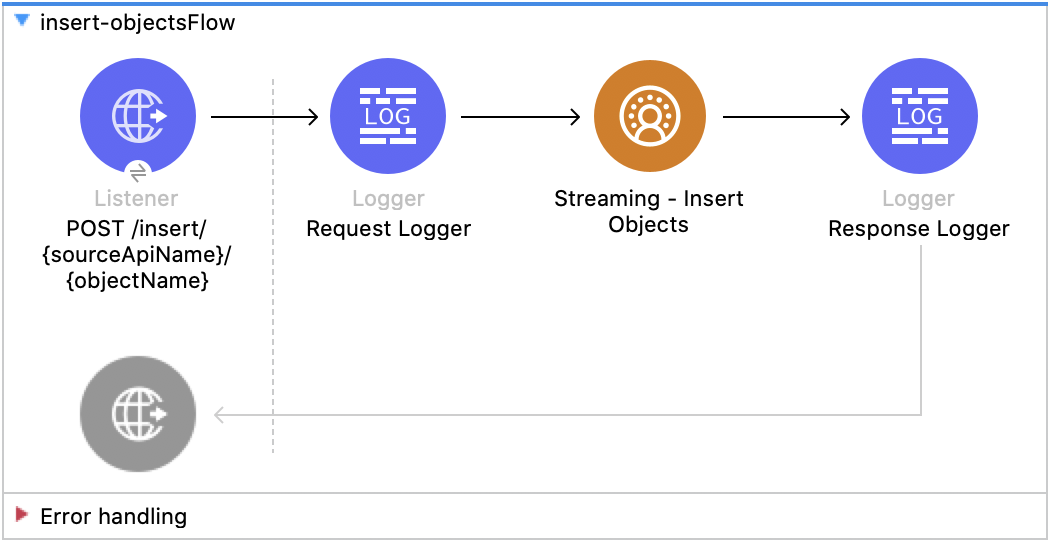
![Salesforce CDP の挿入フローの図 - (Listener - Logger - Insert Objects - Response Logger)](/mulesoft/current/ja-jp/salesforce-data-cloud-connector/1.0/_images/Insert-flow.png)

### [](#この例の-xml)この例の XML

この例のフローをすばやく Mule アプリケーションに読み込むには、次のコードを Studio XML エディターに貼り付けます。

```xml
<?xml version="1.0" encoding="UTF-8"?>

<mule xmlns:sdc="http://www.mulesoft.org/schema/mule/sdc" xmlns:http="http://www.mulesoft.org/schema/mule/http"
	  xmlns="http://www.mulesoft.org/schema/mule/core"
	  xmlns:doc="http://www.mulesoft.org/schema/mule/documentation" xmlns:xsi="http://www.w3.org/2001/XMLSchema-instance" xsi:schemaLocation="http://www.mulesoft.org/schema/mule/core http://www.mulesoft.org/schema/mule/core/current/mule.xsd
http://www.mulesoft.org/schema/mule/http http://www.mulesoft.org/schema/mule/http/current/mule-http.xsd
http://www.mulesoft.org/schema/mule/sdc http://www.mulesoft.org/schema/mule/sdc/current/mule-sdc.xsd">
	<http:listener-config name="HTTP_Listener_config" doc:name="HTTP Listener config" >
		<http:listener-connection host="0.0.0.0" port="8081" />
	</http:listener-config>
    <configuration-properties doc:name="Configuration properties" file="mule-app.properties" />
    <sdc:sdc-config name="Salesforce_CDP_OAuth_JWT_config" doc:name="Salesforce CDP config" >
		<sdc:oauth-jwt-connection consumerKey="${server.consumerKey}" keyStorePath="${server.keyStorePath}" storePassword="${server.keyStorePassword}" subject="${server.userName}" keyAlias="${server.certificateAlias}" audienceUrl="${server.audienceUrl}"/>
	</sdc:sdc-config>
	<sdc:sdc-config name="Salesforce_CDP_OAuth_UsernamePassword_config" doc:name="Salesforce CDP config" >
		<sdc:oauth-user-pass-connection audienceUrl="${server.audienceUrl}" username="${server.userName}" password="${server.password}" clientId="${server.consumerKey}" clientSecret="${server.consumerSecret}"/>
	</sdc:sdc-config>

	<flow name="Insert-objectsFlow" >
		<http:listener doc:name="POST /insert/{sourceApiName}/{objectName}" config-ref="HTTP_Listener_config" path="/insert/{sourceApiName}/{objectName}" allowedMethods="POST"/>
		<logger level="INFO" doc:name="Request Logger" message="#[payload]"/>
		<sdc:insert-objects doc:name="Streaming Insert" config-ref="Salesforce_CDP_OAuth_JWT_config" sourceNameUriParam="#[attributes.uriParams.sourceApiName]" objectNameUriParam="#[attributes.uriParams.objectName]"/>
		<logger level="INFO" doc:name="Response Logger" />
	</flow>
</mule>
```

### [](#この例の実行手順)この例の実行手順

1. コネクタが設定されていることを確認します。
2. プロジェクトを保存します。
3. オブジェクトのスキーマに一致する JSON ペイロードを使用して ​`POST`​ を ​`localhost:8081/{SOURCE_API_NAME}/{OBJECT_NAME}`​ に送信し、フローをテストします。次に例を示します。
    
    ```json
    {
        "data": [
            {
                "your_object_field_1": "value_1",
                "your_object_field_2": "value_2",
                "your_object_field_3": "value_3"
            }
        ]
    }
    ```

## [](#データの照会)データの照会

この Mule フローでは、カスタム SOQL クエリを使用して CDP からデータを照会する方法を示します。

この例では、次の操作を使用します。

- **HTTP Listener**​  
    ペイロードにクエリが含まれる HTTP POST 要求からデータを受け取ります。
- **Logger**​  
    **Listener**​ から受け取った HTTP 要求を表示します。また、後で ​**Query**​ 操作からの HTTP 応答を表示します。
- **クエリ**
    
    - JWT を選択したかユーザー名とパスワードを選択したかに基づいて認証します。
    - 前の SOQL クエリを受け取ります。
    - クエリを含む Salesforce API をコールして、結果を受け取ります。
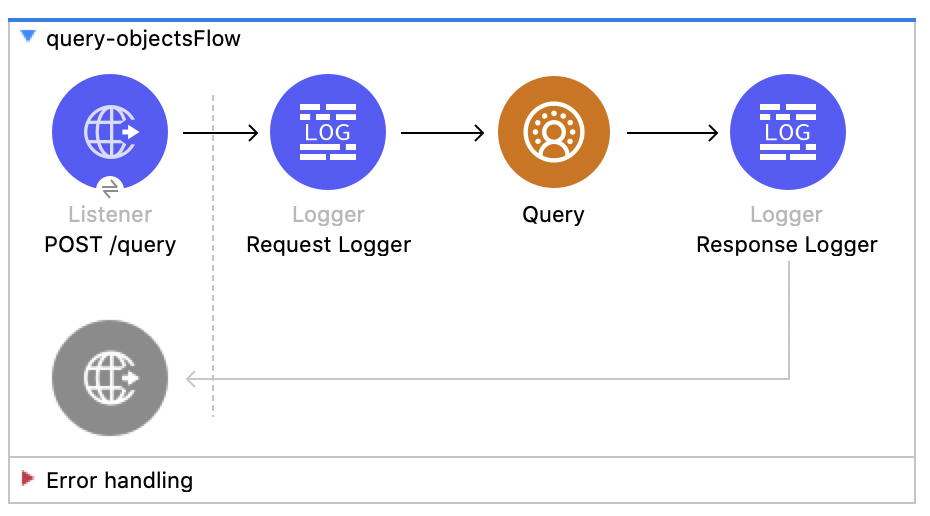
![Salesforce CDP のクエリフローの図 - (Listener - Logger - Query - Response Logger)](/mulesoft/current/ja-jp/salesforce-data-cloud-connector/1.0/_images/query-flow.png)

### [](#この例の-xml-2)この例の XML

この例のフローをすばやく Mule アプリケーションに読み込むには、次のコードを Studio XML エディターに貼り付けます。

```xml
<?xml version="1.0" encoding="UTF-8"?>

<mule xmlns:sdc="http://www.mulesoft.org/schema/mule/sdc" xmlns:http="http://www.mulesoft.org/schema/mule/http"
	  xmlns="http://www.mulesoft.org/schema/mule/core"
	  xmlns:doc="http://www.mulesoft.org/schema/mule/documentation" xmlns:xsi="http://www.w3.org/2001/XMLSchema-instance" xsi:schemaLocation="http://www.mulesoft.org/schema/mule/core http://www.mulesoft.org/schema/mule/core/current/mule.xsd
http://www.mulesoft.org/schema/mule/http http://www.mulesoft.org/schema/mule/http/current/mule-http.xsd
http://www.mulesoft.org/schema/mule/sdc http://www.mulesoft.org/schema/mule/sdc/current/mule-sdc.xsd">
	<http:listener-config name="HTTP_Listener_config" doc:name="HTTP Listener config" >
		<http:listener-connection host="0.0.0.0" port="8081" />
	</http:listener-config>
    <configuration-properties doc:name="Configuration properties" file="mule-app.properties" />
    <sdc:sdc-config name="Salesforce_CDP_OAuth_JWT_config" doc:name="Salesforce CDP config" >
		<sdc:oauth-jwt-connection consumerKey="${server.consumerKey}" keyStorePath="${server.keyStorePath}" storePassword="${server.keyStorePassword}" subject="${server.userName}" keyAlias="${server.certificateAlias}" audienceUrl="${server.audienceUrl}"/>
	</sdc:sdc-config>
	<sdc:sdc-config name="Salesforce_CDP_OAuth_UsernamePassword_config" doc:name="Salesforce CDP config" >
		<sdc:oauth-user-pass-connection audienceUrl="${server.audienceUrl}" username="${server.userName}" password="${server.password}" clientId="${server.consumerKey}" clientSecret="${server.consumerSecret}"/>
	</sdc:sdc-config>

	<flow name="query-objectsFlow" >
		<http:listener doc:name="POST /query" config-ref="HTTP_Listener_config" path="/query" allowedMethods="POST"/>
		<logger level="INFO" doc:name="Request Logger" message="#[payload]"/>
		<sdc:query doc:name="Query" config-ref="Salesforce_CDP_OAuth_JWT_config"/>
		<logger level="INFO" doc:name="Response Logger" message="#[payload]"/>
	</flow>
</mule>
```

### [](#この例の実行手順-2)この例の実行手順

1. コネクタが設定されていることを確認します。
2. プロジェクトを保存します。
3. リクエストボディに SOQL クエリを含めて ​`POST`​ を ​`localhost:8081/query`​ に送信し、フローをテストします。次に例を示します。
    
    ```json
    {
        "sql": "SELECT ID FROM ACCOUNT LIMIT 1"
    }
    ```

## [](#データの削除-ストリーミング-api)データの削除 - ストリーミング API

この Mule フローでは、オブジェクトのエンドポイントを使用してストリーミング API を介してデータを削除する方法を示します。

この例では、次の操作を使用します。

- **HTTP Listener**​  
    ソース API とオブジェクト名が URI パラメーターとして含まれ、レコード ID がクエリパラメーターとして含まれる HTTP DELETE 要求からデータを受け取ります。
- **Logger**​  
    **Listener**​ から受け取った HTTP 要求を表示します。また、後で ​**Streaming Delete**​ 操作からの HTTP 応答を表示します。
- **Streaming Delete**
    
    - JWT を選択したかユーザー名とパスワードを選択したかに基づいて認証します。
    - ソース API 参照名、オブジェクト名、レコード ID を受け取ります。
    - Salesforce API をコールして、該当のオブジェクトのエンドポイントを使用してクエリパラメーターからレコードを削除します。
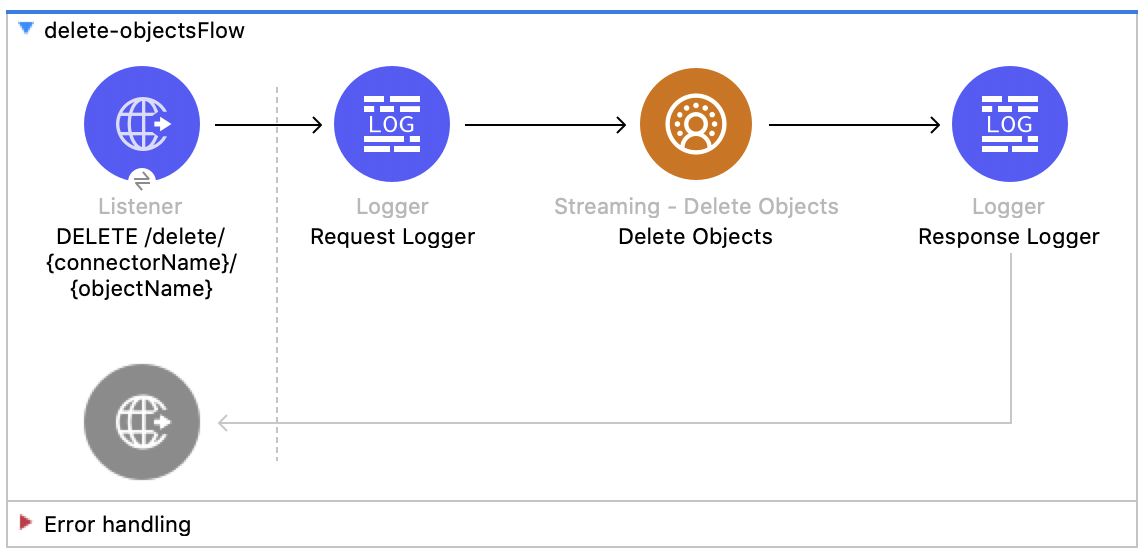
![Salesforce CDP の削除フローの図 - (Listener - Logger - Delete Objects - Response Logger)](/mulesoft/current/ja-jp/salesforce-data-cloud-connector/1.0/_images/delete-flow.png)

### [](#この例の-xml-3)この例の XML

この例のフローをすばやく Mule アプリケーションに読み込むには、次のコードを Studio XML エディターに貼り付けます。

```xml
<?xml version="1.0" encoding="UTF-8"?>

<mule xmlns:sdc="http://www.mulesoft.org/schema/mule/sdc" xmlns:http="http://www.mulesoft.org/schema/mule/http"
	  xmlns="http://www.mulesoft.org/schema/mule/core"
	  xmlns:doc="http://www.mulesoft.org/schema/mule/documentation" xmlns:xsi="http://www.w3.org/2001/XMLSchema-instance" xsi:schemaLocation="http://www.mulesoft.org/schema/mule/core http://www.mulesoft.org/schema/mule/core/current/mule.xsd
http://www.mulesoft.org/schema/mule/http http://www.mulesoft.org/schema/mule/http/current/mule-http.xsd
http://www.mulesoft.org/schema/mule/sdc http://www.mulesoft.org/schema/mule/sdc/current/mule-sdc.xsd">
	<http:listener-config name="HTTP_Listener_config" doc:name="HTTP Listener config" >
		<http:listener-connection host="0.0.0.0" port="8081" />
	</http:listener-config>
    <configuration-properties doc:name="Configuration properties" file="mule-app.properties" />
    <sdc:sdc-config name="Salesforce_CDP_OAuth_JWT_config" doc:name="Salesforce CDP config" >
		<sdc:oauth-jwt-connection consumerKey="${server.consumerKey}" keyStorePath="${server.keyStorePath}" storePassword="${server.keyStorePassword}" subject="${server.userName}" keyAlias="${server.certificateAlias}" audienceUrl="${server.audienceUrl}"/>
	</sdc:sdc-config>
	<sdc:sdc-config name="Salesforce_CDP_OAuth_UsernamePassword_config" doc:name="Salesforce CDP config" >
		<sdc:oauth-user-pass-connection audienceUrl="${server.audienceUrl}" username="${server.userName}" password="${server.password}" clientId="${server.consumerKey}" clientSecret="${server.consumerSecret}"/>
	</sdc:sdc-config>

	<flow name="delete-objectsFlow" >
		<http:listener doc:name="DELETE /delete/{sourceApiName}/{objectName}" config-ref="HTTP_Listener_config" path="/delete/{sourceApiName}/{objectName}" allowedMethods="DELETE"/>
		<logger level="INFO" doc:name="Request Logger" />
		<sdc:delete-objects doc:name="Streaming Delete" config-ref="Salesforce_CDP_OAuth_JWT_config" idsQueryParams="#[output application/java&#10;---&#10;[attributes.queryParams.ids]]" sourceNameUriParam="#[attributes.uriParams.sourceApiName]" objectNameUriParam="#[attributes.uriParams.objectName]"/>
		<logger level="INFO" doc:name="Response Logger" />
	</flow>
</mule>
```

### [](#この例の実行手順-3)この例の実行手順

1. コネクタが設定されていることを確認します。
2. プロジェクトを保存します。
3. `DELETE`​ を ​`localhost:8081/delete/{SOURCE_API_NAME}/{OBJECT_NAME}?ids={RECORD_ID1},{RECORD_ID2}`​ に送信して、フローをテストします。次に例を示します。
    
    `localhost:8081/delete/My_SourceApi/My_Object?ids=1,2,3`

## [](#ジョブの作成-bulk-api)ジョブの作成 - Bulk API

この Mule フローでは、Salesforce CDP 取り込み API オブジェクトにデータをアップロードする一括ジョブを作成する方法を示します。

この例では、次の操作を使用します。

- **HTTP Listener**​  
    ソース API とオブジェクト名が URI パラメーターとして含まれ、レコード ID がクエリパラメーターとして含まれる HTTP POST 要求からデータを受け取ります。
- **Logger**​  
    **Listener**​ から受け取った HTTP 要求を表示します。また、後で ​**Create Job**​ 操作からの HTTP 応答を表示します。
- Create Job:
    
    - JWT を選択したかユーザー名とパスワードを選択したかに基づいて認証します。
    - ソース API 参照名、オブジェクト名、ジョブ操作を受け取ります。ジョブ操作については、​**リソース**​ページを参照してください。
    - ジョブを作成する Salesforce API をコールして、応答を返します。
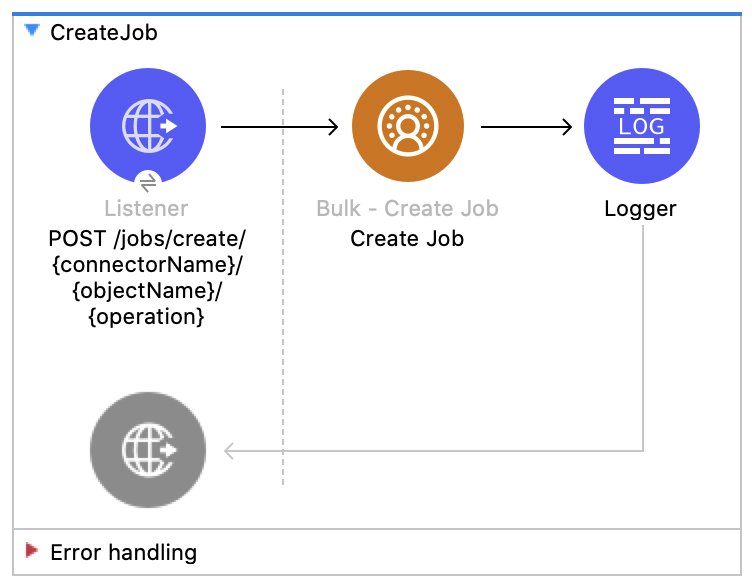
![Salesforce CDP のジョブの作成フローの図 - (Listener - Create Job - Logger)](/mulesoft/current/ja-jp/salesforce-data-cloud-connector/1.0/_images/create-job-bulk.png)

### [](#この例の-xml-4)この例の XML

この例のフローをすばやく Mule アプリケーションに読み込むには、次のコードを Studio XML エディターに貼り付けます。

```xml
<?xml version="1.0" encoding="UTF-8"?>

<mule xmlns:salesforce="http://www.mulesoft.org/schema/mule/salesforce" xmlns:ee="http://www.mulesoft.org/schema/mule/ee/core"
	xmlns:file="http://www.mulesoft.org/schema/mule/file"
	xmlns:sdc="http://www.mulesoft.org/schema/mule/sdc" xmlns:http="http://www.mulesoft.org/schema/mule/http" xmlns="http://www.mulesoft.org/schema/mule/core" xmlns:doc="http://www.mulesoft.org/schema/mule/documentation" xmlns:xsi="http://www.w3.org/2001/XMLSchema-instance" xsi:schemaLocation="http://www.mulesoft.org/schema/mule/core http://www.mulesoft.org/schema/mule/core/current/mule.xsd
http://www.mulesoft.org/schema/mule/http http://www.mulesoft.org/schema/mule/http/current/mule-http.xsd
http://www.mulesoft.org/schema/mule/sdc http://www.mulesoft.org/schema/mule/sdc/current/mule-sdc.xsd
http://www.mulesoft.org/schema/mule/file http://www.mulesoft.org/schema/mule/file/current/mule-file.xsd
http://www.mulesoft.org/schema/mule/ee/core http://www.mulesoft.org/schema/mule/ee/core/current/mule-ee.xsd
http://www.mulesoft.org/schema/mule/salesforce http://www.mulesoft.org/schema/mule/salesforce/current/mule-salesforce.xsd">
	<http:listener-config name="HTTP_Listener_config" doc:name="HTTP Listener config" >
		<http:listener-connection host="0.0.0.0" port="8081" />
	</http:listener-config>
	<sdc:sdc-config name="Salesforce_CDP_OAuth_JWT_config" doc:name="Salesforce CDP config" >
		<sdc:oauth-jwt-connection consumerKey="${server.consumerKey}" keyStorePath="${server.keyStorePath}" storePassword="${server.keyStorePassword}" subject="${server.userName}" audienceUrl="${server.audienceUrl}" keyAlias="${server.certificateAlias}" />
	</sdc:sdc-config>
	<configuration-properties doc:name="Configuration properties" file="mule-app.properties" />
	<sdc:sdc-config name="Salesforce_CDP_OAuth_UsernamePassword_config" doc:name="Salesforce CDP config" >
		<sdc:oauth-user-pass-connection clientId="${server.consumerKey}" clientSecret="${server.consumerSecret}" username="${server.userName}" password="${server.password}" audienceUrl="${server.audienceUrl}" />
	</sdc:sdc-config>
	<flow name="CreateJob" >
		<http:listener doc:name="Post /jobs/create" config-ref="HTTP_Listener_config" path="/jobs/create/{sourceApiName}/{objectName}/{operation}"/>
		<sdc:create-bulk-job doc:name="Create Job" config-ref="Salesforce_CDP_OAuth_UsernamePassword_config" sourceNameUriParam="#[attributes.uriParams.sourceApiName]" objectNameUriParam="#[attributes.uriParams.objectName]" operationUriParam="#[attributes.uriParams.operation]"/>
		<logger level="INFO" doc:name="Logger" />
	</flow>
</mule>
```

### [](#この例の実行手順-4)この例の実行手順

1. コネクタが設定されていることを確認します。
2. プロジェクトを保存します。
3. `POST`​ を ​`localhost:8081/jobs/create/{SOURCE_API_NAME}/{OBJECT_NAME}/{OPERATION}`​ に送信して、フローをテストします。

## [](#ジョブデータのアップロード-bulk-api)ジョブデータのアップロード - Bulk API

この Mule フローでは、ジョブ ID で指定した Salesforce CDP 取り込み API オブジェクトに挿入するデータ、またはその Salesforce CDP 取り込み API オブジェクトから削除するデータをアップロードする方法を示します。

この例では、次の操作を使用します。

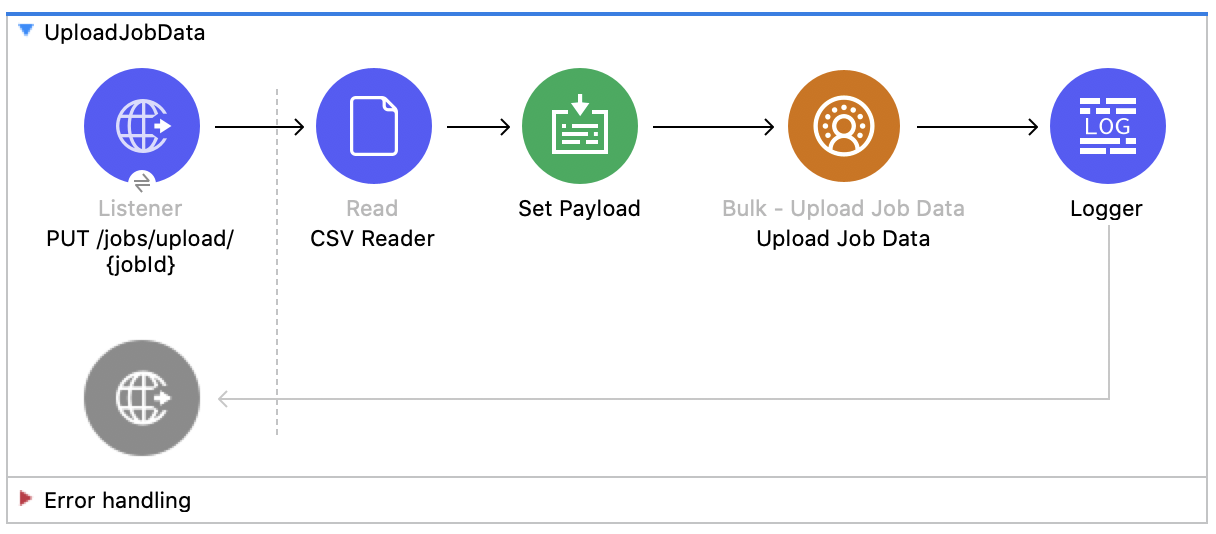
- **HTTP Listener**​  
    URI にジョブ ID が含まれる HTTP POST 要求からデータを受け取ります。
- **CSV Reader**​  
    絶対ファイルパスで設定された CSV からデータを読み取ります。
- **Set Payload**​  
    **Upload Job Data**​ 用の CSV データでペイロードを更新します。
- **Upload Job Data**​  
    
    - JWT を選択したかユーザー名とパスワードを選択したかに基づいて認証します。
    - HTTP 要求からのジョブ ID と、ペイロードにある CSV データを受け取ります。
    - データを CSV から Salesforce CDP 取り込み API オブジェクトにアップロードし、最終的に HTTP 応答を返します。
- **Logger**​  
    **Upload Job Data**​ 操作からの HTTP 結果を表示します。

![Salesforce CDP のジョブのアップロードフローの図 - (Listener - Create Job Data- Logger)](/mulesoft/current/ja-jp/salesforce-data-cloud-connector/1.0/_images/upload-job-data-bulk.png)

### [](#この例の-xml-5)この例の XML

この例のフローをすばやく Mule アプリケーションに読み込むには、次のコードを Studio XML エディターに貼り付けます。

```xml
<?xml version="1.0" encoding="UTF-8"?>

<mule xmlns:salesforce="http://www.mulesoft.org/schema/mule/salesforce" xmlns:ee="http://www.mulesoft.org/schema/mule/ee/core"
	xmlns:file="http://www.mulesoft.org/schema/mule/file"
	xmlns:sdc="http://www.mulesoft.org/schema/mule/sdc" xmlns:http="http://www.mulesoft.org/schema/mule/http" xmlns="http://www.mulesoft.org/schema/mule/core" xmlns:doc="http://www.mulesoft.org/schema/mule/documentation" xmlns:xsi="http://www.w3.org/2001/XMLSchema-instance" xsi:schemaLocation="http://www.mulesoft.org/schema/mule/core http://www.mulesoft.org/schema/mule/core/current/mule.xsd
http://www.mulesoft.org/schema/mule/http http://www.mulesoft.org/schema/mule/http/current/mule-http.xsd
http://www.mulesoft.org/schema/mule/sdc http://www.mulesoft.org/schema/mule/sdc/current/mule-sdc.xsd
http://www.mulesoft.org/schema/mule/file http://www.mulesoft.org/schema/mule/file/current/mule-file.xsd
http://www.mulesoft.org/schema/mule/ee/core http://www.mulesoft.org/schema/mule/ee/core/current/mule-ee.xsd
http://www.mulesoft.org/schema/mule/salesforce http://www.mulesoft.org/schema/mule/salesforce/current/mule-salesforce.xsd">
	<http:listener-config name="HTTP_Listener_config" doc:name="HTTP Listener config" >
		<http:listener-connection host="0.0.0.0" port="8081" />
	</http:listener-config>
	<sdc:sdc-config name="Salesforce_CDP_OAuth_JWT_config" doc:name="Salesforce CDP config" >
		<sdc:oauth-jwt-connection consumerKey="${server.consumerKey}" keyStorePath="${server.keyStorePath}" storePassword="${server.keyStorePassword}" subject="${server.userName}" audienceUrl="${server.audienceUrl}" keyAlias="${server.certificateAlias}" />
	</sdc:sdc-config>
	<configuration-properties doc:name="Configuration properties" file="mule-app.properties" />
	<sdc:sdc-config name="Salesforce_CDP_OAuth_UsernamePassword_config" doc:name="Salesforce CDP config" >
		<sdc:oauth-user-pass-connection clientId="${server.consumerKey}" clientSecret="${server.consumerSecret}" username="${server.userName}" password="${server.password}" audienceUrl="${server.audienceUrl}" />
	</sdc:sdc-config>
	<flow name="UploadJobData" >
        <http:listener doc:name="Upload Job Data Listener" config-ref="HTTP_Listener_config" path="/jobs/upload/{jobId}"/>
        <file:read doc:name="CSV Reader" path="" target="content"/>
        <set-payload value="#[vars.content]" doc:name="Set Payload" />
        <sdc:upload-data-bulk-job doc:name="Upload Job Data" config-ref="Salesforce_CDP_OAuth_JWT_config" idUriParam="#[attributes.uriParams.jobId]"/>
        <logger level="INFO" doc:name="Logger" message="#[message]"/>
    </flow>
</mule>
```

### [](#この例の実行手順-5)この例の実行手順

1. コネクタが設定されていることを確認します。
2. CSV への有効な絶対ファイルパスを CSV Reader の ​**\[File Path (ファイルパス)\]**​ 属性に入力します。
3. プロジェクトを保存します。
4. ジョブを作成し、そのジョブ ID をコピーします。
5. 前の手順でコピーしたジョブ ID を使用して ​`POST`​ を ​`localhost:8081/jobs/upload/{JOB_ID}`​ に送信し、フローをテストします。

## [](#ジョブの終了-bulk-api)ジョブの終了 - Bulk API

この Mule フローでは、指定したジョブ ID の状況を更新してジョブを終了する方法を示します。終了したジョブは処理キューに登録されます。

この例では、次の操作を使用します。

- **HTTP Listener**​  
    URI パラメーターにジョブ ID が含まれる HTTP GET 要求からデータを受け取ります。
- **Logger**​  
    **Close Job**​ 操作からの HTTP 応答を表示します。
- **Close Job**
    
    - JWT を選択したかユーザー名とパスワードを選択したかに基づいて認証します。
    - 指定されたジョブを受け取ります。
    - `UploadComplete`​ 状態を使用して Salesforce API をコールし、該当のジョブを完了した後、HTTP 応答を受け取ります。
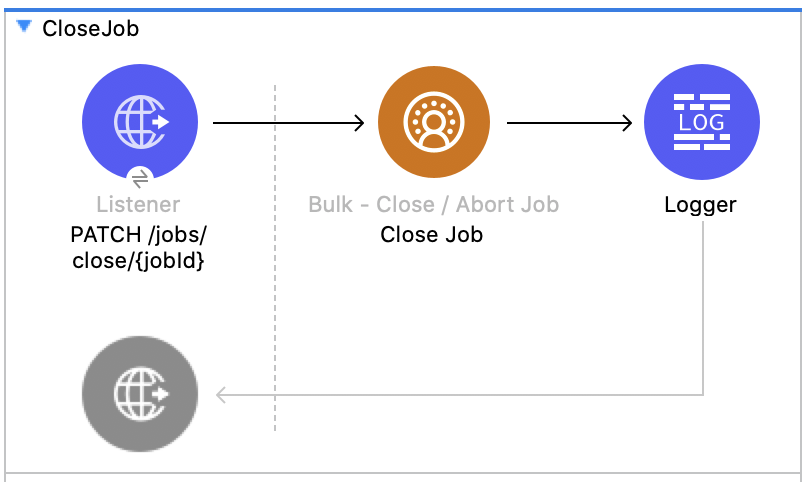
![Salesforce CDP のジョブの終了フローの図 - (Listener - Close Job - Logger)](/mulesoft/current/ja-jp/salesforce-data-cloud-connector/1.0/_images/close-job-bulk.png)

### [](#この例の-xml-6)この例の XML

この例のフローをすばやく Mule アプリケーションに読み込むには、次のコードを Studio XML エディターに貼り付けます。

```xml
<?xml version="1.0" encoding="UTF-8"?>

<mule xmlns:salesforce="http://www.mulesoft.org/schema/mule/salesforce" xmlns:ee="http://www.mulesoft.org/schema/mule/ee/core"
	xmlns:file="http://www.mulesoft.org/schema/mule/file"
	xmlns:sdc="http://www.mulesoft.org/schema/mule/sdc" xmlns:http="http://www.mulesoft.org/schema/mule/http" xmlns="http://www.mulesoft.org/schema/mule/core" xmlns:doc="http://www.mulesoft.org/schema/mule/documentation" xmlns:xsi="http://www.w3.org/2001/XMLSchema-instance" xsi:schemaLocation="http://www.mulesoft.org/schema/mule/core http://www.mulesoft.org/schema/mule/core/current/mule.xsd
http://www.mulesoft.org/schema/mule/http http://www.mulesoft.org/schema/mule/http/current/mule-http.xsd
http://www.mulesoft.org/schema/mule/sdc http://www.mulesoft.org/schema/mule/sdc/current/mule-sdc.xsd
http://www.mulesoft.org/schema/mule/file http://www.mulesoft.org/schema/mule/file/current/mule-file.xsd
http://www.mulesoft.org/schema/mule/ee/core http://www.mulesoft.org/schema/mule/ee/core/current/mule-ee.xsd
http://www.mulesoft.org/schema/mule/salesforce http://www.mulesoft.org/schema/mule/salesforce/current/mule-salesforce.xsd">
	<http:listener-config name="HTTP_Listener_config" doc:name="HTTP Listener config" >
		<http:listener-connection host="0.0.0.0" port="8081" />
	</http:listener-config>
	<sdc:sdc-config name="Salesforce_CDP_OAuth_JWT_config" doc:name="Salesforce CDP config" >
		<sdc:oauth-jwt-connection consumerKey="${server.consumerKey}" keyStorePath="${server.keyStorePath}" storePassword="${server.keyStorePassword}" subject="${server.userName}" audienceUrl="${server.audienceUrl}" keyAlias="${server.certificateAlias}" />
	</sdc:sdc-config>
	<configuration-properties doc:name="Configuration properties" file="mule-app.properties" />
	<sdc:sdc-config name="Salesforce_CDP_OAuth_UsernamePassword_config" doc:name="Salesforce CDP config" >
		<sdc:oauth-user-pass-connection clientId="${server.consumerKey}" clientSecret="${server.consumerSecret}" username="${server.userName}" password="${server.password}" audienceUrl="${server.audienceUrl}" />
	</sdc:sdc-config>
	<flow name="CloseJob" >
		<http:listener doc:name="Get /jobs/close/{jobId}" config-ref="HTTP_Listener_config" path="/jobs/close/{jobId}"/>
		<sdc:update-bulk-operation-job doc:name="Close Job" config-ref="Salesforce_CDP_OAuth_JWT_config" idUriParam="#[attributes.uriParams.jobId]" state="UploadComplete"/>
		<logger level="INFO" doc:name="Logger" />
	</flow>
</mule>
```

### [](#この例の実行手順-6)この例の実行手順

1. コネクタが設定されていることを確認します。
2. プロジェクトを保存します。
3. ジョブを作成し、結果のジョブ ID をコピーします。
4. 前の手順でコピーしたジョブ ID を使用して ​`GET`​ を ​`localhost:8081/jobs/close/{JOB_ID}`​ に送信し、フローをテストします。

## [](#ジョブの中止-bulk-api)ジョブの中止 - Bulk API

この Mule フローでは、指定したジョブ ID の状況を更新してジョブを中止する方法を示します。中止したジョブは処理キューに登録されません。

この例では、次の操作を使用します。

- **HTTP Listener**​  
    URI パラメーターにジョブ ID が含まれる HTTP GET 要求からデータを受け取ります。
- **Logger**​  
    **Abort Job**​ 操作からの HTTP 応答を表示します。
- **Abort Job**​:
    
    - JWT を選択したかユーザー名とパスワードを選択したかに基づいて認証します。
    - URI パラメーターとして使用されたジョブ ID を受け取ります。
    - aborted 状態を使用して Salesforce API をコールし、該当のジョブを中止した後、HTTP 応答を受け取ります。
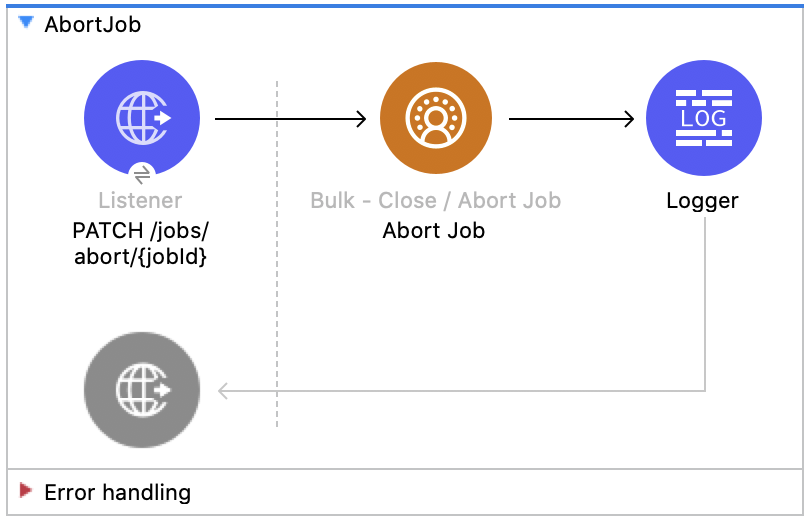
![Salesforce CDP のジョブの中止フローの図 - (Listener - Abort Job - Logger)](/mulesoft/current/ja-jp/salesforce-data-cloud-connector/1.0/_images/abort-job-bulk.png)

### [](#この例の-xml-7)この例の XML

この例のフローをすばやく Mule アプリケーションに読み込むには、次のコードを Studio XML エディターに貼り付けます。

```xml
<?xml version="1.0" encoding="UTF-8"?>

<mule xmlns:salesforce="http://www.mulesoft.org/schema/mule/salesforce" xmlns:ee="http://www.mulesoft.org/schema/mule/ee/core"
	xmlns:file="http://www.mulesoft.org/schema/mule/file"
	xmlns:sdc="http://www.mulesoft.org/schema/mule/sdc" xmlns:http="http://www.mulesoft.org/schema/mule/http" xmlns="http://www.mulesoft.org/schema/mule/core" xmlns:doc="http://www.mulesoft.org/schema/mule/documentation" xmlns:xsi="http://www.w3.org/2001/XMLSchema-instance" xsi:schemaLocation="http://www.mulesoft.org/schema/mule/core http://www.mulesoft.org/schema/mule/core/current/mule.xsd
http://www.mulesoft.org/schema/mule/http http://www.mulesoft.org/schema/mule/http/current/mule-http.xsd
http://www.mulesoft.org/schema/mule/sdc http://www.mulesoft.org/schema/mule/sdc/current/mule-sdc.xsd
http://www.mulesoft.org/schema/mule/file http://www.mulesoft.org/schema/mule/file/current/mule-file.xsd
http://www.mulesoft.org/schema/mule/ee/core http://www.mulesoft.org/schema/mule/ee/core/current/mule-ee.xsd
http://www.mulesoft.org/schema/mule/salesforce http://www.mulesoft.org/schema/mule/salesforce/current/mule-salesforce.xsd">
	<http:listener-config name="HTTP_Listener_config" doc:name="HTTP Listener config" >
		<http:listener-connection host="0.0.0.0" port="8081" />
	</http:listener-config>
	<sdc:sdc-config name="Salesforce_CDP_OAuth_JWT_config" doc:name="Salesforce CDP config" >
		<sdc:oauth-jwt-connection consumerKey="${server.consumerKey}" keyStorePath="${server.keyStorePath}" storePassword="${server.keyStorePassword}" subject="${server.userName}" audienceUrl="${server.audienceUrl}" keyAlias="${server.certificateAlias}" />
	</sdc:sdc-config>
	<configuration-properties doc:name="Configuration properties" file="mule-app.properties" />
	<sdc:sdc-config name="Salesforce_CDP_OAuth_UsernamePassword_config" doc:name="Salesforce CDP config" >
		<sdc:oauth-user-pass-connection clientId="${server.consumerKey}" clientSecret="${server.consumerSecret}" username="${server.userName}" password="${server.password}" audienceUrl="${server.audienceUrl}" />
	</sdc:sdc-config>
	<flow name="AbortJob" >
		<http:listener doc:name="Get /jobs/abort/{jobId}"  config-ref="HTTP_Listener_config" path="/jobs/abort/{jobId}"/>
		<sdc:update-bulk-operation-job doc:name="Abort Job" config-ref="Salesforce_CDP_OAuth_JWT_config" idUriParam="#[attributes.uriParams.jobId]" state="Aborted"/>
		<logger level="INFO" doc:name="Logger" />
	</flow>
</mule>
```

### [](#この例の実行手順-7)この例の実行手順

1. コネクタが設定されていることを確認します。
2. プロジェクトを保存します。
3. ジョブを作成し、結果のジョブ ID をコピーします。
4. 前の手順でコピーしたジョブ ID を使用して ​`GET`​ を ​`localhost:8081/jobs/abort/{JOB_ID}`​ に送信し、フローをテストします。

## [](#ジョブの取得-bulk-api)ジョブの取得 - Bulk API

この Mule フローでは、指定したジョブ ID の現在の状況を取得する方法を示します。

この例では、次の操作を使用します。

- **HTTP Listener**​  
    URI パラメーターにジョブ ID が含まれる HTTP GET 要求からデータを受け取ります。
- **Logger**​  
    **Get Job**​ 操作からの HTTP 応答を表示します。
- **Get Job**
    
    - JWT を選択したかユーザー名とパスワードを選択したかに基づいて認証します。
    - URI パラメーターからジョブ ID を受け取ります。
    - Salesforce API をコールして、ジョブの状況を返します。
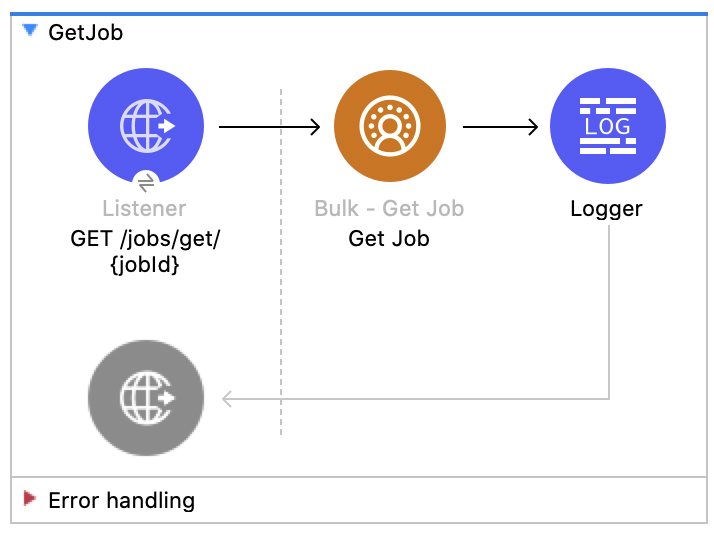
![Salesforce CDP のジョブの取得フローの図 - (Listener - Get Job - Logger)](/mulesoft/current/ja-jp/salesforce-data-cloud-connector/1.0/_images/get-job-bulk.png)

### [](#この例の-xml-8)この例の XML

この例のフローをすばやく Mule アプリケーションに読み込むには、次のコードを Studio XML エディターに貼り付けます。

```xml
<?xml version="1.0" encoding="UTF-8"?>

<mule xmlns:salesforce="http://www.mulesoft.org/schema/mule/salesforce" xmlns:ee="http://www.mulesoft.org/schema/mule/ee/core"
	xmlns:file="http://www.mulesoft.org/schema/mule/file"
	xmlns:sdc="http://www.mulesoft.org/schema/mule/sdc" xmlns:http="http://www.mulesoft.org/schema/mule/http" xmlns="http://www.mulesoft.org/schema/mule/core" xmlns:doc="http://www.mulesoft.org/schema/mule/documentation" xmlns:xsi="http://www.w3.org/2001/XMLSchema-instance" xsi:schemaLocation="http://www.mulesoft.org/schema/mule/core http://www.mulesoft.org/schema/mule/core/current/mule.xsd
http://www.mulesoft.org/schema/mule/http http://www.mulesoft.org/schema/mule/http/current/mule-http.xsd
http://www.mulesoft.org/schema/mule/sdc http://www.mulesoft.org/schema/mule/sdc/current/mule-sdc.xsd
http://www.mulesoft.org/schema/mule/file http://www.mulesoft.org/schema/mule/file/current/mule-file.xsd
http://www.mulesoft.org/schema/mule/ee/core http://www.mulesoft.org/schema/mule/ee/core/current/mule-ee.xsd
http://www.mulesoft.org/schema/mule/salesforce http://www.mulesoft.org/schema/mule/salesforce/current/mule-salesforce.xsd">
	<http:listener-config name="HTTP_Listener_config" doc:name="HTTP Listener config" >
		<http:listener-connection host="0.0.0.0" port="8081" />
	</http:listener-config>
	<sdc:sdc-config name="Salesforce_CDP_OAuth_JWT_config" doc:name="Salesforce CDP config" >
		<sdc:oauth-jwt-connection consumerKey="${server.consumerKey}" keyStorePath="${server.keyStorePath}" storePassword="${server.keyStorePassword}" subject="${server.userName}" audienceUrl="${server.audienceUrl}" keyAlias="${server.certificateAlias}" />
	</sdc:sdc-config>
	<configuration-properties doc:name="Configuration properties" file="mule-app.properties" />
	<sdc:sdc-config name="Salesforce_CDP_OAuth_UsernamePassword_config" doc:name="Salesforce CDP config" >
		<sdc:oauth-user-pass-connection clientId="${server.consumerKey}" clientSecret="${server.consumerSecret}" username="${server.userName}" password="${server.password}" audienceUrl="${server.audienceUrl}" />
	</sdc:sdc-config>
	<flow name="GetJob" >
		<http:listener doc:name="Get /jobs/get/{jobId}" config-ref="HTTP_Listener_config" path="/jobs/get/{jobId}"/>
		<sdc:get-bulk-job doc:name="Get Job" config-ref="Salesforce_CDP_OAuth_JWT_config" idUriParam="#[attributes.uriParams.jobId]"/>
		<logger level="INFO" doc:name="Logger" />
	</flow>
</mule>
```

### [](#この例の実行手順-8)この例の実行手順

1. コネクタが設定されていることを確認します。
2. プロジェクトを保存します。
3. ジョブを作成し、結果のジョブ ID をコピーします。
4. 前の手順でコピーしたジョブ ID を使用して ​`GET`​ を ​`localhost:8081/jobs/get/{JOB_ID}`​ に送信し、フローをテストします。

## [](#ジョブの削除-bulk-api)ジョブの削除 - Bulk API

この Mule フローでは、指定したジョブ ID を削除または終了する方法を示します。これにより、Salesforce で保存されているジョブデータとメタデータが削除されます。 ジョブを削除するには、そのジョブの状況が ​`UploadComplete`​、​`JobComplete`​、​`Aborted`​、または ​`Failed`​ である必要があります。

この例では、次の操作を使用します。

- **HTTP Listener**​  
    URI パラメーターにジョブ ID が含まれる HTTP DELETE 要求からデータを受け取ります。
- **Logger**​  
    **Delete Job**​ 操作からの HTTP 応答を表示します。
- **Delete Job**
    
    - JWT を選択したかユーザー名とパスワードを選択したかに基づいて認証します。
    - URI パラメーターで使用されたジョブ ID を受け取ります。
    - Salesforce API をコールして、ジョブを削除します。
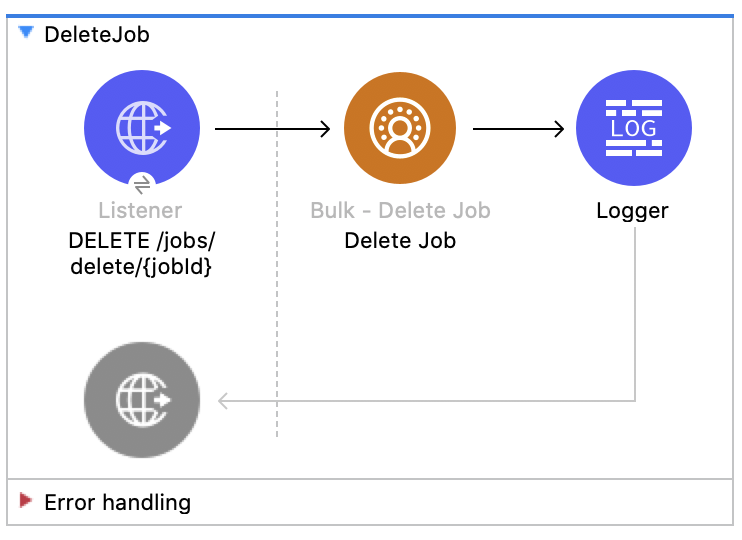
![Salesforce CDP のジョブの削除フローの図 - (Listener - Delete Job - Logger)](/mulesoft/current/ja-jp/salesforce-data-cloud-connector/1.0/_images/delete-job-bulk.png)

### [](#この例の-xml-9)この例の XML

この例のフローをすばやく Mule アプリケーションに読み込むには、次のコードを Studio XML エディターに貼り付けます。

```xml
<?xml version="1.0" encoding="UTF-8"?>

<mule xmlns:salesforce="http://www.mulesoft.org/schema/mule/salesforce" xmlns:ee="http://www.mulesoft.org/schema/mule/ee/core"
	xmlns:file="http://www.mulesoft.org/schema/mule/file"
	xmlns:sdc="http://www.mulesoft.org/schema/mule/sdc" xmlns:http="http://www.mulesoft.org/schema/mule/http" xmlns="http://www.mulesoft.org/schema/mule/core" xmlns:doc="http://www.mulesoft.org/schema/mule/documentation" xmlns:xsi="http://www.w3.org/2001/XMLSchema-instance" xsi:schemaLocation="http://www.mulesoft.org/schema/mule/core http://www.mulesoft.org/schema/mule/core/current/mule.xsd
http://www.mulesoft.org/schema/mule/http http://www.mulesoft.org/schema/mule/http/current/mule-http.xsd
http://www.mulesoft.org/schema/mule/sdc http://www.mulesoft.org/schema/mule/sdc/current/mule-sdc.xsd
http://www.mulesoft.org/schema/mule/file http://www.mulesoft.org/schema/mule/file/current/mule-file.xsd
http://www.mulesoft.org/schema/mule/ee/core http://www.mulesoft.org/schema/mule/ee/core/current/mule-ee.xsd
http://www.mulesoft.org/schema/mule/salesforce http://www.mulesoft.org/schema/mule/salesforce/current/mule-salesforce.xsd">
	<http:listener-config name="HTTP_Listener_config" doc:name="HTTP Listener config" >
		<http:listener-connection host="0.0.0.0" port="8081" />
	</http:listener-config>
	<sdc:sdc-config name="Salesforce_CDP_OAuth_JWT_config" doc:name="Salesforce CDP config" >
		<sdc:oauth-jwt-connection consumerKey="${server.consumerKey}" keyStorePath="${server.keyStorePath}" storePassword="${server.keyStorePassword}" subject="${server.userName}" audienceUrl="${server.audienceUrl}" keyAlias="${server.certificateAlias}" />
	</sdc:sdc-config>
	<configuration-properties doc:name="Configuration properties" file="mule-app.properties" />
	<sdc:sdc-config name="Salesforce_CDP_OAuth_UsernamePassword_config" doc:name="Salesforce CDP config" >
		<sdc:oauth-user-pass-connection clientId="${server.consumerKey}" clientSecret="${server.consumerSecret}" username="${server.userName}" password="${server.password}" audienceUrl="${server.audienceUrl}" />
	</sdc:sdc-config>
	<flow name="DeleteJob" >
		<http:listener doc:name="Delete /jobs/delete/{jobId}" config-ref="HTTP_Listener_config" path="/jobs/delete/{jobId}"/>
		<sdc:delete-bulk-job doc:name="Delete Job" config-ref="Salesforce_CDP_OAuth_JWT_config" idUriParam="#[attributes.uriParams.jobId]"/>
		<logger level="INFO" doc:name="Logger" />
	</flow>
</mule>
```

### [](#この例の実行手順-9)この例の実行手順

1. コネクタが設定されていることを確認します。
2. プロジェクトを保存します。
3. ジョブを作成し、結果のジョブ ID をコピーします。
4. コピーしたジョブを使用して、ジョブを終了します (​[\[Close Job - Bulk API\]](<#Close Job - Bulk API>)​フローを参照)。
5. 前の手順でコピーしたジョブ ID を使用して ​`DELETE`​ を ​`localhost:8081/jobs/delete/{JOB_ID}`​ に送信し、フローをテストします。

## [](#関連情報)関連情報

- [Anypoint Connector の概要](https://docs.mulesoft.com/connectors/introduction/introduction-to-anypoint-connectors)
- [MuleSoft ヘルプセンター](https://help.mulesoft.com)