
You can implement, deploy, and operate REST APIs using native OpenAPI Specification (OAS) formats in Anypoint Platform.
October 22, 2026
Support for OAS 3.1 is now available across the API lifecycle in Anypoint Platform, including Anypoint Code Builder, Anypoint Exchange, APIkit for REST, API Manager, and API Experience Hub.
OAS 3.1 is fully aligned with JSON Schema 2020-12, so you can describe your APIs with precise schemas that AI agents can consume without translation.
What’s New in OAS 3.1
OAS 3.1 introduces these capabilities:
-
Alignment with JSON Schema 2020-12, including
oneOf,anyOf,allOf,if/then/else,prefixItems, andconst -
Nullable types declared natively with
type: ["string", "null"]instead ofnullable: true -
Sibling properties alongside
$ref -
Numeric
exclusiveMinimumandexclusiveMaximumvalues -
SPDX license identifiers in
info.license.identifier
OAS 3.1 Support in Anypoint Platform
| API Lifecycle Stage | Product | Additional Information |
|---|---|---|
Design |
Anypoint Code Builder |
You can create, edit, and validate OAS 3.1 API specifications in YAML or JSON format, with inline validation and autocompletion for JSON Schema 2020-12 keywords. You can create OAS 3.1 API fragments and reference them with |
Catalog |
Anypoint Exchange |
You can upload and publish OAS 3.1 API specifications in YAML or JSON format and view the specification documentation. You can download OAS 3.1 assets in their original OAS version or as RAML. REST Connect generates Mule 4 connectors from OAS 3.1 API specifications. API Console renders OAS 3.1 schemas, and the mocking service validates requests against JSON Schema 2020-12. For more information, see: |
Implement |
APIkit for REST |
You can scaffold Mule flows from OAS 3.1 API specifications. OAS 3.1 support requires APIkit for REST version 1.13.2 or later and Mule runtime 4.13 or later. The minimum Mule runtime version for other specifications doesn’t change. For more information, see APIkit Compatibility and APIkit for REST Scaffolding Reference. |
Manage |
API Manager |
You can create API instances from OAS 3.1 API specifications for Mule Gateway and apply policies to them. For more information, see Adding a Mule Gateway API Instance. |
Share |
API Experience Hub |
You can publish OAS 3.1 API specifications and view the specification documentation. |
Upgrade OAS 3.0 API Specifications to OAS 3.1
OAS 3.1 isn’t backward compatible with OAS 3.0. To upgrade an OAS 3.0 API specification to OAS 3.1, update constructs such as nullable: true to the JSON Schema 2020-12 equivalents. Your existing OAS 3.0 API specifications continue to work without changes.
Limitations
-
OAS 3.2 isn’t supported in this release.
-
Exchange doesn’t resolve dynamic references (
$dynamicRefand$dynamicAnchor) in OAS 3.1 API specifications and doesn’t apply custom$schemadialects. For more information, see Creating an Asset. -
Exchange doesn’t support importing and managing OAS 3.x components as Exchange dependencies inside a specification.
-
API Manager doesn’t support the OAS 3.1 callback feature. To work around this limitation, handle the callback outside of the Mule runtime engine domain or use an OAS 3.1 specification that doesn’t use callbacks. For more information, see Adding a Mule Gateway API Instance.
-
Omni Gateway doesn’t support OAS 3.1 API specifications in this release.
-
API Designer, Anypoint Studio, and API Community Manager don’t support OAS 3.1. To design OAS 3.1 API specifications, use Anypoint Code Builder.
-
REST Connect doesn’t support webhooks and or the
mutualTLSsecurity scheme in OAS 3.1 API specifications.
February 2, 2021
Support for OAS 3.0 is included in API Designer, Anypoint Studio, Anypoint Exchange, API Manager, and Anypoint API Community Manager.
You can catalog existing REST OAS 3.0 API specifications to share with partners, customers, and developers in the platform or in internal and external API communities. You can also manage and secure your OAS 3.0 APIs by applying appropriate policies.
Additionally, if required, Anypoint Platform enables you to convert an OAS 3.0 specification to RAML or OAS 2.0.
OAS 3.0 Support in Anypoint Platform
OAS 3.0 is supported by all the products in Anypoint Platform for the API lifecycle stages of design, publish, and manage.
| API Lifecycle Stage | Product | OAS 3.0 Supported? | Additional Information |
|---|---|---|---|
Design |
API Designer |
Yes |
You can create an OAS 3.0 API specification or import one from Anypoint Exchange. |
Design |
Anypoint Studio |
Yes |
You can import an OAS 3.0 API specification from Design Center as an editable API specification project in Studio. You can also create an API specification project from scratch in Studio and then synchronize it with Design Center. |
Publish |
Anypoint Exchange |
Yes |
You can download, and publish an OAS 3.0 specification and view the specification documentation in Exchange. |
Publish |
Anypoint API Community Manager |
Yes |
You can publish an OAS 3.0 specification and view the specification documentation. |
Publish |
REST Connect |
Yes |
API specifications are typically published from API Designer to Anypoint Exchange, except when a connector cannot be generated from the API specification. For such cases, an email is sent to the user, explaining the cause of the error. |
Implement |
Anypoint Studio |
Yes |
|
Deploy |
Mule runtime engine |
Yes |
OAS 3.0 is supported in Mule runtime engine. |
Operate |
API Manager |
Yes |
OAS 3.0 is supported in API Manager. |
Convert Specifications
The RAML and OAS specification standards have some differences. RAML has constructs such as resource types, traits, and overlays, which do not exist in OAS. Similarly, OAS 3.0 has constructs such as server-templating, links, and callbacks, which do not exist in RAML. The conversion between these standards is a best effort only.
Convert to RAML
When you upload an OAS 3.0 specification to Anypoint Exchange, it automatically generates a RAML version.
To convert an OAS 3.0 API specification to RAML in API Designer:
-
Import the OAS 3.0 API specification to API Designer.
-
Click the three dots next to the filename in the Files pane and select Duplicate as….
-
In the Duplicate As dialog, select RAML.
-
Set the root file of the project to the RAML version of the API specification.
You can use the converted RAML specification in Anypoint Studio and API Manager.
Convert to OAS 2.0
Currently, Anypoint Platform does not support converting OAS 3.0 APIs to OAS 2.0. To convert an API from OAS 3.0 to OAS 2.0, download the OAS 3.0 specification and convert it using a third-party or open-source tool, such as APImatic Transformer. You can upload the converted OAS 2.0 specification to Exchange.
Converting an asset in API Designer creates a new version of the asset in Exchange and does not create a second duplicate asset in Exchange. Downloading an asset from Exchange, converting it by using a third-party tool such as APIMatic Transformer, and uploading the converted asset back to Exchange does create a second duplicate asset in Exchange. It is best to have no duplicate assets. However, only third-party tools can convert OAS 3.0 to OAS 2.0.
Work with OAS 3.0 APIs in API Designer
API Designer supports these actions with OAS 3.0 APIs:
-
Create API specifications in OAS 3.0.
When creating a new API-specification project, select OAS 3.0 in the Language field.
-
Import OAS 3.0 specifications from Anypoint Exchange or from your filesystem:
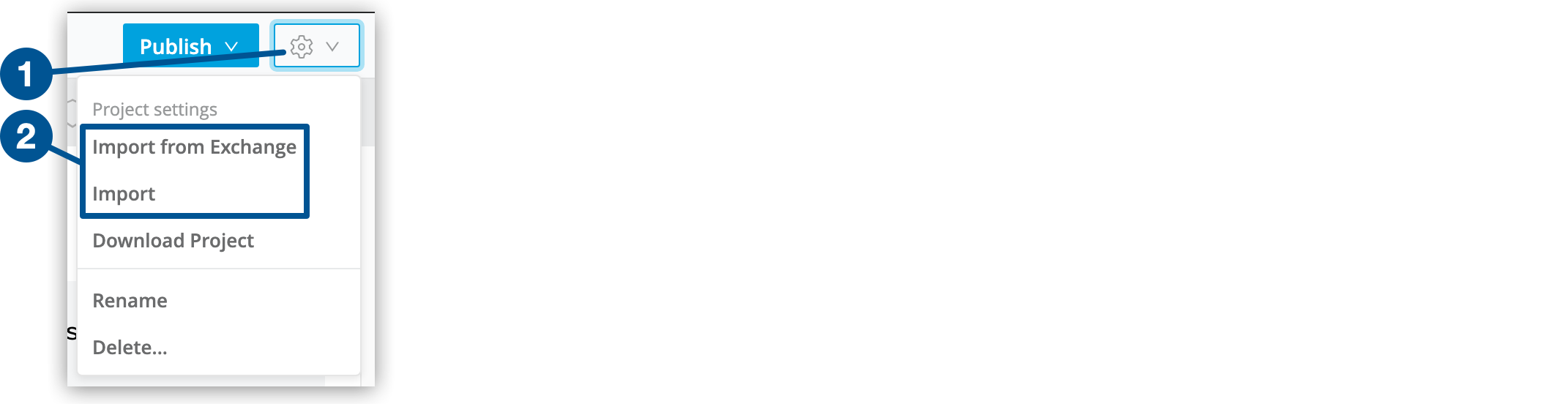 Figure 1. How to import files into an API-specification project in API Designer
-
Click the gear icon in the top-right corner of the text editor.
-
Select either of these options:
-
Select Import from Exchange to see both of these lists:
-
A list of the API specifications that are available from the business organization that your user ID belongs to in Anypoint Platform
-
A list of the API specifications that are published by MuleSoft
-
-
Select Import to import an API specification from your local filesystem.
-
-
-
Develop and edit OAS 3.0 specifications.
-
View documentation that is included in OAS 3.0 API specifications.
-
Simulate calls to methods that are in OAS 3.0 API specifications by activating the mocking service.
-
Publish OAS 3.0 API specifications to Anypoint Exchange.
Work with OAS 3.0 APIs in Anypoint Exchange
Exchange supports these actions with OAS 3.0 APIs:
-
Publish an existing OAS 3.0 API specification.
On the Publish a new asset page, select REST API - OAS in the Asset type field.
The API is now visible to Exchange users, and the users can explore the documentation and specification as with any other API, including the original OAS 3.0 specification and the generated RAML specification.
-
Download OAS 3.0 API specifications as RAML API specifications for scaffolding and implementation with third-party IDEs.
Work with OAS 3.0 APIs in API Manager
You can create OAS 3.0 APIs as the following types in API Manager:
-
Basic Endpoint for Mule applications (callbacks not supported)
-
Basic Endpoint for non-Mule applications
-
Endpoint with proxy (callbacks not supported)
You can manage your OAS 3.0 APIs by creating versions and instances, and applying policies from API Manager.
Work with OAS 3.0 APIs in API Community Manager
Publish APIs written in OAS 3.0 and cataloged in the platform into your API communities.
OAS 3.0 APIs are presented to your target audiences the same way as RAML and OAS 2.0 APIs, so that your audiences can discover, learn, and consume the APIs seamlessly, regardless of the specification language.