---
schema_version: "1"
id: c384ac85423a2a2b7602b149e2930f7c0a694d547c25ffc1adc9526729275149
title: Oracle EBS 12.1 Connector 5.3
collection: mulesoft
version: current
locale: ja-jp
portal_url: https://docs.salesforce.com/mulesoft/current/ja-jp/oracle-ebs-connector/latest/index.md
canonical_url: https://docs.mulesoft.com/jp/oracle-ebs-connector/latest/
source_site: docs.mulesoft.com
content_type: documentation
content_hash: a4135042c1ca334f15f5f44eab6ae29d419ba6ef93b8cdba642d9edbbecc2294
description: MuleSoft Documentation Site
release: "5.3"
latest: true
---
# Oracle EBS 12.1 Connector 5.3
Oracle E-Business Suite 用 Anypoint Connector (Oracle EBS Connector) を使用すると、Oracle EBS にリアルタイムに接続して Web サービスやメッセージキューを使用してクエリや更新を実行できます。このコネクタは、Oracle EBS v12.1.x 向けに開発されています。
Oracle EBS Connector では、次のものと統合できます。
- 財務管理モジュールと注文管理モジュール: 財務管理サービスと注文管理サービスに対する API を完全にカバーしています。
- PL/SQL インテグレーション: 標準 PL/SQL とユーザー定義の PL/SQL の両方を呼び出すことができます。
- XML Gateway: インバウンドとアウトバウンドで、メッセージを EBS に送受信します。
- ビジネスイベント: EBS で `WF_JMS_JMS_OUT` トピックを使用してイベントが起動されたときにメッセージを受信することができます。
## [](#始める前に)始める前に
この情報を使用するには、Oracle EBS、Mule Runtime Engine (Mule)、Anypoint Connector、Anypoint Studio、Mule の概念、Mule フローの要素、グローバル要素に精通している必要があります。
対象リソースへの接続をテストするには、ログイン情報が必要です。
Maven でこのコネクタを使用するには、Anypoint Exchange の \[Dependency Snippets (連動関係スニペット)\] で pom.xml の連動関係情報を確認してください。
## [](#pom-ファイル情報)POM ファイル情報
```xml
org.mule.connectors
mule-oracle-ebs-connector
x.x.x
mule-plugin
```
`x.x.x` を使用しているコネクタに対応するバージョンに置き換えます。
最新の `pom.xml` ファイル情報を取得するには、 [Anypoint Exchange](https://www.mulesoft.com/exchange/) でコネクタにアクセスし、**\[Dependency Snippets (連動関係スニペット)\]** をクリックします。
## [](#コネクタのアーキテクチャ)コネクタのアーキテクチャ
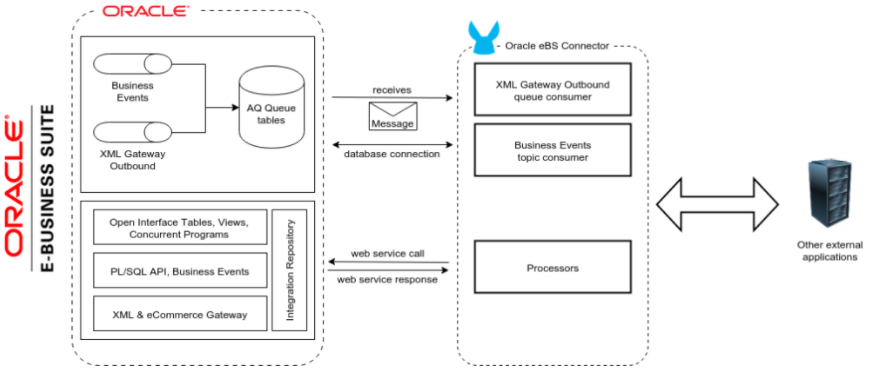
Oracle EBS には、さまざまな種類のインテグレーションに対応するための各種のテクノロジーや製品が含まれています。エンタープライズアプリケーションとのインテグレーションには、次の技術が最も広く使用されています。
1. データ中心のインテグレーション。
2. Oracle ビジネスイベントシステムと XML Gateway キューを使用したイベント駆動型インテグレーション。
3. Oracle E-Business Suite Integrated SOA Gateway (ISG) を使用した Web サービスによるインテグレーション。
## [](#web-サービスエンドポイント)Web サービスエンドポイント
次の Oracle Web サービスエンドポイントがサポートされています。
- Receivables
- DQM 検索サービス (`/oracle/apps/ar/hz/service/party/DqmSearchService`)
- Find Parties
- Email (メール) ビジネスオブジェクトサービス (`/oracle/apps/ar/hz/service/party/EmailService`)
- Create E-mail
- Get E-mail
- Save E-mail
- Update E-mail
- Location (場所) ビジネスオブジェクトサービス (`/oracle/apps/ar/hz/service/party/LocationService`)
- Create Location
- Get Location
- Save Location
- Update Location
- Organization (組織) ビジネスオブジェクトサービス (`/oracle/apps/ar/hz/service/party/OrganizationService`)
- Create Organization
- Get Organization
- Get Organizations Created
- Get Organizations Updated
- Save Organization
- Update Organization
- Organization Contact (組織担当者) ビジネスオブジェクトサービス (`/oracle/apps/ar/hz/service/party/OrgContactService`)
- Create Organization Contact
- Get Organization Contact
- Save Organization Contact
- Update Organization Contact
- Organization Customer (組織顧客) ビジネスオブジェクトサービス (`/oracle/apps/ar/hz/service/account/OrgCustomerService`)
- Create Organization Customer
- Get Organization Customer
- Get Organization Customers Created
- Get Organization Customers Updated
- Save Organization Customer
- Update Organization Customer
- Party Site Business (パーティサイトビジネス) オブジェクトサービス (`/oracle/apps/ar/hz/service/party/PartySiteService`)
- Create Party Site
- Get Party Site
- Save Party Site
- Update Party Site
- Person Business (個人ビジネス) オブジェクトサービス (`/oracle/apps/ar/hz/service/party/PersonService`)
- Create Person
- Get Person
- Get Persons Created
- Get Persons Updated
- Save Person
- Update Person
- Person Customer (個人顧客) ビジネスオブジェクトサービス (`/oracle/apps/ar/hz/service/account/PersonCustomerService`)
- Create Person Customer
- Get Person Customer
- Get Person Customers Created
- Get Person Customers Updated
- Save Person Customer
- Update Person Customer
- Phone Business (電話番号) ビジネスオブジェクトサービス (`/oracle/apps/ar/hz/service/party/PhoneService`)
- Create Phone
- Get Phone
- Save Phone
- Update Phone
- Relationship (リレーションシップ) ビジネスオブジェクトサービス (`/oracle/apps/ar/hz/service/party/RelationshipService`)
- Create Relationship
- Get Relationship
- Save Relationship
- Update Relationship
- Web Business (Web ビジネス) オブジェクトサービス (`/oracle/apps/ar/hz/service/party/WebService`)
- Create Web
- Get Web
- Save Web
- Update Web
PL/SQL 機能について、コネクタは次のものを標準でサポートし、カスタム機能もサポートしています。
- Install Base
- 品目インスタンスの管理 (`CSI_ITEM_INSTANCE_PUB`)
- Copy Item Instance
- Create Item Instance
- Get Item Instances
- Get Item Instance Details
- Update Item Instance
- Order Management
- Process Order API (`OE_ORDER_PUB`)
- Delete Line
- Delete Order
- Get Order
- ID to Value
- Lock Order
- Process Header
- Process Line
- Process Order
- Update Header
- Update Line
- Value to ID
- Purchase Order Acknowledgments Extension Columns API (`EC_POAO_EXT`)
- POAO Populate Ext Lev01
- POAO Populate Ext Lev02
- Purchase Order Change Acknowledgments Extension Columns API (`EC_POCAO_EXT`)
- POCAO Populate Ext Lev01
- POCAO Populate Ext Lev02
- Sales Agreement API (`OE_BLANKET_PUB`)
- Process Blanket
- 出荷確認 (`OE_SHIP_CONFIRMATION_PUB`)
- Ship Zero
- Payables
- 仕入先パッケージ (`AP_VENDOR_PUB_PKG`)
- Create Vendor
- Create Vendor Contact
- Create Vendor Site
- Receivables
- 請求書作成 (`AR_INVOICE_API_PUB`)
- Create Invoice
- Create Single Invoice
- Trading Community
- 場所 (`HZ_LOCATION_V2PUB`)
- Create Location
- Create Location 1
- Update Location
- Update Location 1
- パーティ担当者 (`HZ_PARTY_CONTACT_V2PUB`)
- Create Org Contact
- Create Org Contact Role
- Update Org Contact
- Update Org Contact Role
### [](#このコネクタのライブラリの追加)このコネクタのライブラリの追加
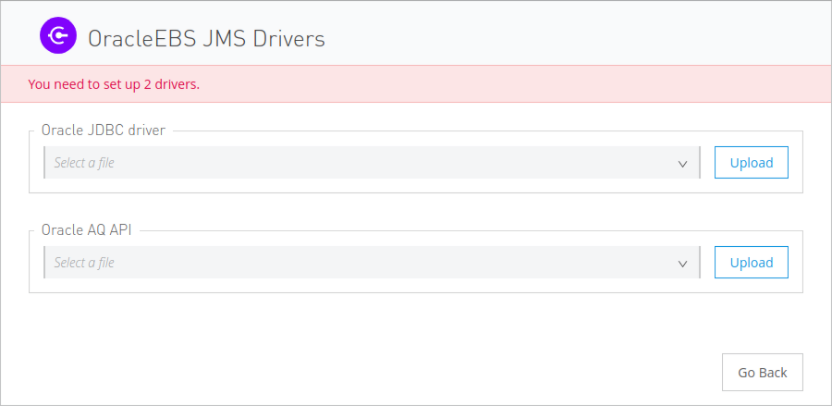
ビジネスイベントまたは XML Gateway キューをサブスクライブするには、JMS 設定に 2 つの外部ライブラリが必要です。
1. コネクタの \[JMS Configuration (JMS 設定)\] に移動します。
2. メッセージの下の **\[Set Up (セットアップ)\]** をクリックして、ドライバーをセットアップします。
3. ライブラリをアップロードして選択します。
1. Oracle AQ API: EBS インスタンスの `$ORACLE_HOME/rdbms/jlib/aqapi.jar` から取得できます。
2. Oracle Database JDBC Driver (Oracle データベース JDBC ドライバー): 同様にインスタンスの `$ORACLE_HOME/jdbc/lib/ojdbc6.jar` から取得できます。
## [](#studio-プロジェクトへのコネクタの追加)Studio プロジェクトへのコネクタの追加
Anypoint Studio には、Studio プロジェクトにコネクタを追加する 2 つの方法があります。
- Studio タスクバーの Exchange ボタンから
- \[Mule Palette (Mule パレット)\] ビューから
### [](#exchange-を使用してコネクタを追加する)Exchange を使用してコネクタを追加する
1. Studio で Mule プロジェクトを作成します。
2. Studio タスクバーの左上にある Exchange アイコン **(X)** をクリックします。
3. Exchange で、**\[Login (ログイン)\]** をクリックし、Anypoint Platform のユーザー名とパスワードを指定します。
4. Exchange で、「ebs」を検索します。
5. コネクタを選択して **\[Add to project (プロジェクトに追加)\]** をクリックします。
6. 画面の指示に従ってコネクタをインストールします。
### [](#studio-でコネクタに追加する)Studio でコネクタに追加する
1. Studio で Mule プロジェクトを作成します。
2. \[Mule Palette (Mule パレット)\] ビューで、**\[(X) Search in Exchange ((X) Exchange 内を検索)\]** をクリックします。
3. **\[Add Modules to Project (モジュールをプロジェクトに追加)\]** で、検索項目に「ebs」と入力します。
4. **\[Available modules (使用可能なモジュール)\]** で、このコネクタの名前をクリックします。
5. **\[Add (追加)\]** をクリックします。
6. **\[Finish (完了)\]** をクリックします。
### [](#studio-で設定する)Studio で設定する
1. コネクタの操作を Studio キャンバスにドラッグします。
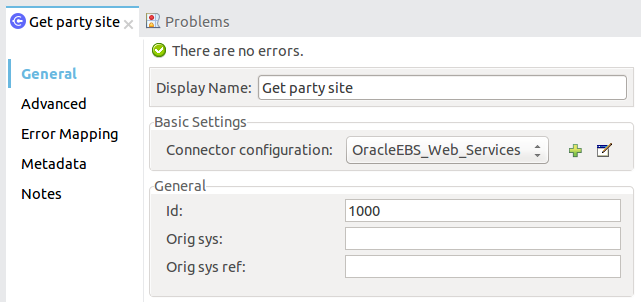
2. 例の Get Party Site を設定します。
1. Id: Party Site (パーティサイト) ビジネスオブジェクトの TCA ID。
2. Orig Sys (元のシステム): パーティサイトの元のシステムの名前。
3. Orig Sys Ref (元のシステムの参照): パーティサイトの元のシステムの参照。
## [](#psql-および-web-サービスの要求および応答のログ記録)PSQL および Web サービスの要求および応答のログ記録
コネクタを使用する場合に PSQL および Web サービスの要求および応答をログに記録するには、ロガーを設定します。
- PSQL の要求と応答の場合、次の行を Mule アプリケーションの `log4j2.xml` 設定ファイルの `Loggers` 要素に追加します。
```xml
```
- Web サービスの要求と応答の場合、次の行を Mule アプリケーションの `log4j2.xml` 設定ファイルの `Loggers` 要素に追加します。
```xml
```
次の例に示されている `Loggers` 要素では、Web サービスの要求と応答をログに記録するように `AsyncLogger` 行が設定されています。
```xml
```
## [](#ユースケース-操作をコールして記録する)ユースケース: 操作をコールして記録する
このサンプルフローは、30 秒ごとに操作をコールし、その出力を記録します。
1. \[Scheduler (スケジューラー)\] をドラッグし、頻度を 30 秒に設定します。
2. \[Mule Palette (Mule パレット)\] ビューから **\[Oracle EBS\] > \[Get Party Site\]** を選択し、フローにドラッグします。
3. 入力を設定します。
4. \[Logger (ロガー)\] をドラッグし、メッセージを `#[payload]` に設定します。
![\[Scheduler\] アイコン、\[Get Party Site\] アイコン、\[Logger (ロガー)\] アイコンが表示された Studio フロー](_images/oracle-ebs-studio-flow.png)
### [](#ユースケース-xml)ユースケース: XML
前述の例のコードを次に示します。
```xml
```
## [](#関連情報)関連情報
- [Oracle E-Business Suite 12.1 Connector リリースノート](https://docs.mulesoft.com/jp/release-notes/connector/oracle-ebs-connector-release-notes-mule-4)
- [Oracle E-Business Suite (EBS) 12.1 Connector](https://www.mulesoft.com/exchange/org.mule.connectors/mule-oracle-ebs-connector/)
- [Oracle のサイト](http://www.oracle.com/us/products/applications/ebusiness/overview/index.html)
- [Oracle E-Business Suite Documentation Web Library (Oracle E-Business Suite ドキュメント Web ライブラリ)](https://docs.oracle.com/cd/E18727_01/index.htm)
- [MuleSoft ヘルプセンター](https://help.mulesoft.com)