
HTTP ベースのデータサービスを使用して、OData MySQL サンプルで MySQL データベースを照会できます。
始める前に
APIkit で OData REST API を作成および使用するには、次のソフトウェアをインストールする必要があります。
-
OData プラグイン
-
Mule Runtime Engine 4.3.0 以降
-
Anypoint Studio 7.9.0 以降
さらに、OData 4 実装サンプルをダウンロードする必要があります。
APIkit for OData を使用した OData V4 API のスキャフォールディング
-
Studio で、[File (ファイル)] > [New (新規)] > [Mule Project (Mule プロジェクト)] を選択します。
-
[Project Name (プロジェクト名)] 項目で、Mule プロジェクトの名前を入力します。
-
[Finish (完了)] をクリックします。
-
src/main/resources/api で、.csdl.xml 拡張子の付いた新しいファイルを作成します。例:
odata-metadata.csdl.xml。<?xml version="1.0" encoding="UTF-8"?> <edmx:Edmx Version="4.0" xmlns:edmx="http://docs.oasis-open.org/odata/ns/edmx"> <edmx:DataServices> <Schema xmlns="http://docs.oasis-open.org/odata/ns/edm" Namespace="odata4.namespace"> <EntityType Name="Customers"> (1) <Key> (2) <PropertyRef Name="CustomerID" /> </Key> <Property Name="CompanyName" Type="Edm.String" MaxLength="40" Unicode="false" /> <Property Name="ContactName" Type="Edm.String" MaxLength="30" Unicode="false" /> <Property Name="ContactTitle" Type="Edm.String" MaxLength="30" Unicode="false" /> <Property Name="CustomerID" Type="Edm.String" Nullable="false" MaxLength="5" Unicode="false" /> <NavigationProperty Name="Orders" Type="Collection(odata4.namespace.Orders)"/> </EntityType> <EntityType Name="Orders"> <Key> <PropertyRef Name="OrderID" /> <PropertyRef Name="ShipName" /> </Key> <Property Name="Freight" Type="Edm.Decimal" Precision="19" Scale="4" /> <Property Name="OrderDate" Type="Edm.DateTimeOffset" Unicode="false" /> <Property Name="OrderID" Type="Edm.Int32" Nullable="false" Unicode="false" /> <Property Name="CustomerID" Type="Edm.String" MaxLength="5"/> <Property Name="Price" Type="Edm.Single" Unicode="false" /> <Property Name="Priority" Type="Edm.Int16" Unicode="false" /> <Property Name="ShipAddress" Type="Edm.String" MaxLength="60" Unicode="false" /> <Property Name="ShipName" Type="Edm.String" Nullable="false" MaxLength="40" Unicode="false" /> <NavigationProperty Name="Customer" Type="odata4.namespace.Customers"> <ReferentialConstraint Property="CustomerID" ReferencedProperty="CustomerID" /> </NavigationProperty> </EntityType> <EntityContainer Name="OData4EntityContainer"> (3) <EntitySet Name="Customers" EntityType="odata4.namespace.Customers"> (4) <NavigationPropertyBinding Path="Orders" Target="Orders"/> </EntitySet> <EntitySet Name="Orders" EntityType="odata4.namespace.Orders"/> </EntityContainer> </Schema> </edmx:DataServices> </edmx:Edmx>1 EntityType は、種別とそのプロパティを定義します。2 key は、どのプロパティまたはプロパティのセットがエンティティのキーであるかを定義します。たとえば、エンティティセット
Orders は、2 つのキー OrderID と ShipName で構成されます。3 EntityContainer は、公開エンティティのセットを定義します。この例では、
Orders と Customers です。4 EntitySet には名前と EntityType が含まれます。それらを
schema 名前空間で定義する必要があります。 -
Package Explorer で、
odata-metadata.csdl.xml ファイルを右クリックし、[Generate Mule OData 4 API (Mule OData 4 API を生成)] を選択します。![[Generate Mule OData 4 API (Mule OData 4 API を生成)] オプションへのパスが強調表示されています](_images/generate-odata-v4-api.png)
-
APIkit は、
.csdl.xml メタデータファイルに基づいて対応するフローを生成します。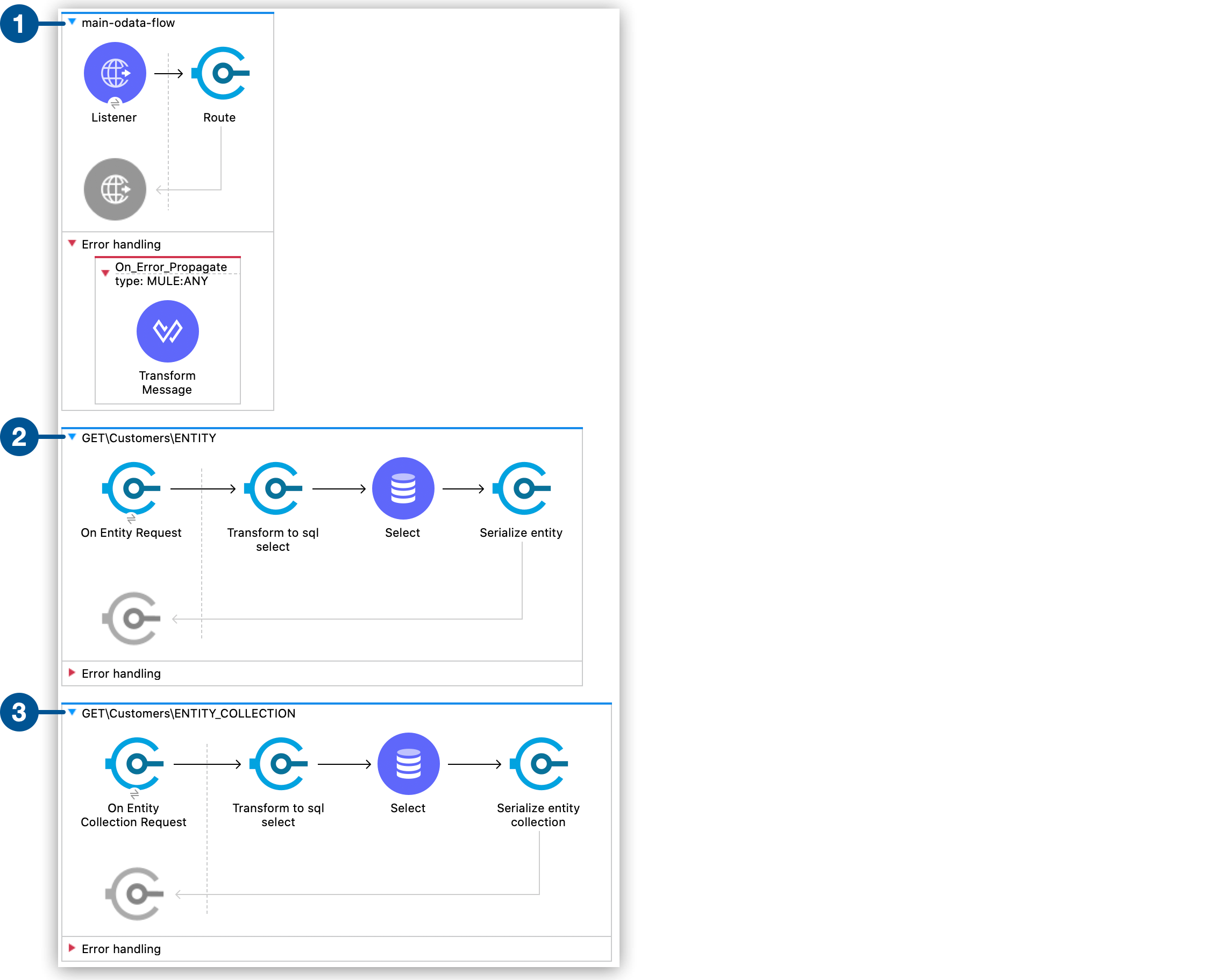
1 メッセージを受信し、操作を正しいハンドラーに転送するメインフロー。 2 各エンティティの GET、PUT、POST、DELETE 操作を含む 5 つのフロー。3 エンティティのコレクションを取得する GET 操作を含むフロー。
OData システムクエリオプションの処理
各 On Entity Request および On Entity Collection Request リスナー内で、各 OData クエリオプション ($select、$orderby、$count など) にマップする systemQueryOptions 属性にアクセスできます。たとえば、$select 値にアクセスするには、次の式を使用します。
#[attributes.odataRequestAttributes.systemQueryOptions.select]![[Output (出力)] タブで、属性の下の Mule メッセージ内の [odataRequestAttributes] が強調表示されています](_images/odata-query-option-attributes.png)
APIkit for OData 4 実装例
-
完全な apikit-odata4-example をダウンロードします。
-
ダウンロードしたサンプルを Studio にインポートします。
-
src/main/resources/example.sql ファイル内の SQL ステートメントを実行して、MySQL データベースにデータベース、テーブル、およびテストデータを作成します。
-
Studio でアプリケーションを実行します。
Studio がアプリケーションをデプロイしたら、次のクエリの例を使用して OData サービスを照会できます。
GET 要求の例
curl --location --request GET 'localhost:8081/api/Customers('BLAUS')'{
"@odata.context": "http://localhost:8081/api/$metadata#Customers/$entity",
"CompanyName": "Blauer See Delikatessen",
"ContactName": "Hanna Moos",
"ContactTitle": "Sales Representative",
"CustomerID": "BLAUS"
}複合キーを含む GET 要求の例
curl --location --request GET 'localhost:8081/api/Orders(OrderID=10315,ShipName='Island Trading'){
"@odata.context": "http://localhost:8081/api/$metadata#Orders/$entity",
"Freight": 41.76,
"OrderDate": "1996-09-26T00:00:00Z",
"OrderID": "10315",
"Price": null,
"Priority": 1,
"ShipAddress": "Garden house Crowther Way",
"ShipName": "Island Trading"
}作成の例
この例では、クライアントは新しいエンティティを作成するための 1 つまたは複数のキーを提供します。
curl --location --request POST 'http://localhost:8081/api/Customers' \
--header 'Content-Type: application/json' \
--data-raw '{
   "CompanyName": "Mulesoft",
   "ContactName": "Customer 123",
   "CustomerID": "NW123"
}'curl --location --request POST 'http://localhost:8081/api/Orders' \
--header 'Content-Type: application/json' \
--data-raw '{
"Freight": 32.38,
"OrderID": 100000,
"ShipAddress": "Unknown St. 123",
"ShipName": "Order 100000"
}'更新の例
OData V4 は提供された項目のみを変更するため、PATCH を使用してエンティティを更新することをお勧めします。
curl --location --request PATCH 'http://localhost:8081/api/Customers('\''BOTTM'\'')' \
--header 'Content-Type: application/json' \
--data-raw '{
   "ContactName": "James Bottom"
}'
curl --location --request PATCH 'http://localhost:8081/api/Orders(OrderID=10251,ShipName='\''Victuailles en stock'\'')' \
--header 'Content-Type: application/json' \
--data-raw '{
"ShipAddress": "Unknown Av. 1234"
}'OData V4 はエンティティ全体を新しいエンティティに置き換えるため、PUT を使用してエンティティを更新することをお勧めしません。これは、データが失われる可能性があるためです。
curl --location --request PUT 'http://localhost:8081/api/Customers('\''LONEP'\'')' \
--header 'Content-Type: application/json' \
--data-raw '{
   "CompanyName": "New Lonesome Pine Restaurant",
   "ContactName": "Fran C. Wilson",
   "CustomerID": "LONEP"
}'
curl --location --request PUT 'http://localhost:8081/api/Orders(OrderID=11056,ShipName='\''Eastern Connection'\'')' \
--header 'Content-Type: application/json' \
--data-raw '{
"Freight": 27.52,
"OrderDate": "1998-05-28T00:00:00",
"OrderID": 11056,
"Priority": 2,
"ShipAddress": "45 King George",
"ShipName": "Eastern Connection"
}'削除の例
エンティティを削除する例を次に示します。
curl --location --request DELETE 'http://localhost:8081/api/Customers('\''NW123'\'')'curl --location --request DELETE 'http://localhost:8081/api/Orders(OrderID=11056,ShipName='\''Eastern Connection'\'')'APIkit for OData 4 のクライアント側ページネーション
HTTP クエリパラメーター $skip と $top を使用してページを要求するようにクライアントを設定できます。
-
$top システムクエリパラメーターでは、コレクションから返される項目の数を制限する負以外の整数 n を指定します。 -
$skip システムクエリパラメーターでは、照会されたコレクションの最初の n 項目を結果から除外する負以外の整数 n を指定します。
次に例を示します。
curl -X GET ‘localhost:8081/api/Customers?$skip=1&$top=5’2 番目の位置から始まる 5 件のレコードを返します。
APIkit for OData 4 のサーバー側ページネーション
サーバー側ページネーションにより、クライアント側ページネーションから取得されたデータ要求のサブセットを、固定値の pageSize パラメーターを使用して制御できます。応答データセットを個別のページに分割することで、データの読みやすさを改善します。サーバーは、ページサイズを定義します。このページサイズは、サーバーが要求で返す最大レコード数です。
OData 4 でのサーバー側ページネーション
OData は、@odata.nextLink を定義することで、応答には要求されたエンティティコレクションのサブセットのみが含まれていることを示します。そのため、@odata.nextLink には、クライアントが要求したコレクションの次のサブセットを取得できるようにする URL が含まれます。この URL には、次のページが開始されるサーバーを示す $skiptoken パラメーターが含まれます。
APIkit for OData 4 のサーバー側ページネーションの実装
Anypoint Studio の [Responses (応答)] タブで <apikit-odata:request-entity-collection-listener> を使用して一連の項目を定義することで、サーバー側ページネーションを実装できます。
![[Entity Collection Request (エンティティコレクション要求)] タブで pageSize が ${service.orders.pageSize} に設定されています](_images/pagesize.png)
pageSize に値を入力すると、APIkit は項目の XML 表現を作成します。
<apikit-odata:request-entity-collection-listener config-ref="odata-metadata-config" path="/Orders" method="GET" >
        <apikit-odata:collection-success-response >
            <apikit-odata:entity-collection-success-response pageSize="${service.orders.pageSize}"/>
        </apikit-odata:collection-success-response>
    <apikit-odata:request-entity-collection-listener>