Project Name (プロジェクト名)
| 1 | Set Variable コンポーネント |
| 2 | Logger コンポーネント |
| 1 | キャンバスでは、Mule フローまたはサブフローを視覚的に表現する領域が提供されます。 |
| 2 | 設定 XML エディターには、Mule アプリケーションの設定ファイルが表示されます。 |
| 自動的に生成されたフロー要素 | 名前変更されたフロー要素 |
|---|---|
|
|
| 1 | 操作名を HTTP /flights に変更します。 |
| 2 | 設定参照ドロップダウンメニューから [inbound-request] を選択します。 |
| 3 | [Path (パス)] 属性を [flights (フライト)] に設定します。 |
| 1 | コンポーネント名を Set Response に変更します。 |
| 2 | [Value (値)] 属性を [Flight info (フライト情報)] に設定します。 |
| 1 | value 属性を「Flight info」 (フライト情報) に設定し、doc:name を「Set Response」 (応答を設定) に設定します。 |
| Issue Resolution | ID |
|---|---|
Global Elements now shows required external libraries as expected when those libraries are defined on the connector configuration, such as Spring Config. |
W-24612980 |
Anypoint Code Builder updates its OpenJDKs. |
W-24630068 |
| Issue Resolution | ID |
|---|---|
MUnit tests now resolve BOM-managed dependency versions correctly when run from the Anypoint Code Builder UI. |
W-23448108 |
The Transformation Builder now preserves namespaces when mapping input for services that expect XML. |
W-23768550 |
The Transformation Builder now handles several mapping edge cases correctly. |
W-23768451 |
Anypoint Code Builder no longer retries Mule framework instance creation repeatedly when a security key is invalid. |
W-23864352 |
The debugger now visually indicates a pause after the Publish operation when using VM Pub/Sub. |
W-23959396 |
FIPS configuration now references the generated |
W-24176669 |
FIPS setup now applies the trust store password alongside a custom |
W-24176694 |
Anypoint Code Builder now keeps the Mule module metadata version and |
W-24192883 |
AccessDeniedException errors no longer recur in the logs on Windows. |
W-24207276 |
Secure properties connections now resolve reliably instead of intermittently reporting an unknown connection type. |
W-24220432 |
Anypoint Code Builder no longer deletes the shared JDK that the platform JVM is running on. |
W-24236209 |
Canvas component icons now render correctly instead of showing as Unknown when connector types resolve after the first render. |
W-24280838 |
Code search results now open directly in Code View. |
W-24278214 |
The Error Type list is now contextual and no longer shows every error type. |
W-24335809 |
Anypoint Code Builder desktop workspace settings no longer allow arbitrary JVM arguments that could lead to command execution. |
W-24408390 |
Export Project now uses the current project’s name and saves the JAR to the selected folder. |
W-24455874 |
| Issue Resolution | ID |
|---|---|
The Add Component (+) button now appears on hover in the descriptive UI as expected. |
W-23437230 |
Bundled connectors now load reliably on startup and are no longer skipped due to a stale interrupt flag. |
W-24014499 |
The design service now works as expected for projects using JDK 17 with Mule runtime 4.6.x. |
W-24079635 |
The canvas now renders components correctly when the dynamic tooling cache file is truncated, instead of showing every component as Unknown. |
W-24154114 |
FIPS trust store setup now succeeds with BCFKS source keystores when a custom Cacerts path is configured. |
W-24152130 |
Loading the bundled connector cache no longer causes out-of-memory errors on low-resource machines. |
W-24117873 |
| Issue Resolution | ID |
|---|---|
Error handlers scaffolded from an API specification now map the Error Type correctly. |
W-19987815 |
Running a Mule application on Windows no longer requires administrator permission. |
W-23172858 |
The canvas now loads as expected when the |
W-23846800 |
MCP server network requests now succeed when a proxy is configured. |
W-23853401 |
The debugger’s Step Over action now pauses at the next step when Save & Hot Deploy is used. |
W-23959338 |
| Issue Resolution | ID |
|---|---|
Canceling the login process no longer displays an unexpected error. |
W-20636555 |
The Problems tab no longer shows incorrect validation warnings for global configuration. |
W-21322966 |
Opening a project no longer overwrites the |
W-23357940 |
The Re-scaffold this local API command is now available when you set up a multi-root workspace manually as expected. |
W-23493499 |
The FIPS custom |
W-23517641 |
Implement This Local API no longer fails intermittently on Windows with a |
W-23546215 |
The IDE no longer rewrites |
W-23604327 |
| Issue Resolution | ID |
|---|---|
Runtime default arguments now parse correctly when you configure application run settings. |
W-23122012 |
The Transformation Builder component now appears with a consistent display name across the UI as expected. |
W-22775707 |
The Add Component button now behaves consistently when you add components to your flow. |
W-22293870 |
Autocomplete now supports partial text matches so you can find items faster while typing. |
W-22454656 |
API spec projects now appear correctly in the Project and Project Dependencies panels. |
W-22715444 |
XML debugger launch configurations now accept the |
W-23122632 |
| Issue Resolution | ID |
|---|---|
Mule language server operations now complete reliably without timing out during normal workflows. |
W-23049419 |
MuleSoft Vibes requests now route through the proxy correctly. |
W-23056251 |
The metadata tree now stays expanded when you open Transformation Builder with custom metadata. |
W-23061578 |
Go To Flow now opens the referenced flow as expected. |
W-23090107 |
Debugging now opens dependency flows referenced by |
W-23128325 |
Skill auto-update failures no longer display an error toast in the IDE. |
W-23148357 |
Opening Mule projects on Windows now handles lowercase drive-letter paths correctly during Maven validation. |
W-21968540 |
Uncommenting a component that Studio disabled now preserves valid Mule code. |
W-22708555 |
The canvas now loads as expected when dependency resolution takes longer than usual. |
W-23032933 |
DataWeave scripts now update correctly on Windows for array and nested mapping scenarios. |
W-23122433 |
Anypoint Code Builder now connects reliably on slower computers during startup. |
W-23232084 |
Projects that use CI-friendly |
W-23293643 |
| Issue Resolution | ID |
|---|---|
The configuration panel now loads as expected for connectors that use XML simple-content elements with attributes. |
W-23048952 |
Local JSON-RPC socket connections now initialize more reliably on slower or constrained machines. |
W-23156379 |
MuleSoft Vibes Anypoint Platform tools now fetch user profiles correctly in the India region when listing applications. |
W-23008805 |
Language server requests now continue reliably in slower environments without timing out prematurely during startup. |
W-23049419 |
Platform shutdown now handles failed JSON-RPC initialization without additional NullPointerException errors. |
W-23049504 |
Custom connectors that define union-typed object parameters now load correctly. |
W-22863083 |
| Issue Resolution | ID |
|---|---|
Transformation Builder source metadata now remains visible after mapping operations. |
W-22767859 |
Implicit DataWeave variables, such as |
W-20610661 |
Auto-discovery now adds the required namespace information automatically. |
W-22158386 |
Expression Builder now keeps the cursor position stable so functions insert in the expected location. |
W-22154279 |
Namespace additions now apply correctly when editing configurations. |
W-22941217 |
Mule runtime downloads from the CLI now complete successfully. |
W-22432886 |
Mule runtime download authentication now works correctly in non-production environments. |
W-22434986 |
Path handling on Windows now uses consistent separators during URI comparisons. |
W-22770705 |
| Issue Resolution | ID |
|---|---|
MCP tools now display correctly across supported IDEs. The connectivity MCP server can appear without registered tools in this release, which is the expected behavior. |
W-22854860 |
| Issue Resolution | ID |
|---|---|
Anypoint Code Builder no longer shows duplicate or triplicate items when selecting a project for testing. |
W-22565928 |
| Issue Resolution | ID |
|---|---|
The debugger now focuses on the correct file as expected when debugging multiple files simultaneously. |
W-20493459 |
Sample data specified in custom metadata examples now loads correctly in the transformation window. |
W-21314835 |
Sample data displayed in Expression Builder now matches the persisted sample data as expected. |
W-21319134 |
Type propagation now resolves correctly without unexpected failure errors. |
W-21485471 |
The debugger now displays Mule Message component values correctly for non-Java data types. |
W-21707026 |
Copying JSON from a Mule event in debug mode now works as expected without errors. |
W-21707258 |
Type propagation no longer fails when component location returns null values. |
W-21735935 |
Variable value updates in the debugger now work as expected during debugging sessions. |
W-21936302 |
Error breakpoint exception messages now provide clearer and more actionable information. |
W-21957772 |
Breakpoint icons on the canvas now correctly display their muted state. |
W-21986288 |
Signing in now works as expected for all users. |
W-22000712 |
Document identifiers now propagate correctly across all batch steps in the Batch Processing connector. |
W-22002465 |
The Go To Flow navigation feature no longer has intermittent failures. |
W-22043908 |
Error objects are now visible in the VARIABLES panel when debugging inside error handler scopes. |
W-22099074 |
Mapping icons now work correctly when variables are present in scripts. |
W-22100547 |
MuleSoft Vibes no longer shows ValidationException errors for large prompts or PII context window connection errors. |
W-22107257 |
MuleSoft Vibes MCP server connections now succeed for servers that don’t support resources or prompts. |
W-22116159 |
The MimeType attributes no longer incorrectly show expression mode as supported. |
W-22164971 |
Project artifact IDs can now be directly inherited in parent POMs. |
W-22166146 |
The undo command now executes on the first invocation instead of requiring two attempts. |
W-22170160 |
The debugger can now introspect |
W-22177315 |
Token refresh no longer enters an infinite loop due to |
W-22251798 |
The Apply button in the HTTP Listener Global Element configuration now works as expected. |
W-22321659 |
The debugger now processes files within nested folders when debugging as expected. |
W-22349447 |
| Issue Resolution | ID |
|---|---|
Applying policies with required schema properties that have default values in Agent Networks no longer causes failures. |
W-22170170 |
| Issue Resolution | ID |
|---|---|
Enum option lists now appear as expected inside arrays in the configuration UI. |
W-20031362 |
Publishing a project to Anypoint Exchange no longer creates an example project unexpectedly. |
W-20969183 |
Opening a project no longer takes more time than expected to load XML. |
W-21154541 |
Opening a project or XML file again on Windows no longer takes an excessive amount of time. |
W-21239937 |
Importing a project without sources no longer produces poor error handling. |
W-21284401 |
Anypoint Code Builder AI no longer suggests an outdated Salesforce connector version. |
W-21290906 |
The Transform Message component now shows the output tree for an inner field as expected. |
W-21309692 |
Drag-and-drop mapping now works as expected for nested objects in flat file formats. |
W-21310967 |
Metadata validation errors now work as expected for JMS and AS2 elements with Mule runtime 4.11.0. |
W-21314344 |
DataWeave data preview works as expected on failure and shows log output. |
W-21324741 |
The editor and workspace no longer show an unsaved file warning after saving all changes. |
W-21327302 |
Importing a new API from Anypoint Exchange from the command palette no longer requires a reload to show changes. |
W-21341100 |
Opening a file in a non-Mule project no longer raises nested project errors. |
W-21341353 |
Field concatenation no longer fails across arrays and different sources in DataWeave. |
W-21346401 |
Breakpoints in a source now stop execution as expected. |
W-21352232 |
Sample generation no longer fails after changing custom metadata for the first time in the transformation window. |
W-21421249 |
Progressive mapping now extends existing mappings as expected instead of replacing them. |
W-21462334 |
The factory now handles the object-store-caching-strategy component as expected. |
W-21467904 |
Large log files no longer slow down error logging. |
W-21469432 |
The Mule::p function reference now resolves as expected. |
W-21472817 |
Incorrect underline placement for DataWeave expressions in set-variable XML is fixed. |
W-21473016 |
Verifying a test connection no longer randomly breaks. |
W-21473880 |
A stack overflow in |
W-21485285 |
DataWeave editor no longer shows inconsistent counts of errors and warnings on the Problems tab. |
W-21530956 |
The resolution of the |
W-21533179 |
Embedded documents now regenerate in DataWeave as expected. |
W-21549247 |
The message reference now resolves in DataWeave as expected. |
W-21550252 |
A StatusLogger format or conversion error in the design service is fixed. |
W-21552602 |
Missing icons for date fields in DataWeave transforms are fixed. |
W-21560510 |
Tests that affected reliability of the test suite are now stabilized and working as expected. |
W-21575885 |
DataWeave syntax errors are now highlighted in configuration XML as expected. |
W-21627864 |
POM.xml now resolves as expected when using a relative path. |
W-21629880 |
An unexpected child element error in DefaultContainerProcessor in the DataWeave editor is fixed. |
W-21631829 |
MUnit files now resolve in the workspace as expected. |
W-21631910 |
Spacing around the Transform Message workspace in the DataWeave UI is tightened. |
W-21638610 |
Saving files now persists changes as expected. |
W-21642439 |
Clearing search on the Metadata tab now works as expected. |
W-21642458 |
The canvas no longer fails to load. |
W-21666326 |
Null pointer errors in the DataWeave virtual file system are fixed. |
W-21667508 / W-21770880 |
The HTTP port is released as expected after use. |
W-21706607 |
The restarts now pick up your latest changes as expected. |
W-21706655 |
New components are no longer occasionally inserted inside a nested body instead of after it on the canvas. |
W-21707238 |
Error messages now appear in the Mule event view as expected. |
W-21707484 |
Intermittent socket timeout errors from Anypoint Exchange search are fixed. |
W-21709965 |
A stack overflow in SimpleReferenceType.metadataConstraints caused by a self-referencing variable is fixed. |
W-21712344 |
Contained element content now overrides the parent operation’s general content on the canvas as expected. |
W-21712983 |
The first multi-selected canvas node (Shift+click) no longer opens the configuration UI unexpectedly. |
W-21780098 |
The Project Properties header now shows the project name instead of the path. |
W-21804043 |
Mapping editor errors caused by VFS initialization failures are fixed. |
W-21809434 |
Corrupted JDK downloads no longer report success. |
W-21841815 |
Autocompletion now works as expected in customer projects. |
W-21850315 |
The Extract To form now shows the correct project’s file name in the drop-down. |
W-21869137 |
The Extract To form now hides non-extractable nodes when multiple nodes are selected. |
W-21869146 |
The Extract To form no longer appears for nodes that can’t be extracted. |
W-21869157 |
The Extract To form now selects the current file by default as the extraction target. |
W-21873522 |
Transform mapping data is no longer overwritten when variables are declared in the header. |
W-21886152 |
Signing out of Anypoint Code Builder now works as expected. |
W-21892267 |
Creating MUnit tests from a flow now works as expected. |
W-21950086 |
Library configuration changes are now saved as expected when a shared library already exists in the POM. |
W-21966352 |
Log files no longer use an incorrect file extension. |
W-21978917 |
| Issue Resolution | ID |
|---|---|
Opening multiple projects no longer causes errors during the initialization of the embedded DataWeave language server. |
W-21618731 |
The file picker for DataWeave transformation configurations now opens as expected on Windows. |
W-21651056 |
API governance validations no longer fail and display a "Validation failed: try again later" error message on Windows. |
W-21568869 |
| Issue Resolution | ID |
|---|---|
The Open Project tool no longer closes the current workspace when opening a project folder during application generation. |
W-21351774 |
Core models for the Mule runtime are now correctly cached. This change prevents the design service from starting unnecessarily and improves startup performance. |
W-21354463 |
Workspaces now open correctly when you create an integration project from a template. |
W-21414040 |
Integration projects created from a template now correctly include JavaSpecifications in the mule-artifact.json file. |
W-21439730 |
Project Properties now correctly reflect the JDK version immediately after it is downloaded. |
W-21514611 |
Login now works as expected on VDI machines after a previous logout. |
W-21145337 |
Applications now correctly inherit characteristics from the parent pom file. |
W-21368450 |
Instantiate a Mule framework instance using plugins without encountering NoSuchMethodException. |
W-20922748 |
Project-specific connector operations now display correctly in the canvas without requiring you to reopen the file. |
W-21582912 |
| Issue Resolution | ID |
|---|---|
The bundled Mule runtime is no longer copied empty in the Web IDE. |
W-21314634 |
Mule projects located outside of the Anypoint Studio workspace folder now import correctly into the Anypoint Code Builder workspace. |
W-21294903 |
Fixed an issue where project deployment to CloudHub 2.0 failed because the system looked for an incorrect JAR file name after a successful package operation. |
W-21304545 |
The custom metadata UI now loads correctly for projects with paths that contain spaces. |
W-21308475 |
| Issue Resolution | ID |
|---|---|
Duplicate runtime arguments from |
W-20293482 |
Standalone DataWeave library projects in Anypoint Code Builder now execute correctly across all workspace configurations. |
W-20334373 |
Error handling logic now works as expected and provides uniform behavior and messaging consistency across the IDE. |
W-20364853 |
Project properties and connection lists now display correctly and are no longer hidden or empty. |
W-20531631 |
Mule Maven plugin dependencies now resolve correctly in clean .m2 repositories without manual intervention. |
W-20825706 |
Processors can now be added as expected to the beginning of existing components within the Process Record section of a Batch Job component. |
W-20926265 |
Components are now placed in the correct location during drag operations on the UI canvas. |
W-20926514 |
The Transform Message component content is now visible without the requirement of CDATA tags. |
W-21146025 |
Database connection configurations in the global configuration page now update the XML source correctly. |
W-21147450 |
Socket timeout exceptions no longer occur when loading connector operators. |
W-20201721 |
| Issue Resolution | ID |
|---|---|
The |
W-20978630 |
You can now edit nested connections from different XML files as expected. |
W-20898437 |
The Exchange search filter is no longer breaking search results. |
W-21018002 |
| Issue Resolution | ID |
|---|---|
Fixed an issue where switching between factory configurations in a JMS publish component caused XML corruption. |
W-20159060 |
Fixed an issue in the Java module New operation where the error icon remained visible after the Constructor value is successfully configured. The UI now correctly clears the error state after valid configuration data is provided. |
W-20117914 |
Fixed an issue in DataWeave Transform where mapping fields from a nested source to a nested target sometimes resulted in incorrect script nesting. The UI now accurately maintains the nested structure and context when multiple fields are mapped to the same target path. |
W-20208318 |
Fixed an issue where creating a new API project inside a nested workspace folder prevented the project from opening or being added to the current workspace. Projects now open correctly regardless of their folder depth within the workspace. |
W-20212604 |
Drag actions in Transformation Builder no longer occasionally result in a UI error state. |
W-20222649 |
Anypoint Code Builder now correctly shows an error message when you open a project located outside the root folder or within the current workspace. |
W-20249789 |
The canvas now accurately identifies and displays synthetic routes within connectors. |
W-20332947 |
Anypoint Code Builder now displays an error related to project properties when your project fails to initialize correctly. |
W-20481957 |
The editor now correctly uses UTF-8 encoding across all platforms to ensure that consistent data is displayed in the Transformation Builder input and output windows. |
W-20494670 |
Fixed an issue with MCP tools that took no input arguments. |
W-20474172 |
The DataWeave editor no longer becomes slow or unresponsive when working with large transformations, including freezes triggered by auto-save. |
W-19966256 |
DataWeave scripts no longer lose their formatting or collapse into a single line when you edit connection configurations or make unrelated project changes. |
W-20082580 |
The canvas no longer gets stuck in an infinite loading state. |
W-20214677 |
The HTTP Request component no longer reverts header or body values back to |
W-20581927 |
DataWeave mappings no longer drop type casting when concatenating expressions. |
W-20582971 |
| Issue Resolution | ID |
|---|---|
CLI for Agent Fabric Plugin is updated to the latest version to address reported security vulnerabilities. |
W-20573569 |
| Issue Resolution | ID |
|---|---|
The Autodiscovery element no longer appears in the Add Component panel. |
W-16891052 |
Users now receive a notification after successful deployment to CloudHub as expected. |
W-18079627 |
DataWeave output metadata is now correct in component fields. |
W-18553945 |
The canvas now correctly reflects unsaved changes. |
W-18657386 |
CloudHub redeployment no longer fails intermittently. |
W-18727013 |
The Transformation Builder window for DataWeave no longer shows an error in the input sample on Windows systems. |
W-18911593 |
The flow configuration UI attribute for enabling default events is now correctly written in the XML file. |
W-19117758 |
The configuration UI no longer shows a default value for data types when no default value exists in the metadata. |
W-19175333 |
Errors updating XML no longer occur on the canvas when updating auto closed tags. |
W-19211738 |
Editing metadata in the Transform Message component now works correctly if the source is a DataWeave file. |
W-19273485 |
The |
W-19476167 |
The debugger now correctly pauses in the main flow and sub-flow after using Step into. |
W-19547488 |
Toggling between INLINE or Bean mode to None now works correctly in the configuration panel. |
W-19623905 |
You can now input text for |
W-19637694 |
Validation now shows errors as expected for missing fields in the Database component. |
W-19679369 |
The debugger now shows the breakpoint information as expected if Step into is used on a flow reference pointing to a flow in the configuration of a sub-folder. |
W-19679780 |
Unauthorized errors no longer occur when the token expires. |
W-19971283 |
A2A Connector configurations now appear in version 0.4.0-BETA as expected. |
W-20004568 |
If deployment to CloudHub 2.0 fails, the user now gets an error notification. |
W-20030018 |
Transformation Builder no longer closes unexpectedly on Windows systems when pressing Ctrl+Backspace. |
W-20031151 |
Error messages no longer repeatedly pop up for the same error during dependency resolution. |
W-20036183 |
A path traversal vulnerability in MuleSoft MCP Server tools is now fixed. |
W-20039005 |
Intermittent corruption of the JDK installation no longer occurs. |
W-20052935 |
A server-side template injection vulnerability in MCP flow generation tools is now fixed. |
W-20053148 |
The Dev Agent web fetch tool timeout is increased from 10 to 30 seconds to support slow-loading URLs. |
W-20084547 |
Expression Builder no longer breaks or displays incorrectly if the DataWeave transformation contains a long script. |
W-20086693 |
The configuration UI in the Java module now successfully loads the Method field values. |
W-20112957 |
Misleading stack traces from the Design Service logs that appeared when loading custom connectors are removed. |
W-20131222 |
The HTTP Listener component now secures the password during TLS setup as expected. |
W-20135822 |
The Anypoint Code Builder Integration Extension now uses the correct version of |
W-20159499 |
The Anypoint Code Builder Platform Extension version 5.9.7 no longer breaks in Windows systems. |
W-20192341 |
The Expression Builder gear icon is now clickable as expected. |
W-20203410 |
The Audience field in the MCP tool listener configuration no longer intermittently fails to display. |
W-19127724 |
The MCP configuration reference field in the Inference Connector can now be edited as expected. |
W-20018055 |
The internal platform jar socket is now restricted to listening on localhost only, mitigating a potential Remote Code Execution (RCE) vulnerability. |
W-20194553 |
Object group element attributes now update correctly in the UI, and inconsistent behavior related to empty element deletion in the Transform script field no longer occurs. |
W-20244840 |
Custom metadata now shows as expected in the Output column of the mapping window for transform components. |
W-20062856 |
SAP Connector test connection no longer fails. |
W-19124681 |
The scaffolding process no longer fails when the project ID used for scaffolding doesn’t match the project ID that was created. |
W-20201660 |
Projects that are inherited from a Parent POM that use Maven’s CI-friendly version properties no longer incorrectly report that the parent POM can’t be found. |
W-20272484 |
The Connectors tab in Project Properties no longer fails to load when an incompatible connector version causes the Mule framework introspection to fail. |
W-19284941 |
The code editor of a component is now resizable and shows line numbers. |
W-20060203 |
The drag and drop action for simple Transform components no longer breaks the canvas view and flow XML on Windows systems. |
W-20439430 |
The MuleSoft Dev Agent stream no longer intermittently throws an incorrect |
W-20068043 |
MuleSoft Dev Agent no longer fails due to streaming errors or server timeouts during operations. |
W-20023190 |
MuleSoft Dev Agent no longer experiences a five-second delay before making the first API call after being opened. |
W-20077965 |
The Map with AI feature in Transformation Builder now correctly displays user access errors when they occur. |
W-20276613 |
The Edit Sample Data File icon is no longer disabled in the Map with AI feature in Transformation Builder. Also, the default call when opening the Transform UI is removed, and the UI now shows a message instead of a spinning icon when the GenAI API call fails. |
W-20276613 |
Anypoint Code Builder no longer fails to render all configuration parameters, such as the HTTP Requestor parameter, for the RosettaNet Connector in the Configuration UI. |
W-20190237 |
Anypoint Code Builder no longer displays an incorrect compatibility error message when a project dependency is missing in the current Exchange environment. |
W-19750194 |
The Import global element now recognizes flows defined within the imported plugin as expected. |
W-19986168 |
The Visual Designer no longer fails to show and recognize shared configuration components when they’re inherited from a Parent POM. |
W-20178132 |
Keyboard shortcuts, such as Command+C and Command+V, now work as expected when selecting and editing text in the DataWeave Editor. |
W-20162326 |
| Issue Resolution | ID |
|---|---|
The distributed trace now correctly includes LLM calls for an agent broker. |
W-19825674 |
| Issue Resolution | ID |
|---|---|
Anypoint Code Builder Platform Extension no longer fails on Windows systems. |
W-20192341 |
| Issue Resolution | ID |
|---|---|
Some dependencies are updated to address reported vulnerabilities. |
W-20115973 |
| Issue Resolution | ID |
|---|---|
Anypoint Code Builder now correctly resolves Maven settings and configurations against the settings.xml file and no longer creates a temporary acb_settings.xml file. |
W-19128433 |
The canvas now refreshes automatically after updating the runtime version in project properties. |
W-19285759 |
Pasting a component after a disabled component no longer breaks the canvas UI or prevents the flow from rendering. |
W-19719169 |
The Error Handler configuration now displays all applicable error types based on the components used in the flow as expected. |
W-19788055 |
The Agent Fabric flag is now correctly enabled when switching from the Control Plane to EU Cloud in the desktop IDE. |
W-19810833 |
The context menu no longer appears for nodes in the read-only Agent Fabric Authoring canvas. |
W-19840137 |
The auto approval for tool execution in the Dev Agent chat window now works as expected. |
W-19842516 |
Java processes no longer remain active after closing Anypoint Code Builder. |
W-19849557 |
The local .m2 repository is now populated correctly at startup. |
W-19860834 |
Dev Agent no longer becomes unresponsive. |
W-20051611 |
Validation decorators now appear correctly in the canvas after adding a new connector or updating dependencies in the project |
W-18741926 |
The Java debug server that started automatically when running Mule apps is now disabled by default to prevent unauthorized access. |
W-18968450 |
Anypoint Code Builder now loads the Maven settings.xml file at startup to correctly generate the acb_settings.xml file with the user’s configuration. |
W-19128433 |
MUnit configurations defined in the parent |
W-19284704 |
The |
W-19374653 |
Anypoint Code Builder no longer becomes unresponsive or stuck on the loading screen when adding components to a flow in customer projects. |
W-19525162 |
The canvas now opens the correct configuration panel when selecting components. |
W-19687980 |
Disabled components can now be copied and pasted successfully without triggering errors during node duplication. |
W-19760175 |
DataWeave actions now appear in the correct position within the context menu. |
W-19883653 |
Anypoint Code Builder now defaults to the US production environment when the |
W-20003674 |
Exchange search now correctly returns the Inference connector when using Mule runtime 4.9.10 or later. |
W-20054759 |
The correct message is now displayed when attribute and variable samples are empty in the configuration panel. |
W-20057018 |
Error messages related to connector dependencies now include a clickable |
W-15813306 |
| Issue Resolution | ID |
|---|---|
Agent brokers now maintain conversation context during multi-turn interactions. |
W-19825674 |
Agent brokers now return properly formatted text content in input-required responses instead of empty strings. |
W-19880599 |
| Issue Resolution | ID |
|---|---|
Auto-approval for safe commands is now disabled in MuleSoft Dev Agent. Command execution now always requires explicit user approval, unless Execute all commands is enabled, preventing potential prompt injection exploits. |
W-19853225 |
Editing VS Code configuration files ( |
W-19853255 |
Editing the MCP configuration file ( |
W-19853247 |
| Issue Resolution | ID |
|---|---|
Core capabilities in the Design Service, including Test Connection and Run and Debug, function as expected on slow machines. |
W-19864902 |
Data streaming issues are fixed now and responses from Model API no longer fail. |
W-19845839 |
| Issue Resolution | ID |
|---|---|
When setting up HTTP request headers, the IDE no longer incorrectly adds an empty array symbol #[] in the headers expression section of the flow XML code. |
W-19152657 |
The inference connector no longer fails to retrieve and show dynamic data for the value provider field. |
W-19084301 |
The IDE now correctly generates the default XML code snippets for nested fields, including arrays, objects, and unions. |
W-19144806 |
In the Salesforce Connector, the parameters for the "Salesforce - Query" connector no longer disappear after clicking on it from the "Set variable" connector. |
W-18836813 |
The Agent Conductor module now displays correctly. |
W-19094498 |
The paths for certain container route types, such as scatter-gather and first successful, no longer overlap with each other. |
W-19094528 |
The connection test for the Kafka connector is now working as expected. |
W-12553536 |
The XML code is now generated in the correct order in the A2A Connector. |
W-19105944 |
The MIME type parameters are shown as expected in the user interface. |
W-18106124 |
DataWeave data and functions no longer return empty if adding a new project to an existing workspace. |
W-18824864 |
The agent conductor data now loads properly in the user interface. |
W-19154866 |
Setting breakpoints on flow control nodes is now working as expected. |
W-18838355 |
The debugger tool no longer disappears unexpectedly. |
W-19145809 |
The flow name updates as expected if you close the panel right after changing the flow name. |
W-19147834 |
The error message |
W-18195261 |
The output of a DataWeave mapping for non-transform components is no longer incorrect. |
W-18566031 |
The startup error no longer occurs in specific customer project. |
W-19337637 |
The output variable of a DataWeave mapping is now correct. |
W-18566025 |
Dynamic control data is no longer overridden if you switch nodes. |
W-19280291 |
Adding a |
W-19404195 |
Validation issues in the XML file are fixed when using the batch component. |
W-19136911 |
DataSense resolution errors no longer occur with certain components. |
W-19367638 |
Sample data persistence calls for some nodes no longer fail. |
W-19145325 |
Debug sessions are no longer killed on slower machines. |
W-19183938 |
The |
W-19248177 |
Breakpoints set in one file are no longer incorrectly shown in another file’s canvas. |
W-19302452 |
DataWeave expressions used within a |
W-19336241 |
Custom names for flows and error handlers are now correctly updated in the flow canvas. |
W-19121648 |
The error state for connector routes is now displayed correctly. |
W-19388454 |
The Export Shareable Jar command on Windows no longer includes unwanted folders. |
W-19461974 |
NullPointerException no longer occurs if invoking |
W-18727157 |
The Go to Flow command now correctly finds a sub-flow in a second file. |
W-19013755 |
The Map and Transform with AI feature is now working as expected. |
W-19134821 |
| Issue Resolution | ID |
|---|---|
The platform extension pack is updated to version 5.7.2 to fix a compatibility issue with Intel Mac machines. |
W-19359467 |
| Issue Resolution | ID |
|---|---|
When you define a DataWeave multiline expression, code highlighting now works as expected. |
W-11492623 |
| Issue Resolution | ID |
|---|---|
DataSense now works as expected when a tag spans multiple lines. |
W-12482310 |
DataSense now works as expected when you create a project with Mule runtime version 4.4 and no other runtime versions are downloaded. |
W-16117373 |
| Issue Resolution | ID |
|---|---|
A notification now appears after you change the region in the |
W-13184670 |
XML formatting is no longer corrupted when you add or update a connection configuration, or when you use the Format Document menu option. |
W-16850099 |
Avro suggestions now appear when you define an Avro schema and declare a record inside a record property. |
W-16814386 |
Correct suggestions now display for inline Avro schema payloads. The issue occurred inside maps that contained arrays. |
W-16809972 |
Correct suggestions now display for values in fields of type map. |
W-16814887 |
Syntax errors in DataWeave expressions in projects imported from Studio no longer occur. Anypoint Code Builder now automatically fetches the required dependencies when the project loads. |
W-14037343 |
When you use a proxy, the Mule runtime options now appear in the UI form for creating a new integration project. You can click Create Project to create the project. |
None |
| Issue Resolution | ID |
|---|---|
Anypoint Connector for Zoom (Zoom Connector) component configuration view now correctly displays relevant options. |
W-17148078 |
Adding a transform connector no longer incorrectly inserts Previous:
New:
|
W-17199037 |
| Issue Resolution | ID |
|---|---|
JMS Connector connections can now be validated with the Test Connection button. |
W-16983063 |
| Issue Resolution | ID |
|---|---|
The Governance Rulesets and Governance Results panels now update as expected when more than one project folder is open in a VS Code workspace. |
W-15677742 |
After iteratively scaffolding an API spec into an implementation project, the Data and Functions tabs in the expression builder no longer display the "loading" animation. |
W-15828343 |
| Issue Resolution | ID |
|---|---|
The Governance Rulesets and Governance Results now update as expected when more than one folder is open in a VS Code workspace. |
W-15677742 |
The Preview tab in the expression builder UI no longer produces an 
|
W-15906886 |
| Issue Resolution | ID |
|---|---|
You no longer have to update the runtime version when deploying a Mule application with Mule runtime version 4.6 or 4.7. This issue occurred when deploying to CloudHub from the IDE. |
W-15902597 |
A tooling client error no longer appears after creating a Java class, adding a New operation from the Java Module to a flow, selecting the class, and then refreshing Constructor. |
W-15877062 |
The XML now reflects changes after configuring the Send operation of Anypoint Connector for Email (Email Connector) from the component configuration panel. |
W-15906937 |
After changing the class setting in the Class field, you no longer have to refresh the Method field before selecting from the list of methods in the class. This issue occurred when updating the Invoke, Invoke Static, or New operations from the Java Module in the configuration panel. |
W-15111695 |
To import DataWeave libraries when using functions outside of the Core library, you no longer have to use the Quick Fix option. The DataWeave libraries are now imported automatically. |
W-15673127 |
The feedback button for the open beta of AsyncAPI support to implement event-driven architecture now consistently appears in the canvas. |
W-16084084 |
| Description | Issue |
|---|---|
When you open the IDE, the exception |
W-14268344 |
The issue |
W-14254505 |
After scaffolding an API spec into an interface within an implementation project, the IDE no longer produces the syntax validation issue |
W-14243529 |
A test connection no longer fails with the error |
W-14252415 |
| Any use of an Anypoint Code Builder IDE in its beta state is subject to the applicable beta services terms and conditions, available from the cloud IDE. |
| Application/Service | Version |
|---|---|
Anypoint Platform |
US Cloud, EU Cloud, and these Anypoint Platform control plane regions: Australia Cloud, Canada Cloud, Japan Cloud, and United Kingdom Cloud. Anypoint Code Builder also connects to Anypoint Platform Private Cloud Edition (PCE). (Not supported by MuleSoft Government Cloud) |
API Governance |
Validations for REST API and AsyncAPI specs |
CloudHub |
1.0 and 2.0 (for deployments to the Sandbox environment) |
DataWeave |
Bundled with Mule runtime engine (built-in) |
Java |
Multiple versions supported. See supported Mule and Java versions. |
Maven |
3.9.4 (built-in) |
Mule runtime engine |
Multiple versions supported. See supported Mule and Java versions. |
Operating system |
Windows 11, Windows 10, macOS Intel and ARM (M1 or M2) |
Visual Studio Code |
Minimum version: 1.99.3
|
Web browser |
| Mule runtime version | Java version |
|---|---|
Mule 4.13.x Edge |
Java 17 |
Mule 4.12.x Edge |
Java 17 |
Mule 4.11.x Edge |
Java 17 |
Mule 4.10.x Edge |
Java 17 |
Mule 4.9.x LTS |
Java 17 |
Mule 4.8 Edge |
Java 11, Java 17 |
Mule 4.6.x LTS |
Java 11, Java 17 |
Mule 4.4 |
Java 11 |
|
Starting May 18, 2026, publishing connectors and Mule plugins to Exchange requires |
| Limitation | ID |
|---|---|
When the Anypoint Code Builder launches for the first time, a corrupted dependency ( |
W-14047707 |
Previously configured sample data is overridden when selecting a component in the canvas UI. |
W-16270847 |
There is no command to delete dependencies related to assets that you import from Exchange to an API design project.
|
W-13822075 |
Moving the editors while searching for components from the UI canvas causes your search to be canceled.
|
W-13172200 |
Using autocompletion to create a parameter for the |
W-12444650 |
Autocompletion does not work properly when more than one connector has the same prefix. |
W-10667510 |
Anypoint Connector for Apache Kafka (Apache Kafka Connector) does not display the Test Connection option. |
|
DataSense doesn’t identify functions provided by a connector. |
W-12448776 |
DataSense doesn’t reflect array structures at the payload’s root level. |
W-12263085 |
DataWeave doesn’t recognize the larger context to which samples belong. So DataWeave requests sample data for all scripts within a single component. |
None |
DataWeave validations to produce |
W-11750473 |
Updates to metadata in one component don’t trigger metadata validation in subsequent components. This issue causes Anypoint Code Builder to display potential issues in the subsequent components. |
W-12215165 |
The Batch Job processor is not supported by the UI canvas or through auto-complete in the configuration XML. |
None |
When scaffolding a GraphQL or AsyncAPI specification on Windows, an empty Mule configuration file with the name of the project is created in addition to the |
W-15757808 |
When source validation is enabled, AsyncAPI messages are invalid if |
W-16663560 |
When source validation is disabled, AsyncAPI messages are sent downstream without transforming |
W-16663585 |
Source validation is not working with the Salesforce platform events |
W-16756836 |
| 1 | 式項目: コンポーネント設定パネルに DataWeave 式またはスクリプトを入力します。 |
| 2 | 式ビルダー: Mule アプリケーション内で式を作成および管理します。 |
| 3 | 変換ビルダー: AI 支援の視覚的インターフェースで、Mule アプリケーションの DataWeave 変換を作成します。 |
| [Data (データ)] タブ (自動生成データを含む) | [Data (データ)] タブ (拡張済み) |
|---|---|
|
|
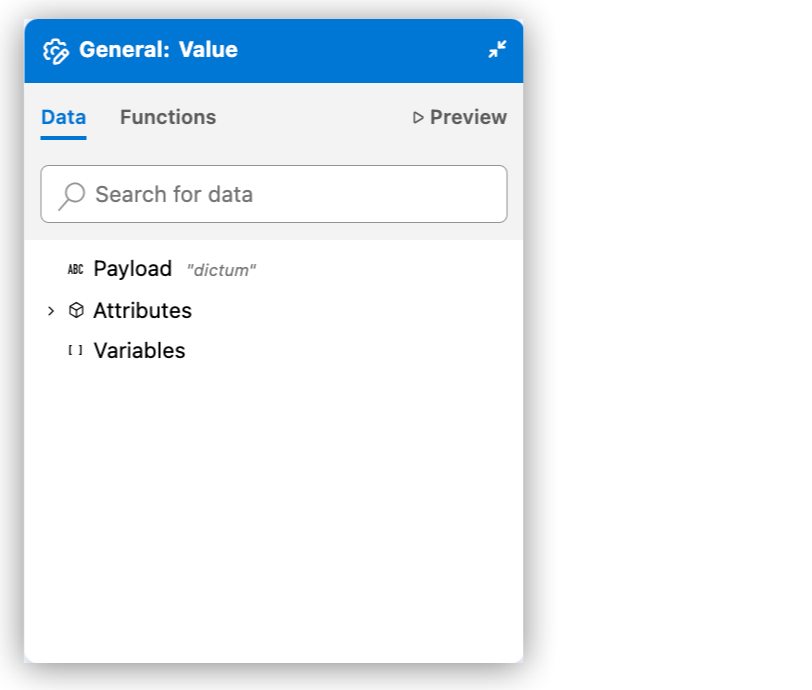
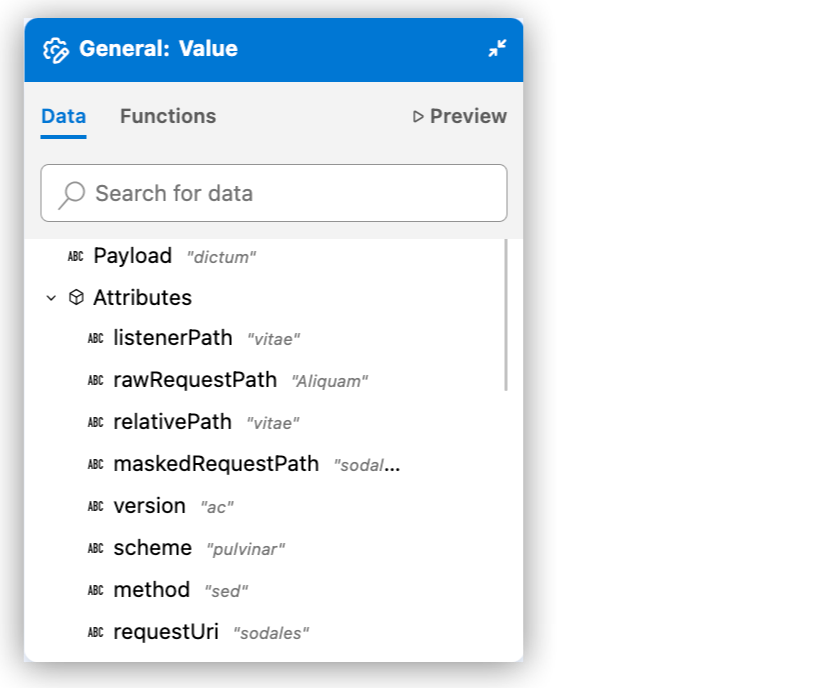
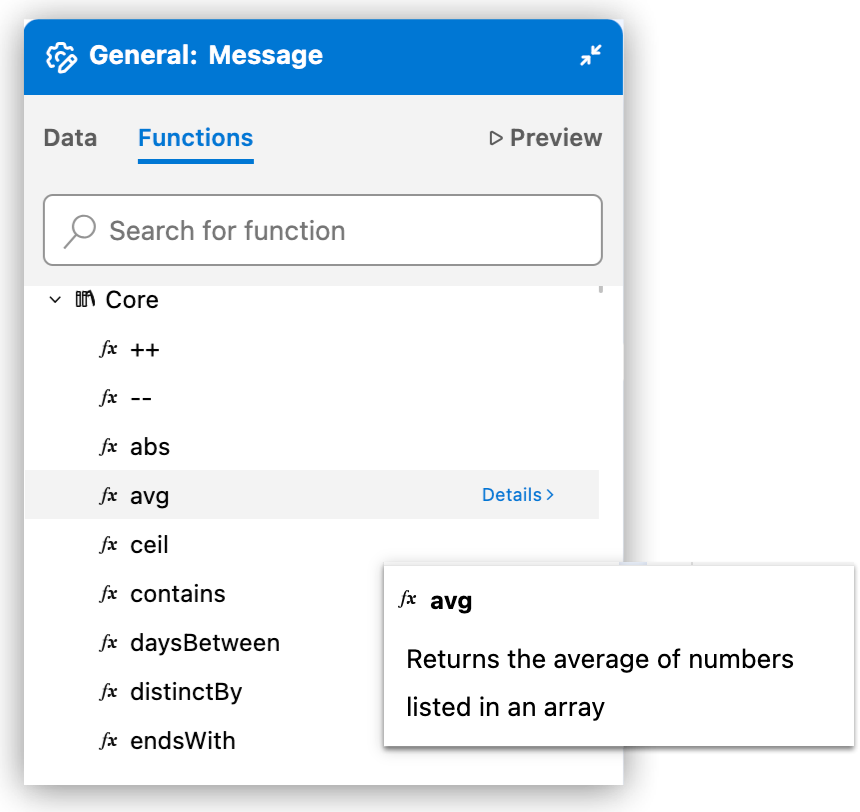
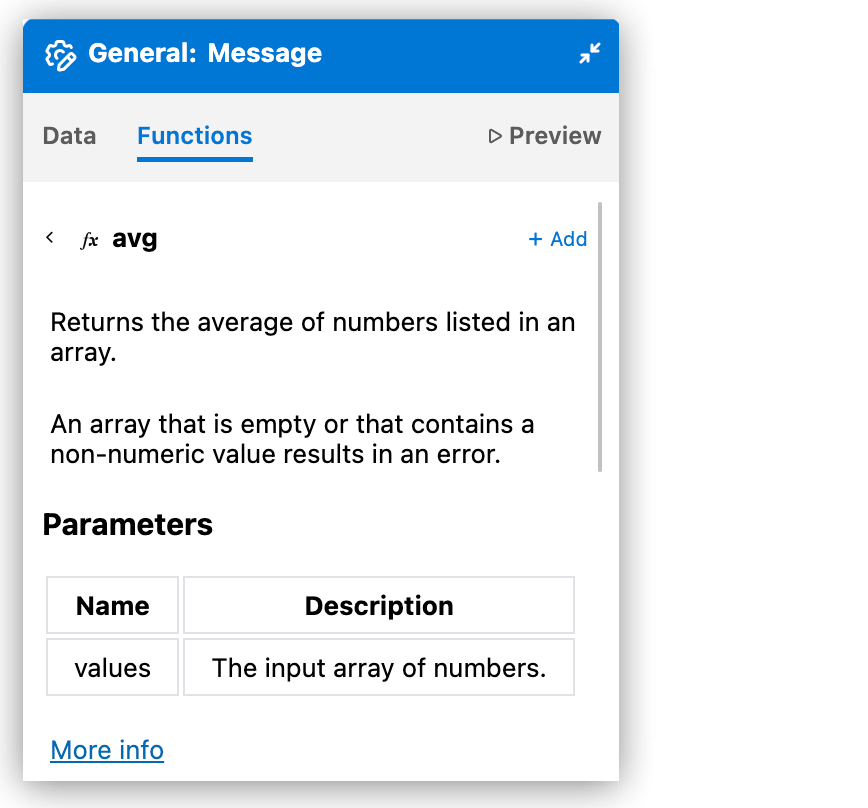
| DataWeave 関数 | 関数リファレンス |
|---|---|
関数にマウスポインターを置くと、短い説明が表示されます。
|
[Details (詳細)] をクリックすると、完全なドキュメントが表示されます。
|
| 自動生成されたサンプルデータのプレビュー | サンプルデータのプレビュー |
|---|---|
自動生成されたサンプルデータからの出力結果
|
ユーザーが作成したサンプルデータを使用した式からの出力結果
|
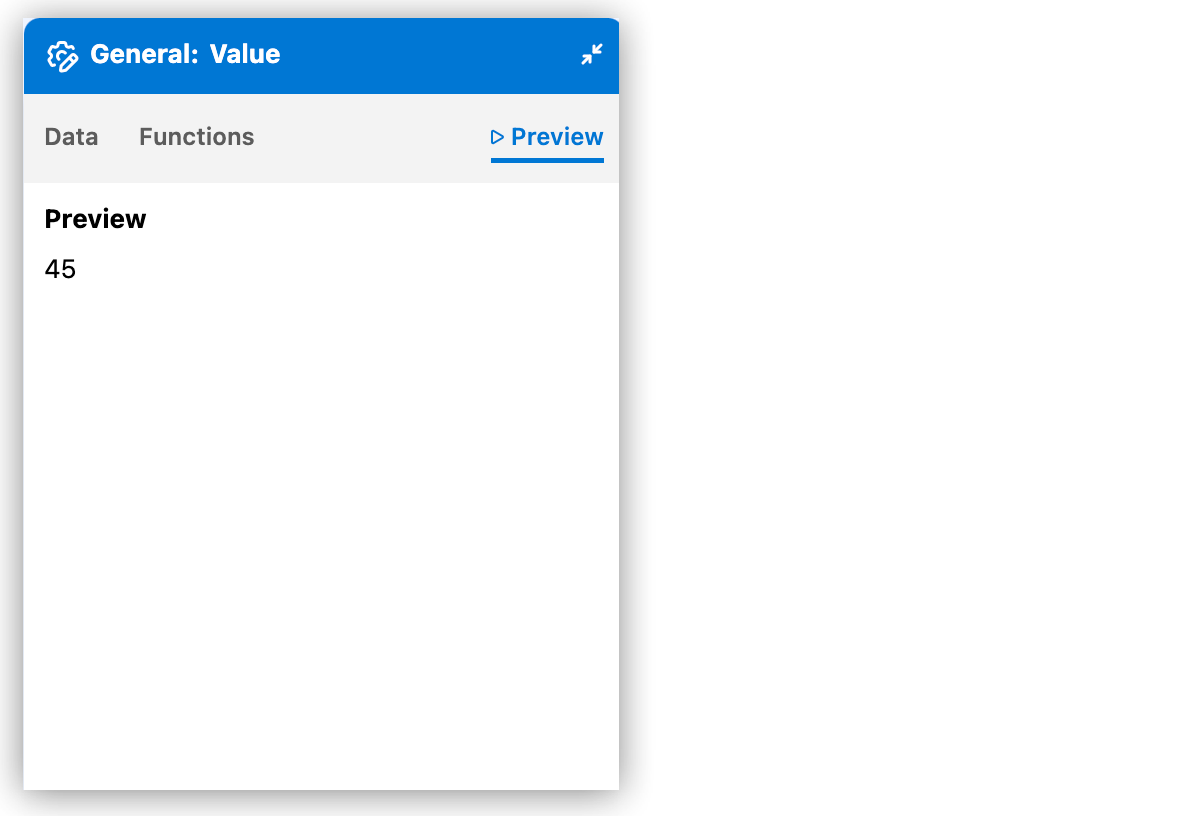
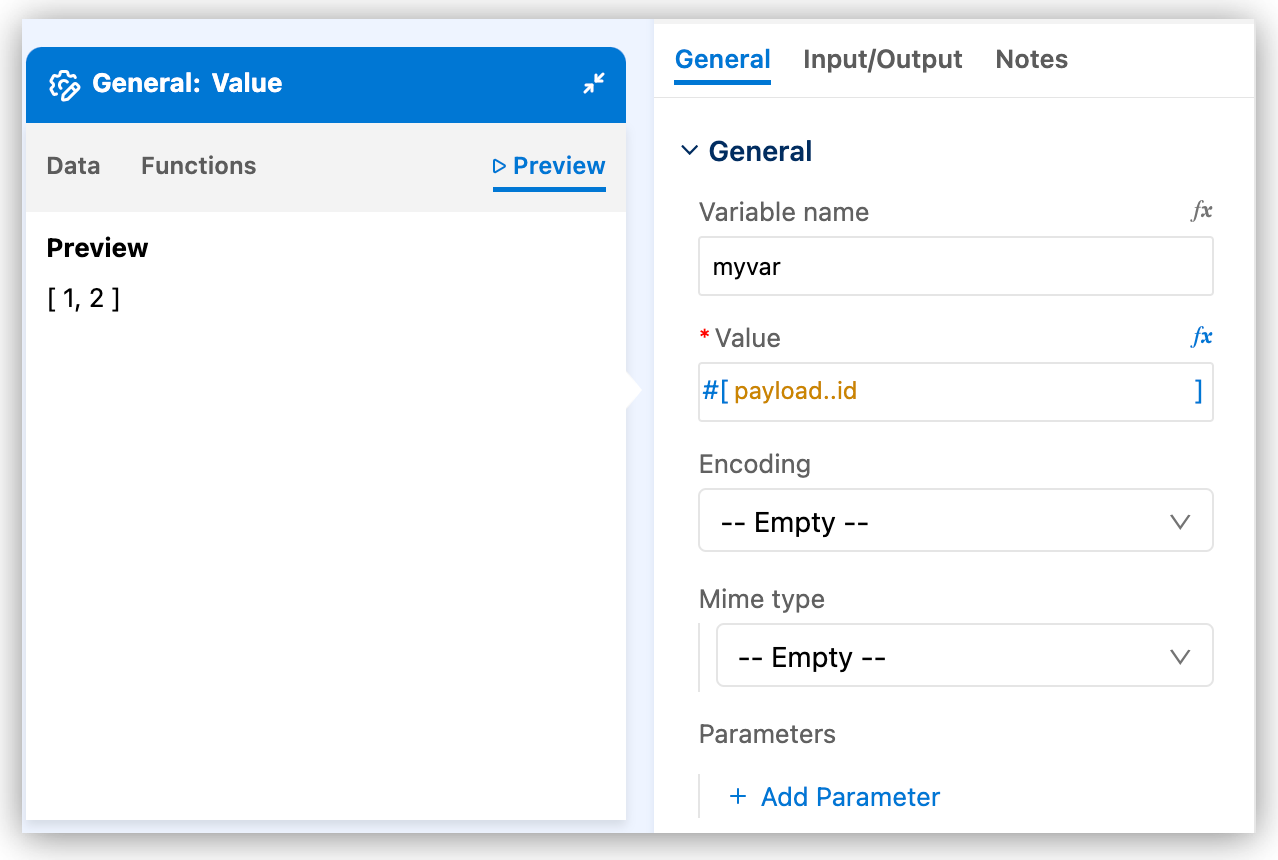
| 入力および出力サンプルデータを変更する場合は、AI が意図した変換を理解できるように同じ情報を提供します。入力データは、ペイロード、属性、または変数から取得できます。 |
|
| プロキシ設定はクラウド IDE では機能しません |
Anypoint Code Builder では、認証を使用しない SOCKS プロキシはサポートされていますが、基本認証を使用する SOCKS プロキシはサポートされていません。 |
| MuleSoft | URL |
|---|---|
Anypoint Platform サービス: CloudHub、Exchange、コアサービス |
|
Exchange からダウンロードしたアセット |
|
API Portal のリソース |
|
| サードパーティ | URL |
|---|---|
Eclipse ライブラリと Eclipse 更新サイト |
|
MuleSoft Maven リポジトリとコネクタの更新サイト |
|
| Login や Exchange 操作などの Web ブラウザーを使用するサービスの場合、ブラウザーのネットワーク要件についてはブラウザーのドキュメントを参照してください。外部 ID プロバイダー (IdP) を使用する場合は、他のサードパーティドメインにも権限を付与する必要があります。 |
|
インストールエラーを回避する方法
Visual Studio Marketplace の Anypoint Extension Pack から個別に入手することもできる個々の Anypoint Code Builder 拡張機能をインストールしないでください。 |
|
クラウド IDE は進行中のベータ期間中です。 進行中のベータの間、クラウド IDE インスタンスが削除される場合があります。これにより、インテグレーション、自動化、API が失われます。 詳細を表示するには、クリックしてください。作業内容を保存するには、プロジェクトファイルをソース制御管理 (SCM) システムにコミットします。ソースファイルの制御を参照してください。 本番環境の API、インテグレーション、または自動化の開発に Anypoint Code Builder のクラウド IDE ベータバージョンを使用しないでください。 |
|
|
[Attach Project Sources (プロジェクトソースを添付)] を選択すると、Mule Maven プラグインで Mule プロジェクトをパッケージ化する場合と同様に -DattachMuleSources パラメーターにフラグが付けられます。 |
| Avro | JSON | RAML | |
|---|---|---|---|
AsyncAPI |
はい |
はい |
いいえ |
GraphQL |
いいえ |
いいえ |
はい |
OData |
いいえ |
いいえ |
はい |
REST |
いいえ |
いいえ |
はい |
SOAP |
いいえ |
いいえ |
はい |
プロジェクトを適切に動作させるには、.code-workspace ファイルがどちらのプロジェクトフォルダーにも存在してはなりません。 |
|
デフォルトの場所を受け入れないでください。 API 仕様フォルダー内ではなく、プロジェクトフォルダー外のディレクトリに |
| 1 | API 仕様 |
| 2 | 実装プロジェクト |
| Anypoint Code Builder で新しい設計プロジェクトに対してプロジェクト名を再利用するには、以前のプロジェクトを削除する必要があります。 |
| 項目名 | Field Value (項目値) |
|---|---|
Project Name (プロジェクト名) |
プロジェクトの一意の名前。 この名前は Exchange での API 仕様のタイトル、仕様ファイルの名前、プロジェクトのルートディレクトリの名前として使用されます。
たとえば、プロジェクト名が「OAS Example」 (OAS 例) の場合、仕様ファイル名は 既存のプロジェクト名を再利用するには、その名前をすでに使用しているプロジェクトを最初に削除する必要があります。API 仕様とフラグメントの削除を参照してください。 |
Project Location (プロジェクトの場所) |
|
API Type (API 種別) |
作成する API 仕様のエンティティの種別。 使用可能なオプションは、[REST API] と [AsyncAPI] です。 この手順でサンプルを使用するには、[REST API] を選択します。 |
API Specification Language (API 仕様言語) |
サポートされる OAS および RAML バージョンを参照してください。 この手順でサンプルを使用するには、[OAS 3.0 (YAML)] を選択します。 |
| 1 | メソッドをクリックして詳細を表示します。 |
| 2 | コンソールメニューを表示します。 |
| 現在、この手順はデスクトップ IDE のみを対象として記載されています。 |
| 項目名 | 項目値 |
|---|---|
Project Name (プロジェクト名) |
Retrieve Users API (ユーザーの取得 API) |
Project Location (プロジェクトの場所) |
ホームディレクトリまたは作成する別のディレクトリ (ホームディレクトリへのフォルダーの追加を参照)。 |
API Type (API 種別) |
REST API |
API Specification Language (API 仕様言語) |
RAML 1.0 |
マルチワークスペースの拡張子 .code-workspace 付きのファイルを保存するように促すプロンプトで、このファイルを API 仕様プロジェクトフォルダー内に保存しないでください。代わりに、次のステップに進みます。 |
| Avro | JSON | RAML | |
|---|---|---|---|
AsyncAPI |
はい |
はい |
いいえ |
GraphQL |
いいえ |
いいえ |
はい |
OData |
いいえ |
いいえ |
はい |
REST |
いいえ |
いいえ |
はい |
SOAP |
いいえ |
いいえ |
はい |
| 項目名 | 項目値 |
|---|---|
Project Name (プロジェクト名) |
フラグメントの一意の名前。 この名前は、Exchange のフラグメントタイトルおよびフラグメントファイルの名前として使用されます。
たとえば、プロジェクト名が「Example OAS Fragment」 (サンプル OAS フラグメント) の場合、仕様ファイル名は 既存のプロジェクト名を再利用するには、その名前をすでに使用しているプロジェクトを最初に削除する必要があります。API 仕様とフラグメントの削除を参照してください。 |
Project Location (プロジェクトの場所) |
|
API Specification Language (API 仕様言語) |
「API フラグメントでサポートされる仕様言語」を参照してください。 この手順でサンプルを使用するには、[OAS 3.0 (YAML)] を選択します。 |
<Language> Syntax (<Language> 構文) |
選択した言語の構文。 この手順でサンプルを使用するには、[YAML] を選択します。 |
| 1 | !include を使用して、AmericanFlightDataType.raml から AmericanFlight オブジェクトをデータ型として追加します
組み込み関数を使用して、
|
| 2 | JSON (application/json) へのレスポンスボディの形式を設定し、応答の種別を AmericanFlight オブジェクトの配列 (AmericanFlight[]) として設定します |
| 3 | AmericanFlightsExample.raml の例を追加します |


| 1 | 200 コードの応答を追加します |
| 2 | get リクエストボディの JSON 形式と種別 (AmericanFlight) を指定します |
| 3 | /examples ディレクトリからの例をリクエストボディのコンテンツとして追加します |
| 1 | post メソッドの JSON 形式のボディを指定します |
| 2 | AmericanFlight を post メソッドの種別として設定します |
| 1 | 目的地を選択します。 |
| 2 | この目的地の AmericanFlight オブジェクトの配列を返します。 |
| 3 | examples/AmericanFlightNoIDExample.raml から AmericanFlight オブジェクトを投稿します。 |
| 4 | post メソッドへの JSON 形式の応答でカスタムメッセージを指定します |
| 5 | examples/AmericanFlightExample.raml からの例をネストされた get 要求への応答として追加します |
| 属性名 | 属性 XML | 説明 |
|---|---|---|
Async (非同期) (デフォルト) |
|
設定 XML ファイルにのみ表示される編集可能な名前。 |
[Name (名前)] または [Display Name (表示名)] |
|
キャンバスに表示されるコンポーネントの編集可能な名前。 |
Max concurrency (最大同時実行) |
|
スコープが処理できる同時メッセージの最大数を設定します。デフォルトでは、メッセージの処理時にパフォーマンスを最適化するために使用される最大スレッド数は、コンテナスレッドプールによって異なります。スコープが最大数の同時メッセージを処理している間は追加要求を受信できません。
|
| 項目名 | 項目値 |
|---|---|
Project Name (プロジェクト名) |
プロジェクトの一意の名前。 この名前は Exchange での AsyncAPI 仕様のタイトル、仕様ファイルの名前、プロジェクトのルートディレクトリの名前として使用されます。
たとえば、プロジェクト名が「AsyncAPI Example」 (AsyncAPI 例) の場合、仕様ファイル名は 既存のプロジェクト名を再利用するには、その名前をすでに使用しているプロジェクトを最初に削除する必要があります。API 仕様とフラグメントの削除を参照してください。 |
Project Location (プロジェクトの場所) |
|
API Type (API 種別) |
作成する API 仕様のエンティティの種別。 使用可能なオプションは、[REST API] と [AsyncAPI] です。 この手順でサンプルを使用するには、[AsyncAPI] を選択します。 |
API Specification Language (API 仕様言語) |
「サポートされる AsyncAPI バージョン」を参照してください。 この手順でサンプルを使用するには、[AsyncAPI 2.6 (YAML)] を選択します。 |
| 1 | チャネルをクリックして詳細を表示します。 |
| 2 | コンソールメニューを表示します。 |
| 1 | AsyncAPI
API モデルを AsyncAPI として識別し、API 仕様のタイトルとバージョンを指定します。 |
| 2 | サーバー
AsyncAPI モジュールの操作を介してイベントをパブリッシュまたはサブスクライブするときに (間接的に) 使用するコネクタを決定するメッセージブローカーを定義します。
|
| 3 | Channels (チャネル)
バインドを定義します。
|
| 4 | コンポーネント
|
| Avro | JSON | RAML | |
|---|---|---|---|
AsyncAPI |
はい |
はい |
いいえ |
GraphQL |
いいえ |
いいえ |
はい |
OData |
いいえ |
いいえ |
はい |
REST |
いいえ |
いいえ |
はい |
SOAP |
いいえ |
いいえ |
はい |
|
再スキャフォールディングする場合、スキャフォルダーは仕様内のチャネル、サーバー、および publish 操作と subscribe 操作のグルーピングの新しい組み合わせに対してアクションを実行しますが、新しくない組み合わせを再スキャフォールディングすることはありません。 |
| 項目名 | 項目値 |
|---|---|
Project Name (プロジェクト名) |
プロジェクトの一意の名前。 この名前はタイトルおよびプロジェクトファイルの名前として使用されます。
たとえば、プロジェクト名が「My Project (私のプロジェクト)」の場合、プロジェクトファイル名は |
Project Location (プロジェクトの場所) |
|
Search an API Specification from Exchange (Exchange から API 仕様を検索) |
Exchange の仕様の名前。[Show filters (検索条件を表示)] をアクティブ化して、検索結果を絞り込みます。詳細は、検索結果の絞り込みを参照してください。 |
Mule Runtime |
プロジェクトに使用する Mule Runtime バージョン。 |
Java Version (Java バージョン) |
Mule に使用する Java バージョン。 |
| 1 | AMQ-prod では、Anypoint MQ ブローカーを設定します。
MQ ブローカーの URL は、キューを作成するときに選択したリージョンで見つけることができます。キューを作成するのコピーボタンと、クライアントアプリケーションの設定を参照してください。 |
| 2 | Kafka-prod では、ローカルでホストされた Kafka ブローカーを設定します。 |
| 3 | order-placed では、注文をパブリッシュ (リスン) およびサブスクライブ (パブリッシュ) するための Anypoint MQ チャネルを設定します。order-cancelled チャネルと order-confirmed チャネルは同様に設定されます。 |
| 4 | order-backordered では、取り寄せ注文をパブリッシュ (リスン) およびサブスクライブ (パブリッシュ) するための Kafka チャネルを設定します。 |
| 5 | components では、OrderPlaced、OrderCancelled、OrderConfirmed、BackOrder を含むさまざまな注文種別のメッセージの構造を定義します。 |
| 1 | <apikit-asyncapi:server value="AMQ-prod" /> の AMQ-prod は Anypoint MQ サーバー接続を識別します。詳細は、例: 接続設定を参照してください。 |
| 2 | <apikit-asyncapi:server value="Kafka-prod" /> の Kafka-prod は Kafka サーバー接続を識別します。詳細は、例: 接続設定を参照してください。 |
| 1 | 注文によりフロー LISTEN:listen-order-placed 内の Message Listener がトリガーされると、HTTP 要求操作 (<http:request/>) で在庫データが要求されて対象変数 inventory に保存されます。 |
| 2 | Choice コンポーネント (<choice/>) では、対象変数 (vars.inventory.stockDetails.availableStock) の availableStock 値を注文ペイロード (payload.items.quantity[0]) の quantity 値と照合します。quantity 値は、フローをトリガーする OrderPlaced メッセージから取得されます。
十分な在庫がある場合、Set Payload コンポーネント ( |
| 3 | フロー LISTEN:listen-order-confirmations の Message Listener は Anypoint MQ チャネル order-confirmed のアクティビティをリスンします。トリガーされると、フローでその <set-payload/> コンポーネントが設定されて注文確認メッセージが作成されます。Flow Reference (<flow-ref/>) でこのメッセージが notification-flow サブフローでの処理のために送信されます。 |
| 4 | 在庫が十分でない場合、LISTEN:listen-order-placed によってフロー LISTEN:listen-order-backordered がトリガーされます。 |
| 1 | HTTP 要求接続設定例 |
| 2 | HTTP リスナー接続設定例 |
| 3 | メール SMTP 接続設定例 |
| 4 | Slack 接続設定例 |
| 1 | LISTEN:listen-order-confirmations フローから出力されたペイロードを、確認メッセージデータを取得する Mule 変数に変換します。 |
| 2 | Slack Connector から <slack:post-message/>`* 操作を使用して Slack 確認メッセージを投稿します。 |
| 3 | Email Connector から <email:send/> 操作を使用して確認メッセージをメール送信します。 |
| 同期はパフォーマンスに影響し、その影響はクラスターモードで最も深刻になります。 |
| 属性名 | 属性 XML | 説明 |
|---|---|---|
Cache (キャッシュ) (デフォルト) |
|
キャンバスに表示されるコンポーネントの編集可能な名前。 |
なし |
|
コンポーネントの自動生成された識別子。 |
Cachingstrategy ref (キャッシュ戦略参照) |
|
参照するキャッシュ戦略の名前。 |
Filter expression (検索条件式) |
|
Cache スコープフローから特定のペイロードを除外する DataWeave 式。 |
| 属性名 | 属性 XML | 説明 |
|---|---|---|
なし |
|
キャンバスに表示されるコンポーネントの編集可能な名前。 |
なし |
|
コンポーネントの自動生成された識別子。 |
なし |
|
省略可能。キーを生成する DataWeave 式 ( |
なし |
|
Mule がキャッシュへのアクセスを同期するかどうかを示します。使用可能な値は |
| 1 | expression 属性には、評価する条件が含まれています。 |
| 2 | expression が true と評価された場合に実行される任意の数のメッセージプロセッサーを追加します。 |
| 3 | 条件がいずれも true と評価されなかった場合に実行される任意の数のメッセージプロセッサーを追加します。 |
| 属性名 | 属性 XML | 説明 |
|---|---|---|
Choice (選択肢) (デフォルト) |
|
キャンバスに表示されるコンポーネントの編集可能な名前。 |
なし |
|
コンポーネントの自動生成された識別子。 |
| 子要素 | 説明 |
|---|---|
|
Mule イベントを処理する埋め込みコンポーネントを実行する前に照合する条件を指定するための子要素。1 つ以上の |
|
|
| 属性名 | 属性 XML | 説明 |
|---|---|---|
Expression (式) |
|
入力を評価するために使用する DataWeave 式。式が |
| 名前 | Expression / Value (式 / 値) |
|---|---|
|
|
|
|
|
|
|
|
|
|
|
|
| 属性名 | 属性 XML | 説明 |
|---|---|---|
Custom event (カスタムイベント) (デフォルト) |
|
キャンバスに表示されるコンポーネントの編集可能な名前。 |
なし |
|
コンポーネントの自動生成された識別子。 |
Event name (イベント名) |
|
追跡するイベントの名前。 |
Inherits (継承) |
|
なし |
Meta data (メタデータ) |
|
なし |
Target Variable (対象変数) |
|
メッセージデータを格納する変数の名前。数字、文字、アンダースコアのみを使用できます。たとえば、名前にハイフンは使用できません。 Mule ドキュメントの Enrich Data with Target Variablesを参照してください。 |
Target Value (対象値) |
|
対象変数に格納するデータの値。このデフォルト値はメッセージペイロード (payload) です。この項目は、変数が受け入れるすべての値を受け入れます。サポートされているデータ型、DataWeave の式、 |
| 属性名 | 属性 XML | 説明 |
|---|---|---|
なし |
|
KPI の名前。 |
なし |
|
KPI の値。 |
| 1 | runtime バージョンは、インテグレーションの作成時に選択した Mule Runtime バージョンです。
バージョンサポートと Mule パッチ自動更新については、「Mule と Java バージョンのサポート」を参照してください。 |
| 2 | applicationName プロパティでは、CloudHub のアプリケーションにアクセスするために使用する URL の一部を定義します。
この名前は、CloudHub にデプロイされているすべてのアプリケーションで一意である必要があります。 |
| API 仕様の応答の構造 | 実際の応答の構造 |
|---|---|
|
|
| 属性名 | 属性 XML | 説明 |
|---|---|---|
Dynamic evaluate (動的評価) (デフォルト) |
|
キャンバスに表示されるコンポーネントの編集可能な名前。 |
なし |
|
コンポーネントの自動生成された識別子。 |
Expression (式) |
|
Mule で実行される DataWeave スクリプトを選択する式 (例: |
Additional Bindings (追加のバインド) |
|
なし |
Target Variable (対象変数) |
|
メッセージデータを格納する変数の名前。数字、文字、アンダースコアのみを使用できます。たとえば、名前にハイフンは使用できません。 Mule ドキュメントの Enrich Data with Target Variablesを参照してください。 |
Target Value (対象値) |
|
対象変数に格納するデータの値。このデフォルト値はメッセージペイロード (payload) です。この項目は、変数が受け入れるすべての値を受け入れます。サポートされているデータ型、DataWeave の式、 |
| 子要素 | 説明 |
|---|---|
|
DataWeave スクリプトが評価できるパラメーターとして機能するキー-値ペア (例: |
| 属性名 | 属性 XML | 説明 |
|---|---|---|
Error handler (エラーハンドラー) (デフォルト) |
|
キャンバスに表示されるコンポーネントの編集可能な名前。 |
なし |
|
コンポーネントの自動生成された識別子。 |
| 属性名 | 属性 XML | 説明 |
|---|---|---|
When (条件) |
|
この On-Error 戦略の実行をトリガーする条件を定義する一致式。式はブール値 ( |
Type (種別) |
|
この On-Error 戦略で処理されるエラーを定義する、Mule エラー種別のカンマ区切りのリスト。 |
Log exception (ログ例外) |
|
この戦略でエラーが処理される前に、そのエラーをレベル |
Enable notifications (通知を有効化) |
|
エラーが発生したときに、この戦略で |
| 1 | Search locally (ローカルで検索) |
| 2 | Search in Exchange (Exchange 内を検索) |
| 属性名 | 属性 XML | 説明 |
|---|---|---|
First successful (最初の成功) (デフォルト) |
|
キャンバスに表示されるコンポーネントの編集可能な名前。 |
なし |
|
コンポーネントの自動生成された識別子。 |
| 子要素 | 説明 |
|---|---|
|
1 つ以上のコンポーネントを子要素として受け入れます。複数の |
| 1 | 最初のルートが実行され、存在しないファイルを読み取ろうとしたため失敗します。 |
| 2 | 2 つ目のルートは、存在しない変数にアクセスしようとしたため失敗します。 |
| 3 | 3 つ目のルートは正常に実行され、successfulRoute 変数に 3 を設定します。 |
| 4 | First Successful ルーターは、いずれかのルートが正常に完了した時点で実行を終了するため、4 つ目のルートは実行されません。 |
| 属性名 | 属性 XML | 説明 |
|---|---|---|
name1 (デフォルト) |
|
キャンバスに表示されるコンポーネントの編集可能な名前。 |
Initial state (初期状態) |
|
アプリケーションの起動時にフローが有効かどうかを示します。使用可能な値は、 初期状態を デフォルトは |
Max concurrency (最大同時実行) |
|
フローが処理できる同時メッセージの最大数を設定します。設定しない場合、フローがメッセージの処理時にパフォーマンスを最適化するために使用できる最大スレッド数は、コンテナスレッドプールによって異なります。フローが最大数の同時メッセージを処理している間は追加要求を受信できません。 フローが要求を 1 つずつ処理するようにするには、 最大同時実行値に達した後の Mule Runtime の動作についての詳細は、「バックプレッシャー」を参照してください。 |
なし |
|
|
なし |
|
ビジネスイベントのトランザクション ID を指定します。 |
実際のフロー名を使用して [Flow name (フロー名)] (name) 属性を定義してください。動的値 (DataWeave 式、変数) を使用して参照先フローを指定すると、パフォーマンスが低下します。また、MUnit テストおよびアプリケーション分析ツールは動的参照では正常に機能しない可能性があります。 |
| 属性名 | 属性 XML | 説明 |
|---|---|---|
Name (名前) |
|
このコンポーネントが参照するフローの名前。 |
なし |
|
コンポーネントの自動生成された識別子。 |
Target Variable (対象変数) |
|
メッセージデータを格納する変数の名前。数字、文字、アンダースコアのみを使用できます。たとえば、名前にハイフンは使用できません。 Mule ドキュメントの Enrich Data with Target Variablesを参照してください。 |
Target Value (対象値) |
|
対象変数に格納するデータの値。このデフォルト値はメッセージペイロード (payload) です。この項目は、変数が受け入れるすべての値を受け入れます。サポートされているデータ型、DataWeave の式、 |
| 属性名 | 属性 XML | 説明 |
|---|---|---|
Foreach (デフォルト) |
|
キャンバスに表示されるコンポーネントの編集可能な名前。 |
なし |
|
コンポーネントの自動生成された識別子。 |
Collection (コレクション) |
|
Java コレクション、オブジェクト、配列、マップ、または DOM ノードを返す DataWeave 式。For Each は、コレクションを要素 (オブジェクトの JSON 配列内の最上位レベルのオブジェクトなど) に自動的に分割します。各要素は、For Each 内のプロセッサーが処理する |
Batch size (バッチサイズ) |
|
入力から収集された要素を指定されたサイズのサブコレクションに分割するためにスコープが使用する数値。たとえば、For Each への入力が 199 要素の配列で、バッチサイズを 50 に設定した場合、スコープはそれぞれ 50 要素の配列を 3 つと、49 要素の配列を 1 つ生成します。デフォルトは |
Root message variable name (ルートメッセージ変数名) |
|
元の入力からの分割されていない完全な Mule メッセージを For Each に格納する変数の設定可能な名前。メッセージにはペイロードと属性が含まれますが、Mule メッセージを含む Mule イベントの一部である変数 ( |
Counter variable name (カウンター変数名) |
|
特定の要素の各反復に番号を割り当てる変数の名前。シーケンスは |
| 1 | For Each (<foreach />) は入力ペイロード全体を収集し、その中の次のような 10 個の最上位 JSON オブジェクトに分割します。
|
| 2 | For Each は各オブジェクトを反復処理するため、Transform コンポーネント (<ee:transform />) の DataWeave 式 (payload.company) は DataWeave セレクターを使用して各 "company" キーの値を抽出し、payload をそれらのキーのそれぞれの値に変換します。Mule フローと同様に、For Each 内の次のコンポーネントは、変換されたペイロードを入力として受け取ります。 |
| 3 | File Write 操作 (<file:write />) は、より大きな DataWeave 式内で payload.name を使用して、変換されたオブジェクトから各会社の name を選択します。各ファイルの名前は、式で指定されたパターンに従い、抽出された会社名がハイフンで区切られ、ファイル名を一意にするために日時スタンプが追加されます。たとえば、Romaguera-Crona データのファイルの名前は次のようになります。
デフォルトでは、この操作では、Transform Message から受信したペイロードも各ファイルに読み込まれます。 |
| 4 | ログには、入力配列の最初のオブジェクトに関する次のメッセージが出力されます。
|
| GraphQL スキーマ | Mule フロー |
|---|---|
|
|
Postman などのツールでは、GraphQL クエリをビルドする方法が提供されます。たとえば、Postman では、クエリを [Body (本文)] タブに配置して、curl 要求のコードスニペットを見つけることができます。結果のコマンドには、curl コマンドの --data 値から削除できる改行 (\\n) とタブ (\\t) 文字が含まれます。詳細は、Postman ドキュメントの 「Make an HTTP call with GraphQL (GraphQL を使用した HTTP コールの実行)」を参照してください。 |
| 別のプロジェクトフォルダー内でプロジェクトフォルダーを開いたり、展開したりしないでください。 |
IDE の警告「This file is not displayed in the text editor because it is either binary or uses an unsupported encoding. (このファイルはバイナリであるか、サポートされていない文字コードを使用しているため、テキストエディターに表示されません。)」への応答として [Open Anyway (このまま開く)] をクリックしないでください。 |
| 属性名 | 属性 XML | 説明 |
|---|---|---|
Idempotent message validator (冪等性のあるメッセージバリデーター) (デフォルト) |
|
キャンバスに表示されるコンポーネントの編集可能な名前。 |
なし |
|
コンポーネントの自動生成された識別子。 |
Value expression (値の式) |
|
なし |
Id expression (ID 式) |
|
Mule が ID を生成するために使用する式。DataWeave 関数を使用して ID を計算するか、または Mule メッセージの任意の既存の値から ID を抽出することができます。 |
Store prefix (ストアプレフィックス) |
|
なし |
Object store (オブジェクトストア) |
|
なし |
| 属性名 | 属性 XML | 説明 |
|---|---|---|
Invalidate cache (キャッシュを無効化) (デフォルト) |
|
キャンバスに表示されるコンポーネントの編集可能な名前。 |
なし |
|
コンポーネントの自動生成された識別子。 |
Cachingstrategy ref (キャッシュ戦略参照) |
|
無効化するキャッシュのキャッシュ戦略への参照。 |
| 属性名 | 属性 XML | 説明 |
|---|---|---|
Invalidate key (キーを無効化) (デフォルト) |
|
キャンバスに表示されるコンポーネントの編集可能な名前。 |
なし |
|
コンポーネントの自動生成された識別子。 |
Cachingstrategy ref (キャッシュ戦略参照) |
|
無効化するキャッシュキーのキャッシュ戦略への参照。 |
Key generation expression (キー生成式) |
|
省略可能。無効化するキーを生成する DataWeave 式。キーを生成したキャッシュ戦略で設定された式と同じ式を使用します。 |
Keygenerator ref (キージェネレーター参照) |
|
なし |
| 属性名 | 属性 XML | 説明 |
|---|---|---|
Logger (ロガー) (デフォルト) |
|
キャンバスに表示されるコンポーネントの編集可能な名前。 |
なし |
|
コンポーネントの自動生成された識別子。 |
Message (メッセージ) |
|
二重引用符または単一引用符で囲まれた文字列、DataWeave 式、Mule 変数、またはメッセージとして機能するサポート対象値の連結された組み合わせ。 この項目が空の場合、Logger は次のメッセージを生成します。 |
Level (レベル) |
|
オプションは、 |
Category (カテゴリ) |
|
フロー内の他のロガーと区別するのに役立つ方法でロガーを説明する、省略可能な文字列。コンソールでは、ロガーにより汎用プロセッサー名がカテゴリに置き換えられます。 |
|
CloudHub 2.0 デプロイメントの場合、
|
| プロパティ | 説明 | Host (ホスト) |
|---|---|---|
|
プロジェクトで使用される Mule Runtime バージョンを指定します。 |
CloudHub または CloudHub 2.0 |
|
1 つのワーカーまたは使用可能なワーカー数に対してワーカーメモリを設定します。デフォルト値は |
CloudHub |
|
レプリカ固有のメモリ容量と処理能力を設定します。デフォルト値は |
CloudHub 2.0 |
|
Mule アプリケーションのハイフン付きの小文字の名前を指定します。 |
CloudHub または CloudHub 2.0 |
|
この Mule アプリケーションを実行するための Mule Runtime インスタンスの数を設定します。デフォルト値は |
CloudHub |
|
この Mule アプリケーションを実行するための Mule Runtime エンジンの専用インスタンスを設定します。デフォルト値は |
CloudHub |
|
デプロイメントプロセスの完了後にアプリケーションを自動的に起動するかどうかを示します。デフォルト値は |
CloudHub または CloudHub 2.0 |
|
アプリケーションのレプリカを更新または再デプロイするモデルを示します。デフォルト値は |
CloudHub 2.0 |
|
このアプリケーションで Object Store v2 が有効かどうかを示します。デフォルト値は |
CloudHub または CloudHub 2.0 |
| 1 | [Start Debugging (デバッグを開始)]: デバッグモードで Mule アプリケーションのインスタンスを開始します。 |
| 2 | [Debug Toolbar (デバッグツールバー)]: Mule アプリケーションのデバッグを制御します。
デバッグツールバーを参照してください。 |
| 3 | [Variables (変数)] パネル: Mule イベントとパラメーターデータを提供します。
Mule イベントには、メッセージペイロードと属性の詳細のほか、Mule 変数データが含まれます。パラメーターには、コンポーネント名などのコンポーネントデータが含まれます。 |
| 4 | [Run and Debug (実行およびデバッグ)] (MuleSoft) アイコン: [Run and Debug (実行およびデバッグ)] パネルを開きます。ここで、[Start Debugging (デバッグを開始)] (F5) をクリックしてデバッグ情報を見つけることができます。
キーボードショートカット: Cmd+Shift+d (Mac) または Ctrl+Shift+d (Windows) |
| 5 | [Watch (監視)] パネル: 変数と式を評価するのに役立ちます。 |
| 6 | [Call Stack (コールスタック)] パネル: 現在スタックしている関数またはプロシージャーを特定します。 |
| 7 | [Breakpoints (ブレークポイント)] パネル: Mule アプリケーション内のすべてのブレークポイントをリストします。 |
| 8 | [Terminal (ターミナル)] コンソール: Maven ビルドプロセスの出力と、埋め込み Mule Runtime Engine へのデプロイメントの結果を表示します。 |
| 9 | [Breakpoint (ブレークポイント)] アイコン: 問題の確認と修正ができるようにフローの実行を一時停止する、設定 XML の行を特定します。 |
| 10 | [Breakpoint (ブレークポイント)] アイコン: 1 つ以上のブレークポイントを含むコンポーネントを識別します。 |
| [Run (実行)] > [Start without Debugging (デバッグなしで実行)] を選択すると、エラーが発生します。 |
| 1 | [Continue (続行)] F5
次のブレークポイントがある場合、そのブレークポイントに進んでアプリケーションの実行を一時停止します。 ない場合、アプリケーションの最後まで続行します。 |
||||||
| 2 | [Step Over (ステップオーバー)] F10
フローの次のコンポーネントに進み、そこで実行を一時停止します。
Flow Ref コンポーネント ( [Step Over (ステップオーバー)] の詳細設定 XML の例: [Step Over (ステップオーバー)] の動作:
|
||||||
| 3 | [Step Into (ステップイン)] F11
フローの次のコンポーネントに進み、そこで実行を一時停止します。
Flow Ref コンポーネント ( [Step Into (ステップイン)] の詳細設定 XML の例: [Step Into (ステップイン)] の動作:
|
||||||
| 4 | [Step Out (ステップアウト)] Shift+F11
現在のフローを終了し、前のフローに戻ろうとします。前のフローが存在しない場合、デバッガーは [Continue (続行)] と同様に動作します。 |
||||||
| 5 | [Restart (再起動)] Shift+Cmd+F5 (Mac) または Shift+Ctrl+F5 (Windows)
|
||||||
| 6 | [Stop (停止)] Shift+F5
アプリケーションの実行を停止します。開始する次のデバッグセッションでは、新しい連動関係でアプリケーションがパッケージ化されます。 |
| プロパティ | 説明 | Host (ホスト) |
|---|---|---|
|
プロジェクトで使用される Mule Runtime バージョンを指定します。 |
CloudHub または CloudHub 2.0 |
|
1 つのワーカーまたは使用可能なワーカー数に対してワーカーメモリを設定します。デフォルト値は |
CloudHub |
|
レプリカ固有のメモリ容量と処理能力を設定します。デフォルト値は |
CloudHub 2.0 |
|
Mule アプリケーションのハイフン付きの小文字の名前を指定します。 |
CloudHub または CloudHub 2.0 |
|
この Mule アプリケーションを実行するための Mule Runtime インスタンスの数を設定します。デフォルト値は |
CloudHub |
|
この Mule アプリケーションを実行するための Mule Runtime エンジンの専用インスタンスを設定します。デフォルト値は |
CloudHub |
|
デプロイメントプロセスの完了後にアプリケーションを自動的に起動するかどうかを示します。デフォルト値は |
CloudHub または CloudHub 2.0 |
|
アプリケーションのレプリカを更新または再デプロイするモデルを示します。デフォルト値は |
CloudHub 2.0 |
|
このアプリケーションで Object Store v2 が有効かどうかを示します。デフォルト値は |
CloudHub または CloudHub 2.0 |
| 暗号化されていないすべてのキーの値 | 暗号化された uname および pw キーの値 |
|---|---|
|
|
暗号化されていない workingDir および host キーの値 |
暗号化された uname および pw キーの値 |
|---|---|
dev.properties.yaml のコンテンツ: |
dev.secure.yaml のコンテンツ: |
暗号化されていない workingDir および host キーの値 |
暗号化された uname および pw キーの値 |
|---|---|
dev.properties のコンテンツ: |
dev.secure.properties のコンテンツ: |
| 暗号化鍵値 (パスワード) は安全な場所に保管してください。後でアプリケーションをデプロイするときにキー値が必要になります。 |
この手順により、mule-artifact.json 内で暗号化鍵の名前は設定されますが、その値は設定されません。セキュリティ上の理由で、デプロイするプロジェクト内でパッケージ化するこのファイルまたは他のファイルで、暗号化鍵の値を絶対に設定しないでください。 |
| 1 | "properties" キーを追加します。 |
| 2 | プロパティファイルの ${env} プレフィックスの値 (sandbox など) を指定するオブジェクトを追加します。 |
| 項目名 | 項目値 |
|---|---|
Asset Name (アセット名) |
Exchange がパブリッシュされたプロジェクトを識別するために使用する名前。 |
Version (バージョン) |
Exchange によって作成される、アセット用のページの [Version (バージョン)] セクションに表示されるバージョン番号。 アセットを初めてパブリッシュする場合、任意の有効な番号を使用できます。一般的な開始バージョンは アセットを再パブリッシュする場合、Anypoint Code Builder によって [Version (バージョン)] 項目に自動的に値が入力されます。この番号を変更できますが、すでに使用されているバージョン番号を使用してこのアセットの安定バージョンをパブリッシュすると、再パブリッシュは失敗します。 |
Description (説明) |
アセットの省略可能な説明。 |
Business Group (ビジネスグループ) |
アセットが属する Anypoint Platform のビジネスユニット。 |
Group ID (グループ ID) |
アセットが属する Anypoint Platform のビジネスユニットの ID。 |
Artifact ID (アーティファクト ID) |
Exchange がパブリッシュされたアセットを識別するために使用する一意の ID。パブリッシュされたアセットの ID が同じでない場合、デフォルト値を使用します。 |
| 項目名 | 項目値 |
|---|---|
Tags (タグ) |
Exchange がアセットの検索に使用する記述子。 |
Categories (カテゴリ) |
以前に Exchange に追加されたカテゴリ。組織のカテゴリを作成する方法は、カテゴリの管理ドキュメントを参照してください。 |
| Anypoint Code Builder では、キャンバスから MUnit テストスイートを作成するために MUnit 3.4.0 以降が必要です。 |
| Anypoint Code Builder では、キャンバスから MUnit テストスイートを作成するために MUnit 3.4.0 以降が必要です。 |
| 1 | すべてのスイート: すべてのスイートのすべてのテストを実行するには、[Run Tests (テストを実行)]、[Debug Tests (テストをデバッグ)]、または [Run Tests with Coverage (カバー率を使用してテストを実行)] アイコンをクリックします。 右クリックしメニューから同じオプションを選択できます。 |
| 2 | スイート: 1 つのスイートのすべてのテストを実行するには、スイートにマウスポインターを置くか、それをクリックし、[Run Test (テストを実行)]、[Debug Test (テストをデバッグ)]、または [Run Tests with Coverage (カバー率を使用してテストを実行)] アイコンをクリックします。 右クリックしメニューから同じオプションを選択できます。 |
| 3 | テスト: 1 つのテストを実行するには、テストスイートのテストにマウスポインターを置くか、それをクリックし、[Run Test (テストを実行)]、[Debug Test (テストをデバッグ)]、または [Run Tests with Coverage (カバー率を使用してテストを実行)] アイコンをクリックします。 |
| 1 | [Debug Mule Application (Mule アプリケーションをデバッグ)] という名前の標準デバッガーのランチャー。 |
| 2 | [Munit Run Tests (Munit テスト実行)] という名前の MUnit デバッガーのランチャー。 |
| プロセッサー | 説明 |
|---|---|
|
フロー内にイベントプロセッサーのモックを作成し、イベントプロセッサーを実行せずにその動作をシミュレーションします。 |
|
フロー内の特定のイベントプロセッサーの動作を変更せずに、その実行前と実行後に何が起こるかを観察します。 |
| Avro | JSON | RAML | |
|---|---|---|---|
AsyncAPI |
はい |
はい |
いいえ |
GraphQL |
いいえ |
いいえ |
はい |
OData |
いいえ |
いいえ |
はい |
REST |
いいえ |
いいえ |
はい |
SOAP |
いいえ |
いいえ |
はい |
| 項目名 | 項目値 |
|---|---|
Project Name (プロジェクト名) |
プロジェクトの一意の名前。 この名前はタイトルおよびプロジェクトファイルの名前として使用されます。
たとえば、プロジェクト名が「My Project (私のプロジェクト)」の場合、プロジェクトファイル名は |
Project Location (プロジェクトの場所) |
|
Search an API Specification from Exchange (Exchange から API 仕様を検索) |
Exchange の仕様の名前。[Show filters (検索条件を表示)] をアクティブ化して、検索結果を絞り込みます。詳細は、検索結果の絞り込みを参照してください。 |
Mule Runtime |
プロジェクトに使用する Mule Runtime バージョン。 |
Java Version (Java バージョン) |
Mule に使用する Java バージョン。 |
| 属性名 | 属性 XML | 説明 |
|---|---|---|
Parallel foreach (並列 foreach ) (デフォルト) |
|
キャンバスに表示されるコンポーネントの編集可能な名前。 |
なし |
|
コンポーネントの自動生成された識別子。 |
Collection (コレクション) |
|
コレクションを返す式。デフォルトは |
Timeout (タイムアウト) |
|
各並列ルートのタイムアウトをミリ秒単位で指定します。 |
Max concurrency (最大同時実行) |
|
ルーターが使用する並列性の最大レベルを指定します。 + デフォルトでは、すべてのルートが並列実行されます。 |
Target Variable (対象変数) |
|
メッセージデータを格納する変数の名前。数字、文字、アンダースコアのみを使用できます。たとえば、名前にハイフンは使用できません。 Mule ドキュメントの Enrich Data with Target Variablesを参照してください。 |
Target Value (対象値) |
|
対象変数に格納するデータの値。このデフォルト値はメッセージペイロード (payload) です。この項目は、変数が受け入れるすべての値を受け入れます。サポートされているデータ型、DataWeave の式、 |
| 属性名 | 属性 XML | 説明 |
|---|---|---|
Parse template (解析テンプレート) (デフォルト) |
|
キャンバスに表示されるコンポーネントの編集可能な名前。 |
なし |
|
コンポーネントの自動生成された識別子。 |
Content (コンテンツ) |
|
テンプレートを表す文字列であり、このテンプレートでは埋め込まれた式が評価され、その結果に置き換えられます。 |
Location (場所) |
|
テンプレートファイルの場所。Mule は、メッセージのプロパティまたは変数から抽出した値をこのファイルに挿入します。 |
Output encoding (出力エンコード) |
|
このコンポーネントで出力されるペイロードのエンコード。 |
Output mime type (出力 MIME タイプ) |
|
このコンポーネントで出力されるペイロードの MIME タイプ。詳細は、「リーダーとライターのプロパティの使用」を参照してください。 |
パラメーター |
なし |
リーダープロパティのキーと値のペアを |
Target Variable (対象変数) |
|
メッセージデータを格納する変数の名前。数字、文字、アンダースコアのみを使用できます。たとえば、名前にハイフンは使用できません。 Mule ドキュメントの Enrich Data with Target Variablesを参照してください。 |
Target Value (対象値) |
|
対象変数に格納するデータの値。このデフォルト値はメッセージペイロード (payload) です。この項目は、変数が受け入れるすべての値を受け入れます。サポートされているデータ型、DataWeave の式、 |
| First Name | Last Name | Department | Job Title | Start Date | Employee Type |
|---|---|---|---|---|---|
| "Melba" | "Roy Mouton" | "Computers" | "Assistant Chief of Research Programs" | "01/01/2021" | "mathematician" |
| First Name | Last Name | Department | Job Title | Start Date | Employee Type |
|---|---|---|---|---|---|
| Melba | Roy Mouton | Computers | Assistant Chief of Research Programs | 01/01/2021 | mathematician |
| Annie | Easley | Software Development | Technical Lead | 06/02/2020 | Rocket Scientist |
| 属性名 | 属性 XML | 説明 |
|---|---|---|
Raise error (エラー生成) (デフォルト) |
|
キャンバスに表示されるコンポーネントの編集可能な名前。 |
なし |
|
コンポーネントの自動生成された識別子。 |
Type (種別) |
|
エラーの種別。 |
Description (説明) |
|
エラーの説明。 |
| 1 | Choice Router コンポーネントにより、条件処理がフローに追加されます。 |
| 2 | 要求で送信された age パラメーターが 16 (http://localhost:8081/test?age=15) 未満の場合、Raise Error コンポーネントでエラー種別 PRECONDITIONS:INCORRECT_AGE と説明 Minimum age of 16 required to drive が生成されます。 |
| 3 | 要求 (http://localhost:8081/test?age=17) の age パラメーターが 16 より大きい場合、Logger コンポーネントでデフォルトのメッセージ「。User age above 16 years.」が返されます` Allowed to drive` が返されます。 |
| 4 | On-Error Continue コンポーネントでエラー PRECONDITIONS:INCORRECT_AGE の種別が照合され、そのスコープ内で Logger コンポーネントが実行されます。Logger コンポーネントによってエラーメッセージ Minimum age of 16 required to drive が記録されます。 |
| 5 | 要求 (http://localhost:8081/test) で age パラメーターが渡されない場合、式 #[message.attributes.queryParams.age < 16] を評価しようとしたときに Choice コンポーネントで自動的に MULE:EXPRESSION エラーが生成されます。要求で age パラメーターが指定されなかったため、その値は null です。
次に、On-Error Continue コンポーネントでエラー |
| 属性名 | 属性 XML | 説明 |
|---|---|---|
Remove variable (変数を削除) (デフォルト) |
|
キャンバスに表示されるコンポーネントの編集可能な名前。 |
なし |
|
コンポーネントの自動生成された識別子。 |
Variable name (変数名) |
|
削除する Mule 変数の名前。 |
| 1 | Scheduler コンポーネントによってフローがトリガーされます。 |
| 2 | Set Variable によって Mule 変数 (myMuleVar) が作成されます。 |
| 3 | フローの最初の Logger によって変数の値 ("value of my Mule variable") が出力されます。 |
| 4 | Remove Variable によって Mule イベントから変数を削除するための変数 (variableName="myMuleVar") の名前が含まれる文字列が提供されます。 |
| 5 | Mule 変数が存在しなくなっているため、2 番目の Logger によって null が出力されます。 |
| 6 | Mule イベントに存在していない Mule 変数 (banana) の削除を試みるため、2 番目の Remove Variable によって WARN メッセージがログに記録されます。 |
| 属性名 | 属性 XML | 説明 |
|---|---|---|
Round robin (ラウンドロビン) (デフォルト) |
|
キャンバスに表示されるコンポーネントの編集可能な名前。 |
なし |
|
コンポーネントの自動生成された識別子。 |
なし |
|
|
| 子要素 | 説明 |
|---|---|
|
Mule イベントを処理するための 1 つ以上のコンポーネントを子要素として受け入れます。複数の |
| 1 | Scheduler (<scheduler/>) が 10 秒ごとにフローを実行します。 |
| 2 | Set Payload (<set-payload/>) によって配列 [1,2,3,4] が提供されます。 |
| 3 | Round Robin の前の Logger コンポーネントによって最初のペイロード [1,2,3,4] が出力されます。 |
| 4 | Round Robin の最初のルート (<route/>) である Set Payload コンポーネントによって、DataWeave 式 payload - 4 を使用して最初のペイロードの最後の要素が削除され、そのルートの Logger によって生成されたペイロードがキー "r1" の値 { "r1": [1,2,3] } として出力されます。 |
| 5 | Round Robin の 2 つ目のルート (<route/>) である Set Payload コンポーネントによって、DataWeave 式 payload + 5 を使用して新しい要素が最初のペイロードに追加され、そのルートの Logger によって生成されたペイロードがキー "r2" の値 { "r2": [1,2,3,4,5] } として出力されます。 |
| 6 | Round Robin の後の Logger コンポーネントによって、Round Robin の実行によって処理されたルートのペイロードが出力されます。最初の実行では [1, 2, 3] が出力されます。次の実行では [1, 2, 3, 4, 5] が出力されます。その次には [1, 2, 3] が出力される、といった具合になります。 |
| 属性名 | 属性 XML | 説明 |
|---|---|---|
Scatter gather (スキャッターギャザー) (デフォルト) |
|
キャンバスに表示されるコンポーネントの編集可能な名前。 |
なし |
|
コンポーネントの自動生成された識別子。 |
Timeout (タイムアウト) |
|
送信したメッセージからの応答のタイムアウトをミリ秒単位で指定します。 |
Max concurrency (最大同時実行) |
|
同時に実行するルートの最大数を設定します。 デフォルトでは、すべてのルートが並列実行されます。この値を |
Collect list (収集リスト) |
なし |
なし |
Target Variable (対象変数) |
|
メッセージデータを格納する変数の名前。数字、文字、アンダースコアのみを使用できます。たとえば、名前にハイフンは使用できません。 Mule ドキュメントの Enrich Data with Target Variablesを参照してください。 |
Target Value (対象値) |
|
対象変数に格納するデータの値。このデフォルト値はメッセージペイロード (payload) です。この項目は、変数が受け入れるすべての値を受け入れます。サポートされているデータ型、DataWeave の式、 Mule ドキュメントの Enrich Data with Target Variablesを参照してください。 |
| 子要素 | 説明 |
|---|---|
|
Mule イベントを処理するための 1 つ以上のコンポーネントを子要素として受け入れます。複数の |
| 属性名 | 属性 XML | 説明 |
|---|---|---|
Set payload (ペイロードを設定) (デフォルト) |
|
キャンバスに表示されるコンポーネントの編集可能な名前。 |
なし |
|
コンポーネントの自動生成された識別子。 |
Value (値) |
|
リテラル文字列またはペイロードの設定方法を定義した DataWeave 式。例: |
なし |
|
DataWeave 変換スクリプトが格納された |
Encoding (エンコード) |
|
このコンポーネントで出力されるペイロードのエンコード。 |
Mime type (MIME タイプ) |
|
このコンポーネントで出力されるペイロードの MIME タイプ。詳細は、「リーダーとライターのプロパティの使用」を参照してください。 |
パラメーター |
なし |
リーダープロパティのキーと値のペアを |
|
|
| 属性名 | 属性 XML | 説明 |
|---|---|---|
Set variable (変数を設定) (デフォルト) |
|
キャンバスに表示されるコンポーネントの編集可能な名前。 |
なし |
|
コンポーネントの自動生成された識別子。 |
Value (値) |
|
変数の値で、文字列または DataWeave 式を指定できます。式を使用する例については、動的ライタープロパティの使用を参照してください。この属性は必須です。 |
Variable name (変数名) |
|
変数の名前で、文字列または DataWeave 式を指定できます。変数名には、数字、文字、およびアンダースコアのみを含める必要があります。この属性は必須です。 |
Encoding (エンコード) |
|
このコンポーネントで出力されるペイロードのエンコード。 |
Mime type (MIME タイプ) |
|
このコンポーネントで出力されるペイロードの MIME タイプ。詳細は、「リーダーとライターのプロパティの使用」を参照してください。 |
パラメーター |
なし |
リーダープロパティのキーと値のペアを |
| 1 | channel 項目を、チュートリアルで以前に設定したチャネル名に設定します。 |
| アプリケーションパスワードを設定するには、Gmail アカウントで 2 要素認証が有効になっている必要があります。 |
|
|
| 属性名 | 属性 XML | 説明 |
|---|---|---|
name1 (デフォルト) |
|
サブフローの編集可能な名前。 |
| 属性名 | 属性 XML | 説明 |
|---|---|---|
Transaction (トランザクション) (デフォルト) |
|
キャンバスに表示されるコンポーネントの編集可能な名前。 |
なし |
|
コンポーネントの自動生成された識別子。 |
Id |
|
識別子の値を定義します。この値は式またはリテラルにすることができます。デフォルトでは、コンポーネントには数値が割り当てられます。 |
| 属性名 | 属性 XML | 説明 |
|---|---|---|
Try (試行) (デフォルト) |
|
キャンバスに表示されるコンポーネントの編集可能な名前。 |
なし |
|
コンポーネントの自動生成された識別子。 |
Transaction type (トランザクション種別) |
|
トランザクションの種別を指定します。可能な値:
|
Transactional action (トランザクションアクション) |
|
トランザクションの処理方法を定義します。可能な値:
|
| 1 | アクティビティバー: プロジェクトの作業を行っているときに VS Code アクティビティバーの項目を使用します。項目の上にマウスを置くと、その名前が表示されます。
Anypoint Code Builder (MuleSoft アイコン) に加えて、アクティビティバーでよく使用する項目を次に示します。
|
| 2 | Anypoint Code Builder (MuleSoft アイコン): プロジェクトを開始するための [Anypoint Code Builder] パネルを開きます。チュートリアルに従って、Anypoint Code Builder で API 仕様の設計、実装、インテグレーションの開発を行います。 |
| 3 | Quick Actions (クイックアクション): API 仕様、実装、またはインテグレーションプロジェクトを開始します。 |
| 4 | 設定: IDE の US クラウドまたは EU クラウドを含め、Anypoint Code Builder 設定を定義します。自分の Anypoint Platform ユーザーアカウントが存在するクラウドを選択します。 |
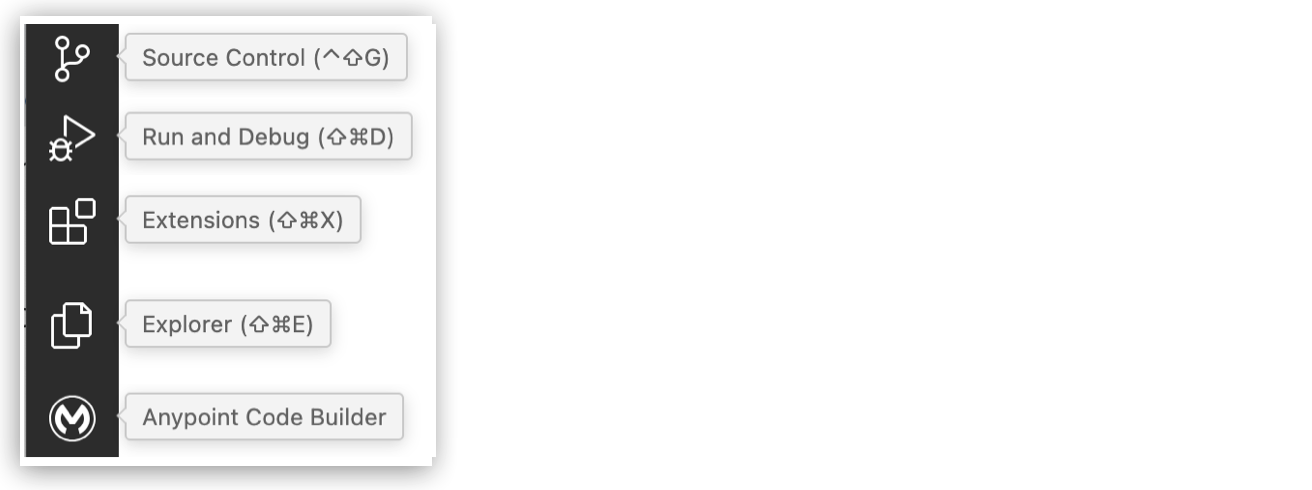
| 1 | Explorer: プロジェクトのワークスペースを開きます。 |
| 2 | エディター: キャンバスと設定 XML ファイルでプロジェクトを開発します。設定 XML ファイルでは、オートコンプリートがサポートされます。 |
| 3 | ステータスバー: ユーザー名を参照して、Anypoint Platform にログインしているかどうかを確認します。 |
| 4 | 出力パネル: プロジェクトが Anypoint Code Builder で実行されているときに、Mule DX サーバーまたは Mule DX サーバー: スキャフォールディングからの出力とログを表示します。組み込みコマンドターミナルを開きます。問題とポートを表示します。
詳細は、インテグレーションの開発 and API の実装を参照してください。 |
| 1 | エディター: API 仕様プロジェクトファイルを設定します。このエディターでは、オートコンプリートがサポートされます。 |
| 2 | API Console: 例でエンドポイントをテストします。
詳細は、API 仕様とフラグメントの設計を参照してください。 |
| キャンバスタブ上のドット (•) は、ファイルに保存されていない変更が含まれていることを示します。 |
| 属性名 | 属性 XML | 説明 |
|---|---|---|
Until successful (成功するまで) (デフォルト) |
|
キャンバスに表示されるコンポーネントの編集可能な名前。 |
なし |
|
コンポーネントの自動生成された識別子。 |
Max retries (最大再試行回数) |
|
許可される再試行の最大数。この属性は、数値、または数値に解決される式にできます。最大回数に達すると、 |
Millis between retries (再試行間のミリ秒数) |
|
再試行から次の再試行を実行するまでの最小間隔をミリ秒で指定します。間隔の長さは前回の実行の影響を受けますが、通常は最小値の 2 倍を超えることはありません。この属性は、数値、または数値に解決される式にできます。デフォルトは |
getFlights フローには、予期されるエラー「The content of element 'flow' is not complete. (要素「flow」のコンテンツが不完全です。)」が含まれています。このエラーは、この手順の後半でコネクタを追加するまで存在します。 |
| 1 | コネクタ名を [Query Flights (フライトを照会)] に変更します。 |
| 2 | コネクタ設定ドロップダウンメニューから [Database_Config] を選択します。 |
| 3 | [Query (クエリ)] 属性を [Select * FROM american] に設定します。 |
| 項目名 | Field Value (項目値) |
|---|---|
Project Name (プロジェクト名) |
プロジェクトの一意の名前。 この名前はタイトルおよびインテグレーションプロジェクトファイルの名前として使用されます。
たとえば、プロジェクト名が「OAS Integration」 (OAS インテグレーション) の場合、プロジェクトファイル名は |
Project Location (プロジェクトの場所) |
ホームディレクトリまたは作成する別のディレクトリ。インテグレーション用の別のディレクトリを選択するには、[Browse (参照)] をクリックします。 ホームディレクトリへのフォルダーの追加を参照してください。 別のプロジェクトディレクトリ内にプロジェクトを作成しないでください。 |
|
クラウド IDE は進行中のベータ期間中です。 進行中のベータの間、クラウド IDE インスタンスが削除される場合があります。これにより、インテグレーション、自動化、API が失われます。 詳細を表示するには、クリックしてください。作業内容を保存するには、プロジェクトファイルをソース制御管理 (SCM) システムにコミットします。ソースファイルの制御を参照してください。 本番環境の API、インテグレーション、または自動化の開発に Anypoint Code Builder のクラウド IDE ベータバージョンを使用しないでください。 |
| 1 | スニペットリストに表示される名前 |
| 2 | スニペットのオートコンプリートを実行するトリガーテキスト |
| 3 | 再利用可能なコード |
| 1 | 組み込み Choice スニペットの XML はオートコンプリートリストの flow:choice です。このメニュー内のスニペットのアイコンは 1 次元ボックスです。 |
| 2 | 最小設定の Choice コンポーネントの XML。これは、キャンバスから [Core Processors (コアプロセッサー)] > [Flow Control (フロー制御)] > [Choice] に移動しても使用できます。
この XML のアイコンは 3 次元ボックスです。
|
![[Log a message (メッセージを記録)] ユーザースニペットのオートコンプリートオプション](https://docs.mulesoft.com/jp/anypoint-code-builder/_images/acb-auto-complete-user-snip.png)
| 1 | キャンバスでは、Mule フローまたはサブフローを視覚的に表現する領域が提供されます。 |
| 2 | 設定 XML エディターには、Mule アプリケーションの設定ファイルが表示されます。 |
|
インストールエラーを回避する方法
Visual Studio Marketplace の Anypoint Extension Pack から個別に入手することもできる個々の Anypoint Code Builder 拡張機能をインストールしないでください。 |
| 項目名 | 項目値 | ||
|---|---|---|---|
Project Name (プロジェクト名) |
プロジェクトの一意の名前。 この名前は Exchange での API 仕様のタイトル、仕様ファイルの名前、プロジェクトのルートディレクトリの名前として使用されます。
たとえば、プロジェクト名が「Agent Example」 (エージェントの例) の場合、仕様ファイル名は 既存のプロジェクト名を再利用するには、その名前をすでに使用しているプロジェクトを最初に削除する必要があります。API 仕様とフラグメントの削除を参照してください。 |
||
Project Location (プロジェクトの場所) |
|||
API Type (API 種別) |
[REST API] を選択します。 |
||
API Specification Language (API 仕様言語) |
[OAS 3.0 (YAML)] または [OAS 3.0 (JSON)] を選択します。
|
||
Business Group (ビジネスグループ) |
API が属するビジネスグループを選択します。API Governance および中央管理ルールセットの同期にはビジネスグループが必要です。API 仕様を Anypoint Code Builder から Exchange にパブリッシュすると、IDE でビジネスグループの名前が要求されます。 |
| 項目名 | 説明 | 例 |
|---|---|---|
Topic Label (トピックの表示ラベル) |
トピックの一意の名前を入力します。 |
営業エージェント |
Classification Description (分類の説明) |
1 ~ 3 個のプレーンテキスト文を入力します。エージェントはこの説明を使用して、会話でトピックをいつ使用するかを決定します。ユーザーがメッセージを入力すると、エージェントはユーザーのインテントを識別し、トピック名および分類の説明を比較して、最も一致するトピックを使用します。 |
分類の説明のいくつかの例を次に示します。 ビジネスポリシー、手順、または商品に関する質問に答えます。 ユーザーとやり取りしてコンテンツのドラフト作成や修正を行います。 ユーザーの注文状況、返品状況、返品に関する質問に答えます。 |
Scope (スコープ) |
スコープは、特定のトピックに対してエージェントができることとできないことを正確に定義します。スコープは、トピックに含める必要があるジョブやスコープの範囲外でエージェントが応答しないように制限できるため、特定のトピックに対してエージェントのジョブを詳細に定義する場合に最も効果的です。 |
スコープの説明のいくつかの例を次に示します。 あなたの役割は、商談を成立させるための商談成立戦略の設定に関連するタスクのみを処理することです。これには、商品関連の価格設定に関する質問への回答、会話に基づく顧客のセンチメントに関するユーザーへのブリーフィング、ユーザーが商談を成立させるために役立つ商談成立プランの提案、ビデオ通話や音声通話に基づくアドバイスの提供などが含まれます。 あなたの役割は、ユーザーの予約に関する質問に対して情報を提供すること、および予約確認メールを再送信して今後の予約や既存の予約の変更を処理することのみです。新規予約を行うことはできません。 |
Instructions (手順) |
プレーンテキストの手順は、エージェントがさまざまなユースケースでトピック内のアクションをどのように使用するか決定するのに役立ちます。各手順は 1 つのトピック固有のガイドラインであり、通常は「常に…」、「決して…」、「x の場合は y…」、「最初のステップとして、…」などで表されます。 手順は非確定的であるため、機密性が高いか、確定的なビジネスルールは含めないでください。 |
手順のいくつかの例を次に示します。 [ナレッジを使用して質問に回答] 機能を使用してトラブルシューティング情報を取得する前に、常にモバイルデバイスの種別 (iOS または Android) を明確にします。 決してユーザーに ID を尋ねないでください。代わりに、レコードの名前を使用するか、レコードの名前を尋ねて、IdentifyRecordByName を使用して ID を取得し、他のアクションをコールします。 ユーザーから注文の状況や注文確認について質問があった場合は、注文番号またはメールアドレスを持っているかどうかを尋ねます。ユーザーがメールアドレスまたは注文番号を持っていない場合は、エージェントにエスカレーションするかケースを作成するかを尋ねます。 |
| エクステンション | 説明 | デフォルト値 |
|---|---|---|
x-sfdc/agent/action/publishAsAgentAction |
必須。操作をアクションとして有効にするには、この属性を |
false |
x-sfdc/privacy/isPii |
省略可能。この属性を |
false |
x-sfdc/agent/action/isUserInput |
必須。この属性を |
false |
x-sfdc/agent/action/isDisplayable |
必須。項目をユーザーに表示できるようにするには、この属性を |
false |
| 1 | バージョンおよび IDE の詳細:
Anypoint Code Builder のクラウド IDE インスタンスのバージョンを表示します。[View IDE Details (IDE の詳細を表示)] の上にマウスポインターを置くと、クラウド IDE インスタンスに関する一部の内部的な詳細を表示できます。
|
||
| 2 | Reboot (再起動): クラウド IDE インスタンスを再起動するためのボタン。 | ||
| 3 | Delete (削除): クラウド IDE インスタンスを削除するためのボタン。
|
| 1 | キャンバスでは、Mule フローまたはサブフローを視覚的に表現する領域が提供されます。 |
| 2 | 設定 XML エディターには、Mule アプリケーションの設定ファイルが表示されます。 |
| 1 | casestatus は、Salesforce のケース状況 ([新規]、[処理中]、[エスカレーション済み]) を取得します。 |
| 2 | casenumber は、Salesforce によって作成されたケース番号を取得します。 |
| 3 | slackchannel を、チュートリアルで以前に設定したチャネル名に設定します。 |
| Avro | JSON | RAML | |
|---|---|---|---|
AsyncAPI |
はい |
はい |
いいえ |
GraphQL |
いいえ |
いいえ |
はい |
OData |
いいえ |
いいえ |
はい |
REST |
いいえ |
いいえ |
はい |
SOAP |
いいえ |
いいえ |
はい |
| 1 | コネクタの [+] アイコンをクリックして、設定パネルを開きます。 |
| 2 | 必須項目に入力したら、[Test Connection (接続をテスト)] をクリックします。 |
| 生成サポートは現在、RAML 1.0 および OAS 3.0 仕様に制限されています。 |
| 1 | 新しい注文を作成する: POST /orders 操作は JSON ペイロードを受け入れ、成功またはエラーの応答を返します。 |
| 2 | すべての注文のリストを取得する: GET /orders 操作は、注文オブジェクトの配列を返します。 |
| 3 | 特定の注文の操作を処理する: パスパラメーター検証を使用する /orders/{orderId} の GET、PUT、DELETE メソッドが含まれます。 |
| 4 | ベアラートークン認証を使用する: すべてのエンドポイントを保護するために、bearerAuth スキームが適用されます。 |
| 5 | 再利用可能なデータモデルを定義する: Order および OrderItem スキーマは、要求ペイロードと応答ペイロードに一貫した構造を提供します。 |
| 1 | 新しい商品を作成する: POST /products 操作は、JSON ペイロードを使用して商品を定義します。 |
| 2 | すべての商品をリストする: GET /products 操作は、在庫商品の配列を返します。 |
| 3 | 個々の商品を管理する: ID を使用して特定の商品を取得、更新、または削除する操作が含まれます。 |
| 4 | ベアラー認証でエンドポイントを保護する: この API は bearerAuth を使用して、インベントリ操作を保護します。 |
| 5 | 検証済みの商品スキーマを含める: この商品スキーマは、必須項目と検証 (数量の最小値: 0 など) を適用します。 |
| 1 | 新規ユーザーを登録する: POST /register は入力を検証し、新しいユーザーアカウントを作成します。 |
| 2 | ユーザーをログインする: POST /login はログイン情報を確認し、成功時にトークンを返します。 |
| 3 | トークンを更新する: POST /token/refresh は、更新トークンを使用して新しいアクセストークンを発行します。 |
| 4 | パスワードのリセットを開始する: ユーザーが存在する場合、POST /reset-password はリセットメールを送信します。 |
| 5 | エンドポイントを保護する: 保護されたすべてのルートは JWT ベアラー認証を使用します。 |
| 6 | スキーマを定義する: UserRegistration および UserLogin スキーマには、minLength や format: email などの入力規則が含まれます。 |
| 1 | このフローは、Salesforce Connector の on-new-object-listener トリガーで開始され、新規ケースが作成されるとフローがトリガーされます。 |
| 2 | 新規ケースのペイロードは、Transform コンポーネント内の DataWeave スクリプトを使用して変数で設定されます。 |
| 3 | メールは、定義済み SMTP 設定を使用して Email Connector の Send 操作を使用して送信されます。
メールの件名は、 |
| 4 | メールの本文は HTML 形式に設定され、ケース ID、件名、説明が含まれます。 |
| 1 | このフローは、/updatePhoneNumber パス上の API コールをリスンする HTTP リスナーから始まります。 |
| 2 | Transform コンポーネントでは、更新する取引先 ID と電話番号を指定する <ee:transform> 操作を使用してペイロードが設定されます。 |
| 3 | Salesforce Connector の Update 操作は、Salesforce の取引先オブジェクトを更新するために使用されます。
|
| 4 | ペイロードは、Salesforce で更新するレコードとして渡されます。 |
| 1 | /syncAccountPhone パスで POST 要求をリスンするように HTTP Listener 操作を設定します。 |
| 2 | ペイロードから取引先 ID を抽出し、accountId という名前の変数に保存します。 |
| 3 | ペイロードから電話番号を抽出し、phone という名前の変数に保存します。 |
| 4 | Database Connector の Select 操作は、取引先 ID に基づいてデータベースから取引先レコードを取得します。 |
| 5 | DataWeave の Transform 操作を使用して、Salesforce 取引先オブジェクトの更新データを作成します。 |
| 6 | Salesforce 取引先を更新するには、Salesforce Connector の Update 操作を使用します。 |
| 7 | Database Connector の Update 操作を使用して、データベース内の取引先情報も更新されます。 |
| 8 | ペイロードは、同期が成功したことを示すために [Phone field synced successfully (電話項目が正常に同期されました)] に設定されます。 |
| 1 | このフローは、データベース record テーブル内の新規レコードをリスンする Database Connector の Listener コンポーネントから始まります。 |
| 2 | スケジュール戦略は、1 秒ごとに一定間隔でフローをトリガーするように設定されています。 |
| 3 | リスナーのペイロードは、Set Variable 操作を使用して record という名前の変数に保存されます。 |
| 4 | メールは、Email Send コンポーネントを使用してアドレス sender@example.com から送信されます。 |
| 5 | メールはアドレス recipient@example.com に送信されます。 |
| 1 | OAS 3.0 仕様 |
| 2 | /current-time エンドポイント定義 |
| 3 | 書式設定された日時値の例 |
| 1 | HTTP リスナー接続設定例 |
| 2 | フロー currentTimeFlow を参照する自動検出設定
このアプリケーションを試す場合は、 |
| 3 | フロー currentTimeFlow |
| 4 | エンドポイント設定 path="/current-time" の HTTP リスナー
このエンドポイントは、OAS 仕様の例で定義されたエンドポイントの名前と一致します。 |
| 5 | DataWeave を使用して現在時刻を指定された形式で取得する Transform Message コンポーネント
この形式は、OAS 仕様の例で定義された形式と一致します。 |
| 6 | アプリケーション実行中の http://localhost:8081/current-time への要求時に現在時刻 (payload 内) を出力する Logger コンポーネント |
| 1 | リスナー (<http:listener/>) 内で属性 path="/api/*" はスキャフォールディングプロセス中に自動的に設定されます。 |
| 2 | ルーター (<apikit:router/>) は設定 XML 内のスキャフォールディング済みインターフェースのリスナーの後に配置されます。 |
この手順の例は、IDE のターミナルから curl コマンドを使用してフローをトリガーする方法を示しています。また、VS Code のサードパーティ拡張機能である Thunder Client を使用して、同じ URL でフローをトリガーすることもできます。セキュリティ上の理由で、Advanced REST クライアントや Postman などの外部 REST クライアントでは、クラウド IDE にデプロイされたプロジェクトに要求を送信することはできません。 |