---
schema_version: "1"
id: 320f4419d797263984ce43c6dc3b3cf28dec54d9149ec0cd66588b339afdc1d7
title: Troubleshooting Web Service Consumer Connector
collection: mulesoft
version: current
locale: en-us
portal_url: https://docs.salesforce.com/mulesoft/current/en-us/web-service-consumer-connector/latest/web-service-consumer-troubleshooting.md
canonical_url: https://docs.mulesoft.com/web-service-consumer-connector/latest/web-service-consumer-troubleshooting
source_site: docs.mulesoft.com
content_type: documentation
content_hash: ae07f478cc58a8a73715216757e11f06a5487ae7dde9c25715770916f601df31
description: MuleSoft Documentation Site
release: "2.2"
latest: true
---
---
product: Web Service Consumer Connector
version: 2.2
is-latest-version: true
---
# Troubleshooting Web Service Consumer Connector
> For the full documentation index, see: https://docs.mulesoft.com/llms.txt
To troubleshoot Anypoint Connector for Web Service Consumer (Web Service Consumer Connector), become
familiar with the information about enabling wire logging, troubleshooting access attachments,
troubleshooting design-time WSDL issues, and interpreting commonly thrown messages.
## Enable Wire Logging
To begin troubleshooting Web Service Consumer Connector, look at the transport request and response
on the Web Service Consumer. If you are using the underlying HTTP transport, you can enable wire
logging to see the exact HTTP message, the transmission headers, and the response status.
To enable wire logging:
1. Access Anypoint Studio and navigate to the **Package Explorer** view.
2. Open your application’s project name.
3. Open the `src/main/resources` path folder.
4. Open the `log4j2.xml` file inside the folder.
5. If the following line is already in the `log4j2.xml` file, uncomment it to enable it; otherwise,
add it:
```xml
```
6. Save your changes.
7. Click the project name in **Package Explorer** and then click **Run** > **Run As** > **Mule
Application**.
8. Navigate to the **Console** view to read the HTTP messages in the logger:
```plain-text
POST /essentials/delta HTTP/1.1
soapaction:
Host: ilt.mulesoft-training.com
User-Agent: AHC/1.0
Connection: keep-alive
Accept: */*
Content-Type: text/xml; charset=UTF-8
Transfer-Encoding: chunked
b1
DEBUG 2021-04-06 15:04:23,058 [[wsc-base].wsc-dispatcher.11 SelectorRunner] [processor: ; event: ] org.mule.service.http.impl.service.HttpMessageLogger.wsc-dispatcher: REQUESTER
0
DEBUG 2021-04-06 15:04:23,319 [[wsc-base].wsc-dispatcher.11 SelectorRunner] [processor: ; event: ] org.mule.service.http.impl.service.HttpMessageLogger.wsc-dispatcher: REQUESTER
HTTP/1.1 200
Date: Tue, 06 Apr 2021 18:04:23 GMT
Content-Type: text/xml; charset=UTF-8
Transfer-Encoding: chunked
Connection: keep-alive
MULE_ENCODING: UTF-8
Strict-Transport-Security: max-age=31536000; includeSubdomains;
X-Content-Type-Options: 1
X-Frame-Options: SAMEORIGIN
X-XSS-Protection: 1; mode=block
bfe
...
```
## Troubleshoot Access Attachments
Some servers respond to requests by sending MTOM (Message Transmission Optimization Mechanism)
messages. These messages separate their data into parts, which enables different types of content
data to coexist in the same HTTP message.
MTOM is in charge of sending binary data in a separate part and referencing that part from the
corresponding field within the SOAP envelope. Web Service Consumer users interact with these
messages (multipart) only with the MTOM configuration.
Refer to the following documentation for further information about MTOM:
- [RFC2387 - The MIME Multipart/Related Content-type](https://www.ietf.org/rfc/rfc2387.txt)
- [XML-binary Optimized Packaging (XOP) W3C Recommendation](https://www.w3.org/TR/2005/REC-xop10-20050125/)
- [SOAP Message Transmission Optimization Mechanism (MTOM) W3C Recommendation](https://www.w3.org/TR/soap12-mtom/)
Beginning with version 1.6.4, Web Service Consumer Connector enables you to configure MTOM for
request messages that also automatically manage MTOM responses, regardless of the MTOM setting in
the Web Service Consumer global configuration. Incoming messages with MTOM are treated as
MTOM-enabled, regardless of whether MTOM is configured in the Web Service Consumer global
configuration.
The following example shows the Web Service Consumer Connector global configuration with MTOM
enabled:
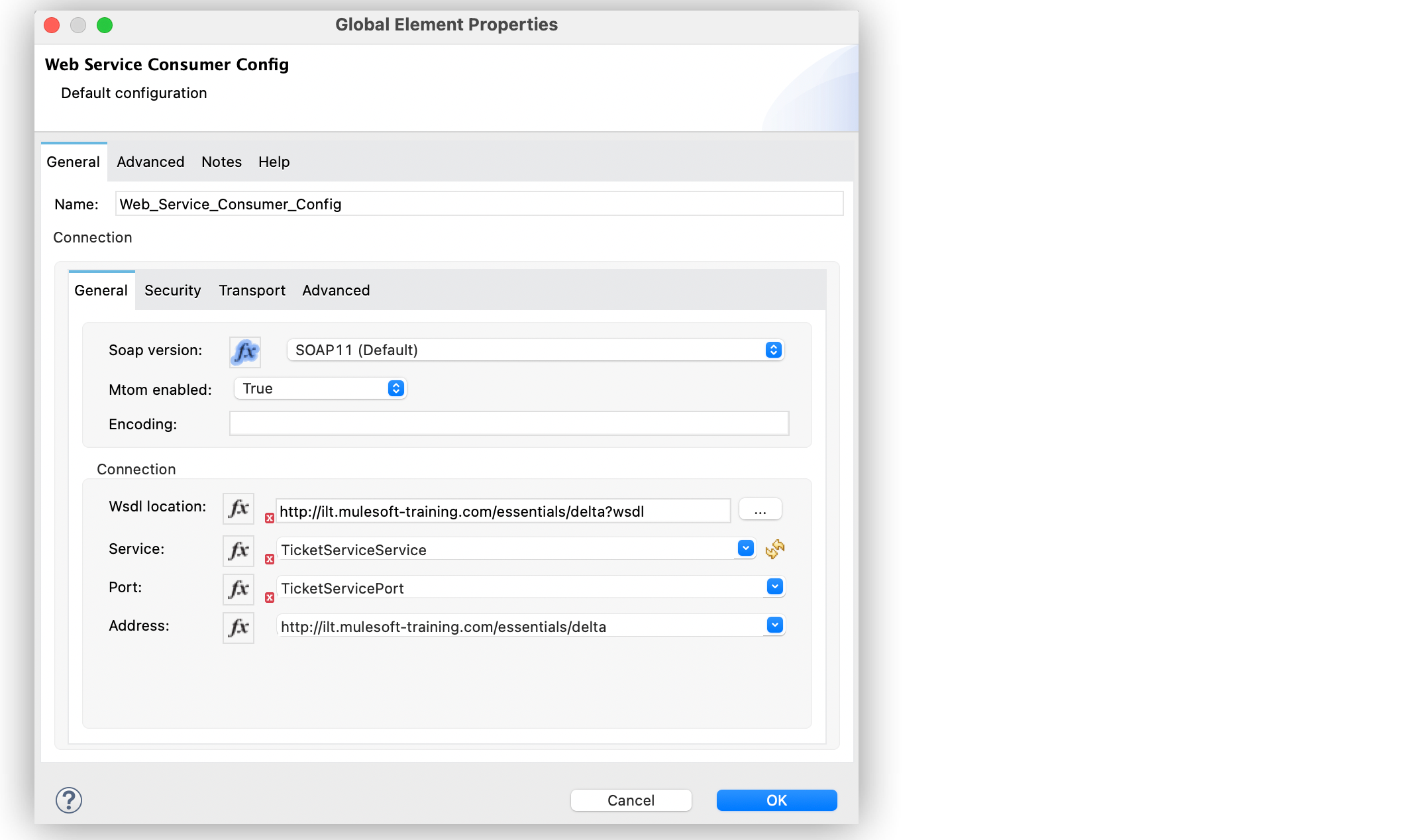
Figure 1. Web Service Consumer Connector Global Element
In the XML editor, the `` and `mtomEnabled` configurations look like this:
```xml
```
Depending on the server side multipart setting, the server might send some binary data as a
Base64-encoded text field or as a referenced binary part in the MIME message.
To troubleshoot how to access the binary data:
- If the server sends the binary data as Base64-encoded text field, you must access this field as
part of the message.
Base64 decoding is automatically performed by Web Service Consumer.
- If the server sends the binary data as a referenced binary part, you must access this field as an
attachment.
The following example shows an image sent as an attachment with MTOM by a web service server. You
use DataWeave to access and transform the image into JSON. In this case, Base64 encoding is
required:
```DataWeave
import * from dw::core::Strings
import dw::core::Binaries
output application/json
ns nam http://mynamespace.com
---
{
...
"image": Binaries::toBase64(payload.attachments[0]),
...
}
```
## Troubleshoot Design Time WSDL Issues
Errors related to incorrect WSDL recognition, acquisition, or parsing sometimes lead to the
following issues:
- DataSense does not correctly expose the message metadata defined in the WSDL.
- In the Web Service Consumer Connector configuration screen, the **Operations** field does not show
any web service operation names for the connector to invoke:

Figure 2. Web Service Consumer Connector Operations field
- In the Web Service Consumer Connector global element configuration, the **Port** and **Address**
fields are not automatically filled when a WSDL location is provided.
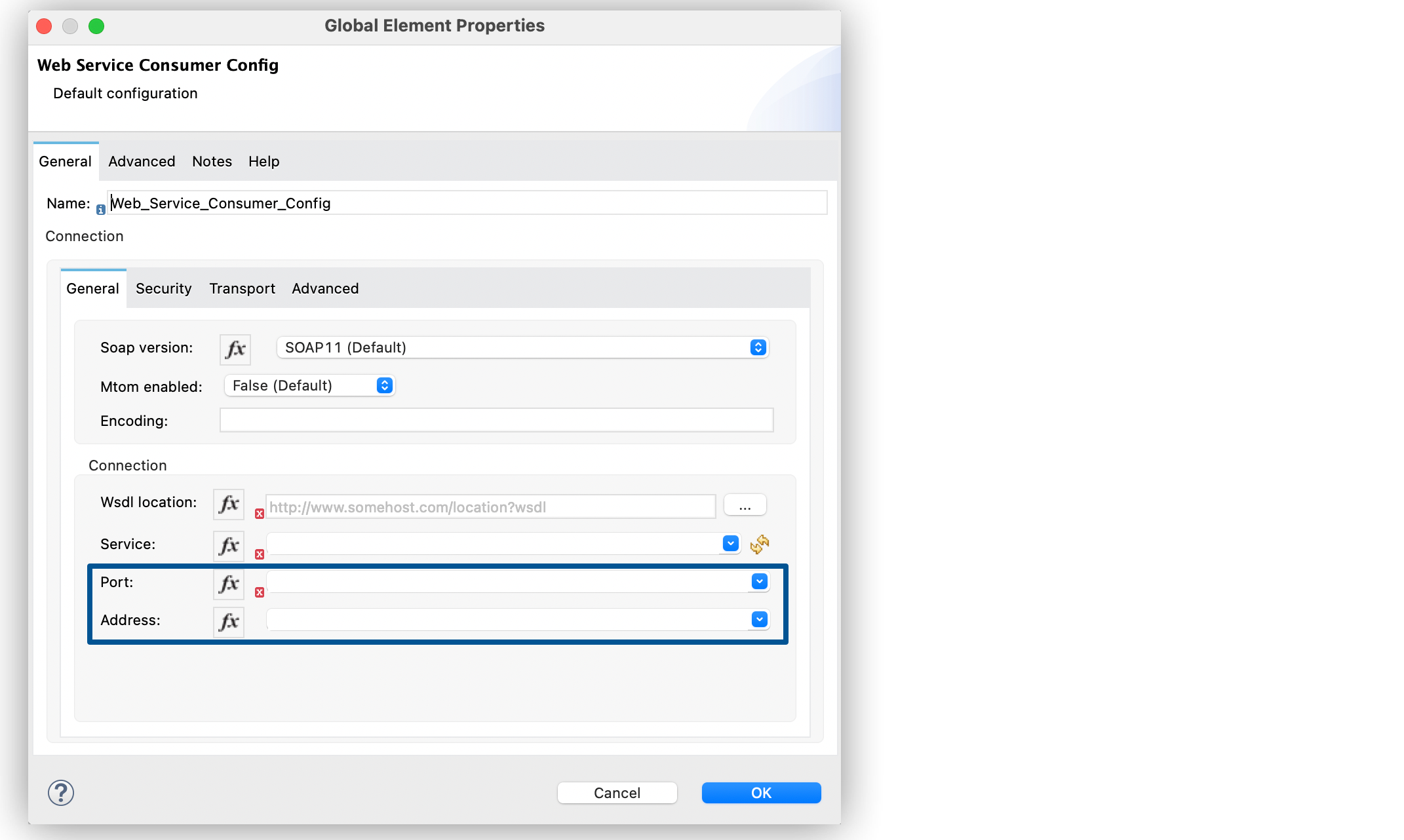
Figure 3. Web Service Consumer Connector Global Element
To resolve these issues:
- Check the integrity of your WSDL by using your preferred online or desktop viewer applications.
Because every parsing error during the configuration is not shown during design-time, implementing
an external application helps detect them.
- If you do not add the WSDL as a resource in the application’s **src/main/resources** folder in
Studio, check for a correct connection to the server hosting the WSDL.
Sometimes you need to add custom HTTP settings, such as OAuth settings or user/password settings,
to access an HTTP server in an HTTP security layer. See
[Setting a Custom HTTP Transport Configuration.](https://docs.mulesoft.com/web-service-consumer-connector/latest/web-service-consumer-config-topics)
## Troubleshooting Must Understand Error
If your Mule Web Service Consumer app throws the error `WSC:CANNOT_DISPATCH`, and the third-party
server returns in the HTTP response the `soap:MustUnderstand` as the
exception for the connector caused error, this indicates that the Web Service Consumer connector
configuration has the Security setting **Must Understand** field set to the default value of `true`.
To avoid this issue, set the **Must understand** field to `false`. The default value of this
attribute to `true` is on the connector side, but on the SOAP protocol side the implicit value for
the **Must Understand** attribute is `false` when is not present. If you do not explicitly need to
use the **Must Understand** attribute for SOAP request, set the value to `false`.
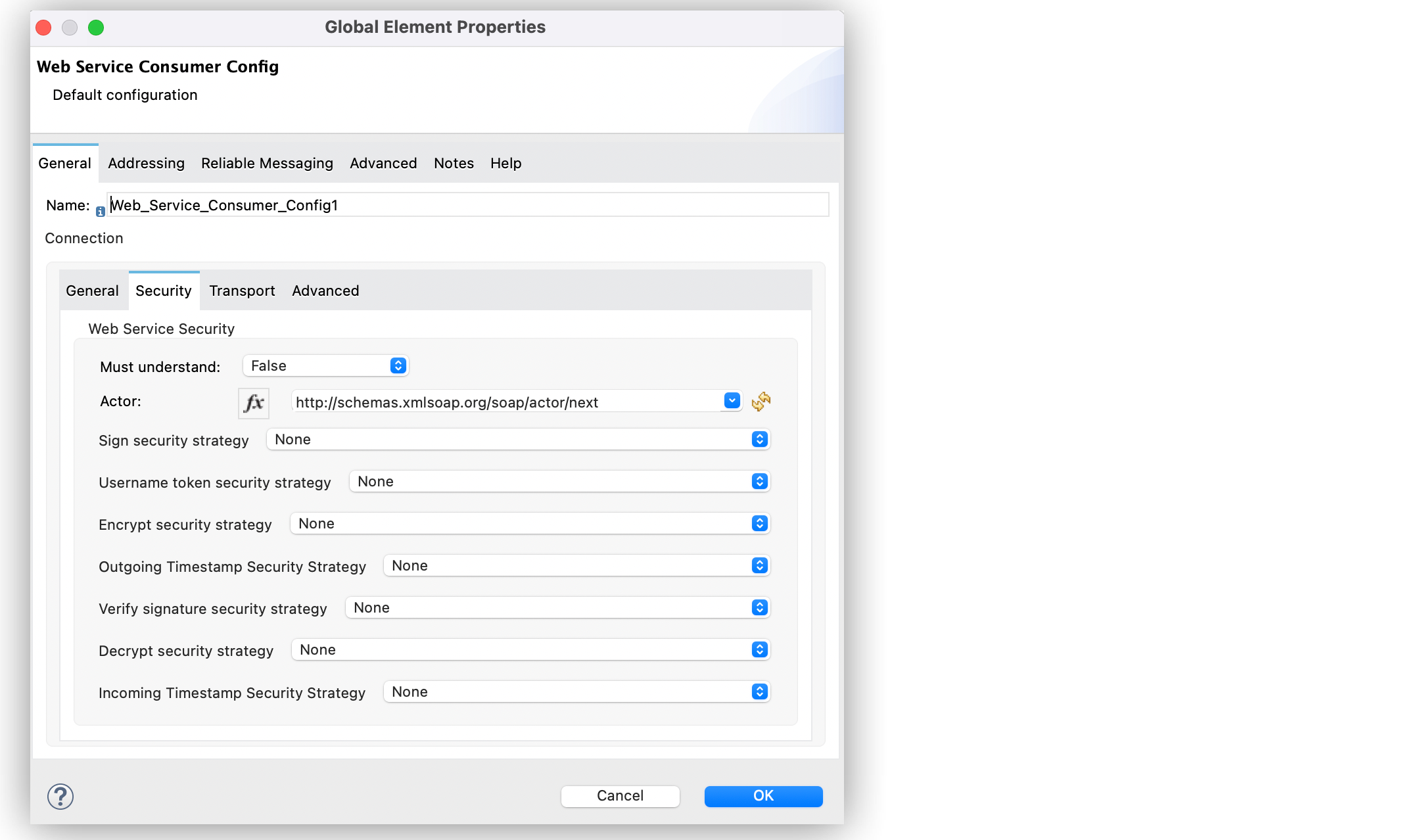
The returned HTTP response might come with a compressed or uncompressed payload body for you to
check the `soap:MustUnderstand` exception. If the HTTP response header
`Content-Encoding` is `gzip`, it indicates that the payload body is compressed, for example, review
the following HTTP response where you can see compressed characters such as �RMo�0��W���:
```XML
HTTP/1.1 500 Internal Server Error
X-OPNET-Transaction-Trace: a2_ba571488-537c-4839-94a9-48f3f08fadf3
Content-Encoding: gzip
Content-Type: multipart/related; type="application/xop+xml"; boundary="uuid:83b066a2-fb96-4abf-a687-dd178a5b3e29"; start=""; start-info="text/xml"
Content-Length: 363
X-Cnection: close
Date: Wed, 23 Nov 2022 13:41:25 GMT
Connection: close
Set-Cookie: dc=dcs; Path=/; Version=1; Secure; Httponly; Max-Age=900
Strict-Transport-Security: max-age=31536000
�???????�RMo�0��W���N!�c-�M�:i��֞��1�&(h�_h���v���l?[�iJ��4X,`��t��sHs�pɥ�,C�Og8]�GOZYT��#u]��R+����=Vk�`�f�{��Y��x[+�]�0�(G÷*ӲT�����]$������?"�!ksj�
��9$��x��:ڪ/�t��5Q���+��#!�ɏ@��z��} pH^r��e7�/�T6���r�09�o
ٽ�hȂ����g%Y�&Ine�@��}�������@%q�_�,}�i�E0g���`֘�v�n�|�~K��}�?dJ[֜;k-���`+ף������^�����Y9E??
```
To decompress the payload body of the response, your Mule app must catch the thrown error using an
**Error Handler** component, and then use the Compression Module **Decompress** operation to
decompress the response.
In Studio, navigate to the **Decompress** operation configuration screen, and set the **Compressed**
field to the following expression to read compressed payload and catch the exception:
`error.exception.errorMessage.typedAttributes.value.headers.`
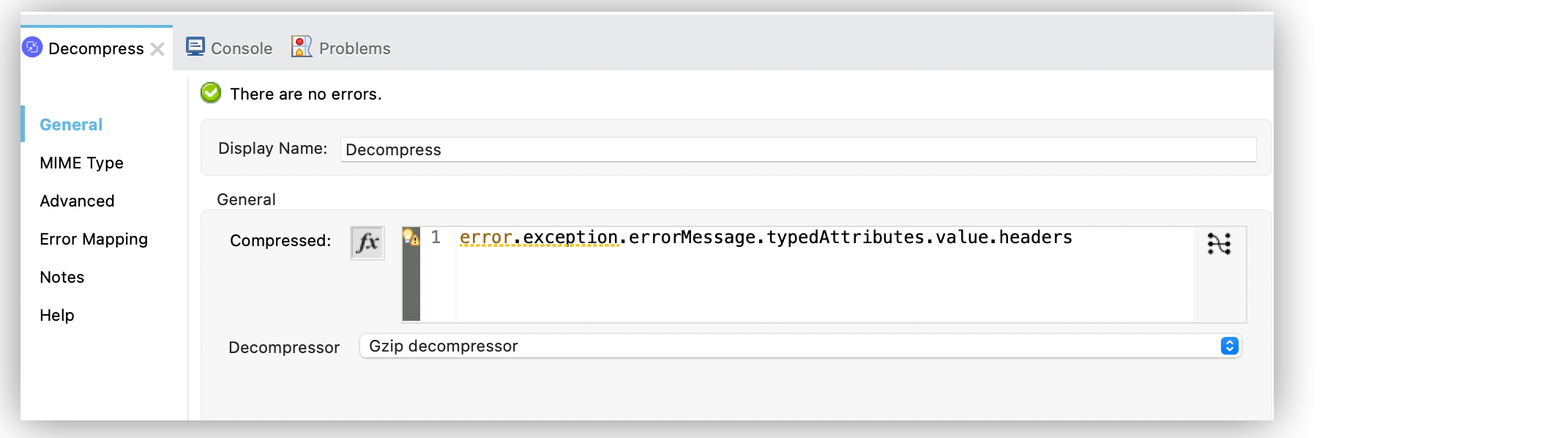
Subsequently, you can use a **Logger** component in your Mule app to log the entire payload body
with the exception, for example, the following logs show the decompressed payload SOAP body with
`soap:MustUnderstand`:
```XML
INFO 2022-11-23 14:57:05,247 [[MuleRuntime].uber.05: [ri-uhip-integration-esb-1095brequesttransmitterservice2_11-02-20221].BulkRequestTransmitter:\soapkit-config.BLOCKING @3f46eb07] [processor: BulkRequestTransmitter:\soapkit-config/processors/4/errorHandler/0/processors/2; event: 58ed0ad0-6b57-11ed-b9ce-147ddaa4cf6c] org.mule.runtime.core.internal.processor.LoggerMessageProcessor: --uuid:223e386d-3093-4df4-b5f9-9cb3b9a493a2
Content-Type: application/xop+xml; charset=UTF-8; type="text/xml"
Content-Transfer-Encoding: binary
Content-ID:
soap:MustUnderstandMustUnderstand headers: [{http://docs.oasis-open.org/wss/2004/01/oasis-200401-wss-wssecurity-secext-1.0.xsd}Security] are not understood.
--uuid:223e386d-3093-4df4-b5f9-9cb3b9a493a2--
```
## Troubleshooting Systems Properties
- `mule.soap.maxAttributeSize` (default value = 524288)
The XML parser library has a value limit for the `mule.soap.maxAttributeSize` system property that
specifies maximum allowed length of attribute values, in characters. The limit protects against
possible Denial-of-Service (DoS) attacks, wherein XML-based web services may be attacked by
specifically crafted documents that could cause processing problems by excessive memory or computing
power usage.
The default value is 524288 characters and it is a reasonable default value for normal usage. You
can change it to a higher value if input documents can legitimately exceed the default limit, or to
a lower value if specific attacks are observed or the system has a lower resource allocation.
One signal to change the value limit is when the exception
`javax.xml.stream.XMLStreamException: Maximum attribute size limit (524288) exceeded` occurs when
processing legitimate documents.
To change this value, you have to set the `mule.soap.maxAttributeSize` system property with the
accurate number according to your needs. Refer to the Knowledge article
[How can I set Mule and Java system properties at startup?](https://help.salesforce.com/s/articleView?id=001115098&type=1)).
The maximum value allowed is 2147483647
([Integer.MAX\_VALUE](https://docs.oracle.com/javase/8/docs/api/java/lang/Integer.html#MAX_VALUE) in
Java). If you set 0 or if you don’t set the property, the connector takes the default value.
### Re-enable DOCTYPE and External Entity Processing in XML Parsing
In Web Service Consumer Connector 2.2 and later, XML parsing is hardened by default to mitigate XML
External Entity (XXE) attacks. DOCTYPE declarations and external general or parameter entities are
disabled when parsing SOAP messages.
If your integration requires DOCTYPE declarations or external entity processing in SOAP messages,
you can re-enable these XML features by setting this system property:
`mule.soap.xml.disableXxeProtection` (default value = `false`)
Setting this property to `true` re-enables DOCTYPE and external entity processing. This isn’t
recommended because doing so reintroduces exposure to XXE-based attacks. The runtime logs a warning
when the property is active.
To set this property, refer to
[How can I set Mule and Java system properties at startup?](https://help.salesforce.com/s/articleView?id=001115098&type=1).
## No Content-Type Boundled in the Message
In Web Service Consumer Connector 1.10.0 and earlier, you might see the
`No Content-Type boundled in the message` error. In Web Service Consumer Connector 1.10.1 and later,
the `No Content-Type boundled in the message` error is not thrown if the Content-Type header is
missing in the response when the status code is not `200`. For more information, refer to the
[SOAP specification](https://www.w3.org/TR/2000/NOTE-SOAP-20000508/#_Toc478383529) and
[HTTP Response Headers Fields](https://www.w3.org/TR/soap12-part2/#http-respbindprocess).
## Understand Common Throws
Here is a list of common throw messages and how to interpret them.
- WSC:SOAP\_FAULT
Error matching the SOAP response with the format provided by the WSDL.
Every CXF SOAP fault error is wrapped in a \`WSC:SOAP\_FAULT\`.
- WSC:BAD\_REQUEST
The Web Service Consumer Connector operation does not exist in the WSDL.
The request body is not a valid XML.
- WSC:INVALID\_WSDL
The WSDL is poorly formatted.
- WSC:EMPTY\_RESPONSE
Occurs when mandatory fields are missing from the response (Illegal Empty Response).
## See Also
- [Web Service Consumer Connector Reference](https://docs.mulesoft.com/web-service-consumer-connector/latest/web-service-consumer-reference)
- [Salesforce Help](https://help.salesforce.com)
- [Known Issues](https://help.salesforce.com/s/issues)