
The Tracing module Clear logging variables, Remove logging variable and Set logging variable operations enable you to enhance your logs by adding, removing, and clearing variables from the logging context of a single Mule event.
Mapped Diagnostic Context (MDC) enriches logging and improves tracking by providing more context or information in the logs for the current Mule event. By default, Mule logs two MDC entries: processor, which shows the location of the current event, and event, which shows the correlation ID of the event.
Before You Begin
To use the Tracing module logging operations, complete the following tasks:
-
Add the module to your integration project. See Add the Module to Your Integration Project.
-
Change the pattern layouts in the
log4j.xmlfile toMDC.
Change the Pattern Layouts in the log4j.xml File
This change instructs Mule to automatically add the MDC context, which includes the correlation ID and the processor path. In the Explorer view, open log4j2.xml in src/main/resources of your integration project, or /conf/log4j2.xml in your Mule instance.
In the editor, replace [processor: %X{processorPath}; event: %X{correlationId}] with [%MDC].
Example log4j.xml File Configurations
<PatternLayout pattern="%-5p %d [%t] [processor: %X{processorPath}; event: %X{correlationId}] %c: %m%n"/>
<PatternLayout pattern="%-5p %d [%t] [%MDC] %c: %m%n"/>
Configure Tracing Module Operations in Anypoint Code Builder
To configure the logging variables operations, add any of the available operations Clear logging variables, Remove logging variable or Set logging variables to your Mule app flow and specify the corresponding attributes.
In the following example, you configure the Set logging variables operation:
-
Click the
 (Add component) icon, search for
 Tracing, and select Set logging variable. -
On the General tab, set Variable name to
testVarand Value totestValue.
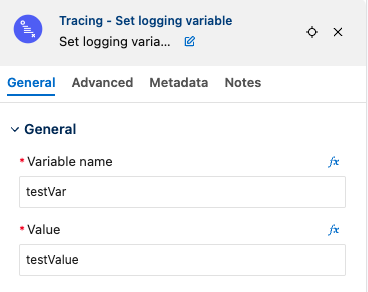
In the configuration XML file, the <tracing:set-logging-variable> configuration looks like this:
<flow name="exampleFlow">
    ...
    <tracing:set-logging-variable variableName="testVar" value="testValue" />
    ...
</flow>
After executing the flow, the output logs are:
INFO 2021-04-08 16:58:26,882 [[MuleRuntime].uber.15: [test-project-app].exampleFlow.CPU_LITE @18f679] [{correlationId=c85e16c0-98a4-11eb-bc34-cac765a2219b, processorPath=exampleFlow/processors/2, testVar=testValue}] org.mule.runtime.core.internal.processor.LoggerMessageProcessor: Example
The previous logging context example affects any output of a Logger component and any internal logging that Mule runtime engine produces.
Create a Set Logging Variable Mule App
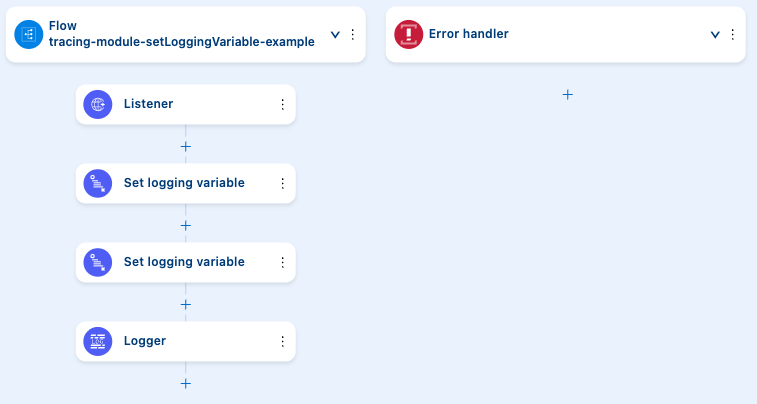
In the following example, you configure the Set logging variable operation to log variables based on the request payload and attributes:
-
Click the
(Add component) icon, search for Listener, and select Listener from the HTTP results. -
On the General tab, set Path to
/order. -
Add an HTTP Listener configuration (
<http:listener-config>) for the listener. See Add a Global Configuration. -
Click the
(Add component) icon after Listener, search for Tracing, and select Set logging variable. -
On the General tab, set Variable name to
customerIdand Value to#[payload.customerId]to log the customer ID sent in the request. -
Click the
(Add component) icon after the first Set logging variable operation, search for Tracing, and select Set logging variable again. -
On the General tab, set Variable name to
requestPathand Value to'#["$(attributes.method):$(attributes.requestPath)"]'to log the request path. -
Click the
(Add component) icon after the second Set logging variable operation, search for Logger, and select it. -
On the General tab, set Message to
#[output application/json --- payload]to log the request payload. -
Run your application in debug mode.
-
Send the following curl command:
curl --location --request GET '0.0.0.0:8081/order' \
--header 'Content-Type: application/json' \
--data-raw '{
    "orderId": 548102842,
    "customerId": "ARG-12934",
    "items": [
        "CP-123",
        "CP-452"
    ]
}'
The output logs customerId, requestPath, and the request payload:
INFO  2021-04-09 11:14:38,409 [[MuleRuntime].uber.05: [tracing-module].tracing-moduleFlow.CPU_LITE @34a62707] [processor: tracing-moduleFlow/processors/2; event: eb2b2461-993d-11eb-8a64-4865ee1fd814] {correlationId=eb2b2461-993d-11eb-8a64-4865ee1fd814, customerId=ARG-12934, processorPath=tracing-moduleFlow/processors/2, requestPath=GET:/order} org.mule.runtime.core.internal.processor.LoggerMessageProcessor: {
    "orderId": 548102842,
    "customerId": "ARG-12934",
    "items": [
        "CP-123",
        "CP-452"
    ]
}
XML for the Set Logging Variable Mule App
Paste this code into the configuration XML file of your integration project to quickly load the flow for this example into your Mule app:
<?xml version="1.0" encoding="UTF-8"?>

<mule xmlns:json="http://www.mulesoft.org/schema/mule/json" xmlns:tracing="http://www.mulesoft.org/schema/mule/tracing"
	xmlns:http="http://www.mulesoft.org/schema/mule/http"
	xmlns="http://www.mulesoft.org/schema/mule/core" xmlns:doc="http://www.mulesoft.org/schema/mule/documentation" xmlns:xsi="http://www.w3.org/2001/XMLSchema-instance" xsi:schemaLocation="http://www.mulesoft.org/schema/mule/core http://www.mulesoft.org/schema/mule/core/current/mule.xsd
http://www.mulesoft.org/schema/mule/http http://www.mulesoft.org/schema/mule/http/current/mule-http.xsd
http://www.mulesoft.org/schema/mule/tracing http://www.mulesoft.org/schema/mule/tracing/current/mule-tracing.xsd
http://www.mulesoft.org/schema/mule/json http://www.mulesoft.org/schema/mule/json/current/mule-json.xsd">
	<http:listener-config name="HTTP_Listener_config" doc:name="HTTP Listener config" doc:id="2258f968-60ad-41d3-a1c1-5afeffd89297" >
		<http:listener-connection host="0.0.0.0" port="8081" />
	</http:listener-config>
	<flow name="tracingmodule2Flow" >
		<http:listener  config-ref="HTTP_Listener_config" path="/order"/>
		<tracing:set-logging-variable variableName="customerId" value="#[payload.customerId]"/>
		<tracing:set-logging-variable  variableName="requestPath" value='#["$(attributes.method):$(attributes.requestPath)"]'/>
		<logger level="INFO" message="#[output application/json --- payload]"/>
	</flow>
</mule>