---
schema_version: "1"
id: 73154ec1529750f0b2c0b6af632cb2662ec7c89ee589b0632b4a096e2395d0d7
title: Sockets Examples
collection: mulesoft
version: current
locale: en-us
portal_url: https://docs.salesforce.com/mulesoft/current/en-us/sockets-connector/latest/sockets-connector-examples.md
canonical_url: https://docs.mulesoft.com/sockets-connector/latest/sockets-connector-examples
source_site: docs.mulesoft.com
content_type: documentation
content_hash: d2a8673b49e365b95f507436e3338f501a0a97f710e39ffecde512169ff2e5e4
description: MuleSoft Documentation Site
release: "1.2"
latest: true
---
---
product: Sockets Connector
version: 1.2
is-latest-version: true
---
# Sockets Examples
> For the full documentation index, see: https://docs.mulesoft.com/llms.txt
Anypoint Connector for Sockets (Sockets Connector) enables you to send or receive transport layer
packages through both UDP and TCP sockets. The following examples show you how to use the available
operations while taking into consideration the transport layer protocol you want to implement in
your application, and how to create a custom TPC protocol
## Send a Message
In the following example, you have set up your Socket Listener and you want to build an application
that upon receiving specific data from an external client, performs a database query and sends a
message to a UDP Server Socket with the obtained results. Note that, even though we chose UDP for
this example, you can use the Send operation to send messages to both TCP and UDP sockets:
```xml
#["SELECT first_name, last_name from SYSTEM.MUSICIANS where id = :id"]
```
To test this example:
1. Initialize an Oracle database by using the following script:
```xml
CREATE TABLE SYSTEM.MUSICIANS(
id INTEGER GENERATED BY DEFAULT AS IDENTITY,
age INTEGER,
first_name VARCHAR2(100),
last_name VARCHAR2(100),
PRIMARY KEY(id)
);
INSERT INTO SYSTEM.MUSICIANS(age, first_name, last_name) VALUES(37, 'Farrokh', 'Bulsara');
INSERT INTO SYSTEM.MUSICIANS(age, first_name, last_name) VALUES(36, 'Brian Harold', 'May');
INSERT INTO SYSTEM.MUSICIANS(age, first_name, last_name) VALUES(35, 'Roger', 'Meddows Taylor');
INSERT INTO SYSTEM.MUSICIANS(age, first_name, last_name) VALUES(32, 'John', 'Deacon');
```
2. At port 8085, start a UDP server to which the results will be sent by running the netcat command
`nc -ul 8085`.
3. Run your Mule application and start a TCP client socket to send the expected query parameter by
running netcat command `nc localhost 8082` and sending the data `{"id": 2}`.
## Send and Receive Messages
Because sockets are full-duplex, they allow bidirectional communication, enabling you to send and
receive messages simultaneously. The following example operation is slightly different from the
example of only sending a message because this example not only sends data to the client but also
expects a response.
This operation can be used for both TCP and UDP sockets.
The operation will:
1. Send the data using the client associated to the RequesterConnection.
2. Block until data is received or Timeout is met (in which case a null payload will be returned).
Building on the example of only sending data, in this scenario you add a new flow,
`socketSendQueryAndReceiveResult`, that connects to the Listener from the
`socketSearchDatabaseAndReturnResult` flow, send the query string, and wait for the response, which
is then written to a file:
```xml
#["SELECT first_name, last_name from SYSTEM.MUSICIANS where id = :id"]
```
To test this example, use the same database setup as used for the sending example, run the Mule
application, access the endpoint using the following netcat command `nc localhost 8085`, and send
the data `{"id":2}`.
## Create a Custom TCP Protocol
The following example creates a TCP-based custom protocol that appends a string header to every
message sent and limits input message size to a fixed length by truncating all additional
characters.
1. Create a class that implements the `TcpProtocol` interface:
```java
package org.mule.extension.socket.protocol;
import static java.lang.System.arraycopy;
import static org.slf4j.LoggerFactory.getLogger;
import org.apache.commons.io.output.ByteArrayOutputStream;
import org.mule.extension.socket.api.socket.tcp.TcpProtocol;
import org.slf4j.Logger;
import java.io.IOException;
import java.io.OutputStream;
import java.io.InputStream;
import java.io.ByteArrayInputStream;
import java.io.BufferedOutputStream;
public class CustomTestTcpProtocol implements TcpProtocol {
protected static final int READ_ATTEMPTS = 50;
protected static final int CUSTOM_BUFFER_SIZE = 30;
private static final String HEADER = "This is my custom protocol.";
private static final Logger LOGGER = getLogger(CustomTestTcpProtocol.class);
protected int bufferSize;
public CustomTestTcpProtocol() {
this(CUSTOM_BUFFER_SIZE);
}
public CustomTestTcpProtocol(int bufferSize) {
this.bufferSize = bufferSize;
}
@Override
public InputStream read(InputStream socketIs) throws IOException {
byte[] buffer = new byte[HEADER.length() + bufferSize];
int bytesRead, attempts = 0;
while ((bytesRead = socketIs.read(buffer)) <= 0 && (attempts < READ_ATTEMPTS)) {
attempts++;
}
if (bytesRead <= 0) {
throw new IOException("Number of read attempts exceeded! Failed to read any data from socket!");
}
ByteArrayOutputStream byteArrayOutputStream = new ByteArrayOutputStream(bytesRead);
byteArrayOutputStream.write(buffer, 0, bytesRead);
return new ByteArrayInputStream(byteArrayOutputStream.toByteArray());
}
@Override
public void write(OutputStream os, InputStream data) throws IOException {
byte[] messageToSend = new byte[HEADER.length() + bufferSize];
byte[] inputPayload = new byte[bufferSize];
int dataLength = data.read(inputPayload);
if (dataLength == bufferSize) {
LOGGER.warn("Data length exceeds buffer size so data will be chunked.");
}
arraycopy(HEADER.getBytes(), 0, messageToSend, 0, HEADER.length());
if (dataLength >= 0) {
arraycopy(inputPayload, 0, messageToSend, HEADER.length(), dataLength);
}
BufferedOutputStream writer = new BufferedOutputStream(os);
writer.write(messageToSend, 0, HEADER.length() + dataLength);
writer.flush();
}
}
}
```
2. Add the class name in the **Connector configuration** window of the Sockets Listener source and
either the Sockets Send operation or Send and receive operation:
- Sockets Listener source
1. In Studio, open the **Global Element Properties** configuration for your Sockets Listener
source.
2. On the **General** tab, set **Protocol** to `Custom protocol`.
3. Add the class name in the **Protocol Class Name** field.
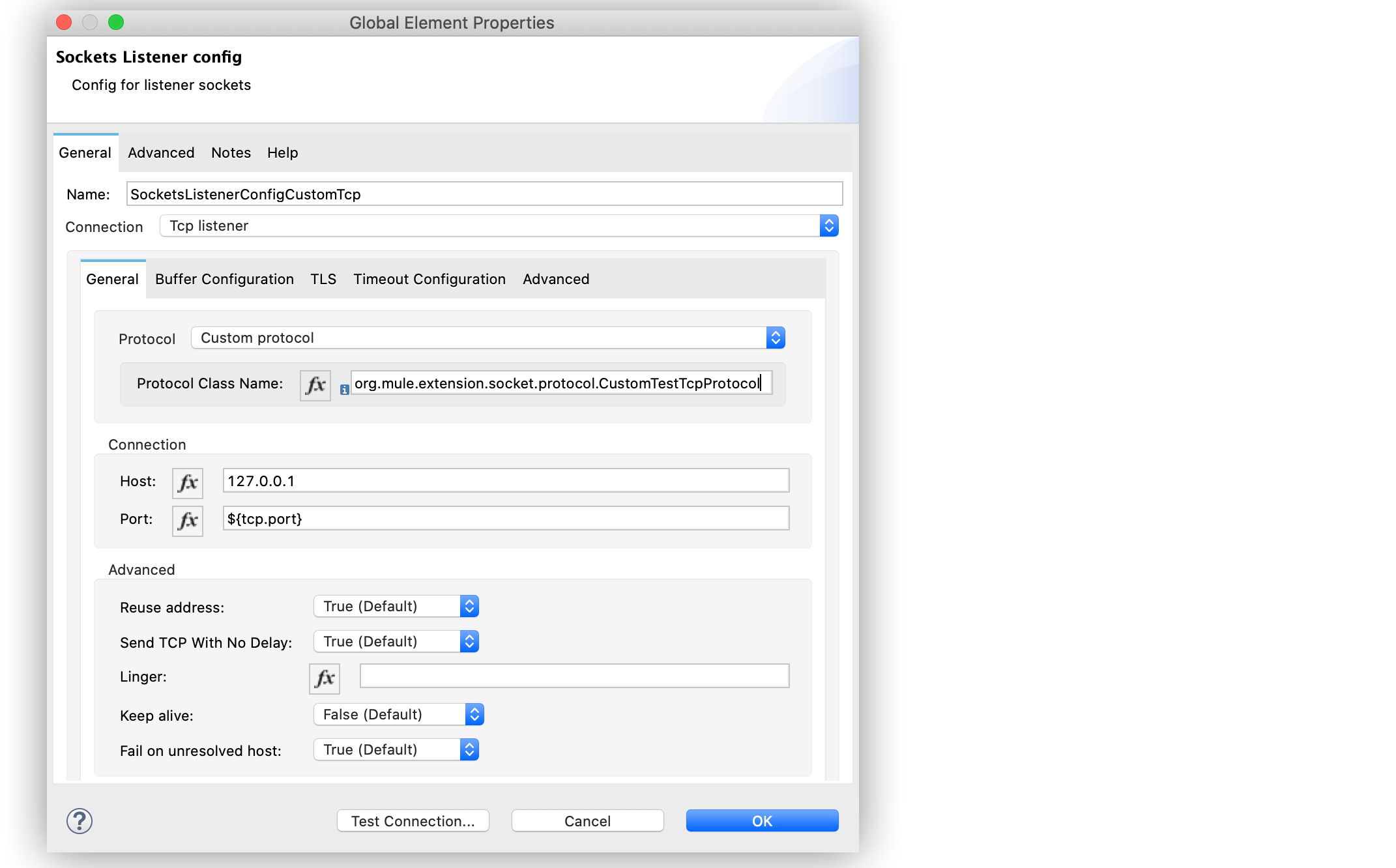
Figure 1. Sockets Listener Custom Protocol Configuration
- Sockets Send operation or Send and receive operation
1. In Studio, open the **Global Element Properties** configuration of your Sockets Send operation
or Send and receive operation.
2. On the **Connection** tab, set **Protocol** to `Custom protocol`.
3. Add the class name in the **Protocol Class Name** field.
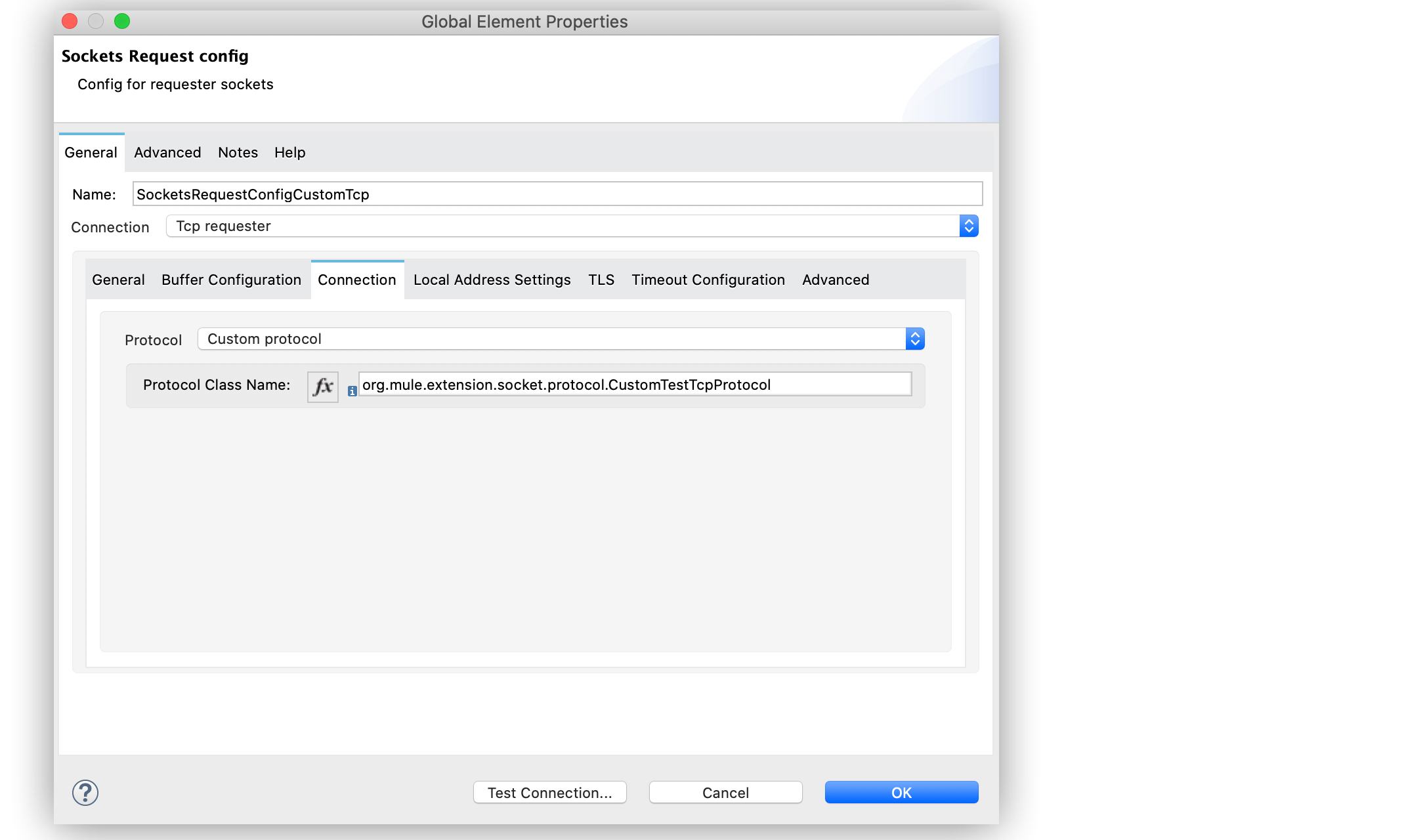
Figure 2. Sockets Send and Receive Custom Protocol Configuration
In the **Configuration XML** tab, use the `class` parameter to add the class in the
`sockets:custom-protocol` section of the connector operation:
```xml
```
## See Also
[Introduction to Anypoint Connectors](https://docs.mulesoft.com/connectors/introduction/introduction-to-anypoint-connectors)
[Salesforce Help](https://help.salesforce.com)