---
schema_version: "1"
id: 33222ecb7e58e95f6bc0ae5d69d5af3cfceb7ad934273fc0f2c0d444418cc2dd
title: Oracle EBS 12.1 Connector 5.3
collection: mulesoft
version: current
locale: en-us
portal_url: https://docs.salesforce.com/mulesoft/current/en-us/oracle-ebs-connector/latest/index.md
canonical_url: https://docs.mulesoft.com/oracle-ebs-connector/latest/
source_site: docs.mulesoft.com
content_type: documentation
content_hash: a1310e9a8e2d323b2d3a13c1df34030d5207860eb889624d978aeb85df4f99fd
description: MuleSoft Documentation Site
release: "5.3"
latest: true
---
---
product: Oracle EBS 12.1 Connector
version: 5.3
is-latest-version: true
---
# Oracle EBS 12.1 Connector 5.3
> For the full documentation index, see: https://docs.mulesoft.com/llms.txt
Anypoint Connector for Oracle E-Business Suite (Oracle EBS Connector) provides real-time
connectivity to query and update Oracle EBS using web services and message queues. The connector has
been developed for the Oracle EBS v12.1.x.
Oracle EBS Connector provides integration to the following:
- Financial Management and Order Management Modules: Full API coverage for Financials and Order
Management services
- PL/SQL Integration: Both standard PL/SQL or user-defined PL/SQL can be invoked
- XML Gateway: Inbound and Outbound, to send and receive message to and from EBS
- Business Events: The ability to receive messages when an event is fired in EBS, via the
`WF_JMS_JMS_OUT` topic
## Before You Begin
To use this information, you should be familiar with Oracle EBS, Mule runtime engine (Mule),
Anypoint Connectors, Anypoint Studio, Mule concepts, elements in a Mule flow, and Global Elements.
You need login credentials to test your connection to your target resource.
To use this connector with Maven, view the pom.xml dependency information in the Dependency Snippets
in Anypoint Exchange.
## POM File Information
```xml
org.mule.connectors
mule-oracle-ebs-connector
x.x.x
mule-plugin
```
Replace `x.x.x` with the version that corresponds to the connector you are using.
To obtain the most up-to-date `pom.xml` file information, access the connector in
[Anypoint Exchange](https://www.mulesoft.com/exchange/) and click **Dependency Snippets**.
## Connector Architecture
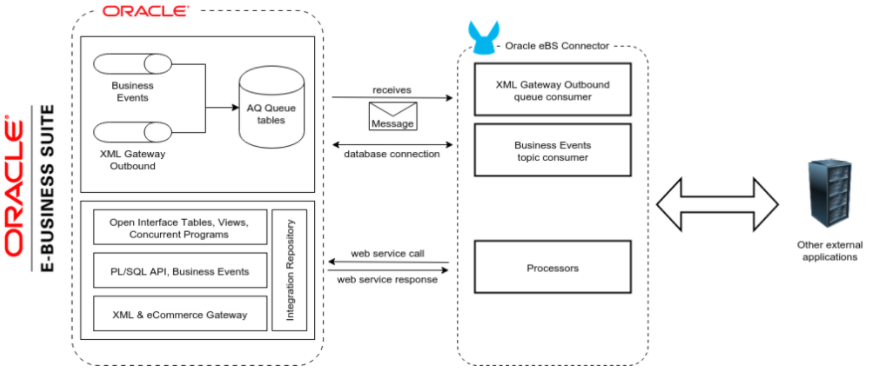
Oracle EBS offers different technologies or products to address various types of integrations. The
most widely used technologies for integration with enterprise applications includes:
1. Data-centric integration
2. Event-driven integration using Oracle Business Event System and XML Gateway queues
3. Integration through Web Services using Oracle E-Business Suite Integrated SOA Gateway (ISG)
## Web Service Endpoints
The supported Oracle Web Service endpoints include the following:
- Receivables
- DQM Search Service (`/oracle/apps/ar/hz/service/party/DqmSearchService`)
- Find Parties
- Email Business Object Services (`/oracle/apps/ar/hz/service/party/EmailService`)
- Create E-mail
- Get E-mail
- Save E-mail
- Update E-mail
- Location Business Object Services (`/oracle/apps/ar/hz/service/party/LocationService`)
- Create Location
- Get Location
- Save Location
- Update Location
- Organization Business Object Services (`/oracle/apps/ar/hz/service/party/OrganizationService`)
- Create Organization
- Get Organization
- Get Organizations Created
- Get Organizations Updated
- Save Organization
- Update Organization
- Organization Contact Business Object Services
(`/oracle/apps/ar/hz/service/party/OrgContactService`)
- Create Organization Contact
- Get Organization Contact
- Save Organization Contact
- Update Organization Contact
- Organization Customer Business Object Services
(`/oracle/apps/ar/hz/service/account/OrgCustomerService`)
- Create Organization Customer
- Get Organization Customer
- Get Organization Customers Created
- Get Organization Customers Updated
- Save Organization Customer
- Update Organization Customer
- Party Site Business Object Services (`/oracle/apps/ar/hz/service/party/PartySiteService`)
- Create Party Site
- Get Party Site
- Save Party Site
- Update Party Site
- Person Business Object Services (`/oracle/apps/ar/hz/service/party/PersonService`)
- Create Person
- Get Person
- Get Persons Created
- Get Persons Updated
- Save Person
- Update Person
- Person Customer Business Object Services
(`/oracle/apps/ar/hz/service/account/PersonCustomerService`)
- Create Person Customer
- Get Person Customer
- Get Person Customers Created
- Get Person Customers Updated
- Save Person Customer
- Update Person Customer
- Phone Business Object Services (`/oracle/apps/ar/hz/service/party/PhoneService`)
- Create Phone
- Get Phone
- Save Phone
- Update Phone
- Relationship Business Object Services (`/oracle/apps/ar/hz/service/party/RelationshipService`)
- Create Relationship
- Get Relationship
- Save Relationship
- Update Relationship
- Web Business Object Services (`/oracle/apps/ar/hz/service/party/WebService`)
- Create Web
- Get Web
- Save Web
- Update Web
For PL/SQL functions, the connector supports the following out of the box, along with custom
functions:
- Install Base
- Manage Item Instances (`CSI_ITEM_INSTANCE_PUB`)
- Copy Item Instance
- Create Item Instance
- Get Item Instances
- Get Item Instance Details
- Update Item Instance
- Order Management
- Process Order API (`OE_ORDER_PUB`)
- Delete Line
- Delete Order
- Get Order
- ID to Value
- Lock Order
- Process Header
- Process Line
- Process Order
- Update Header
- Update Line
- Value to ID
- Purchase Order Acknowledgments Extension Columns API (`EC_POAO_EXT`)
- POAO Populate Ext Lev01
- POAO Populate Ext Lev02
- Purchase Order Change Acknowledgments Extension Columns API (`EC_POCAO_EXT`)
- POCAO Populate Ext Lev01
- POCAO Populate Ext Lev02
- Sales Agreement API (`OE_BLANKET_PUB`)
- Process Blanket
- Ship Conformation (`OE_SHIP_CONFIRMATION_PUB`)
- Ship Zero
- Payables
- Suppliers Package (`AP_VENDOR_PUB_PKG`)
- Create Vendor
- Create Vendor Contact
- Create Vendor Site
- Receivables
- Invoice Creation (`AR_INVOICE_API_PUB`)
- Create Invoice
- Create Single Invoice
- Trading Community
- Location (`HZ_LOCATION_V2PUB`)
- Create Location
- Create Location 1
- Update Location
- Update Location 1
- Party Contact (`HZ_PARTY_CONTACT_V2PUB`)
- Create Org Contact
- Create Org Contact Role
- Update Org Contact
- Update Org Contact Role
### Add Libraries for This Connector
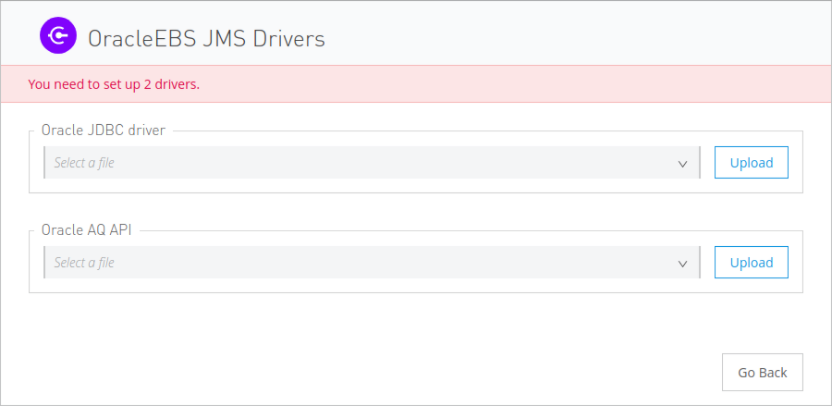
To subscribe to business events or to the XML Gateway queue, the JMS Configuration requires two
external libraries:
1. Go to the connector’s JMS configuration.
2. Click **Set Up** under the message to setup drivers.
3. Upload and select your libraries.
1. Oracle AQ API: Can be retrieved from the EBS instance, at
`$ORACLE_HOME/rdbms/jlib/aqapi.jar`.
2. Oracle Database JDBC Driver: Can also be found in the instance, at
`$ORACLE_HOME/jdbc/lib/ojdbc6.jar`.
## Add the Connector to a Studio Project
Anypoint Studio provides two ways to add the connector to your Studio project:
- From the Exchange button in the Studio taskbar
- From the Mule Palette view
### Add the Connector Using Exchange
1. In Studio, create a Mule project.
2. Click the Exchange icon **(X)** in the upper-left of the Studio task bar.
3. In Exchange, click **Login** and supply your Anypoint Platform username and password.
4. In Exchange, search for "ebs".
5. Select the connector and click **Add to project**.
6. Follow the prompts to install the connector.
### Add the Connector in Studio
1. In Studio, create a Mule project.
2. In the Mule Palette view, click **(X) Search in Exchange**.
3. In **Add Modules to Project**, type "ebs" in the search field.
4. Click this connector’s name in **Available modules**.
5. Click **Add**.
6. Click **Finish**.
### Configure in Studio
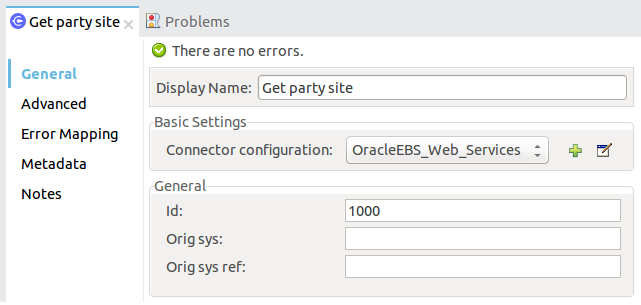
1. Drag a connector’s operation to the Studio Canvas.
2. Configure the example Get Party Site:
1. Id: TCA identifier for the Party Site business object.
2. Orig Sys: Party Site original system name.
3. Orig Sys Ref: Party Site original system reference.
## Log PSQL and Web Service Requests and Responses
To log PSQL and Web Service requests and responses when using the connector, configure a logger:
- For PSQL requests and responses, add this line to the `Loggers` element of the `log4j2.xml`
configuration file for the Mule app:
```xml
```
- For web service requests and responses, add this line to the `Loggers` element of the `log4j2.xml`
configuration file for the Mule app:
```xml
```
The following example shows the `Loggers` element with the `AsyncLogger` line configured to log
web service requests and responses:
```xml
```
## Use Case: Call and Log an Operation
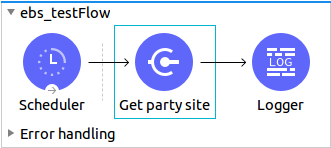
This sample flow calls an operation every 30 seconds and logs its output.
1. Drag a Scheduler and set the frequency to 30 seconds.
2. Select **Oracle EBS > Get Party Site** from the Mule Palette view and drag it to the flow.
3. Configure its input.
4. Drag a Logger and set its message to `#[payload]`.
### Use Case: XML
Here is the code for the aforementioned example:
```xml
```
## See Also
- [Oracle E-Business Suite 12.1 Connector Release Notes](https://docs.mulesoft.com/release-notes/connector/oracle-ebs-connector-release-notes-mule-4)
- [Oracle E-Business Suite (EBS) 12.1 Connector](https://www.mulesoft.com/exchange/org.mule.connectors/mule-oracle-ebs-connector/)
- [Oracle site](https://www.oracle.com/applications/ebusiness/)
- [Oracle E-Business Suite Documentation Web Library](https://docs.oracle.com/cd/E18727_01/index.htm)
- [Salesforce Help](https://help.salesforce.com)