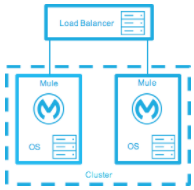
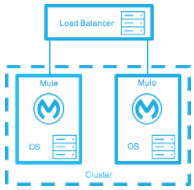
# mulesoft On-premises Runtimes - Full Documentation --- product: On-premises Runtimes version: 4.11 keywords: hazelcast, quorum, split brain, node failure, failover, virtual IP, load balancer, server group, object store, mule-cluster.properties, 5701, multicast, unicast, on-premises, on-prem, standalone --- # Cluster On-Premises Mule Runtime Instances > For the full documentation index, see: https://docs.mulesoft.com/llms.txt Clustering is optional. Use it when on-premises runtime must keep serving traffic if a node fails. Clustering requires Mule Enterprise Edition and an [Enterprise license](https://docs.mulesoft.com/on-premises/4.11/installing-an-enterprise-license). You supply the load balancer. The cluster doesn’t create a virtual IP and doesn’t copy Mule application artifacts from node to node. A server group isn’t a cluster. A server group is a set of unclustered servers that Runtime Manager can deploy to together. Server groups and Runtime Manager clusters are in [Hybrid Standalone Runtimes](https://docs.mulesoft.com/hybrid-standalone/). See the Cluster stage in [On-Premises Runtimes Overview](https://docs.mulesoft.com/on-premises/4.11/). After you choose a topology, see [On-Premises Mule Runtime High Availability Cluster Overview](https://docs.mulesoft.com/on-premises/4.11/mule-high-availability-ha-clusters) for node behavior, [Create and Manage an On-Premises Mule Runtime Cluster Manually](https://docs.mulesoft.com/on-premises/4.11/creating-and-managing-a-cluster-manually) to create the cluster, and [High Availability and Disaster Recovery for On-Premises Mule Runtime Engine](https://docs.mulesoft.com/on-premises/4.11/on-premises-hadr) for standby options. ## Choose a Clustering Topology A cluster shares memory, VM queues, and object-store data across nodes. Deploying a Mule application into a cluster is useful for: - High availability (HA): making your system continually available in the event that one or more servers in the cluster, or a data center, fails. - Fault tolerance (FT): ensuring recovery from failure of an underlying component. Typically, the recovery is achieved through transaction rollback or compensating actions. - Scaling: ensuring that your application can scale horizontally to meet increased demand. ## Understand On-Premises High Availability **_Enterprise Edition_**

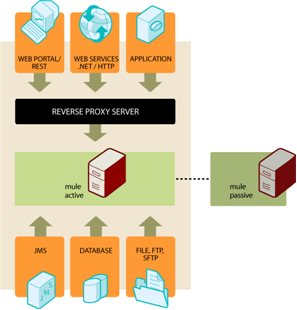
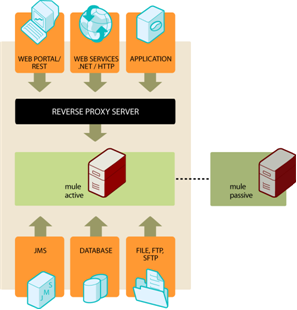
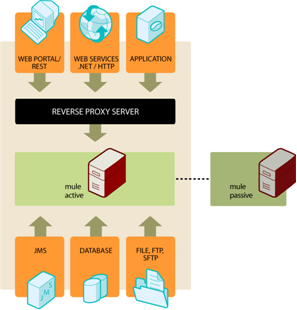
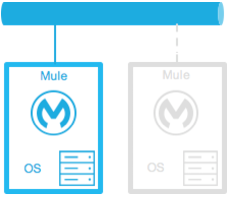
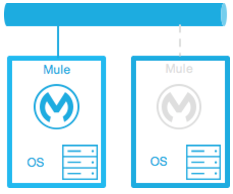
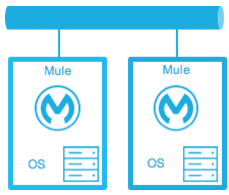
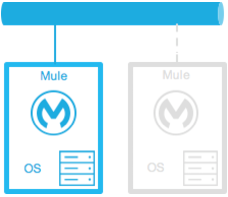
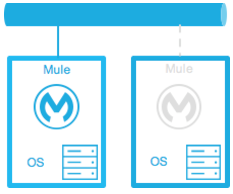
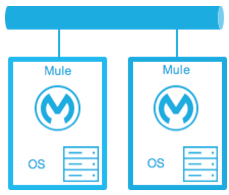
Mule High Availability provides basic failover capability for Mule. When the primary Mule instance become unavailable (e.g., because of a fatal JVM or hardware failure or it’s taken offline for maintenance), a backup Mule instance immediately becomes the primary node and resumes processing where the failed instance left off. After a system administrator has recovered the failed Mule instance and brought it back online, it automatically becomes the backup node.

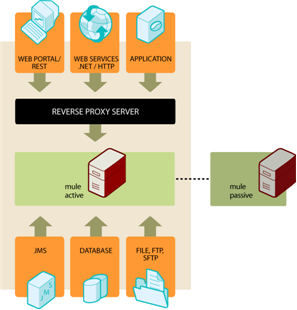
Seamless failover is made possible by a distributed memory store that shares all transient state information among clustered Mule instances, such as:

  • SEDA service event queues

  • In-memory message queues

Mule High Availability is currently available for the following transports:

  • HTTP (including CXF Web Services)

  • JMS

  • WebSphere MQ

  • JDBC

  • File

  • FTP

  • Clustered (replaces the local VM transport)

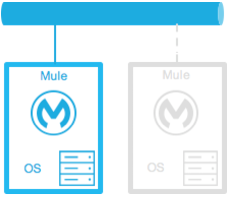
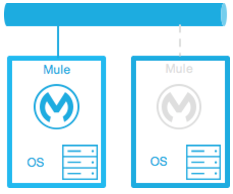
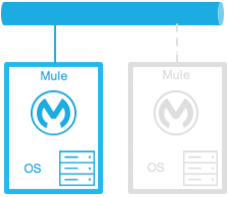
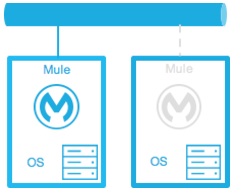
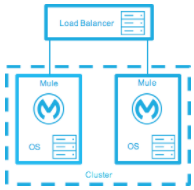
A high-availability architecture featuring web services and a reverse proxy server

Mule High Availability is available with Mule Enterprise subscriptions. For details including technical highlights, requirements, and installation details, [contact us](mailto:sales@mulesoft.com). ## Use JMS Queues for High Availability JMS can be used to achieve HA & FT by routing messages through JMS queues. In this case, each message is routed through a JMS queue whenever it moves from component to component. ![A Mule server cluster interfacing with external JMS queues](/mulesoft/current/en-us/on-premises/4.11/_images/jms-queues.png) Pros: - Easy to do - Well understood by developers Cons: - Requires lots of transactions, and transactions can be complicated - Performance hit if you’re using XA ## Use Load Balancers with Clusters Load balancers simply route requests to different servers based on the current load of each server and which servers are currently up. Load balancers can be software or hardware based. This approach is commonly used with clustered databases (see below). Pros: - Straightforward to do - Well understood by developers Cons: - Not a complete solution on its own, doesn’t provide fault tolerance. ## Review a Clustered Topology Example In this example architecture, HTTP requests come in through a load balancer and are immediately put on a JMS queue. The JMS queue is clustered between the different servers. A server will start processing a message off the JMS queue and wrap everything in a transaction. ![A flow including an HTTP and JMS configurations](/mulesoft/current/en-us/on-premises/4.11/_images/http-and-jms.png) If the server goes down, the transaction will roll back and another server will pick up the message and start processing it. **Note**: If the HTTP connection is open for the duration of this process, this approach will not work, as the load balancer will not transparently switch connections between servers. In this case, the HTTP client will need to retry the request. ## Maintain State in a Database If you have a clustered database, one option for your application is to simply store all state in the database and rely on it to replicate the data consistently across servers. Pros: - Straightforward to do - Well understood by developers Cons: - Not all state is amenable to being stored in the database ## Handle Stateful Components While most applications can be supported by the above techniques, some require sharing state between JVMs more deeply. One common example of this is an aggregator component. For example, assume you have an aggregator that is aggregating messages from two different producers. Producer #1 sends a message to the aggregator, which receives it and holds it in memory until Producer #2 sends a message. ```text Producer #1 ---> |----------| |Aggregator| --> Some other component Producer #2 ---> |----------| ``` If the server with the aggregator goes down between Producer #1 sending a message and Producer #2 sending a message, Producer #2 can’t just send its message to a different server because that server will not have the message from Producer #1. The solution to this is to share the state of the aggregator component across different machines through clustering software such as Terracotta, Oracle Coherence, JGroups, etc. By using one of these tools, Producer #2 can simply fail over to a different server. Note that MuleSoft has not tested Mule with these tools and does not officially support them. Pros: - Works for all clustering cases - Can work as a cache as well Cons: - Not officially supported by MuleSoft - Requires performance tuning to get things working efficiently ## Review Related Clustering Topics As you design your topology, there are several other topics to keep in mind that also affect topology design: - Maintaining geo-distributed clusters - Data partitioning - ACID vs. BASE transactions - Compensation and transactions ## See Also - [On-Premises Runtimes Overview](https://docs.mulesoft.com/on-premises/4.11/) - [Install an Enterprise License on On-Premises Mule Runtime Engine](https://docs.mulesoft.com/on-premises/4.11/installing-an-enterprise-license) - [On-Premises Mule Runtime High Availability Cluster Overview](https://docs.mulesoft.com/on-premises/4.11/mule-high-availability-ha-clusters) - [Create and Manage an On-Premises Mule Runtime Cluster Manually](https://docs.mulesoft.com/on-premises/4.11/creating-and-managing-a-cluster-manually) - [High Availability and Disaster Recovery for On-Premises Mule Runtime Engine](https://docs.mulesoft.com/on-premises/4.11/on-premises-hadr) - [Hybrid Standalone Runtimes](https://docs.mulesoft.com/hybrid-standalone/) --- product: On-premises Runtimes version: 4.12 keywords: hazelcast, quorum, split brain, node failure, failover, virtual IP, load balancer, server group, object store, mule-cluster.properties, 5701, multicast, unicast, on-premises, on-prem, standalone --- # Cluster On-Premises Mule Runtime Instances > For the full documentation index, see: https://docs.mulesoft.com/llms.txt Clustering is optional. Use it when on-premises runtime must keep serving traffic if a node fails. Clustering requires Mule Enterprise Edition and an [Enterprise license](https://docs.mulesoft.com/on-premises/4.12/installing-an-enterprise-license). You supply the load balancer. The cluster doesn’t create a virtual IP and doesn’t copy Mule application artifacts from node to node. A server group isn’t a cluster. A server group is a set of unclustered servers that Runtime Manager can deploy to together. Server groups and Runtime Manager clusters are in [Hybrid Standalone Runtimes](https://docs.mulesoft.com/hybrid-standalone/). See the Cluster stage in [On-Premises Runtimes Overview](https://docs.mulesoft.com/on-premises/4.12/). After you choose a topology, see [On-Premises Mule Runtime High Availability Cluster Overview](https://docs.mulesoft.com/on-premises/4.12/mule-high-availability-ha-clusters) for node behavior, [Create and Manage an On-Premises Mule Runtime Cluster Manually](https://docs.mulesoft.com/on-premises/4.12/creating-and-managing-a-cluster-manually) to create the cluster, and [High Availability and Disaster Recovery for On-Premises Mule Runtime Engine](https://docs.mulesoft.com/on-premises/4.12/on-premises-hadr) for standby options. ## Choose a Clustering Topology A cluster shares memory, VM queues, and object-store data across nodes. Deploying a Mule application into a cluster is useful for: - High availability (HA): making your system continually available in the event that one or more servers in the cluster, or a data center, fails. - Fault tolerance (FT): ensuring recovery from failure of an underlying component. Typically, the recovery is achieved through transaction rollback or compensating actions. - Scaling: ensuring that your application can scale horizontally to meet increased demand. ## Understand On-Premises High Availability **_Enterprise Edition_**
Mule High Availability provides basic failover capability for Mule. When the primary Mule instance become unavailable (e.g., because of a fatal JVM or hardware failure or it’s taken offline for maintenance), a backup Mule instance immediately becomes the primary node and resumes processing where the failed instance left off. After a system administrator has recovered the failed Mule instance and brought it back online, it automatically becomes the backup node.

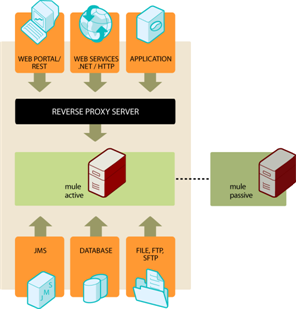
Seamless failover is made possible by a distributed memory store that shares all transient state information among clustered Mule instances, such as:

  • SEDA service event queues

  • In-memory message queues

Mule High Availability is currently available for these transports:

  • HTTP (including CXF Web Services)

  • JMS

  • WebSphere MQ

  • JDBC

  • File

  • FTP

  • Clustered (replaces the local VM transport)

A high-availability architecture featuring web services and a reverse proxy server

Mule High Availability is available with Mule Enterprise subscriptions. For details including technical highlights, requirements, and installation details, [contact us](mailto:sales@mulesoft.com). ## Use JMS Queues for High Availability JMS can be used to achieve HA & FT by routing messages through JMS queues. In this case, each message is routed through a JMS queue whenever it moves from component to component. ![A Mule server cluster interfacing with external JMS queues](/mulesoft/current/en-us/on-premises/4.12/_images/jms-queues.png) Pros: - Easy to do - Well understood by developers Cons: - Requires lots of transactions, and transactions can be complicated - Performance hit if you’re using XA ## Use Load Balancers with Clusters Load balancers simply route requests to different servers based on the current load of each server and which servers are currently up. Load balancers can be software or hardware based. This approach is commonly used with clustered databases (see below). Pros: - Straightforward to do - Well understood by developers Cons: - Not a complete solution on its own, doesn’t provide fault tolerance. ## Review a Clustered Topology Example In this example architecture, HTTP requests come in through a load balancer and are immediately put on a JMS queue. The JMS queue is clustered between the different servers. A server will start processing a message off the JMS queue and wrap everything in a transaction. ![A flow including an HTTP and JMS configurations](/mulesoft/current/en-us/on-premises/4.12/_images/http-and-jms.png) If the server goes down, the transaction will roll back and another server will pick up the message and start processing it. **Note**: If the HTTP connection is open for the duration of this process, this approach will not work, as the load balancer will not transparently switch connections between servers. In this case, the HTTP client will need to retry the request. ## Maintain State in a Database If you have a clustered database, one option for your application is to simply store all state in the database and rely on it to replicate the data consistently across servers. Pros: - Straightforward to do - Well understood by developers Cons: - Not all state is amenable to being stored in the database ## Handle Stateful Components While most Mule applications can be supported by the above techniques, some require sharing state between JVMs more deeply. One common example of this is an aggregator component. For example, assume you have an aggregator that is aggregating messages from two different producers. Producer #1 sends a message to the aggregator, which receives it and holds it in memory until Producer #2 sends a message. ```text Producer #1 ---> |----------| |Aggregator| --> Some other component Producer #2 ---> |----------| ``` If the server with the aggregator goes down between Producer #1 sending a message and Producer #2 sending a message, Producer #2 can’t just send its message to a different server because that server will not have the message from Producer #1. The solution to this is to share the state of the aggregator component across different machines through clustering software such as Terracotta, Oracle Coherence, JGroups, etc. By using one of these tools, Producer #2 can simply fail over to a different server. Note that MuleSoft has not tested Mule with these tools and doesn’t officially support them. Pros: - Works for all clustering cases - Can work as a cache as well Cons: - Not officially supported by MuleSoft - Requires performance tuning to get things working efficiently ## Review Related Clustering Topics These topics also affect topology design: - Maintaining geo-distributed clusters - Data partitioning - ACID vs. BASE transactions - Compensation and transactions If you need more assistance, MuleSoft Professional Services can review your architecture plan. For more information, [contact us](https://www.mulesoft.com/contact). ## See Also - [On-Premises Runtimes Overview](https://docs.mulesoft.com/on-premises/4.12/) - [Install an Enterprise License on On-Premises Mule Runtime Engine](https://docs.mulesoft.com/on-premises/4.12/installing-an-enterprise-license) - [On-Premises Mule Runtime High Availability Cluster Overview](https://docs.mulesoft.com/on-premises/4.12/mule-high-availability-ha-clusters) - [Create and Manage an On-Premises Mule Runtime Cluster Manually](https://docs.mulesoft.com/on-premises/4.12/creating-and-managing-a-cluster-manually) - [High Availability and Disaster Recovery for On-Premises Mule Runtime Engine](https://docs.mulesoft.com/on-premises/4.12/on-premises-hadr) - [Hybrid Standalone Runtimes](https://docs.mulesoft.com/hybrid-standalone/) --- product: On-premises Runtimes version: 4.3 keywords: hazelcast, quorum, split brain, node failure, failover, virtual IP, load balancer, server group, object store, mule-cluster.properties, 5701, multicast, unicast, on-premises, on-prem, standalone --- # Cluster On-Premises Mule Runtime Instances > For the full documentation index, see: https://docs.mulesoft.com/llms.txt Clustering is optional. Use it when on-premises runtime must keep serving traffic if a node fails. Clustering requires Mule Enterprise Edition and an [Enterprise license](https://docs.mulesoft.com/on-premises/4.3/installing-an-enterprise-license). You supply the load balancer. The cluster doesn’t create a virtual IP and doesn’t copy Mule application artifacts from node to node. A server group isn’t a cluster. A server group is a set of unclustered servers that Runtime Manager can deploy to together. Server groups and Runtime Manager clusters are in [Hybrid Standalone Runtimes](https://docs.mulesoft.com/hybrid-standalone/). See the Cluster stage in [On-Premises Runtimes Overview](https://docs.mulesoft.com/on-premises/4.3/). After you choose a topology, see [On-Premises Mule Runtime High Availability Cluster Overview](https://docs.mulesoft.com/on-premises/4.3/mule-high-availability-ha-clusters) for node behavior, [Create and Manage an On-Premises Mule Runtime Cluster Manually](https://docs.mulesoft.com/on-premises/4.3/creating-and-managing-a-cluster-manually) to create the cluster, and [High Availability and Disaster Recovery for On-Premises Mule Runtime Engine](https://docs.mulesoft.com/on-premises/4.3/on-premises-hadr) for standby options. ## Choose a Clustering Topology A cluster shares memory, VM queues, and object-store data across nodes. Deploying a Mule application into a cluster is useful for: - High availability (HA): making your system continually available in the event that one or more servers in the cluster, or a data center, fails. - Fault tolerance (FT): ensuring recovery from failure of an underlying component. Typically, the recovery is achieved through transaction rollback or compensating actions. - Scaling: ensuring that your application can scale horizontally to meet increased demand. ## Understand On-Premises High Availability **_Enterprise Edition_**

Mule High Availability provides basic failover capability for Mule. When the primary Mule instance become unavailable (e.g., because of a fatal JVM or hardware failure or it’s taken offline for maintenance), a backup Mule instance immediately becomes the primary node and resumes processing where the failed instance left off. After a system administrator has recovered the failed Mule instance and brought it back online, it automatically becomes the backup node.

Seamless failover is made possible by a distributed memory store that shares all transient state information among clustered Mule instances, such as:

  • SEDA service event queues

  • In-memory message queues

Mule High Availability is currently available for the following transports:

  • HTTP (including CXF Web Services)

  • JMS

  • WebSphere MQ

  • JDBC

  • File

  • FTP

  • Clustered (replaces the local VM transport)

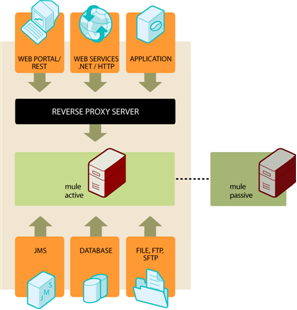
HA-arch

Mule High Availability is available with Mule Enterprise subscriptions. For details including technical highlights, requirements, and installation details, [contact us](mailto:sales@mulesoft.com). ## Use JMS Queues for High Availability JMS can be used to achieve HA & FT by routing messages through JMS queues. In this case, each message is routed through a JMS queue whenever it moves from component to component. ![jms queues](/mulesoft/current/en-us/on-premises/4.3/_images/jms-queues.png) Pros: - Easy to do - Well understood by developers Cons: - Requires lots of transactions, and transactions can be complicated - Performance hit if you’re using XA ## Use Load Balancers with Clusters Load balancers simply route requests to different servers based on the the current load of each server and which servers are currently up. Load balancers can be software or hardware based. This approach is commonly used with clustered databases (see below). Pros: - Straightforward to do - Well understood by developers Cons: - Not a complete solution on its own, doesn’t provide fault tolerance. ## Review a Clustered Topology Example In this example architecture, HTTP requests come in through a load balancer and are immediately put on a JMS queue. The JMS queue is clustered between the different servers. A server will start processing a message off the JMS queue and wrap everything in a transaction. ![http\_and\_jms](/mulesoft/current/en-us/on-premises/4.3/_images/http-and-jms.png) If the server goes down, the transaction will roll back and another server will pick up the message and start processing it. **Note**: If the HTTP connection is open for the duration of this process, this approach will not work, as the load balancer will not transparently switch connections between servers. In this case, the HTTP client will need to retry the request. ## Maintain State in a Database If you have a clustered database, one option for your application is to simply store all state in the database and rely on it to replicate the data consistently across servers. Pros: - Straightforward to do - Well understood by developers Cons: - Not all state is amenable to being stored in the database ## Handle Stateful Components While most applications can be supported by the above techniques, some require sharing state between JVMs more deeply. One common example of this is an aggregator component. For example, assume you have an aggregator that is aggregating messages from two different producers. Producer #1 sends a message to the aggregator, which receives it and holds it in memory until Producer #2 sends a message. ```text Producer #1 ---> |----------| |Aggregator| --> Some other component Producer #2 ---> |----------| ``` If the server with the aggregator goes down between Producer #1 sending a message and Producer #2 sending a message, Producer #2 can’t just send its message to a different server because that server will not have the message from Producer #1. The solution to this is to share the state of the aggregator component across different machines through clustering software such as Terracotta, Oracle Coherence, JGroups, etc. By using one of these tools, Producer #2 can simply fail over to a different server. Note that MuleSoft has not tested Mule with these tools and does not officially support them. Pros: - Works for all clustering cases - Can work as a cache as well Cons: - Not officially supported by MuleSoft - Requires performance tuning to get things working efficiently ## Review Related Clustering Topics As you design your topology, there are several other topics to keep in mind that also affect topology design: - Maintaining geo-distributed clusters - Data partitioning - ACID vs. BASE transactions - Compensation and transactions ## See Also - [On-Premises Runtimes Overview](https://docs.mulesoft.com/on-premises/4.3/) - [Install an Enterprise License on On-Premises Mule Runtime Engine](https://docs.mulesoft.com/on-premises/4.3/installing-an-enterprise-license) - [On-Premises Mule Runtime High Availability Cluster Overview](https://docs.mulesoft.com/on-premises/4.3/mule-high-availability-ha-clusters) - [Create and Manage an On-Premises Mule Runtime Cluster Manually](https://docs.mulesoft.com/on-premises/4.3/creating-and-managing-a-cluster-manually) - [High Availability and Disaster Recovery for On-Premises Mule Runtime Engine](https://docs.mulesoft.com/on-premises/4.3/on-premises-hadr) - [Hybrid Standalone Runtimes](https://docs.mulesoft.com/hybrid-standalone/) --- product: On-premises Runtimes version: 4.4 keywords: hazelcast, quorum, split brain, node failure, failover, virtual IP, load balancer, server group, object store, mule-cluster.properties, 5701, multicast, unicast, on-premises, on-prem, standalone --- # Cluster On-Premises Mule Runtime Instances > For the full documentation index, see: https://docs.mulesoft.com/llms.txt Clustering is optional. Use it when on-premises runtime must keep serving traffic if a node fails. Clustering requires Mule Enterprise Edition and an [Enterprise license](https://docs.mulesoft.com/on-premises/4.4/installing-an-enterprise-license). You supply the load balancer. The cluster doesn’t create a virtual IP and doesn’t copy Mule application artifacts from node to node. A server group isn’t a cluster. A server group is a set of unclustered servers that Runtime Manager can deploy to together. Server groups and Runtime Manager clusters are in [Hybrid Standalone Runtimes](https://docs.mulesoft.com/hybrid-standalone/). See the Cluster stage in [On-Premises Runtimes Overview](https://docs.mulesoft.com/on-premises/4.4/). After you choose a topology, see [On-Premises Mule Runtime High Availability Cluster Overview](https://docs.mulesoft.com/on-premises/4.4/mule-high-availability-ha-clusters) for node behavior, [Create and Manage an On-Premises Mule Runtime Cluster Manually](https://docs.mulesoft.com/on-premises/4.4/creating-and-managing-a-cluster-manually) to create the cluster, and [High Availability and Disaster Recovery for On-Premises Mule Runtime Engine](https://docs.mulesoft.com/on-premises/4.4/on-premises-hadr) for standby options. ## Choose a Clustering Topology A cluster shares memory, VM queues, and object-store data across nodes. Deploying a Mule application into a cluster is useful for: - High availability (HA): making your system continually available in the event that one or more servers in the cluster, or a data center, fails. - Fault tolerance (FT): ensuring recovery from failure of an underlying component. Typically, the recovery is achieved through transaction rollback or compensating actions. - Scaling: ensuring that your application can scale horizontally to meet increased demand. ## Understand On-Premises High Availability **_Enterprise Edition_**

Mule High Availability provides basic failover capability for Mule. When the primary Mule instance become unavailable (e.g., because of a fatal JVM or hardware failure or it’s taken offline for maintenance), a backup Mule instance immediately becomes the primary node and resumes processing where the failed instance left off. After a system administrator has recovered the failed Mule instance and brought it back online, it automatically becomes the backup node.

Seamless failover is made possible by a distributed memory store that shares all transient state information among clustered Mule instances, such as:

  • SEDA service event queues

  • In-memory message queues

Mule High Availability is currently available for the following transports:

  • HTTP (including CXF Web Services)

  • JMS

  • WebSphere MQ

  • JDBC

  • File

  • FTP

  • Clustered (replaces the local VM transport)

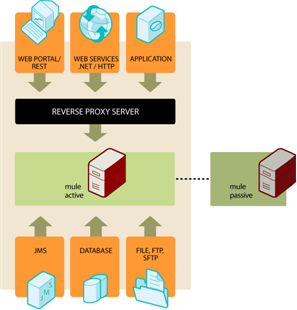
HA-arch

Mule High Availability is available with Mule Enterprise subscriptions. For details including technical highlights, requirements, and installation details, [contact us](mailto:sales@mulesoft.com). ## Use JMS Queues for High Availability JMS can be used to achieve HA & FT by routing messages through JMS queues. In this case, each message is routed through a JMS queue whenever it moves from component to component. ![jms queues](/mulesoft/current/en-us/on-premises/4.4/_images/jms-queues.png) Pros: - Easy to do - Well understood by developers Cons: - Requires lots of transactions, and transactions can be complicated - Performance hit if you’re using XA ## Use Load Balancers with Clusters Load balancers simply route requests to different servers based on the the current load of each server and which servers are currently up. Load balancers can be software or hardware based. This approach is commonly used with clustered databases (see below). Pros: - Straightforward to do - Well understood by developers Cons: - Not a complete solution on its own, doesn’t provide fault tolerance. ## Review a Clustered Topology Example In this example architecture, HTTP requests come in through a load balancer and are immediately put on a JMS queue. The JMS queue is clustered between the different servers. A server will start processing a message off the JMS queue and wrap everything in a transaction. ![http\_and\_jms](/mulesoft/current/en-us/on-premises/4.4/_images/http-and-jms.png) If the server goes down, the transaction will roll back and another server will pick up the message and start processing it. **Note**: If the HTTP connection is open for the duration of this process, this approach will not work, as the load balancer will not transparently switch connections between servers. In this case, the HTTP client will need to retry the request. ## Maintain State in a Database If you have a clustered database, one option for your application is to simply store all state in the database and rely on it to replicate the data consistently across servers. Pros: - Straightforward to do - Well understood by developers Cons: - Not all state is amenable to being stored in the database ## Handle Stateful Components While most applications can be supported by the above techniques, some require sharing state between JVMs more deeply. One common example of this is an aggregator component. For example, assume you have an aggregator that is aggregating messages from two different producers. Producer #1 sends a message to the aggregator, which receives it and holds it in memory until Producer #2 sends a message. ```text Producer #1 ---> |----------| |Aggregator| --> Some other component Producer #2 ---> |----------| ``` If the server with the aggregator goes down between Producer #1 sending a message and Producer #2 sending a message, Producer #2 can’t just send its message to a different server because that server will not have the message from Producer #1. The solution to this is to share the state of the aggregator component across different machines through clustering software such as Terracotta, Oracle Coherence, JGroups, etc. By using one of these tools, Producer #2 can simply fail over to a different server. Note that MuleSoft has not tested Mule with these tools and does not officially support them. Pros: - Works for all clustering cases - Can work as a cache as well Cons: - Not officially supported by MuleSoft - Requires performance tuning to get things working efficiently ## Review Related Clustering Topics As you design your topology, there are several other topics to keep in mind that also affect topology design: - Maintaining geo-distributed clusters - Data partitioning - ACID vs. BASE transactions - Compensation and transactions ## See Also - [On-Premises Runtimes Overview](https://docs.mulesoft.com/on-premises/4.4/) - [Install an Enterprise License on On-Premises Mule Runtime Engine](https://docs.mulesoft.com/on-premises/4.4/installing-an-enterprise-license) - [On-Premises Mule Runtime High Availability Cluster Overview](https://docs.mulesoft.com/on-premises/4.4/mule-high-availability-ha-clusters) - [Create and Manage an On-Premises Mule Runtime Cluster Manually](https://docs.mulesoft.com/on-premises/4.4/creating-and-managing-a-cluster-manually) - [High Availability and Disaster Recovery for On-Premises Mule Runtime Engine](https://docs.mulesoft.com/on-premises/4.4/on-premises-hadr) - [Hybrid Standalone Runtimes](https://docs.mulesoft.com/hybrid-standalone/) --- product: On-premises Runtimes version: 4.6 keywords: hazelcast, quorum, split brain, node failure, failover, virtual IP, load balancer, server group, object store, mule-cluster.properties, 5701, multicast, unicast, on-premises, on-prem, standalone --- # Cluster On-Premises Mule Runtime Instances > For the full documentation index, see: https://docs.mulesoft.com/llms.txt Clustering is optional. Use it when on-premises runtime must keep serving traffic if a node fails. Clustering requires Mule Enterprise Edition and an [Enterprise license](https://docs.mulesoft.com/on-premises/4.6/installing-an-enterprise-license). You supply the load balancer. The cluster doesn’t create a virtual IP and doesn’t copy Mule application artifacts from node to node. A server group isn’t a cluster. A server group is a set of unclustered servers that Runtime Manager can deploy to together. Server groups and Runtime Manager clusters are in [Hybrid Standalone Runtimes](https://docs.mulesoft.com/hybrid-standalone/). See the Cluster stage in [On-Premises Runtimes Overview](https://docs.mulesoft.com/on-premises/4.6/). After you choose a topology, see [On-Premises Mule Runtime High Availability Cluster Overview](https://docs.mulesoft.com/on-premises/4.6/mule-high-availability-ha-clusters) for node behavior, [Create and Manage an On-Premises Mule Runtime Cluster Manually](https://docs.mulesoft.com/on-premises/4.6/creating-and-managing-a-cluster-manually) to create the cluster, and [High Availability and Disaster Recovery for On-Premises Mule Runtime Engine](https://docs.mulesoft.com/on-premises/4.6/on-premises-hadr) for standby options. ## Choose a Clustering Topology A cluster shares memory, VM queues, and object-store data across nodes. Deploying a Mule application into a cluster is useful for: - High availability (HA): making your system continually available in the event that one or more servers in the cluster, or a data center, fails. - Fault tolerance (FT): ensuring recovery from failure of an underlying component. Typically, the recovery is achieved through transaction rollback or compensating actions. - Scaling: ensuring that your application can scale horizontally to meet increased demand. ## Understand On-Premises High Availability **_Enterprise Edition_**

Mule High Availability provides basic failover capability for Mule. When the primary Mule instance become unavailable (e.g., because of a fatal JVM or hardware failure or it’s taken offline for maintenance), a backup Mule instance immediately becomes the primary node and resumes processing where the failed instance left off. After a system administrator has recovered the failed Mule instance and brought it back online, it automatically becomes the backup node.

Seamless failover is made possible by a distributed memory store that shares all transient state information among clustered Mule instances, such as:

  • SEDA service event queues

  • In-memory message queues

Mule High Availability is currently available for the following transports:

  • HTTP (including CXF Web Services)

  • JMS

  • WebSphere MQ

  • JDBC

  • File

  • FTP

  • Clustered (replaces the local VM transport)

HA-arch

Mule High Availability is available with Mule Enterprise subscriptions. For details including technical highlights, requirements, and installation details, [contact us](mailto:sales@mulesoft.com). ## Use JMS Queues for High Availability JMS can be used to achieve HA & FT by routing messages through JMS queues. In this case, each message is routed through a JMS queue whenever it moves from component to component. ![jms queues](/mulesoft/current/en-us/on-premises/4.6/_images/jms-queues.png) Pros: - Easy to do - Well understood by developers Cons: - Requires lots of transactions, and transactions can be complicated - Performance hit if you’re using XA ## Use Load Balancers with Clusters Load balancers simply route requests to different servers based on the the current load of each server and which servers are currently up. Load balancers can be software or hardware based. This approach is commonly used with clustered databases (see below). Pros: - Straightforward to do - Well understood by developers Cons: - Not a complete solution on its own, doesn’t provide fault tolerance. ## Review a Clustered Topology Example In this example architecture, HTTP requests come in through a load balancer and are immediately put on a JMS queue. The JMS queue is clustered between the different servers. A server will start processing a message off the JMS queue and wrap everything in a transaction. ![http\_and\_jms](/mulesoft/current/en-us/on-premises/4.6/_images/http-and-jms.png) If the server goes down, the transaction will roll back and another server will pick up the message and start processing it. **Note**: If the HTTP connection is open for the duration of this process, this approach will not work, as the load balancer will not transparently switch connections between servers. In this case, the HTTP client will need to retry the request. ## Maintain State in a Database If you have a clustered database, one option for your application is to simply store all state in the database and rely on it to replicate the data consistently across servers. Pros: - Straightforward to do - Well understood by developers Cons: - Not all state is amenable to being stored in the database ## Handle Stateful Components While most applications can be supported by the above techniques, some require sharing state between JVMs more deeply. One common example of this is an aggregator component. For example, assume you have an aggregator that is aggregating messages from two different producers. Producer #1 sends a message to the aggregator, which receives it and holds it in memory until Producer #2 sends a message. ```text Producer #1 ---> |----------| |Aggregator| --> Some other component Producer #2 ---> |----------| ``` If the server with the aggregator goes down between Producer #1 sending a message and Producer #2 sending a message, Producer #2 can’t just send its message to a different server because that server will not have the message from Producer #1. The solution to this is to share the state of the aggregator component across different machines through clustering software such as Terracotta, Oracle Coherence, JGroups, etc. By using one of these tools, Producer #2 can simply fail over to a different server. Note that MuleSoft has not tested Mule with these tools and does not officially support them. Pros: - Works for all clustering cases - Can work as a cache as well Cons: - Not officially supported by MuleSoft - Requires performance tuning to get things working efficiently ## Review Related Clustering Topics As you design your topology, there are several other topics to keep in mind that also affect topology design: - Maintaining geo-distributed clusters - Data partitioning - ACID vs. BASE transactions - Compensation and transactions ## See Also - [On-Premises Runtimes Overview](https://docs.mulesoft.com/on-premises/4.6/) - [Install an Enterprise License on On-Premises Mule Runtime Engine](https://docs.mulesoft.com/on-premises/4.6/installing-an-enterprise-license) - [On-Premises Mule Runtime High Availability Cluster Overview](https://docs.mulesoft.com/on-premises/4.6/mule-high-availability-ha-clusters) - [Create and Manage an On-Premises Mule Runtime Cluster Manually](https://docs.mulesoft.com/on-premises/4.6/creating-and-managing-a-cluster-manually) - [High Availability and Disaster Recovery for On-Premises Mule Runtime Engine](https://docs.mulesoft.com/on-premises/4.6/on-premises-hadr) - [Hybrid Standalone Runtimes](https://docs.mulesoft.com/hybrid-standalone/) --- product: On-premises Runtimes version: 4.9 keywords: hazelcast, quorum, split brain, node failure, failover, virtual IP, load balancer, server group, object store, mule-cluster.properties, 5701, multicast, unicast, on-premises, on-prem, standalone --- # Cluster On-Premises Mule Runtime Instances > For the full documentation index, see: https://docs.mulesoft.com/llms.txt Clustering is optional. Use it when on-premises runtime must keep serving traffic if a node fails. Clustering requires Mule Enterprise Edition and an [Enterprise license](https://docs.mulesoft.com/on-premises/4.9/installing-an-enterprise-license). You supply the load balancer. The cluster doesn’t create a virtual IP and doesn’t copy Mule application artifacts from node to node. A server group isn’t a cluster. A server group is a set of unclustered servers that Runtime Manager can deploy to together. Server groups and Runtime Manager clusters are in [Hybrid Standalone Runtimes](https://docs.mulesoft.com/hybrid-standalone/). See the Cluster stage in [On-Premises Runtimes Overview](https://docs.mulesoft.com/on-premises/4.9/). After you choose a topology, see [On-Premises Mule Runtime High Availability Cluster Overview](https://docs.mulesoft.com/on-premises/4.9/mule-high-availability-ha-clusters) for node behavior, [Create and Manage an On-Premises Mule Runtime Cluster Manually](https://docs.mulesoft.com/on-premises/4.9/creating-and-managing-a-cluster-manually) to create the cluster, and [High Availability and Disaster Recovery for On-Premises Mule Runtime Engine](https://docs.mulesoft.com/on-premises/4.9/on-premises-hadr) for standby options. ## Choose a Clustering Topology A cluster shares memory, VM queues, and object-store data across nodes. Deploying a Mule application into a cluster is useful for: - High availability (HA): making your system continually available in the event that one or more servers in the cluster, or a data center, fails. - Fault tolerance (FT): ensuring recovery from failure of an underlying component. Typically, the recovery is achieved through transaction rollback or compensating actions. - Scaling: ensuring that your application can scale horizontally to meet increased demand. ## Understand On-Premises High Availability **_Enterprise Edition_**

Mule High Availability provides basic failover capability for Mule. When the primary Mule instance become unavailable (e.g., because of a fatal JVM or hardware failure or it’s taken offline for maintenance), a backup Mule instance immediately becomes the primary node and resumes processing where the failed instance left off. After a system administrator has recovered the failed Mule instance and brought it back online, it automatically becomes the backup node.

Seamless failover is made possible by a distributed memory store that shares all transient state information among clustered Mule instances, such as:

  • SEDA service event queues

  • In-memory message queues

Mule High Availability is currently available for the following transports:

  • HTTP (including CXF Web Services)

  • JMS

  • WebSphere MQ

  • JDBC

  • File

  • FTP

  • Clustered (replaces the local VM transport)

A high-availability architecture featuring web services and a reverse proxy server

Mule High Availability is available with Mule Enterprise subscriptions. For details including technical highlights, requirements, and installation details, [contact us](mailto:sales@mulesoft.com). ## Use JMS Queues for High Availability JMS can be used to achieve HA & FT by routing messages through JMS queues. In this case, each message is routed through a JMS queue whenever it moves from component to component. ![A Mule server cluster interfacing with external JMS queues](/mulesoft/current/en-us/on-premises/4.9/_images/jms-queues.png) Pros: - Easy to do - Well understood by developers Cons: - Requires lots of transactions, and transactions can be complicated - Performance hit if you’re using XA ## Use Load Balancers with Clusters Load balancers simply route requests to different servers based on the current load of each server and which servers are currently up. Load balancers can be software or hardware based. This approach is commonly used with clustered databases (see below). Pros: - Straightforward to do - Well understood by developers Cons: - Not a complete solution on its own, doesn’t provide fault tolerance. ## Review a Clustered Topology Example In this example architecture, HTTP requests come in through a load balancer and are immediately put on a JMS queue. The JMS queue is clustered between the different servers. A server will start processing a message off the JMS queue and wrap everything in a transaction. ![A flow including an HTTP and JMS configurations](/mulesoft/current/en-us/on-premises/4.9/_images/http-and-jms.png) If the server goes down, the transaction will roll back and another server will pick up the message and start processing it. **Note**: If the HTTP connection is open for the duration of this process, this approach will not work, as the load balancer will not transparently switch connections between servers. In this case, the HTTP client will need to retry the request. ## Maintain State in a Database If you have a clustered database, one option for your application is to simply store all state in the database and rely on it to replicate the data consistently across servers. Pros: - Straightforward to do - Well understood by developers Cons: - Not all state is amenable to being stored in the database ## Handle Stateful Components While most applications can be supported by the above techniques, some require sharing state between JVMs more deeply. One common example of this is an aggregator component. For example, assume you have an aggregator that is aggregating messages from two different producers. Producer #1 sends a message to the aggregator, which receives it and holds it in memory until Producer #2 sends a message. ```text Producer #1 ---> |----------| |Aggregator| --> Some other component Producer #2 ---> |----------| ``` If the server with the aggregator goes down between Producer #1 sending a message and Producer #2 sending a message, Producer #2 can’t just send its message to a different server because that server will not have the message from Producer #1. The solution to this is to share the state of the aggregator component across different machines through clustering software such as Terracotta, Oracle Coherence, JGroups, etc. By using one of these tools, Producer #2 can simply fail over to a different server. Note that MuleSoft has not tested Mule with these tools and does not officially support them. Pros: - Works for all clustering cases - Can work as a cache as well Cons: - Not officially supported by MuleSoft - Requires performance tuning to get things working efficiently ## Review Related Clustering Topics As you design your topology, there are several other topics to keep in mind that also affect topology design: - Maintaining geo-distributed clusters - Data partitioning - ACID vs. BASE transactions - Compensation and transactions ## See Also - [On-Premises Runtimes Overview](https://docs.mulesoft.com/on-premises/4.9/) - [Install an Enterprise License on On-Premises Mule Runtime Engine](https://docs.mulesoft.com/on-premises/4.9/installing-an-enterprise-license) - [On-Premises Mule Runtime High Availability Cluster Overview](https://docs.mulesoft.com/on-premises/4.9/mule-high-availability-ha-clusters) - [Create and Manage an On-Premises Mule Runtime Cluster Manually](https://docs.mulesoft.com/on-premises/4.9/creating-and-managing-a-cluster-manually) - [High Availability and Disaster Recovery for On-Premises Mule Runtime Engine](https://docs.mulesoft.com/on-premises/4.9/on-premises-hadr) - [Hybrid Standalone Runtimes](https://docs.mulesoft.com/hybrid-standalone/) --- product: On-premises Runtimes version: 4.13 is-latest-version: true keywords: hazelcast, quorum, split brain, node failure, failover, virtual IP, load balancer, server group, object store, mule-cluster.properties, 5701, multicast, unicast, on-premises, on-prem, standalone --- # Cluster On-Premises Mule Runtime Instances > For the full documentation index, see: https://docs.mulesoft.com/llms.txt Clustering is optional. Use it when on-premises runtime must keep serving traffic if a node fails. Clustering requires Mule Enterprise Edition and an [Enterprise license](https://docs.mulesoft.com/on-premises/latest/installing-an-enterprise-license). You supply the load balancer. The cluster doesn’t create a virtual IP and doesn’t copy Mule application artifacts from node to node. A server group isn’t a cluster. A server group is a set of unclustered servers that Runtime Manager can deploy to together. Server groups and Runtime Manager clusters are in [Hybrid Standalone Runtimes](https://docs.mulesoft.com/hybrid-standalone/). See the Cluster stage in [On-Premises Runtimes Overview](https://docs.mulesoft.com/on-premises/latest/). After you choose a topology, see [On-Premises Mule Runtime High Availability Cluster Overview](https://docs.mulesoft.com/on-premises/latest/mule-high-availability-ha-clusters) for node behavior, [Create and Manage an On-Premises Mule Runtime Cluster Manually](https://docs.mulesoft.com/on-premises/latest/creating-and-managing-a-cluster-manually) to create the cluster, and [High Availability and Disaster Recovery for On-Premises Mule Runtime Engine](https://docs.mulesoft.com/on-premises/latest/on-premises-hadr) for standby options. ## Choose a Clustering Topology A cluster shares memory, VM queues, and object-store data across nodes. Deploying a Mule application into a cluster is useful for: - High availability (HA): making your system continually available in the event that one or more servers in the cluster, or a data center, fails. - Fault tolerance (FT): ensuring recovery from failure of an underlying component. Typically, the recovery is achieved through transaction rollback or compensating actions. - Scaling: ensuring that your application can scale horizontally to meet increased demand. ## Understand On-Premises High Availability **_Enterprise Edition_**

Mule High Availability provides basic failover capability for Mule. When the primary Mule instance become unavailable (e.g., because of a fatal JVM or hardware failure or it’s taken offline for maintenance), a backup Mule instance immediately becomes the primary node and resumes processing where the failed instance left off. After a system administrator has recovered the failed Mule instance and brought it back online, it automatically becomes the backup node.

Seamless failover is made possible by a distributed memory store that shares all transient state information among clustered Mule instances, such as:

  • SEDA service event queues

  • In-memory message queues

Mule High Availability is currently available for these transports:

  • HTTP (including CXF Web Services)

  • JMS

  • WebSphere MQ

  • JDBC

  • File

  • FTP

  • Clustered (replaces the local VM transport)

A high-availability architecture featuring web services and a reverse proxy server

Mule High Availability is available with Mule Enterprise subscriptions. For details including technical highlights, requirements, and installation details, [contact us](mailto:sales@mulesoft.com). ## Use JMS Queues for High Availability JMS can be used to achieve HA & FT by routing messages through JMS queues. In this case, each message is routed through a JMS queue whenever it moves from component to component. ![A Mule server cluster interfacing with external JMS queues](/mulesoft/current/en-us/on-premises/latest/_images/jms-queues.png) Pros: - Easy to do - Well understood by developers Cons: - Requires lots of transactions, and transactions can be complicated - Performance hit if you’re using XA ## Use Load Balancers with Clusters Load balancers simply route requests to different servers based on the current load of each server and which servers are currently up. Load balancers can be software or hardware based. This approach is commonly used with clustered databases (see below). Pros: - Straightforward to do - Well understood by developers Cons: - Not a complete solution on its own, doesn’t provide fault tolerance. ## Review a Clustered Topology Example In this example architecture, HTTP requests come in through a load balancer and are immediately put on a JMS queue. The JMS queue is clustered between the different servers. A server will start processing a message off the JMS queue and wrap everything in a transaction. ![A flow including an HTTP and JMS configurations](/mulesoft/current/en-us/on-premises/latest/_images/http-and-jms.png) If the server goes down, the transaction will roll back and another server will pick up the message and start processing it. **Note**: If the HTTP connection is open for the duration of this process, this approach will not work, as the load balancer will not transparently switch connections between servers. In this case, the HTTP client will need to retry the request. ## Maintain State in a Database If you have a clustered database, one option for your application is to simply store all state in the database and rely on it to replicate the data consistently across servers. Pros: - Straightforward to do - Well understood by developers Cons: - Not all state is amenable to being stored in the database ## Handle Stateful Components While most Mule applications can be supported by the above techniques, some require sharing state between JVMs more deeply. One common example of this is an aggregator component. For example, assume you have an aggregator that is aggregating messages from two different producers. Producer #1 sends a message to the aggregator, which receives it and holds it in memory until Producer #2 sends a message. ```text Producer #1 ---> |----------| |Aggregator| --> Some other component Producer #2 ---> |----------| ``` If the server with the aggregator goes down between Producer #1 sending a message and Producer #2 sending a message, Producer #2 can’t just send its message to a different server because that server will not have the message from Producer #1. The solution to this is to share the state of the aggregator component across different machines through clustering software such as Terracotta, Oracle Coherence, JGroups, etc. By using one of these tools, Producer #2 can simply fail over to a different server. Note that MuleSoft has not tested Mule with these tools and doesn’t officially support them. Pros: - Works for all clustering cases - Can work as a cache as well Cons: - Not officially supported by MuleSoft - Requires performance tuning to get things working efficiently ## Review Related Clustering Topics These topics also affect topology design: - Maintaining geo-distributed clusters - Data partitioning - ACID vs. BASE transactions - Compensation and transactions If you need more assistance, MuleSoft Professional Services can review your architecture plan. For more information, [contact us](https://www.mulesoft.com/contact). ## See Also - [On-Premises Runtimes Overview](https://docs.mulesoft.com/on-premises/latest/) - [Install an Enterprise License on On-Premises Mule Runtime Engine](https://docs.mulesoft.com/on-premises/latest/installing-an-enterprise-license) - [On-Premises Mule Runtime High Availability Cluster Overview](https://docs.mulesoft.com/on-premises/latest/mule-high-availability-ha-clusters) - [Create and Manage an On-Premises Mule Runtime Cluster Manually](https://docs.mulesoft.com/on-premises/latest/creating-and-managing-a-cluster-manually) - [High Availability and Disaster Recovery for On-Premises Mule Runtime Engine](https://docs.mulesoft.com/on-premises/latest/on-premises-hadr) - [Hybrid Standalone Runtimes](https://docs.mulesoft.com/hybrid-standalone/) --- product: On-premises Runtimes version: 4.11 keywords: hazelcast, quorum, split brain, node failure, failover, virtual IP, load balancer, server group, object store, mule-cluster.properties, 5701, multicast, unicast, on-premises, on-prem, standalone --- # Create and Manage an On-Premises Mule Runtime Cluster Manually > For the full documentation index, see: https://docs.mulesoft.com/llms.txt Create a cluster after you install Mule Enterprise Edition, install an [Enterprise license](https://docs.mulesoft.com/on-premises/4.11/installing-an-enterprise-license), and choose a topology. See [Cluster On-Premises Mule Runtime Instances](https://docs.mulesoft.com/on-premises/4.11/choosing-the-right-clustering-topology) and [On-Premises Mule Runtime High Availability Cluster Overview](https://docs.mulesoft.com/on-premises/4.11/mule-high-availability-ha-clusters). The cluster doesn’t include a load balancer. You still start and stop each node with [Start and Stop On-Premises Mule Runtime Engine](https://docs.mulesoft.com/on-premises/4.11/starting-and-stopping-mule-esb). There are two ways to create and manage clusters for on-premises runtime: - Using Runtime Manager See [Clusters](https://docs.mulesoft.com/runtime-manager/cluster-about) for configuration instructions. - Manually, using a configuration file ## Review Cluster Requirements and Restrictions - Do not mix cluster management tools. Manual cluster configuration is not synced to Anypoint Runtime Manager, so any change you make in the platform overrides the cluster configuration files. To avoid this scenario, use only one method for creating and managing your clusters: either manual configuration or configuration using Anypoint Runtime Manager. - All nodes in a cluster must have the same versions of: - Mule runtime engine If you are using a cumulative patch release, such as 4.3.0-20210322, all instances of Mule must be the same cumulative patch version. - Runtime Manager agent version - Java ## Create a Cluster Manually Follow this procedure to create a cluster manually, using a configuration file. 1. Ensure that the node is not running, that is that the Mule Runtime Server is stopped. 2. Create a file named `mule-cluster.properties` inside the node’s `$MULE_HOME/.mule` directory. 3. Edit the file with parameter = value pairs, one per line. See the example below. **Note**: `mule.clusterId` and `mule.clusterNodeId` must be in the properties file. ```text ... mule.cluster.nodes=192.168.10.21,192.168.10.22,192.168.10.23 mule.cluster.multicastenabled=false mule.clusterId= mule.clusterNodeId= ... ``` 4. Repeat this procedure for all Mule servers that you want to be in the cluster. 5. Start the Mule servers in the nodes. For the full list of available parameters, see [Set mule-cluster.properties Parameters](#cluster-config-params). ## Manage a Cluster Manually You can manually manage only manually created clusters. To manually change the configuration of a cluster node, follow these steps: 1. Stop the node’s Mule server. 2. Edit the node’s `mule-cluster.properties` as desired, then save the file. 3. Restart the node’s Mule server. > [!IMPORTANT] Failure to ensure that the options you apply in the configuration file are valid for > all cluster nodes can break cluster configuration and disable the cluster. ### Configure Quorum When managing a _manually configured cluster_ you can now set a minimum quorum of machines required for the cluster to be operational. When partitioning a network, clusters are available by default. However, by setting a minimum quorum size you can configure your cluster to reject updates that do not pass a minimum threshold. This helps you achieve better consistency and protects your cluster in case of an unexpected loss of one of your nodes (Mule Runtimes in the cluster). Under normal circumstances, if a node were to die in the cluster, you may still have enough memory available to store your data, but the amount of threads available to process requests would be reduced as you now would have less nodes available and the partition threads in the cluster could quickly become overwhelmed. This could lead to - Clients left without threads to process their requests. - The remaining members of the cluster become so overwhelmed with requests that they’re unable to respond and are forced out of the cluster on the assumption that they are dead. To protect the rest of the cluster in the event of member loss, you can set a minimum quorum size to stop concurrent updates to your nodes, and throwing a QuorumException whenever the number of active nodes in the cluster is below your configured value. > [!IMPORTANT] Ensure you catch QuorumExceptions when configuring a Quorum Size for your cluster, > and then make any decision as to send an email, stop a process, perform some logging, activate > retry strategies, etc. To enable quorum, place in the cluster configurations file `{MULE_HOME}/.mule/mule-cluster.properties` the `mule.cluster.quorumsize` property, and then define the minimum number of nodes of the cluster to remain in an operational state. > [!NOTE] Quorum feature is only valid for components that use Object Store. ### Persist Object Stores Persistent object stores are not shared across a full cluster shutdown unless you configure a centralized JDBC store. The in-grid copy does not survive stopping every node, even when the object store `persistent` flag is true. > [!NOTE] Ensure you set up a centralized JDBC store for the cluster object store persistence. > Otherwise, shutting down all cluster nodes causes the content of object stores to be lost, no > matter if the persistent setting is enabled on the object store configuration. You can persistently store JDBC data in a central system that is accessible by all cluster nodes when using Mule runtime engine on-premises. The following relational database systems are supported: - MySQL 5.5+ - PostgreSQL 9 - Microsoft SQL Server 2014 - Microsoft SQL Server 2019 - Microsoft SQL Server 2022 To enable object store persistence, create a database and define its configuration values in the `{MULE_HOME}/.mule/mule-cluster.properties` file: 1. `mule.cluster.jdbcstoreurl`: JDBC URL for connection to the database 2. `mule.cluster.jdbcstoreusername`: Database username 3. `mule.cluster.jdbcstorepassword`: Database user password 4. `mule.cluster.jdbcstoredriver`: JDBC Driver class name 5. `mule.cluster.jdbcstorequerystrategy`: SQL dialect See [Cluster Configuration Parameters](#cluster-config-params) for possible configuration values for this parameter. The database’s tables are created automatically, as this feature creates tables for each different object store that you want to persist. Two tables are created per object store: - One table stores data - Another table stores partitions. #### Recommendations for the Object Store Database - MuleSoft recommends that you create a dedicated database/schema that will only be used for JDBC store. - The database username needs to have permission to: - Create objects in the database (`DDL`), `CREATE` and `DROP` for tables. - Access and manage the objects it creates (`DML`), `INSERT`, `UPDATE`, `DELETE`, and `SELECT`. - Always keep in mind that the data storage needs to be hosted in a centralized DB reachable from all nodes. Don’t use more than one database per cluster. Check the [cluster configuration reference for persistency](#persistency-config) for details on how to configure these values. - Some relational databases have certain constraints regarding the name length of tables. Use the `mule.cluster.jdbcstoretableNametransformerstrategy` property to transform long table names into shorter values. Check the [Table Name Transformers](#table-name-transformers) section for more details on how to configure this property. - The persistent object store uses a database connection pool based on the `ComboPooledDataSource` Java class. The Mule runtime engine does not set any explicit values for the connection pool behavior. The standard configuration uses the default value for each property. For example, the default value for `maxIdleTime` is 0, which means that idle connections never expire and are not removed from the pool. Idle connections remain connected to the database in an idle state. You can configure the connection pool behavior by passing your desired parameter values to the runtime, using either of the following options: - Pass multiple parameters in the command line when starting Mule: ```console $ $MULE_HOME/bin/mule start \ -M-Dc3p0.maxIdleTime= \ -M-Dc3p0.maxIdleTimeExcessConnections= ``` Replace `` with your desired value in milliseconds. - Add multiple lines to the `$MULE_HOME/conf/wrapper.conf` file: wrapper.java.additional.=-Dc3p0.maxIdleTime= wrapper.java.additional.=-Dc3p0.maxIdleTimeExcessConnections= Replace `` with the next highest sequential value from the `wrapper.conf` file. > [!NOTE] You can find more information about the pool configuration of the > `ComboPooledDataSource` Java class in [this article](https://www.mchange.com/projects/c3p0/). ### Monitor the Cluster You can monitor the events thrown by the cluster members through the [JMX technology](https://www.oracle.com/java/technologies/javase/javamanagement.html). The JMX monitoring option is disabled by default. To enable it, add the `mule.cluster.jmxenabled` property to the `{MULE_HOME}/.mule/mule-cluster.properties` configuration file. Please note that enabling JMX might cause some performance overheads given that the underlying structure adds listeners to get the statistics for each individual node. #### Table Name Transformers The `mule.cluster.jdbcstoretableNametransformerstrategy` property enables you to define a custom transformer to modify table names. For example, if you set the following property in the `mule-cluster.properties` file, Mule hashes table names using MD5 and a prefix to identify tables as Mule tables: ```none mule.cluster.jdbcstoretableNametransformerstrategy=com.mulesoft.mule.runtime.module.cluster.api.persistence.query.MD5TableNameTransformerStrategy ``` Hashing table names guarantees that the length constraint is honored. You can also create a custom transformer strategy by implementing the `com.mulesoft.mule.runtime.module.cluster.api.persistence.query.TableNameTransformerStrategy` interface, and then configure your custom transformer strategy in the `mule.cluster.jdbcstoretableNametransformerstrategy` property. ### Listen for Cluster Membership Changes The membership listener allows you to get notifications whenever: 1. A new member is added to the cluster 2. An existing member leaves the cluster When one of these events is triggered, the membership listener outputs the addresses of the members that joined or left respectively. ## Set mule-cluster.properties Parameters The following table lists the parameters of the `mule-cluster.properties` file.
Property NameDescriptionRequired

mule.clusterId

Unique identifier for the cluster. It can be any alphanumeric string.

Yes

mule.clusterNodeId

Unique ID of the node within the cluster. It can be any integer between 1 and the number of nodes in the cluster.

Yes

mule.clusterSize

The number of nodes that belong to the cluster.

Yes

mule.cluster.networkinterfaces

Comma-separated list of interfaces to use by Hazelcast. Wildcards are supported, as shown below.

192.168.1.*,192.168.100.25

No

mule.cluster.nodes

The nodes that belong to the cluster, in the form <host:port>, for example, 172.16.9.24:9000. Specifying just one IP address enables the server to join the cluster.

The port number is optional; if not set, the default is 5701. To include more than one host, create a comma-separated list.

This option configures the cluster with the specified fixed IP addresses. Use this option if you are not relying on multicast for cluster node discovery. If using this option, set mule.cluster.multicastenabled to false, otherwise an exception is thrown when you start the cluster. (see next item in this table).

Examples:

Two nodes listening on port 9000:

172.16.9.24:9000,172.16.9.51:9000

Two nodes listening on port 5701:

192.168.1.19,192.168.1.20

No

mule.cluster.quorumsize

Enables you to define the minimum number of machines required in a cluster to remain in an operational state.

No

mule.cluster.multicastenabled

(Boolean) Enable/disable multicast. Set to false if using fixed IP addresses for cluster node discovery (see option mule.cluster.nodes above).
If set to true, do not set IP addresses in mule.cluster.nodes.

No

mule.cluster.multicastgroup

Multicast group IP address to use.

No

mule.cluster.multicastport

Multicast port number to use.

No

mule.cluster.jdbcstoreurl

The JDBC URL for connection to the database

Required only when storing persistent data.

mule.cluster.jdbcstoreusername

Database username

Required only when storing persistent data.

mule.cluster.jdbcstorepassword

Database user password

Required only when storing persistent data.

mule.cluster.jdbcstoredriver

JDBC Driver class name

Required only when storing persistent data.

mule.cluster.jdbcstorequerystrategy

SQL dialect for accessing the stored object data. This property can take three different values: mssql, mysql and postgresql.

Required only when storing persistent data.

mule.cluster.jmxenabled

(Boolean) Enable/disable monitoring

No

mule.cluster.listenersenabled

(Boolean) Enable/disable membership listener. Set to true if you want your nodes to get notified when a member enters or leaves the cluster.

No

## Troubleshoot Common Error Messages ### `Invalid cluster configuration: Node failed to start` The manual cluster file is invalid or disagrees with other nodes. `mule.clusterId` and `mule.clusterNodeId` must be present. Unicast (`mule.cluster.nodes`) requires `mule.cluster.multicastenabled=false`. Multicast is not available on Amazon Web Services; use unicast there. ### `NoDataMemberInClusterException` The cluster has no Hazelcast data member for the requested partition. Check quorum (`mule.cluster.quorumsize`) and that enough nodes are running. ## See Also - [On-Premises Runtimes Overview](https://docs.mulesoft.com/on-premises/4.11/) - [Cluster On-Premises Mule Runtime Instances](https://docs.mulesoft.com/on-premises/4.11/choosing-the-right-clustering-topology) - [On-Premises Mule Runtime High Availability Cluster Overview](https://docs.mulesoft.com/on-premises/4.11/mule-high-availability-ha-clusters) - [High Availability and Disaster Recovery for On-Premises Mule Runtime Engine](https://docs.mulesoft.com/on-premises/4.11/on-premises-hadr) - [Start and Stop On-Premises Mule Runtime Engine](https://docs.mulesoft.com/on-premises/4.11/starting-and-stopping-mule-esb) - [Install an Enterprise License on On-Premises Mule Runtime Engine](https://docs.mulesoft.com/on-premises/4.11/installing-an-enterprise-license) - [Clusters](https://docs.mulesoft.com/runtime-manager/cluster-about) --- product: On-premises Runtimes version: 4.12 keywords: hazelcast, quorum, split brain, node failure, failover, virtual IP, load balancer, server group, object store, mule-cluster.properties, 5701, multicast, unicast, on-premises, on-prem, standalone --- # Create and Manage an On-Premises Mule Runtime Cluster Manually > For the full documentation index, see: https://docs.mulesoft.com/llms.txt Create a cluster after you install Mule Enterprise Edition, install an [Enterprise license](https://docs.mulesoft.com/on-premises/4.12/installing-an-enterprise-license), and choose a topology. See [Cluster On-Premises Mule Runtime Instances](https://docs.mulesoft.com/on-premises/4.12/choosing-the-right-clustering-topology) and [On-Premises Mule Runtime High Availability Cluster Overview](https://docs.mulesoft.com/on-premises/4.12/mule-high-availability-ha-clusters). The cluster doesn’t include a load balancer. You still start and stop each node with [Start and Stop On-Premises Mule Runtime Engine](https://docs.mulesoft.com/on-premises/4.12/starting-and-stopping-mule-esb). There are two ways to create and manage clusters for on-premises runtime: - Using Runtime Manager See [Clusters](https://docs.mulesoft.com/runtime-manager/cluster-about) for configuration instructions. - Manually, using a configuration file ## Review Cluster Requirements and Restrictions - Don’t mix cluster management tools. Manual cluster configuration isn’t synced to Anypoint Runtime Manager, so any change you make in the platform overrides the cluster configuration files. To avoid this scenario, use only one method for creating and managing your clusters: either manual configuration or configuration using Anypoint Runtime Manager. - All nodes in a cluster must have the same versions of: - Mule runtime engine If you’re using a cumulative patch release, such as 4.3.0-20210322, all instances of Mule must be the same cumulative patch version. - Runtime Manager agent version - Java ## Create a Cluster Manually Follow this procedure to create a cluster manually, using a configuration file. 1. Ensure that the node isn’t running, that is that the Mule Runtime Server is stopped. 2. Create a file named `mule-cluster.properties` inside the node’s `$MULE_HOME/.mule` directory. 3. Edit the file with parameter = value pairs, one per line. See the example below. **Note**: `mule.clusterId` and `mule.clusterNodeId` must be in the properties file. ```text ... mule.cluster.nodes=192.168.10.21,192.168.10.22,192.168.10.23 mule.cluster.multicastenabled=false mule.clusterId= mule.clusterNodeId= ... ``` 4. Repeat this procedure for all Mule servers that you want to be in the cluster. 5. Start the Mule servers in the nodes. For the full list of available parameters, see [Set mule-cluster.properties Parameters](#cluster-config-params). ## Manage a Cluster Manually You can manually manage only manually created clusters. To manually change the configuration of a cluster node, follow these steps: 1. Stop the node’s Mule server. 2. Edit the node’s `mule-cluster.properties` as desired, then save the file. 3. Restart the node’s Mule server. > [!IMPORTANT] Failure to ensure that the options you apply in the configuration file are valid for > all cluster nodes can break cluster configuration and disable the cluster. ### Configure Quorum When managing a _manually configured cluster_ you can now set a minimum quorum of machines required for the cluster to be operational. When partitioning a network, clusters are available by default. However, by setting a minimum quorum size you can configure your cluster to reject updates that don’t pass a minimum threshold. This helps you achieve better consistency and protects your cluster in case of an unexpected loss of one of your nodes (Mule Runtimes in the cluster). Under normal circumstances, if a node were to die in the cluster, you may still have enough memory available to store your data, but the amount of threads available to process requests would be reduced as you now would have less nodes available and the partition threads in the cluster could quickly become overwhelmed. This could lead to - Clients left without threads to process their requests. - The remaining members of the cluster become so overwhelmed with requests that they’re unable to respond and are forced out of the cluster on the assumption that they’re dead. To protect the rest of the cluster in the event of member loss, you can set a minimum quorum size to stop concurrent updates to your nodes, and throwing a QuorumException whenever the number of active nodes in the cluster is below your configured value. > [!IMPORTANT] Ensure you catch QuorumExceptions when configuring a Quorum Size for your cluster, > and then make any decision as to send an email, stop a process, perform some logging, activate > retry strategies, etc. To enable quorum, place in the cluster configurations file `{MULE_HOME}/.mule/mule-cluster.properties` the `mule.cluster.quorumsize` property, and then define the minimum number of nodes of the cluster to remain in an operational state. > [!NOTE] Quorum feature is only valid for components that use Object Store. ### Persist Object Stores Persistent object stores aren’t shared across a full cluster shutdown unless you configure a centralized JDBC store. The in-grid copy doesn’t survive stopping every node, even when the object store `persistent` flag is true. > [!NOTE] Ensure you set up a centralized JDBC store for the cluster object store persistence. > Otherwise, shutting down all cluster nodes causes the content of object stores to be lost, no > matter if the persistent setting is enabled on the object store configuration. You can persistently store JDBC data in a central system that’s accessible by all cluster nodes when using Mule runtime engine on-premises. These relational database systems are supported: - MySQL 5.5+ - PostgreSQL 9 - Microsoft SQL Server 2014 - Microsoft SQL Server 2019 - Microsoft SQL Server 2022 To enable object store persistence, create a database and define its configuration values in the `{MULE_HOME}/.mule/mule-cluster.properties` file: 1. `mule.cluster.jdbcstoreurl`: JDBC URL for connection to the database 2. `mule.cluster.jdbcstoreusername`: Database username 3. `mule.cluster.jdbcstorepassword`: Database user password 4. `mule.cluster.jdbcstoredriver`: JDBC Driver class name 5. `mule.cluster.jdbcstorequerystrategy`: SQL dialect See [Cluster Configuration Parameters](#cluster-config-params) for possible configuration values for this parameter. The database’s tables are created automatically, as this feature creates tables for each different object store that you want to persist. Two tables are created per object store: - One table stores data - Another table stores partitions. #### Recommendations for the Object Store Database - MuleSoft recommends that you create a dedicated database/schema that will only be used for JDBC store. - The database username needs to have permission to: - Create objects in the database (`DDL`), `CREATE` and `DROP` for tables. - Access and manage the objects it creates (`DML`), `INSERT`, `UPDATE`, `DELETE`, and `SELECT`. - Always keep in mind that the data storage needs to be hosted in a centralized DB reachable from all nodes. Don’t use more than one database per cluster. Check the [cluster configuration reference for persistency](#persistency-config) for details on how to configure these values. - Don’t share the same database across different clusters. Because clusters aren’t aware of each other, sharing a database can lead to data corruption, for example when Mule applications in different clusters have the same name. You can reuse the same database when you’re migrating a single cluster to a new runtime minor version, but stop all cluster nodes until the migration finishes to prevent serialization errors. See [Upgrading Clustered Mule Instances](https://docs.mulesoft.com/mule-runtime/latest/mule-upgrade-tool#upgrade_clustered_mule_instances) for the upgrade procedure. - Some relational databases have certain constraints regarding the name length of tables. Use the `mule.cluster.jdbcstoretableNametransformerstrategy` property to transform long table names into shorter values. Check the [Table Name Transformers](#table-name-transformers) section for more details on how to configure this property. - The persistent object store uses a database connection pool based on the `ComboPooledDataSource` Java class. The Mule runtime engine doesn’t set any explicit values for the connection pool behavior. The standard configuration uses the default value for each property. For example, the default value for `maxIdleTime` is 0, which means that idle connections never expire and aren’t removed from the pool. Idle connections remain connected to the database in an idle state. You can configure the connection pool behavior by passing your desired parameter values to the runtime, using either of these options: - Pass multiple parameters in the command line when starting Mule: ```console $ $MULE_HOME/bin/mule start \ -M-Dc3p0.maxIdleTime= \ -M-Dc3p0.maxIdleTimeExcessConnections= ``` Replace `` with your desired value in milliseconds. - Add multiple lines to the `$MULE_HOME/conf/wrapper.conf` file: wrapper.java.additional.=-Dc3p0.maxIdleTime= wrapper.java.additional.=-Dc3p0.maxIdleTimeExcessConnections= Replace `` with the next highest sequential value from the `wrapper.conf` file. > [!NOTE] You can find more information about the pool configuration of the > `ComboPooledDataSource` Java class in [this article](https://www.mchange.com/projects/c3p0/). ### Monitor the Cluster You can monitor the events thrown by the cluster members through the [JMX technology](https://www.oracle.com/java/technologies/javase/javamanagement.html). The JMX monitoring option is disabled by default. To enable it, add the `mule.cluster.jmxenabled` property to the `{MULE_HOME}/.mule/mule-cluster.properties` configuration file. Please note that enabling JMX might cause some performance overheads given that the underlying structure adds listeners to get the statistics for each individual node. #### Table Name Transformers The `mule.cluster.jdbcstoretableNametransformerstrategy` property enables you to define a custom transformer to modify table names. For example, if you set this property in the `mule-cluster.properties` file, Mule hashes table names using MD5 and a prefix to identify tables as Mule tables: ```none mule.cluster.jdbcstoretableNametransformerstrategy=com.mulesoft.mule.runtime.module.cluster.api.persistence.query.MD5TableNameTransformerStrategy ``` Hashing table names guarantees that the length constraint is honored. You can also create a custom transformer strategy by implementing the `com.mulesoft.mule.runtime.module.cluster.api.persistence.query.TableNameTransformerStrategy` interface, and then configure your custom transformer strategy in the `mule.cluster.jdbcstoretableNametransformerstrategy` property. ### Listen for Cluster Membership Changes The membership listener allows you to get notifications whenever: 1. A new member is added to the cluster 2. An existing member leaves the cluster When one of these events is triggered, the membership listener outputs the addresses of the members that joined or left respectively. ## Set mule-cluster.properties Parameters This table lists the parameters of the `mule-cluster.properties` file.
Property NameDescriptionRequired

mule.clusterId

Unique identifier for the cluster. It can be any alphanumeric string.

Yes

mule.clusterNodeId

Unique ID of the node within the cluster. It can be any integer between 1 and the number of nodes in the cluster.

Yes

mule.clusterSize

The number of nodes that belong to the cluster.

Yes

mule.cluster.networkinterfaces

Comma-separated list of interfaces to use by Hazelcast. Wildcards are supported, as shown below.

192.168.1.*,192.168.100.25

No

mule.cluster.nodes

The nodes that belong to the cluster, in the form <host:port>, for example, 172.16.9.24:9000. Specifying just one IP address enables the server to join the cluster.

The port number is optional; if not set, the default is 5701. To include more than one host, create a comma-separated list.

This option configures the cluster with the specified fixed IP addresses. Use this option if you aren’t relying on multicast for cluster node discovery. If using this option, set mule.cluster.multicastenabled to false, otherwise an exception is thrown when you start the cluster. (see next item in this table).

Examples:

Two nodes listening on port 9000:

172.16.9.24:9000,172.16.9.51:9000

Two nodes listening on port 5701:

192.168.1.19,192.168.1.20

No

mule.cluster.quorumsize

Enables you to define the minimum number of machines required in a cluster to remain in an operational state.

No

mule.cluster.multicastenabled

(Boolean) Enable/disable multicast. Set to false if using fixed IP addresses for cluster node discovery (see option mule.cluster.nodes above).
If set to true, don’t set IP addresses in mule.cluster.nodes.

No

mule.cluster.multicastgroup

Multicast group IP address to use.

No

mule.cluster.multicastport

Multicast port number to use.

No

mule.cluster.jdbcstoreurl

The JDBC URL for connection to the database

Required only when storing persistent data.

mule.cluster.jdbcstoreusername

Database username

Required only when storing persistent data.

mule.cluster.jdbcstorepassword

Database user password

Required only when storing persistent data.

mule.cluster.jdbcstoredriver

JDBC Driver class name

Required only when storing persistent data.

mule.cluster.jdbcstorequerystrategy

SQL dialect for accessing the stored object data. This property can take three different values: mssql, mysql and postgresql.

Required only when storing persistent data.

mule.cluster.jmxenabled

(Boolean) Enable/disable monitoring

No

mule.cluster.listenersenabled

(Boolean) Enable/disable membership listener. Set to true if you want your nodes to get notified when a member enters or leaves the cluster.

No

## Troubleshoot Common Error Messages ### `Invalid cluster configuration: Node failed to start` The manual cluster file is invalid or disagrees with other nodes. `mule.clusterId` and `mule.clusterNodeId` must be present. Unicast (`mule.cluster.nodes`) requires `mule.cluster.multicastenabled=false`. Multicast isn’t available on Amazon Web Services; use unicast there. ### `NoDataMemberInClusterException` The cluster has no Hazelcast data member for the requested partition. Check quorum (`mule.cluster.quorumsize`) and that enough nodes are running. ## See Also - [On-Premises Runtimes Overview](https://docs.mulesoft.com/on-premises/4.12/) - [Cluster On-Premises Mule Runtime Instances](https://docs.mulesoft.com/on-premises/4.12/choosing-the-right-clustering-topology) - [On-Premises Mule Runtime High Availability Cluster Overview](https://docs.mulesoft.com/on-premises/4.12/mule-high-availability-ha-clusters) - [High Availability and Disaster Recovery for On-Premises Mule Runtime Engine](https://docs.mulesoft.com/on-premises/4.12/on-premises-hadr) - [Start and Stop On-Premises Mule Runtime Engine](https://docs.mulesoft.com/on-premises/4.12/starting-and-stopping-mule-esb) - [Install an Enterprise License on On-Premises Mule Runtime Engine](https://docs.mulesoft.com/on-premises/4.12/installing-an-enterprise-license) - [Clusters](https://docs.mulesoft.com/runtime-manager/cluster-about) --- product: On-premises Runtimes version: 4.3 keywords: hazelcast, quorum, split brain, node failure, failover, virtual IP, load balancer, server group, object store, mule-cluster.properties, 5701, multicast, unicast, on-premises, on-prem, standalone --- # Create and Manage an On-Premises Mule Runtime Cluster Manually > For the full documentation index, see: https://docs.mulesoft.com/llms.txt There are two ways to create and manage clusters: - Using Runtime Manager See [Clusters](https://docs.mulesoft.com/runtime-manager/cluster-about) for configuration instructions. - Manually, using a configuration file ## Review Cluster Requirements and Restrictions - Do not mix cluster management tools. Manual cluster configuration is not synced to Anypoint Runtime Manager, so any change you make in the platform overrides the cluster configuration files. To avoid this scenario, use only one method for creating and managing your clusters: either manual configuration or configuration using Anypoint Runtime Manager. - All nodes in a cluster must have the same versions of: - Mule runtime engine If you are using a cumulative patch release, such as 4.3.0-20210322, all instances of Mule must be the same cumulative patch version. - Runtime Manager agent version - Java ## Create a Cluster Manually Follow this procedure to create a cluster manually, using a configuration file. 1. Ensure that the node is not running, that is that the Mule Runtime Server is stopped. 2. Create a file named `mule-cluster.properties` inside the node’s `$MULE_HOME/.mule` directory. 3. Edit the file with parameter = value pairs, one per line. See the example below. **Note**: `mule.clusterId` and `mule.clusterNodeId` must be in the properties file. ```text ... mule.cluster.nodes=192.168.10.21,192.168.10.22,192.168.10.23 mule.cluster.multicastenabled=false mule.clusterId= mule.clusterNodeId= ... ``` 4. Repeat this procedure for all Mule servers that you want to be in the cluster. 5. Start the Mule servers in the nodes. For the full list of available parameters, see [Set mule-cluster.properties Parameters](#cluster-config-params). ## Manage a Cluster Manually Manual management of a cluster is only possible for clusters that have been manually created. To manually change the configuration of a cluster node, follow these steps: 1. Stop the node’s Mule server. 2. Edit the node’s `mule-cluster.properties` as desired, then save the file. 3. Restart the node’s Mule server. > [!CAUTION] Failure to ensure that the options you apply in the configuration file are valid for > all cluster nodes can break cluster configuration and disable the cluster. ### Configure Quorum When managing a _manually configured cluster_ you can now set a minimum quorum of machines required for the cluster to be operational. When partitioning a network, clusters are available by default. However, by setting a minimum quorum size you can configure your cluster to reject updates that do not pass a minimum threshold. This helps you achieve better consistency and protects your cluster in case of an unexpected loss of one of your nodes (Mule Runtimes in the cluster). Under normal circumstances, if a node were to die in the cluster, you may still have enough memory available to store your data, but the amount of threads available to process requests would be reduced as you now would have less nodes available and the partition threads in the cluster could quickly become overwhelmed. This could lead to - Clients left without threads to process their requests. - The remaining members of the cluster become so overwhelmed with requests that they’re unable to respond and are forced out of the cluster on the assumption that they are dead. To protect the rest of the cluster in the event of member loss, you can set a minimum quorum size to stop concurrent updates to your nodes, and throwing a QuorumException whenever the number of active nodes in the cluster is below your configured value. > [!CAUTION] Ensure you catch QuorumExceptions when configuring a Quorum Size for your cluster, and > then make any decision as to send an email, stop a process, perform some logging, activate retry > strategies, etc. To enable quorum, place in the cluster configurations file `{MULE_HOME}/.mule/mule-cluster.properties` the `mule.cluster.quorumsize` property, and then define the minimum number of nodes of the cluster to remain in an operational state. > [!NOTE] Quorum feature is only valid for components that use Object Store. ### Persist Object Stores Persistent object stores are not shared across a full cluster shutdown unless you configure a centralized JDBC store. The in-grid copy does not survive stopping every node, even when the object store `persistent` flag is true. You can persistently store JDBC data in a central system that is accessible by all cluster nodes when using Mule runtime engine on-premises. The following relational database systems are supported: - MySQL 5.5+ - PostgreSQL 9 - Microsoft SQL Server 2014 To enable object store persistence, create a database and define its configuration values in the `{MULE_HOME}/.mule/mule-cluster.properties` file: 1. `mule.cluster.jdbcstoreurl`: JDBC URL for connection to the database 2. `mule.cluster.jdbcstoreusername`: Database username 3. `mule.cluster.jdbcstorepassword`: Database user password 4. `mule.cluster.jdbcstoredriver`: JDBC Driver class name 5. `mule.cluster.jdbcstorequerystrategy`: SQL dialect See [Cluster Configuration Parameters](#cluster-config-params) for possible configuration values for this parameter. The database’s tables are created automatically, as this feature creates tables for each different object store that you want to persist. Two tables are created per object store: - One table stores data - Another table stores partitions. #### Recommendations for the Object Store Database - MuleSoft recommends that you create a dedicated database/schema that will only be used for JDBC store. - The database username needs to have permission to: - Create objects in the database (`DDL`), `CREATE` and `DROP` for tables. - Access and manage the objects it creates (`DML`), `INSERT`, `UPDATE`, `DELETE`, and `SELECT`. - Always keep in mind that the data storage needs to be hosted in a centralized DB reachable from all nodes. Don’t use more than one database per cluster. Check the [cluster configuration reference for persistency](#persistency-config) for details on how to configure these values. - The persistent object store uses a database connection pool based on the `ComboPooledDataSource` Java class. The Mule runtime engine does not set any explicit values for the connection pool behavior. The standard configuration uses the default value for each property. For example, the default value for `maxIdleTime` is 0, which means that idle connections never expire and are not removed from the pool. Idle connections remain connected to the database in an idle state. You can configure the connection pool behavior by passing your desired parameter values to the runtime, using either of the following options: - Pass multiple parameters in the command line when starting Mule: ```console $ $MULE_HOME/bin/mule start \ -M-Dc3p0.maxIdleTime= \ -M-Dc3p0.maxIdleTimeExcessConnections= ``` Replace `` with your desired value in milliseconds. - Add multiple lines to the `$MULE_HOME/conf/wrapper.conf` file: wrapper.java.additional.=-Dc3p0.maxIdleTime= wrapper.java.additional.=-Dc3p0.maxIdleTimeExcessConnections= Replace `` with the next highest sequential value from the `wrapper.conf` file. > [!NOTE] You can find more information about the pool configuration of the > `ComboPooledDataSource` Java class in [this article](https://www.mchange.com/projects/c3p0/). ### Monitor the Cluster You can monitor the events thrown by the cluster members through the [JMX technology](https://www.oracle.com/java/technologies/javase/javamanagement.html). The JMX monitoring option is disabled by default. To enable it, add the `mule.cluster.jmxenabled` property to the `{MULE_HOME}/.mule/mule-cluster.properties` configuration file. Please note that enabling JMX might cause some performance overheads given that the underlying structure adds listeners to get the statistics for each individual node. ### Listen for Cluster Membership Changes The membership listener allows you to get notifications whenever: 1. A new member is added to the cluster 2. An existing member leaves the cluster When one of these events is triggered, the membership listener outputs the addresses of the members that joined or left respectively. ## Set mule-cluster.properties Parameters The following table lists the parameters of the `mule-cluster.properties` file.
Property NameDescriptionRequired

mule.clusterId

Unique identifier for the cluster. It can be any alphanumeric string.

Yes

mule.clusterNodeId

Unique ID of the node within the cluster. It can be any integer between 1 and the number of nodes in the cluster.

Yes

mule.clusterSize

The number of nodes that belong to the cluster.

Yes

mule.cluster.networkinterfaces

Comma-separated list of interfaces to use by Hazelcast. Wildcards are supported, as shown below.

192.168.1.*,192.168.100.25

No

mule.cluster.nodes

The nodes that belong to the cluster, in the form <host:port>, for example, 172.16.9.24:9000. Specifying just one IP address enables the server to join the cluster.

The port number is optional; if not set, the default is 5701. To include more than one host, create a comma-separated list.

This option configures the cluster with the specified fixed IP addresses. Use this option if you are not relying on multicast for cluster node discovery. If using this option, set mule.cluster.multicastenabled to false, otherwise an exception is thrown when you start the cluster. (see next item in this table).

Examples:

Two nodes listening on port 9000:

172.16.9.24:9000,172.16.9.51:9000

Two nodes listening on port 5701:

192.168.1.19,192.168.1.20

No

mule.cluster.quorumsize

Enables you to define the minimum number of machines required in a cluster to remain in an operational state.

No

mule.cluster.multicastenabled

(Boolean) Enable/disable multicast. Set to false if using fixed IP addresses for cluster node discovery (see option mule.cluster.nodes above).
If set to true, do not set IP addresses in mule.cluster.nodes.

No

mule.cluster.multicastgroup

Multicast group IP address to use.

No

mule.cluster.multicastport

Multicast port number to use.

No

mule.cluster.jdbcstoreurl

The JDBC URL for connection to the database

Required only when storing persistent data.

mule.cluster.jdbcstoreusername

Database username

Required only when storing persistent data.

mule.cluster.jdbcstorepassword

Database user password

Required only when storing persistent data.

mule.cluster.jdbcstoredriver

JDBC Driver class name

Required only when storing persistent data.

mule.cluster.jdbcstorequerystrategy

SQL dialect for accessing the stored object data. This property can take three different values: mssql, mysql and postgresql.

Required only when storing persistent data.

mule.cluster.jmxenabled

(Boolean) Enable/disable monitoring

No

mule.cluster.listenersenabled

(Boolean) Enable/disable membership listener. Set to true if you want your nodes to get notified when a member enters or leaves the cluster.

No

## Troubleshoot Common Error Messages ### `Invalid cluster configuration: Node failed to start` The manual cluster file is invalid or disagrees with other nodes. `mule.clusterId` and `mule.clusterNodeId` must be present. Unicast (`mule.cluster.nodes`) requires `mule.cluster.multicastenabled=false`. Multicast is not available on Amazon Web Services; use unicast there. ### `NoDataMemberInClusterException` The cluster has no Hazelcast data member for the requested partition. Check quorum (`mule.cluster.quorumsize`) and that enough nodes are running. ## See Also - [On-Premises Runtimes Overview](https://docs.mulesoft.com/on-premises/4.3/) - [Cluster On-Premises Mule Runtime Instances](https://docs.mulesoft.com/on-premises/4.3/choosing-the-right-clustering-topology) - [On-Premises Mule Runtime High Availability Cluster Overview](https://docs.mulesoft.com/on-premises/4.3/mule-high-availability-ha-clusters) - [High Availability and Disaster Recovery for On-Premises Mule Runtime Engine](https://docs.mulesoft.com/on-premises/4.3/on-premises-hadr) - [Start and Stop On-Premises Mule Runtime Engine](https://docs.mulesoft.com/on-premises/4.3/starting-and-stopping-mule-esb) - [Install an Enterprise License on On-Premises Mule Runtime Engine](https://docs.mulesoft.com/on-premises/4.3/installing-an-enterprise-license) - [Clusters](https://docs.mulesoft.com/runtime-manager/cluster-about) --- product: On-premises Runtimes version: 4.4 keywords: hazelcast, quorum, split brain, node failure, failover, virtual IP, load balancer, server group, object store, mule-cluster.properties, 5701, multicast, unicast, on-premises, on-prem, standalone --- # Create and Manage an On-Premises Mule Runtime Cluster Manually > For the full documentation index, see: https://docs.mulesoft.com/llms.txt Create a cluster after you install Mule Enterprise Edition, install an [Enterprise license](https://docs.mulesoft.com/on-premises/4.4/installing-an-enterprise-license), and choose a topology. See [Cluster On-Premises Mule Runtime Instances](https://docs.mulesoft.com/on-premises/4.4/choosing-the-right-clustering-topology) and [On-Premises Mule Runtime High Availability Cluster Overview](https://docs.mulesoft.com/on-premises/4.4/mule-high-availability-ha-clusters). The cluster doesn’t include a load balancer. You still start and stop each node with [Start and Stop On-Premises Mule Runtime Engine](https://docs.mulesoft.com/on-premises/4.4/starting-and-stopping-mule-esb). There are two ways to create and manage clusters for on-premises runtime: - Using Runtime Manager See [Clusters](https://docs.mulesoft.com/runtime-manager/cluster-about) for configuration instructions. - Manually, using a configuration file ## Review Cluster Requirements and Restrictions - Do not mix cluster management tools. Manual cluster configuration is not synced to Anypoint Runtime Manager, so any change you make in the platform overrides the cluster configuration files. To avoid this scenario, use only one method for creating and managing your clusters: either manual configuration or configuration using Anypoint Runtime Manager. - All nodes in a cluster must have the same versions of: - Mule runtime engine If you are using a cumulative patch release, such as 4.3.0-20210322, all instances of Mule must be the same cumulative patch version. - Runtime Manager agent version - Java ## Create a Cluster Manually Follow this procedure to create a cluster manually, using a configuration file. 1. Ensure that the node is not running, that is that the Mule Runtime Server is stopped. 2. Create a file named `mule-cluster.properties` inside the node’s `$MULE_HOME/.mule` directory. 3. Edit the file with parameter = value pairs, one per line. See the example below. **Note**: `mule.clusterId` and `mule.clusterNodeId` must be in the properties file. ```text ... mule.cluster.nodes=192.168.10.21,192.168.10.22,192.168.10.23 mule.cluster.multicastenabled=false mule.clusterId= mule.clusterNodeId= ... ``` 4. Repeat this procedure for all Mule servers that you want to be in the cluster. 5. Start the Mule servers in the nodes. For the full list of available parameters, see [Set mule-cluster.properties Parameters](#cluster-config-params). ## Manage a Cluster Manually Manual management of a cluster is only possible for clusters that have been manually created. To manually change the configuration of a cluster node, follow these steps: 1. Stop the node’s Mule server. 2. Edit the node’s `mule-cluster.properties` as desired, then save the file. 3. Restart the node’s Mule server. > [!CAUTION] Failure to ensure that the options you apply in the configuration file are valid for > all cluster nodes can break cluster configuration and disable the cluster. ### Configure Quorum When managing a _manually configured cluster_ you can now set a minimum quorum of machines required for the cluster to be operational. When partitioning a network, clusters are available by default. However, by setting a minimum quorum size you can configure your cluster to reject updates that do not pass a minimum threshold. This helps you achieve better consistency and protects your cluster in case of an unexpected loss of one of your nodes (Mule Runtimes in the cluster). Under normal circumstances, if a node were to die in the cluster, you may still have enough memory available to store your data, but the amount of threads available to process requests would be reduced as you now would have less nodes available and the partition threads in the cluster could quickly become overwhelmed. This could lead to - Clients left without threads to process their requests. - The remaining members of the cluster become so overwhelmed with requests that they’re unable to respond and are forced out of the cluster on the assumption that they are dead. To protect the rest of the cluster in the event of member loss, you can set a minimum quorum size to stop concurrent updates to your nodes, and throwing a QuorumException whenever the number of active nodes in the cluster is below your configured value. > [!CAUTION] Ensure you catch QuorumExceptions when configuring a Quorum Size for your cluster, and > then make any decision as to send an email, stop a process, perform some logging, activate retry > strategies, etc. To enable quorum, place in the cluster configurations file `{MULE_HOME}/.mule/mule-cluster.properties` the `mule.cluster.quorumsize` property, and then define the minimum number of nodes of the cluster to remain in an operational state. > [!NOTE] Quorum feature is only valid for components that use Object Store. ### Persist Object Stores Persistent object stores are not shared across a full cluster shutdown unless you configure a centralized JDBC store. The in-grid copy does not survive stopping every node, even when the object store `persistent` flag is true. > [!NOTE] Ensure you set up a centralized JDBC store for the cluster object store persistence. > Otherwise, shutting down all cluster nodes causes the content of object stores to be lost, no > matter if the persistent setting is enabled on the object store configuration. You can persistently store JDBC data in a central system that is accessible by all cluster nodes when using Mule runtime engine on-premises. The following relational database systems are supported: - MySQL 5.5+ - PostgreSQL 9 - Microsoft SQL Server 2014 To enable object store persistence, create a database and define its configuration values in the `{MULE_HOME}/.mule/mule-cluster.properties` file: 1. `mule.cluster.jdbcstoreurl`: JDBC URL for connection to the database 2. `mule.cluster.jdbcstoreusername`: Database username 3. `mule.cluster.jdbcstorepassword`: Database user password 4. `mule.cluster.jdbcstoredriver`: JDBC Driver class name 5. `mule.cluster.jdbcstorequerystrategy`: SQL dialect See [Cluster Configuration Parameters](#cluster-config-params) for possible configuration values for this parameter. The database’s tables are created automatically, as this feature creates tables for each different object store that you want to persist. Two tables are created per object store: - One table stores data - Another table stores partitions. #### Recommendations for the Object Store Database - MuleSoft recommends that you create a dedicated database/schema that will only be used for JDBC store. - The database username needs to have permission to: - Create objects in the database (`DDL`), `CREATE` and `DROP` for tables. - Access and manage the objects it creates (`DML`), `INSERT`, `UPDATE`, `DELETE`, and `SELECT`. - Always keep in mind that the data storage needs to be hosted in a centralized DB reachable from all nodes. Don’t use more than one database per cluster. Check the [cluster configuration reference for persistency](#persistency-config) for details on how to configure these values. - Some relational databases have certain constraints regarding the name length of tables. Use the `mule.cluster.jdbcstoretableNametransformerstrategy` property to transform long table names into shorter values. Check the [Table Name Transformers](#table-name-transformers) section for more details on how to configure this property. - The persistent object store uses a database connection pool based on the `ComboPooledDataSource` Java class. The Mule runtime engine does not set any explicit values for the connection pool behavior. The standard configuration uses the default value for each property. For example, the default value for `maxIdleTime` is 0, which means that idle connections never expire and are not removed from the pool. Idle connections remain connected to the database in an idle state. You can configure the connection pool behavior by passing your desired parameter values to the runtime, using either of the following options: - Pass multiple parameters in the command line when starting Mule: ```console $ $MULE_HOME/bin/mule start \ -M-Dc3p0.maxIdleTime= \ -M-Dc3p0.maxIdleTimeExcessConnections= ``` Replace `` with your desired value in milliseconds. - Add multiple lines to the `$MULE_HOME/conf/wrapper.conf` file: wrapper.java.additional.=-Dc3p0.maxIdleTime= wrapper.java.additional.=-Dc3p0.maxIdleTimeExcessConnections= Replace `` with the next highest sequential value from the `wrapper.conf` file. > [!NOTE] You can find more information about the pool configuration of the > `ComboPooledDataSource` Java class in [this article](https://www.mchange.com/projects/c3p0/). ### Monitor the Cluster You can monitor the events thrown by the cluster members through the [JMX technology](https://www.oracle.com/java/technologies/javase/javamanagement.html). The JMX monitoring option is disabled by default. To enable it, add the `mule.cluster.jmxenabled` property to the `{MULE_HOME}/.mule/mule-cluster.properties` configuration file. Please note that enabling JMX might cause some performance overheads given that the underlying structure adds listeners to get the statistics for each individual node. #### Table Name Transformers The `mule.cluster.jdbcstoretableNametransformerstrategy` property enables you to define a custom transformer to modify table names. For example, if you set the following property in the `mule-cluster.properties` file, Mule hashes table names using MD5 and a prefix to identify tables as Mule tables: ```none mule.cluster.jdbcstoretableNametransformerstrategy=com.mulesoft.mule.runtime.module.cluster.api.persistence.query.MD5TableNameTransformerStrategy ``` Hashing table names guarantees that the length constraint is honored. You can also create a custom transformer strategy by implementing the `com.mulesoft.mule.runtime.module.cluster.api.persistence.query.TableNameTransformerStrategy` interface, and then configure your custom transformer strategy in the `mule.cluster.jdbcstoretableNametransformerstrategy` property. ### Listen for Cluster Membership Changes The membership listener allows you to get notifications whenever: 1. A new member is added to the cluster 2. An existing member leaves the cluster When one of these events is triggered, the membership listener outputs the addresses of the members that joined or left respectively. ## Set mule-cluster.properties Parameters The following table lists the parameters of the `mule-cluster.properties` file.
Property NameDescriptionRequired

mule.clusterId

Unique identifier for the cluster. It can be any alphanumeric string.

Yes

mule.clusterNodeId

Unique ID of the node within the cluster. It can be any integer between 1 and the number of nodes in the cluster.

Yes

mule.clusterSize

The number of nodes that belong to the cluster.

Yes

mule.cluster.networkinterfaces

Comma-separated list of interfaces to use by Hazelcast. Wildcards are supported, as shown below.

192.168.1.*,192.168.100.25

No

mule.cluster.nodes

The nodes that belong to the cluster, in the form <host:port>, for example, 172.16.9.24:9000. Specifying just one IP address enables the server to join the cluster.

The port number is optional; if not set, the default is 5701. To include more than one host, create a comma-separated list.

This option configures the cluster with the specified fixed IP addresses. Use this option if you are not relying on multicast for cluster node discovery. If using this option, set mule.cluster.multicastenabled to false, otherwise an exception is thrown when you start the cluster. (see next item in this table).

Examples:

Two nodes listening on port 9000:

172.16.9.24:9000,172.16.9.51:9000

Two nodes listening on port 5701:

192.168.1.19,192.168.1.20

No

mule.cluster.quorumsize

Enables you to define the minimum number of machines required in a cluster to remain in an operational state.

No

mule.cluster.multicastenabled

(Boolean) Enable/disable multicast. Set to false if using fixed IP addresses for cluster node discovery (see option mule.cluster.nodes above).
If set to true, do not set IP addresses in mule.cluster.nodes.

No

mule.cluster.multicastgroup

Multicast group IP address to use.

No

mule.cluster.multicastport

Multicast port number to use.

No

mule.cluster.jdbcstoreurl

The JDBC URL for connection to the database

Required only when storing persistent data.

mule.cluster.jdbcstoreusername

Database username

Required only when storing persistent data.

mule.cluster.jdbcstorepassword

Database user password

Required only when storing persistent data.

mule.cluster.jdbcstoredriver

JDBC Driver class name

Required only when storing persistent data.

mule.cluster.jdbcstorequerystrategy

SQL dialect for accessing the stored object data. This property can take three different values: mssql, mysql and postgresql.

Required only when storing persistent data.

mule.cluster.jmxenabled

(Boolean) Enable/disable monitoring

No

mule.cluster.listenersenabled

(Boolean) Enable/disable membership listener. Set to true if you want your nodes to get notified when a member enters or leaves the cluster.

No

## Troubleshoot Common Error Messages ### `Invalid cluster configuration: Node failed to start` The manual cluster file is invalid or disagrees with other nodes. `mule.clusterId` and `mule.clusterNodeId` must be present. Unicast (`mule.cluster.nodes`) requires `mule.cluster.multicastenabled=false`. Multicast is not available on Amazon Web Services; use unicast there. ### `NoDataMemberInClusterException` The cluster has no Hazelcast data member for the requested partition. Check quorum (`mule.cluster.quorumsize`) and that enough nodes are running. ## See Also - [On-Premises Runtimes Overview](https://docs.mulesoft.com/on-premises/4.4/) - [Cluster On-Premises Mule Runtime Instances](https://docs.mulesoft.com/on-premises/4.4/choosing-the-right-clustering-topology) - [On-Premises Mule Runtime High Availability Cluster Overview](https://docs.mulesoft.com/on-premises/4.4/mule-high-availability-ha-clusters) - [High Availability and Disaster Recovery for On-Premises Mule Runtime Engine](https://docs.mulesoft.com/on-premises/4.4/on-premises-hadr) - [Start and Stop On-Premises Mule Runtime Engine](https://docs.mulesoft.com/on-premises/4.4/starting-and-stopping-mule-esb) - [Install an Enterprise License on On-Premises Mule Runtime Engine](https://docs.mulesoft.com/on-premises/4.4/installing-an-enterprise-license) - [Clusters](https://docs.mulesoft.com/runtime-manager/cluster-about) --- product: On-premises Runtimes version: 4.6 keywords: hazelcast, quorum, split brain, node failure, failover, virtual IP, load balancer, server group, object store, mule-cluster.properties, 5701, multicast, unicast, on-premises, on-prem, standalone --- # Create and Manage an On-Premises Mule Runtime Cluster Manually > For the full documentation index, see: https://docs.mulesoft.com/llms.txt Create a cluster after you install Mule Enterprise Edition, install an [Enterprise license](https://docs.mulesoft.com/on-premises/4.6/installing-an-enterprise-license), and choose a topology. See [Cluster On-Premises Mule Runtime Instances](https://docs.mulesoft.com/on-premises/4.6/choosing-the-right-clustering-topology) and [On-Premises Mule Runtime High Availability Cluster Overview](https://docs.mulesoft.com/on-premises/4.6/mule-high-availability-ha-clusters). The cluster doesn’t include a load balancer. You still start and stop each node with [Start and Stop On-Premises Mule Runtime Engine](https://docs.mulesoft.com/on-premises/4.6/starting-and-stopping-mule-esb). There are two ways to create and manage clusters for on-premises runtime: - Using Runtime Manager See [Clusters](https://docs.mulesoft.com/runtime-manager/cluster-about) for configuration instructions. - Manually, using a configuration file ## Review Cluster Requirements and Restrictions - Do not mix cluster management tools. Manual cluster configuration is not synced to Anypoint Runtime Manager, so any change you make in the platform overrides the cluster configuration files. To avoid this scenario, use only one method for creating and managing your clusters: either manual configuration or configuration using Anypoint Runtime Manager. - All nodes in a cluster must have the same versions of: - Mule runtime engine If you are using a cumulative patch release, such as 4.3.0-20210322, all instances of Mule must be the same cumulative patch version. - Runtime Manager agent version - Java ## Create a Cluster Manually Follow this procedure to create a cluster manually, using a configuration file. 1. Ensure that the node is not running, that is that the Mule Runtime Server is stopped. 2. Create a file named `mule-cluster.properties` inside the node’s `$MULE_HOME/.mule` directory. 3. Edit the file with parameter = value pairs, one per line. See the example below. **Note**: `mule.clusterId` and `mule.clusterNodeId` must be in the properties file. ```text ... mule.cluster.nodes=192.168.10.21,192.168.10.22,192.168.10.23 mule.cluster.multicastenabled=false mule.clusterId= mule.clusterNodeId= ... ``` 4. Repeat this procedure for all Mule servers that you want to be in the cluster. 5. Start the Mule servers in the nodes. For the full list of available parameters, see [Set mule-cluster.properties Parameters](#cluster-config-params). ## Manage a Cluster Manually You can manually manage only manually created clusters. To manually change the configuration of a cluster node, follow these steps: 1. Stop the node’s Mule server. 2. Edit the node’s `mule-cluster.properties` as desired, then save the file. 3. Restart the node’s Mule server. > [!CAUTION] Failure to ensure that the options you apply in the configuration file are valid for > all cluster nodes can break cluster configuration and disable the cluster. ### Configure Quorum When managing a _manually configured cluster_ you can now set a minimum quorum of machines required for the cluster to be operational. When partitioning a network, clusters are available by default. However, by setting a minimum quorum size you can configure your cluster to reject updates that do not pass a minimum threshold. This helps you achieve better consistency and protects your cluster in case of an unexpected loss of one of your nodes (Mule Runtimes in the cluster). Under normal circumstances, if a node were to die in the cluster, you may still have enough memory available to store your data, but the amount of threads available to process requests would be reduced as you now would have less nodes available and the partition threads in the cluster could quickly become overwhelmed. This could lead to - Clients left without threads to process their requests. - The remaining members of the cluster become so overwhelmed with requests that they’re unable to respond and are forced out of the cluster on the assumption that they are dead. To protect the rest of the cluster in the event of member loss, you can set a minimum quorum size to stop concurrent updates to your nodes, and throwing a QuorumException whenever the number of active nodes in the cluster is below your configured value. > [!CAUTION] Ensure you catch QuorumExceptions when configuring a Quorum Size for your cluster, and > then make any decision as to send an email, stop a process, perform some logging, activate retry > strategies, etc. To enable quorum, place in the cluster configurations file `{MULE_HOME}/.mule/mule-cluster.properties` the `mule.cluster.quorumsize` property, and then define the minimum number of nodes of the cluster to remain in an operational state. > [!NOTE] Quorum feature is only valid for components that use Object Store. ### Persist Object Stores Persistent object stores are not shared across a full cluster shutdown unless you configure a centralized JDBC store. The in-grid copy does not survive stopping every node, even when the object store `persistent` flag is true. > [!NOTE] Ensure you set up a centralized JDBC store for the cluster object store persistence. > Otherwise, shutting down all cluster nodes causes the content of object stores to be lost, no > matter if the persistent setting is enabled on the object store configuration. You can persistently store JDBC data in a central system that is accessible by all cluster nodes when using Mule runtime engine on-premises. The following relational database systems are supported: - MySQL 5.5+ - PostgreSQL 9 - Microsoft SQL Server 2014 - Microsoft SQL Server 2019 - Microsoft SQL Server 2022 To enable object store persistence, create a database and define its configuration values in the `{MULE_HOME}/.mule/mule-cluster.properties` file: 1. `mule.cluster.jdbcstoreurl`: JDBC URL for connection to the database 2. `mule.cluster.jdbcstoreusername`: Database username 3. `mule.cluster.jdbcstorepassword`: Database user password 4. `mule.cluster.jdbcstoredriver`: JDBC Driver class name 5. `mule.cluster.jdbcstorequerystrategy`: SQL dialect See [Cluster Configuration Parameters](#cluster-config-params) for possible configuration values for this parameter. The database’s tables are created automatically, as this feature creates tables for each different object store that you want to persist. Two tables are created per object store: - One table stores data - Another table stores partitions. #### Recommendations for the Object Store Database - MuleSoft recommends that you create a dedicated database/schema that will only be used for JDBC store. - The database username needs to have permission to: - Create objects in the database (`DDL`), `CREATE` and `DROP` for tables. - Access and manage the objects it creates (`DML`), `INSERT`, `UPDATE`, `DELETE`, and `SELECT`. - Always keep in mind that the data storage needs to be hosted in a centralized DB reachable from all nodes. Don’t use more than one database per cluster. Check the [cluster configuration reference for persistency](#persistency-config) for details on how to configure these values. - Some relational databases have certain constraints regarding the name length of tables. Use the `mule.cluster.jdbcstoretableNametransformerstrategy` property to transform long table names into shorter values. Check the [Table Name Transformers](#table-name-transformers) section for more details on how to configure this property. - The persistent object store uses a database connection pool based on the `ComboPooledDataSource` Java class. The Mule runtime engine does not set any explicit values for the connection pool behavior. The standard configuration uses the default value for each property. For example, the default value for `maxIdleTime` is 0, which means that idle connections never expire and are not removed from the pool. Idle connections remain connected to the database in an idle state. You can configure the connection pool behavior by passing your desired parameter values to the runtime, using either of the following options: - Pass multiple parameters in the command line when starting Mule: ```console $ $MULE_HOME/bin/mule start \ -M-Dc3p0.maxIdleTime= \ -M-Dc3p0.maxIdleTimeExcessConnections= ``` Replace `` with your desired value in milliseconds. - Add multiple lines to the `$MULE_HOME/conf/wrapper.conf` file: wrapper.java.additional.=-Dc3p0.maxIdleTime= wrapper.java.additional.=-Dc3p0.maxIdleTimeExcessConnections= Replace `` with the next highest sequential value from the `wrapper.conf` file. > [!NOTE] You can find more information about the pool configuration of the > `ComboPooledDataSource` Java class in [this article](https://www.mchange.com/projects/c3p0/). ### Monitor the Cluster You can monitor the events thrown by the cluster members through the [JMX technology](https://www.oracle.com/java/technologies/javase/javamanagement.html). The JMX monitoring option is disabled by default. To enable it, add the `mule.cluster.jmxenabled` property to the `{MULE_HOME}/.mule/mule-cluster.properties` configuration file. Please note that enabling JMX might cause some performance overheads given that the underlying structure adds listeners to get the statistics for each individual node. #### Table Name Transformers The `mule.cluster.jdbcstoretableNametransformerstrategy` property enables you to define a custom transformer to modify table names. For example, if you set the following property in the `mule-cluster.properties` file, Mule hashes table names using MD5 and a prefix to identify tables as Mule tables: ```none mule.cluster.jdbcstoretableNametransformerstrategy=com.mulesoft.mule.runtime.module.cluster.api.persistence.query.MD5TableNameTransformerStrategy ``` Hashing table names guarantees that the length constraint is honored. You can also create a custom transformer strategy by implementing the `com.mulesoft.mule.runtime.module.cluster.api.persistence.query.TableNameTransformerStrategy` interface, and then configure your custom transformer strategy in the `mule.cluster.jdbcstoretableNametransformerstrategy` property. ### Listen for Cluster Membership Changes The membership listener allows you to get notifications whenever: 1. A new member is added to the cluster 2. An existing member leaves the cluster When one of these events is triggered, the membership listener outputs the addresses of the members that joined or left respectively. ## Set mule-cluster.properties Parameters The following table lists the parameters of the `mule-cluster.properties` file.
Property NameDescriptionRequired

mule.clusterId

Unique identifier for the cluster. It can be any alphanumeric string.

Yes

mule.clusterNodeId

Unique ID of the node within the cluster. It can be any integer between 1 and the number of nodes in the cluster.

Yes

mule.clusterSize

The number of nodes that belong to the cluster.

Yes

mule.cluster.networkinterfaces

Comma-separated list of interfaces to use by Hazelcast. Wildcards are supported, as shown below.

192.168.1.*,192.168.100.25

No

mule.cluster.nodes

The nodes that belong to the cluster, in the form <host:port>, for example, 172.16.9.24:9000. Specifying just one IP address enables the server to join the cluster.

The port number is optional; if not set, the default is 5701. To include more than one host, create a comma-separated list.

This option configures the cluster with the specified fixed IP addresses. Use this option if you are not relying on multicast for cluster node discovery. If using this option, set mule.cluster.multicastenabled to false, otherwise an exception is thrown when you start the cluster. (see next item in this table).

Examples:

Two nodes listening on port 9000:

172.16.9.24:9000,172.16.9.51:9000

Two nodes listening on port 5701:

192.168.1.19,192.168.1.20

No

mule.cluster.quorumsize

Enables you to define the minimum number of machines required in a cluster to remain in an operational state.

No

mule.cluster.multicastenabled

(Boolean) Enable/disable multicast. Set to false if using fixed IP addresses for cluster node discovery (see option mule.cluster.nodes above).
If set to true, do not set IP addresses in mule.cluster.nodes.

No

mule.cluster.multicastgroup

Multicast group IP address to use.

No

mule.cluster.multicastport

Multicast port number to use.

No

mule.cluster.jdbcstoreurl

The JDBC URL for connection to the database

Required only when storing persistent data.

mule.cluster.jdbcstoreusername

Database username

Required only when storing persistent data.

mule.cluster.jdbcstorepassword

Database user password

Required only when storing persistent data.

mule.cluster.jdbcstoredriver

JDBC Driver class name

Required only when storing persistent data.

mule.cluster.jdbcstorequerystrategy

SQL dialect for accessing the stored object data. This property can take three different values: mssql, mysql and postgresql.

Required only when storing persistent data.

mule.cluster.jmxenabled

(Boolean) Enable/disable monitoring

No

mule.cluster.listenersenabled

(Boolean) Enable/disable membership listener. Set to true if you want your nodes to get notified when a member enters or leaves the cluster.

No

## Troubleshoot Common Error Messages ### `Invalid cluster configuration: Node failed to start` The manual cluster file is invalid or disagrees with other nodes. `mule.clusterId` and `mule.clusterNodeId` must be present. Unicast (`mule.cluster.nodes`) requires `mule.cluster.multicastenabled=false`. Multicast is not available on Amazon Web Services; use unicast there. ### `NoDataMemberInClusterException` The cluster has no Hazelcast data member for the requested partition. Check quorum (`mule.cluster.quorumsize`) and that enough nodes are running. ## See Also - [On-Premises Runtimes Overview](https://docs.mulesoft.com/on-premises/4.6/) - [Cluster On-Premises Mule Runtime Instances](https://docs.mulesoft.com/on-premises/4.6/choosing-the-right-clustering-topology) - [On-Premises Mule Runtime High Availability Cluster Overview](https://docs.mulesoft.com/on-premises/4.6/mule-high-availability-ha-clusters) - [High Availability and Disaster Recovery for On-Premises Mule Runtime Engine](https://docs.mulesoft.com/on-premises/4.6/on-premises-hadr) - [Start and Stop On-Premises Mule Runtime Engine](https://docs.mulesoft.com/on-premises/4.6/starting-and-stopping-mule-esb) - [Install an Enterprise License on On-Premises Mule Runtime Engine](https://docs.mulesoft.com/on-premises/4.6/installing-an-enterprise-license) - [Clusters](https://docs.mulesoft.com/runtime-manager/cluster-about) --- product: On-premises Runtimes version: 4.9 keywords: hazelcast, quorum, split brain, node failure, failover, virtual IP, load balancer, server group, object store, mule-cluster.properties, 5701, multicast, unicast, on-premises, on-prem, standalone --- # Create and Manage an On-Premises Mule Runtime Cluster Manually > For the full documentation index, see: https://docs.mulesoft.com/llms.txt Create a cluster after you install Mule Enterprise Edition, install an [Enterprise license](https://docs.mulesoft.com/on-premises/4.9/installing-an-enterprise-license), and choose a topology. See [Cluster On-Premises Mule Runtime Instances](https://docs.mulesoft.com/on-premises/4.9/choosing-the-right-clustering-topology) and [On-Premises Mule Runtime High Availability Cluster Overview](https://docs.mulesoft.com/on-premises/4.9/mule-high-availability-ha-clusters). The cluster doesn’t include a load balancer. You still start and stop each node with [Start and Stop On-Premises Mule Runtime Engine](https://docs.mulesoft.com/on-premises/4.9/starting-and-stopping-mule-esb). There are two ways to create and manage clusters for on-premises runtime: - Using Runtime Manager See [Clusters](https://docs.mulesoft.com/runtime-manager/cluster-about) for configuration instructions. - Manually, using a configuration file ## Review Cluster Requirements and Restrictions - Do not mix cluster management tools. Manual cluster configuration is not synced to Anypoint Runtime Manager, so any change you make in the platform overrides the cluster configuration files. To avoid this scenario, use only one method for creating and managing your clusters: either manual configuration or configuration using Anypoint Runtime Manager. - All nodes in a cluster must have the same versions of: - Mule runtime engine If you are using a cumulative patch release, such as 4.3.0-20210322, all instances of Mule must be the same cumulative patch version. - Runtime Manager agent version - Java ## Create a Cluster Manually Follow this procedure to create a cluster manually, using a configuration file. 1. Ensure that the node is not running, that is that the Mule Runtime Server is stopped. 2. Create a file named `mule-cluster.properties` inside the node’s `$MULE_HOME/.mule` directory. 3. Edit the file with parameter = value pairs, one per line. See the example below. **Note**: `mule.clusterId` and `mule.clusterNodeId` must be in the properties file. ```text ... mule.cluster.nodes=192.168.10.21,192.168.10.22,192.168.10.23 mule.cluster.multicastenabled=false mule.clusterId= mule.clusterNodeId= ... ``` 4. Repeat this procedure for all Mule servers that you want to be in the cluster. 5. Start the Mule servers in the nodes. For the full list of available parameters, see [Set mule-cluster.properties Parameters](#cluster-config-params). ## Manage a Cluster Manually You can manually manage only manually created clusters. To manually change the configuration of a cluster node, follow these steps: 1. Stop the node’s Mule server. 2. Edit the node’s `mule-cluster.properties` as desired, then save the file. 3. Restart the node’s Mule server. > [!IMPORTANT] Failure to ensure that the options you apply in the configuration file are valid for > all cluster nodes can break cluster configuration and disable the cluster. ### Configure Quorum When managing a _manually configured cluster_ you can now set a minimum quorum of machines required for the cluster to be operational. When partitioning a network, clusters are available by default. However, by setting a minimum quorum size you can configure your cluster to reject updates that do not pass a minimum threshold. This helps you achieve better consistency and protects your cluster in case of an unexpected loss of one of your nodes (Mule Runtimes in the cluster). Under normal circumstances, if a node were to die in the cluster, you may still have enough memory available to store your data, but the amount of threads available to process requests would be reduced as you now would have less nodes available and the partition threads in the cluster could quickly become overwhelmed. This could lead to - Clients left without threads to process their requests. - The remaining members of the cluster become so overwhelmed with requests that they’re unable to respond and are forced out of the cluster on the assumption that they are dead. To protect the rest of the cluster in the event of member loss, you can set a minimum quorum size to stop concurrent updates to your nodes, and throwing a QuorumException whenever the number of active nodes in the cluster is below your configured value. > [!IMPORTANT] Ensure you catch QuorumExceptions when configuring a Quorum Size for your cluster, > and then make any decision as to send an email, stop a process, perform some logging, activate > retry strategies, etc. To enable quorum, place in the cluster configurations file `{MULE_HOME}/.mule/mule-cluster.properties` the `mule.cluster.quorumsize` property, and then define the minimum number of nodes of the cluster to remain in an operational state. > [!NOTE] Quorum feature is only valid for components that use Object Store. ### Persist Object Stores Persistent object stores are not shared across a full cluster shutdown unless you configure a centralized JDBC store. The in-grid copy does not survive stopping every node, even when the object store `persistent` flag is true. > [!NOTE] Ensure you set up a centralized JDBC store for the cluster object store persistence. > Otherwise, shutting down all cluster nodes causes the content of object stores to be lost, no > matter if the persistent setting is enabled on the object store configuration. You can persistently store JDBC data in a central system that is accessible by all cluster nodes when using Mule runtime engine on-premises. The following relational database systems are supported: - MySQL 5.5+ - PostgreSQL 9 - Microsoft SQL Server 2014 - Microsoft SQL Server 2019 - Microsoft SQL Server 2022 To enable object store persistence, create a database and define its configuration values in the `{MULE_HOME}/.mule/mule-cluster.properties` file: 1. `mule.cluster.jdbcstoreurl`: JDBC URL for connection to the database 2. `mule.cluster.jdbcstoreusername`: Database username 3. `mule.cluster.jdbcstorepassword`: Database user password 4. `mule.cluster.jdbcstoredriver`: JDBC Driver class name 5. `mule.cluster.jdbcstorequerystrategy`: SQL dialect See [Cluster Configuration Parameters](#cluster-config-params) for possible configuration values for this parameter. The database’s tables are created automatically, as this feature creates tables for each different object store that you want to persist. Two tables are created per object store: - One table stores data - Another table stores partitions. #### Recommendations for the Object Store Database - MuleSoft recommends that you create a dedicated database/schema that will only be used for JDBC store. - The database username needs to have permission to: - Create objects in the database (`DDL`), `CREATE` and `DROP` for tables. - Access and manage the objects it creates (`DML`), `INSERT`, `UPDATE`, `DELETE`, and `SELECT`. - Always keep in mind that the data storage needs to be hosted in a centralized DB reachable from all nodes. Don’t use more than one database per cluster. Check the [cluster configuration reference for persistency](#persistency-config) for details on how to configure these values. - Some relational databases have certain constraints regarding the name length of tables. Use the `mule.cluster.jdbcstoretableNametransformerstrategy` property to transform long table names into shorter values. Check the [Table Name Transformers](#table-name-transformers) section for more details on how to configure this property. - The persistent object store uses a database connection pool based on the `ComboPooledDataSource` Java class. The Mule runtime engine does not set any explicit values for the connection pool behavior. The standard configuration uses the default value for each property. For example, the default value for `maxIdleTime` is 0, which means that idle connections never expire and are not removed from the pool. Idle connections remain connected to the database in an idle state. You can configure the connection pool behavior by passing your desired parameter values to the runtime, using either of the following options: - Pass multiple parameters in the command line when starting Mule: ```console $ $MULE_HOME/bin/mule start \ -M-Dc3p0.maxIdleTime= \ -M-Dc3p0.maxIdleTimeExcessConnections= ``` Replace `` with your desired value in milliseconds. - Add multiple lines to the `$MULE_HOME/conf/wrapper.conf` file: wrapper.java.additional.=-Dc3p0.maxIdleTime= wrapper.java.additional.=-Dc3p0.maxIdleTimeExcessConnections= Replace `` with the next highest sequential value from the `wrapper.conf` file. > [!NOTE] You can find more information about the pool configuration of the > `ComboPooledDataSource` Java class in [this article](https://www.mchange.com/projects/c3p0/). ### Monitor the Cluster You can monitor the events thrown by the cluster members through the [JMX technology](https://www.oracle.com/java/technologies/javase/javamanagement.html). The JMX monitoring option is disabled by default. To enable it, add the `mule.cluster.jmxenabled` property to the `{MULE_HOME}/.mule/mule-cluster.properties` configuration file. Please note that enabling JMX might cause some performance overheads given that the underlying structure adds listeners to get the statistics for each individual node. #### Table Name Transformers The `mule.cluster.jdbcstoretableNametransformerstrategy` property enables you to define a custom transformer to modify table names. For example, if you set the following property in the `mule-cluster.properties` file, Mule hashes table names using MD5 and a prefix to identify tables as Mule tables: ```none mule.cluster.jdbcstoretableNametransformerstrategy=com.mulesoft.mule.runtime.module.cluster.api.persistence.query.MD5TableNameTransformerStrategy ``` Hashing table names guarantees that the length constraint is honored. You can also create a custom transformer strategy by implementing the `com.mulesoft.mule.runtime.module.cluster.api.persistence.query.TableNameTransformerStrategy` interface, and then configure your custom transformer strategy in the `mule.cluster.jdbcstoretableNametransformerstrategy` property. ### Listen for Cluster Membership Changes The membership listener allows you to get notifications whenever: 1. A new member is added to the cluster 2. An existing member leaves the cluster When one of these events is triggered, the membership listener outputs the addresses of the members that joined or left respectively. ## Set mule-cluster.properties Parameters The following table lists the parameters of the `mule-cluster.properties` file.
Property NameDescriptionRequired

mule.clusterId

Unique identifier for the cluster. It can be any alphanumeric string.

Yes

mule.clusterNodeId

Unique ID of the node within the cluster. It can be any integer between 1 and the number of nodes in the cluster.

Yes

mule.clusterSize

The number of nodes that belong to the cluster.

Yes

mule.cluster.networkinterfaces

Comma-separated list of interfaces to use by Hazelcast. Wildcards are supported, as shown below.

192.168.1.*,192.168.100.25

No

mule.cluster.nodes

The nodes that belong to the cluster, in the form <host:port>, for example, 172.16.9.24:9000. Specifying just one IP address enables the server to join the cluster.

The port number is optional; if not set, the default is 5701. To include more than one host, create a comma-separated list.

This option configures the cluster with the specified fixed IP addresses. Use this option if you are not relying on multicast for cluster node discovery. If using this option, set mule.cluster.multicastenabled to false, otherwise an exception is thrown when you start the cluster. (see next item in this table).

Examples:

Two nodes listening on port 9000:

172.16.9.24:9000,172.16.9.51:9000

Two nodes listening on port 5701:

192.168.1.19,192.168.1.20

No

mule.cluster.quorumsize

Enables you to define the minimum number of machines required in a cluster to remain in an operational state.

No

mule.cluster.multicastenabled

(Boolean) Enable/disable multicast. Set to false if using fixed IP addresses for cluster node discovery (see option mule.cluster.nodes above).
If set to true, do not set IP addresses in mule.cluster.nodes.

No

mule.cluster.multicastgroup

Multicast group IP address to use.

No

mule.cluster.multicastport

Multicast port number to use.

No

mule.cluster.jdbcstoreurl

The JDBC URL for connection to the database

Required only when storing persistent data.

mule.cluster.jdbcstoreusername

Database username

Required only when storing persistent data.

mule.cluster.jdbcstorepassword

Database user password

Required only when storing persistent data.

mule.cluster.jdbcstoredriver

JDBC Driver class name

Required only when storing persistent data.

mule.cluster.jdbcstorequerystrategy

SQL dialect for accessing the stored object data. This property can take three different values: mssql, mysql and postgresql.

Required only when storing persistent data.

mule.cluster.jmxenabled

(Boolean) Enable/disable monitoring

No

mule.cluster.listenersenabled

(Boolean) Enable/disable membership listener. Set to true if you want your nodes to get notified when a member enters or leaves the cluster.

No

## Troubleshoot Common Error Messages ### `Invalid cluster configuration: Node failed to start` The manual cluster file is invalid or disagrees with other nodes. `mule.clusterId` and `mule.clusterNodeId` must be present. Unicast (`mule.cluster.nodes`) requires `mule.cluster.multicastenabled=false`. Multicast is not available on Amazon Web Services; use unicast there. ### `NoDataMemberInClusterException` The cluster has no Hazelcast data member for the requested partition. Check quorum (`mule.cluster.quorumsize`) and that enough nodes are running. ## See Also - [On-Premises Runtimes Overview](https://docs.mulesoft.com/on-premises/4.9/) - [Cluster On-Premises Mule Runtime Instances](https://docs.mulesoft.com/on-premises/4.9/choosing-the-right-clustering-topology) - [On-Premises Mule Runtime High Availability Cluster Overview](https://docs.mulesoft.com/on-premises/4.9/mule-high-availability-ha-clusters) - [High Availability and Disaster Recovery for On-Premises Mule Runtime Engine](https://docs.mulesoft.com/on-premises/4.9/on-premises-hadr) - [Start and Stop On-Premises Mule Runtime Engine](https://docs.mulesoft.com/on-premises/4.9/starting-and-stopping-mule-esb) - [Install an Enterprise License on On-Premises Mule Runtime Engine](https://docs.mulesoft.com/on-premises/4.9/installing-an-enterprise-license) - [Clusters](https://docs.mulesoft.com/runtime-manager/cluster-about) --- product: On-premises Runtimes version: 4.13 is-latest-version: true keywords: hazelcast, quorum, split brain, node failure, failover, virtual IP, load balancer, server group, object store, mule-cluster.properties, 5701, multicast, unicast, on-premises, on-prem, standalone --- # Create and Manage an On-Premises Mule Runtime Cluster Manually > For the full documentation index, see: https://docs.mulesoft.com/llms.txt Create a cluster after you install Mule Enterprise Edition, install an [Enterprise license](https://docs.mulesoft.com/on-premises/latest/installing-an-enterprise-license), and choose a topology. See [Cluster On-Premises Mule Runtime Instances](https://docs.mulesoft.com/on-premises/latest/choosing-the-right-clustering-topology) and [On-Premises Mule Runtime High Availability Cluster Overview](https://docs.mulesoft.com/on-premises/latest/mule-high-availability-ha-clusters). The cluster doesn’t include a load balancer. You still start and stop each node with [Start and Stop On-Premises Mule Runtime Engine](https://docs.mulesoft.com/on-premises/latest/starting-and-stopping-mule-esb). There are two ways to create and manage clusters for on-premises runtime: - Using Runtime Manager See [Clusters](https://docs.mulesoft.com/runtime-manager/cluster-about) for configuration instructions. - Manually, using a configuration file ## Review Cluster Requirements and Restrictions - Don’t mix cluster management tools. Manual cluster configuration isn’t synced to Anypoint Runtime Manager, so any change you make in the platform overrides the cluster configuration files. To avoid this scenario, use only one method for creating and managing your clusters: either manual configuration or configuration using Anypoint Runtime Manager. - All nodes in a cluster must have the same versions of: - Mule runtime engine If you’re using a cumulative patch release, such as 4.3.0-20210322, all instances of Mule must be the same cumulative patch version. - Runtime Manager agent version - Java ## Create a Cluster Manually Follow this procedure to create a cluster manually, using a configuration file. 1. Ensure that the node isn’t running, that is that the Mule Runtime Server is stopped. 2. Create a file named `mule-cluster.properties` inside the node’s `$MULE_HOME/.mule` directory. 3. Edit the file with parameter = value pairs, one per line. See the example below. **Note**: `mule.clusterId` and `mule.clusterNodeId` must be in the properties file. ```text ... mule.cluster.nodes=192.168.10.21,192.168.10.22,192.168.10.23 mule.cluster.multicastenabled=false mule.clusterId= mule.clusterNodeId= ... ``` 4. Repeat this procedure for all Mule servers that you want to be in the cluster. 5. Start the Mule servers in the nodes. For the full list of available parameters, see [Set mule-cluster.properties Parameters](#cluster-config-params). ## Manage a Cluster Manually You can manually manage only manually created clusters. To manually change the configuration of a cluster node, follow these steps: 1. Stop the node’s Mule server. 2. Edit the node’s `mule-cluster.properties` as desired, then save the file. 3. Restart the node’s Mule server. > [!IMPORTANT] Failure to ensure that the options you apply in the configuration file are valid for > all cluster nodes can break cluster configuration and disable the cluster. ### Configure Quorum When managing a _manually configured cluster_ you can now set a minimum quorum of machines required for the cluster to be operational. When partitioning a network, clusters are available by default. However, by setting a minimum quorum size you can configure your cluster to reject updates that don’t pass a minimum threshold. This helps you achieve better consistency and protects your cluster in case of an unexpected loss of one of your nodes (Mule Runtimes in the cluster). Under normal circumstances, if a node were to die in the cluster, you may still have enough memory available to store your data, but the amount of threads available to process requests would be reduced as you now would have less nodes available and the partition threads in the cluster could quickly become overwhelmed. This could lead to - Clients left without threads to process their requests. - The remaining members of the cluster become so overwhelmed with requests that they’re unable to respond and are forced out of the cluster on the assumption that they’re dead. To protect the rest of the cluster in the event of member loss, you can set a minimum quorum size to stop concurrent updates to your nodes, and throwing a QuorumException whenever the number of active nodes in the cluster is below your configured value. > [!IMPORTANT] Ensure you catch QuorumExceptions when configuring a Quorum Size for your cluster, > and then make any decision as to send an email, stop a process, perform some logging, activate > retry strategies, etc. To enable quorum, place in the cluster configurations file `{MULE_HOME}/.mule/mule-cluster.properties` the `mule.cluster.quorumsize` property, and then define the minimum number of nodes of the cluster to remain in an operational state. > [!NOTE] Quorum feature is only valid for components that use Object Store. ### Persist Object Stores Persistent object stores aren’t shared across a full cluster shutdown unless you configure a centralized JDBC store. The in-grid copy doesn’t survive stopping every node, even when the object store `persistent` flag is true. > [!NOTE] Ensure you set up a centralized JDBC store for the cluster object store persistence. > Otherwise, shutting down all cluster nodes causes the content of object stores to be lost, no > matter if the persistent setting is enabled on the object store configuration. You can persistently store JDBC data in a central system that’s accessible by all cluster nodes when using Mule runtime engine on-premises. These relational database systems are supported: - MySQL 5.5+ - PostgreSQL 9 - Microsoft SQL Server 2014 - Microsoft SQL Server 2019 - Microsoft SQL Server 2022 To enable object store persistence, create a database and define its configuration values in the `{MULE_HOME}/.mule/mule-cluster.properties` file: 1. `mule.cluster.jdbcstoreurl`: JDBC URL for connection to the database 2. `mule.cluster.jdbcstoreusername`: Database username 3. `mule.cluster.jdbcstorepassword`: Database user password 4. `mule.cluster.jdbcstoredriver`: JDBC Driver class name 5. `mule.cluster.jdbcstorequerystrategy`: SQL dialect See [Cluster Configuration Parameters](#cluster-config-params) for possible configuration values for this parameter. The database’s tables are created automatically, as this feature creates tables for each different object store that you want to persist. Two tables are created per object store: - One table stores data - Another table stores partitions. #### Recommendations for the Object Store Database - MuleSoft recommends that you create a dedicated database/schema that will only be used for JDBC store. - The database username needs to have permission to: - Create objects in the database (`DDL`), `CREATE` and `DROP` for tables. - Access and manage the objects it creates (`DML`), `INSERT`, `UPDATE`, `DELETE`, and `SELECT`. - Always keep in mind that the data storage needs to be hosted in a centralized DB reachable from all nodes. Don’t use more than one database per cluster. Check the [cluster configuration reference for persistency](#persistency-config) for details on how to configure these values. - Don’t share the same database across different clusters. Because clusters aren’t aware of each other, sharing a database can lead to data corruption, for example when Mule applications in different clusters have the same name. You can reuse the same database when you’re migrating a single cluster to a new runtime minor version, but stop all cluster nodes until the migration finishes to prevent serialization errors. See [Upgrading Clustered Mule Instances](https://docs.mulesoft.com/mule-runtime/latest/mule-upgrade-tool#upgrade_clustered_mule_instances) for the upgrade procedure. - Some relational databases have certain constraints regarding the name length of tables. Use the `mule.cluster.jdbcstoretableNametransformerstrategy` property to transform long table names into shorter values. Check the [Table Name Transformers](#table-name-transformers) section for more details on how to configure this property. - The persistent object store uses a database connection pool based on the `ComboPooledDataSource` Java class. The Mule runtime engine doesn’t set any explicit values for the connection pool behavior. The standard configuration uses the default value for each property. For example, the default value for `maxIdleTime` is 0, which means that idle connections never expire and aren’t removed from the pool. Idle connections remain connected to the database in an idle state. You can configure the connection pool behavior by passing your desired parameter values to the runtime, using either of these options: - Pass multiple parameters in the command line when starting Mule: ```console $ $MULE_HOME/bin/mule start \ -M-Dc3p0.maxIdleTime= \ -M-Dc3p0.maxIdleTimeExcessConnections= ``` Replace `` with your desired value in milliseconds. - Add multiple lines to the `$MULE_HOME/conf/wrapper.conf` file: wrapper.java.additional.=-Dc3p0.maxIdleTime= wrapper.java.additional.=-Dc3p0.maxIdleTimeExcessConnections= Replace `` with the next highest sequential value from the `wrapper.conf` file. > [!NOTE] You can find more information about the pool configuration of the > `ComboPooledDataSource` Java class in [this article](https://www.mchange.com/projects/c3p0/). ### Monitor the Cluster You can monitor the events thrown by the cluster members through the [JMX technology](https://www.oracle.com/java/technologies/javase/javamanagement.html). The JMX monitoring option is disabled by default. To enable it, add the `mule.cluster.jmxenabled` property to the `{MULE_HOME}/.mule/mule-cluster.properties` configuration file. Please note that enabling JMX might cause some performance overheads given that the underlying structure adds listeners to get the statistics for each individual node. #### Table Name Transformers The `mule.cluster.jdbcstoretableNametransformerstrategy` property enables you to define a custom transformer to modify table names. For example, if you set this property in the `mule-cluster.properties` file, Mule hashes table names using MD5 and a prefix to identify tables as Mule tables: ```none mule.cluster.jdbcstoretableNametransformerstrategy=com.mulesoft.mule.runtime.module.cluster.api.persistence.query.MD5TableNameTransformerStrategy ``` Hashing table names guarantees that the length constraint is honored. You can also create a custom transformer strategy by implementing the `com.mulesoft.mule.runtime.module.cluster.api.persistence.query.TableNameTransformerStrategy` interface, and then configure your custom transformer strategy in the `mule.cluster.jdbcstoretableNametransformerstrategy` property. ### Listen for Cluster Membership Changes The membership listener allows you to get notifications whenever: 1. A new member is added to the cluster 2. An existing member leaves the cluster When one of these events is triggered, the membership listener outputs the addresses of the members that joined or left respectively. ## Set mule-cluster.properties Parameters This table lists the parameters of the `mule-cluster.properties` file.
Property NameDescriptionRequired

mule.clusterId

Unique identifier for the cluster. It can be any alphanumeric string.

Yes

mule.clusterNodeId

Unique ID of the node within the cluster. It can be any integer between 1 and the number of nodes in the cluster.

Yes

mule.clusterSize

The number of nodes that belong to the cluster.

Yes

mule.cluster.networkinterfaces

Comma-separated list of interfaces to use by Hazelcast. Wildcards are supported, as shown below.

192.168.1.*,192.168.100.25

No

mule.cluster.nodes

The nodes that belong to the cluster, in the form <host:port>, for example, 172.16.9.24:9000. Specifying just one IP address enables the server to join the cluster.

The port number is optional; if not set, the default is 5701. To include more than one host, create a comma-separated list.

This option configures the cluster with the specified fixed IP addresses. Use this option if you aren’t relying on multicast for cluster node discovery. If using this option, set mule.cluster.multicastenabled to false, otherwise an exception is thrown when you start the cluster. (see next item in this table).

Examples:

Two nodes listening on port 9000:

172.16.9.24:9000,172.16.9.51:9000

Two nodes listening on port 5701:

192.168.1.19,192.168.1.20

No

mule.cluster.quorumsize

Enables you to define the minimum number of machines required in a cluster to remain in an operational state.

No

mule.cluster.multicastenabled

(Boolean) Enable/disable multicast. Set to false if using fixed IP addresses for cluster node discovery (see option mule.cluster.nodes above).
If set to true, don’t set IP addresses in mule.cluster.nodes.

No

mule.cluster.multicastgroup

Multicast group IP address to use.

No

mule.cluster.multicastport

Multicast port number to use.

No

mule.cluster.jdbcstoreurl

The JDBC URL for connection to the database

Required only when storing persistent data.

mule.cluster.jdbcstoreusername

Database username

Required only when storing persistent data.

mule.cluster.jdbcstorepassword

Database user password

Required only when storing persistent data.

mule.cluster.jdbcstoredriver

JDBC Driver class name

Required only when storing persistent data.

mule.cluster.jdbcstorequerystrategy

SQL dialect for accessing the stored object data. This property can take three different values: mssql, mysql and postgresql.

Required only when storing persistent data.

mule.cluster.jmxenabled

(Boolean) Enable/disable monitoring

No

mule.cluster.listenersenabled

(Boolean) Enable/disable membership listener. Set to true if you want your nodes to get notified when a member enters or leaves the cluster.

No

## Troubleshoot Common Error Messages ### `Invalid cluster configuration: Node failed to start` The manual cluster file is invalid or disagrees with other nodes. `mule.clusterId` and `mule.clusterNodeId` must be present. Unicast (`mule.cluster.nodes`) requires `mule.cluster.multicastenabled=false`. Multicast isn’t available on Amazon Web Services; use unicast there. ### `NoDataMemberInClusterException` The cluster has no Hazelcast data member for the requested partition. Check quorum (`mule.cluster.quorumsize`) and that enough nodes are running. ## See Also - [On-Premises Runtimes Overview](https://docs.mulesoft.com/on-premises/latest/) - [Cluster On-Premises Mule Runtime Instances](https://docs.mulesoft.com/on-premises/latest/choosing-the-right-clustering-topology) - [On-Premises Mule Runtime High Availability Cluster Overview](https://docs.mulesoft.com/on-premises/latest/mule-high-availability-ha-clusters) - [High Availability and Disaster Recovery for On-Premises Mule Runtime Engine](https://docs.mulesoft.com/on-premises/latest/on-premises-hadr) - [Start and Stop On-Premises Mule Runtime Engine](https://docs.mulesoft.com/on-premises/latest/starting-and-stopping-mule-esb) - [Install an Enterprise License on On-Premises Mule Runtime Engine](https://docs.mulesoft.com/on-premises/latest/installing-an-enterprise-license) - [Clusters](https://docs.mulesoft.com/runtime-manager/cluster-about) --- product: On-premises Runtimes version: 4.3 keywords: on-premises, on-prem, standalone, install, download, MULE_HOME, wrapper.conf, wrapper.java.command, offline install, air-gapped, mule upgrade tool, linux, RHEL, windows service, heap, Xmx, Metaspace, wrapper.startup.timeout, multiple instances --- # Download, Install, and Upgrade On-Premises Mule Runtime Engine > For the full documentation index, see: https://docs.mulesoft.com/llms.txt Download, unpack, and configure on-premises runtime after you confirm [Hardware and Software Requirements for On-Premises Mule Runtime Engine](https://docs.mulesoft.com/on-premises/4.3/hardware-and-software-requirements). This is the Download and Wrapper stages in [On-Premises Runtimes Overview](https://docs.mulesoft.com/on-premises/4.3/). After the JVM starts in the console, stop it and install an [Enterprise license](https://docs.mulesoft.com/on-premises/4.3/installing-an-enterprise-license) before you run the instance in production. Before downloading and installing Mule runtime engine, verify that you have a supported JDK installed. This example uses AdoptOpenJDK 8, which is recommended for Mule runtime engine 4.3. ```console $ java -version openjdk version "1.8.0_212" OpenJDK Runtime Environment (AdoptOpenJDK)(build 1.8.0_212-b03) OpenJDK 64-Bit Server VM (AdoptOpenJDK)(build 25.212-b03, mixed mode) ``` ## Download Mule Runtime Engine for On-Premises Download the Enterprise standalone distribution (`mule-enterprise-standalone-*.zip`) when you have an Enterprise license. The Mule Kernel (Community Edition) artifact is `mule-standalone-*.zip`. Kernel does not accept an Enterprise license and does not include clustering. 1. Download `mule-enterprise-standalone-*.zip` from the MuleSoft Support portal at [https://help.mulesoft.com](https://help.mulesoft.com) or from your MuleSoft account representative, then unzip it. Don’t use the Anypoint Studio installer to obtain on-premises runtime. Studio already includes Mule for development. 2. Set an environment variable called `MULE_HOME` for the `mule` directory inside your extracted folder. Example for Mule runtime engine 4.3.0 in the `Downloads` directory: - On Windows environments: ```console $ env:MULE_HOME="C:\Downloads\mule-enterprise-standalone-4.3.0" ``` - On Linux/Unix environments: ```console $ export MULE_HOME=~/Downloads/mule-enterprise-standalone-4.3.0 ``` The procedure for making the `MULE_HOME` setting permanent depends on your operating system. ## Run Mule Runtime Engine After Download You can test if Mule runs in your system without errors by running the following commands: - On Windows environments: ```powershell %MULE_HOME%\bin\mule.bat ``` - On Linux/Unix environments: ```console $ $MULE_HOME/bin/mule ``` These commands run Mule in foreground mode, and the startup script displays information on the terminal’s standard output. You can’t issue further commands on the terminal as long as Mule is running. To stop Mule, press `CTRL-C` in the terminal in which the script is running. ## Configure JVM Memory and Wrapper Timeouts The Java Service Wrapper (Tanuki) starts the JVM that hosts on-premises Mule runtime engine. Set heap, Metaspace, and startup timeouts in `$MULE_HOME/conf/wrapper.conf`. Restart the runtime after you change this file. Heap is not the full RAM of the host. Leave memory for the operating system and for Metaspace, which is a separate pool. Do not set `wrapper.java.maxmemory` equal to the host RAM. The CloudHub vCore model does not apply on-premises. Use the wrapper memory properties, not a mix of those properties and `-Xms`/`-Xmx` additional lines, so one setting does not silently override the other: wrapper.java.initmemory=1024 wrapper.java.maxmemory=2048 Those values are megabytes and map to `-Xms` and `-Xmx`. To cap Metaspace, add an unused `wrapper.java.additional.` index: wrapper.java.additional.=-XX:MaxMetaspaceSize=512m If two additional properties share the same ``, the wrapper keeps one and ignores the other. Do not edit `wrapper-additional.conf`; the runtime regenerates that file. If startup fails with `Timed out waiting for signal from JVM`, increase `wrapper.startup.timeout` in `wrapper.conf` (seconds). The wrapper kills and can restart the JVM when `Pinging the JVM took` persists; fix heap, CPU, and GC before raising ping timeouts. ## Install Offline or Air-Gapped An air-gapped on-premises install does not require outbound internet on the runtime host after you have the standalone zip. Download `mule-enterprise-standalone-*.zip` (or the Kernel zip) on a connected machine, transfer the file to the isolated host, unpack it, and set `MULE_HOME`. The standalone distribution starts without Maven Central. Application JARs must already include their dependencies. Resolve and package applications on a connected build agent, then copy the deployable JARs to `$MULE_HOME/apps` (and domain JARs to `$MULE_HOME/domains`). Do not run Studio’s "install new software" flow on the isolated host to obtain the runtime. That flow installs Anypoint Studio components, not the on-premises standalone distribution. ## Run Multiple Instances on One Host Each on-premises Mule runtime engine instance needs its own install directory and its own `MULE_HOME`. Do not run two instances from the same unpacked zip. Copy or unpack a second distribution into a different folder, for example `/opt/mule-runtime-a` and `/opt/mule-runtime-b`. Give each instance unique HTTP and other listener ports in the applications (or in a domain). Wrapper and cluster ports must not collide. On Windows, install each instance as its own service from that instance’s `bin` directory so the service name and `wrapper.conf` stay isolated. Keep a stable path for operations (a symlink such as `/opt/mule` that points at the current directory) if your monitoring agent or scripts hard-code `MULE_HOME`. Renaming the install directory after Anypoint Monitoring is installed breaks that agent; reinstall monitoring after a path change. ## Update, Upgrade, or Migrate Mule Runtime Engine MuleSoft releases new major, minor, and patch release versions of Mule, as well as monthly updates to patch releases of Mule that incorporate the latest bug fixes and security enhancements. - To update a patch version of Mule, see [Update Patches to Mule Runtime Engine](https://docs.mulesoft.com/release-notes/mule-runtime/patching-mule-versions). - To upgrade to a later version of Mule 4, see [Upgrading Mule Runtime Engine (Versions 4.x to 4.n)](https://docs.mulesoft.com/release-notes/mule-runtime/updating-mule-4-versions). - To migrate from Mule 3 to Mule 4, see [Migration to Mule 4](https://docs.mulesoft.com/mule-runtime/latest/). ## Troubleshoot Common Error Messages ### `Timed out waiting for signal from JVM` The Java Service Wrapper (Tanuki) started the JVM but did not receive a ready signal before `wrapper.startup.timeout`. Increase that timeout in `wrapper.conf` or fix whatever is blocking JVM startup (JDK, license, or port conflict). ### `JVM received a signal SIGKILL (9)` The operating system killed the JVM that hosts on-premises Mule runtime engine. This is not a graceful `mule stop`. Check the out-of-memory killer, `ulimit` settings, and whether an operator or orchestrator sent SIGKILL. ### `Pinging the JVM took` The Java Service Wrapper pinged the JVM and the response was slow. The wrapper can restart Mule runtime engine when ping delays persist. Review heap, CPU, and GC before raising ping timeouts. ## See Also - [On-Premises Runtimes Overview](https://docs.mulesoft.com/on-premises/4.3/) - [Hardware and Software Requirements for On-Premises Mule Runtime Engine](https://docs.mulesoft.com/on-premises/4.3/hardware-and-software-requirements) - [Install an Enterprise License on On-Premises Mule Runtime Engine](https://docs.mulesoft.com/on-premises/4.3/installing-an-enterprise-license) - [Start and Stop On-Premises Mule Runtime Engine](https://docs.mulesoft.com/on-premises/4.3/starting-and-stopping-mule-esb) - [On-Premises Mule Runtime Deployment Model](https://docs.mulesoft.com/on-premises/4.3/mule-deployment-model) - [Harden Your On-Premises Mule Runtime Engine Installation](https://docs.mulesoft.com/on-premises/4.3/hardening-your-mule-installation) - [Hybrid Standalone Runtimes](https://docs.mulesoft.com/hybrid-standalone/) --- product: On-premises Runtimes version: 4.11 keywords: on-premises, on-prem, standalone, install, download, MULE_HOME, wrapper.conf, wrapper.java.command, offline install, air-gapped, mule upgrade tool, linux, RHEL, windows service, heap, Xmx, Metaspace, wrapper.startup.timeout, multiple instances --- # Download, Install, Configure, and Upgrade On-Premises Mule Runtime Engine > For the full documentation index, see: https://docs.mulesoft.com/llms.txt Download, unpack, and configure on-premises runtime after you confirm [Hardware and Software Requirements for On-Premises Mule Runtime Engine](https://docs.mulesoft.com/on-premises/4.11/hardware-and-software-requirements). This is the Download and Wrapper stages in [On-Premises Runtimes Overview](https://docs.mulesoft.com/on-premises/4.11/). After the JVM starts in the console, stop it and install an [Enterprise license](https://docs.mulesoft.com/on-premises/4.11/installing-an-enterprise-license) before you run the instance in production. Before downloading and installing Mule runtime engine, verify that you have a [supported JDK](https://docs.mulesoft.com/general/java-support#mule-runtime-java-support) installed. This example uses [Eclipse Temurin 17](https://adoptium.net/temurin/releases/?version=17), which is recommended for Mule runtime engine 4.11. ```console $ java -version openjdk version "17.0.13" 2024-10-15 OpenJDK Runtime Environment Temurin-17.0.13+11 (build 17.0.13+11) OpenJDK 64-Bit Server VM Temurin-17.0.13+11 (build 17.0.13+11, mixed mode, sharing) ``` AdoptOpenJDK moved to the Eclipse Foundation and changed its name to the Eclipse Adoptium project. The name of the JDK changed to Temurin. ## Download Mule Runtime Engine for On-Premises Download the Enterprise standalone distribution (`mule-enterprise-standalone-*.zip`) when you have an Enterprise license. The Mule Kernel (Community Edition) artifact is `mule-standalone-*.zip`. Kernel does not accept an Enterprise license and does not include clustering. 1. Download `mule-enterprise-standalone-*.zip` from the MuleSoft Support portal at [https://help.mulesoft.com](https://help.mulesoft.com) or from your MuleSoft account representative, then unzip it. Don’t use the Anypoint Studio installer to obtain on-premises runtime. Studio already includes Mule for development. 2. Set an environment variable called `MULE_HOME` for the `mule` directory inside your extracted folder. Example for Mule runtime engine 4.11.0 in the `Downloads` directory: - In Windows environments: ```console $ env:MULE_HOME="C:\Downloads\mule-enterprise-standalone-4.11.0" ``` - In Linux or Unix environments: ```console $ export MULE_HOME=~/Downloads/mule-enterprise-standalone-4.11.0 ``` The procedure for making the `MULE_HOME` setting permanent depends on your operating system. ### Test the On-Premises Runtime After downloading Mule, test to confirm that it runs in your system without errors by executing the following commands: - In Windows environments: ```powershell %MULE_HOME%\bin\mule.bat ``` - In Linux or Unix environments: ```console $ $MULE_HOME/bin/mule ``` These commands run Mule in foreground mode, and the startup script displays information on the terminal’s standard output. You can’t issue further commands on the terminal as long as Mule is running. To stop Mule, press `CTRL-C` in the terminal in which the script is running. ## Install as a Windows Service or Linux Daemon You can install Mule as a Windows service or as a Linux or Unix daemon by executing the corresponding command: - In Windows environments: ```powershell $ $MULE_HOME\bin\mule.bat install ``` - In Linux or Unix environments: ```console $ $MULE_HOME/bin/mule install ``` ## Configure the Java Service Wrapper To point Mule runtime engine at a specific JDK, set `wrapper.java.command` in `wrapper.conf` to the `java` executable path, not to `JAVA_HOME`. An incorrect `wrapper.java.command` value is a common cause of startup failures. After installing Mule as a service or as a daemon, you can modify the properties defined in the `wrapper.conf` file. For details about what you can do with the configuration file, see [Configuration Property Overview](https://wrapper.tanukisoftware.com/doc/english/properties.html). After modifying the `wrapper.conf` file, restart your Mule instance to enable the changes. > [!NOTE] When you add new properties, ensure that no other properties already use the same sequence > number (don’t worry about the ones in `wrapper-additional.conf`, as Mule adjusts those upon > restart). > > Don’t modify the `wrapper-additional.conf` file, as Mule automatically generates this file. > [!NOTE] On Linux hosts, for applications that use Java Native Access (JNA) to load native > libraries, JNA loads those libraries from a temporary directory. If that directory is mounted with > the `noexec` option, library loading fails. Add a line to the `wrapper.conf` file to redirect JNA > to a directory that permits execution, replacing `` with an unused sequence number: > `wrapper.java.additional.=-Djna.tmpdir=/tmp`. ## Configure JVM Memory and Wrapper Timeouts The Java Service Wrapper (Tanuki) starts the JVM that hosts on-premises Mule runtime engine. Set heap, Metaspace, and startup timeouts in `$MULE_HOME/conf/wrapper.conf`. Restart the runtime after you change this file. Heap is not the full RAM of the host. Leave memory for the operating system and for Metaspace, which is a separate pool. Do not set `wrapper.java.maxmemory` equal to the host RAM. The CloudHub vCore model does not apply on-premises. Use the wrapper memory properties, not a mix of those properties and `-Xms`/`-Xmx` additional lines, so one setting does not silently override the other: wrapper.java.initmemory=1024 wrapper.java.maxmemory=2048 Those values are megabytes and map to `-Xms` and `-Xmx`. To cap Metaspace, add an unused `wrapper.java.additional.` index: wrapper.java.additional.=-XX:MaxMetaspaceSize=512m If two additional properties share the same ``, the wrapper keeps one and ignores the other. Do not edit `wrapper-additional.conf`; the runtime regenerates that file. If startup fails with `Timed out waiting for signal from JVM`, increase `wrapper.startup.timeout` in `wrapper.conf` (seconds). The wrapper kills and can restart the JVM when `Pinging the JVM took` persists; fix heap, CPU, and GC before raising ping timeouts. ## Install Offline or Air-Gapped An air-gapped on-premises install does not require outbound internet on the runtime host after you have the standalone zip. Download `mule-enterprise-standalone-*.zip` (or the Kernel zip) on a connected machine, transfer the file to the isolated host, unpack it, and set `MULE_HOME`. The standalone distribution starts without Maven Central. Application JARs must already include their dependencies. Resolve and package applications on a connected build agent, then copy the deployable JARs to `$MULE_HOME/apps` (and domain JARs to `$MULE_HOME/domains`). Do not run Studio’s "install new software" flow on the isolated host to obtain the runtime. That flow installs Anypoint Studio components, not the on-premises standalone distribution. ## Run Multiple Instances on One Host Each on-premises Mule runtime engine instance needs its own install directory and its own `MULE_HOME`. Do not run two instances from the same unpacked zip. Copy or unpack a second distribution into a different folder, for example `/opt/mule-runtime-a` and `/opt/mule-runtime-b`. Give each instance unique HTTP and other listener ports in the applications (or in a domain). Wrapper and cluster ports must not collide. On Windows, install each instance as its own service from that instance’s `bin` directory so the service name and `wrapper.conf` stay isolated. Keep a stable path for operations (a symlink such as `/opt/mule` that points at the current directory) if your monitoring agent or scripts hard-code `MULE_HOME`. Renaming the install directory after Anypoint Monitoring is installed breaks that agent; reinstall monitoring after a path change. ## Configure CPU Affinity Many operating systems provide a mechanism to bind a process to one or more central processing units (CPUs) so that the process executes only on the assigned CPUs. You can configure CPU affinity in your environment to run Mule in a nonvirtualized multicore server and comply with the number of cores included in your subscription. ### Review CPU Affinity Considerations - CPUs have groups of cores that share a cache to improve thread communication and migration performance. To avoid such performance issues, check with your infrastructure team to identify which cores share this cache before setting up this feature. - Check with your infrastructure team to ensure that no existing resource allocation policy that can interfere with your CPU affinity configuration. - Ensure that the number of cores you plan to configure through CPU affinity does not exceed the number of cores included in your MuleSoft subscription plan. ## Remove the Service or Daemon You can remove Mule as a Windows service or as a Unix daemon by executing the corresponding command: - In Windows environments: ```powershell $ $MULE_HOME\bin\mule.bat remove ``` - In Linux or Unix environments: ```console $ $MULE_HOME/bin/mule remove MULE_HOME is set to /Applications/mule-enterprise-standalone-4.11.0 MULE_BASE is set to /Applications/mule-enterprise-standalone-4.11.0 Detected Mac OSX: Mule Enterprise Edition is not running. Removing Mule Enterprise Edition daemon... ``` ## Install Anypoint Monitoring You can [install Anypoint Monitoring](https://docs.mulesoft.com/monitoring/am-installing) for cloud-managed supported versions of on-premises runtime instances to monitor applications running on that server. ## Update, Upgrade, or Migrate Mule Runtime Engine MuleSoft releases new major, minor, and patch release versions of Mule, as well as monthly updates to patch releases of Mule that incorporate the latest bug fixes and security enhancements. - To update a patch version of Mule, see [Update Patches to Mule Runtime Engine](https://docs.mulesoft.com/release-notes/mule-runtime/patching-mule-versions) - To upgrade to a later version of Mule 4, see [Upgrading Mule Runtime Engine (Versions 4.x to 4.n)](https://docs.mulesoft.com/release-notes/mule-runtime/updating-mule-4-versions) ## Troubleshoot Common Error Messages ### `Timed out waiting for signal from JVM` The Java Service Wrapper (Tanuki) started the JVM but did not receive a ready signal before `wrapper.startup.timeout`. Increase that timeout in `wrapper.conf` or fix whatever is blocking JVM startup (JDK, license, or port conflict). ### `JVM received a signal SIGKILL (9)` The operating system killed the JVM that hosts on-premises Mule runtime engine. This is not a graceful `mule stop`. Check the out-of-memory killer, `ulimit` settings, and whether an operator or orchestrator sent SIGKILL. ### `Pinging the JVM took` The Java Service Wrapper pinged the JVM and the response was slow. The wrapper can restart Mule runtime engine when ping delays persist. Review heap, CPU, and GC before raising ping timeouts. ## See Also - [On-Premises Runtimes Overview](https://docs.mulesoft.com/on-premises/4.11/) - [Hardware and Software Requirements for On-Premises Mule Runtime Engine](https://docs.mulesoft.com/on-premises/4.11/hardware-and-software-requirements) - [Install an Enterprise License on On-Premises Mule Runtime Engine](https://docs.mulesoft.com/on-premises/4.11/installing-an-enterprise-license) - [Start and Stop On-Premises Mule Runtime Engine](https://docs.mulesoft.com/on-premises/4.11/starting-and-stopping-mule-esb) - [On-Premises Mule Runtime Deployment Model](https://docs.mulesoft.com/on-premises/4.11/mule-deployment-model) - [Harden Your On-Premises Mule Runtime Engine Installation](https://docs.mulesoft.com/on-premises/4.11/hardening-your-mule-installation) - [Hybrid Standalone Runtimes](https://docs.mulesoft.com/hybrid-standalone/) --- product: On-premises Runtimes version: 4.12 keywords: on-premises, on-prem, standalone, install, download, MULE_HOME, wrapper.conf, wrapper.java.command, offline install, air-gapped, mule upgrade tool, linux, RHEL, windows service, heap, Xmx, Metaspace, wrapper.startup.timeout, multiple instances --- # Download, Install, Configure, and Upgrade On-Premises Mule Runtime Engine > For the full documentation index, see: https://docs.mulesoft.com/llms.txt Download, unpack, and configure on-premises runtime after you confirm [Hardware and Software Requirements for On-Premises Mule Runtime Engine](https://docs.mulesoft.com/on-premises/4.12/hardware-and-software-requirements). This is the Download and Wrapper stages in [On-Premises Runtimes Overview](https://docs.mulesoft.com/on-premises/4.12/). After the JVM starts in the console, stop it and install an [Enterprise license](https://docs.mulesoft.com/on-premises/4.12/installing-an-enterprise-license) before you run the instance in production. Before downloading and installing Mule runtime engine (Mule), verify that you have a [supported JDK](https://docs.mulesoft.com/general/java-support#mule-runtime-java-support) installed. This example uses [Eclipse Temurin 17](https://adoptium.net/temurin/releases/?version=17), which is recommended for Mule runtime engine. ```console $ java -version openjdk version "17.0.13" 2024-10-15 OpenJDK Runtime Environment Temurin-17.0.13+11 (build 17.0.13+11) OpenJDK 64-Bit Server VM Temurin-17.0.13+11 (build 17.0.13+11, mixed mode, sharing) ``` AdoptOpenJDK moved to the Eclipse Foundation and changed its name to the Eclipse Adoptium project. The name of the JDK changed to Temurin. ## Download Mule Runtime Engine for On-Premises Download the Enterprise standalone distribution (`mule-enterprise-standalone-*.zip`) when you have an Enterprise license. That zip is Mule Enterprise Edition. The Mule Kernel (Community Edition) artifact is `mule-standalone-*.zip`. Kernel doesn’t accept an Enterprise license and doesn’t include clustering. 1. Download `mule-enterprise-standalone-*.zip` from the MuleSoft Support portal at [https://help.mulesoft.com](https://help.mulesoft.com) or from your MuleSoft account representative, then unzip it. Don’t use the Anypoint Studio installer to obtain on-premises runtime. Studio already includes Mule for development. 2. Set an environment variable called `MULE_HOME` for the `mule` directory inside your extracted folder. Example in the `Downloads` directory: - In Windows environments: ```console $ env:MULE_HOME="C:\Downloads\mule-enterprise-standalone-" ``` - In Linux or Unix environments: ```console $ export MULE_HOME=~/Downloads/mule-enterprise-standalone- ``` The procedure for making the `MULE_HOME` setting permanent depends on your operating system. ### Test the On-Premises Runtime After downloading Mule, test to confirm that it runs in your system without errors by executing these commands: - In Windows environments: ```powershell %MULE_HOME%\bin\mule.bat ``` - In Linux or Unix environments: ```console $ $MULE_HOME/bin/mule ``` These commands run Mule in foreground mode, and the startup script displays information on the terminal’s standard output. You can’t issue further commands on the terminal as long as Mule is running. To stop Mule, press `CTRL-C` in the terminal in which the script is running. After the console start succeeds, stop Mule. Next, install an [Enterprise license](https://docs.mulesoft.com/on-premises/4.12/installing-an-enterprise-license). Then install the Windows service or Linux daemon and configure the wrapper. ## Install as a Windows Service or Linux Daemon Installing the service or daemon is the Service stage in [On-Premises Runtimes Overview](https://docs.mulesoft.com/on-premises/4.12/). Start and stop commands are in [Start and Stop On-Premises Mule Runtime Engine](https://docs.mulesoft.com/on-premises/4.12/starting-and-stopping-mule-esb). Install Mule as a Windows service or as a Linux or Unix daemon: - In Windows environments: ```powershell $ $MULE_HOME\bin\mule.bat install ``` - In Linux or Unix environments: ```console $ $MULE_HOME/bin/mule install ``` ## Configure the Java Service Wrapper To point Mule runtime engine at a specific JDK, set `wrapper.java.command` in `wrapper.conf` to the `java` executable path, not to `JAVA_HOME`. An incorrect `wrapper.java.command` value is a common cause of startup failures. After installing Mule as a service or as a daemon, you can modify the properties defined in the `wrapper.conf` file. For details about what you can do with the configuration file, see [Configuration Property Overview](https://wrapper.tanukisoftware.com/doc/english/properties.html). After modifying the `wrapper.conf` file, restart your Mule instance to enable the changes. > [!NOTE] When you add new properties, ensure that no other properties already use the same sequence > number (don’t worry about the ones in `wrapper-additional.conf`, as Mule adjusts those upon > restart). > > Don’t modify the `wrapper-additional.conf` file, as Mule automatically generates this file. > [!NOTE] On Linux hosts, for Mule applications that use Java Native Access (JNA) to load native > libraries, JNA loads those libraries from a temporary directory. If that directory is mounted with > the `noexec` option, library loading fails. Add a line to the `wrapper.conf` file to redirect JNA > to a directory that permits execution, replacing `` with an unused sequence number: > `wrapper.java.additional.=-Djna.tmpdir=/tmp`. ## Configure JVM Memory and Wrapper Timeouts The Java Service Wrapper (Tanuki) starts the JVM that hosts on-premises Mule runtime engine. Set heap, Metaspace, and startup timeouts in `$MULE_HOME/conf/wrapper.conf`. Restart the runtime after you change this file. Heap isn’t the full RAM of the host. Leave memory for the operating system and for Metaspace, which is a separate pool. Don’t set `wrapper.java.maxmemory` equal to the host RAM. The CloudHub vCore model doesn’t apply on-premises. Use the wrapper memory properties, not a mix of those properties and `-Xms`/`-Xmx` additional lines, so one setting doesn’t silently override the other: wrapper.java.initmemory=1024 wrapper.java.maxmemory=2048 Those values are megabytes and map to `-Xms` and `-Xmx`. To cap Metaspace, add an unused `wrapper.java.additional.` index: wrapper.java.additional.=-XX:MaxMetaspaceSize=512m If two additional properties share the same ``, the wrapper keeps one and ignores the other. Don’t edit `wrapper-additional.conf`; the runtime regenerates that file. If startup fails with `Timed out waiting for signal from JVM`, increase `wrapper.startup.timeout` in `wrapper.conf` (seconds). The wrapper kills and can restart the JVM when `Pinging the JVM took` persists; fix heap, CPU, and GC before raising ping timeouts. ## Install Offline or Air-Gapped An air-gapped on-premises install doesn’t require outbound internet on the runtime host after you have the standalone zip. Download `mule-enterprise-standalone-*.zip` (or the Kernel zip) on a connected machine, transfer the file to the isolated host, unpack it, and set `MULE_HOME`. The standalone distribution starts without Maven Central. Application JARs must already include their dependencies. Resolve and package Mule applications on a connected build agent, then copy the deployable JARs to `$MULE_HOME/apps` (and domain JARs to `$MULE_HOME/domains`). Don’t run Studio’s "install new software" flow on the isolated host to obtain the runtime. That flow installs Anypoint Studio components, not the on-premises standalone distribution. ## Run Multiple Instances on One Host Each on-premises Mule runtime engine instance needs its own install directory and its own `MULE_HOME`. Don’t run two instances from the same unpacked zip. Copy or unpack a second distribution into a different folder, for example `/opt/mule-runtime-a` and `/opt/mule-runtime-b`. Give each instance unique HTTP and other listener ports in the Mule applications (or in a domain). Wrapper and cluster ports must not collide. On Windows, install each instance as its own service from that instance’s `bin` directory so the service name and `wrapper.conf` stay isolated. Keep a stable path for operations (a symlink such as `/opt/mule` that points at the current directory) if your monitoring agent or scripts hard-code `MULE_HOME`. Renaming the install directory after Anypoint Monitoring is installed breaks that agent; reinstall monitoring after a path change. ## Configure CPU Affinity Many operating systems provide a mechanism to bind a process to one or more central processing units (CPUs) so that the process executes only on the assigned CPUs. You can configure CPU affinity in your environment to run Mule in a nonvirtualized multicore server and comply with the number of cores included in your subscription. ### Review CPU Affinity Considerations - CPUs have groups of cores that share a cache to improve thread communication and migration performance. To avoid such performance issues, check with your infrastructure team to identify which cores share this cache before setting up this feature. - Check with your infrastructure team to ensure that no existing resource allocation policy that can interfere with your CPU affinity configuration. - Ensure that the number of cores you plan to configure through CPU affinity doesn’t exceed the number of cores included in your MuleSoft subscription plan. ## Remove the Service or Daemon You can remove Mule as a Windows service or as a Unix daemon by executing the corresponding command: - In Windows environments: ```powershell $ $MULE_HOME\bin\mule.bat remove ``` - In Linux or Unix environments: ```console $ $MULE_HOME/bin/mule remove MULE_HOME is set to /Applications/mule-enterprise-standalone- MULE_BASE is set to /Applications/mule-enterprise-standalone- Detected Mac OSX: Mule Enterprise Edition is not running. Removing Mule Enterprise Edition daemon... ``` ## Install Anypoint Monitoring You can [install Anypoint Monitoring](https://docs.mulesoft.com/monitoring/am-installing) after you register on-premises runtime with Runtime Manager. That registered model is a [Hybrid Standalone Runtime](https://docs.mulesoft.com/hybrid-standalone/). Unregistered on-premises runtime doesn’t use this monitoring install path. ## Update, Upgrade, or Migrate Mule Runtime Engine MuleSoft releases new major, minor, and patch release versions of Mule, as well as monthly updates to patch releases of Mule that incorporate the latest bug fixes and security enhancements. - To update a patch version of Mule, see [Update Patches to Mule Runtime Engine](https://docs.mulesoft.com/release-notes/mule-runtime/patching-mule-versions) - To upgrade to a later version of Mule 4, see [Upgrading Mule Runtime Engine (Versions 4.x to 4.n)](https://docs.mulesoft.com/release-notes/mule-runtime/updating-mule-4-versions) ## Troubleshoot Common Error Messages ### `Timed out waiting for signal from JVM` The Java Service Wrapper (Tanuki) started the JVM but didn’t receive a ready signal before `wrapper.startup.timeout`. Increase that timeout in `wrapper.conf` or fix whatever is blocking JVM startup (JDK, license, or port conflict). ### `JVM received a signal SIGKILL (9)` The operating system killed the JVM that hosts on-premises Mule runtime engine. This isn’t a graceful `mule stop`. Check the out-of-memory killer, `ulimit` settings, and whether an operator or orchestrator sent SIGKILL. ### `Pinging the JVM took` The Java Service Wrapper pinged the JVM and the response was slow. The wrapper can restart Mule runtime engine when ping delays persist. Review heap, CPU, and GC before raising ping timeouts. ## See Also - [On-Premises Runtimes Overview](https://docs.mulesoft.com/on-premises/4.12/) - [Hardware and Software Requirements for On-Premises Mule Runtime Engine](https://docs.mulesoft.com/on-premises/4.12/hardware-and-software-requirements) - [Install an Enterprise License on On-Premises Mule Runtime Engine](https://docs.mulesoft.com/on-premises/4.12/installing-an-enterprise-license) - [Start and Stop On-Premises Mule Runtime Engine](https://docs.mulesoft.com/on-premises/4.12/starting-and-stopping-mule-esb) - [On-Premises Mule Runtime Deployment Model](https://docs.mulesoft.com/on-premises/4.12/mule-deployment-model) - [Harden Your On-Premises Mule Runtime Engine Installation](https://docs.mulesoft.com/on-premises/4.12/hardening-your-mule-installation) - [Hybrid Standalone Runtimes](https://docs.mulesoft.com/hybrid-standalone/) --- product: On-premises Runtimes version: 4.4 keywords: on-premises, on-prem, standalone, install, download, MULE_HOME, wrapper.conf, wrapper.java.command, offline install, air-gapped, mule upgrade tool, linux, RHEL, windows service, heap, Xmx, Metaspace, wrapper.startup.timeout, multiple instances --- # Download, Install, Configure, and Upgrade On-Premises Mule Runtime Engine > For the full documentation index, see: https://docs.mulesoft.com/llms.txt Download, unpack, and configure on-premises runtime after you confirm [Hardware and Software Requirements for On-Premises Mule Runtime Engine](https://docs.mulesoft.com/on-premises/4.4/hardware-and-software-requirements). This is the Download and Wrapper stages in [On-Premises Runtimes Overview](https://docs.mulesoft.com/on-premises/4.4/). After the JVM starts in the console, stop it and install an [Enterprise license](https://docs.mulesoft.com/on-premises/4.4/installing-an-enterprise-license) before you run the instance in production. Before downloading and installing Mule runtime engine, verify that you have a supported JDK installed. This example uses [Eclipse Temurin 8](https://adoptium.net/temurin/releases/?version=8), which is recommended for Mule runtime engine 4.4 ```console $ java -version openjdk version "1.8.0_352" OpenJDK Runtime Environment (Temurin)(build 1.8.0_352-b08) OpenJDK 64-Bit Server VM (Temurin)(build 25.352-b08, mixed mode) ``` AdoptOpenJDK moved to the Eclipse Foundation and changed its name to the Eclipse Adoptium project. The name of the JDK changed to Temurin. ## Download Mule Runtime Engine for On-Premises Download the Enterprise standalone distribution (`mule-enterprise-standalone-*.zip`) when you have an Enterprise license. The Mule Kernel (Community Edition) artifact is `mule-standalone-*.zip`. Kernel does not accept an Enterprise license and does not include clustering. 1. Download `mule-enterprise-standalone-*.zip` from the MuleSoft Support portal at [https://help.mulesoft.com](https://help.mulesoft.com) or from your MuleSoft account representative, then unzip it. Don’t use the Anypoint Studio installer to obtain on-premises runtime. Studio already includes Mule for development. 2. Set an environment variable called `MULE_HOME` for the `mule` directory inside your extracted folder. Example for Mule runtime engine 4.4.0 in the `Downloads` directory: - In Windows environments: ```console $ env:MULE_HOME="C:\Downloads\mule-enterprise-standalone-4.4.0" ``` - In Linux or Unix environments: ```console $ export MULE_HOME=~/Downloads/mule-enterprise-standalone-4.4.0 ``` The procedure for making the `MULE_HOME` setting permanent depends on your operating system. ### Test the On-Premises Runtime After downloading Mule, test to confirm that it runs in your system without errors by executing the following commands: - In Windows environments: ```powershell %MULE_HOME%\bin\mule.bat ``` - In Linux or Unix environments: ```console $ $MULE_HOME/bin/mule ``` These commands run Mule in foreground mode, and the startup script displays information on the terminal’s standard output. You can’t issue further commands on the terminal as long as Mule is running. To stop Mule, press `CTRL-C` in the terminal in which the script is running. ## Install as a Windows Service or Linux Daemon You can install Mule as a Windows service or as a Linux or Unix daemon by executing the corresponding command: - In Windows environments: ```powershell $ $MULE_HOME\bin\mule.bat install ``` - In Linux or Unix environments: ```console $ $MULE_HOME/bin/mule install ``` ## Configure the Java Service Wrapper To point Mule runtime engine at a specific JDK, set `wrapper.java.command` in `wrapper.conf` to the `java` executable path, not to `JAVA_HOME`. An incorrect `wrapper.java.command` value is a common cause of startup failures. After installing Mule as a Windows service, you can override the properties defined in the `wrapper.conf` file by declaring new properties in the `wrapper.additional.conf` file. The configuration steps change depending on the Mule edition you are using: - Mule Community Edition 1. After adding a new property, reinstall or restart the Windows service. 2. Add the property, ensuring that its index is higher than the highest index in the `wrapper-additional.conf` file so that your property cannot be overridden. For example, imagine that `wrapper-additional.conf` has the following property: `wrapper.java.additional.n=-Dproperty=value` If `n` is the highest index, you would add your property in the `wrapper.conf` file and increment the index, as follows: `wrapper.java.additional.n+1=-DyourProperty=valueOfYourProperty` - Mule Enterprise Edition After you install Mule as a service, configure up to 20 additional properties using the following command-line argument: `-additionalJavaProperties=numberOfExtraProperties` ## Configure JVM Memory and Wrapper Timeouts The Java Service Wrapper (Tanuki) starts the JVM that hosts on-premises Mule runtime engine. Set heap, Metaspace, and startup timeouts in `$MULE_HOME/conf/wrapper.conf`. Restart the runtime after you change this file. Heap is not the full RAM of the host. Leave memory for the operating system and for Metaspace, which is a separate pool. Do not set `wrapper.java.maxmemory` equal to the host RAM. The CloudHub vCore model does not apply on-premises. Use the wrapper memory properties, not a mix of those properties and `-Xms`/`-Xmx` additional lines, so one setting does not silently override the other: wrapper.java.initmemory=1024 wrapper.java.maxmemory=2048 Those values are megabytes and map to `-Xms` and `-Xmx`. To cap Metaspace, add an unused `wrapper.java.additional.` index: wrapper.java.additional.=-XX:MaxMetaspaceSize=512m If two additional properties share the same ``, the wrapper keeps one and ignores the other. Do not edit `wrapper-additional.conf`; the runtime regenerates that file. If startup fails with `Timed out waiting for signal from JVM`, increase `wrapper.startup.timeout` in `wrapper.conf` (seconds). The wrapper kills and can restart the JVM when `Pinging the JVM took` persists; fix heap, CPU, and GC before raising ping timeouts. ## Install Offline or Air-Gapped An air-gapped on-premises install does not require outbound internet on the runtime host after you have the standalone zip. Download `mule-enterprise-standalone-*.zip` (or the Kernel zip) on a connected machine, transfer the file to the isolated host, unpack it, and set `MULE_HOME`. The standalone distribution starts without Maven Central. Application JARs must already include their dependencies. Resolve and package applications on a connected build agent, then copy the deployable JARs to `$MULE_HOME/apps` (and domain JARs to `$MULE_HOME/domains`). Do not run Studio’s "install new software" flow on the isolated host to obtain the runtime. That flow installs Anypoint Studio components, not the on-premises standalone distribution. ## Run Multiple Instances on One Host Each on-premises Mule runtime engine instance needs its own install directory and its own `MULE_HOME`. Do not run two instances from the same unpacked zip. Copy or unpack a second distribution into a different folder, for example `/opt/mule-runtime-a` and `/opt/mule-runtime-b`. Give each instance unique HTTP and other listener ports in the applications (or in a domain). Wrapper and cluster ports must not collide. On Windows, install each instance as its own service from that instance’s `bin` directory so the service name and `wrapper.conf` stay isolated. Keep a stable path for operations (a symlink such as `/opt/mule` that points at the current directory) if your monitoring agent or scripts hard-code `MULE_HOME`. Renaming the install directory after Anypoint Monitoring is installed breaks that agent; reinstall monitoring after a path change. ## Configure CPU Affinity Many operating systems provide a mechanism to bind a process to one or more central processing units (CPUs) so that the process executes only on the assigned CPUs. You can configure CPU affinity in your environment to run Mule in a nonvirtualized multicore server and comply with the number of cores included in your subscription. ### Review CPU Affinity Considerations - CPUs have groups of cores that share a cache to improve thread communication and migration performance. To avoid such performance issues, check with your infrastructure team to identify which cores share this cache before setting up this feature. - Check with your infrastructure team to ensure that no existing resource allocation policy that can interfere with your CPU affinity configuration. - Ensure that the number of cores you plan to configure through CPU affinity does not exceed the number of cores included in your MuleSoft subscription plan. ## Remove the Service or Daemon You can remove Mule as a Windows service or as a Unix daemon by executing the corresponding command: - In Windows environments: ```powershell $ $MULE_HOME\bin\mule.bat remove ``` - In Linux or Unix environments: ```console $ $MULE_HOME/bin/mule remove MULE_HOME is set to /Applications/mule-enterprise-standalone-4.4.0 MULE_BASE is set to /Applications/mule-enterprise-standalone-4.4.0 Detected Mac OSX: Mule Enterprise Edition is not running. Removing Mule Enterprise Edition daemon... ``` ## Install Anypoint Monitoring You can [install Anypoint Monitoring](https://docs.mulesoft.com/monitoring/am-installing) for cloud-managed supported versions of on-premises runtime instances to monitor applications running on that server. ## Update, Upgrade, or Migrate Mule Runtime Engine MuleSoft releases new major, minor, and patch release versions of Mule, as well as monthly updates to patch releases of Mule that incorporate the latest bug fixes and security enhancements. - To update a patch version of Mule, see [Update Patches to Mule Runtime Engine](https://docs.mulesoft.com/release-notes/mule-runtime/patching-mule-versions). - To upgrade to a later version of Mule 4, see [Upgrading Mule Runtime Engine (Versions 4.x to 4.n)](https://docs.mulesoft.com/release-notes/mule-runtime/updating-mule-4-versions). - To migrate from Mule 3 to Mule 4, see [Migration to Mule 4](https://docs.mulesoft.com/mule-runtime/latest/). ## Troubleshoot Common Error Messages ### `Timed out waiting for signal from JVM` The Java Service Wrapper (Tanuki) started the JVM but did not receive a ready signal before `wrapper.startup.timeout`. Increase that timeout in `wrapper.conf` or fix whatever is blocking JVM startup (JDK, license, or port conflict). ### `JVM received a signal SIGKILL (9)` The operating system killed the JVM that hosts on-premises Mule runtime engine. This is not a graceful `mule stop`. Check the out-of-memory killer, `ulimit` settings, and whether an operator or orchestrator sent SIGKILL. ### `Pinging the JVM took` The Java Service Wrapper pinged the JVM and the response was slow. The wrapper can restart Mule runtime engine when ping delays persist. Review heap, CPU, and GC before raising ping timeouts. ## See Also - [On-Premises Runtimes Overview](https://docs.mulesoft.com/on-premises/4.4/) - [Hardware and Software Requirements for On-Premises Mule Runtime Engine](https://docs.mulesoft.com/on-premises/4.4/hardware-and-software-requirements) - [Install an Enterprise License on On-Premises Mule Runtime Engine](https://docs.mulesoft.com/on-premises/4.4/installing-an-enterprise-license) - [Start and Stop On-Premises Mule Runtime Engine](https://docs.mulesoft.com/on-premises/4.4/starting-and-stopping-mule-esb) - [On-Premises Mule Runtime Deployment Model](https://docs.mulesoft.com/on-premises/4.4/mule-deployment-model) - [Harden Your On-Premises Mule Runtime Engine Installation](https://docs.mulesoft.com/on-premises/4.4/hardening-your-mule-installation) - [Hybrid Standalone Runtimes](https://docs.mulesoft.com/hybrid-standalone/) --- product: On-premises Runtimes version: 4.6 keywords: on-premises, on-prem, standalone, install, download, MULE_HOME, wrapper.conf, wrapper.java.command, offline install, air-gapped, mule upgrade tool, linux, RHEL, windows service, heap, Xmx, Metaspace, wrapper.startup.timeout, multiple instances --- # Download, Install, Configure, and Upgrade On-Premises Mule Runtime Engine > For the full documentation index, see: https://docs.mulesoft.com/llms.txt Download, unpack, and configure on-premises runtime after you confirm [Hardware and Software Requirements for On-Premises Mule Runtime Engine](https://docs.mulesoft.com/on-premises/4.6/hardware-and-software-requirements). This is the Download and Wrapper stages in [On-Premises Runtimes Overview](https://docs.mulesoft.com/on-premises/4.6/). After the JVM starts in the console, stop it and install an [Enterprise license](https://docs.mulesoft.com/on-premises/4.6/installing-an-enterprise-license) before you run the instance in production. Before downloading and installing Mule runtime engine, verify that you have a supported JDK installed. This example uses [Eclipse Temurin 8](https://adoptium.net/temurin/releases/?version=8), which is recommended for Mule runtime engine 4.6. ```console $ java -version openjdk version "1.8.0_352" OpenJDK Runtime Environment (Temurin)(build 1.8.0_352-b08) OpenJDK 64-Bit Server VM (Temurin)(build 25.352-b08, mixed mode) ``` AdoptOpenJDK moved to the Eclipse Foundation and changed its name to the Eclipse Adoptium project. The name of the JDK changed to Temurin. ## Download Mule Runtime Engine for On-Premises Download the Enterprise standalone distribution (`mule-enterprise-standalone-*.zip`) when you have an Enterprise license. The Mule Kernel (Community Edition) artifact is `mule-standalone-*.zip`. Kernel does not accept an Enterprise license and does not include clustering. 1. Download `mule-enterprise-standalone-*.zip` from the MuleSoft Support portal at [https://help.mulesoft.com](https://help.mulesoft.com) or from your MuleSoft account representative, then unzip it. Don’t use the Anypoint Studio installer to obtain on-premises runtime. Studio already includes Mule for development. 2. Set an environment variable called `MULE_HOME` for the `mule` directory inside your extracted folder. Example for Mule runtime engine 4.6.0 in the `Downloads` directory: - In Windows environments: ```console $ env:MULE_HOME="C:\Downloads\mule-enterprise-standalone-4.6.0" ``` - In Linux or Unix environments: ```console $ export MULE_HOME=~/Downloads/mule-enterprise-standalone-4.6.0 ``` The procedure for making the `MULE_HOME` setting permanent depends on your operating system. ### Test the On-Premises Runtime After downloading Mule, test to confirm that it runs in your system without errors by executing the following commands: - In Windows environments: ```powershell %MULE_HOME%\bin\mule.bat ``` - In Linux or Unix environments: ```console $ $MULE_HOME/bin/mule ``` These commands run Mule in foreground mode, and the startup script displays information on the terminal’s standard output. You can’t issue further commands on the terminal as long as Mule is running. To stop Mule, press `CTRL-C` in the terminal in which the script is running. ## Install as a Windows Service or Linux Daemon You can install Mule as a Windows service or as a Linux or Unix daemon by executing the corresponding command: - In Windows environments: ```powershell $ $MULE_HOME\bin\mule.bat install ``` - In Linux or Unix environments: ```console $ $MULE_HOME/bin/mule install ``` ## Configure the Java Service Wrapper To point Mule runtime engine at a specific JDK, set `wrapper.java.command` in `wrapper.conf` to the `java` executable path, not to `JAVA_HOME`. An incorrect `wrapper.java.command` value is a common cause of startup failures. After installing Mule as a service or as a daemon, you can modify the properties defined in the `wrapper.conf` file. For details about what you can do with the configuration file, see [Configuration Property Overview](https://wrapper.tanukisoftware.com/doc/english/properties.html). After modifying the `wrapper.conf` file, restart your Mule instance to enable the changes. > [!NOTE] When you add new properties, ensure that no other properties already use the same sequence > number. Don’t modify the `wrapper-additional.conf` file, as Mule automatically generates this > file. To prevent property sequences in `wrapper-additional.conf` from colliding with the ones you > added, stop and start Mule instead of restarting it. This ensures that `wrapper-additional.conf` > regenerates, incorporating your new properties. Alternatively, you can use > `-additionalJavaProperties=numberOfExtraProperties` to have a gap between the last sequence in > `wrapper.conf` and the first one in `wrapper-additional.conf` (Mule Enterprise Edition only). > [!NOTE] On Linux hosts, for applications that use Java Native Access (JNA) to load native > libraries, JNA loads those libraries from a temporary directory. If that directory is mounted with > the `noexec` option, library loading fails. Add a line to the `wrapper.conf` file to redirect JNA > to a directory that permits execution, replacing `` with an unused sequence number: > `wrapper.java.additional.=-Djna.tmpdir=/tmp`. ## Configure JVM Memory and Wrapper Timeouts The Java Service Wrapper (Tanuki) starts the JVM that hosts on-premises Mule runtime engine. Set heap, Metaspace, and startup timeouts in `$MULE_HOME/conf/wrapper.conf`. Restart the runtime after you change this file. Heap is not the full RAM of the host. Leave memory for the operating system and for Metaspace, which is a separate pool. Do not set `wrapper.java.maxmemory` equal to the host RAM. The CloudHub vCore model does not apply on-premises. Use the wrapper memory properties, not a mix of those properties and `-Xms`/`-Xmx` additional lines, so one setting does not silently override the other: wrapper.java.initmemory=1024 wrapper.java.maxmemory=2048 Those values are megabytes and map to `-Xms` and `-Xmx`. To cap Metaspace, add an unused `wrapper.java.additional.` index: wrapper.java.additional.=-XX:MaxMetaspaceSize=512m If two additional properties share the same ``, the wrapper keeps one and ignores the other. Do not edit `wrapper-additional.conf`; the runtime regenerates that file. If startup fails with `Timed out waiting for signal from JVM`, increase `wrapper.startup.timeout` in `wrapper.conf` (seconds). The wrapper kills and can restart the JVM when `Pinging the JVM took` persists; fix heap, CPU, and GC before raising ping timeouts. ## Install Offline or Air-Gapped An air-gapped on-premises install does not require outbound internet on the runtime host after you have the standalone zip. Download `mule-enterprise-standalone-*.zip` (or the Kernel zip) on a connected machine, transfer the file to the isolated host, unpack it, and set `MULE_HOME`. The standalone distribution starts without Maven Central. Application JARs must already include their dependencies. Resolve and package applications on a connected build agent, then copy the deployable JARs to `$MULE_HOME/apps` (and domain JARs to `$MULE_HOME/domains`). Do not run Studio’s "install new software" flow on the isolated host to obtain the runtime. That flow installs Anypoint Studio components, not the on-premises standalone distribution. ## Run Multiple Instances on One Host Each on-premises Mule runtime engine instance needs its own install directory and its own `MULE_HOME`. Do not run two instances from the same unpacked zip. Copy or unpack a second distribution into a different folder, for example `/opt/mule-runtime-a` and `/opt/mule-runtime-b`. Give each instance unique HTTP and other listener ports in the applications (or in a domain). Wrapper and cluster ports must not collide. On Windows, install each instance as its own service from that instance’s `bin` directory so the service name and `wrapper.conf` stay isolated. Keep a stable path for operations (a symlink such as `/opt/mule` that points at the current directory) if your monitoring agent or scripts hard-code `MULE_HOME`. Renaming the install directory after Anypoint Monitoring is installed breaks that agent; reinstall monitoring after a path change. ## Configure CPU Affinity Many operating systems provide a mechanism to bind a process to one or more central processing units (CPUs) so that the process executes only on the assigned CPUs. You can configure CPU affinity in your environment to run Mule in a nonvirtualized multicore server and comply with the number of cores included in your subscription. ### Review CPU Affinity Considerations - CPUs have groups of cores that share a cache to improve thread communication and migration performance. To avoid such performance issues, check with your infrastructure team to identify which cores share this cache before setting up this feature. - Check with your infrastructure team to ensure that no existing resource allocation policy that can interfere with your CPU affinity configuration. - Ensure that the number of cores you plan to configure through CPU affinity does not exceed the number of cores included in your MuleSoft subscription plan. ## Remove the Service or Daemon You can remove Mule as a Windows service or as a Unix daemon by executing the corresponding command: - In Windows environments: ```powershell $ $MULE_HOME\bin\mule.bat remove ``` - In Linux or Unix environments: ```console $ $MULE_HOME/bin/mule remove MULE_HOME is set to /Applications/mule-enterprise-standalone-4.6.0 MULE_BASE is set to /Applications/mule-enterprise-standalone-4.6.0 Detected Mac OSX: Mule Enterprise Edition is not running. Removing Mule Enterprise Edition daemon... ``` ## Install Anypoint Monitoring You can [install Anypoint Monitoring](https://docs.mulesoft.com/monitoring/am-installing) for cloud-managed supported versions of on-premises runtime instances to monitor applications running on that server. ## Update, Upgrade, or Migrate Mule Runtime Engine MuleSoft releases new major, minor, and patch release versions of Mule, as well as monthly updates to patch releases of Mule that incorporate the latest bug fixes and security enhancements. - To update a patch version of Mule, see [Update Patches to Mule Runtime Engine](https://docs.mulesoft.com/release-notes/mule-runtime/patching-mule-versions) - To upgrade to a later version of Mule 4, see [Upgrading Mule Runtime Engine (Versions 4.x to 4.n)](https://docs.mulesoft.com/release-notes/mule-runtime/updating-mule-4-versions) ## Troubleshoot Common Error Messages ### `Timed out waiting for signal from JVM` The Java Service Wrapper (Tanuki) started the JVM but did not receive a ready signal before `wrapper.startup.timeout`. Increase that timeout in `wrapper.conf` or fix whatever is blocking JVM startup (JDK, license, or port conflict). ### `JVM received a signal SIGKILL (9)` The operating system killed the JVM that hosts on-premises Mule runtime engine. This is not a graceful `mule stop`. Check the out-of-memory killer, `ulimit` settings, and whether an operator or orchestrator sent SIGKILL. ### `Pinging the JVM took` The Java Service Wrapper pinged the JVM and the response was slow. The wrapper can restart Mule runtime engine when ping delays persist. Review heap, CPU, and GC before raising ping timeouts. ## See Also - [On-Premises Runtimes Overview](https://docs.mulesoft.com/on-premises/4.6/) - [Hardware and Software Requirements for On-Premises Mule Runtime Engine](https://docs.mulesoft.com/on-premises/4.6/hardware-and-software-requirements) - [Install an Enterprise License on On-Premises Mule Runtime Engine](https://docs.mulesoft.com/on-premises/4.6/installing-an-enterprise-license) - [Start and Stop On-Premises Mule Runtime Engine](https://docs.mulesoft.com/on-premises/4.6/starting-and-stopping-mule-esb) - [On-Premises Mule Runtime Deployment Model](https://docs.mulesoft.com/on-premises/4.6/mule-deployment-model) - [Harden Your On-Premises Mule Runtime Engine Installation](https://docs.mulesoft.com/on-premises/4.6/hardening-your-mule-installation) - [Hybrid Standalone Runtimes](https://docs.mulesoft.com/hybrid-standalone/) --- product: On-premises Runtimes version: 4.9 keywords: on-premises, on-prem, standalone, install, download, MULE_HOME, wrapper.conf, wrapper.java.command, offline install, air-gapped, mule upgrade tool, linux, RHEL, windows service, heap, Xmx, Metaspace, wrapper.startup.timeout, multiple instances --- # Download, Install, Configure, and Upgrade On-Premises Mule Runtime Engine > For the full documentation index, see: https://docs.mulesoft.com/llms.txt Download, unpack, and configure on-premises runtime after you confirm [Hardware and Software Requirements for On-Premises Mule Runtime Engine](https://docs.mulesoft.com/on-premises/4.9/hardware-and-software-requirements). This is the Download and Wrapper stages in [On-Premises Runtimes Overview](https://docs.mulesoft.com/on-premises/4.9/). After the JVM starts in the console, stop it and install an [Enterprise license](https://docs.mulesoft.com/on-premises/4.9/installing-an-enterprise-license) before you run the instance in production. Before downloading and installing Mule runtime engine, verify that you have a [supported JDK](https://docs.mulesoft.com/general/java-support#mule-runtime-java-support) installed. This example uses [Eclipse Temurin 17](https://adoptium.net/temurin/releases/?version=17), which is recommended for Mule runtime engine 4.9. ```console $ java -version openjdk version "17.0.13" 2024-10-15 OpenJDK Runtime Environment Temurin-17.0.13+11 (build 17.0.13+11) OpenJDK 64-Bit Server VM Temurin-17.0.13+11 (build 17.0.13+11, mixed mode, sharing) ``` AdoptOpenJDK moved to the Eclipse Foundation and changed its name to the Eclipse Adoptium project. The name of the JDK changed to Temurin. ## Download Mule Runtime Engine for On-Premises Download the Enterprise standalone distribution (`mule-enterprise-standalone-*.zip`) when you have an Enterprise license. The Mule Kernel (Community Edition) artifact is `mule-standalone-*.zip`. Kernel does not accept an Enterprise license and does not include clustering. 1. Download `mule-enterprise-standalone-*.zip` from the MuleSoft Support portal at [https://help.mulesoft.com](https://help.mulesoft.com) or from your MuleSoft account representative, then unzip it. Don’t use the Anypoint Studio installer to obtain on-premises runtime. Studio already includes Mule for development. 2. Set an environment variable called `MULE_HOME` for the `mule` directory inside your extracted folder. Example for Mule runtime engine 4.9.0 in the `Downloads` directory: - In Windows environments: ```console $ env:MULE_HOME="C:\Downloads\mule-enterprise-standalone-4.9.0" ``` - In Linux or Unix environments: ```console $ export MULE_HOME=~/Downloads/mule-enterprise-standalone-4.9.0 ``` The procedure for making the `MULE_HOME` setting permanent depends on your operating system. ### Test the On-Premises Runtime After downloading Mule, test to confirm that it runs in your system without errors by executing the following commands: - In Windows environments: ```powershell %MULE_HOME%\bin\mule.bat ``` - In Linux or Unix environments: ```console $ $MULE_HOME/bin/mule ``` These commands run Mule in foreground mode, and the startup script displays information on the terminal’s standard output. You can’t issue further commands on the terminal as long as Mule is running. To stop Mule, press `CTRL-C` in the terminal in which the script is running. ## Install as a Windows Service or Linux Daemon You can install Mule as a Windows service or as a Linux or Unix daemon by executing the corresponding command: - In Windows environments: ```powershell $ $MULE_HOME\bin\mule.bat install ``` - In Linux or Unix environments: ```console $ $MULE_HOME/bin/mule install ``` ## Configure the Java Service Wrapper To point Mule runtime engine at a specific JDK, set `wrapper.java.command` in `wrapper.conf` to the `java` executable path, not to `JAVA_HOME`. An incorrect `wrapper.java.command` value is a common cause of startup failures. After installing Mule as a service or as a daemon, you can modify the properties defined in the `wrapper.conf` file. For details about what you can do with the configuration file, see [Configuration Property Overview](https://wrapper.tanukisoftware.com/doc/english/properties.html). After modifying the `wrapper.conf` file, restart your Mule instance to enable the changes. > [!NOTE] When you add new properties, ensure that no other properties already use the same sequence > number (don’t worry about the ones in `wrapper-additional.conf`, as Mule adjusts those upon > restart). > > Don’t modify the `wrapper-additional.conf` file, as Mule automatically generates this file. > [!NOTE] On Linux hosts, for applications that use Java Native Access (JNA) to load native > libraries, JNA loads those libraries from a temporary directory. If that directory is mounted with > the `noexec` option, library loading fails. Add a line to the `wrapper.conf` file to redirect JNA > to a directory that permits execution, replacing `` with an unused sequence number: > `wrapper.java.additional.=-Djna.tmpdir=/tmp`. ## Configure JVM Memory and Wrapper Timeouts The Java Service Wrapper (Tanuki) starts the JVM that hosts on-premises Mule runtime engine. Set heap, Metaspace, and startup timeouts in `$MULE_HOME/conf/wrapper.conf`. Restart the runtime after you change this file. Heap is not the full RAM of the host. Leave memory for the operating system and for Metaspace, which is a separate pool. Do not set `wrapper.java.maxmemory` equal to the host RAM. The CloudHub vCore model does not apply on-premises. Use the wrapper memory properties, not a mix of those properties and `-Xms`/`-Xmx` additional lines, so one setting does not silently override the other: wrapper.java.initmemory=1024 wrapper.java.maxmemory=2048 Those values are megabytes and map to `-Xms` and `-Xmx`. To cap Metaspace, add an unused `wrapper.java.additional.` index: wrapper.java.additional.=-XX:MaxMetaspaceSize=512m If two additional properties share the same ``, the wrapper keeps one and ignores the other. Do not edit `wrapper-additional.conf`; the runtime regenerates that file. If startup fails with `Timed out waiting for signal from JVM`, increase `wrapper.startup.timeout` in `wrapper.conf` (seconds). The wrapper kills and can restart the JVM when `Pinging the JVM took` persists; fix heap, CPU, and GC before raising ping timeouts. ## Install Offline or Air-Gapped An air-gapped on-premises install does not require outbound internet on the runtime host after you have the standalone zip. Download `mule-enterprise-standalone-*.zip` (or the Kernel zip) on a connected machine, transfer the file to the isolated host, unpack it, and set `MULE_HOME`. The standalone distribution starts without Maven Central. Application JARs must already include their dependencies. Resolve and package applications on a connected build agent, then copy the deployable JARs to `$MULE_HOME/apps` (and domain JARs to `$MULE_HOME/domains`). Do not run Studio’s "install new software" flow on the isolated host to obtain the runtime. That flow installs Anypoint Studio components, not the on-premises standalone distribution. ## Run Multiple Instances on One Host Each on-premises Mule runtime engine instance needs its own install directory and its own `MULE_HOME`. Do not run two instances from the same unpacked zip. Copy or unpack a second distribution into a different folder, for example `/opt/mule-runtime-a` and `/opt/mule-runtime-b`. Give each instance unique HTTP and other listener ports in the applications (or in a domain). Wrapper and cluster ports must not collide. On Windows, install each instance as its own service from that instance’s `bin` directory so the service name and `wrapper.conf` stay isolated. Keep a stable path for operations (a symlink such as `/opt/mule` that points at the current directory) if your monitoring agent or scripts hard-code `MULE_HOME`. Renaming the install directory after Anypoint Monitoring is installed breaks that agent; reinstall monitoring after a path change. ## Configure CPU Affinity Many operating systems provide a mechanism to bind a process to one or more central processing units (CPUs) so that the process executes only on the assigned CPUs. You can configure CPU affinity in your environment to run Mule in a nonvirtualized multicore server and comply with the number of cores included in your subscription. ### Review CPU Affinity Considerations - CPUs have groups of cores that share a cache to improve thread communication and migration performance. To avoid such performance issues, check with your infrastructure team to identify which cores share this cache before setting up this feature. - Check with your infrastructure team to ensure that no existing resource allocation policy that can interfere with your CPU affinity configuration. - Ensure that the number of cores you plan to configure through CPU affinity does not exceed the number of cores included in your MuleSoft subscription plan. ## Remove the Service or Daemon You can remove Mule as a Windows service or as a Unix daemon by executing the corresponding command: - In Windows environments: ```powershell $ $MULE_HOME\bin\mule.bat remove ``` - In Linux or Unix environments: ```console $ $MULE_HOME/bin/mule remove MULE_HOME is set to /Applications/mule-enterprise-standalone-4.9.0 MULE_BASE is set to /Applications/mule-enterprise-standalone-4.9.0 Detected Mac OSX: Mule Enterprise Edition is not running. Removing Mule Enterprise Edition daemon... ``` ## Install Anypoint Monitoring You can [install Anypoint Monitoring](https://docs.mulesoft.com/monitoring/am-installing) for cloud-managed supported versions of on-premises runtime instances to monitor applications running on that server. ## Update, Upgrade, or Migrate Mule Runtime Engine MuleSoft releases new major, minor, and patch release versions of Mule, as well as monthly updates to patch releases of Mule that incorporate the latest bug fixes and security enhancements. - To update a patch version of Mule, see [Update Patches to Mule Runtime Engine](https://docs.mulesoft.com/release-notes/mule-runtime/patching-mule-versions) - To upgrade to a later version of Mule 4, see [Upgrading Mule Runtime Engine (Versions 4.x to 4.n)](https://docs.mulesoft.com/release-notes/mule-runtime/updating-mule-4-versions) ## Troubleshoot Common Error Messages ### `Timed out waiting for signal from JVM` The Java Service Wrapper (Tanuki) started the JVM but did not receive a ready signal before `wrapper.startup.timeout`. Increase that timeout in `wrapper.conf` or fix whatever is blocking JVM startup (JDK, license, or port conflict). ### `JVM received a signal SIGKILL (9)` The operating system killed the JVM that hosts on-premises Mule runtime engine. This is not a graceful `mule stop`. Check the out-of-memory killer, `ulimit` settings, and whether an operator or orchestrator sent SIGKILL. ### `Pinging the JVM took` The Java Service Wrapper pinged the JVM and the response was slow. The wrapper can restart Mule runtime engine when ping delays persist. Review heap, CPU, and GC before raising ping timeouts. ## See Also - [On-Premises Runtimes Overview](https://docs.mulesoft.com/on-premises/4.9/) - [Hardware and Software Requirements for On-Premises Mule Runtime Engine](https://docs.mulesoft.com/on-premises/4.9/hardware-and-software-requirements) - [Install an Enterprise License on On-Premises Mule Runtime Engine](https://docs.mulesoft.com/on-premises/4.9/installing-an-enterprise-license) - [Start and Stop On-Premises Mule Runtime Engine](https://docs.mulesoft.com/on-premises/4.9/starting-and-stopping-mule-esb) - [On-Premises Mule Runtime Deployment Model](https://docs.mulesoft.com/on-premises/4.9/mule-deployment-model) - [Harden Your On-Premises Mule Runtime Engine Installation](https://docs.mulesoft.com/on-premises/4.9/hardening-your-mule-installation) - [Hybrid Standalone Runtimes](https://docs.mulesoft.com/hybrid-standalone/) --- product: On-premises Runtimes version: 4.13 is-latest-version: true keywords: on-premises, on-prem, standalone, install, download, MULE_HOME, wrapper.conf, wrapper.java.command, offline install, air-gapped, mule upgrade tool, linux, RHEL, windows service, heap, Xmx, Metaspace, wrapper.startup.timeout, multiple instances --- # Download, Install, Configure, and Upgrade On-Premises Mule Runtime Engine > For the full documentation index, see: https://docs.mulesoft.com/llms.txt Download, unpack, and configure on-premises runtime after you confirm [Hardware and Software Requirements for On-Premises Mule Runtime Engine](https://docs.mulesoft.com/on-premises/latest/hardware-and-software-requirements). This is the Download and Wrapper stages in [On-Premises Runtimes Overview](https://docs.mulesoft.com/on-premises/latest/). After the JVM starts in the console, stop it and install an [Enterprise license](https://docs.mulesoft.com/on-premises/latest/installing-an-enterprise-license) before you run the instance in production. Before downloading and installing Mule runtime engine (Mule), verify that you have a [supported JDK](https://docs.mulesoft.com/general/java-support#mule-runtime-java-support) installed. This example uses [Eclipse Temurin 17](https://adoptium.net/temurin/releases/?version=17), which is recommended for Mule runtime engine. ```console $ java -version openjdk version "17.0.13" 2024-10-15 OpenJDK Runtime Environment Temurin-17.0.13+11 (build 17.0.13+11) OpenJDK 64-Bit Server VM Temurin-17.0.13+11 (build 17.0.13+11, mixed mode, sharing) ``` AdoptOpenJDK moved to the Eclipse Foundation and changed its name to the Eclipse Adoptium project. The name of the JDK changed to Temurin. ## Download Mule Runtime Engine for On-Premises Download the Enterprise standalone distribution (`mule-enterprise-standalone-*.zip`) when you have an Enterprise license. That zip is Mule Enterprise Edition. The Mule Kernel (Community Edition) artifact is `mule-standalone-*.zip`. Kernel doesn’t accept an Enterprise license and doesn’t include clustering. 1. Download `mule-enterprise-standalone-*.zip` from the MuleSoft Support portal at [https://help.mulesoft.com](https://help.mulesoft.com) or from your MuleSoft account representative, then unzip it. Don’t use the Anypoint Studio installer to obtain on-premises runtime. Studio already includes Mule for development. 2. Set an environment variable called `MULE_HOME` for the `mule` directory inside your extracted folder. Example in the `Downloads` directory: - In Windows environments: ```console $ env:MULE_HOME="C:\Downloads\mule-enterprise-standalone-" ``` - In Linux or Unix environments: ```console $ export MULE_HOME=~/Downloads/mule-enterprise-standalone- ``` The procedure for making the `MULE_HOME` setting permanent depends on your operating system. ### Test the On-Premises Runtime After downloading Mule, test to confirm that it runs in your system without errors by executing these commands: - In Windows environments: ```powershell %MULE_HOME%\bin\mule.bat ``` - In Linux or Unix environments: ```console $ $MULE_HOME/bin/mule ``` These commands run Mule in foreground mode, and the startup script displays information on the terminal’s standard output. You can’t issue further commands on the terminal as long as Mule is running. To stop Mule, press `CTRL-C` in the terminal in which the script is running. After the console start succeeds, stop Mule. Next, install an [Enterprise license](https://docs.mulesoft.com/on-premises/latest/installing-an-enterprise-license). Then install the Windows service or Linux daemon and configure the wrapper. ## Install as a Windows Service or Linux Daemon Installing the service or daemon is the Service stage in [On-Premises Runtimes Overview](https://docs.mulesoft.com/on-premises/latest/). Start and stop commands are in [Start and Stop On-Premises Mule Runtime Engine](https://docs.mulesoft.com/on-premises/latest/starting-and-stopping-mule-esb). Install Mule as a Windows service or as a Linux or Unix daemon: - In Windows environments: ```powershell $ $MULE_HOME\bin\mule.bat install ``` - In Linux or Unix environments: ```console $ $MULE_HOME/bin/mule install ``` ## Configure the Java Service Wrapper To point Mule runtime engine at a specific JDK, set `wrapper.java.command` in `wrapper.conf` to the `java` executable path, not to `JAVA_HOME`. An incorrect `wrapper.java.command` value is a common cause of startup failures. After installing Mule as a service or as a daemon, you can modify the properties defined in the `wrapper.conf` file. For details about what you can do with the configuration file, see [Configuration Property Overview](https://wrapper.tanukisoftware.com/doc/english/properties.html). After modifying the `wrapper.conf` file, restart your Mule instance to enable the changes. > [!NOTE] When you add new properties, ensure that no other properties already use the same sequence > number (don’t worry about the ones in `wrapper-additional.conf`, as Mule adjusts those upon > restart). > > Don’t modify the `wrapper-additional.conf` file, as Mule automatically generates this file. > [!NOTE] On Linux hosts, for Mule applications that use Java Native Access (JNA) to load native > libraries, JNA loads those libraries from a temporary directory. If that directory is mounted with > the `noexec` option, library loading fails. Add a line to the `wrapper.conf` file to redirect JNA > to a directory that permits execution, replacing `` with an unused sequence number: > `wrapper.java.additional.=-Djna.tmpdir=/tmp`. ## Configure JVM Memory and Wrapper Timeouts The Java Service Wrapper (Tanuki) starts the JVM that hosts on-premises Mule runtime engine. Set heap, Metaspace, and startup timeouts in `$MULE_HOME/conf/wrapper.conf`. Restart the runtime after you change this file. Heap isn’t the full RAM of the host. Leave memory for the operating system and for Metaspace, which is a separate pool. Don’t set `wrapper.java.maxmemory` equal to the host RAM. The CloudHub vCore model doesn’t apply on-premises. Use the wrapper memory properties, not a mix of those properties and `-Xms`/`-Xmx` additional lines, so one setting doesn’t silently override the other: wrapper.java.initmemory=1024 wrapper.java.maxmemory=2048 Those values are megabytes and map to `-Xms` and `-Xmx`. To cap Metaspace, add an unused `wrapper.java.additional.` index: wrapper.java.additional.=-XX:MaxMetaspaceSize=512m If two additional properties share the same ``, the wrapper keeps one and ignores the other. Don’t edit `wrapper-additional.conf`; the runtime regenerates that file. If startup fails with `Timed out waiting for signal from JVM`, increase `wrapper.startup.timeout` in `wrapper.conf` (seconds). The wrapper kills and can restart the JVM when `Pinging the JVM took` persists; fix heap, CPU, and GC before raising ping timeouts. ## Install Offline or Air-Gapped An air-gapped on-premises install doesn’t require outbound internet on the runtime host after you have the standalone zip. Download `mule-enterprise-standalone-*.zip` (or the Kernel zip) on a connected machine, transfer the file to the isolated host, unpack it, and set `MULE_HOME`. The standalone distribution starts without Maven Central. Application JARs must already include their dependencies. Resolve and package Mule applications on a connected build agent, then copy the deployable JARs to `$MULE_HOME/apps` (and domain JARs to `$MULE_HOME/domains`). Don’t run Studio’s "install new software" flow on the isolated host to obtain the runtime. That flow installs Anypoint Studio components, not the on-premises standalone distribution. ## Run Multiple Instances on One Host Each on-premises Mule runtime engine instance needs its own install directory and its own `MULE_HOME`. Don’t run two instances from the same unpacked zip. Copy or unpack a second distribution into a different folder, for example `/opt/mule-runtime-a` and `/opt/mule-runtime-b`. Give each instance unique HTTP and other listener ports in the Mule applications (or in a domain). Wrapper and cluster ports must not collide. On Windows, install each instance as its own service from that instance’s `bin` directory so the service name and `wrapper.conf` stay isolated. Keep a stable path for operations (a symlink such as `/opt/mule` that points at the current directory) if your monitoring agent or scripts hard-code `MULE_HOME`. Renaming the install directory after Anypoint Monitoring is installed breaks that agent; reinstall monitoring after a path change. ## Configure CPU Affinity Many operating systems provide a mechanism to bind a process to one or more central processing units (CPUs) so that the process executes only on the assigned CPUs. You can configure CPU affinity in your environment to run Mule in a nonvirtualized multicore server and comply with the number of cores included in your subscription. ### Review CPU Affinity Considerations - CPUs have groups of cores that share a cache to improve thread communication and migration performance. To avoid such performance issues, check with your infrastructure team to identify which cores share this cache before setting up this feature. - Check with your infrastructure team to ensure that no existing resource allocation policy that can interfere with your CPU affinity configuration. - Ensure that the number of cores you plan to configure through CPU affinity doesn’t exceed the number of cores included in your MuleSoft subscription plan. ## Remove the Service or Daemon You can remove Mule as a Windows service or as a Unix daemon by executing the corresponding command: - In Windows environments: ```powershell $ $MULE_HOME\bin\mule.bat remove ``` - In Linux or Unix environments: ```console $ $MULE_HOME/bin/mule remove MULE_HOME is set to /Applications/mule-enterprise-standalone- MULE_BASE is set to /Applications/mule-enterprise-standalone- Detected Mac OSX: Mule Enterprise Edition is not running. Removing Mule Enterprise Edition daemon... ``` ## Install Anypoint Monitoring You can [install Anypoint Monitoring](https://docs.mulesoft.com/monitoring/am-installing) after you register on-premises runtime with Runtime Manager. That registered model is a [Hybrid Standalone Runtime](https://docs.mulesoft.com/hybrid-standalone/). Unregistered on-premises runtime doesn’t use this monitoring install path. ## Update, Upgrade, or Migrate Mule Runtime Engine MuleSoft releases new major, minor, and patch release versions of Mule, as well as monthly updates to patch releases of Mule that incorporate the latest bug fixes and security enhancements. - To update a patch version of Mule, see [Update Patches to Mule Runtime Engine](https://docs.mulesoft.com/release-notes/mule-runtime/patching-mule-versions) - To upgrade to a later version of Mule 4, see [Upgrading Mule Runtime Engine (Versions 4.x to 4.n)](https://docs.mulesoft.com/release-notes/mule-runtime/updating-mule-4-versions) ## Troubleshoot Common Error Messages ### `Timed out waiting for signal from JVM` The Java Service Wrapper (Tanuki) started the JVM but didn’t receive a ready signal before `wrapper.startup.timeout`. Increase that timeout in `wrapper.conf` or fix whatever is blocking JVM startup (JDK, license, or port conflict). ### `JVM received a signal SIGKILL (9)` The operating system killed the JVM that hosts on-premises Mule runtime engine. This isn’t a graceful `mule stop`. Check the out-of-memory killer, `ulimit` settings, and whether an operator or orchestrator sent SIGKILL. ### `Pinging the JVM took` The Java Service Wrapper pinged the JVM and the response was slow. The wrapper can restart Mule runtime engine when ping delays persist. Review heap, CPU, and GC before raising ping timeouts. ## See Also - [On-Premises Runtimes Overview](https://docs.mulesoft.com/on-premises/latest/) - [Hardware and Software Requirements for On-Premises Mule Runtime Engine](https://docs.mulesoft.com/on-premises/latest/hardware-and-software-requirements) - [Install an Enterprise License on On-Premises Mule Runtime Engine](https://docs.mulesoft.com/on-premises/latest/installing-an-enterprise-license) - [Start and Stop On-Premises Mule Runtime Engine](https://docs.mulesoft.com/on-premises/latest/starting-and-stopping-mule-esb) - [On-Premises Mule Runtime Deployment Model](https://docs.mulesoft.com/on-premises/latest/mule-deployment-model) - [Harden Your On-Premises Mule Runtime Engine Installation](https://docs.mulesoft.com/on-premises/latest/hardening-your-mule-installation) - [Hybrid Standalone Runtimes](https://docs.mulesoft.com/hybrid-standalone/) --- product: On-premises Runtimes version: 4.11 keywords: hardening, FIPS, TLS, cipher suites, keystore, BCFKS, non-root, file permissions, on-premises, on-prem, standalone --- # Harden Your On-Premises Mule Runtime Engine Installation > For the full documentation index, see: https://docs.mulesoft.com/llms.txt Harden on-premises runtime after Mule applications deploy successfully and before you use the instance in production. Run as a non-root user, install as a service, restrict file permissions, and configure TLS or FIPS. This is the Harden stage in [On-Premises Runtimes Overview](https://docs.mulesoft.com/on-premises/4.11/). Use secure configuration files for passwords and keystores. Keep those files outside the Mule application archive when DevOps must change them without a redeploy. ## Follow the Hardening Checklist To begin hardening a Mule runtime engine installation that you are hosting on-premises: - Run Mule as a non-privileged User. - Install Mule as a Service. - Configure Mule to write logs or temporary files within appropriate locations. Configure logs, passwords, and keystore files. - In some situations, you must configure usernames, passwords, and keystores on Mule. Usually, these settings are made available externally, so that DevOps can change these settings. - Manage certificates in a keystore file. - Use a separate property file to store usernames and passwords, and secure it using file system permissions. ### Run as a Non-Root User Run on-premises Mule runtime engine as a non-root OS user. Root is not required except to bind ports below 1024. The runtime user must own `$MULE_HOME` and have write permission to the logs directory. On Linux and Unix, you can run Mule as any user with the following caveats: - You need write permissions to logs directory - Without root you cannot use ports below 1024 On Windows, you need to be in admin user’s group to run Mule. ## Harden in Layers By its nature, you can situate Mule in a variety of configurations. The suggested approach to hardening involves hardening in layers beginning with the operating system, then working up the stack. The Center for Internet Security (CIS) publishes configuration benchmarks that are widely used in whole or in part as system hardening guides. Commercial configuration management and integrity management tools can help you automate management to the CIS benchmarks. Also, Mule documentation includes a good deal of information on configuring security. If your application deals in sensitive data, consider using SSL Transport (HTTPS) to protect it. On the network security side, security experts recommend using a good stateful inspection network firewall with a default-deny rule set and exceptions only for justified business needs. Also, any internet facing server belongs in a DMZ with strong default-deny egress rules on the firewall to prevent data exfiltration. Furthermore, you can use a network IDS/IPS to monitor and prevent known attacks. Putting the database on an internal network - not the DMZ - also helps to harden your installation. Be sure your software developers are familiar with secure web application coding techniques. At the very least, they should be familiar with best practices to avoid common web app pitfalls, such as those listed in OWASP’s top 10 Project. ## Troubleshoot Common Error Messages ### `PKIX path building failed` TLS trust failed while the on-premises runtime or Runtime Manager agent (`amc_setup`) connected to an HTTPS endpoint. Import the issuing CA into the JVM truststore or configure the corporate proxy certificate. This error is not a Mule application flow failure. ## See Also - [On-Premises Runtimes Overview](https://docs.mulesoft.com/on-premises/4.11/) - [Start and Stop On-Premises Mule Runtime Engine](https://docs.mulesoft.com/on-premises/4.11/starting-and-stopping-mule-esb) - [On-Premises Mule Runtime Deployment Model](https://docs.mulesoft.com/on-premises/4.11/mule-deployment-model) - [FIPS 140-2 Compliance Support](https://docs.mulesoft.com/mule-runtime/latest/fips-140-2-compliance-support) - [Security](https://docs.mulesoft.com/mule-runtime/latest/securing) - [Harden Mule Runtime on Runtime Fabric](https://docs.mulesoft.com/runtime-fabric/latest/configure-hardening) --- product: On-premises Runtimes version: 4.12 keywords: hardening, FIPS, TLS, cipher suites, keystore, BCFKS, non-root, file permissions, on-premises, on-prem, standalone --- # Harden Your On-Premises Mule Runtime Engine Installation > For the full documentation index, see: https://docs.mulesoft.com/llms.txt Harden on-premises runtime after Mule applications deploy successfully and before you use the instance in production. Run as a non-root user, install as a service, restrict file permissions, and configure TLS or FIPS. This is the Harden stage in [On-Premises Runtimes Overview](https://docs.mulesoft.com/on-premises/4.12/). Use secure configuration files for passwords and keystores. Keep those files outside the Mule application archive when DevOps must change them without a redeploy. ## Follow the Hardening Checklist To harden on-premises runtime: - Run Mule as a non-privileged user. - Install Mule as a service. See [Start and Stop On-Premises Mule Runtime Engine](https://docs.mulesoft.com/on-premises/4.12/starting-and-stopping-mule-esb). - Configure Mule to write logs or temporary files in appropriate locations. Configure logs, passwords, and keystore files. - Make usernames, passwords, and keystores available externally so DevOps can change them. - Manage certificates in a keystore file. - Use a separate property file to store usernames and passwords, and secure it using file system permissions. - For FIPS, see [FIPS 140-2 Compliance Support](https://docs.mulesoft.com/mule-runtime/latest/fips-140-2-compliance-support) and [Download Your License Key](https://docs.mulesoft.com/on-premises/4.12/installing-an-enterprise-license#download-your-license-key). ### Run as a Non-Root User Run on-premises Mule runtime engine as a non-root OS user. Root isn’t required except to bind ports below 1024. The runtime user must own `$MULE_HOME` and have write permission to the logs directory. On Linux and Unix, you can run Mule as any user with these caveats: - You need write permissions to logs directory - Without root you cannot use ports below 1024 On Windows, you need to be in admin user’s group to run Mule. ## Harden in Layers By its nature, you can situate Mule in a variety of configurations. The suggested approach to hardening involves hardening in layers beginning with the operating system, then working up the stack. The Center for Internet Security (CIS) publishes configuration benchmarks that are widely used in whole or in part as system hardening guides. Commercial configuration management and integrity management tools can help you automate management to the CIS benchmarks. Also, Mule documentation includes a good deal of information on configuring security. If your application deals in sensitive data, consider using SSL Transport (HTTPS) to protect it. On the network security side, security experts recommend using a good stateful inspection network firewall with a default-deny rule set and exceptions only for justified business needs. Also, any internet facing server belongs in a DMZ with strong default-deny egress rules on the firewall to prevent data exfiltration. Furthermore, you can use a network IDS/IPS to monitor and prevent known attacks. Putting the database on an internal network - not the DMZ - also helps to harden your installation. Be sure your software developers are familiar with secure web application coding techniques. At the very least, they should be familiar with best practices to avoid common web app pitfalls, such as those listed in OWASP’s top 10 Project. ## Troubleshoot Common Error Messages ### `PKIX path building failed` TLS trust failed while the on-premises runtime or Runtime Manager agent (`amc_setup`) connected to an HTTPS endpoint. Import the issuing CA into the JVM truststore or configure the corporate proxy certificate. This error isn’t a Mule application flow failure. ## See Also - [On-Premises Runtimes Overview](https://docs.mulesoft.com/on-premises/4.12/) - [Start and Stop On-Premises Mule Runtime Engine](https://docs.mulesoft.com/on-premises/4.12/starting-and-stopping-mule-esb) - [On-Premises Mule Runtime Deployment Model](https://docs.mulesoft.com/on-premises/4.12/mule-deployment-model) - [FIPS 140-2 Compliance Support](https://docs.mulesoft.com/mule-runtime/latest/fips-140-2-compliance-support) - [Security](https://docs.mulesoft.com/mule-runtime/latest/securing) - [Harden Mule Runtime on Runtime Fabric](https://docs.mulesoft.com/runtime-fabric/latest/configure-hardening) --- product: On-premises Runtimes version: 4.3 keywords: hardening, FIPS, TLS, cipher suites, keystore, BCFKS, non-root, file permissions, on-premises, on-prem, standalone --- # Harden Your On-Premises Mule Runtime Engine Installation > For the full documentation index, see: https://docs.mulesoft.com/llms.txt Harden on-premises runtime after Mule applications deploy successfully and before you use the instance in production. Run as a non-root user, install as a service, restrict file permissions, and configure TLS or FIPS. This is the Harden stage in [On-Premises Runtimes Overview](https://docs.mulesoft.com/on-premises/4.3/). Use secure configuration files for passwords and keystores. Keep those files outside the Mule application archive when DevOps must change them without a redeploy. ## Follow the Hardening Checklist To begin hardening a Mule runtime engine installation that you are hosting on-premises: - Run Mule as a non-privileged User. - Install Mule as a Service. - Configure Mule to write logs or temporary files within appropriate locations. Configure logs, passwords, and keystore files. - In some situations, you must configure usernames, passwords, and keystores on Mule. Usually, these settings are made available externally, so that DevOps can change these settings. - Manage certificates in a keystore file. - Use a separate property file to store usernames and passwords, and secure it using file system permissions. ### Run as a Non-Root User Run on-premises Mule runtime engine as a non-root OS user. Root is not required except to bind ports below 1024. The runtime user must own `$MULE_HOME` and have write permission to the logs directory. On Linux and Unix, you can run Mule as any user with the following caveats: - You need write permissions to logs directory - Without root you cannot use ports below 1024 On Windows, you need to be in admin user’s group to run Mule. ## Harden in Layers By its nature, you can situate Mule in a variety of configurations. The suggested approach to hardening involves hardening in layers beginning with the operating system, then working up the stack. The Center for Internet Security (CIS) publishes configuration benchmarks that are widely used in whole or in part as system hardening guides. Commercial configuration management and integrity management tools can help you automate management to the CIS benchmarks. Also, Mule documentation includes a good deal of information on configuring security. If your application deals in sensitive data, consider using SSL Transport (HTTPS) to protect it. On the network security side, security experts recommend using a good stateful inspection network firewall with a default-deny rule set and exceptions only for justified business needs. Also, any internet facing server belongs in a DMZ with strong default-deny egress rules on the firewall to prevent data exfiltration. Furthermore, you can use a network IDS/IPS to monitor and prevent known attacks. Putting the database on an internal network - not the DMZ - also helps to harden your installation. Be sure your software developers are familiar with secure web application coding techniques. At the very least, they should be familiar with best practices to avoid common web app pitfalls, such as those listed in OWASP’s top 10 Project. ## Troubleshoot Common Error Messages ### `PKIX path building failed` TLS trust failed while the on-premises runtime or Runtime Manager agent (`amc_setup`) connected to an HTTPS endpoint. Import the issuing CA into the JVM truststore or configure the corporate proxy certificate. This error is not a Mule application flow failure. ## See Also - [On-Premises Runtimes Overview](https://docs.mulesoft.com/on-premises/4.3/) - [Start and Stop On-Premises Mule Runtime Engine](https://docs.mulesoft.com/on-premises/4.3/starting-and-stopping-mule-esb) - [On-Premises Mule Runtime Deployment Model](https://docs.mulesoft.com/on-premises/4.3/mule-deployment-model) - [FIPS 140-2 Compliance Support](https://docs.mulesoft.com/mule-runtime/latest/fips-140-2-compliance-support) - [Security](https://docs.mulesoft.com/mule-runtime/latest/securing) - [Harden Mule Runtime on Runtime Fabric](https://docs.mulesoft.com/runtime-fabric/latest/configure-hardening) --- product: On-premises Runtimes version: 4.4 keywords: hardening, FIPS, TLS, cipher suites, keystore, BCFKS, non-root, file permissions, on-premises, on-prem, standalone --- # Harden Your On-Premises Mule Runtime Engine Installation > For the full documentation index, see: https://docs.mulesoft.com/llms.txt Harden on-premises runtime after Mule applications deploy successfully and before you use the instance in production. Run as a non-root user, install as a service, restrict file permissions, and configure TLS or FIPS. This is the Harden stage in [On-Premises Runtimes Overview](https://docs.mulesoft.com/on-premises/4.4/). Use secure configuration files for passwords and keystores. Keep those files outside the Mule application archive when DevOps must change them without a redeploy. ## Follow the Hardening Checklist To begin hardening a Mule runtime engine installation that you are hosting on-premises: - Run Mule as a non-privileged User. - Install Mule as a Service. - Configure Mule to write logs or temporary files within appropriate locations. Configure logs, passwords, and keystore files. - In some situations, you must configure usernames, passwords, and keystores on Mule. Usually, these settings are made available externally, so that DevOps can change these settings. - Manage certificates in a keystore file. - Use a separate property file to store usernames and passwords, and secure it using file system permissions. ### Run as a Non-Root User Run on-premises Mule runtime engine as a non-root OS user. Root is not required except to bind ports below 1024. The runtime user must own `$MULE_HOME` and have write permission to the logs directory. On Linux and Unix, you can run Mule as any user with the following caveats: - You need write permissions to logs directory - Without root you cannot use ports below 1024 On Windows, you need to be in admin user’s group to run Mule. ## Harden in Layers By its nature, you can situate Mule in a variety of configurations. The suggested approach to hardening involves hardening in layers beginning with the operating system, then working up the stack. The Center for Internet Security (CIS) publishes configuration benchmarks that are widely used in whole or in part as system hardening guides. Commercial configuration management and integrity management tools can help you automate management to the CIS benchmarks. Also, Mule documentation includes a good deal of information on configuring security. If your application deals in sensitive data, consider using SSL Transport (HTTPS) to protect it. On the network security side, security experts recommend using a good stateful inspection network firewall with a default-deny rule set and exceptions only for justified business needs. Also, any internet facing server belongs in a DMZ with strong default-deny egress rules on the firewall to prevent data exfiltration. Furthermore, you can use a network IDS/IPS to monitor and prevent known attacks. Putting the database on an internal network - not the DMZ - also helps to harden your installation. Be sure your software developers are familiar with secure web application coding techniques. At the very least, they should be familiar with best practices to avoid common web app pitfalls, such as those listed in OWASP’s top 10 Project. ## Troubleshoot Common Error Messages ### `PKIX path building failed` TLS trust failed while the on-premises runtime or Runtime Manager agent (`amc_setup`) connected to an HTTPS endpoint. Import the issuing CA into the JVM truststore or configure the corporate proxy certificate. This error is not a Mule application flow failure. ## See Also - [On-Premises Runtimes Overview](https://docs.mulesoft.com/on-premises/4.4/) - [Start and Stop On-Premises Mule Runtime Engine](https://docs.mulesoft.com/on-premises/4.4/starting-and-stopping-mule-esb) - [On-Premises Mule Runtime Deployment Model](https://docs.mulesoft.com/on-premises/4.4/mule-deployment-model) - [FIPS 140-2 Compliance Support](https://docs.mulesoft.com/mule-runtime/latest/fips-140-2-compliance-support) - [Security](https://docs.mulesoft.com/mule-runtime/latest/securing) - [Harden Mule Runtime on Runtime Fabric](https://docs.mulesoft.com/runtime-fabric/latest/configure-hardening) --- product: On-premises Runtimes version: 4.6 keywords: hardening, FIPS, TLS, cipher suites, keystore, BCFKS, non-root, file permissions, on-premises, on-prem, standalone --- # Harden Your On-Premises Mule Runtime Engine Installation > For the full documentation index, see: https://docs.mulesoft.com/llms.txt Harden on-premises runtime after Mule applications deploy successfully and before you use the instance in production. Run as a non-root user, install as a service, restrict file permissions, and configure TLS or FIPS. This is the Harden stage in [On-Premises Runtimes Overview](https://docs.mulesoft.com/on-premises/4.6/). Use secure configuration files for passwords and keystores. Keep those files outside the Mule application archive when DevOps must change them without a redeploy. ## Follow the Hardening Checklist To begin hardening a Mule runtime engine installation that you are hosting on-premises: - Run Mule as a non-privileged User. - Install Mule as a Service. - Configure Mule to write logs or temporary files within appropriate locations. Configure logs, passwords, and keystore files. - In some situations, you must configure usernames, passwords, and keystores on Mule. Usually, these settings are made available externally, so that DevOps can change these settings. - Manage certificates in a keystore file. - Use a separate property file to store usernames and passwords, and secure it using file system permissions. ### Run as a Non-Root User Run on-premises Mule runtime engine as a non-root OS user. Root is not required except to bind ports below 1024. The runtime user must own `$MULE_HOME` and have write permission to the logs directory. On Linux and Unix, you can run Mule as any user with the following caveats: - You need write permissions to logs directory - Without root you cannot use ports below 1024 On Windows, you need to be in admin user’s group to run Mule. ## Harden in Layers By its nature, you can situate Mule in a variety of configurations. The suggested approach to hardening involves hardening in layers beginning with the operating system, then working up the stack. The Center for Internet Security (CIS) publishes configuration benchmarks that are widely used in whole or in part as system hardening guides. Commercial configuration management and integrity management tools can help you automate management to the CIS benchmarks. Also, Mule documentation includes a good deal of information on configuring security. If your application deals in sensitive data, consider using SSL Transport (HTTPS) to protect it. On the network security side, security experts recommend using a good stateful inspection network firewall with a default-deny rule set and exceptions only for justified business needs. Also, any internet facing server belongs in a DMZ with strong default-deny egress rules on the firewall to prevent data exfiltration. Furthermore, you can use a network IDS/IPS to monitor and prevent known attacks. Putting the database on an internal network - not the DMZ - also helps to harden your installation. Be sure your software developers are familiar with secure web application coding techniques. At the very least, they should be familiar with best practices to avoid common web app pitfalls, such as those listed in OWASP’s top 10 Project. ## Troubleshoot Common Error Messages ### `PKIX path building failed` TLS trust failed while the on-premises runtime or Runtime Manager agent (`amc_setup`) connected to an HTTPS endpoint. Import the issuing CA into the JVM truststore or configure the corporate proxy certificate. This error is not a Mule application flow failure. ## See Also - [On-Premises Runtimes Overview](https://docs.mulesoft.com/on-premises/4.6/) - [Start and Stop On-Premises Mule Runtime Engine](https://docs.mulesoft.com/on-premises/4.6/starting-and-stopping-mule-esb) - [On-Premises Mule Runtime Deployment Model](https://docs.mulesoft.com/on-premises/4.6/mule-deployment-model) - [FIPS 140-2 Compliance Support](https://docs.mulesoft.com/mule-runtime/latest/fips-140-2-compliance-support) - [Security](https://docs.mulesoft.com/mule-runtime/latest/securing) - [Harden Mule Runtime on Runtime Fabric](https://docs.mulesoft.com/runtime-fabric/latest/configure-hardening) --- product: On-premises Runtimes version: 4.9 keywords: hardening, FIPS, TLS, cipher suites, keystore, BCFKS, non-root, file permissions, on-premises, on-prem, standalone --- # Harden Your On-Premises Mule Runtime Engine Installation > For the full documentation index, see: https://docs.mulesoft.com/llms.txt Harden on-premises runtime after Mule applications deploy successfully and before you use the instance in production. Run as a non-root user, install as a service, restrict file permissions, and configure TLS or FIPS. This is the Harden stage in [On-Premises Runtimes Overview](https://docs.mulesoft.com/on-premises/4.9/). Use secure configuration files for passwords and keystores. Keep those files outside the Mule application archive when DevOps must change them without a redeploy. ## Follow the Hardening Checklist To begin hardening a Mule runtime engine installation that you are hosting on-premises: - Run Mule as a non-privileged User. - Install Mule as a Service. - Configure Mule to write logs or temporary files within appropriate locations. Configure logs, passwords, and keystore files. - In some situations, you must configure usernames, passwords, and keystores on Mule. Usually, these settings are made available externally, so that DevOps can change these settings. - Manage certificates in a keystore file. - Use a separate property file to store usernames and passwords, and secure it using file system permissions. ### Run as a Non-Root User Run on-premises Mule runtime engine as a non-root OS user. Root is not required except to bind ports below 1024. The runtime user must own `$MULE_HOME` and have write permission to the logs directory. On Linux and Unix, you can run Mule as any user with the following caveats: - You need write permissions to logs directory - Without root you cannot use ports below 1024 On Windows, you need to be in admin user’s group to run Mule. ## Harden in Layers By its nature, you can situate Mule in a variety of configurations. The suggested approach to hardening involves hardening in layers beginning with the operating system, then working up the stack. The Center for Internet Security (CIS) publishes configuration benchmarks that are widely used in whole or in part as system hardening guides. Commercial configuration management and integrity management tools can help you automate management to the CIS benchmarks. Also, Mule documentation includes a good deal of information on configuring security. If your application deals in sensitive data, consider using SSL Transport (HTTPS) to protect it. On the network security side, security experts recommend using a good stateful inspection network firewall with a default-deny rule set and exceptions only for justified business needs. Also, any internet facing server belongs in a DMZ with strong default-deny egress rules on the firewall to prevent data exfiltration. Furthermore, you can use a network IDS/IPS to monitor and prevent known attacks. Putting the database on an internal network - not the DMZ - also helps to harden your installation. Be sure your software developers are familiar with secure web application coding techniques. At the very least, they should be familiar with best practices to avoid common web app pitfalls, such as those listed in OWASP’s top 10 Project. ## Troubleshoot Common Error Messages ### `PKIX path building failed` TLS trust failed while the on-premises runtime or Runtime Manager agent (`amc_setup`) connected to an HTTPS endpoint. Import the issuing CA into the JVM truststore or configure the corporate proxy certificate. This error is not a Mule application flow failure. ## See Also - [On-Premises Runtimes Overview](https://docs.mulesoft.com/on-premises/4.9/) - [Start and Stop On-Premises Mule Runtime Engine](https://docs.mulesoft.com/on-premises/4.9/starting-and-stopping-mule-esb) - [On-Premises Mule Runtime Deployment Model](https://docs.mulesoft.com/on-premises/4.9/mule-deployment-model) - [FIPS 140-2 Compliance Support](https://docs.mulesoft.com/mule-runtime/latest/fips-140-2-compliance-support) - [Security](https://docs.mulesoft.com/mule-runtime/latest/securing) - [Harden Mule Runtime on Runtime Fabric](https://docs.mulesoft.com/runtime-fabric/latest/configure-hardening) --- product: On-premises Runtimes version: 4.13 is-latest-version: true keywords: hardening, FIPS, TLS, cipher suites, keystore, BCFKS, non-root, file permissions, on-premises, on-prem, standalone --- # Harden Your On-Premises Mule Runtime Engine Installation > For the full documentation index, see: https://docs.mulesoft.com/llms.txt Harden on-premises runtime after Mule applications deploy successfully and before you use the instance in production. Run as a non-root user, install as a service, restrict file permissions, and configure TLS or FIPS. This is the Harden stage in [On-Premises Runtimes Overview](https://docs.mulesoft.com/on-premises/latest/). Use secure configuration files for passwords and keystores. Keep those files outside the Mule application archive when DevOps must change them without a redeploy. ## Follow the Hardening Checklist To harden on-premises runtime: - Run Mule as a non-privileged user. - Install Mule as a service. See [Start and Stop On-Premises Mule Runtime Engine](https://docs.mulesoft.com/on-premises/latest/starting-and-stopping-mule-esb). - Configure Mule to write logs or temporary files in appropriate locations. Configure logs, passwords, and keystore files. - Make usernames, passwords, and keystores available externally so DevOps can change them. - Manage certificates in a keystore file. - Use a separate property file to store usernames and passwords, and secure it using file system permissions. - For FIPS, see [FIPS 140-2 Compliance Support](https://docs.mulesoft.com/mule-runtime/latest/fips-140-2-compliance-support) and [Download Your License Key](https://docs.mulesoft.com/on-premises/latest/installing-an-enterprise-license#download-your-license-key). ### Run as a Non-Root User Run on-premises Mule runtime engine as a non-root OS user. Root isn’t required except to bind ports below 1024. The runtime user must own `$MULE_HOME` and have write permission to the logs directory. On Linux and Unix, you can run Mule as any user with these caveats: - You need write permissions to logs directory - Without root you cannot use ports below 1024 On Windows, you need to be in admin user’s group to run Mule. ## Harden in Layers By its nature, you can situate Mule in a variety of configurations. The suggested approach to hardening involves hardening in layers beginning with the operating system, then working up the stack. The Center for Internet Security (CIS) publishes configuration benchmarks that are widely used in whole or in part as system hardening guides. Commercial configuration management and integrity management tools can help you automate management to the CIS benchmarks. Also, Mule documentation includes a good deal of information on configuring security. If your application deals in sensitive data, consider using SSL Transport (HTTPS) to protect it. On the network security side, security experts recommend using a good stateful inspection network firewall with a default-deny rule set and exceptions only for justified business needs. Also, any internet facing server belongs in a DMZ with strong default-deny egress rules on the firewall to prevent data exfiltration. Furthermore, you can use a network IDS/IPS to monitor and prevent known attacks. Putting the database on an internal network - not the DMZ - also helps to harden your installation. Be sure your software developers are familiar with secure web application coding techniques. At the very least, they should be familiar with best practices to avoid common web app pitfalls, such as those listed in OWASP’s top 10 Project. ## Troubleshoot Common Error Messages ### `PKIX path building failed` TLS trust failed while the on-premises runtime or Runtime Manager agent (`amc_setup`) connected to an HTTPS endpoint. Import the issuing CA into the JVM truststore or configure the corporate proxy certificate. This error isn’t a Mule application flow failure. ## See Also - [On-Premises Runtimes Overview](https://docs.mulesoft.com/on-premises/latest/) - [Start and Stop On-Premises Mule Runtime Engine](https://docs.mulesoft.com/on-premises/latest/starting-and-stopping-mule-esb) - [On-Premises Mule Runtime Deployment Model](https://docs.mulesoft.com/on-premises/latest/mule-deployment-model) - [FIPS 140-2 Compliance Support](https://docs.mulesoft.com/mule-runtime/latest/fips-140-2-compliance-support) - [Security](https://docs.mulesoft.com/mule-runtime/latest/securing) - [Harden Mule Runtime on Runtime Fabric](https://docs.mulesoft.com/runtime-fabric/latest/configure-hardening) --- product: On-premises Runtimes version: 4.11 keywords: RHEL, Red Hat, Rocky Linux, Ubuntu, Windows Server, supported versions, sizing, RAM, heap, CPU, on-premises, on-prem, standalone, JDK 17 --- # Hardware and Software Requirements for On-Premises Mule Runtime Engine > For the full documentation index, see: https://docs.mulesoft.com/llms.txt Confirm these requirements before you download on-premises runtime. This is the Prerequisites stage in [On-Premises Runtimes Overview](https://docs.mulesoft.com/on-premises/4.11/). After the host meets them, download Mule Enterprise Edition. See [Download, Install, Configure, and Upgrade On-Premises Mule Runtime Engine](https://docs.mulesoft.com/on-premises/4.11/runtime-installation-task). ## Review Minimum Hardware Requirements The CloudHub vCore sizing model does not apply to on-premises Mule runtime engine 4.11. You size CPU, heap, and RAM on the host yourself. - 2 GHz CPU or 1 virtual CPU in virtualized environments. - 1 GB of RAM. - 4 GB of storage. Adjust RAM to match your latency requirements and the size and number of simultaneous messages that applications process. Mule runtime engine 4.11 supports the x86 and x64 architectures. On-premises Mule runtime engine 4.11 is not supported on ARM processors. ## Use a Supported Java Version Verify that you use a supported version of Java before you install Mule runtime engine. Mule runtime engine 4.11 requires JDK 17.
SoftwareVersion

JDK

JDK 17

> [!NOTE] Though you can run a different JDK of choice, MuleSoft doesn’t support or take action to > fix issues if they’re traced back to the JDK. ## Review Supported Operating Systems Mule runtime engine 4.11 is supported on any operating system that runs a Java Runtime Environment (JRE) from a supported JDK. Red Hat Enterprise Linux (RHEL) is a tested distribution. MuleSoft supports RHEL clones such as Rocky Linux even when a specific clone version is not listed as tested. ### Review Tested Software Mule runtime engine 4.11 passed functional testing against these software and operating systems:
SoftwareVersion

OS

MacOS 10.15, Windows Server 2019, Windows 10, Red Hat Enterprise Linux 9.4, Ubuntu Server 20.04

JDK

Adoptium OpenJDK distribution

Mule runtime engine 4.11 is bundled with the Runtime Manager agent plugin version 2.7.9. For Runtime Manager Agent compatibility, see [Runtime Manager Agent Release Notes](https://docs.mulesoft.com/release-notes/runtime-manager-agent/runtime-manager-agent-release-notes). ## Troubleshoot Common Error Messages ### `Unsupported class file major version 61` This error means bytecode compiled for Java 17 (class file major version 61) was loaded by an older JDK, or Mule runtime engine 4.11 is running on an unsupported JDK. Mule runtime engine 4.11 requires JDK 17. ### `JavaVersionNotSupportedByExtensionException` An extension, connector, or module such as APIkit does not support the JDK that on-premises Mule runtime engine 4.11 is running. Mule runtime engine 4.11 requires JDK 17. Align the application’s Java compatibility with that JDK, or run a JDK the extension lists as supported. ### `OutOfMemoryError: Metaspace` The JVM that hosts on-premises Mule runtime engine 4.11 ran out of Metaspace. Increase Metaspace in the Java Service Wrapper (`wrapper.conf`) rather than only increasing heap. Heap and Metaspace are separate pools. ## See Also - [On-Premises Runtimes Overview](https://docs.mulesoft.com/on-premises/4.11/) - [Download, Install, Configure, and Upgrade On-Premises Mule Runtime Engine](https://docs.mulesoft.com/on-premises/4.11/runtime-installation-task) - [Java Support](https://docs.mulesoft.com/general/java-support#mule-runtime-java-support) - [Hybrid Standalone Runtimes](https://docs.mulesoft.com/hybrid-standalone/) --- product: On-premises Runtimes version: 4.12 keywords: RHEL, Red Hat, Rocky Linux, Ubuntu, Windows Server, supported versions, sizing, RAM, heap, CPU, on-premises, on-prem, standalone, JDK 17 --- # Hardware and Software Requirements for On-Premises Mule Runtime Engine > For the full documentation index, see: https://docs.mulesoft.com/llms.txt Confirm these requirements before you download on-premises runtime. This is the Prerequisites stage in [On-Premises Runtimes Overview](https://docs.mulesoft.com/on-premises/4.12/). After the host meets them, download Mule Enterprise Edition. See [Download, Install, Configure, and Upgrade On-Premises Mule Runtime Engine](https://docs.mulesoft.com/on-premises/4.12/runtime-installation-task). ## Review Minimum Hardware Requirements The CloudHub vCore sizing model doesn’t apply to on-premises runtime. You size CPU, heap, and RAM on the host yourself. - 2 GHz CPU or 1 virtual CPU in virtualized environments. - 1 GB of RAM. - 4 GB of storage. Adjust RAM to match your latency requirements and the size and number of simultaneous messages that Mule applications process. Mule runtime engine supports the x86 and x64 architectures. On-premises runtime isn’t supported on ARM processors. ## Use a Supported Java Version Verify that you use a supported version of Java before you install Mule runtime engine. Mule runtime engine requires JDK 17.
SoftwareVersion

JDK

JDK 17

> [!NOTE] Though you can run a different JDK of choice, MuleSoft doesn’t support or take action to > fix issues if they’re traced back to the JDK. ## Review Supported Operating Systems Mule runtime engine is supported on any operating system that runs a Java Runtime Environment (JRE) from a supported JDK. Red Hat Enterprise Linux (RHEL) is a tested distribution. MuleSoft supports RHEL clones such as Rocky Linux even when a specific clone version isn’t listed as tested. ### Review Tested Software Mule runtime engine passed functional testing against these software and operating systems:
SoftwareVersion

OS

MacOS 10.15, Windows Server 2019, Windows 10, Red Hat Enterprise Linux 9.4, Ubuntu Server 20.04

JDK

Adoptium OpenJDK distribution

This Mule version bundles the Runtime Manager agent plugin version 2.7.14. You need that agent only if you register the instance with Anypoint Runtime Manager. That registered model is a [Hybrid Standalone Runtime](https://docs.mulesoft.com/hybrid-standalone/), not unregistered on-premises runtime. For agent compatibility, see [Runtime Manager Agent Release Notes](https://docs.mulesoft.com/release-notes/runtime-manager-agent/runtime-manager-agent-release-notes). ## Troubleshoot Common Error Messages ### `Unsupported class file major version 61` This error means bytecode compiled for Java 17 (class file major version 61) was loaded by an older JDK, or Mule runtime engine is running on an unsupported JDK. Mule runtime engine requires JDK 17. ### `JavaVersionNotSupportedByExtensionException` An extension, connector, or module such as APIkit doesn’t support the JDK that on-premises runtime is running. Mule runtime engine requires JDK 17. Align the Mule application’s Java compatibility with that JDK, or run a JDK the extension lists as supported. ### `OutOfMemoryError: Metaspace` The JVM that hosts on-premises runtime ran out of Metaspace. Increase Metaspace in the Java Service Wrapper (`wrapper.conf`) rather than only increasing heap. Heap and Metaspace are separate pools. See [Configure JVM Memory and Wrapper Timeouts](https://docs.mulesoft.com/on-premises/4.12/runtime-installation-task#configure-jvm-memory-and-wrapper-timeouts). ## See Also - [On-Premises Runtimes Overview](https://docs.mulesoft.com/on-premises/4.12/) - [Download, Install, Configure, and Upgrade On-Premises Mule Runtime Engine](https://docs.mulesoft.com/on-premises/4.12/runtime-installation-task) - [Java Support](https://docs.mulesoft.com/general/java-support#mule-runtime-java-support) - [Hybrid Standalone Runtimes](https://docs.mulesoft.com/hybrid-standalone/) --- product: On-premises Runtimes version: 4.3 keywords: RHEL, Red Hat, Rocky Linux, Ubuntu, Windows Server, supported versions, sizing, RAM, heap, CPU, on-premises, on-prem, standalone, JDK 1.8, JDK 11 --- # Hardware and Software Requirements for On-Premises Mule Runtime Engine > For the full documentation index, see: https://docs.mulesoft.com/llms.txt Confirm these requirements before you download on-premises runtime. This is the Prerequisites stage in [On-Premises Runtimes Overview](https://docs.mulesoft.com/on-premises/4.3/). After the host meets them, download Mule Enterprise Edition. See [Download, Install, Configure, and Upgrade On-Premises Mule Runtime Engine](https://docs.mulesoft.com/on-premises/4.3/runtime-installation-task). ## Review Minimum Hardware Requirements The CloudHub vCore sizing model does not apply to on-premises Mule runtime engine 4.3. You size CPU, heap, and RAM on the host yourself. - 2 GHz CPU or 1 virtual CPU in virtualized environments. - 1 GB of RAM. - 4 GB of storage. Adjust RAM to match your latency requirements and the size and number of simultaneous messages that applications process. ## Use a Supported Java Version Verify that you use a supported version of Java before you install Mule runtime engine. Mule runtime engine 4.3 requires JDK 1.8 or JDK 11. Mule runtime engine 4.3 does not support JDK 17.
SoftwareVersion

JDK

JDK 1.8.0 or JDK 11

> [!NOTE] Though you can run a different JDK of choice, MuleSoft doesn’t support or take action to > fix issues if they are traced back to the JDK. ## Review Supported Operating Systems Mule runtime engine 4.3 is supported on any operating system that runs a Java Runtime Environment (JRE) from a supported JDK. Red Hat Enterprise Linux (RHEL) is a tested distribution. MuleSoft supports RHEL clones such as Rocky Linux even when a specific clone version is not listed as tested. ### Review Tested Software Mule runtime engine 4.3 passed functional testing against the following software and operating systems:
SoftwareVersion

OS

MacOS 10.15, HP-UX 11i V3, AIX 7.2, Windows Server 2019, Windows 10, Solaris 11.3, RHEL 8, Ubuntu Server 20.04

JDK

Adoptium OpenJDK distribution

Mule runtime engine 4.3 is bundled with the Runtime Manager agent plugin version 2.4.5. For Runtime Manager Agent compatibility, see [Runtime Manager Agent Release Notes](https://docs.mulesoft.com/release-notes/runtime-manager-agent/runtime-manager-agent-release-notes). ## Troubleshoot Common Error Messages ### `Unsupported class file major version 61` This error means bytecode compiled for Java 17 (class file major version 61) was loaded by an older JDK, or Mule runtime engine 4.3 is running on an unsupported JDK. Mule runtime engine 4.3 requires JDK 1.8 or JDK 11. Mule runtime engine 4.3 does not support JDK 17. ### `JavaVersionNotSupportedByExtensionException` An extension, connector, or module such as APIkit does not support the JDK that on-premises Mule runtime engine 4.3 is running. Mule runtime engine 4.3 requires JDK 1.8 or JDK 11. Mule runtime engine 4.3 does not support JDK 17. Align the application’s Java compatibility with that JDK, or run a JDK the extension lists as supported. ### `OutOfMemoryError: Metaspace` The JVM that hosts on-premises Mule runtime engine 4.3 ran out of Metaspace. Increase Metaspace in the Java Service Wrapper (`wrapper.conf`) rather than only increasing heap. Heap and Metaspace are separate pools. ## See Also - [On-Premises Runtimes Overview](https://docs.mulesoft.com/on-premises/4.3/) - [Download, Install, Configure, and Upgrade On-Premises Mule Runtime Engine](https://docs.mulesoft.com/on-premises/4.3/runtime-installation-task) - [Java Support](https://docs.mulesoft.com/general/java-support#mule-runtime-java-support) - [Hybrid Standalone Runtimes](https://docs.mulesoft.com/hybrid-standalone/) --- product: On-premises Runtimes version: 4.4 keywords: RHEL, Red Hat, Rocky Linux, Ubuntu, Windows Server, supported versions, sizing, RAM, heap, CPU, on-premises, on-prem, standalone, JDK 1.8, JDK 11 --- # Hardware and Software Requirements for On-Premises Mule Runtime Engine > For the full documentation index, see: https://docs.mulesoft.com/llms.txt Confirm these requirements before you download on-premises runtime. This is the Prerequisites stage in [On-Premises Runtimes Overview](https://docs.mulesoft.com/on-premises/4.4/). After the host meets them, download Mule Enterprise Edition. See [Download, Install, Configure, and Upgrade On-Premises Mule Runtime Engine](https://docs.mulesoft.com/on-premises/4.4/runtime-installation-task). ## Review Minimum Hardware Requirements The CloudHub vCore sizing model does not apply to on-premises Mule runtime engine 4.4. You size CPU, heap, and RAM on the host yourself. - 2 GHz CPU or 1 virtual CPU in virtualized environments. - 1 GB of RAM. - 4 GB of storage. Adjust RAM to match your latency requirements and the size and number of simultaneous messages that applications process. Mule runtime engine 4.4 supports the x86 and x64 architectures. On-premises Mule runtime engine 4.4 is not supported on ARM processors. ## Use a Supported Java Version Verify that you use a supported version of Java before you install Mule runtime engine. Mule runtime engine 4.4 requires JDK 1.8 or JDK 11. Mule runtime engine 4.4 does not support JDK 17.
SoftwareVersion

JDK

JDK 1.8.0 or JDK 11

> [!NOTE] Though you can run a different JDK of choice, MuleSoft doesn’t support or take action to > fix issues if they are traced back to the JDK. ## Review Supported Operating Systems Mule runtime engine 4.4 is supported on any operating system that runs a Java Runtime Environment (JRE) from a supported JDK. Red Hat Enterprise Linux (RHEL) is a tested distribution. MuleSoft supports RHEL clones such as Rocky Linux even when a specific clone version is not listed as tested. ### Review Tested Software Mule runtime engine 4.4 passed functional testing against the following software and operating systems:
SoftwareVersion

OS

MacOS 10.15, HP-UX 11i V3, AIX 7.2, Windows Server 2019, Windows 10, Solaris 11.3, Red Hat Enterprise Linux 8.8, Ubuntu Server 20.04

JDK

Adoptium OpenJDK distribution

Mule runtime engine 4.4 is bundled with the Runtime Manager agent plugin version 2.4.21. For Runtime Manager Agent compatibility, see [Runtime Manager Agent Release Notes](https://docs.mulesoft.com/release-notes/runtime-manager-agent/runtime-manager-agent-release-notes). ## Troubleshoot Common Error Messages ### `Unsupported class file major version 61` This error means bytecode compiled for Java 17 (class file major version 61) was loaded by an older JDK, or Mule runtime engine 4.4 is running on an unsupported JDK. Mule runtime engine 4.4 requires JDK 1.8 or JDK 11. Mule runtime engine 4.4 does not support JDK 17. ### `JavaVersionNotSupportedByExtensionException` An extension, connector, or module such as APIkit does not support the JDK that on-premises Mule runtime engine 4.4 is running. Mule runtime engine 4.4 requires JDK 1.8 or JDK 11. Mule runtime engine 4.4 does not support JDK 17. Align the application’s Java compatibility with that JDK, or run a JDK the extension lists as supported. ### `OutOfMemoryError: Metaspace` The JVM that hosts on-premises Mule runtime engine 4.4 ran out of Metaspace. Increase Metaspace in the Java Service Wrapper (`wrapper.conf`) rather than only increasing heap. Heap and Metaspace are separate pools. ## See Also - [On-Premises Runtimes Overview](https://docs.mulesoft.com/on-premises/4.4/) - [Download, Install, Configure, and Upgrade On-Premises Mule Runtime Engine](https://docs.mulesoft.com/on-premises/4.4/runtime-installation-task) - [Java Support](https://docs.mulesoft.com/general/java-support#mule-runtime-java-support) - [Hybrid Standalone Runtimes](https://docs.mulesoft.com/hybrid-standalone/) --- product: On-premises Runtimes version: 4.6 keywords: RHEL, Red Hat, Rocky Linux, Ubuntu, Windows Server, supported versions, sizing, RAM, heap, CPU, on-premises, on-prem, standalone, JDK 1.8, JDK 11, JDK 17 --- # Hardware and Software Requirements for On-Premises Mule Runtime Engine > For the full documentation index, see: https://docs.mulesoft.com/llms.txt Confirm these requirements before you download on-premises runtime. This is the Prerequisites stage in [On-Premises Runtimes Overview](https://docs.mulesoft.com/on-premises/4.6/). After the host meets them, download Mule Enterprise Edition. See [Download, Install, Configure, and Upgrade On-Premises Mule Runtime Engine](https://docs.mulesoft.com/on-premises/4.6/runtime-installation-task). ## Review Minimum Hardware Requirements The CloudHub vCore sizing model does not apply to on-premises Mule runtime engine 4.6. You size CPU, heap, and RAM on the host yourself. - 2 GHz CPU or 1 virtual CPU in virtualized environments. - 1 GB of RAM. - 4 GB of storage. Adjust RAM to match your latency requirements and the size and number of simultaneous messages that applications process. Mule runtime engine 4.6 supports the x86 and x64 architectures. On-premises Mule runtime engine 4.6 is not supported on ARM processors. ## Use a Supported Java Version Verify that you use a supported version of Java before you install Mule runtime engine. Mule runtime engine 4.6 requires JDK 1.8, JDK 11, or JDK 17.
SoftwareVersion

JDK

JDK 1.8.0, JDK 11, or JDK 17

> [!NOTE] Though you can run a different JDK of choice, MuleSoft doesn’t support or take action to > fix issues if they are traced back to the JDK. ## Review Supported Operating Systems Mule runtime engine 4.6 is supported on any operating system that runs a Java Runtime Environment (JRE) from a supported JDK. Red Hat Enterprise Linux (RHEL) is a tested distribution. MuleSoft supports RHEL clones such as Rocky Linux even when a specific clone version is not listed as tested. ### Review Tested Software Mule runtime engine 4.6 passed functional testing against the following software and operating systems:
SoftwareVersion

OS

MacOS 10.15, HP-UX 11i V3, AIX 7.2, Windows Server 2019, Windows 10, Solaris 11.3, Red Hat Enterprise Linux 9.4, Ubuntu Server 20.04

JDK

Adoptium OpenJDK distribution

Mule runtime engine 4.6 is bundled with the Runtime Manager agent plugin version 2.4.21. For Runtime Manager Agent compatibility, see [Runtime Manager Agent Release Notes](https://docs.mulesoft.com/release-notes/runtime-manager-agent/runtime-manager-agent-release-notes). ## Troubleshoot Common Error Messages ### `Unsupported class file major version 61` This error means bytecode compiled for Java 17 (class file major version 61) was loaded by an older JDK, or Mule runtime engine 4.6 is running on an unsupported JDK. Mule runtime engine 4.6 requires JDK 1.8, JDK 11, or JDK 17. ### `JavaVersionNotSupportedByExtensionException` An extension, connector, or module such as APIkit does not support the JDK that on-premises Mule runtime engine 4.6 is running. Mule runtime engine 4.6 requires JDK 1.8, JDK 11, or JDK 17. Align the application’s Java compatibility with that JDK, or run a JDK the extension lists as supported. ### `OutOfMemoryError: Metaspace` The JVM that hosts on-premises Mule runtime engine 4.6 ran out of Metaspace. Increase Metaspace in the Java Service Wrapper (`wrapper.conf`) rather than only increasing heap. Heap and Metaspace are separate pools. ## See Also - [On-Premises Runtimes Overview](https://docs.mulesoft.com/on-premises/4.6/) - [Download, Install, Configure, and Upgrade On-Premises Mule Runtime Engine](https://docs.mulesoft.com/on-premises/4.6/runtime-installation-task) - [Java Support](https://docs.mulesoft.com/general/java-support#mule-runtime-java-support) - [Hybrid Standalone Runtimes](https://docs.mulesoft.com/hybrid-standalone/) --- product: On-premises Runtimes version: 4.9 keywords: RHEL, Red Hat, Rocky Linux, Ubuntu, Windows Server, supported versions, sizing, RAM, heap, CPU, on-premises, on-prem, standalone, JDK 17 --- # Hardware and Software Requirements for On-Premises Mule Runtime Engine > For the full documentation index, see: https://docs.mulesoft.com/llms.txt Confirm these requirements before you download on-premises runtime. This is the Prerequisites stage in [On-Premises Runtimes Overview](https://docs.mulesoft.com/on-premises/4.9/). After the host meets them, download Mule Enterprise Edition. See [Download, Install, Configure, and Upgrade On-Premises Mule Runtime Engine](https://docs.mulesoft.com/on-premises/4.9/runtime-installation-task). ## Review Minimum Hardware Requirements The CloudHub vCore sizing model does not apply to on-premises Mule runtime engine 4.9. You size CPU, heap, and RAM on the host yourself. - 2 GHz CPU or 1 virtual CPU in virtualized environments. - 1 GB of RAM. - 4 GB of storage. Adjust RAM to match your latency requirements and the size and number of simultaneous messages that applications process. Mule runtime engine 4.9 supports the x86 and x64 architectures. On-premises Mule runtime engine 4.9 is not supported on ARM processors. ## Use a Supported Java Version Verify that you use a supported version of Java before you install Mule runtime engine. Mule runtime engine 4.9 requires JDK 17.
SoftwareVersion

JDK

JDK 17

> [!NOTE] Though you can run a different JDK of choice, MuleSoft doesn’t support or take action to > fix issues if they are traced back to the JDK. ## Review Supported Operating Systems Mule runtime engine 4.9 is supported on any operating system that runs a Java Runtime Environment (JRE) from a supported JDK. Red Hat Enterprise Linux (RHEL) is a tested distribution. MuleSoft supports RHEL clones such as Rocky Linux even when a specific clone version is not listed as tested. ### Review Tested Software Mule runtime engine 4.9 passed functional testing against the following software and operating systems:
SoftwareVersion

OS

MacOS 10.15, HP-UX 11i V3, AIX 7.2, Windows Server 2019, Windows 10, Solaris 11.3, Red Hat Enterprise Linux 9.4, Ubuntu Server 20.04

JDK

Adoptium OpenJDK distribution

Mule runtime engine 4.9 is bundled with the Runtime Manager agent plugin version 2.4.21. For Runtime Manager Agent compatibility, see [Runtime Manager Agent Release Notes](https://docs.mulesoft.com/release-notes/runtime-manager-agent/runtime-manager-agent-release-notes). ## Troubleshoot Common Error Messages ### `Unsupported class file major version 61` This error means bytecode compiled for Java 17 (class file major version 61) was loaded by an older JDK, or Mule runtime engine 4.9 is running on an unsupported JDK. Mule runtime engine 4.9 requires JDK 17. ### `JavaVersionNotSupportedByExtensionException` An extension, connector, or module such as APIkit does not support the JDK that on-premises Mule runtime engine 4.9 is running. Mule runtime engine 4.9 requires JDK 17. Align the application’s Java compatibility with that JDK, or run a JDK the extension lists as supported. ### `OutOfMemoryError: Metaspace` The JVM that hosts on-premises Mule runtime engine 4.9 ran out of Metaspace. Increase Metaspace in the Java Service Wrapper (`wrapper.conf`) rather than only increasing heap. Heap and Metaspace are separate pools. ## See Also - [On-Premises Runtimes Overview](https://docs.mulesoft.com/on-premises/4.9/) - [Download, Install, Configure, and Upgrade On-Premises Mule Runtime Engine](https://docs.mulesoft.com/on-premises/4.9/runtime-installation-task) - [Java Support](https://docs.mulesoft.com/general/java-support#mule-runtime-java-support) - [Hybrid Standalone Runtimes](https://docs.mulesoft.com/hybrid-standalone/) --- product: On-premises Runtimes version: 4.13 is-latest-version: true keywords: RHEL, Red Hat, Rocky Linux, Ubuntu, Windows Server, supported versions, sizing, RAM, heap, CPU, on-premises, on-prem, standalone, JDK 17 --- # Hardware and Software Requirements for On-Premises Mule Runtime Engine > For the full documentation index, see: https://docs.mulesoft.com/llms.txt Confirm these requirements before you download on-premises runtime. This is the Prerequisites stage in [On-Premises Runtimes Overview](https://docs.mulesoft.com/on-premises/latest/). After the host meets them, download Mule Enterprise Edition. See [Download, Install, Configure, and Upgrade On-Premises Mule Runtime Engine](https://docs.mulesoft.com/on-premises/latest/runtime-installation-task). ## Review Minimum Hardware Requirements The CloudHub vCore sizing model doesn’t apply to on-premises runtime. You size CPU, heap, and RAM on the host yourself. - 2 GHz CPU or 1 virtual CPU in virtualized environments. - 1 GB of RAM. - 4 GB of storage. Adjust RAM to match your latency requirements and the size and number of simultaneous messages that Mule applications process. Mule runtime engine supports the x86 and x64 architectures. On-premises runtime isn’t supported on ARM processors. ## Use a Supported Java Version Verify that you use a supported version of Java before you install Mule runtime engine. Mule runtime engine requires JDK 17.
SoftwareVersion

JDK

JDK 17

> [!NOTE] Though you can run a different JDK of choice, MuleSoft doesn’t support or take action to > fix issues if they’re traced back to the JDK. ## Review Supported Operating Systems Mule runtime engine is supported on any operating system that runs a Java Runtime Environment (JRE) from a supported JDK. Red Hat Enterprise Linux (RHEL) is a tested distribution. MuleSoft supports RHEL clones such as Rocky Linux even when a specific clone version isn’t listed as tested. ### Review Tested Software Mule runtime engine passed functional testing against these software and operating systems:
SoftwareVersion

OS

MacOS 15, Windows Server 2019, Red Hat Enterprise Linux 9.4, Ubuntu Server 20.04

JDK

Adoptium OpenJDK distribution

This Mule version bundles the Runtime Manager agent plugin version 2.8.5. You need that agent only if you register the instance with Anypoint Runtime Manager. That registered model is a [Hybrid Standalone Runtime](https://docs.mulesoft.com/hybrid-standalone/), not unregistered on-premises runtime. For agent compatibility, see [Runtime Manager Agent Release Notes](https://docs.mulesoft.com/release-notes/runtime-manager-agent/runtime-manager-agent-release-notes). ## Troubleshoot Common Error Messages ### `Unsupported class file major version 61` This error means bytecode compiled for Java 17 (class file major version 61) was loaded by an older JDK, or Mule runtime engine is running on an unsupported JDK. Mule runtime engine requires JDK 17. ### `JavaVersionNotSupportedByExtensionException` An extension, connector, or module such as APIkit doesn’t support the JDK that on-premises runtime is running. Mule runtime engine requires JDK 17. Align the Mule application’s Java compatibility with that JDK, or run a JDK the extension lists as supported. ### `OutOfMemoryError: Metaspace` The JVM that hosts on-premises runtime ran out of Metaspace. Increase Metaspace in the Java Service Wrapper (`wrapper.conf`) rather than only increasing heap. Heap and Metaspace are separate pools. See [Configure JVM Memory and Wrapper Timeouts](https://docs.mulesoft.com/on-premises/latest/runtime-installation-task#configure-jvm-memory-and-wrapper-timeouts). ## See Also - [On-Premises Runtimes Overview](https://docs.mulesoft.com/on-premises/latest/) - [Download, Install, Configure, and Upgrade On-Premises Mule Runtime Engine](https://docs.mulesoft.com/on-premises/latest/runtime-installation-task) - [Java Support](https://docs.mulesoft.com/general/java-support#mule-runtime-java-support) - [Hybrid Standalone Runtimes](https://docs.mulesoft.com/hybrid-standalone/) --- product: On-premises Runtimes version: 4.11 keywords: high availability, disaster recovery, failover, RTO, RPO, backup, active-active, active-passive, data center, on-premises, on-prem, standalone --- # High Availability and Disaster Recovery for On-Premises Mule Runtime Engine > For the full documentation index, see: https://docs.mulesoft.com/llms.txt When you run Mule runtime engine on servers that you manage, you build high availability (HA) and disaster recovery (DR) yourself. You achieve HA by clustering Mule runtime instances so that another node takes over when one fails, and you choose a standby topology that matches your SLA. You own DR under a shared-responsibility model: because you control the infrastructure, you back up, restore, and recover it with your own tooling, while MuleSoft provides the runtime clustering capabilities and control-plane availability through Anypoint Platform. HA clustering is optional and requires an [Enterprise license](https://docs.mulesoft.com/on-premises/4.11/installing-an-enterprise-license). Choose a topology in [Cluster On-Premises Mule Runtime Instances](https://docs.mulesoft.com/on-premises/4.11/choosing-the-right-clustering-topology) before you size standby capacity. See the Cluster stage in [On-Premises Runtimes Overview](https://docs.mulesoft.com/on-premises/4.11/). For an overview of HA and DR across all Mule deployment models, see [High Availability and Disaster Recovery](https://docs.mulesoft.com/hosting-home/hadr-guide). ## Compare High Availability and Disaster Recovery High availability (HA) measures a system’s ability to remain accessible when a component fails. On on-premises servers, you achieve HA by clustering and load balancing Mule runtime nodes, so that another node takes over when one fails. Disaster recovery (DR) restores a system to an acceptable previous state after a natural or man-made disaster, such as flooding, power failures, server failures, or misconfigurations. Both strategies increase availability but differ in scope: on-premises, HA keeps your application serving requests when a node in the cluster fails with no loss of service, whereas DR restores service and data after an infrastructure disaster and usually incurs a brief loss of service while the DR plan runs. Two measurable objectives drive your DR plan: Recovery Time Objective (RTO) The maximum downtime a business tolerates. RTO is the time the system takes to recover after a disruption. Recovery Point Objective (RPO) The maximum data loss a business accepts after a disaster. RPO drives how often you back up data. ## Achieve High Availability On-Premises You achieve high availability on on-premises servers by clustering and load balancing Mule runtime nodes. Depending on your SLA, you choose a standby topology and a deployment architecture that meet your availability and fault-tolerance requirements. Clustering and failover You can deploy Mule runtime engine in many topologies to support your HA and DR strategies. One common method, high-availability clustering, gives Mule basic failover capability. When the primary Mule runtime becomes unavailable—because of a fatal JVM or hardware failure, or because you take it offline for maintenance—a backup Mule runtime immediately takes over as the primary node and resumes processing where the failed instance stopped. After you recover the failed Mule runtime server and bring it back online, that server automatically becomes the backup node. Distributed memory A distributed memory store makes seamless failover possible by sharing all transient state across clustered Mule runtimes, including SEDA service event queues and in-memory message queues. ![A clustered server environment handling incoming and outgoing messages](/mulesoft/current/en-us/on-premises/4.11/_images/hadr-cluster.png) As you build your Mule application, think critically about how to architect it for the availability, fault tolerance, and performance you need. ### Choose a High Availability Option You achieve high availability by clustering and load balancing nodes. Depending on your SLA, Mule supports four HA options: - [Cold Standby](#cold-standby) - [Warm Standby](#warm-standby) - [Hot Standby - Active-Passive](#hot-standby-active-passive) - [Active-Active](#active-active) > [!NOTE] These options often pair with a disaster recovery strategy. #### Cold Standby
DiagramDescriptionDowntime

A cold standby configuration in a server setup

You install and configure the Mule environment but leave one or more operating systems stopped—for example, as a backup of a production system or virtual machine. You start the operating system and the Mule runtime after you detect an outage.

Some. Covers the time to start the environment and route traffic.

#### Warm Standby
DiagramDescriptionDowntime

A warm standby setup for server redundancy

You install and configure the Mule environment and run the operating systems but leave the Mule runtimes stopped. You start the Mule runtime after you detect an outage.

Little. Covers the time for the Mule runtime instances to start and route traffic to the environment.

#### Hot Standby - Active-Passive
DiagramDescriptionDowntime

An active-passive server setup in a high-availability configuration

You install, configure, and fully run the Mule environment, but it doesn’t process requests until you detect an outage.

Minimal to none. Covers the time to route traffic to the environment.

#### Active-Active
DiagramDescriptionDowntime

A load balancer distributing traffic to a cluster of Mule instances in an active-active configuration

Load-balanced clustered environments: Two or more fully operational Mule environments run at the same time, each with its own cluster, and the load balancer distributes traffic across all of them.

None. The service experiences no downtime.

An active-active server configuration with a load balancer and clustering

Load-balanced single clustered environment: Two or more Mule environments belong to the same cluster. This scenario requires network latency between environments to stay below 10 ms.

None. The service experiences no downtime.

### Choose an On-Premises Deployment Model You size your on-premises architecture to meet your SLA. Mule supports three common deployment models: - [Active-Active Clustering Deployment Model](#active-active-clustering-deployment-model) - [Active-Active Clustering Fault Tolerance Deployment Model](#active-active-clustering-fault-tolerance-deployment-model) - [Zero Downtime Deployment Model](#zero-downtime-deployment-model) #### Active-Active Clustering Deployment Model Two nodes in a clustered or load-balanced environment can plausibly support 1,500 TPS with 1-second responses, which meets the normal SLA. If one node fails, the service degrades but still handles 700 TPS with 1-second responses—well above the agreed acceptable impact—so the failure doesn’t breach the SLA. ![An active-active clustering setup with load balancers and multiple servers](/mulesoft/current/en-us/on-premises/4.11/_images/hadr-aa-clustering.png) Distribute the load evenly across multiple Mule nodes: - All nodes offer the same capabilities. - All nodes stay active at the same time. **Costs** Costs vary with your SLA requirements. This model needs two nodes to meet the SLA. If the acceptable service impact rises to match normal operations, the environment needs at least three nodes to absorb a single node failure. High-probability failure scenarios can require even more nodes. #### Active-Active Clustering Fault Tolerance Deployment Model Fault tolerance means a failure within the system doesn’t affect the service at all. It differs from high availability, which tolerates some service impact and downtime. ![A fault-tolerant system with redundant nodes and a load balancer](/mulesoft/current/en-us/on-premises/4.11/_images/hadr-fault-tolerant.png) Fault tolerance differs from high availability by adding resources that let an application keep running—without interruption—after a component fails. Fault-tolerant environments cost more than highly available environments. The degree of fault tolerance you need depends on the probability of system failures. Take the earlier SLA example and raise the minimum acceptable service impact to match the normal operation requirement. The new SLA now requires the system to handle 1,000 transactions per second with 1-second response times, zero downtime, and zero service impact. If the probability of losing more than one node stays low, the architecture needs just three nodes. If that probability rises above what you accept, the architecture needs more than three nodes to absorb multiple failures. **Costs** This model costs more because it requires the redundancy to meet the defined SLA. #### Zero Downtime Deployment Model This model lets you change the environment—including upgrading the infrastructure and the applications that run on it—without breaching your SLAs. Zero-downtime deployments typically use a side-by-side approach, where the old and new environments coexist briefly. An in-place deployment, by contrast, can reduce capacity or cause complete downtime. [Gartner](https://www.gartner.com/en/information-technology/glossary/continuous-operations) defines continuous operations as "those characteristics of a data-processing system that reduce or eliminate the need for planned downtime, such as scheduled maintenance. One element of 24-hour-a-day, seven-day-a-week operation". The baseline production environment is your current operating environment. You create a new environment with the changes—upgraded runtimes, new configurations, and new applications. A small percentage of traffic flows to the new environment and increases as your confidence grows. The baseline environment keeps serving traffic until the new environment handles 100 percent of the traffic. After the new environment accepts all traffic, it becomes the new baseline production environment, and the previous baseline terminates. This example assumes that each environment uses the same number of Mule runtimes and cores, but the new environment can use more or fewer.
Deployment StepDiagram

You deploy the new production environment and route a small percentage of traffic to it.

A traffic distribution in a smaller percentage from current to new production environments in a high-availability deployment

Your confidence in the new environment grows, and you route more traffic to it.

A traffic distribution in a higher percentage from current to new production environment in a high-availability deployment

You route all traffic to the new environment.

A zero-downtime deployment with traffic shifting from an current to a new environment

You promote the new environment to baseline production and terminate the previous baseline.

A traffic routing to a new production environment completed in a high-availability environment

**Costs** This method can temporarily add capacity to the service for a few minutes, hours, or days. ## Plan Disaster Recovery Because you control the infrastructure, you own disaster recovery for on-premises deployments. You back up your servers, applications, and data, and you bring backup infrastructure online to meet your recovery objectives when your primary environment fails. Standby topologies Use a cold, warm, or hot standby topology to meet your RTO and RPO. A hot standby minimizes downtime but costs the most, whereas a cold standby costs the least but takes longest to recover. Backups Back up Mule applications, runtime configurations, and application data to external storage outside your primary environment. Schedule backups often enough to meet your RPO. Anypoint configuration Back up your platform configurations—such as connections and properties—with the Anypoint CLI or Anypoint Platform APIs. MuleSoft responsibility MuleSoft keeps the Anypoint Platform control plane available across multiple availability zones. The control plane stores only operational metadata and configuration, not your business data. ## Review Considerations and Limitations Account for these factors when you design a clustered on-premises topology: Network latency Clustering across availability zones or regions can degrade performance because of network latency. A single clustered environment that spans locations requires network latency between nodes to stay below 10 ms. Where possible, place cluster nodes on the same subnet or availability zone. Simultaneous node restarts Don’t restart multiple cluster nodes at the same time, such as during operating system patching. Concurrent restarts can trigger cluster-membership eviction and take applications offline. Sequential deployment staging When you deploy an application to an on-premises Mule cluster through Runtime Manager, Runtime Manager stages deployment artifacts to cluster nodes sequentially. Sequential staging doesn’t guarantee that the application starts on one node before startup begins on another. Application startup and readiness across cluster nodes follow no fixed order and can overlap. Cost trade-offs Higher availability and fault tolerance require more nodes and infrastructure. Size your architecture to the SLA you must meet, rather than to the maximum possible resilience. ## Follow High Availability and Disaster Recovery Best Practices Follow these design principles for high availability and disaster recovery on on-premises servers: - Keep your integrations stateless, and externalize state to an external store, such as a database or a messaging queue. - Run identical Mule runtime, Runtime Manager agent, and Java versions on all cluster nodes. - Choose a standby topology and node count that meet your SLA rather than the maximum possible resilience. - Schedule cluster changes during maintenance windows. - Test your failover and restore procedures regularly. ## See Also - [On-Premises Runtimes Overview](https://docs.mulesoft.com/on-premises/4.11/) - [Cluster On-Premises Mule Runtime Instances](https://docs.mulesoft.com/on-premises/4.11/choosing-the-right-clustering-topology) - [High Availability and Disaster Recovery](https://docs.mulesoft.com/hosting-home/hadr-guide) - [On-Premises Mule Runtime High Availability Cluster Overview](https://docs.mulesoft.com/on-premises/4.11/mule-high-availability-ha-clusters) - [Create and Manage an On-Premises Mule Runtime Cluster Manually](https://docs.mulesoft.com/on-premises/4.11/creating-and-managing-a-cluster-manually) - [Install an Enterprise License on On-Premises Mule Runtime Engine](https://docs.mulesoft.com/on-premises/4.11/installing-an-enterprise-license) --- product: On-premises Runtimes version: 4.12 keywords: high availability, disaster recovery, failover, RTO, RPO, backup, active-active, active-passive, data center, on-premises, on-prem, standalone --- # High Availability and Disaster Recovery for On-Premises Mule Runtime Engine > For the full documentation index, see: https://docs.mulesoft.com/llms.txt When you run Mule runtime engine on servers that you manage, you build high availability (HA) and disaster recovery (DR) yourself. You achieve HA by clustering Mule runtime instances so that another node takes over when one fails, and you choose a standby topology that matches your SLA. You own DR under a shared-responsibility model: because you control the infrastructure, you back up, restore, and recover it with your own tooling, while MuleSoft provides the runtime clustering capabilities and control-plane availability through Anypoint Platform. HA clustering is optional and requires an [Enterprise license](https://docs.mulesoft.com/on-premises/4.12/installing-an-enterprise-license). Choose a topology in [Cluster On-Premises Mule Runtime Instances](https://docs.mulesoft.com/on-premises/4.12/choosing-the-right-clustering-topology) before you size standby capacity. See the Cluster stage in [On-Premises Runtimes Overview](https://docs.mulesoft.com/on-premises/4.12/). For an overview of HA and DR across all Mule deployment models, see [High Availability and Disaster Recovery](https://docs.mulesoft.com/hosting-home/hadr-guide). ## Compare High Availability and Disaster Recovery High availability (HA) measures a system’s ability to remain accessible when a component fails. On on-premises servers, you achieve HA by clustering and load balancing Mule runtime nodes, so that another node takes over when one fails. Disaster recovery (DR) restores a system to an acceptable previous state after a natural or man-made disaster, such as flooding, power failures, server failures, or misconfigurations. Both strategies increase availability but differ in scope: on-premises, HA keeps your application serving requests when a node in the cluster fails with no loss of service, whereas DR restores service and data after an infrastructure disaster and usually incurs a brief loss of service while the DR plan runs. Two measurable objectives drive your DR plan: Recovery Time Objective (RTO) The maximum downtime a business tolerates. RTO is the time the system takes to recover after a disruption. Recovery Point Objective (RPO) The maximum data loss a business accepts after a disaster. RPO drives how often you back up data. ## Achieve High Availability On-Premises You achieve high availability on on-premises servers by clustering and load balancing Mule runtime nodes. Depending on your SLA, you choose a standby topology and a deployment architecture that meet your availability and fault-tolerance requirements. Clustering and failover You can deploy Mule runtime engine in many topologies to support your HA and DR strategies. One common method, high-availability clustering, gives Mule basic failover capability. When the primary Mule runtime becomes unavailable—because of a fatal JVM or hardware failure, or because you take it offline for maintenance—a backup Mule runtime immediately takes over as the primary node and resumes processing where the failed instance stopped. After you recover the failed Mule runtime server and bring it back online, that server automatically becomes the backup node. Distributed memory A distributed memory store makes seamless failover possible by sharing all transient state across clustered Mule runtimes, including SEDA service event queues and in-memory message queues. ![A clustered server environment handling incoming and outgoing messages](/mulesoft/current/en-us/on-premises/4.12/_images/hadr-cluster.png) As you build your Mule application, think critically about how to architect it for the availability, fault tolerance, and performance you need. ### Choose a High Availability Option You achieve high availability by clustering and load balancing nodes. Depending on your SLA, Mule supports four HA options: - [Cold Standby](#cold-standby) - [Warm Standby](#warm-standby) - [Hot Standby - Active-Passive](#hot-standby-active-passive) - [Active-Active](#active-active) > [!NOTE] These options often pair with a disaster recovery strategy. #### Cold Standby
DiagramDescriptionDowntime

A cold standby configuration in a server setup

You install and configure the Mule environment but leave one or more operating systems stopped—for example, as a backup of a production system or virtual machine. You start the operating system and the Mule runtime after you detect an outage.

Some. Covers the time to start the environment and route traffic.

#### Warm Standby
DiagramDescriptionDowntime

A warm standby setup for server redundancy

You install and configure the Mule environment and run the operating systems but leave the Mule runtimes stopped. You start the Mule runtime after you detect an outage.

Little. Covers the time for the Mule runtime instances to start and route traffic to the environment.

#### Hot Standby - Active-Passive
DiagramDescriptionDowntime

An active-passive server setup in a high-availability configuration

You install, configure, and fully run the Mule environment, but it doesn’t process requests until you detect an outage.

Minimal to none. Covers the time to route traffic to the environment.

#### Active-Active
DiagramDescriptionDowntime

A load balancer distributing traffic to a cluster of Mule instances in an active-active configuration

Load-balanced clustered environments: Two or more fully operational Mule environments run at the same time, each with its own cluster, and the load balancer distributes traffic across all of them.

None. The service experiences no downtime.

An active-active server configuration with a load balancer and clustering

Load-balanced single clustered environment: Two or more Mule environments belong to the same cluster. This scenario requires network latency between environments to stay below 10 ms.

None. The service experiences no downtime.

### Choose an On-Premises Deployment Model You size your on-premises architecture to meet your SLA. Mule supports three common deployment models: - [Active-Active Clustering Deployment Model](#active-active-clustering-deployment-model) - [Active-Active Clustering Fault Tolerance Deployment Model](#active-active-clustering-fault-tolerance-deployment-model) - [Zero Downtime Deployment Model](#zero-downtime-deployment-model) #### Active-Active Clustering Deployment Model Two nodes in a clustered or load-balanced environment can plausibly support 1,500 TPS with 1-second responses, which meets the normal SLA. If one node fails, the service degrades but still handles 700 TPS with 1-second responses—well above the agreed acceptable impact—so the failure doesn’t breach the SLA. ![An active-active clustering setup with load balancers and multiple servers](/mulesoft/current/en-us/on-premises/4.12/_images/hadr-aa-clustering.png) Distribute the load evenly across multiple Mule nodes: - All nodes offer the same capabilities. - All nodes stay active at the same time. **Costs** Costs vary with your SLA requirements. This model needs two nodes to meet the SLA. If the acceptable service impact rises to match normal operations, the environment needs at least three nodes to absorb a single node failure. High-probability failure scenarios can require even more nodes. #### Active-Active Clustering Fault Tolerance Deployment Model Fault tolerance means a failure within the system doesn’t affect the service at all. It differs from high availability, which tolerates some service impact and downtime. ![A fault-tolerant system with redundant nodes and a load balancer](/mulesoft/current/en-us/on-premises/4.12/_images/hadr-fault-tolerant.png) Fault tolerance differs from high availability by adding resources that let an application keep running—without interruption—after a component fails. Fault-tolerant environments cost more than highly available environments. The degree of fault tolerance you need depends on the probability of system failures. Take the earlier SLA example and raise the minimum acceptable service impact to match the normal operation requirement. The new SLA now requires the system to handle 1,000 transactions per second with 1-second response times, zero downtime, and zero service impact. If the probability of losing more than one node stays low, the architecture needs just three nodes. If that probability rises above what you accept, the architecture needs more than three nodes to absorb multiple failures. **Costs** This model costs more because it requires the redundancy to meet the defined SLA. #### Zero Downtime Deployment Model This model lets you change the environment—including upgrading the infrastructure and the Mule applications that run on it—without breaching your SLAs. Zero-downtime deployments typically use a side-by-side approach, where the old and new environments coexist briefly. An in-place deployment, by contrast, can reduce capacity or cause complete downtime. [Gartner](https://www.gartner.com/en/information-technology/glossary/continuous-operations) defines continuous operations as "those characteristics of a data-processing system that reduce or eliminate the need for planned downtime, such as scheduled maintenance. One element of 24-hour-a-day, seven-day-a-week operation". The baseline production environment is your current operating environment. You create a new environment with the changes—upgraded runtimes, new configurations, and new Mule applications. A small percentage of traffic flows to the new environment and increases as your confidence grows. The baseline environment keeps serving traffic until the new environment handles 100 percent of the traffic. After the new environment accepts all traffic, it becomes the new baseline production environment, and the previous baseline terminates. This example assumes that each environment uses the same number of Mule runtimes and cores, but the new environment can use more or fewer.
Deployment StepDiagram

You deploy the new production environment and route a small percentage of traffic to it.

A traffic distribution in a smaller percentage from current to new production environments in a high-availability deployment

Your confidence in the new environment grows, and you route more traffic to it.

A traffic distribution in a higher percentage from current to new production environment in a high-availability deployment

You route all traffic to the new environment.

A zero-downtime deployment with traffic shifting from an current to a new environment

You promote the new environment to baseline production and terminate the previous baseline.

A traffic routing to a new production environment completed in a high-availability environment

**Costs** This method can temporarily add capacity to the service for a few minutes, hours, or days. ## Plan Disaster Recovery Because you control the infrastructure, you own disaster recovery for on-premises deployments. You back up your servers, Mule applications, and data, and you bring backup infrastructure online to meet your recovery objectives when your primary environment fails. Standby topologies Use a cold, warm, or hot standby topology to meet your RTO and RPO. A hot standby minimizes downtime but costs the most, whereas a cold standby costs the least but takes longest to recover. Backups Back up Mule applications, runtime configurations, and application data to external storage outside your primary environment. Schedule backups often enough to meet your RPO. Anypoint configuration Back up your platform configurations—such as connections and properties—with the Anypoint CLI or Anypoint Platform APIs. MuleSoft responsibility MuleSoft keeps the Anypoint Platform control plane available across multiple availability zones. The control plane stores only operational metadata and configuration, not your business data. ## Review Considerations and Limitations Account for these factors when you design a clustered on-premises topology: Network latency Clustering across availability zones or regions can degrade performance because of network latency. A single clustered environment that spans locations requires network latency between nodes to stay below 10 ms. Where possible, place cluster nodes on the same subnet or availability zone. Simultaneous node restarts Don’t restart multiple cluster nodes at the same time, such as during operating system patching. Concurrent restarts can trigger cluster-membership eviction and take Mule applications offline. Sequential deployment staging When you deploy an application to an on-premises Mule cluster through Runtime Manager, Runtime Manager stages deployment artifacts to cluster nodes sequentially. Sequential staging doesn’t guarantee that the application starts on one node before startup begins on another. Application startup and readiness across cluster nodes follow no fixed order and can overlap. Cost trade-offs Higher availability and fault tolerance require more nodes and infrastructure. Size your architecture to the SLA you must meet, rather than to the maximum possible resilience. ## Follow High Availability and Disaster Recovery Best Practices Follow these design principles for high availability and disaster recovery on on-premises servers: - Keep your integrations stateless, and externalize state to an external store, such as a database or a messaging queue. - Run identical Mule runtime, Runtime Manager agent, and Java versions on all cluster nodes. - Choose a standby topology and node count that meet your SLA rather than the maximum possible resilience. - Schedule cluster changes during maintenance windows. - Test your failover and restore procedures regularly. ## See Also - [On-Premises Runtimes Overview](https://docs.mulesoft.com/on-premises/4.12/) - [Cluster On-Premises Mule Runtime Instances](https://docs.mulesoft.com/on-premises/4.12/choosing-the-right-clustering-topology) - [High Availability and Disaster Recovery](https://docs.mulesoft.com/hosting-home/hadr-guide) - [On-Premises Mule Runtime High Availability Cluster Overview](https://docs.mulesoft.com/on-premises/4.12/mule-high-availability-ha-clusters) - [Create and Manage an On-Premises Mule Runtime Cluster Manually](https://docs.mulesoft.com/on-premises/4.12/creating-and-managing-a-cluster-manually) - [Install an Enterprise License on On-Premises Mule Runtime Engine](https://docs.mulesoft.com/on-premises/4.12/installing-an-enterprise-license) --- product: On-premises Runtimes version: 4.3 keywords: high availability, disaster recovery, failover, RTO, RPO, backup, active-active, active-passive, data center, on-premises, on-prem, standalone --- # High Availability and Disaster Recovery for On-Premises Mule Runtime Engine > For the full documentation index, see: https://docs.mulesoft.com/llms.txt When you run Mule runtime engine on servers that you manage, you build high availability (HA) and disaster recovery (DR) yourself. You achieve HA by clustering Mule runtime instances so that another node takes over when one fails, and you choose a standby topology that matches your SLA. You own DR under a shared-responsibility model: because you control the infrastructure, you back up, restore, and recover it with your own tooling, while MuleSoft provides the runtime clustering capabilities and control-plane availability through Anypoint Platform. HA clustering is optional and requires an [Enterprise license](https://docs.mulesoft.com/on-premises/4.3/installing-an-enterprise-license). Choose a topology in [Cluster On-Premises Mule Runtime Instances](https://docs.mulesoft.com/on-premises/4.3/choosing-the-right-clustering-topology) before you size standby capacity. See the Cluster stage in [On-Premises Runtimes Overview](https://docs.mulesoft.com/on-premises/4.3/). For an overview of HA and DR across all Mule deployment models, see [High Availability and Disaster Recovery](https://docs.mulesoft.com/hosting-home/hadr-guide). ## Compare High Availability and Disaster Recovery High availability (HA) measures a system’s ability to remain accessible when a component fails. On on-premises servers, you achieve HA by clustering and load balancing Mule runtime nodes, so that another node takes over when one fails. Disaster recovery (DR) restores a system to an acceptable previous state after a natural or man-made disaster, such as flooding, power failures, server failures, or misconfigurations. Both strategies increase availability but differ in scope: on-premises, HA keeps your application serving requests when a node in the cluster fails with no loss of service, whereas DR restores service and data after an infrastructure disaster and usually incurs a brief loss of service while the DR plan runs. Two measurable objectives drive your DR plan: Recovery Time Objective (RTO) The maximum downtime a business tolerates. RTO is the time the system takes to recover after a disruption. Recovery Point Objective (RPO) The maximum data loss a business accepts after a disaster. RPO drives how often you back up data. ## Achieve High Availability On-Premises You achieve high availability on on-premises servers by clustering and load balancing Mule runtime nodes. Depending on your SLA, you choose a standby topology and a deployment architecture that meet your availability and fault-tolerance requirements. Clustering and failover You can deploy Mule runtime engine in many topologies to support your HA and DR strategies. One common method, high-availability clustering, gives Mule basic failover capability. When the primary Mule runtime becomes unavailable—because of a fatal JVM or hardware failure, or because you take it offline for maintenance—a backup Mule runtime immediately takes over as the primary node and resumes processing where the failed instance stopped. After you recover the failed Mule runtime server and bring it back online, that server automatically becomes the backup node. Distributed memory A distributed memory store makes seamless failover possible by sharing all transient state across clustered Mule runtimes, including SEDA service event queues and in-memory message queues. ![A clustered server environment handling incoming and outgoing messages](/mulesoft/current/en-us/on-premises/4.3/_images/hadr-cluster.png) As you build your Mule application, think critically about how to architect it for the availability, fault tolerance, and performance you need. ### Choose a High Availability Option You achieve high availability by clustering and load balancing nodes. Depending on your SLA, Mule supports four HA options: - [Cold Standby](#cold-standby) - [Warm Standby](#warm-standby) - [Hot Standby - Active-Passive](#hot-standby-active-passive) - [Active-Active](#active-active) > [!NOTE] These options often pair with a disaster recovery strategy. #### Cold Standby
DiagramDescriptionDowntime

A cold standby configuration in a server setup

You install and configure the Mule environment but leave one or more operating systems stopped—for example, as a backup of a production system or virtual machine. You start the operating system and the Mule runtime after you detect an outage.

Some. Covers the time to start the environment and route traffic.

#### Warm Standby
DiagramDescriptionDowntime

A warm standby setup for server redundancy

You install and configure the Mule environment and run the operating systems but leave the Mule runtimes stopped. You start the Mule runtime after you detect an outage.

Little. Covers the time for the Mule runtime instances to start and route traffic to the environment.

#### Hot Standby - Active-Passive
DiagramDescriptionDowntime

An active-passive server setup in a high-availability configuration

You install, configure, and fully run the Mule environment, but it doesn’t process requests until you detect an outage.

Minimal to none. Covers the time to route traffic to the environment.

#### Active-Active
DiagramDescriptionDowntime

A load balancer distributing traffic to a cluster of Mule instances in an active-active configuration

Load-balanced clustered environments: Two or more fully operational Mule environments run at the same time, each with its own cluster, and the load balancer distributes traffic across all of them.

None. The service experiences no downtime.

An active-active server configuration with a load balancer and clustering

Load-balanced single clustered environment: Two or more Mule environments belong to the same cluster. This scenario requires network latency between environments to stay below 10 ms.

None. The service experiences no downtime.

### Choose an On-Premises Deployment Model You size your on-premises architecture to meet your SLA. Mule supports three common deployment models: - [Active-Active Clustering Deployment Model](#active-active-clustering-deployment-model) - [Active-Active Clustering Fault Tolerance Deployment Model](#active-active-clustering-fault-tolerance-deployment-model) - [Zero Downtime Deployment Model](#zero-downtime-deployment-model) #### Active-Active Clustering Deployment Model Two nodes in a clustered or load-balanced environment can plausibly support 1,500 TPS with 1-second responses, which meets the normal SLA. If one node fails, the service degrades but still handles 700 TPS with 1-second responses—well above the agreed acceptable impact—so the failure doesn’t breach the SLA. ![An active-active clustering setup with load balancers and multiple servers](/mulesoft/current/en-us/on-premises/4.3/_images/hadr-aa-clustering.png) Distribute the load evenly across multiple Mule nodes: - All nodes offer the same capabilities. - All nodes stay active at the same time. **Costs** Costs vary with your SLA requirements. This model needs two nodes to meet the SLA. If the acceptable service impact rises to match normal operations, the environment needs at least three nodes to absorb a single node failure. High-probability failure scenarios can require even more nodes. #### Active-Active Clustering Fault Tolerance Deployment Model Fault tolerance means a failure within the system doesn’t affect the service at all. It differs from high availability, which tolerates some service impact and downtime. ![A fault-tolerant system with redundant nodes and a load balancer](/mulesoft/current/en-us/on-premises/4.3/_images/hadr-fault-tolerant.png) Fault tolerance differs from high availability by adding resources that let an application keep running—without interruption—after a component fails. Fault-tolerant environments cost more than highly available environments. The degree of fault tolerance you need depends on the probability of system failures. Take the earlier SLA example and raise the minimum acceptable service impact to match the normal operation requirement. The new SLA now requires the system to handle 1,000 transactions per second with 1-second response times, zero downtime, and zero service impact. If the probability of losing more than one node stays low, the architecture needs just three nodes. If that probability rises above what you accept, the architecture needs more than three nodes to absorb multiple failures. **Costs** This model costs more because it requires the redundancy to meet the defined SLA. #### Zero Downtime Deployment Model This model lets you change the environment—including upgrading the infrastructure and the applications that run on it—without breaching your SLAs. Zero-downtime deployments typically use a side-by-side approach, where the old and new environments coexist briefly. An in-place deployment, by contrast, can reduce capacity or cause complete downtime. [Gartner](https://www.gartner.com/en/information-technology/glossary/continuous-operations) defines continuous operations as "those characteristics of a data-processing system that reduce or eliminate the need for planned downtime, such as scheduled maintenance. One element of 24-hour-a-day, seven-day-a-week operation". The baseline production environment is your current operating environment. You create a new environment with the changes—upgraded runtimes, new configurations, and new applications. A small percentage of traffic flows to the new environment and increases as your confidence grows. The baseline environment keeps serving traffic until the new environment handles 100 percent of the traffic. After the new environment accepts all traffic, it becomes the new baseline production environment, and the previous baseline terminates. This example assumes that each environment uses the same number of Mule runtimes and cores, but the new environment can use more or fewer.
Deployment StepDiagram

You deploy the new production environment and route a small percentage of traffic to it.

A traffic distribution in a smaller percentage from current to new production environments in a high-availability deployment

Your confidence in the new environment grows, and you route more traffic to it.

A traffic distribution in a higher percentage from current to new production environment in a high-availability deployment

You route all traffic to the new environment.

A zero-downtime deployment with traffic shifting from an current to a new environment

You promote the new environment to baseline production and terminate the previous baseline.

A traffic routing to a new production environment completed in a high-availability environment

**Costs** This method can temporarily add capacity to the service for a few minutes, hours, or days. ## Plan Disaster Recovery Because you control the infrastructure, you own disaster recovery for on-premises deployments. You back up your servers, applications, and data, and you bring backup infrastructure online to meet your recovery objectives when your primary environment fails. Standby topologies Use a cold, warm, or hot standby topology to meet your RTO and RPO. A hot standby minimizes downtime but costs the most, whereas a cold standby costs the least but takes longest to recover. Backups Back up Mule applications, runtime configurations, and application data to external storage outside your primary environment. Schedule backups often enough to meet your RPO. Anypoint configuration Back up your platform configurations—such as connections and properties—with the Anypoint CLI or Anypoint Platform APIs. MuleSoft responsibility MuleSoft keeps the Anypoint Platform control plane available across multiple availability zones. The control plane stores only operational metadata and configuration, not your business data. ## Review Considerations and Limitations Account for these factors when you design a clustered on-premises topology: Network latency Clustering across availability zones or regions can degrade performance because of network latency. A single clustered environment that spans locations requires network latency between nodes to stay below 10 ms. Where possible, place cluster nodes on the same subnet or availability zone. Simultaneous node restarts Don’t restart multiple cluster nodes at the same time, such as during operating system patching. Concurrent restarts can trigger cluster-membership eviction and take applications offline. Sequential deployment staging When you deploy an application to an on-premises Mule cluster through Runtime Manager, Runtime Manager stages deployment artifacts to cluster nodes sequentially. Sequential staging doesn’t guarantee that the application starts on one node before startup begins on another. Application startup and readiness across cluster nodes follow no fixed order and can overlap. Cost trade-offs Higher availability and fault tolerance require more nodes and infrastructure. Size your architecture to the SLA you must meet, rather than to the maximum possible resilience. ## Follow High Availability and Disaster Recovery Best Practices Follow these design principles for high availability and disaster recovery on on-premises servers: - Keep your integrations stateless, and externalize state to an external store, such as a database or a messaging queue. - Run identical Mule runtime, Runtime Manager agent, and Java versions on all cluster nodes. - Choose a standby topology and node count that meet your SLA rather than the maximum possible resilience. - Schedule cluster changes during maintenance windows. - Test your failover and restore procedures regularly. ## See Also - [On-Premises Runtimes Overview](https://docs.mulesoft.com/on-premises/4.3/) - [Cluster On-Premises Mule Runtime Instances](https://docs.mulesoft.com/on-premises/4.3/choosing-the-right-clustering-topology) - [High Availability and Disaster Recovery](https://docs.mulesoft.com/hosting-home/hadr-guide) - [On-Premises Mule Runtime High Availability Cluster Overview](https://docs.mulesoft.com/on-premises/4.3/mule-high-availability-ha-clusters) - [Create and Manage an On-Premises Mule Runtime Cluster Manually](https://docs.mulesoft.com/on-premises/4.3/creating-and-managing-a-cluster-manually) - [Install an Enterprise License on On-Premises Mule Runtime Engine](https://docs.mulesoft.com/on-premises/4.3/installing-an-enterprise-license) --- product: On-premises Runtimes version: 4.4 keywords: high availability, disaster recovery, failover, RTO, RPO, backup, active-active, active-passive, data center, on-premises, on-prem, standalone --- # High Availability and Disaster Recovery for On-Premises Mule Runtime Engine > For the full documentation index, see: https://docs.mulesoft.com/llms.txt When you run Mule runtime engine on servers that you manage, you build high availability (HA) and disaster recovery (DR) yourself. You achieve HA by clustering Mule runtime instances so that another node takes over when one fails, and you choose a standby topology that matches your SLA. You own DR under a shared-responsibility model: because you control the infrastructure, you back up, restore, and recover it with your own tooling, while MuleSoft provides the runtime clustering capabilities and control-plane availability through Anypoint Platform. HA clustering is optional and requires an [Enterprise license](https://docs.mulesoft.com/on-premises/4.4/installing-an-enterprise-license). Choose a topology in [Cluster On-Premises Mule Runtime Instances](https://docs.mulesoft.com/on-premises/4.4/choosing-the-right-clustering-topology) before you size standby capacity. See the Cluster stage in [On-Premises Runtimes Overview](https://docs.mulesoft.com/on-premises/4.4/). For an overview of HA and DR across all Mule deployment models, see [High Availability and Disaster Recovery](https://docs.mulesoft.com/hosting-home/hadr-guide). ## Compare High Availability and Disaster Recovery High availability (HA) measures a system’s ability to remain accessible when a component fails. On on-premises servers, you achieve HA by clustering and load balancing Mule runtime nodes, so that another node takes over when one fails. Disaster recovery (DR) restores a system to an acceptable previous state after a natural or man-made disaster, such as flooding, power failures, server failures, or misconfigurations. Both strategies increase availability but differ in scope: on-premises, HA keeps your application serving requests when a node in the cluster fails with no loss of service, whereas DR restores service and data after an infrastructure disaster and usually incurs a brief loss of service while the DR plan runs. Two measurable objectives drive your DR plan: Recovery Time Objective (RTO) The maximum downtime a business tolerates. RTO is the time the system takes to recover after a disruption. Recovery Point Objective (RPO) The maximum data loss a business accepts after a disaster. RPO drives how often you back up data. ## Achieve High Availability On-Premises You achieve high availability on on-premises servers by clustering and load balancing Mule runtime nodes. Depending on your SLA, you choose a standby topology and a deployment architecture that meet your availability and fault-tolerance requirements. Clustering and failover You can deploy Mule runtime engine in many topologies to support your HA and DR strategies. One common method, high-availability clustering, gives Mule basic failover capability. When the primary Mule runtime becomes unavailable—because of a fatal JVM or hardware failure, or because you take it offline for maintenance—a backup Mule runtime immediately takes over as the primary node and resumes processing where the failed instance stopped. After you recover the failed Mule runtime server and bring it back online, that server automatically becomes the backup node. Distributed memory A distributed memory store makes seamless failover possible by sharing all transient state across clustered Mule runtimes, including SEDA service event queues and in-memory message queues. ![A clustered server environment handling incoming and outgoing messages](/mulesoft/current/en-us/on-premises/4.4/_images/hadr-cluster.png) As you build your Mule application, think critically about how to architect it for the availability, fault tolerance, and performance you need. ### Choose a High Availability Option You achieve high availability by clustering and load balancing nodes. Depending on your SLA, Mule supports four HA options: - [Cold Standby](#cold-standby) - [Warm Standby](#warm-standby) - [Hot Standby - Active-Passive](#hot-standby-active-passive) - [Active-Active](#active-active) > [!NOTE] These options often pair with a disaster recovery strategy. #### Cold Standby
DiagramDescriptionDowntime

A cold standby configuration in a server setup

You install and configure the Mule environment but leave one or more operating systems stopped—for example, as a backup of a production system or virtual machine. You start the operating system and the Mule runtime after you detect an outage.

Some. Covers the time to start the environment and route traffic.

#### Warm Standby
DiagramDescriptionDowntime

A warm standby setup for server redundancy

You install and configure the Mule environment and run the operating systems but leave the Mule runtimes stopped. You start the Mule runtime after you detect an outage.

Little. Covers the time for the Mule runtime instances to start and route traffic to the environment.

#### Hot Standby - Active-Passive
DiagramDescriptionDowntime

An active-passive server setup in a high-availability configuration

You install, configure, and fully run the Mule environment, but it doesn’t process requests until you detect an outage.

Minimal to none. Covers the time to route traffic to the environment.

#### Active-Active
DiagramDescriptionDowntime

A load balancer distributing traffic to a cluster of Mule instances in an active-active configuration

Load-balanced clustered environments: Two or more fully operational Mule environments run at the same time, each with its own cluster, and the load balancer distributes traffic across all of them.

None. The service experiences no downtime.

An active-active server configuration with a load balancer and clustering

Load-balanced single clustered environment: Two or more Mule environments belong to the same cluster. This scenario requires network latency between environments to stay below 10 ms.

None. The service experiences no downtime.

### Choose an On-Premises Deployment Model You size your on-premises architecture to meet your SLA. Mule supports three common deployment models: - [Active-Active Clustering Deployment Model](#active-active-clustering-deployment-model) - [Active-Active Clustering Fault Tolerance Deployment Model](#active-active-clustering-fault-tolerance-deployment-model) - [Zero Downtime Deployment Model](#zero-downtime-deployment-model) #### Active-Active Clustering Deployment Model Two nodes in a clustered or load-balanced environment can plausibly support 1,500 TPS with 1-second responses, which meets the normal SLA. If one node fails, the service degrades but still handles 700 TPS with 1-second responses—well above the agreed acceptable impact—so the failure doesn’t breach the SLA. ![An active-active clustering setup with load balancers and multiple servers](/mulesoft/current/en-us/on-premises/4.4/_images/hadr-aa-clustering.png) Distribute the load evenly across multiple Mule nodes: - All nodes offer the same capabilities. - All nodes stay active at the same time. **Costs** Costs vary with your SLA requirements. This model needs two nodes to meet the SLA. If the acceptable service impact rises to match normal operations, the environment needs at least three nodes to absorb a single node failure. High-probability failure scenarios can require even more nodes. #### Active-Active Clustering Fault Tolerance Deployment Model Fault tolerance means a failure within the system doesn’t affect the service at all. It differs from high availability, which tolerates some service impact and downtime. ![A fault-tolerant system with redundant nodes and a load balancer](/mulesoft/current/en-us/on-premises/4.4/_images/hadr-fault-tolerant.png) Fault tolerance differs from high availability by adding resources that let an application keep running—without interruption—after a component fails. Fault-tolerant environments cost more than highly available environments. The degree of fault tolerance you need depends on the probability of system failures. Take the earlier SLA example and raise the minimum acceptable service impact to match the normal operation requirement. The new SLA now requires the system to handle 1,000 transactions per second with 1-second response times, zero downtime, and zero service impact. If the probability of losing more than one node stays low, the architecture needs just three nodes. If that probability rises above what you accept, the architecture needs more than three nodes to absorb multiple failures. **Costs** This model costs more because it requires the redundancy to meet the defined SLA. #### Zero Downtime Deployment Model This model lets you change the environment—including upgrading the infrastructure and the applications that run on it—without breaching your SLAs. Zero-downtime deployments typically use a side-by-side approach, where the old and new environments coexist briefly. An in-place deployment, by contrast, can reduce capacity or cause complete downtime. [Gartner](https://www.gartner.com/en/information-technology/glossary/continuous-operations) defines continuous operations as "those characteristics of a data-processing system that reduce or eliminate the need for planned downtime, such as scheduled maintenance. One element of 24-hour-a-day, seven-day-a-week operation". The baseline production environment is your current operating environment. You create a new environment with the changes—upgraded runtimes, new configurations, and new applications. A small percentage of traffic flows to the new environment and increases as your confidence grows. The baseline environment keeps serving traffic until the new environment handles 100 percent of the traffic. After the new environment accepts all traffic, it becomes the new baseline production environment, and the previous baseline terminates. This example assumes that each environment uses the same number of Mule runtimes and cores, but the new environment can use more or fewer.
Deployment StepDiagram

You deploy the new production environment and route a small percentage of traffic to it.

A traffic distribution in a smaller percentage from current to new production environments in a high-availability deployment

Your confidence in the new environment grows, and you route more traffic to it.

A traffic distribution in a higher percentage from current to new production environment in a high-availability deployment

You route all traffic to the new environment.

A zero-downtime deployment with traffic shifting from an current to a new environment

You promote the new environment to baseline production and terminate the previous baseline.

A traffic routing to a new production environment completed in a high-availability environment

**Costs** This method can temporarily add capacity to the service for a few minutes, hours, or days. ## Plan Disaster Recovery Because you control the infrastructure, you own disaster recovery for on-premises deployments. You back up your servers, applications, and data, and you bring backup infrastructure online to meet your recovery objectives when your primary environment fails. Standby topologies Use a cold, warm, or hot standby topology to meet your RTO and RPO. A hot standby minimizes downtime but costs the most, whereas a cold standby costs the least but takes longest to recover. Backups Back up Mule applications, runtime configurations, and application data to external storage outside your primary environment. Schedule backups often enough to meet your RPO. Anypoint configuration Back up your platform configurations—such as connections and properties—with the Anypoint CLI or Anypoint Platform APIs. MuleSoft responsibility MuleSoft keeps the Anypoint Platform control plane available across multiple availability zones. The control plane stores only operational metadata and configuration, not your business data. ## Review Considerations and Limitations Account for these factors when you design a clustered on-premises topology: Network latency Clustering across availability zones or regions can degrade performance because of network latency. A single clustered environment that spans locations requires network latency between nodes to stay below 10 ms. Where possible, place cluster nodes on the same subnet or availability zone. Simultaneous node restarts Don’t restart multiple cluster nodes at the same time, such as during operating system patching. Concurrent restarts can trigger cluster-membership eviction and take applications offline. Sequential deployment staging When you deploy an application to an on-premises Mule cluster through Runtime Manager, Runtime Manager stages deployment artifacts to cluster nodes sequentially. Sequential staging doesn’t guarantee that the application starts on one node before startup begins on another. Application startup and readiness across cluster nodes follow no fixed order and can overlap. Cost trade-offs Higher availability and fault tolerance require more nodes and infrastructure. Size your architecture to the SLA you must meet, rather than to the maximum possible resilience. ## Follow High Availability and Disaster Recovery Best Practices Follow these design principles for high availability and disaster recovery on on-premises servers: - Keep your integrations stateless, and externalize state to an external store, such as a database or a messaging queue. - Run identical Mule runtime, Runtime Manager agent, and Java versions on all cluster nodes. - Choose a standby topology and node count that meet your SLA rather than the maximum possible resilience. - Schedule cluster changes during maintenance windows. - Test your failover and restore procedures regularly. ## See Also - [On-Premises Runtimes Overview](https://docs.mulesoft.com/on-premises/4.4/) - [Cluster On-Premises Mule Runtime Instances](https://docs.mulesoft.com/on-premises/4.4/choosing-the-right-clustering-topology) - [High Availability and Disaster Recovery](https://docs.mulesoft.com/hosting-home/hadr-guide) - [On-Premises Mule Runtime High Availability Cluster Overview](https://docs.mulesoft.com/on-premises/4.4/mule-high-availability-ha-clusters) - [Create and Manage an On-Premises Mule Runtime Cluster Manually](https://docs.mulesoft.com/on-premises/4.4/creating-and-managing-a-cluster-manually) - [Install an Enterprise License on On-Premises Mule Runtime Engine](https://docs.mulesoft.com/on-premises/4.4/installing-an-enterprise-license) --- product: On-premises Runtimes version: 4.6 keywords: high availability, disaster recovery, failover, RTO, RPO, backup, active-active, active-passive, data center, on-premises, on-prem, standalone --- # High Availability and Disaster Recovery for On-Premises Mule Runtime Engine > For the full documentation index, see: https://docs.mulesoft.com/llms.txt When you run Mule runtime engine on servers that you manage, you build high availability (HA) and disaster recovery (DR) yourself. You achieve HA by clustering Mule runtime instances so that another node takes over when one fails, and you choose a standby topology that matches your SLA. You own DR under a shared-responsibility model: because you control the infrastructure, you back up, restore, and recover it with your own tooling, while MuleSoft provides the runtime clustering capabilities and control-plane availability through Anypoint Platform. HA clustering is optional and requires an [Enterprise license](https://docs.mulesoft.com/on-premises/4.6/installing-an-enterprise-license). Choose a topology in [Cluster On-Premises Mule Runtime Instances](https://docs.mulesoft.com/on-premises/4.6/choosing-the-right-clustering-topology) before you size standby capacity. See the Cluster stage in [On-Premises Runtimes Overview](https://docs.mulesoft.com/on-premises/4.6/). For an overview of HA and DR across all Mule deployment models, see [High Availability and Disaster Recovery](https://docs.mulesoft.com/hosting-home/hadr-guide). ## Compare High Availability and Disaster Recovery High availability (HA) measures a system’s ability to remain accessible when a component fails. On on-premises servers, you achieve HA by clustering and load balancing Mule runtime nodes, so that another node takes over when one fails. Disaster recovery (DR) restores a system to an acceptable previous state after a natural or man-made disaster, such as flooding, power failures, server failures, or misconfigurations. Both strategies increase availability but differ in scope: on-premises, HA keeps your application serving requests when a node in the cluster fails with no loss of service, whereas DR restores service and data after an infrastructure disaster and usually incurs a brief loss of service while the DR plan runs. Two measurable objectives drive your DR plan: Recovery Time Objective (RTO) The maximum downtime a business tolerates. RTO is the time the system takes to recover after a disruption. Recovery Point Objective (RPO) The maximum data loss a business accepts after a disaster. RPO drives how often you back up data. ## Achieve High Availability On-Premises You achieve high availability on on-premises servers by clustering and load balancing Mule runtime nodes. Depending on your SLA, you choose a standby topology and a deployment architecture that meet your availability and fault-tolerance requirements. Clustering and failover You can deploy Mule runtime engine in many topologies to support your HA and DR strategies. One common method, high-availability clustering, gives Mule basic failover capability. When the primary Mule runtime becomes unavailable—because of a fatal JVM or hardware failure, or because you take it offline for maintenance—a backup Mule runtime immediately takes over as the primary node and resumes processing where the failed instance stopped. After you recover the failed Mule runtime server and bring it back online, that server automatically becomes the backup node. Distributed memory A distributed memory store makes seamless failover possible by sharing all transient state across clustered Mule runtimes, including SEDA service event queues and in-memory message queues. ![A clustered server environment handling incoming and outgoing messages](/mulesoft/current/en-us/on-premises/4.6/_images/hadr-cluster.png) As you build your Mule application, think critically about how to architect it for the availability, fault tolerance, and performance you need. ### Choose a High Availability Option You achieve high availability by clustering and load balancing nodes. Depending on your SLA, Mule supports four HA options: - [Cold Standby](#cold-standby) - [Warm Standby](#warm-standby) - [Hot Standby - Active-Passive](#hot-standby-active-passive) - [Active-Active](#active-active) > [!NOTE] These options often pair with a disaster recovery strategy. #### Cold Standby
DiagramDescriptionDowntime

A cold standby configuration in a server setup

You install and configure the Mule environment but leave one or more operating systems stopped—for example, as a backup of a production system or virtual machine. You start the operating system and the Mule runtime after you detect an outage.

Some. Covers the time to start the environment and route traffic.

#### Warm Standby
DiagramDescriptionDowntime

A warm standby setup for server redundancy

You install and configure the Mule environment and run the operating systems but leave the Mule runtimes stopped. You start the Mule runtime after you detect an outage.

Little. Covers the time for the Mule runtime instances to start and route traffic to the environment.

#### Hot Standby - Active-Passive
DiagramDescriptionDowntime

An active-passive server setup in a high-availability configuration

You install, configure, and fully run the Mule environment, but it doesn’t process requests until you detect an outage.

Minimal to none. Covers the time to route traffic to the environment.

#### Active-Active
DiagramDescriptionDowntime

A load balancer distributing traffic to a cluster of Mule instances in an active-active configuration

Load-balanced clustered environments: Two or more fully operational Mule environments run at the same time, each with its own cluster, and the load balancer distributes traffic across all of them.

None. The service experiences no downtime.

An active-active server configuration with a load balancer and clustering

Load-balanced single clustered environment: Two or more Mule environments belong to the same cluster. This scenario requires network latency between environments to stay below 10 ms.

None. The service experiences no downtime.

### Choose an On-Premises Deployment Model You size your on-premises architecture to meet your SLA. Mule supports three common deployment models: - [Active-Active Clustering Deployment Model](#active-active-clustering-deployment-model) - [Active-Active Clustering Fault Tolerance Deployment Model](#active-active-clustering-fault-tolerance-deployment-model) - [Zero Downtime Deployment Model](#zero-downtime-deployment-model) #### Active-Active Clustering Deployment Model Two nodes in a clustered or load-balanced environment can plausibly support 1,500 TPS with 1-second responses, which meets the normal SLA. If one node fails, the service degrades but still handles 700 TPS with 1-second responses—well above the agreed acceptable impact—so the failure doesn’t breach the SLA. ![An active-active clustering setup with load balancers and multiple servers](/mulesoft/current/en-us/on-premises/4.6/_images/hadr-aa-clustering.png) Distribute the load evenly across multiple Mule nodes: - All nodes offer the same capabilities. - All nodes stay active at the same time. **Costs** Costs vary with your SLA requirements. This model needs two nodes to meet the SLA. If the acceptable service impact rises to match normal operations, the environment needs at least three nodes to absorb a single node failure. High-probability failure scenarios can require even more nodes. #### Active-Active Clustering Fault Tolerance Deployment Model Fault tolerance means a failure within the system doesn’t affect the service at all. It differs from high availability, which tolerates some service impact and downtime. ![A fault-tolerant system with redundant nodes and a load balancer](/mulesoft/current/en-us/on-premises/4.6/_images/hadr-fault-tolerant.png) Fault tolerance differs from high availability by adding resources that let an application keep running—without interruption—after a component fails. Fault-tolerant environments cost more than highly available environments. The degree of fault tolerance you need depends on the probability of system failures. Take the earlier SLA example and raise the minimum acceptable service impact to match the normal operation requirement. The new SLA now requires the system to handle 1,000 transactions per second with 1-second response times, zero downtime, and zero service impact. If the probability of losing more than one node stays low, the architecture needs just three nodes. If that probability rises above what you accept, the architecture needs more than three nodes to absorb multiple failures. **Costs** This model costs more because it requires the redundancy to meet the defined SLA. #### Zero Downtime Deployment Model This model lets you change the environment—including upgrading the infrastructure and the applications that run on it—without breaching your SLAs. Zero-downtime deployments typically use a side-by-side approach, where the old and new environments coexist briefly. An in-place deployment, by contrast, can reduce capacity or cause complete downtime. [Gartner](https://www.gartner.com/en/information-technology/glossary/continuous-operations) defines continuous operations as "those characteristics of a data-processing system that reduce or eliminate the need for planned downtime, such as scheduled maintenance. One element of 24-hour-a-day, seven-day-a-week operation". The baseline production environment is your current operating environment. You create a new environment with the changes—upgraded runtimes, new configurations, and new applications. A small percentage of traffic flows to the new environment and increases as your confidence grows. The baseline environment keeps serving traffic until the new environment handles 100 percent of the traffic. After the new environment accepts all traffic, it becomes the new baseline production environment, and the previous baseline terminates. This example assumes that each environment uses the same number of Mule runtimes and cores, but the new environment can use more or fewer.
Deployment StepDiagram

You deploy the new production environment and route a small percentage of traffic to it.

A traffic distribution in a smaller percentage from current to new production environments in a high-availability deployment

Your confidence in the new environment grows, and you route more traffic to it.

A traffic distribution in a higher percentage from current to new production environment in a high-availability deployment

You route all traffic to the new environment.

A zero-downtime deployment with traffic shifting from an current to a new environment

You promote the new environment to baseline production and terminate the previous baseline.

A traffic routing to a new production environment completed in a high-availability environment

**Costs** This method can temporarily add capacity to the service for a few minutes, hours, or days. ## Plan Disaster Recovery Because you control the infrastructure, you own disaster recovery for on-premises deployments. You back up your servers, applications, and data, and you bring backup infrastructure online to meet your recovery objectives when your primary environment fails. Standby topologies Use a cold, warm, or hot standby topology to meet your RTO and RPO. A hot standby minimizes downtime but costs the most, whereas a cold standby costs the least but takes longest to recover. Backups Back up Mule applications, runtime configurations, and application data to external storage outside your primary environment. Schedule backups often enough to meet your RPO. Anypoint configuration Back up your platform configurations—such as connections and properties—with the Anypoint CLI or Anypoint Platform APIs. MuleSoft responsibility MuleSoft keeps the Anypoint Platform control plane available across multiple availability zones. The control plane stores only operational metadata and configuration, not your business data. ## Review Considerations and Limitations Account for these factors when you design a clustered on-premises topology: Network latency Clustering across availability zones or regions can degrade performance because of network latency. A single clustered environment that spans locations requires network latency between nodes to stay below 10 ms. Where possible, place cluster nodes on the same subnet or availability zone. Simultaneous node restarts Don’t restart multiple cluster nodes at the same time, such as during operating system patching. Concurrent restarts can trigger cluster-membership eviction and take applications offline. Sequential deployment staging When you deploy an application to an on-premises Mule cluster through Runtime Manager, Runtime Manager stages deployment artifacts to cluster nodes sequentially. Sequential staging doesn’t guarantee that the application starts on one node before startup begins on another. Application startup and readiness across cluster nodes follow no fixed order and can overlap. Cost trade-offs Higher availability and fault tolerance require more nodes and infrastructure. Size your architecture to the SLA you must meet, rather than to the maximum possible resilience. ## Follow High Availability and Disaster Recovery Best Practices Follow these design principles for high availability and disaster recovery on on-premises servers: - Keep your integrations stateless, and externalize state to an external store, such as a database or a messaging queue. - Run identical Mule runtime, Runtime Manager agent, and Java versions on all cluster nodes. - Choose a standby topology and node count that meet your SLA rather than the maximum possible resilience. - Schedule cluster changes during maintenance windows. - Test your failover and restore procedures regularly. ## See Also - [On-Premises Runtimes Overview](https://docs.mulesoft.com/on-premises/4.6/) - [Cluster On-Premises Mule Runtime Instances](https://docs.mulesoft.com/on-premises/4.6/choosing-the-right-clustering-topology) - [High Availability and Disaster Recovery](https://docs.mulesoft.com/hosting-home/hadr-guide) - [On-Premises Mule Runtime High Availability Cluster Overview](https://docs.mulesoft.com/on-premises/4.6/mule-high-availability-ha-clusters) - [Create and Manage an On-Premises Mule Runtime Cluster Manually](https://docs.mulesoft.com/on-premises/4.6/creating-and-managing-a-cluster-manually) - [Install an Enterprise License on On-Premises Mule Runtime Engine](https://docs.mulesoft.com/on-premises/4.6/installing-an-enterprise-license) --- product: On-premises Runtimes version: 4.9 keywords: high availability, disaster recovery, failover, RTO, RPO, backup, active-active, active-passive, data center, on-premises, on-prem, standalone --- # High Availability and Disaster Recovery for On-Premises Mule Runtime Engine > For the full documentation index, see: https://docs.mulesoft.com/llms.txt When you run Mule runtime engine on servers that you manage, you build high availability (HA) and disaster recovery (DR) yourself. You achieve HA by clustering Mule runtime instances so that another node takes over when one fails, and you choose a standby topology that matches your SLA. You own DR under a shared-responsibility model: because you control the infrastructure, you back up, restore, and recover it with your own tooling, while MuleSoft provides the runtime clustering capabilities and control-plane availability through Anypoint Platform. HA clustering is optional and requires an [Enterprise license](https://docs.mulesoft.com/on-premises/4.9/installing-an-enterprise-license). Choose a topology in [Cluster On-Premises Mule Runtime Instances](https://docs.mulesoft.com/on-premises/4.9/choosing-the-right-clustering-topology) before you size standby capacity. See the Cluster stage in [On-Premises Runtimes Overview](https://docs.mulesoft.com/on-premises/4.9/). For an overview of HA and DR across all Mule deployment models, see [High Availability and Disaster Recovery](https://docs.mulesoft.com/hosting-home/hadr-guide). ## Compare High Availability and Disaster Recovery High availability (HA) measures a system’s ability to remain accessible when a component fails. On on-premises servers, you achieve HA by clustering and load balancing Mule runtime nodes, so that another node takes over when one fails. Disaster recovery (DR) restores a system to an acceptable previous state after a natural or man-made disaster, such as flooding, power failures, server failures, or misconfigurations. Both strategies increase availability but differ in scope: on-premises, HA keeps your application serving requests when a node in the cluster fails with no loss of service, whereas DR restores service and data after an infrastructure disaster and usually incurs a brief loss of service while the DR plan runs. Two measurable objectives drive your DR plan: Recovery Time Objective (RTO) The maximum downtime a business tolerates. RTO is the time the system takes to recover after a disruption. Recovery Point Objective (RPO) The maximum data loss a business accepts after a disaster. RPO drives how often you back up data. ## Achieve High Availability On-Premises You achieve high availability on on-premises servers by clustering and load balancing Mule runtime nodes. Depending on your SLA, you choose a standby topology and a deployment architecture that meet your availability and fault-tolerance requirements. Clustering and failover You can deploy Mule runtime engine in many topologies to support your HA and DR strategies. One common method, high-availability clustering, gives Mule basic failover capability. When the primary Mule runtime becomes unavailable—because of a fatal JVM or hardware failure, or because you take it offline for maintenance—a backup Mule runtime immediately takes over as the primary node and resumes processing where the failed instance stopped. After you recover the failed Mule runtime server and bring it back online, that server automatically becomes the backup node. Distributed memory A distributed memory store makes seamless failover possible by sharing all transient state across clustered Mule runtimes, including SEDA service event queues and in-memory message queues. ![A clustered server environment handling incoming and outgoing messages](/mulesoft/current/en-us/on-premises/4.9/_images/hadr-cluster.png) As you build your Mule application, think critically about how to architect it for the availability, fault tolerance, and performance you need. ### Choose a High Availability Option You achieve high availability by clustering and load balancing nodes. Depending on your SLA, Mule supports four HA options: - [Cold Standby](#cold-standby) - [Warm Standby](#warm-standby) - [Hot Standby - Active-Passive](#hot-standby-active-passive) - [Active-Active](#active-active) > [!NOTE] These options often pair with a disaster recovery strategy. #### Cold Standby
DiagramDescriptionDowntime

A cold standby configuration in a server setup

You install and configure the Mule environment but leave one or more operating systems stopped—for example, as a backup of a production system or virtual machine. You start the operating system and the Mule runtime after you detect an outage.

Some. Covers the time to start the environment and route traffic.

#### Warm Standby
DiagramDescriptionDowntime

A warm standby setup for server redundancy

You install and configure the Mule environment and run the operating systems but leave the Mule runtimes stopped. You start the Mule runtime after you detect an outage.

Little. Covers the time for the Mule runtime instances to start and route traffic to the environment.

#### Hot Standby - Active-Passive
DiagramDescriptionDowntime

An active-passive server setup in a high-availability configuration

You install, configure, and fully run the Mule environment, but it doesn’t process requests until you detect an outage.

Minimal to none. Covers the time to route traffic to the environment.

#### Active-Active
DiagramDescriptionDowntime

A load balancer distributing traffic to a cluster of Mule instances in an active-active configuration

Load-balanced clustered environments: Two or more fully operational Mule environments run at the same time, each with its own cluster, and the load balancer distributes traffic across all of them.

None. The service experiences no downtime.

An active-active server configuration with a load balancer and clustering

Load-balanced single clustered environment: Two or more Mule environments belong to the same cluster. This scenario requires network latency between environments to stay below 10 ms.

None. The service experiences no downtime.

### Choose an On-Premises Deployment Model You size your on-premises architecture to meet your SLA. Mule supports three common deployment models: - [Active-Active Clustering Deployment Model](#active-active-clustering-deployment-model) - [Active-Active Clustering Fault Tolerance Deployment Model](#active-active-clustering-fault-tolerance-deployment-model) - [Zero Downtime Deployment Model](#zero-downtime-deployment-model) #### Active-Active Clustering Deployment Model Two nodes in a clustered or load-balanced environment can plausibly support 1,500 TPS with 1-second responses, which meets the normal SLA. If one node fails, the service degrades but still handles 700 TPS with 1-second responses—well above the agreed acceptable impact—so the failure doesn’t breach the SLA. ![An active-active clustering setup with load balancers and multiple servers](/mulesoft/current/en-us/on-premises/4.9/_images/hadr-aa-clustering.png) Distribute the load evenly across multiple Mule nodes: - All nodes offer the same capabilities. - All nodes stay active at the same time. **Costs** Costs vary with your SLA requirements. This model needs two nodes to meet the SLA. If the acceptable service impact rises to match normal operations, the environment needs at least three nodes to absorb a single node failure. High-probability failure scenarios can require even more nodes. #### Active-Active Clustering Fault Tolerance Deployment Model Fault tolerance means a failure within the system doesn’t affect the service at all. It differs from high availability, which tolerates some service impact and downtime. ![A fault-tolerant system with redundant nodes and a load balancer](/mulesoft/current/en-us/on-premises/4.9/_images/hadr-fault-tolerant.png) Fault tolerance differs from high availability by adding resources that let an application keep running—without interruption—after a component fails. Fault-tolerant environments cost more than highly available environments. The degree of fault tolerance you need depends on the probability of system failures. Take the earlier SLA example and raise the minimum acceptable service impact to match the normal operation requirement. The new SLA now requires the system to handle 1,000 transactions per second with 1-second response times, zero downtime, and zero service impact. If the probability of losing more than one node stays low, the architecture needs just three nodes. If that probability rises above what you accept, the architecture needs more than three nodes to absorb multiple failures. **Costs** This model costs more because it requires the redundancy to meet the defined SLA. #### Zero Downtime Deployment Model This model lets you change the environment—including upgrading the infrastructure and the applications that run on it—without breaching your SLAs. Zero-downtime deployments typically use a side-by-side approach, where the old and new environments coexist briefly. An in-place deployment, by contrast, can reduce capacity or cause complete downtime. [Gartner](https://www.gartner.com/en/information-technology/glossary/continuous-operations) defines continuous operations as "those characteristics of a data-processing system that reduce or eliminate the need for planned downtime, such as scheduled maintenance. One element of 24-hour-a-day, seven-day-a-week operation". The baseline production environment is your current operating environment. You create a new environment with the changes—upgraded runtimes, new configurations, and new applications. A small percentage of traffic flows to the new environment and increases as your confidence grows. The baseline environment keeps serving traffic until the new environment handles 100 percent of the traffic. After the new environment accepts all traffic, it becomes the new baseline production environment, and the previous baseline terminates. This example assumes that each environment uses the same number of Mule runtimes and cores, but the new environment can use more or fewer.
Deployment StepDiagram

You deploy the new production environment and route a small percentage of traffic to it.

A traffic distribution in a smaller percentage from current to new production environments in a high-availability deployment

Your confidence in the new environment grows, and you route more traffic to it.

A traffic distribution in a higher percentage from current to new production environment in a high-availability deployment

You route all traffic to the new environment.

A zero-downtime deployment with traffic shifting from an current to a new environment

You promote the new environment to baseline production and terminate the previous baseline.

A traffic routing to a new production environment completed in a high-availability environment

**Costs** This method can temporarily add capacity to the service for a few minutes, hours, or days. ## Plan Disaster Recovery Because you control the infrastructure, you own disaster recovery for on-premises deployments. You back up your servers, applications, and data, and you bring backup infrastructure online to meet your recovery objectives when your primary environment fails. Standby topologies Use a cold, warm, or hot standby topology to meet your RTO and RPO. A hot standby minimizes downtime but costs the most, whereas a cold standby costs the least but takes longest to recover. Backups Back up Mule applications, runtime configurations, and application data to external storage outside your primary environment. Schedule backups often enough to meet your RPO. Anypoint configuration Back up your platform configurations—such as connections and properties—with the Anypoint CLI or Anypoint Platform APIs. MuleSoft responsibility MuleSoft keeps the Anypoint Platform control plane available across multiple availability zones. The control plane stores only operational metadata and configuration, not your business data. ## Review Considerations and Limitations Account for these factors when you design a clustered on-premises topology: Network latency Clustering across availability zones or regions can degrade performance because of network latency. A single clustered environment that spans locations requires network latency between nodes to stay below 10 ms. Where possible, place cluster nodes on the same subnet or availability zone. Simultaneous node restarts Don’t restart multiple cluster nodes at the same time, such as during operating system patching. Concurrent restarts can trigger cluster-membership eviction and take applications offline. Sequential deployment staging When you deploy an application to an on-premises Mule cluster through Runtime Manager, Runtime Manager stages deployment artifacts to cluster nodes sequentially. Sequential staging doesn’t guarantee that the application starts on one node before startup begins on another. Application startup and readiness across cluster nodes follow no fixed order and can overlap. Cost trade-offs Higher availability and fault tolerance require more nodes and infrastructure. Size your architecture to the SLA you must meet, rather than to the maximum possible resilience. ## Follow High Availability and Disaster Recovery Best Practices Follow these design principles for high availability and disaster recovery on on-premises servers: - Keep your integrations stateless, and externalize state to an external store, such as a database or a messaging queue. - Run identical Mule runtime, Runtime Manager agent, and Java versions on all cluster nodes. - Choose a standby topology and node count that meet your SLA rather than the maximum possible resilience. - Schedule cluster changes during maintenance windows. - Test your failover and restore procedures regularly. ## See Also - [On-Premises Runtimes Overview](https://docs.mulesoft.com/on-premises/4.9/) - [Cluster On-Premises Mule Runtime Instances](https://docs.mulesoft.com/on-premises/4.9/choosing-the-right-clustering-topology) - [High Availability and Disaster Recovery](https://docs.mulesoft.com/hosting-home/hadr-guide) - [On-Premises Mule Runtime High Availability Cluster Overview](https://docs.mulesoft.com/on-premises/4.9/mule-high-availability-ha-clusters) - [Create and Manage an On-Premises Mule Runtime Cluster Manually](https://docs.mulesoft.com/on-premises/4.9/creating-and-managing-a-cluster-manually) - [Install an Enterprise License on On-Premises Mule Runtime Engine](https://docs.mulesoft.com/on-premises/4.9/installing-an-enterprise-license) --- product: On-premises Runtimes version: 4.13 is-latest-version: true keywords: high availability, disaster recovery, failover, RTO, RPO, backup, active-active, active-passive, data center, on-premises, on-prem, standalone --- # High Availability and Disaster Recovery for On-Premises Mule Runtime Engine > For the full documentation index, see: https://docs.mulesoft.com/llms.txt When you run Mule runtime engine on servers that you manage, you build high availability (HA) and disaster recovery (DR) yourself. You achieve HA by clustering Mule runtime instances so that another node takes over when one fails, and you choose a standby topology that matches your SLA. You own DR under a shared-responsibility model: because you control the infrastructure, you back up, restore, and recover it with your own tooling, while MuleSoft provides the runtime clustering capabilities and control-plane availability through Anypoint Platform. HA clustering is optional and requires an [Enterprise license](https://docs.mulesoft.com/on-premises/latest/installing-an-enterprise-license). Choose a topology in [Cluster On-Premises Mule Runtime Instances](https://docs.mulesoft.com/on-premises/latest/choosing-the-right-clustering-topology) before you size standby capacity. See the Cluster stage in [On-Premises Runtimes Overview](https://docs.mulesoft.com/on-premises/latest/). For an overview of HA and DR across all Mule deployment models, see [High Availability and Disaster Recovery](https://docs.mulesoft.com/hosting-home/hadr-guide). ## Compare High Availability and Disaster Recovery High availability (HA) measures a system’s ability to remain accessible when a component fails. On on-premises servers, you achieve HA by clustering and load balancing Mule runtime nodes, so that another node takes over when one fails. Disaster recovery (DR) restores a system to an acceptable previous state after a natural or man-made disaster, such as flooding, power failures, server failures, or misconfigurations. Both strategies increase availability but differ in scope: on-premises, HA keeps your application serving requests when a node in the cluster fails with no loss of service, whereas DR restores service and data after an infrastructure disaster and usually incurs a brief loss of service while the DR plan runs. Two measurable objectives drive your DR plan: Recovery Time Objective (RTO) The maximum downtime a business tolerates. RTO is the time the system takes to recover after a disruption. Recovery Point Objective (RPO) The maximum data loss a business accepts after a disaster. RPO drives how often you back up data. ## Achieve High Availability On-Premises You achieve high availability on on-premises servers by clustering and load balancing Mule runtime nodes. Depending on your SLA, you choose a standby topology and a deployment architecture that meet your availability and fault-tolerance requirements. Clustering and failover You can deploy Mule runtime engine in many topologies to support your HA and DR strategies. One common method, high-availability clustering, gives Mule basic failover capability. When the primary Mule runtime becomes unavailable—because of a fatal JVM or hardware failure, or because you take it offline for maintenance—a backup Mule runtime immediately takes over as the primary node and resumes processing where the failed instance stopped. After you recover the failed Mule runtime server and bring it back online, that server automatically becomes the backup node. Distributed memory A distributed memory store makes seamless failover possible by sharing all transient state across clustered Mule runtimes, including SEDA service event queues and in-memory message queues. ![A clustered server environment handling incoming and outgoing messages](/mulesoft/current/en-us/on-premises/latest/_images/hadr-cluster.png) As you build your Mule application, think critically about how to architect it for the availability, fault tolerance, and performance you need. ### Choose a High Availability Option You achieve high availability by clustering and load balancing nodes. Depending on your SLA, Mule supports four HA options: - [Cold Standby](#cold-standby) - [Warm Standby](#warm-standby) - [Hot Standby - Active-Passive](#hot-standby-active-passive) - [Active-Active](#active-active) > [!NOTE] These options often pair with a disaster recovery strategy. #### Cold Standby
DiagramDescriptionDowntime

A cold standby configuration in a server setup

You install and configure the Mule environment but leave one or more operating systems stopped—for example, as a backup of a production system or virtual machine. You start the operating system and the Mule runtime after you detect an outage.

Some. Covers the time to start the environment and route traffic.

#### Warm Standby
DiagramDescriptionDowntime

A warm standby setup for server redundancy

You install and configure the Mule environment and run the operating systems but leave the Mule runtimes stopped. You start the Mule runtime after you detect an outage.

Little. Covers the time for the Mule runtime instances to start and route traffic to the environment.

#### Hot Standby - Active-Passive
DiagramDescriptionDowntime

An active-passive server setup in a high-availability configuration

You install, configure, and fully run the Mule environment, but it doesn’t process requests until you detect an outage.

Minimal to none. Covers the time to route traffic to the environment.

#### Active-Active
DiagramDescriptionDowntime

A load balancer distributing traffic to a cluster of Mule instances in an active-active configuration

Load-balanced clustered environments: Two or more fully operational Mule environments run at the same time, each with its own cluster, and the load balancer distributes traffic across all of them.

None. The service experiences no downtime.

An active-active server configuration with a load balancer and clustering

Load-balanced single clustered environment: Two or more Mule environments belong to the same cluster. This scenario requires network latency between environments to stay below 10 ms.

None. The service experiences no downtime.

### Choose an On-Premises Deployment Model You size your on-premises architecture to meet your SLA. Mule supports three common deployment models: - [Active-Active Clustering Deployment Model](#active-active-clustering-deployment-model) - [Active-Active Clustering Fault Tolerance Deployment Model](#active-active-clustering-fault-tolerance-deployment-model) - [Zero Downtime Deployment Model](#zero-downtime-deployment-model) #### Active-Active Clustering Deployment Model Two nodes in a clustered or load-balanced environment can plausibly support 1,500 TPS with 1-second responses, which meets the normal SLA. If one node fails, the service degrades but still handles 700 TPS with 1-second responses—well above the agreed acceptable impact—so the failure doesn’t breach the SLA. ![An active-active clustering setup with load balancers and multiple servers](/mulesoft/current/en-us/on-premises/latest/_images/hadr-aa-clustering.png) Distribute the load evenly across multiple Mule nodes: - All nodes offer the same capabilities. - All nodes stay active at the same time. **Costs** Costs vary with your SLA requirements. This model needs two nodes to meet the SLA. If the acceptable service impact rises to match normal operations, the environment needs at least three nodes to absorb a single node failure. High-probability failure scenarios can require even more nodes. #### Active-Active Clustering Fault Tolerance Deployment Model Fault tolerance means a failure within the system doesn’t affect the service at all. It differs from high availability, which tolerates some service impact and downtime. ![A fault-tolerant system with redundant nodes and a load balancer](/mulesoft/current/en-us/on-premises/latest/_images/hadr-fault-tolerant.png) Fault tolerance differs from high availability by adding resources that let an application keep running—without interruption—after a component fails. Fault-tolerant environments cost more than highly available environments. The degree of fault tolerance you need depends on the probability of system failures. Take the earlier SLA example and raise the minimum acceptable service impact to match the normal operation requirement. The new SLA now requires the system to handle 1,000 transactions per second with 1-second response times, zero downtime, and zero service impact. If the probability of losing more than one node stays low, the architecture needs just three nodes. If that probability rises above what you accept, the architecture needs more than three nodes to absorb multiple failures. **Costs** This model costs more because it requires the redundancy to meet the defined SLA. #### Zero Downtime Deployment Model This model lets you change the environment—including upgrading the infrastructure and the Mule applications that run on it—without breaching your SLAs. Zero-downtime deployments typically use a side-by-side approach, where the old and new environments coexist briefly. An in-place deployment, by contrast, can reduce capacity or cause complete downtime. [Gartner](https://www.gartner.com/en/information-technology/glossary/continuous-operations) defines continuous operations as "those characteristics of a data-processing system that reduce or eliminate the need for planned downtime, such as scheduled maintenance. One element of 24-hour-a-day, seven-day-a-week operation". The baseline production environment is your current operating environment. You create a new environment with the changes—upgraded runtimes, new configurations, and new Mule applications. A small percentage of traffic flows to the new environment and increases as your confidence grows. The baseline environment keeps serving traffic until the new environment handles 100 percent of the traffic. After the new environment accepts all traffic, it becomes the new baseline production environment, and the previous baseline terminates. This example assumes that each environment uses the same number of Mule runtimes and cores, but the new environment can use more or fewer.
Deployment StepDiagram

You deploy the new production environment and route a small percentage of traffic to it.

A traffic distribution in a smaller percentage from current to new production environments in a high-availability deployment

Your confidence in the new environment grows, and you route more traffic to it.

A traffic distribution in a higher percentage from current to new production environment in a high-availability deployment

You route all traffic to the new environment.

A zero-downtime deployment with traffic shifting from an current to a new environment

You promote the new environment to baseline production and terminate the previous baseline.

A traffic routing to a new production environment completed in a high-availability environment

**Costs** This method can temporarily add capacity to the service for a few minutes, hours, or days. ## Plan Disaster Recovery Because you control the infrastructure, you own disaster recovery for on-premises deployments. You back up your servers, Mule applications, and data, and you bring backup infrastructure online to meet your recovery objectives when your primary environment fails. Standby topologies Use a cold, warm, or hot standby topology to meet your RTO and RPO. A hot standby minimizes downtime but costs the most, whereas a cold standby costs the least but takes longest to recover. Backups Back up Mule applications, runtime configurations, and application data to external storage outside your primary environment. Schedule backups often enough to meet your RPO. Anypoint configuration Back up your platform configurations—such as connections and properties—with the Anypoint CLI or Anypoint Platform APIs. MuleSoft responsibility MuleSoft keeps the Anypoint Platform control plane available across multiple availability zones. The control plane stores only operational metadata and configuration, not your business data. ## Review Considerations and Limitations Account for these factors when you design a clustered on-premises topology: Network latency Clustering across availability zones or regions can degrade performance because of network latency. A single clustered environment that spans locations requires network latency between nodes to stay below 10 ms. Where possible, place cluster nodes on the same subnet or availability zone. Simultaneous node restarts Don’t restart multiple cluster nodes at the same time, such as during operating system patching. Concurrent restarts can trigger cluster-membership eviction and take Mule applications offline. Sequential deployment staging When you deploy an application to an on-premises Mule cluster through Runtime Manager, Runtime Manager stages deployment artifacts to cluster nodes sequentially. Sequential staging doesn’t guarantee that the application starts on one node before startup begins on another. Application startup and readiness across cluster nodes follow no fixed order and can overlap. Cost trade-offs Higher availability and fault tolerance require more nodes and infrastructure. Size your architecture to the SLA you must meet, rather than to the maximum possible resilience. ## Follow High Availability and Disaster Recovery Best Practices Follow these design principles for high availability and disaster recovery on on-premises servers: - Keep your integrations stateless, and externalize state to an external store, such as a database or a messaging queue. - Run identical Mule runtime, Runtime Manager agent, and Java versions on all cluster nodes. - Choose a standby topology and node count that meet your SLA rather than the maximum possible resilience. - Schedule cluster changes during maintenance windows. - Test your failover and restore procedures regularly. ## See Also - [On-Premises Runtimes Overview](https://docs.mulesoft.com/on-premises/latest/) - [Cluster On-Premises Mule Runtime Instances](https://docs.mulesoft.com/on-premises/latest/choosing-the-right-clustering-topology) - [High Availability and Disaster Recovery](https://docs.mulesoft.com/hosting-home/hadr-guide) - [On-Premises Mule Runtime High Availability Cluster Overview](https://docs.mulesoft.com/on-premises/latest/mule-high-availability-ha-clusters) - [Create and Manage an On-Premises Mule Runtime Cluster Manually](https://docs.mulesoft.com/on-premises/latest/creating-and-managing-a-cluster-manually) - [Install an Enterprise License on On-Premises Mule Runtime Engine](https://docs.mulesoft.com/on-premises/latest/installing-an-enterprise-license) --- product: On-premises Runtimes version: 4.11 keywords: muleLicenseKey.lic, installLicense, verifyLicense, license expired, tanuki, java service wrapper license, vcore, on-premises, on-prem, standalone, enterprise, ee, license, licensed --- # Install an Enterprise License on On-Premises Mule Runtime Engine > For the full documentation index, see: https://docs.mulesoft.com/llms.txt This is the License stage in [On-Premises Runtimes Overview](https://docs.mulesoft.com/on-premises/4.11/). Stop the runtime before you install the license. After it installs, configure the Java Service Wrapper, then start the instance and deploy Mule applications. An on-premises Mule runtime engine 4.11 with an expired license does not restart. Install a valid Enterprise license before you start the runtime in production. The Mule Enterprise license (`muleLicenseKey.lic`) is not the Java Service Wrapper (Tanuki) license. A Tanuki license error means the wrapper key is missing or invalid, not that `mule -installLicense` failed. MuleSoft makes available a trial version of the Enterprise Edition of Mule runtime engine (Mule) for the purpose of evaluation. Though perfect for exploring Mule and Anypoint Studio, the trial license for Enterprise limits usage of Mule and isn’t appropriate for production uses. Complete this steps to acquire and install a non-trial **Enterprise license** before you use Mule runtime in a production environment. 1. Contact your MuleSoft account representative or [the MuleSoft sales team](https://www.mulesoft.com/contact) to acquire an **Enterprise license**. Depending on your subscription, the license is provided either as: 1. A single `license.lic` file 2. A `.zip` file that contains one or more license files: - For Government Cloud customers, the `.zip` file includes both a `license-fips.lic` (FIPS), and a `license.lic` (non-FIPS) license. - For non-Government Cloud customers, the `.zip` file usually contains only one license file in the form of a `license.lic` file. 2. Before installing, it’s recommended to remove the previous license from your `$MULE_HOME` directory: 1. Navigate to `$MULE_HOME/conf/` 2. Delete the existing `muleLicenseKey.lic` file. 3. If you’re installing your license on multiple platforms, back up your new `license.lic` file in another location before proceeding. 4. Make sure that the Mule Server is **stopped (not running)** and then open the terminal or command line on your system. 5. Set the `JAVA_HOME` environment variable before running the `mule -installLicense` command. 1. On **Mac/Unix/Linux**, if `JAVA_HOME` isn’t detected automatically, set it to avoid any issues. 2. On **Windows**, if `JAVA_HOME` isn’t set, the license installation fails. 6. If your license was provided as a `.zip` file, extract it and select the correct file for your environment. 7. Run the license installation command: 1. On **Mac/Unix/Linux**, from the `$MULE_HOME/bin` directory, run `mule -installLicense ~/license.lic`. 2. On **Windows**, copy the `license.lic` file to the `\bin` folder, and then run `mule.bat -installLicense license.lic` from the command line. 8. In the `$MULE_HOME/conf` directory, Mule saves a new file called `muleLicenseKey.lic`. This shows that the license has been installed. 9. **Start** your Mule Server again, by the usual means. ## Verify or Remove an Enterprise License Make sure that the Mule Server is **stopped** and then open the terminal or command line on your system. - To verify that Mule has successfully installed your Enterprise license, run: `mule -verifyLicense` The command outputs: ```xml License information Evaluation = false, Expiration Date = Tue May 19 00:00:00 UTC 2025, Contact Name = John Doe, Contact Email Address = john.doe@company.com, Contact Telephone = 00000000, Contact Company = Local Global Ltd, Contact Country = US, Entitlements = clustering,api-gateway ``` - To uninstall a previously installed license, run: `mule -unInstallLicense` Sometimes the license installation fails and it might be necessary to manually delete `$MULE_HOME/conf/muleLicenseKey.lic`. - To verify the license before installing it, run: `mule -verifyLicenseDetails [path_to_license]` The command outputs the same information as in `mule -verifyLicense`. ## Download Your License Key 1. Log in to the MuleSoft Support portal at [https://help.mulesoft.com](https://help.mulesoft.com) using your credentials. If you don’t have login information, contact your Customer Success Manager. 2. Click on the **Support** tab located on the navigation menu of the Mulesoft Help Center home page. 3. Click on the **Subscriptions** tab located halfway through the page. 4. Click on the **Subscription Name** of the subscription you would like a license key for. Please note that you must click on the Subscription Name (second column on the right) or you won’t be forwarded to the correct page. 5. Click on the **License ID** number located at the end of the page on the right. 6. Click on the **License Key** file located in the Notes & Attachments section at the beginning of the page on the right to download your license key. 1. Some subscriptions provide a direct `license.lic` file. 2. Others provide a `.zip` file that contains one or more license files. Extract the `.zip` file and use the correct license previously described. If you download a FIPS license, see [FIPS 140-2 Compliance Support](https://docs.mulesoft.com/mule-runtime/latest/fips-140-2-compliance-support) to configure your Mule runtime to run in FIPS mode. ## Install an Enterprise License on Embedded Mule Runtime Engine Though not recommended for production environments, you have the option of installing an Enterprise license on the Mule that comes bundled with Studio. 1. Download and install Mule Enterprise Edition. 2. Contact your account representative or [the MuleSoft sales team](https://www.mulesoft.com/contact) to acquire an **Enterprise Edition license**. Depending on your subscription, the license is provided either as a direct `license.lic` file or inside a `.zip` file. 3. Complete the steps previously outlined to install the new license on the Mule Enterprise Edition from the first step. 4. From the `$MULE_HOME/conf` directory, copy the new license file that Mule stored: `muleLicenseKey.lic`. 5. Paste the `muleLicenseKey.lic` file into the classpath of your embedded application in Mule bundled with Studio. ## Install Product Licenses To use the SAP Connector or other premium connectors, you must first acquire, then install a product license. Contact your account representative or [the MuleSoft sales team](https://www.mulesoft.com/contact) to acquire a license for one of the previously mentioned products. > [!TIP] The > [MuleSoft Enterprise Maven customer repository](https://repository.mulesoft.org/nexus-ee/content/repositories/releases-ee/) > allows you to access Mule Enterprise modules, connectors, and other components not included in the > trial or community versions. See > [About the Mule Maven Plugin](https://docs.mulesoft.com/mule-runtime/latest/mmp-concept) for details. ## Troubleshoot Common Error Messages ### `java.io.FileNotFoundException: muleLicenseKey.lic (Permission denied)` The process that runs `mule -installLicense` cannot write `$MULE_HOME/conf/muleLicenseKey.lic`. Stop the runtime, confirm the OS user owns `$MULE_HOME`, and retry. Do not copy-paste the install command if paste inserts hidden characters; type the command. ### `The License Key was found but failed to be validated` This message comes from the Java Service Wrapper (Tanuki), not from the Mule Enterprise license. Fix the wrapper license. Then use `mule -verifyLicense` to confirm `muleLicenseKey.lic`. ## See Also - [On-Premises Runtimes Overview](https://docs.mulesoft.com/on-premises/4.11/) - [Download, Install, Configure, and Upgrade On-Premises Mule Runtime Engine](https://docs.mulesoft.com/on-premises/4.11/runtime-installation-task) - [Start and Stop On-Premises Mule Runtime Engine](https://docs.mulesoft.com/on-premises/4.11/starting-and-stopping-mule-esb) - [Cluster On-Premises Mule Runtime Instances](https://docs.mulesoft.com/on-premises/4.11/choosing-the-right-clustering-topology) - [FIPS 140-2 Compliance Support](https://docs.mulesoft.com/mule-runtime/latest/fips-140-2-compliance-support) --- product: On-premises Runtimes version: 4.12 keywords: muleLicenseKey.lic, installLicense, verifyLicense, license expired, tanuki, java service wrapper license, vcore, on-premises, on-prem, standalone, enterprise, ee, license, licensed --- # Install an Enterprise License on On-Premises Mule Runtime Engine > For the full documentation index, see: https://docs.mulesoft.com/llms.txt Mule Enterprise Edition is the Mule runtime engine (Mule) distribution you download as `mule-enterprise-standalone-*.zip`. See [Download, Install, Configure, and Upgrade On-Premises Mule Runtime Engine](https://docs.mulesoft.com/on-premises/4.12/runtime-installation-task). An Enterprise license is a separate `license.lic` file from your MuleSoft subscription. You install that file on a Mule Enterprise Edition instance with `mule -installLicense`. Mule stores it as `muleLicenseKey.lic` in `$MULE_HOME/conf`. Production use, clustering, and premium connectors require a valid Enterprise license. Mule Kernel (`mule-standalone-*.zip`) doesn’t accept an Enterprise license and doesn’t include clustering. This is the License stage in [On-Premises Runtimes Overview](https://docs.mulesoft.com/on-premises/4.12/). Stop the runtime before you install the license. After it installs, configure the Java Service Wrapper, then start the instance and deploy Mule applications. An on-premises runtime with an expired Enterprise license doesn’t restart. Install a valid Enterprise license before you start the runtime in production. The Enterprise license isn’t the Java Service Wrapper (Tanuki) license. A Tanuki license error means the wrapper key is missing or invalid, not that `mule -installLicense` failed. MuleSoft provides a trial of Mule Enterprise Edition for evaluation. The trial license limits usage of Mule and isn’t appropriate for production. Install a non-trial Enterprise license before you use Mule Enterprise Edition in production. If you already have a subscription, you can also [download the license key](#download-your-license-key) from the MuleSoft Support portal. 1. Contact your MuleSoft account representative or [the MuleSoft sales team](https://www.mulesoft.com/contact) to acquire an _Enterprise license_. Depending on your subscription, the license is provided either as: 1. A single `license.lic` file 2. A `.zip` file that contains one or more license files: - For Government Cloud customers, the `.zip` file includes both a `license-fips.lic` (FIPS), and a `license.lic` (non-FIPS) license. - For non-Government Cloud customers, the `.zip` file usually contains only one license file in the form of a `license.lic` file. 2. Before installing, it’s recommended to remove the previous license from your `$MULE_HOME` directory: 1. Navigate to `$MULE_HOME/conf/` 2. Delete the existing `muleLicenseKey.lic` file. 3. If you’re installing your license on multiple platforms, back up your new `license.lic` file in another location before proceeding. 4. Make sure that the Mule Server is **stopped (not running)** and then open the terminal or command line on your system. 5. Set the `JAVA_HOME` environment variable before running the `mule -installLicense` command. 1. On **Mac/Unix/Linux**, if `JAVA_HOME` isn’t detected automatically, set it to avoid any issues. 2. On **Windows**, if `JAVA_HOME` isn’t set, the license installation fails. 6. If your license was provided as a `.zip` file, extract it and select the correct file for your environment. 7. Run the license installation command: 1. On **Mac/Unix/Linux**, from the `$MULE_HOME/bin` directory, run `mule -installLicense ~/license.lic`. 2. On **Windows**, copy the `license.lic` file to the `\bin` folder, and then run `mule.bat -installLicense license.lic` from the command line. 8. In the `$MULE_HOME/conf` directory, Mule saves a new file called `muleLicenseKey.lic`. This shows that the license has been installed. 9. **Start** your Mule Server again, by the usual means. ## Verify or Remove an Enterprise License Make sure that the Mule Server is **stopped** and then open the terminal or command line on your system. - To verify that Mule has successfully installed your Enterprise license, run: `mule -verifyLicense` The command outputs: ```xml License information Evaluation = false, Expiration Date = Tue May 19 00:00:00 UTC 2025, Contact Name = John Doe, Contact Email Address = john.doe@company.com, Contact Telephone = 00000000, Contact Company = Local Global Ltd, Contact Country = US, Entitlements = clustering,api-gateway ``` - To uninstall a previously installed license, run: `mule -unInstallLicense` Sometimes the license installation fails and it might be necessary to manually delete `$MULE_HOME/conf/muleLicenseKey.lic`. - To verify the license before installing it, run: `mule -verifyLicenseDetails [path_to_license]` The command outputs the same information as in `mule -verifyLicense`. ## Download Your License Key 1. Log in to the MuleSoft Support portal at [https://help.mulesoft.com](https://help.mulesoft.com) using your credentials. If you don’t have login information, contact your Customer Success Manager. 2. Click on the **Support** tab located on the navigation menu of the Mulesoft Help Center home page. 3. Click on the **Subscriptions** tab located halfway through the page. 4. Click on the **Subscription Name** of the subscription you would like a license key for. Please note that you must click on the Subscription Name (second column on the right) or you won’t be forwarded to the correct page. 5. Click on the **License ID** number located at the end of the page on the right. 6. Click on the **License Key** file located in the Notes & Attachments section at the beginning of the page on the right to download your license key. 1. Some subscriptions provide a direct `license.lic` file. 2. Others provide a `.zip` file that contains one or more license files. Extract the `.zip` file and use the correct license previously described. If you download a FIPS license, see [FIPS 140-2 Compliance Support](https://docs.mulesoft.com/mule-runtime/latest/fips-140-2-compliance-support) to configure your Mule runtime to run in FIPS mode. ## Install an Enterprise License on Embedded Mule Runtime Engine Though not recommended for production, you can install an Enterprise license on the Mule that comes bundled with Anypoint Studio. That path isn’t the on-premises runtime setup in [On-Premises Runtimes Overview](https://docs.mulesoft.com/on-premises/4.12/). Don’t download a separate on-premises runtime only to license Studio. 1. Download and install Mule Enterprise Edition. 2. Contact your account representative or [the MuleSoft sales team](https://www.mulesoft.com/contact) to acquire an _Enterprise license_. Depending on your subscription, the license is provided either as a direct `license.lic` file or inside a `.zip` file. 3. Complete the steps previously outlined to install the new license on the Mule Enterprise Edition from the first step. 4. From the `$MULE_HOME/conf` directory, copy the new license file that Mule stored: `muleLicenseKey.lic`. 5. Paste the `muleLicenseKey.lic` file into the classpath of your embedded application in Mule bundled with Studio. ## Install Product Licenses To use the SAP Connector or other premium connectors, you must first acquire, then install a product license. Contact your account representative or [the MuleSoft sales team](https://www.mulesoft.com/contact) to acquire a license for one of the previously mentioned products. > [!TIP] The > [MuleSoft Enterprise Maven customer repository](https://repository.mulesoft.org/nexus-ee/content/repositories/releases-ee/) > allows you to access Mule Enterprise modules, connectors, and other components not included in the > trial or community versions. See > [About the Mule Maven Plugin](https://docs.mulesoft.com/mule-runtime/latest/mmp-concept) for details. ## Troubleshoot Common Error Messages ### `java.io.FileNotFoundException: muleLicenseKey.lic (Permission denied)` The process that runs `mule -installLicense` cannot write `$MULE_HOME/conf/muleLicenseKey.lic`. Stop the runtime, confirm the OS user owns `$MULE_HOME`, and retry. Don’t copy-paste the install command if paste inserts hidden characters; type the command. ### `The License Key was found but failed to be validated` This message comes from the Java Service Wrapper (Tanuki), not from the Mule Enterprise license. Fix the wrapper license. Then use `mule -verifyLicense` to confirm `muleLicenseKey.lic`. ## See Also - [On-Premises Runtimes Overview](https://docs.mulesoft.com/on-premises/4.12/) - [Download, Install, Configure, and Upgrade On-Premises Mule Runtime Engine](https://docs.mulesoft.com/on-premises/4.12/runtime-installation-task) - [Start and Stop On-Premises Mule Runtime Engine](https://docs.mulesoft.com/on-premises/4.12/starting-and-stopping-mule-esb) - [Cluster On-Premises Mule Runtime Instances](https://docs.mulesoft.com/on-premises/4.12/choosing-the-right-clustering-topology) - [FIPS 140-2 Compliance Support](https://docs.mulesoft.com/mule-runtime/latest/fips-140-2-compliance-support) --- product: On-premises Runtimes version: 4.3 keywords: muleLicenseKey.lic, installLicense, verifyLicense, license expired, tanuki, java service wrapper license, vcore, on-premises, on-prem, standalone, enterprise, ee, license, licensed --- # Install an Enterprise License on On-Premises Mule Runtime Engine > For the full documentation index, see: https://docs.mulesoft.com/llms.txt This is the License stage in [On-Premises Runtimes Overview](https://docs.mulesoft.com/on-premises/4.3/). Stop the runtime before you install the license. After it installs, configure the Java Service Wrapper, then start the instance and deploy Mule applications. An on-premises Mule runtime engine 4.3 with an expired license does not restart. Install a valid Enterprise license before you start the runtime in production. The Mule Enterprise license (`muleLicenseKey.lic`) is not the Java Service Wrapper (Tanuki) license. A Tanuki license error means the wrapper key is missing or invalid, not that `mule -installLicense` failed. MuleSoft makes available a trial version of the Enterprise Edition of Mule runtime engine (Mule) for the purpose of evaluation. Though perfect for exploring Mule and Anypoint Studio, the trial license for Enterprise limits usage of Mule and is not appropriate for production uses. Complete the following steps to acquire and install a non-trial **Enterprise license** before you use Mule runtime in a production environment. 1. Contact your MuleSoft account representative or [the MuleSoft sales team](https://www.mulesoft.com/contact) to acquire an **Enterprise license** in the form of a `license.lic` file. 2. Before installing, it’s recommended to remove the previous license from your `$MULE_HOME` directory: 1. Navigate to `$MULE_HOME/conf/` 2. Delete the existing `muleLicenseKey.lic` file. 3. If you are installing your license on multiple platforms, back up your new `license.lic` file in another location before proceeding. 4. Make sure that the Mule Server is **stopped (not running)** and then open the terminal or command line on your system. 5. Set the `JAVA_HOME` environment variable before running the `mule -installLicense` command. 1. On **Mac/Unix/Linux**, if `JAVA_HOME` isn’t detected automatically, set it to avoid any issues. 2. On **Windows**, if `JAVA_HOME` isn’t set, the license installation fails. 6. Run the license installation command: 1. On **Mac/Unix/Linux**, from the `$MULE_HOME/bin` directory, run `mule -installLicense ~/license.lic`. 2. On **Windows**, copy the `license.lic` file to the `\bin` folder, and then run `mule.bat -installLicense license.lic` from the command line. 7. In the `$MULE_HOME/conf` directory, Mule saves a new file called `muleLicenseKey.lic`. This shows that the license has been installed. 8. **Start** your Mule Server again, by the usual means. ## Verify or Remove an Enterprise License Make sure that the Mule Server is **stopped** and then open the terminal or command line on your system. To verify that Mule successfully installed your Enterprise license, run the following command: `mule -verifyLicense` To uninstall a previously installed license, run the following command: `mule -unInstallLicense` Sometimes the license installation fails and it might be necessary to manually delete `$MULE_HOME/conf/muleLicenseKey.lic` ## Download Your License Key 1. Log in to [the Support portal](https://help.mulesoft.com) using your login information. If you do not have credentials to log in, please contact your Customer Success Manager. 2. Click on the **Support** tab located on the navigation menu of the MuleSoft Help Center home page. 3. Click on the **Subscriptions** tab located halfway through the page. 4. Click on the **Subscription Name** of the subscription you would like a license key for. Please note that you must click on the Subscription Name (second column on the right) or you will not be forwarded to the correct page. 5. Click on the **License ID** number located at the end of the page on the right. 6. Click on the **License Key** file located in the Notes & Attachments section at the beginning of the page on the right to download your license key. ## Install an Enterprise License on Embedded Mule Runtime Engine Though not recommended for production environments, you have the option of installing an Enterprise license on the Mule that comes bundled with Studio. 1. Download and install Mule Enterprise Edition. 2. Contact your account representative or [the MuleSoft sales team](https://www.mulesoft.com/contact) to acquire an **Enterprise Edition license** in the form of a `license.lic` file. 3. Complete the steps outlined above to install the new license on the Mule Enterprise Edition from the first step. 4. From the `$MULE_HOME/conf` directory, copy the new license file that Mule stored: `muleLicenseKey.lic`. 5. Paste the `muleLicenseKey.lic` file into the classpath of your embedded application in Mule bundled with Studio. ## Install Product Licenses To use the SAP Connector or other premium connectors, you must first acquire, then install a product license. Contact your account representative or [the MuleSoft sales team](https://www.mulesoft.com/contact) to acquire a license for one of the above products. > [!TIP] The > [MuleSoft Enterprise Maven customer repository](https://repository.mulesoft.org/nexus-ee/content/repositories/releases-ee/) > allows you to access Mule Enterprise modules, connectors, and other components not included in the > trial or community versions. See > [About the Mule Maven Plugin](https://docs.mulesoft.com/mule-runtime/latest/mmp-concept) for details. ## Troubleshoot Common Error Messages ### `java.io.FileNotFoundException: muleLicenseKey.lic (Permission denied)` The process that runs `mule -installLicense` cannot write `$MULE_HOME/conf/muleLicenseKey.lic`. Stop the runtime, confirm the OS user owns `$MULE_HOME`, and retry. Do not copy-paste the install command if paste inserts hidden characters; type the command. ### `The License Key was found but failed to be validated` This message comes from the Java Service Wrapper (Tanuki), not from the Mule Enterprise license. Fix the wrapper license. Then use `mule -verifyLicense` to confirm `muleLicenseKey.lic`. ## See Also - [On-Premises Runtimes Overview](https://docs.mulesoft.com/on-premises/4.3/) - [Download, Install, Configure, and Upgrade On-Premises Mule Runtime Engine](https://docs.mulesoft.com/on-premises/4.3/runtime-installation-task) - [Start and Stop On-Premises Mule Runtime Engine](https://docs.mulesoft.com/on-premises/4.3/starting-and-stopping-mule-esb) - [Cluster On-Premises Mule Runtime Instances](https://docs.mulesoft.com/on-premises/4.3/choosing-the-right-clustering-topology) - [FIPS 140-2 Compliance Support](https://docs.mulesoft.com/mule-runtime/latest/fips-140-2-compliance-support) --- product: On-premises Runtimes version: 4.4 keywords: muleLicenseKey.lic, installLicense, verifyLicense, license expired, tanuki, java service wrapper license, vcore, on-premises, on-prem, standalone, enterprise, ee, license, licensed --- # Install an Enterprise License on On-Premises Mule Runtime Engine > For the full documentation index, see: https://docs.mulesoft.com/llms.txt This is the License stage in [On-Premises Runtimes Overview](https://docs.mulesoft.com/on-premises/4.4/). Stop the runtime before you install the license. After it installs, configure the Java Service Wrapper, then start the instance and deploy Mule applications. An on-premises Mule runtime engine 4.4 with an expired license does not restart. Install a valid Enterprise license before you start the runtime in production. The Mule Enterprise license (`muleLicenseKey.lic`) is not the Java Service Wrapper (Tanuki) license. A Tanuki license error means the wrapper key is missing or invalid, not that `mule -installLicense` failed. MuleSoft makes available a trial version of the Enterprise Edition of Mule runtime engine (Mule) for the purpose of evaluation. Though perfect for exploring Mule and Anypoint Studio, the trial license for Enterprise limits usage of Mule and is not appropriate for production uses. Complete the following steps to acquire and install a non-trial **Enterprise license** before you use Mule runtime in a production environment. 1. Contact your MuleSoft account representative or [the MuleSoft sales team](https://www.mulesoft.com/contact) to acquire an **Enterprise license** in the form of a `license.lic` file. 2. Before installing, it’s recommended to remove the previous license from your `$MULE_HOME` directory: 1. Navigate to `$MULE_HOME/conf/` 2. Delete the existing `muleLicenseKey.lic` file. 3. If you are installing your license on multiple platforms, back up your new `license.lic` file in another location before proceeding. 4. Make sure that the Mule Server is **stopped (not running)** and then open the terminal or command line on your system. 5. Set the `JAVA_HOME` environment variable before running the `mule -installLicense` command. 1. On **Mac/Unix/Linux**, if `JAVA_HOME` isn’t detected automatically, set it to avoid any issues. 2. On **Windows**, if `JAVA_HOME` isn’t set, the license installation fails. 6. Run the license installation command: 1. On **Mac/Unix/Linux**, from the `$MULE_HOME/bin` directory, run `mule -installLicense ~/license.lic`. 2. On **Windows**, copy the `license.lic` file to the `\bin` folder, and then run `mule.bat -installLicense license.lic` from the command line. 7. In the `$MULE_HOME/conf` directory, Mule saves a new file called `muleLicenseKey.lic`. This shows that the license has been installed. 8. **Start** your Mule Server again, by the usual means. ## Verify or Remove an Enterprise License Make sure that the Mule Server is **stopped** and then open the terminal or command line on your system. - To verify that Mule successfully installed your Enterprise license, run the following command: `mule -verifyLicense` The command outputs: ```xml License information Evaluation = false, Expiration Date = Tue May 19 00:00:00 UTC 2025, Contact Name = John Doe, Contact Email Address = john.doe@company.com, Contact Telephone = 00000000, Contact Company = Local Global Ltd, Contact Country = US, Entitlements = clustering,api-gateway ``` - To uninstall a previously installed license, run the following command: `mule -unInstallLicense` Sometimes the license installation fails and it might be necessary to manually delete `$MULE_HOME/conf/muleLicenseKey.lic` - To verify the license before installing it, run the following command: `mule -verifyLicenseDetails [path_to_license]` The command outputs the same information as in `mule -verifyLicense`. ## Download Your License Key 1. Log in to [the Support portal](https://help.mulesoft.com) using your login information. If you do not have credentials to log in, please contact your Customer Success Manager. 2. Click on the **Support** tab located on the navigation menu of the Mulesoft Help Center home page. 3. Click on the **Subscriptions** tab located halfway through the page. 4. Click on the **Subscription Name** of the subscription you would like a license key for. Please note that you must click on the Subscription Name (second column on the right) or you will not be forwarded to the correct page. 5. Click on the **License ID** number located at the end of the page on the right. 6. Click on the **License Key** file located in the Notes & Attachments section at the beginning of the page on the right to download your license key. ## Install an Enterprise License on Embedded Mule Runtime Engine Though not recommended for production environments, you have the option of installing an Enterprise license on the Mule that comes bundled with Studio. 1. Download and install Mule Enterprise Edition. 2. Contact your account representative or [the MuleSoft sales team](https://www.mulesoft.com/contact) to acquire an **Enterprise Edition license** in the form of a `license.lic` file. 3. Complete the steps outlined above to install the new license on the Mule Enterprise Edition from the first step. 4. From the `$MULE_HOME/conf` directory, copy the new license file that Mule stored: `muleLicenseKey.lic`. 5. Paste the `muleLicenseKey.lic` file into the classpath of your embedded application in Mule bundled with Studio. ## Install Product Licenses To use the SAP Connector or other premium connectors, you must first acquire, then install a product license. Contact your account representative or [the MuleSoft sales team](https://www.mulesoft.com/contact) to acquire a license for one of the above products. > [!TIP] The > [MuleSoft Enterprise Maven customer repository](https://repository.mulesoft.org/nexus-ee/content/repositories/releases-ee/) > allows you to access Mule Enterprise modules, connectors, and other components not included in the > trial or community versions. See > [About the Mule Maven Plugin](https://docs.mulesoft.com/mule-runtime/latest/mmp-concept) for details. ## Troubleshoot Common Error Messages ### `java.io.FileNotFoundException: muleLicenseKey.lic (Permission denied)` The process that runs `mule -installLicense` cannot write `$MULE_HOME/conf/muleLicenseKey.lic`. Stop the runtime, confirm the OS user owns `$MULE_HOME`, and retry. Do not copy-paste the install command if paste inserts hidden characters; type the command. ### `The License Key was found but failed to be validated` This message comes from the Java Service Wrapper (Tanuki), not from the Mule Enterprise license. Fix the wrapper license. Then use `mule -verifyLicense` to confirm `muleLicenseKey.lic`. ## See Also - [On-Premises Runtimes Overview](https://docs.mulesoft.com/on-premises/4.4/) - [Download, Install, Configure, and Upgrade On-Premises Mule Runtime Engine](https://docs.mulesoft.com/on-premises/4.4/runtime-installation-task) - [Start and Stop On-Premises Mule Runtime Engine](https://docs.mulesoft.com/on-premises/4.4/starting-and-stopping-mule-esb) - [Cluster On-Premises Mule Runtime Instances](https://docs.mulesoft.com/on-premises/4.4/choosing-the-right-clustering-topology) - [FIPS 140-2 Compliance Support](https://docs.mulesoft.com/mule-runtime/latest/fips-140-2-compliance-support) --- product: On-premises Runtimes version: 4.6 keywords: muleLicenseKey.lic, installLicense, verifyLicense, license expired, tanuki, java service wrapper license, vcore, on-premises, on-prem, standalone, enterprise, ee, license, licensed --- # Install an Enterprise License on On-Premises Mule Runtime Engine > For the full documentation index, see: https://docs.mulesoft.com/llms.txt This is the License stage in [On-Premises Runtimes Overview](https://docs.mulesoft.com/on-premises/4.6/). Stop the runtime before you install the license. After it installs, configure the Java Service Wrapper, then start the instance and deploy Mule applications. An on-premises Mule runtime engine 4.6 with an expired license does not restart. Install a valid Enterprise license before you start the runtime in production. The Mule Enterprise license (`muleLicenseKey.lic`) is not the Java Service Wrapper (Tanuki) license. A Tanuki license error means the wrapper key is missing or invalid, not that `mule -installLicense` failed. MuleSoft makes available a trial version of the Enterprise Edition of Mule runtime engine (Mule) for the purpose of evaluation. Though perfect for exploring Mule and Anypoint Studio, the trial license for Enterprise limits usage of Mule and isn’t appropriate for production uses. Complete this steps to acquire and install a non-trial **Enterprise license** before you use Mule runtime in a production environment. 1. Contact your MuleSoft account representative or [the MuleSoft sales team](https://www.mulesoft.com/contact) to acquire an **Enterprise license**. Depending on your subscription, the license is provided either as: 1. A single `license.lic` file 2. A `.zip` file that contains one or more license files: - For Government Cloud customers, the `.zip` file includes both a `license-fips.lic` (FIPS), and a `license.lic` (non-FIPS) license. - For non-Government Cloud customers, the `.zip` file usually contains only one license file in the form of a `license.lic` file. 2. Before installing, it’s recommended to remove the previous license from your `$MULE_HOME` directory: 1. Navigate to `$MULE_HOME/conf/` 2. Delete the existing `muleLicenseKey.lic` file. 3. If you’re installing your license on multiple platforms, back up your new `license.lic` file in another location before proceeding. 4. Make sure that the Mule Server is **stopped (not running)** and then open the terminal or command line on your system. 5. Set the `JAVA_HOME` environment variable before running the `mule -installLicense` command. 1. On **Mac/Unix/Linux**, if `JAVA_HOME` isn’t detected automatically, set it to avoid any issues. 2. On **Windows**, if `JAVA_HOME` isn’t set, the license installation fails. 6. If your license was provided as a `.zip` file, extract it and select the correct file for your environment. 7. Run the license installation command: 1. On **Mac/Unix/Linux**, from the `$MULE_HOME/bin` directory, run `mule -installLicense ~/license.lic`. 2. On **Windows**, copy the `license.lic` file to the `\bin` folder, and then run `mule.bat -installLicense license.lic` from the command line. 8. In the `$MULE_HOME/conf` directory, Mule saves a new file called `muleLicenseKey.lic`. This shows that the license has been installed. 9. **Start** your Mule Server again, by the usual means. ## Verify or Remove an Enterprise License Make sure that the Mule Server is **stopped** and then open the terminal or command line on your system. - To verify that Mule has successfully installed your Enterprise license, run: `mule -verifyLicense` The command outputs: ```xml License information Evaluation = false, Expiration Date = Tue May 19 00:00:00 UTC 2025, Contact Name = John Doe, Contact Email Address = john.doe@company.com, Contact Telephone = 00000000, Contact Company = Local Global Ltd, Contact Country = US, Entitlements = clustering,api-gateway ``` - To uninstall a previously installed license, run: `mule -unInstallLicense` Sometimes the license installation fails and it might be necessary to manually delete `$MULE_HOME/conf/muleLicenseKey.lic`. - To verify the license before installing it, run: `mule -verifyLicenseDetails [path_to_license]` The command outputs the same information as in `mule -verifyLicense`. ## Download Your License Key 1. Log in to the MuleSoft Support portal at [https://help.mulesoft.com](https://help.mulesoft.com) using your credentials. If you don’t have login information, contact your Customer Success Manager. 2. Click on the **Support** tab located on the navigation menu of the Mulesoft Help Center home page. 3. Click on the **Subscriptions** tab located halfway through the page. 4. Click on the **Subscription Name** of the subscription you would like a license key for. Please note that you must click on the Subscription Name (second column on the right) or you won’t be forwarded to the correct page. 5. Click on the **License ID** number located at the end of the page on the right. 6. Click on the **License Key** file located in the Notes & Attachments section at the beginning of the page on the right to download your license key. 1. Some subscriptions provide a direct `license.lic` file. 2. Others provide a `.zip` file that contains one or more license files. Extract the `.zip` file and use the correct license previously described. If you download a FIPS license, see [FIPS 140-2 Compliance Support](https://docs.mulesoft.com/mule-runtime/latest/fips-140-2-compliance-support) to configure your Mule runtime to run in FIPS mode. ## Install an Enterprise License on Embedded Mule Runtime Engine Though not recommended for production environments, you have the option of installing an Enterprise license on the Mule that comes bundled with Studio. 1. Download and install Mule Enterprise Edition. 2. Contact your account representative or [the MuleSoft sales team](https://www.mulesoft.com/contact) to acquire an **Enterprise Edition license**. Depending on your subscription, the license is provided either as a direct `license.lic` file or inside a `.zip` file. 3. Complete the steps previously outlined to install the new license on the Mule Enterprise Edition from the first step. 4. From the `$MULE_HOME/conf` directory, copy the new license file that Mule stored: `muleLicenseKey.lic`. 5. Paste the `muleLicenseKey.lic` file into the classpath of your embedded application in Mule bundled with Studio. ## Install Product Licenses To use the SAP Connector or other premium connectors, you must first acquire, then install a product license. Contact your account representative or [the MuleSoft sales team](https://www.mulesoft.com/contact) to acquire a license for one of the previously mentioned products. > [!TIP] The > [MuleSoft Enterprise Maven customer repository](https://repository.mulesoft.org/nexus-ee/content/repositories/releases-ee/) > allows you to access Mule Enterprise modules, connectors, and other components not included in the > trial or community versions. See > [About the Mule Maven Plugin](https://docs.mulesoft.com/mule-runtime/latest/mmp-concept) for details. ## Troubleshoot Common Error Messages ### `java.io.FileNotFoundException: muleLicenseKey.lic (Permission denied)` The process that runs `mule -installLicense` cannot write `$MULE_HOME/conf/muleLicenseKey.lic`. Stop the runtime, confirm the OS user owns `$MULE_HOME`, and retry. Do not copy-paste the install command if paste inserts hidden characters; type the command. ### `The License Key was found but failed to be validated` This message comes from the Java Service Wrapper (Tanuki), not from the Mule Enterprise license. Fix the wrapper license. Then use `mule -verifyLicense` to confirm `muleLicenseKey.lic`. ## See Also - [On-Premises Runtimes Overview](https://docs.mulesoft.com/on-premises/4.6/) - [Download, Install, Configure, and Upgrade On-Premises Mule Runtime Engine](https://docs.mulesoft.com/on-premises/4.6/runtime-installation-task) - [Start and Stop On-Premises Mule Runtime Engine](https://docs.mulesoft.com/on-premises/4.6/starting-and-stopping-mule-esb) - [Cluster On-Premises Mule Runtime Instances](https://docs.mulesoft.com/on-premises/4.6/choosing-the-right-clustering-topology) - [FIPS 140-2 Compliance Support](https://docs.mulesoft.com/mule-runtime/latest/fips-140-2-compliance-support) --- product: On-premises Runtimes version: 4.9 keywords: muleLicenseKey.lic, installLicense, verifyLicense, license expired, tanuki, java service wrapper license, vcore, on-premises, on-prem, standalone, enterprise, ee, license, licensed --- # Install an Enterprise License on On-Premises Mule Runtime Engine > For the full documentation index, see: https://docs.mulesoft.com/llms.txt This is the License stage in [On-Premises Runtimes Overview](https://docs.mulesoft.com/on-premises/4.9/). Stop the runtime before you install the license. After it installs, configure the Java Service Wrapper, then start the instance and deploy Mule applications. An on-premises Mule runtime engine 4.9 with an expired license does not restart. Install a valid Enterprise license before you start the runtime in production. The Mule Enterprise license (`muleLicenseKey.lic`) is not the Java Service Wrapper (Tanuki) license. A Tanuki license error means the wrapper key is missing or invalid, not that `mule -installLicense` failed. MuleSoft makes available a trial version of the Enterprise Edition of Mule runtime engine (Mule) for the purpose of evaluation. Though perfect for exploring Mule and Anypoint Studio, the trial license for Enterprise limits usage of Mule and isn’t appropriate for production uses. Complete this steps to acquire and install a non-trial **Enterprise license** before you use Mule runtime in a production environment. 1. Contact your MuleSoft account representative or [the MuleSoft sales team](https://www.mulesoft.com/contact) to acquire an **Enterprise license**. Depending on your subscription, the license is provided either as: 1. A single `license.lic` file 2. A `.zip` file that contains one or more license files: - For Government Cloud customers, the `.zip` file includes both a `license-fips.lic` (FIPS), and a `license.lic` (non-FIPS) license. - For non-Government Cloud customers, the `.zip` file usually contains only one license file in the form of a `license.lic` file. 2. Before installing, it’s recommended to remove the previous license from your `$MULE_HOME` directory: 1. Navigate to `$MULE_HOME/conf/` 2. Delete the existing `muleLicenseKey.lic` file. 3. If you’re installing your license on multiple platforms, back up your new `license.lic` file in another location before proceeding. 4. Make sure that the Mule Server is **stopped (not running)** and then open the terminal or command line on your system. 5. Set the `JAVA_HOME` environment variable before running the `mule -installLicense` command. 1. On **Mac/Unix/Linux**, if `JAVA_HOME` isn’t detected automatically, set it to avoid any issues. 2. On **Windows**, if `JAVA_HOME` isn’t set, the license installation fails. 6. If your license was provided as a `.zip` file, extract it and select the correct file for your environment. 7. Run the license installation command: 1. On **Mac/Unix/Linux**, from the `$MULE_HOME/bin` directory, run `mule -installLicense ~/license.lic`. 2. On **Windows**, copy the `license.lic` file to the `\bin` folder, and then run `mule.bat -installLicense license.lic` from the command line. 8. In the `$MULE_HOME/conf` directory, Mule saves a new file called `muleLicenseKey.lic`. This shows that the license has been installed. 9. **Start** your Mule Server again, by the usual means. ## Verify or Remove an Enterprise License Make sure that the Mule Server is **stopped** and then open the terminal or command line on your system. - To verify that Mule has successfully installed your Enterprise license, run: `mule -verifyLicense` The command outputs: ```xml License information Evaluation = false, Expiration Date = Tue May 19 00:00:00 UTC 2025, Contact Name = John Doe, Contact Email Address = john.doe@company.com, Contact Telephone = 00000000, Contact Company = Local Global Ltd, Contact Country = US, Entitlements = clustering,api-gateway ``` - To uninstall a previously installed license, run: `mule -unInstallLicense` Sometimes the license installation fails and it might be necessary to manually delete `$MULE_HOME/conf/muleLicenseKey.lic`. - To verify the license before installing it, run: `mule -verifyLicenseDetails [path_to_license]` The command outputs the same information as in `mule -verifyLicense`. ## Download Your License Key 1. Log in to the MuleSoft Support portal at [https://help.mulesoft.com](https://help.mulesoft.com) using your credentials. If you don’t have login information, contact your Customer Success Manager. 2. Click on the **Support** tab located on the navigation menu of the Mulesoft Help Center home page. 3. Click on the **Subscriptions** tab located halfway through the page. 4. Click on the **Subscription Name** of the subscription you would like a license key for. Please note that you must click on the Subscription Name (second column on the right) or you won’t be forwarded to the correct page. 5. Click on the **License ID** number located at the end of the page on the right. 6. Click on the **License Key** file located in the Notes & Attachments section at the beginning of the page on the right to download your license key. 1. Some subscriptions provide a direct `license.lic` file. 2. Others provide a `.zip` file that contains one or more license files. Extract the `.zip` file and use the correct license previously described. If you download a FIPS license, see [FIPS 140-2 Compliance Support](https://docs.mulesoft.com/mule-runtime/latest/fips-140-2-compliance-support) to configure your Mule runtime to run in FIPS mode. ## Install an Enterprise License on Embedded Mule Runtime Engine Though not recommended for production environments, you have the option of installing an Enterprise license on the Mule that comes bundled with Studio. 1. Download and install Mule Enterprise Edition. 2. Contact your account representative or [the MuleSoft sales team](https://www.mulesoft.com/contact) to acquire an **Enterprise Edition license**. Depending on your subscription, the license is provided either as a direct `license.lic` file or inside a `.zip` file. 3. Complete the steps previously outlined to install the new license on the Mule Enterprise Edition from the first step. 4. From the `$MULE_HOME/conf` directory, copy the new license file that Mule stored: `muleLicenseKey.lic`. 5. Paste the `muleLicenseKey.lic` file into the classpath of your embedded application in Mule bundled with Studio. ## Install Product Licenses To use the SAP Connector or other premium connectors, you must first acquire, then install a product license. Contact your account representative or [the MuleSoft sales team](https://www.mulesoft.com/contact) to acquire a license for one of the previously mentioned products. > [!TIP] The > [MuleSoft Enterprise Maven customer repository](https://repository.mulesoft.org/nexus-ee/content/repositories/releases-ee/) > allows you to access Mule Enterprise modules, connectors, and other components not included in the > trial or community versions. See > [About the Mule Maven Plugin](https://docs.mulesoft.com/mule-runtime/latest/mmp-concept) for details. ## Troubleshoot Common Error Messages ### `java.io.FileNotFoundException: muleLicenseKey.lic (Permission denied)` The process that runs `mule -installLicense` cannot write `$MULE_HOME/conf/muleLicenseKey.lic`. Stop the runtime, confirm the OS user owns `$MULE_HOME`, and retry. Do not copy-paste the install command if paste inserts hidden characters; type the command. ### `The License Key was found but failed to be validated` This message comes from the Java Service Wrapper (Tanuki), not from the Mule Enterprise license. Fix the wrapper license. Then use `mule -verifyLicense` to confirm `muleLicenseKey.lic`. ## See Also - [On-Premises Runtimes Overview](https://docs.mulesoft.com/on-premises/4.9/) - [Download, Install, Configure, and Upgrade On-Premises Mule Runtime Engine](https://docs.mulesoft.com/on-premises/4.9/runtime-installation-task) - [Start and Stop On-Premises Mule Runtime Engine](https://docs.mulesoft.com/on-premises/4.9/starting-and-stopping-mule-esb) - [Cluster On-Premises Mule Runtime Instances](https://docs.mulesoft.com/on-premises/4.9/choosing-the-right-clustering-topology) - [FIPS 140-2 Compliance Support](https://docs.mulesoft.com/mule-runtime/latest/fips-140-2-compliance-support) --- product: On-premises Runtimes version: 4.13 is-latest-version: true keywords: muleLicenseKey.lic, installLicense, verifyLicense, license expired, tanuki, java service wrapper license, vcore, on-premises, on-prem, standalone, enterprise, ee, license, licensed --- # Install an Enterprise License on On-Premises Mule Runtime Engine > For the full documentation index, see: https://docs.mulesoft.com/llms.txt Mule Enterprise Edition is the Mule runtime engine (Mule) distribution you download as `mule-enterprise-standalone-*.zip`. See [Download, Install, Configure, and Upgrade On-Premises Mule Runtime Engine](https://docs.mulesoft.com/on-premises/latest/runtime-installation-task). An Enterprise license is a separate `license.lic` file from your MuleSoft subscription. You install that file on a Mule Enterprise Edition instance with `mule -installLicense`. Mule stores it as `muleLicenseKey.lic` in `$MULE_HOME/conf`. Production use, clustering, and premium connectors require a valid Enterprise license. Mule Kernel (`mule-standalone-*.zip`) doesn’t accept an Enterprise license and doesn’t include clustering. This is the License stage in [On-Premises Runtimes Overview](https://docs.mulesoft.com/on-premises/latest/). Stop the runtime before you install the license. After it installs, configure the Java Service Wrapper, then start the instance and deploy Mule applications. An on-premises runtime with an expired Enterprise license doesn’t restart. Install a valid Enterprise license before you start the runtime in production. The Enterprise license isn’t the Java Service Wrapper (Tanuki) license. A Tanuki license error means the wrapper key is missing or invalid, not that `mule -installLicense` failed. MuleSoft provides a trial of Mule Enterprise Edition for evaluation. The trial license limits usage of Mule and isn’t appropriate for production. Install a non-trial Enterprise license before you use Mule Enterprise Edition in production. If you already have a subscription, you can also [download the license key](#download-your-license-key) from the MuleSoft Support portal. 1. Contact your MuleSoft account representative or [the MuleSoft sales team](https://www.mulesoft.com/contact) to acquire an _Enterprise license_. Depending on your subscription, the license is provided either as: 1. A single `license.lic` file 2. A `.zip` file that contains one or more license files: - For Government Cloud customers, the `.zip` file includes both a `license-fips.lic` (FIPS), and a `license.lic` (non-FIPS) license. - For non-Government Cloud customers, the `.zip` file usually contains only one license file in the form of a `license.lic` file. 2. Before installing, it’s recommended to remove the previous license from your `$MULE_HOME` directory: 1. Navigate to `$MULE_HOME/conf/` 2. Delete the existing `muleLicenseKey.lic` file. 3. If you’re installing your license on multiple platforms, back up your new `license.lic` file in another location before proceeding. 4. Make sure that the Mule Server is **stopped (not running)** and then open the terminal or command line on your system. 5. Set the `JAVA_HOME` environment variable before running the `mule -installLicense` command. 1. On **Mac/Unix/Linux**, if `JAVA_HOME` isn’t detected automatically, set it to avoid any issues. 2. On **Windows**, if `JAVA_HOME` isn’t set, the license installation fails. 6. If your license was provided as a `.zip` file, extract it and select the correct file for your environment. 7. Run the license installation command: 1. On **Mac/Unix/Linux**, from the `$MULE_HOME/bin` directory, run `mule -installLicense ~/license.lic`. 2. On **Windows**, copy the `license.lic` file to the `\bin` folder, and then run `mule.bat -installLicense license.lic` from the command line. 8. In the `$MULE_HOME/conf` directory, Mule saves a new file called `muleLicenseKey.lic`. This shows that the license has been installed. 9. **Start** your Mule Server again, by the usual means. ## Verify or Remove an Enterprise License Make sure that the Mule Server is **stopped** and then open the terminal or command line on your system. - To verify that Mule has successfully installed your Enterprise license, run: `mule -verifyLicense` The command outputs: ```xml License information Evaluation = false, Expiration Date = Tue May 19 00:00:00 UTC 2025, Contact Name = John Doe, Contact Email Address = john.doe@company.com, Contact Telephone = 00000000, Contact Company = Local Global Ltd, Contact Country = US, Entitlements = clustering,api-gateway ``` - To uninstall a previously installed license, run: `mule -unInstallLicense` Sometimes the license installation fails and it might be necessary to manually delete `$MULE_HOME/conf/muleLicenseKey.lic`. - To verify the license before installing it, run: `mule -verifyLicenseDetails [path_to_license]` The command outputs the same information as in `mule -verifyLicense`. ## Download Your License Key 1. Log in to the MuleSoft Support portal at [https://help.mulesoft.com](https://help.mulesoft.com) using your credentials. If you don’t have login information, contact your Customer Success Manager. 2. Click on the **Support** tab located on the navigation menu of the Mulesoft Help Center home page. 3. Click on the **Subscriptions** tab located halfway through the page. 4. Click on the **Subscription Name** of the subscription you would like a license key for. Please note that you must click on the Subscription Name (second column on the right) or you won’t be forwarded to the correct page. 5. Click on the **License ID** number located at the end of the page on the right. 6. Click on the **License Key** file located in the Notes & Attachments section at the beginning of the page on the right to download your license key. 1. Some subscriptions provide a direct `license.lic` file. 2. Others provide a `.zip` file that contains one or more license files. Extract the `.zip` file and use the correct license previously described. If you download a FIPS license, see [FIPS 140-2 Compliance Support](https://docs.mulesoft.com/mule-runtime/latest/fips-140-2-compliance-support) to configure your Mule runtime to run in FIPS mode. ## Install an Enterprise License on Embedded Mule Runtime Engine Though not recommended for production, you can install an Enterprise license on the Mule that comes bundled with Anypoint Studio. That path isn’t the on-premises runtime setup in [On-Premises Runtimes Overview](https://docs.mulesoft.com/on-premises/latest/). Don’t download a separate on-premises runtime only to license Studio. 1. Download and install Mule Enterprise Edition. 2. Contact your account representative or [the MuleSoft sales team](https://www.mulesoft.com/contact) to acquire an _Enterprise license_. Depending on your subscription, the license is provided either as a direct `license.lic` file or inside a `.zip` file. 3. Complete the steps previously outlined to install the new license on the Mule Enterprise Edition from the first step. 4. From the `$MULE_HOME/conf` directory, copy the new license file that Mule stored: `muleLicenseKey.lic`. 5. Paste the `muleLicenseKey.lic` file into the classpath of your embedded application in Mule bundled with Studio. ## Install Product Licenses To use the SAP Connector or other premium connectors, you must first acquire, then install a product license. Contact your account representative or [the MuleSoft sales team](https://www.mulesoft.com/contact) to acquire a license for one of the previously mentioned products. > [!TIP] The > [MuleSoft Enterprise Maven customer repository](https://repository.mulesoft.org/nexus-ee/content/repositories/releases-ee/) > allows you to access Mule Enterprise modules, connectors, and other components not included in the > trial or community versions. See > [About the Mule Maven Plugin](https://docs.mulesoft.com/mule-runtime/latest/mmp-concept) for details. ## Troubleshoot Common Error Messages ### `java.io.FileNotFoundException: muleLicenseKey.lic (Permission denied)` The process that runs `mule -installLicense` cannot write `$MULE_HOME/conf/muleLicenseKey.lic`. Stop the runtime, confirm the OS user owns `$MULE_HOME`, and retry. Don’t copy-paste the install command if paste inserts hidden characters; type the command. ### `The License Key was found but failed to be validated` This message comes from the Java Service Wrapper (Tanuki), not from the Mule Enterprise license. Fix the wrapper license. Then use `mule -verifyLicense` to confirm `muleLicenseKey.lic`. ## See Also - [On-Premises Runtimes Overview](https://docs.mulesoft.com/on-premises/latest/) - [Download, Install, Configure, and Upgrade On-Premises Mule Runtime Engine](https://docs.mulesoft.com/on-premises/latest/runtime-installation-task) - [Start and Stop On-Premises Mule Runtime Engine](https://docs.mulesoft.com/on-premises/latest/starting-and-stopping-mule-esb) - [Cluster On-Premises Mule Runtime Instances](https://docs.mulesoft.com/on-premises/latest/choosing-the-right-clustering-topology) - [FIPS 140-2 Compliance Support](https://docs.mulesoft.com/mule-runtime/latest/fips-140-2-compliance-support) --- product: On-premises Runtimes version: 4.11 keywords: on-premises, on-prem, standalone, apps folder, anchor file, mule-maven-plugin, standaloneDeployment, domain, hot deployment, mule-domain-config.xml, domains folder --- # On-Premises Mule Runtime Deployment Model > For the full documentation index, see: https://docs.mulesoft.com/llms.txt After on-premises runtime is licensed and started, deploy Mule application JAR files to `$MULE_HOME/apps`. This is the Start and deploy stage in [On-Premises Runtimes Overview](https://docs.mulesoft.com/on-premises/4.11/). You own the Mule runtime engine (Mule) instance on that host. [CloudHub](https://docs.mulesoft.com/cloudhub/), [CloudHub 2.0](https://docs.mulesoft.com/cloudhub-2/), and [Anypoint Runtime Fabric](https://docs.mulesoft.com/runtime-fabric/latest/) manage the runtime instance for you. Start and stop commands are in [Start and Stop On-Premises Mule Runtime Engine](https://docs.mulesoft.com/on-premises/4.11/starting-and-stopping-mule-esb). ## Run Multiple Applications in One On-Premises Instance One instance of Mule runtime engine can run multiple applications, enabling you to include the same namespaces within different applications that neither collide nor share information, which provides additional advantages such as: - You can break down a complex application into several Mule apps with their specific logic, and then deploy those several Mule apps in one Mule instance. - You can share configurations across multiple applications by using domains. - Applications can depend on different library versions. - Multiple versions of an application can run within the same Mule instance. ## Package and Deploy Applications On-Premises Mule runtime engine unpacks all applications at runtime, removes the original `.jar` files inside the `/apps` directory, creates a new folder for each application, and names each folder with the same name as the application file (minus the `.jar` extension). To confirm successful deployment, verify the following: - The status of the application in the console is `DEPLOYED`. - An unpacked application folder exists in the `/apps` directory of your Mule instance: for example, for `stockTrader.jar`, `$MULE_HOME/apps/stockTrader`. - An anchor file exists for a running app: for example, `$MULE_HOME/apps/stockTrader-anchor.txt`. The canonical name is `-anchor.txt` in `$MULE_HOME/apps`. Mule runtime engine deletes the original `.jar` from `/apps` after it unpacks a successful deploy. If you want to store your applications in a different location, you can store them on Unix-based systems by creating a symlink to your application directory from `$MULE_HOME/apps`. ## Share Resources with Domains A Mule domain shares connector configurations, such as an HTTP Listener, among applications on the same on-premises Mule runtime instance. Domains are not supported on CloudHub. Two applications cannot bind the same HTTP host and port in one runtime unless they share that listener through a domain. Copying a Studio project to on-premises runtime without a domain is the usual cause of `address already in use`. Create and package the domain project in Anypoint Studio. That authoring procedure is in [Shared Resources (Mule Domains)](https://docs.mulesoft.com/mule-runtime/latest/shared-resources). Deploy the domain JAR to `$MULE_HOME/domains` on the on-premises host. 1. Export the domain as a deployable JAR and copy it to `$MULE_HOME/domains`. 2. Export each application that references the domain and copy those JARs to `$MULE_HOME/apps`. 3. Start on-premises Mule runtime engine. The runtime deploys everything in `$MULE_HOME/domains` before anything in `$MULE_HOME/apps`. Applications that reference a domain fail to start if the domain JAR is missing or still deploying. By default an application uses the `default` domain. To share a port, point the application at your domain and keep the HTTP Listener configuration only in `mule-domain-config.xml`, not in each app. ## Hot-Deploy an Application You can modify your Mule application’s configuration files and custom classes and reload the app without having to restart Mule. The system property `mule.deployment.forceParseConfigXmls` must be set to `true` to pull the changes from the Mule application’s configuration files. Note that if you modify your Mule application’s configuration files to force a redeploy, the validations that happen when the application is packaged aren’t executed. Every three seconds, Mule checks for updated configuration files in the `$MULE_HOME/apps` directory and, when it finds one, Mule reloads the configuration file and the JAR files in that application’s `java` source directory. If you start Mule and specify an app using the `mule.deploy.applications` property, the hot deployment process works only for the specified app. To reload an application, you can: - `touch` the anchor file of that application. - `touch` or update any of the Mule configuration files declared in the `mule-artifact.json` file. For example, if you want to modify one of your custom classes, make your changes to the custom class, copy the updated class to the java directory, and then `touch` the anchor file. ## Continue Running After a Control Plane Disconnect Mule instances run independently from the control plane to execute integration logic and serve API requests. This architecture enables you to deploy Mule runtime engine strategically and ensures that it is not a bottleneck to communications. When an event occurs that causes the Mule instances to become disconnected from the control plane, the instances continue to run as designed to execute integration and serve APIs without interruption. However, new or updated policies are not pulled and updated until the connection is reestablished. ## Troubleshoot Common Error Messages ### `address already in use` Two applications in the same on-premises Mule runtime instance are binding the same HTTP host and port. Put the shared listener in a domain, or change one application’s port. This error is expected when you copy a Studio project to on-premises runtime without a domain. ### `Unauthorized Access. Please verify that authToken is valid` A Maven or pipeline deploy to Runtime Manager (`standaloneDeployment` / ARM) used credentials the control plane rejected. User credentials with MFA do not work for this deploy path. Use a connected app. ## See Also - [On-Premises Runtimes Overview](https://docs.mulesoft.com/on-premises/4.11/) - [Start and Stop On-Premises Mule Runtime Engine](https://docs.mulesoft.com/on-premises/4.11/starting-and-stopping-mule-esb) - [Harden Your On-Premises Mule Runtime Engine Installation](https://docs.mulesoft.com/on-premises/4.11/hardening-your-mule-installation) - [Shared Resources](https://docs.mulesoft.com/mule-runtime/latest/shared-resources) - [Hybrid Standalone Runtimes](https://docs.mulesoft.com/hybrid-standalone/) --- product: On-premises Runtimes version: 4.12 keywords: on-premises, on-prem, standalone, apps folder, anchor file, mule-maven-plugin, standaloneDeployment, domain, hot deployment, mule-domain-config.xml, domains folder --- # On-Premises Mule Runtime Deployment Model > For the full documentation index, see: https://docs.mulesoft.com/llms.txt After on-premises runtime is licensed and started, deploy Mule application JAR files to `$MULE_HOME/apps`. This is the Start and deploy stage in [On-Premises Runtimes Overview](https://docs.mulesoft.com/on-premises/4.12/). You own the Mule runtime engine (Mule) instance on that host. [CloudHub](https://docs.mulesoft.com/cloudhub/), [CloudHub 2.0](https://docs.mulesoft.com/cloudhub-2/), and [Anypoint Runtime Fabric](https://docs.mulesoft.com/runtime-fabric/latest/) manage the runtime instance for you. Start and stop commands are in [Start and Stop On-Premises Mule Runtime Engine](https://docs.mulesoft.com/on-premises/4.12/starting-and-stopping-mule-esb). ## Run Multiple Mule Applications in One On-Premises Instance One instance of Mule runtime engine can run multiple Mule applications, enabling you to include the same namespaces within different Mule applications that neither collide nor share information, which provides additional advantages such as: - You can break down a complex application into several Mule apps with their specific logic, and then deploy those several Mule apps in one Mule instance. - You can share configurations across multiple Mule applications by using domains. - Mule applications can depend on different library versions. - Multiple versions of an application can run within the same Mule instance. ## Package and Deploy Mule Applications On-Premises Mule runtime engine unpacks all Mule applications at runtime, removes the original `.jar` files inside the `/apps` directory, creates a new folder for each application, and names each folder with the same name as the application file (minus the `.jar` extension). To confirm successful deployment, verify these: - The status of the application in the console is `DEPLOYED`. - An unpacked application folder exists in the `/apps` directory of your Mule instance: for example, for `stockTrader.jar`, `$MULE_HOME/apps/stockTrader`. - An anchor file exists for a running app: for example, `$MULE_HOME/apps/stockTrader-anchor.txt`. The canonical name is `-anchor.txt` in `$MULE_HOME/apps`. Mule runtime engine deletes the original `.jar` from `/apps` after it unpacks a successful deploy. If you want to store your Mule applications in a different location, you can store them on Unix-based systems by creating a symlink to your application directory from `$MULE_HOME/apps`. ## Share Resources with Domains A Mule domain shares connector configurations, such as an HTTP Listener, among Mule applications on the same on-premises runtime. Domains aren’t supported on CloudHub. Two Mule applications cannot bind the same HTTP host and port in one runtime unless they share that listener through a domain. Copying a Studio project to on-premises runtime without a domain is the usual cause of `address already in use`. Create and package the domain project in Anypoint Studio. That authoring procedure is in [Shared Resources (Mule Domains)](https://docs.mulesoft.com/mule-runtime/latest/shared-resources). Deploy the domain JAR to `$MULE_HOME/domains` on the on-premises host. 1. Export the domain as a deployable JAR and copy it to `$MULE_HOME/domains`. 2. Export each application that references the domain and copy those JARs to `$MULE_HOME/apps`. 3. Start on-premises Mule runtime engine. The runtime deploys everything in `$MULE_HOME/domains` before anything in `$MULE_HOME/apps`. Mule applications that reference a domain fail to start if the domain JAR is missing or still deploying. By default an application uses the `default` domain. To share a port, point the application at your domain and keep the HTTP Listener configuration only in `mule-domain-config.xml`, not in each app. ## Hot-Deploy an Application You can modify your Mule application’s configuration files and custom classes and reload the app without having to restart Mule. The system property `mule.deployment.forceParseConfigXmls` must be set to `true` to pull the changes from the Mule application’s configuration files. Note that if you modify your Mule application’s configuration files to force a redeploy, the validations that happen when the application is packaged aren’t executed. Every three seconds, Mule checks for updated configuration files in the `$MULE_HOME/apps` directory and, when it finds one, Mule reloads the configuration file and the JAR files in that application’s `java` source directory. If you start Mule and specify an app using the `mule.deploy.applications` property, the hot deployment process works only for the specified app. To reload an application, you can: - `touch` the anchor file of that application. - `touch` or update any of the Mule configuration files declared in the `mule-artifact.json` file. For example, if you want to modify one of your custom classes, make your changes to the custom class, copy the updated class to the java directory, and then `touch` the anchor file. ## Continue Running After a Control Plane Disconnect The Anypoint Platform control plane isn’t in the request path. Mule applications keep serving API and integration traffic if Runtime Manager is unreachable. New or updated policies aren’t pulled until the connection returns. Unregistered on-premises runtime doesn’t depend on Runtime Manager to start or to deploy JARs. ## Troubleshoot Common Error Messages ### `address already in use` Two Mule applications in the same on-premises runtime are binding the same HTTP host and port. Put the shared listener in a domain, or change one application’s port. This error is expected when you copy a Studio project to on-premises runtime without a domain. ### `Unauthorized Access. Please verify that authToken is valid` A Maven or pipeline deploy to Runtime Manager (`standaloneDeployment` / ARM) used credentials the control plane rejected. User credentials with MFA don’t work for this deploy path. Use a connected app. That deploy path is for a [Hybrid Standalone Runtime](https://docs.mulesoft.com/hybrid-standalone/), not for copying a JAR into `$MULE_HOME/apps`. ## See Also - [On-Premises Runtimes Overview](https://docs.mulesoft.com/on-premises/4.12/) - [Start and Stop On-Premises Mule Runtime Engine](https://docs.mulesoft.com/on-premises/4.12/starting-and-stopping-mule-esb) - [Harden Your On-Premises Mule Runtime Engine Installation](https://docs.mulesoft.com/on-premises/4.12/hardening-your-mule-installation) - [Shared Resources](https://docs.mulesoft.com/mule-runtime/latest/shared-resources) - [Hybrid Standalone Runtimes](https://docs.mulesoft.com/hybrid-standalone/) --- product: On-premises Runtimes version: 4.3 keywords: on-premises, on-prem, standalone, apps folder, anchor file, mule-maven-plugin, standaloneDeployment, domain, hot deployment, mule-domain-config.xml, domains folder --- # On-Premises Mule Runtime Deployment Model > For the full documentation index, see: https://docs.mulesoft.com/llms.txt After on-premises runtime is licensed and started, deploy Mule application JAR files to `$MULE_HOME/apps`. This is the Start and deploy stage in [On-Premises Runtimes Overview](https://docs.mulesoft.com/on-premises/4.3/). You own the Mule runtime engine (Mule) instance on that host. [CloudHub](https://docs.mulesoft.com/cloudhub/), [CloudHub 2.0](https://docs.mulesoft.com/cloudhub-2/), and [Anypoint Runtime Fabric](https://docs.mulesoft.com/runtime-fabric/latest/) manage the runtime instance for you. Start and stop commands are in [Start and Stop On-Premises Mule Runtime Engine](https://docs.mulesoft.com/on-premises/4.3/starting-and-stopping-mule-esb). ## Run Multiple Applications in One On-Premises Instance One instance of Mule runtime engine can run multiple applications, enabling you to include the same namespaces within different applications that neither collide nor share information, which provides additional advantages such as: - You can break down a complex application into several Mule apps with their specific logic, and then deploy those several Mule apps in one Mule instance. - You can share configurations across multiple applications by using domains. - Applications can depend on different library versions. - Multiple versions of an application can run within the same Mule instance. ## Package and Deploy Applications On-Premises Mule runtime engine unpacks all applications at runtime, removes the original `.jar` files inside the `/apps` directory, creates a new folder for each application, and names each folder with the same name as the application file (minus the `.jar` extension). To confirm successful deployment, verify the following: - The status of the application in the console is `DEPLOYED`. - An unpacked application folder exists in the `/apps` directory of your Mule instance: for example, for `stockTrader.jar`, `$MULE_HOME/apps/stockTrader`. - An anchor file exists for a running app: for example, `$MULE_HOME/apps/stockTrader-anchor.txt`. The canonical name is `-anchor.txt` in `$MULE_HOME/apps`. Mule runtime engine deletes the original `.jar` from `/apps` after it unpacks a successful deploy. If you want to store your applications in a different location, you can store them on Unix-based systems by creating a symlink to your application directory from `$MULE_HOME/apps`. ## Share Resources with Domains A Mule domain shares connector configurations, such as an HTTP Listener, among applications on the same on-premises Mule runtime instance. Domains are not supported on CloudHub. Two applications cannot bind the same HTTP host and port in one runtime unless they share that listener through a domain. Copying a Studio project to on-premises runtime without a domain is the usual cause of `address already in use`. Create and package the domain project in Anypoint Studio. That authoring procedure is in [Shared Resources (Mule Domains)](https://docs.mulesoft.com/mule-runtime/latest/shared-resources). Deploy the domain JAR to `$MULE_HOME/domains` on the on-premises host. 1. Export the domain as a deployable JAR and copy it to `$MULE_HOME/domains`. 2. Export each application that references the domain and copy those JARs to `$MULE_HOME/apps`. 3. Start on-premises Mule runtime engine. The runtime deploys everything in `$MULE_HOME/domains` before anything in `$MULE_HOME/apps`. Applications that reference a domain fail to start if the domain JAR is missing or still deploying. By default an application uses the `default` domain. To share a port, point the application at your domain and keep the HTTP Listener configuration only in `mule-domain-config.xml`, not in each app. ## Hot-Deploy an Application You can modify your Mule application’s configuration files and custom classes and reload the app without having to restart Mule. Every three seconds, Mule checks for updated configuration files in the `$MULE_HOME/apps` directory and, when it finds one, Mule reloads the configuration file and the JAR files in that application’s `java` source directory. If you start Mule and specify an app using the `mule.deploy.applications` property, the hot deployment process works only for the specified app. To reload an application, you can: - `touch` the anchor file of that application. - `touch` or update any of the Mule configuration files declared in the `mule-artifact.json` file. For example, if you want to modify one of your custom classes, make your changes to the custom class, copy the updated class to the java directory, and then `touch` the anchor file. ## Continue Running After a Control Plane Disconnect Mule instances run independently from the control plane to execute integration logic and serve API requests. This architecture enables you to deploy Mule runtime engine strategically and ensures that it is not a bottleneck to communications. When an event occurs that causes the Mule instances to become disconnected from the control plane, the instances continue to run as designed to execute integration and serve APIs without interruption. However, new or updated policies are not pulled and updated until the connection is reestablished. ## Troubleshoot Common Error Messages ### `address already in use` Two applications in the same on-premises Mule runtime instance are binding the same HTTP host and port. Put the shared listener in a domain, or change one application’s port. This error is expected when you copy a Studio project to on-premises runtime without a domain. ### `Unauthorized Access. Please verify that authToken is valid` A Maven or pipeline deploy to Runtime Manager (`standaloneDeployment` / ARM) used credentials the control plane rejected. User credentials with MFA do not work for this deploy path. Use a connected app. ## See Also - [On-Premises Runtimes Overview](https://docs.mulesoft.com/on-premises/4.3/) - [Start and Stop On-Premises Mule Runtime Engine](https://docs.mulesoft.com/on-premises/4.3/starting-and-stopping-mule-esb) - [Harden Your On-Premises Mule Runtime Engine Installation](https://docs.mulesoft.com/on-premises/4.3/hardening-your-mule-installation) - [Shared Resources](https://docs.mulesoft.com/mule-runtime/latest/shared-resources) - [Hybrid Standalone Runtimes](https://docs.mulesoft.com/hybrid-standalone/) --- product: On-premises Runtimes version: 4.4 keywords: on-premises, on-prem, standalone, apps folder, anchor file, mule-maven-plugin, standaloneDeployment, domain, hot deployment, mule-domain-config.xml, domains folder --- # On-Premises Mule Runtime Deployment Model > For the full documentation index, see: https://docs.mulesoft.com/llms.txt After on-premises runtime is licensed and started, deploy Mule application JAR files to `$MULE_HOME/apps`. This is the Start and deploy stage in [On-Premises Runtimes Overview](https://docs.mulesoft.com/on-premises/4.4/). You own the Mule runtime engine (Mule) instance on that host. [CloudHub](https://docs.mulesoft.com/cloudhub/), [CloudHub 2.0](https://docs.mulesoft.com/cloudhub-2/), and [Anypoint Runtime Fabric](https://docs.mulesoft.com/runtime-fabric/latest/) manage the runtime instance for you. Start and stop commands are in [Start and Stop On-Premises Mule Runtime Engine](https://docs.mulesoft.com/on-premises/4.4/starting-and-stopping-mule-esb). ## Run Multiple Applications in One On-Premises Instance One instance of Mule runtime engine can run multiple applications, enabling you to include the same namespaces within different applications that neither collide nor share information, which provides additional advantages such as: - You can break down a complex application into several Mule apps with their specific logic, and then deploy those several Mule apps in one Mule instance. - You can share configurations across multiple applications by using domains. - Applications can depend on different library versions. - Multiple versions of an application can run within the same Mule instance. ## Package and Deploy Applications On-Premises Mule runtime engine unpacks all applications at runtime, removes the original `.jar` files inside the `/apps` directory, creates a new folder for each application, and names each folder with the same name as the application file (minus the `.jar` extension). To confirm successful deployment, verify the following: - The status of the application in the console is `DEPLOYED`. - An unpacked application folder exists in the `/apps` directory of your Mule instance: for example, for `stockTrader.jar`, `$MULE_HOME/apps/stockTrader`. - An anchor file exists for a running app: for example, `$MULE_HOME/apps/stockTrader-anchor.txt`. The canonical name is `-anchor.txt` in `$MULE_HOME/apps`. Mule runtime engine deletes the original `.jar` from `/apps` after it unpacks a successful deploy. If you want to store your applications in a different location, you can store them on Unix-based systems by creating a symlink to your application directory from `$MULE_HOME/apps`. ## Share Resources with Domains A Mule domain shares connector configurations, such as an HTTP Listener, among applications on the same on-premises Mule runtime instance. Domains are not supported on CloudHub. Two applications cannot bind the same HTTP host and port in one runtime unless they share that listener through a domain. Copying a Studio project to on-premises runtime without a domain is the usual cause of `address already in use`. Create and package the domain project in Anypoint Studio. That authoring procedure is in [Shared Resources (Mule Domains)](https://docs.mulesoft.com/mule-runtime/latest/shared-resources). Deploy the domain JAR to `$MULE_HOME/domains` on the on-premises host. 1. Export the domain as a deployable JAR and copy it to `$MULE_HOME/domains`. 2. Export each application that references the domain and copy those JARs to `$MULE_HOME/apps`. 3. Start on-premises Mule runtime engine. The runtime deploys everything in `$MULE_HOME/domains` before anything in `$MULE_HOME/apps`. Applications that reference a domain fail to start if the domain JAR is missing or still deploying. By default an application uses the `default` domain. To share a port, point the application at your domain and keep the HTTP Listener configuration only in `mule-domain-config.xml`, not in each app. ## Hot-Deploy an Application You can modify your Mule application’s configuration files and custom classes and reload the app without having to restart Mule. Every three seconds, Mule checks for updated configuration files in the `$MULE_HOME/apps` directory and, when it finds one, Mule reloads the configuration file and the JAR files in that application’s `java` source directory. If you start Mule and specify an app using the `mule.deploy.applications` property, the hot deployment process works only for the specified app. To reload an application, you can: - `touch` the anchor file of that application. - `touch` or update any of the Mule configuration files declared in the `mule-artifact.json` file. For example, if you want to modify one of your custom classes, make your changes to the custom class, copy the updated class to the java directory, and then `touch` the anchor file. ## Continue Running After a Control Plane Disconnect Mule instances run independently from the control plane to execute integration logic and serve API requests. This architecture enables you to deploy Mule runtime engine strategically and ensures that it is not a bottleneck to communications. When an event occurs that causes the Mule instances to become disconnected from the control plane, the instances continue to run as designed to execute integration and serve APIs without interruption. However, new or updated policies are not pulled and updated until the connection is reestablished. ## Troubleshoot Common Error Messages ### `address already in use` Two applications in the same on-premises Mule runtime instance are binding the same HTTP host and port. Put the shared listener in a domain, or change one application’s port. This error is expected when you copy a Studio project to on-premises runtime without a domain. ### `Unauthorized Access. Please verify that authToken is valid` A Maven or pipeline deploy to Runtime Manager (`standaloneDeployment` / ARM) used credentials the control plane rejected. User credentials with MFA do not work for this deploy path. Use a connected app. ## See Also - [On-Premises Runtimes Overview](https://docs.mulesoft.com/on-premises/4.4/) - [Start and Stop On-Premises Mule Runtime Engine](https://docs.mulesoft.com/on-premises/4.4/starting-and-stopping-mule-esb) - [Harden Your On-Premises Mule Runtime Engine Installation](https://docs.mulesoft.com/on-premises/4.4/hardening-your-mule-installation) - [Shared Resources](https://docs.mulesoft.com/mule-runtime/latest/shared-resources) - [Hybrid Standalone Runtimes](https://docs.mulesoft.com/hybrid-standalone/) --- product: On-premises Runtimes version: 4.6 keywords: on-premises, on-prem, standalone, apps folder, anchor file, mule-maven-plugin, standaloneDeployment, domain, hot deployment, mule-domain-config.xml, domains folder --- # On-Premises Mule Runtime Deployment Model > For the full documentation index, see: https://docs.mulesoft.com/llms.txt After on-premises runtime is licensed and started, deploy Mule application JAR files to `$MULE_HOME/apps`. This is the Start and deploy stage in [On-Premises Runtimes Overview](https://docs.mulesoft.com/on-premises/4.6/). You own the Mule runtime engine (Mule) instance on that host. [CloudHub](https://docs.mulesoft.com/cloudhub/), [CloudHub 2.0](https://docs.mulesoft.com/cloudhub-2/), and [Anypoint Runtime Fabric](https://docs.mulesoft.com/runtime-fabric/latest/) manage the runtime instance for you. Start and stop commands are in [Start and Stop On-Premises Mule Runtime Engine](https://docs.mulesoft.com/on-premises/4.6/starting-and-stopping-mule-esb). ## Run Multiple Applications in One On-Premises Instance One instance of Mule runtime engine can run multiple applications, enabling you to include the same namespaces within different applications that neither collide nor share information, which provides additional advantages such as: - You can break down a complex application into several Mule apps with their specific logic, and then deploy those several Mule apps in one Mule instance. - You can share configurations across multiple applications by using domains. - Applications can depend on different library versions. - Multiple versions of an application can run within the same Mule instance. ## Package and Deploy Applications On-Premises Mule runtime engine unpacks all applications at runtime, removes the original `.jar` files inside the `/apps` directory, creates a new folder for each application, and names each folder with the same name as the application file (minus the `.jar` extension). To confirm successful deployment, verify the following: - The status of the application in the console is `DEPLOYED`. - An unpacked application folder exists in the `/apps` directory of your Mule instance: for example, for `stockTrader.jar`, `$MULE_HOME/apps/stockTrader`. - An anchor file exists for a running app: for example, `$MULE_HOME/apps/stockTrader-anchor.txt`. The canonical name is `-anchor.txt` in `$MULE_HOME/apps`. Mule runtime engine deletes the original `.jar` from `/apps` after it unpacks a successful deploy. If you want to store your applications in a different location, you can store them on Unix-based systems by creating a symlink to your application directory from `$MULE_HOME/apps`. ## Share Resources with Domains A Mule domain shares connector configurations, such as an HTTP Listener, among applications on the same on-premises Mule runtime instance. Domains are not supported on CloudHub. Two applications cannot bind the same HTTP host and port in one runtime unless they share that listener through a domain. Copying a Studio project to on-premises runtime without a domain is the usual cause of `address already in use`. Create and package the domain project in Anypoint Studio. That authoring procedure is in [Shared Resources (Mule Domains)](https://docs.mulesoft.com/mule-runtime/latest/shared-resources). Deploy the domain JAR to `$MULE_HOME/domains` on the on-premises host. 1. Export the domain as a deployable JAR and copy it to `$MULE_HOME/domains`. 2. Export each application that references the domain and copy those JARs to `$MULE_HOME/apps`. 3. Start on-premises Mule runtime engine. The runtime deploys everything in `$MULE_HOME/domains` before anything in `$MULE_HOME/apps`. Applications that reference a domain fail to start if the domain JAR is missing or still deploying. By default an application uses the `default` domain. To share a port, point the application at your domain and keep the HTTP Listener configuration only in `mule-domain-config.xml`, not in each app. ## Hot-Deploy an Application You can modify your Mule application’s configuration files and custom classes and reload the app without having to restart Mule. The system property `mule.deployment.forceParseConfigXmls` must be set to `true` to pull the changes from the Mule application’s configuration files. Note that if you modify your Mule application’s configuration files to force a redeploy, the validations that happen when the application is packaged aren’t executed. Every three seconds, Mule checks for updated configuration files in the `$MULE_HOME/apps` directory and, when it finds one, Mule reloads the configuration file and the JAR files in that application’s `java` source directory. If you start Mule and specify an app using the `mule.deploy.applications` property, the hot deployment process works only for the specified app. To reload an application, you can: - `touch` the anchor file of that application. - `touch` or update any of the Mule configuration files declared in the `mule-artifact.json` file. For example, if you want to modify one of your custom classes, make your changes to the custom class, copy the updated class to the java directory, and then `touch` the anchor file. ## Continue Running After a Control Plane Disconnect Mule instances run independently from the control plane to execute integration logic and serve API requests. This architecture enables you to deploy Mule runtime engine strategically and ensures that it is not a bottleneck to communications. When an event occurs that causes the Mule instances to become disconnected from the control plane, the instances continue to run as designed to execute integration and serve APIs without interruption. However, new or updated policies are not pulled and updated until the connection is reestablished. ## Troubleshoot Common Error Messages ### `address already in use` Two applications in the same on-premises Mule runtime instance are binding the same HTTP host and port. Put the shared listener in a domain, or change one application’s port. This error is expected when you copy a Studio project to on-premises runtime without a domain. ### `Unauthorized Access. Please verify that authToken is valid` A Maven or pipeline deploy to Runtime Manager (`standaloneDeployment` / ARM) used credentials the control plane rejected. User credentials with MFA do not work for this deploy path. Use a connected app. ## See Also - [On-Premises Runtimes Overview](https://docs.mulesoft.com/on-premises/4.6/) - [Start and Stop On-Premises Mule Runtime Engine](https://docs.mulesoft.com/on-premises/4.6/starting-and-stopping-mule-esb) - [Harden Your On-Premises Mule Runtime Engine Installation](https://docs.mulesoft.com/on-premises/4.6/hardening-your-mule-installation) - [Shared Resources](https://docs.mulesoft.com/mule-runtime/latest/shared-resources) - [Hybrid Standalone Runtimes](https://docs.mulesoft.com/hybrid-standalone/) --- product: On-premises Runtimes version: 4.9 keywords: on-premises, on-prem, standalone, apps folder, anchor file, mule-maven-plugin, standaloneDeployment, domain, hot deployment, mule-domain-config.xml, domains folder --- # On-Premises Mule Runtime Deployment Model > For the full documentation index, see: https://docs.mulesoft.com/llms.txt After on-premises runtime is licensed and started, deploy Mule application JAR files to `$MULE_HOME/apps`. This is the Start and deploy stage in [On-Premises Runtimes Overview](https://docs.mulesoft.com/on-premises/4.9/). You own the Mule runtime engine (Mule) instance on that host. [CloudHub](https://docs.mulesoft.com/cloudhub/), [CloudHub 2.0](https://docs.mulesoft.com/cloudhub-2/), and [Anypoint Runtime Fabric](https://docs.mulesoft.com/runtime-fabric/latest/) manage the runtime instance for you. Start and stop commands are in [Start and Stop On-Premises Mule Runtime Engine](https://docs.mulesoft.com/on-premises/4.9/starting-and-stopping-mule-esb). ## Run Multiple Applications in One On-Premises Instance One instance of Mule runtime engine can run multiple applications, enabling you to include the same namespaces within different applications that neither collide nor share information, which provides additional advantages such as: - You can break down a complex application into several Mule apps with their specific logic, and then deploy those several Mule apps in one Mule instance. - You can share configurations across multiple applications by using domains. - Applications can depend on different library versions. - Multiple versions of an application can run within the same Mule instance. ## Package and Deploy Applications On-Premises Mule runtime engine unpacks all applications at runtime, removes the original `.jar` files inside the `/apps` directory, creates a new folder for each application, and names each folder with the same name as the application file (minus the `.jar` extension). To confirm successful deployment, verify the following: - The status of the application in the console is `DEPLOYED`. - An unpacked application folder exists in the `/apps` directory of your Mule instance: for example, for `stockTrader.jar`, `$MULE_HOME/apps/stockTrader`. - An anchor file exists for a running app: for example, `$MULE_HOME/apps/stockTrader-anchor.txt`. The canonical name is `-anchor.txt` in `$MULE_HOME/apps`. Mule runtime engine deletes the original `.jar` from `/apps` after it unpacks a successful deploy. If you want to store your applications in a different location, you can store them on Unix-based systems by creating a symlink to your application directory from `$MULE_HOME/apps`. ## Share Resources with Domains A Mule domain shares connector configurations, such as an HTTP Listener, among applications on the same on-premises Mule runtime instance. Domains are not supported on CloudHub. Two applications cannot bind the same HTTP host and port in one runtime unless they share that listener through a domain. Copying a Studio project to on-premises runtime without a domain is the usual cause of `address already in use`. Create and package the domain project in Anypoint Studio. That authoring procedure is in [Shared Resources (Mule Domains)](https://docs.mulesoft.com/mule-runtime/latest/shared-resources). Deploy the domain JAR to `$MULE_HOME/domains` on the on-premises host. 1. Export the domain as a deployable JAR and copy it to `$MULE_HOME/domains`. 2. Export each application that references the domain and copy those JARs to `$MULE_HOME/apps`. 3. Start on-premises Mule runtime engine. The runtime deploys everything in `$MULE_HOME/domains` before anything in `$MULE_HOME/apps`. Applications that reference a domain fail to start if the domain JAR is missing or still deploying. By default an application uses the `default` domain. To share a port, point the application at your domain and keep the HTTP Listener configuration only in `mule-domain-config.xml`, not in each app. ## Hot-Deploy an Application You can modify your Mule application’s configuration files and custom classes and reload the app without having to restart Mule. The system property `mule.deployment.forceParseConfigXmls` must be set to `true` to pull the changes from the Mule application’s configuration files. Note that if you modify your Mule application’s configuration files to force a redeploy, the validations that happen when the application is packaged aren’t executed. Every three seconds, Mule checks for updated configuration files in the `$MULE_HOME/apps` directory and, when it finds one, Mule reloads the configuration file and the JAR files in that application’s `java` source directory. If you start Mule and specify an app using the `mule.deploy.applications` property, the hot deployment process works only for the specified app. To reload an application, you can: - `touch` the anchor file of that application. - `touch` or update any of the Mule configuration files declared in the `mule-artifact.json` file. For example, if you want to modify one of your custom classes, make your changes to the custom class, copy the updated class to the java directory, and then `touch` the anchor file. ## Continue Running After a Control Plane Disconnect Mule instances run independently from the control plane to execute integration logic and serve API requests. This architecture enables you to deploy Mule runtime engine strategically and ensures that it is not a bottleneck to communications. When an event occurs that causes the Mule instances to become disconnected from the control plane, the instances continue to run as designed to execute integration and serve APIs without interruption. However, new or updated policies are not pulled and updated until the connection is reestablished. ## Troubleshoot Common Error Messages ### `address already in use` Two applications in the same on-premises Mule runtime instance are binding the same HTTP host and port. Put the shared listener in a domain, or change one application’s port. This error is expected when you copy a Studio project to on-premises runtime without a domain. ### `Unauthorized Access. Please verify that authToken is valid` A Maven or pipeline deploy to Runtime Manager (`standaloneDeployment` / ARM) used credentials the control plane rejected. User credentials with MFA do not work for this deploy path. Use a connected app. ## See Also - [On-Premises Runtimes Overview](https://docs.mulesoft.com/on-premises/4.9/) - [Start and Stop On-Premises Mule Runtime Engine](https://docs.mulesoft.com/on-premises/4.9/starting-and-stopping-mule-esb) - [Harden Your On-Premises Mule Runtime Engine Installation](https://docs.mulesoft.com/on-premises/4.9/hardening-your-mule-installation) - [Shared Resources](https://docs.mulesoft.com/mule-runtime/latest/shared-resources) - [Hybrid Standalone Runtimes](https://docs.mulesoft.com/hybrid-standalone/) --- product: On-premises Runtimes version: 4.13 is-latest-version: true keywords: on-premises, on-prem, standalone, apps folder, anchor file, mule-maven-plugin, standaloneDeployment, domain, hot deployment, mule-domain-config.xml, domains folder --- # On-Premises Mule Runtime Deployment Model > For the full documentation index, see: https://docs.mulesoft.com/llms.txt After on-premises runtime is licensed and started, deploy Mule application JAR files to `$MULE_HOME/apps`. This is the Start and deploy stage in [On-Premises Runtimes Overview](https://docs.mulesoft.com/on-premises/latest/). You own the Mule runtime engine (Mule) instance on that host. [CloudHub](https://docs.mulesoft.com/cloudhub/), [CloudHub 2.0](https://docs.mulesoft.com/cloudhub-2/), and [Anypoint Runtime Fabric](https://docs.mulesoft.com/runtime-fabric/latest/) manage the runtime instance for you. Start and stop commands are in [Start and Stop On-Premises Mule Runtime Engine](https://docs.mulesoft.com/on-premises/latest/starting-and-stopping-mule-esb). ## Run Multiple Mule Applications in One On-Premises Instance One instance of Mule runtime engine can run multiple Mule applications, enabling you to include the same namespaces within different Mule applications that neither collide nor share information, which provides additional advantages such as: - You can break down a complex application into several Mule apps with their specific logic, and then deploy those several Mule apps in one Mule instance. - You can share configurations across multiple Mule applications by using domains. - Mule applications can depend on different library versions. - Multiple versions of an application can run within the same Mule instance. ## Package and Deploy Mule Applications On-Premises Mule runtime engine unpacks all Mule applications at runtime, removes the original `.jar` files inside the `/apps` directory, creates a new folder for each application, and names each folder with the same name as the application file (minus the `.jar` extension). To confirm successful deployment, verify these: - The status of the application in the console is `DEPLOYED`. - An unpacked application folder exists in the `/apps` directory of your Mule instance: for example, for `stockTrader.jar`, `$MULE_HOME/apps/stockTrader`. - An anchor file exists for a running app: for example, `$MULE_HOME/apps/stockTrader-anchor.txt`. The canonical name is `-anchor.txt` in `$MULE_HOME/apps`. Mule runtime engine deletes the original `.jar` from `/apps` after it unpacks a successful deploy. If you want to store your Mule applications in a different location, you can store them on Unix-based systems by creating a symlink to your application directory from `$MULE_HOME/apps`. ## Share Resources with Domains A Mule domain shares connector configurations, such as an HTTP Listener, among Mule applications on the same on-premises runtime. Domains aren’t supported on CloudHub. Two Mule applications cannot bind the same HTTP host and port in one runtime unless they share that listener through a domain. Copying a Studio project to on-premises runtime without a domain is the usual cause of `address already in use`. Create and package the domain project in Anypoint Studio. That authoring procedure is in [Shared Resources (Mule Domains)](https://docs.mulesoft.com/mule-runtime/latest/shared-resources). Deploy the domain JAR to `$MULE_HOME/domains` on the on-premises host. 1. Export the domain as a deployable JAR and copy it to `$MULE_HOME/domains`. 2. Export each application that references the domain and copy those JARs to `$MULE_HOME/apps`. 3. Start on-premises Mule runtime engine. The runtime deploys everything in `$MULE_HOME/domains` before anything in `$MULE_HOME/apps`. Mule applications that reference a domain fail to start if the domain JAR is missing or still deploying. By default an application uses the `default` domain. To share a port, point the application at your domain and keep the HTTP Listener configuration only in `mule-domain-config.xml`, not in each app. ## Hot-Deploy an Application You can modify your Mule application’s configuration files and custom classes and reload the app without having to restart Mule. The system property `mule.deployment.forceParseConfigXmls` must be set to `true` to pull the changes from the Mule application’s configuration files. Note that if you modify your Mule application’s configuration files to force a redeploy, the validations that happen when the application is packaged aren’t executed. Every three seconds, Mule checks for updated configuration files in the `$MULE_HOME/apps` directory and, when it finds one, Mule reloads the configuration file and the JAR files in that application’s `java` source directory. If you start Mule and specify an app using the `mule.deploy.applications` property, the hot deployment process works only for the specified app. To reload an application, you can: - `touch` the anchor file of that application. - `touch` or update any of the Mule configuration files declared in the `mule-artifact.json` file. For example, if you want to modify one of your custom classes, make your changes to the custom class, copy the updated class to the java directory, and then `touch` the anchor file. ## Continue Running After a Control Plane Disconnect The Anypoint Platform control plane isn’t in the request path. Mule applications keep serving API and integration traffic if Runtime Manager is unreachable. New or updated policies aren’t pulled until the connection returns. Unregistered on-premises runtime doesn’t depend on Runtime Manager to start or to deploy JARs. ## Troubleshoot Common Error Messages ### `address already in use` Two Mule applications in the same on-premises runtime are binding the same HTTP host and port. Put the shared listener in a domain, or change one application’s port. This error is expected when you copy a Studio project to on-premises runtime without a domain. ### `Unauthorized Access. Please verify that authToken is valid` A Maven or pipeline deploy to Runtime Manager (`standaloneDeployment` / ARM) used credentials the control plane rejected. User credentials with MFA don’t work for this deploy path. Use a connected app. That deploy path is for a [Hybrid Standalone Runtime](https://docs.mulesoft.com/hybrid-standalone/), not for copying a JAR into `$MULE_HOME/apps`. ## See Also - [On-Premises Runtimes Overview](https://docs.mulesoft.com/on-premises/latest/) - [Start and Stop On-Premises Mule Runtime Engine](https://docs.mulesoft.com/on-premises/latest/starting-and-stopping-mule-esb) - [Harden Your On-Premises Mule Runtime Engine Installation](https://docs.mulesoft.com/on-premises/latest/hardening-your-mule-installation) - [Shared Resources](https://docs.mulesoft.com/mule-runtime/latest/shared-resources) - [Hybrid Standalone Runtimes](https://docs.mulesoft.com/hybrid-standalone/) --- product: On-premises Runtimes version: 4.11 keywords: hazelcast, quorum, split brain, node failure, failover, virtual IP, load balancer, server group, object store, mule-cluster.properties, 5701, multicast, unicast, on-premises, on-prem, standalone, ha, high availability, downtime --- # On-Premises Mule Runtime High Availability Cluster Overview > For the full documentation index, see: https://docs.mulesoft.com/llms.txt Mule Enterprise Edition supports scalable clustering to provide high availability (HA) for on-premises applications. A cluster groups multiple Mule runtime engine nodes into a single unit that shares memory, VM queues, and Object Store data across a distributed grid. Clustering enables automatic failover when a node becomes unavailable, load balancing across active nodes, and coordinated access to resources like files and databases. Clustering is optional. Complete license, start, and deploy first. See the Cluster stage in [On-Premises Runtimes Overview](https://docs.mulesoft.com/on-premises/4.11/). Choose a topology in [Cluster On-Premises Mule Runtime Instances](https://docs.mulesoft.com/on-premises/4.11/choosing-the-right-clustering-topology) before you create the cluster. You can configure clusters through Anypoint Runtime Manager after you register the Runtime Manager agent, or manually for unregistered on-premises runtime. > [!IMPORTANT] For an equivalent to clustering in CloudHub, see > [CloudHub HA](https://docs.mulesoft.com/cloudhub/cloudhub-fabric) for details about how workers can be shared or > doubled to scale your application and provide high availability. A cluster is a set of Mule runtime engines that acts as a unit. In other words, a cluster is a virtual server composed of multiple nodes (Mule runtime engines). The nodes in a cluster communicate and share Object Store and VM queue data through a distributed shared memory grid. This means that the data is replicated across memory in different machines. This shared memory grid and replicated state apply to: - persistent and non-persistent Object stores - persistent and transient VM queues - Mule runtime LockFactory ![Multiple cluster nodes with distributed shared memory](/mulesoft/current/en-us/on-premises/4.11/_images/cluster.png) > [!NOTE] Contact your customer service representative about pricing for this feature. ## Review Clustering Benefits An on-premises Mule runtime cluster does not create a virtual IP. An on-premises cluster does not include a built-in load balancer. You supply a third-party load balancer or client-side failover for HTTP and TCP traffic. Clusters do not distribute application artifacts to nodes; you deploy the same application to each node or through Runtime Manager. By default, clustering Mule runtime engines ensures high system availability. If a Mule runtime engine node becomes unavailable due to failure or planned downtime, another node in the cluster can assume the workload and continue to process messages from VM queues and to service other requests. This figure illustrates the processing of incoming messages by a cluster of two nodes. Notice that the processing load is balanced across nodes: Node 1 processes message 1 while Node 2 simultaneously processes message 2. ![A failover process with multiple nodes and a client](/mulesoft/current/en-us/on-premises/4.11/_images/failovernofail.png) If one node fails, the other available nodes pick up the work of the failing node. An external load balancer redirects the failing node’s share of traffic to an active node, or through VM queues to enable the active nodes to continue to process in-flight messages. As shown in this figure, if Node 2 fails, Node 1 processes both message 1 and message 2. ![A failover process with two nodes and a client in a cluster](/mulesoft/current/en-us/on-premises/4.11/_images/failovernode2fail.png) Because all nodes in a cluster of Mule runtime engines are "active-active" and can process messages simultaneously, clusters can also improve performance and scalability. Compared to a single node instance, clusters can support more users or improve application performance by sharing the workload across multiple nodes or by adding nodes to the cluster. Note that not all applications perform better when horizontally scaling or clustering. Performance depends on the nature of the work to be shared with additional nodes. Performance of some applications with a heavy dependency on Object Stores can degrade because of the work required to replicate or coordinate access to the data within the shared memory grid. This figure illustrates workload sharing in more detail. Both nodes process messages related to order fulfillment. However, when one node is heavily loaded, it can move the processing for one or more steps in the process to another node. Here, processing of the Process order discount step is moved to Node 1, and processing of the Fulfill order step is moved to Node 2. ![A cluster with nodes processing orders and handling messages](/mulesoft/current/en-us/on-premises/4.11/_images/cluster-diagram.png) Beyond benefits such as high availability through automatic failover, improved performance, and enhanced scalability, clustering Mule runtime engines offers these benefits: - Automatic coordination of access to resources, such as files, databases, and FTP sources. The Mule runtime engine cluster automatically manages which node (Mule runtime engine) will handle communication from a data source. - Automatic load balancing of processing within a cluster. If you divide your flows into a series of steps and connect these steps with a connector such as VM, each step is put in a queue, making it cluster-enabled. The cluster of Mule runtime engines can then process each step in any node to better balance the load across nodes. - Raised alerts. You can set up an alert to appear when a node goes down and when a node comes back up. > [!NOTE] All Mule runtime engines in a cluster actively process messages. Note that each Mule node > is also vertically scalable – a single node can scale by taking advantage of multiple cores or > additional memory. Mule operates as a single node in a cluster, even when it uses multiple cores. ### Resolve Concurrency Issues with Clusters These problems can occur in a server group with multiple servers that aren’t bound as a cluster. Clustering the servers prevents these issues: - File-based connectors. All Mule instances access the same Mule file folders concurrently, which can lead to duplicate file processing and possible failures if a file is deleted or modified by the Mule application. - Multicast connector. All Mule instances get the same TCP requests and then process duplicate messages. - JMS topics. All Mule instances connect to the same JMS topic, which might lead to the repeated processing of messages when scaling the non-clustered Mule instance horizontally. To the JMS broker, the instances appear as separate subscribers, all of which get a copy of each message. This behavior is rarely required. To avoid this scenario, a "shared subscriber" configuration is available to instruct the JMS broker to treat all instances as a combined subscriber and to give them each separate messages. - JMS request-reply/request-response. All Mule instances are listening for messages in the same response queue. This implies that a Mule instance might obtain a response that isn’t correlated to the request it sent and might result in incorrect responses or make a flow fail with a timeout. - Idempotent Redelivery Policy and Idempotent Message Validation. Idempotency doesn’t work correctly with horizontal scaling if the same request is received by different Mule instances and the Object Store contents used by the Redelivery policy or the Idempotency Message Validator are localized. For a cluster sharing Object Store values used by these idempotency features, duplicate messages aren’t possible because all nodes are sharing the list of already-processed identifiers. - Salesforce streaming API. If multiple instances of the same application are deployed, they will fail because the API only supports a single consumer. There is no failover support if the instance connected is stopped or crashes. ## Meet Cluster Prerequisites - A cluster requires at least two Mule runtime engine instances, each one running on different machines to avoid a single point of failure on the machine. - Mule high availability (HA) requires a reliable network connection between servers to maintain synchronization between the nodes in the cluster. - Keep the ports configured for the Mule cluster open. - If you configure your cluster through Runtime Manager and you use the default ports, keep TCP ports `5701`, `5702`, and `5703` open. - If you configure custom ports instead, keep the custom ports open. - Ensure communication between nodes is open through port `5701`. Verify the firewall rules in your network to ensure that two-way communication between nodes is enabled. If you enable multicast for your cluster, these additional requirements apply: - Keep UDP port `54327` open. - Enable the multicast IP address: `224.2.2.3`. ## Understand High Availability High Availability is a method of designing a computer system to prevent any downtime for the applications that run on it. Some systems use multiple servers so that if one server experiences downtime, the application can continue to run smoothly on the others, without interrupting service for the application’s end users. ## Design and Manage a Cluster Anypoint Runtime Manager enables you to set up a customer-hosted cluster of Mule instances, and then deploy an application to run on the cluster. You can also monitor the status information for clusters and individual nodes. When clustered, you can easily manage several servers as one. > [!NOTE] For more detailed information about cluster management, see > [Managing Servers](https://docs.mulesoft.com/runtime-manager/managing-servers) in Runtime Manager. For Anypoint Runtime Fabric, an option exists at deployment time to provision the Mule runtime replicas in cluster mode. A Mule cluster consists of two or more Mule runtime engines, or nodes, grouped together and treated as a single unit. With the initial configuration, MuleSoft recommends that you scale a cluster to no more than eight Mule runtime engines. With Anypoint Runtime Manager, you can deploy, monitor, or stop all the Mule runtime engines in a cluster as if they were a single Mule runtime engine. CloudHub doesn’t use this clustering configuration for provisioned workers, but it has other high availability features to provide an equivalent experience, such as externalized state management via Anypoint Object Store (OSv2) or the persistent queues feature (which moves the VM queues outside the workers so they can be shared and survive re-provisioning). CloudHub 2.0 does support clustering, using a different model. For details, see [Clustering in CloudHub 2.0](https://docs.mulesoft.com/cloudhub-2/ch2-clustering). All the nodes in a cluster share memory as shown in this figure: ![A node cluster with arrows showing the flow of messages between nodes](/mulesoft/current/en-us/on-premises/4.11/_images/topology-4-cluster.png) > [!NOTE] To ensure operational performance, Mule uses an active-active model to cluster Mule > runtime engines. The benefit of this model over an active-passive approach is that your > application runs in all nodes, splitting message processing with the other nodes in your cluster, > which expedites processing. ### Understand the Primary Node In an active-active model, all nodes are able to perform processing. However, one of the nodes acts as the primary node, which runs the schedulers and any event sources marked as "primary node only". This model enables you to configure sources to run on a single, primary polling node in a cluster and prevent other nodes in the cluster from reading messages from those sources. This feature works differently depending on the source type: - Scheduler source: only runs in the primary polling node. - Any other source: defined by the `primaryNodeOnly` attribute. Check each connector’s documentation to know which is the default value for `primaryNodeOnly` in that connector. Example configuration for JMS: ```xml ``` This example might be for a use case where the application is receiving messages from JMS where serial/single message at a time processing is critical. The default configuration of the JMS Connector’s On New Message source has "primary node only" selected by default, but most connector sources don’t have "primary node only" selected. The decision on the default configuration lies with the developers of the connector. For a use case where all nodes should perform processing, the developer would de-select the primaryNodeOnly value so that all cluster nodes enable the source. ## Use VM Queues in a Cluster Execution of code and calling of flows via flow reference will happen on the same node that execution of the event began. However, to share or distribute execution across clustered Mule runtimes, you can publish to a VM queue explicitly to load balance across nodes. Both persistent and transient VM queues will use the shared memory grid of the cluster and any transition through a VM queue will potentially jump to another active node. Thus, if your entire application flow contains a sequence of child flows, linked via a publish/listener for a VM queue, the cluster can assign each successive child flow to whichever Mule runtime engine happens to be available at the time. The cluster can potentially process a single message on multiple nodes as it passes through the VM queues in the application flow, as shown in this figure: ![A four-node Mule cluster designed for load balancing with various flow processes](/mulesoft/current/en-us/on-premises/4.11/_images/load-balancing.png) ## Build High-Reliability Applications A high-reliability application must meet these requirements: 1. Zero tolerance for message loss 2. A reliable integration engine (Mule) 3. Highly reliable individual connections The feature known as transactionality tracks application event sequences to ensure that each message-processing step completes successfully, and therefore, no messages get lost or processed incorrectly. If a step fails for some reason, the transactional mechanism rolls back all previous processing events, then restarts the message-processing sequence. Connectors such as JMS, VM, and JDBC provide built-in transactional support, thus ensuring that messages get processed reliably. For example, you can configure a transaction on an inbound JMS connection endpoint to remove messages from the JMS server only after the transaction has been committed. This practice ensures that the original message remains available for reprocessing if an error occurs during the processing flow. You must use XA transactions to move messages between dissimilar connectors that support transactions. This ensures that the Mule runtime engine commits associated transactions from all the dissimilar connectors as a single unit. > [!NOTE] Transactions can’t span interactions or operations with systems for which the connector > doesn’t support transactions. If any involved operations can’t be included in the transaction, > consider an alternative pattern such as > [Sagas](https://www.cs.cornell.edu/andru/cs711/2002fa/reading/sagas.pdf). ## Use Connectors in a Cluster All Mule connectors are supported within a cluster. Because of differences in the way different connectors access inbound traffic, the details of this support vary. In general, outbound traffic acts the same way inside and outside a cluster. Mule runtimes support three basic types of connectors: ### Use Socket-Based Connectors Socket-based connectors read input sent to network sockets that Mule owns. Examples include TCP, UDP, and HTTP\[S\]. Socket-based connectors are supported in clusters in these ways: - Since each clustered Mule runtime runs on a different network node, each instance receives only the socket-based traffic sent to its node. Incoming socket-based traffic should be [Add a Load Balancer](#clustering-and-load-balancing) to distribute it among the clustered instances. - Output to socket-based connectors is written to a specific host/port combination. If the host/port combination is an external host, no special considerations apply. If it is a port on the local host, consider using that port on the load balancer instead to better distribute traffic among the cluster. ### Use Listener-Based Connectors Listener-based connectors read data using a protocol that fully supports concurrent multiple accessors. Examples include JMS and VM. Listener-based connectors are supported in clusters in these ways: - Listener-based connectors fully support multiple readers and writers. No special considerations apply either to input or to output. - Note that, in a cluster, VM connector queues (both persistent and transient) are a shared, cluster-wide resource. The cluster will automatically synchronize access to the VM connector queues. Because of this, any cluster node can process a message written to a VM queue. This makes VM ideal for sharing work among cluster nodes. ### Use Resource-Based Connectors Resource-based connectors read data from a resource that allows multiple concurrent accessors, but doesn’t natively coordinate their use of the resource. Examples of resource-based connectors include File, FTP, SFTP, E-mail, and JDBC. Resource-based connectors are supported in clusters in these ways: - Mule HA Clustering automatically coordinates access to each resource only for nodes within the cluster, ensuring that only one clustered instance accesses each resource at a time. Because of this, it is generally a good idea to immediately write messages read from a resource-based connector to VM queues. This allows the other cluster nodes to take part in processing the messages. > [!NOTE] If you run other applications (either Mule applications outside the cluster or non-Mule > applications) that access the same resources as the nodes in the cluster, you must implement > logic to lock those resources. > > For example, multiple programs might process files in the same shared directory by reading, > modifying, and then deleting them. In this case, the programs must use an explicit, > application-level locking strategy to prevent the same file from being processed more than once. - There are no special considerations in writing to resource-based clustered connectors: - When writing to file-based connectors (File, FTP, SFTP), Mule will generate unique file names. - When writing to JDBC, Mule can generate unique keys. - Writing e-mail is effectively listener-based rather than resource-based. ## Build Reliable Applications in a Cluster High-reliability applications must have zero tolerance for message loss. This means that both the underlying Mule and its individual connections need to be reliable. You can find tools to build fully reliable applications in your clusters in [Reliability Patterns](https://docs.mulesoft.com/mule-runtime/latest/reliability-patterns). If your application uses a non-transactional connector, follow the reliability pattern. These patterns ensure that a message is accepted and successfully processed or that it generates an "unsuccessful" response, allowing the client to retry. If your application uses transactional connectors, such as JMS, VM, and JDBC, use transactions. Mule’s built-in support for transactional connectors enables reliable messaging for applications that use these connectors. These actions can also apply to non-clustered applications. ## Network an On-Premises Cluster ### Cluster in a Single Data Center To ensure reliable connectivity between cluster nodes, all nodes of a cluster must be located on the same LAN. Implementing a cluster with nodes across geographically separated locations, such as different data centers that are connected through a VPN, is possible but not recommended. Ensuring that all cluster nodes reside on the same LAN is the best practice to lower the possibility of network interruptions and unintended consequences, such as duplicated messages. ### Cluster Across Data Centers Linking cluster nodes through a WAN network introduces many possible points of failure, such as external routers and firewalls, which can prevent proper synchronization between cluster nodes. This not only affects performance but also requires you to plan for possible side effects in your app. For example, when two cluster nodes reconnect after getting cut off by a failed network link, the ensuing synchronization process can cause messages to be processed twice, which creates duplicates that must be handled in your application logic. It might also mean that applications using Object Store end up with inconsistent state due to lack of ability for communication between the nodes. Another issue that could occur is that multiple nodes become "primary" due to separate nodes believing they’re the sole node in the cluster. Note that it’s possible to use nodes of a cluster located in different data centers and not necessarily located on the same LAN, but some restrictions apply. To prevent this "split brain" processing behavior, it’s necessary to enable the Quorum Protocol. This protocol is used to allow one set of nodes to continue processing data while other sets do nothing with the shared data until they reconnect. Basically, when a disconnection occurs, only the portion with the most nodes will continue to function. For instance, assume two data centers, one with three nodes and another with two nodes. If a connectivity problem occurs in the data center with two nodes, then the data center with three nodes will continue to function, and the second data center will not. If the three-node data center goes offline, none of your nodes will function. To prevent this outage, you must create the cluster in at least three data centers with the same number of nodes. It’s unlikely for two data centers to crash, so if just one data center goes offline or is separated from the others by a network fault, the cluster will always be functional. > [!IMPORTANT] A cluster partition that doesn’t have enough nodes to function will continue reacting > to external system calls, but all operations over the object stores will fail, preventing data > generation. #### Limitations - Quorum is only supported in Object Store-related operations. - Distributed locking isn’t supported, which affects: - File/FTP connector polling for files concurrently - Idempotent Redelivery Policy component - Idempotent Message Filter component - In-memory messaging isn’t supported, which affects: - VM connector - The Quorum feature can only be configured manually. - Batch jobs don’t use high availability features. ## Add a Load Balancer When Mule clusters are used to serve TCP requests (where TCP includes SSL/TLS, UDP, Multicast, HTTP, and HTTPS), some load balancing is needed to distribute the requests among the clustered instances. Though Anypoint Runtime Fabric includes load-balancer capability as part of the underlying Docker Kubernetes (K8s) infrastructure, customer-hosted, manually-provisioned clusters require you to supply a third-party load balancer or perform client-side load balancing and fail-over. Various software load balancers are available, including: - NGINX, an open-source HTTP server and reverse proxy. You can use NGINX’s `HttpUpstreamModule` for HTTP(S) load balancing. - The Apache web server, which can also be used as an HTTP(S) load balancer. Many hardware load balancers can also route both TCP and HTTP or HTTPS traffic. ## Configure a Cluster for High Performance This section applies only for customer-hosted, manually provisioned cluster deployments. See [Deployment Strategies](https://docs.mulesoft.com/runtime-manager/deployment-strategies) for more information about other deployment options. If high performance is your primary goal (rather than reliability), you can configure a Mule cluster or an individual application for maximum performance using a performance profile. By implementing the performance profile for specific applications within a cluster, you can maximize the scalability of your deployments while deploying applications with different performance and reliability requirements in the same cluster. Performance profiles that you configure at the container level apply to all applications within the container. Application-level configuration overrides container-level configuration. ### Review Performance Profile Considerations Setting the performance profile has two effects: - It disables distributed queues, using local queues instead to prevent data serialization/deserialization and distribution in the shared data grid. - It implements the object store without backups, to avoid replication. > [!WARNING] When one node goes down, the data associated with it is lost. Setting the performance profile doesn’t affect memory sharing. In cluster mode, Mule always distributes and shares the object stores between nodes. ### Configure the Performance Profile To configure the performance profile at the _container_ level, add this to `mule-cluster.properties`, to the system properties (from the command line), or to `wrapper.conf`: `mule.cluster.storeprofile=performance` To configure the performance profile at the _individual application_ level, add the profile inside a configuration wrapper, as shown below. - Performance Store Profile ```xml [!NOTE] All Mule runtime engines in a cluster actively process messages. Note that each Mule node > is also vertically scalable – a single node can scale by taking advantage of multiple cores or > additional memory. Mule operates as a single node in a cluster, even when it uses multiple cores. ### Resolve Concurrency Issues with Clusters These problems can occur in a server group with multiple servers that aren’t bound as a cluster. Clustering the servers prevents these issues: - File-based connectors. All Mule instances access the same Mule file folders concurrently, which can lead to duplicate file processing and possible failures if a file is deleted or modified by the Mule application. - Multicast connector. All Mule instances get the same TCP requests and then process duplicate messages. - JMS topics. All Mule instances connect to the same JMS topic, which might lead to the repeated processing of messages when scaling the non-clustered Mule instance horizontally. To the JMS broker, the instances appear as separate subscribers, all of which get a copy of each message. This behavior is rarely required. To avoid this scenario, a "shared subscriber" configuration is available to instruct the JMS broker to treat all instances as a combined subscriber and to give them each separate messages. - JMS request-reply/request-response. All Mule instances are listening for messages in the same response queue. This implies that a Mule instance might obtain a response that isn’t correlated to the request it sent and might result in incorrect responses or make a flow fail with a timeout. - Idempotent Redelivery Policy and Idempotent Message Validation. Idempotency doesn’t work correctly with horizontal scaling if the same request is received by different Mule instances and the Object Store contents used by the Redelivery policy or the Idempotency Message Validator are localized. For a cluster sharing Object Store values used by these idempotency features, duplicate messages aren’t possible because all nodes are sharing the list of already-processed identifiers. - Salesforce streaming API. If multiple instances of the same application are deployed, they will fail because the API only supports a single consumer. There is no failover support if the instance connected is stopped or crashes. ## Meet Cluster Prerequisites - A cluster requires at least two Mule runtime engine instances, each one running on different machines to avoid a single point of failure on the machine. - Mule high availability (HA) requires a reliable network connection between servers to maintain synchronization between the nodes in the cluster. - Keep the ports configured for the Mule cluster open. - If you configure your cluster through Runtime Manager and you use the default ports, keep TCP ports `5701`, `5702`, and `5703` open. - If you configure custom ports instead, keep the custom ports open. - Ensure communication between nodes is open through port `5701`. Verify the firewall rules in your network to ensure that two-way communication between nodes is enabled. If you enable multicast for your cluster, these additional requirements apply: - Keep UDP port `54327` open. - Enable the multicast IP address: `224.2.2.3`. ## Understand High Availability High Availability is a method of designing a computer system to prevent any downtime for the Mule applications that run on it. Some systems use multiple servers so that if one server experiences downtime, the application can continue to run smoothly on the others, without interrupting service for the application’s end users. ## Design and Manage a Cluster Anypoint Runtime Manager enables you to set up a customer-hosted cluster of Mule instances, and then deploy an application to run on the cluster. You can also monitor the status information for clusters and individual nodes. When clustered, you can easily manage several servers as one. > [!NOTE] For more detailed information about cluster management, see > [Managing Servers](https://docs.mulesoft.com/runtime-manager/managing-servers) in Runtime Manager. For Anypoint Runtime Fabric, an option exists at deployment time to provision the Mule runtime replicas in cluster mode. A Mule cluster consists of two or more Mule runtime engines, or nodes, grouped together and treated as a single unit. With the initial configuration, MuleSoft recommends that you scale a cluster to no more than eight Mule runtime engines. With Anypoint Runtime Manager, you can deploy, monitor, or stop all the Mule runtime engines in a cluster as if they were a single Mule runtime engine. CloudHub doesn’t use this clustering configuration for provisioned workers, but it has other high availability features to provide an equivalent experience, such as externalized state management via Anypoint Object Store (OSv2) or the persistent queues feature (which moves the VM queues outside the workers so they can be shared and survive re-provisioning). CloudHub 2.0 does support clustering, using a different model. For details, see [Clustering in CloudHub 2.0](https://docs.mulesoft.com/cloudhub-2/ch2-clustering). All the nodes in a cluster share memory as shown in this figure: ![A node cluster with arrows showing the flow of messages between nodes](/mulesoft/current/en-us/on-premises/4.12/_images/topology-4-cluster.png) > [!NOTE] To ensure operational performance, Mule uses an active-active model to cluster Mule > runtime engines. The benefit of this model over an active-passive approach is that your > application runs in all nodes, splitting message processing with the other nodes in your cluster, > which expedites processing. ### Understand the Primary Node In an active-active model, all nodes are able to perform processing. However, one of the nodes acts as the primary node, which runs the schedulers and any event sources marked as "primary node only". This model enables you to configure sources to run on a single, primary polling node in a cluster and prevent other nodes in the cluster from reading messages from those sources. This feature works differently depending on the source type: - Scheduler source: only runs in the primary polling node. - Any other source: defined by the `primaryNodeOnly` attribute. Check each connector’s documentation to know which is the default value for `primaryNodeOnly` in that connector. Example configuration for JMS: ```xml ``` This example might be for a use case where the application is receiving messages from JMS where serial/single message at a time processing is critical. The default configuration of the JMS Connector’s On New Message source has "primary node only" selected by default, but most connector sources don’t have "primary node only" selected. The decision on the default configuration lies with the developers of the connector. For a use case where all nodes should perform processing, the developer would de-select the primaryNodeOnly value so that all cluster nodes enable the source. ## Use VM Queues in a Cluster Execution of code and calling of flows via flow reference will happen on the same node that execution of the event began. However, to share or distribute execution across clustered Mule runtimes, you can publish to a VM queue explicitly to load balance across nodes. Both persistent and transient VM queues will use the shared memory grid of the cluster and any transition through a VM queue will potentially jump to another active node. Thus, if your entire application flow contains a sequence of child flows, linked via a publish/listener for a VM queue, the cluster can assign each successive child flow to whichever Mule runtime engine happens to be available at the time. The cluster can potentially process a single message on multiple nodes as it passes through the VM queues in the application flow, as shown in this figure: ![A four-node Mule cluster designed for load balancing with various flow processes](/mulesoft/current/en-us/on-premises/4.12/_images/load-balancing.png) ## Build High-Reliability Applications A high-reliability application must meet these requirements: 1. Zero tolerance for message loss 2. A reliable integration engine (Mule) 3. Highly reliable individual connections The feature known as transactionality tracks application event sequences to ensure that each message-processing step completes successfully, and therefore, no messages get lost or processed incorrectly. If a step fails for some reason, the transactional mechanism rolls back all previous processing events, then restarts the message-processing sequence. Connectors such as JMS, VM, and JDBC provide built-in transactional support, thus ensuring that messages get processed reliably. For example, you can configure a transaction on an inbound JMS connection endpoint to remove messages from the JMS server only after the transaction has been committed. This practice ensures that the original message remains available for reprocessing if an error occurs during the processing flow. You must use XA transactions to move messages between dissimilar connectors that support transactions. This ensures that the Mule runtime engine commits associated transactions from all the dissimilar connectors as a single unit. > [!NOTE] Transactions can’t span interactions or operations with systems for which the connector > doesn’t support transactions. If any involved operations can’t be included in the transaction, > consider an alternative pattern such as > [Sagas](https://www.cs.cornell.edu/andru/cs711/2002fa/reading/sagas.pdf). ## Use Connectors in a Cluster All Mule connectors are supported within a cluster. Because of differences in the way different connectors access inbound traffic, the details of this support vary. In general, outbound traffic acts the same way inside and outside a cluster. Mule runtimes support three basic types of connectors: ### Use Socket-Based Connectors Socket-based connectors read input sent to network sockets that Mule owns. Examples include TCP, UDP, and HTTP\[S\]. Socket-based connectors are supported in clusters in these ways: - Since each clustered Mule runtime runs on a different network node, each instance receives only the socket-based traffic sent to its node. Incoming socket-based traffic should be [Add a Load Balancer](#clustering-and-load-balancing) to distribute it among the clustered instances. - Output to socket-based connectors is written to a specific host/port combination. If the host/port combination is an external host, no special considerations apply. If it is a port on the local host, consider using that port on the load balancer instead to better distribute traffic among the cluster. ### Use Listener-Based Connectors Listener-based connectors read data using a protocol that fully supports concurrent multiple accessors. Examples include JMS and VM. Listener-based connectors are supported in clusters in these ways: - Listener-based connectors fully support multiple readers and writers. No special considerations apply either to input or to output. - Note that, in a cluster, VM connector queues (both persistent and transient) are a shared, cluster-wide resource. The cluster will automatically synchronize access to the VM connector queues. Because of this, any cluster node can process a message written to a VM queue. This makes VM ideal for sharing work among cluster nodes. ### Use Resource-Based Connectors Resource-based connectors read data from a resource that allows multiple concurrent accessors, but doesn’t natively coordinate their use of the resource. Examples of resource-based connectors include File, FTP, SFTP, E-mail, and JDBC. Resource-based connectors are supported in clusters in these ways: - Mule HA Clustering automatically coordinates access to each resource only for nodes within the cluster, ensuring that only one clustered instance accesses each resource at a time. Because of this, it is generally a good idea to immediately write messages read from a resource-based connector to VM queues. This allows the other cluster nodes to take part in processing the messages. > [!NOTE] If you run other applications (either Mule applications outside the cluster or non-Mule > applications) that access the same resources as the nodes in the cluster, you must implement > logic to lock those resources. > > For example, multiple programs might process files in the same shared directory by reading, > modifying, and then deleting them. In this case, the programs must use an explicit, > application-level locking strategy to prevent the same file from being processed more than once. - There are no special considerations in writing to resource-based clustered connectors: - When writing to file-based connectors (File, FTP, SFTP), Mule will generate unique file names. - When writing to JDBC, Mule can generate unique keys. - Writing e-mail is effectively listener-based rather than resource-based. ## Build Reliable Applications in a Cluster High-reliability Mule applications must have zero tolerance for message loss. This means that both the underlying Mule and its individual connections need to be reliable. You can find tools to build fully reliable Mule applications in your clusters in [Reliability Patterns](https://docs.mulesoft.com/mule-runtime/latest/reliability-patterns). If your application uses a non-transactional connector, follow the reliability pattern. These patterns ensure that a message is accepted and successfully processed or that it generates an "unsuccessful" response, allowing the client to retry. If your application uses transactional connectors, such as JMS, VM, and JDBC, use transactions. Mule’s built-in support for transactional connectors enables reliable messaging for Mule applications that use these connectors. These actions can also apply to non-clustered Mule applications. ## Network an On-Premises Cluster ### Cluster in a Single Data Center To ensure reliable connectivity between cluster nodes, all nodes of a cluster must be located on the same LAN. Implementing a cluster with nodes across geographically separated locations, such as different data centers that are connected through a VPN, is possible but not recommended. Ensuring that all cluster nodes reside on the same LAN is the best practice to lower the possibility of network interruptions and unintended consequences, such as duplicated messages. ### Cluster Across Data Centers Linking cluster nodes through a WAN network introduces many possible points of failure, such as external routers and firewalls, which can prevent proper synchronization between cluster nodes. This not only affects performance but also requires you to plan for possible side effects in your app. For example, when two cluster nodes reconnect after getting cut off by a failed network link, the ensuing synchronization process can cause messages to be processed twice, which creates duplicates that must be handled in your application logic. It might also mean that Mule applications using Object Store end up with inconsistent state due to lack of ability for communication between the nodes. Another issue that could occur is that multiple nodes become "primary" due to separate nodes believing they’re the sole node in the cluster. Note that it’s possible to use nodes of a cluster located in different data centers and not necessarily located on the same LAN, but some restrictions apply. To prevent this "split brain" processing behavior, it’s necessary to enable the Quorum Protocol. This protocol is used to allow one set of nodes to continue processing data while other sets do nothing with the shared data until they reconnect. Basically, when a disconnection occurs, only the portion with the most nodes will continue to function. For instance, assume two data centers, one with three nodes and another with two nodes. If a connectivity problem occurs in the data center with two nodes, then the data center with three nodes will continue to function, and the second data center will not. If the three-node data center goes offline, none of your nodes will function. To prevent this outage, you must create the cluster in at least three data centers with the same number of nodes. It’s unlikely for two data centers to crash, so if just one data center goes offline or is separated from the others by a network fault, the cluster will always be functional. > [!IMPORTANT] A cluster partition that doesn’t have enough nodes to function will continue reacting > to external system calls, but all operations over the object stores will fail, preventing data > generation. #### Limitations - Quorum is only supported in Object Store-related operations. - Distributed locking isn’t supported, which affects: - File/FTP connector polling for files concurrently - Idempotent Redelivery Policy component - Idempotent Message Filter component - In-memory messaging isn’t supported, which affects: - VM connector - The Quorum feature can only be configured manually. - Batch jobs don’t use high availability features. ## Add a Load Balancer When Mule clusters are used to serve TCP requests (where TCP includes SSL/TLS, UDP, Multicast, HTTP, and HTTPS), some load balancing is needed to distribute the requests among the clustered instances. Though Anypoint Runtime Fabric includes load-balancer capability as part of the underlying Docker Kubernetes (K8s) infrastructure, customer-hosted, manually-provisioned clusters require you to supply a third-party load balancer or perform client-side load balancing and fail-over. Various software load balancers are available, including: - NGINX, an open-source HTTP server and reverse proxy. You can use NGINX’s `HttpUpstreamModule` for HTTP(S) load balancing. - The Apache web server, which can also be used as an HTTP(S) load balancer. Many hardware load balancers can also route both TCP and HTTP or HTTPS traffic. ## Configure a Cluster for High Performance This section applies only for customer-hosted, manually provisioned cluster deployments. See [Deployment Strategies](https://docs.mulesoft.com/runtime-manager/deployment-strategies) for more information about other deployment options. If high performance is your primary goal (rather than reliability), you can configure a Mule cluster or an individual application for maximum performance using a performance profile. By implementing the performance profile for specific Mule applications within a cluster, you can maximize the scalability of your deployments while deploying Mule applications with different performance and reliability requirements in the same cluster. Performance profiles that you configure at the container level apply to all Mule applications within the container. Application-level configuration overrides container-level configuration. ### Review Performance Profile Considerations Setting the performance profile has two effects: - It disables distributed queues, using local queues instead to prevent data serialization/deserialization and distribution in the shared data grid. - It implements the object store without backups, to avoid replication. > [!WARNING] When one node goes down, the data associated with it is lost. Setting the performance profile doesn’t affect memory sharing. In cluster mode, Mule always distributes and shares the object stores between nodes. ### Configure the Performance Profile To configure the performance profile at the _container_ level, add this to `mule-cluster.properties`, to the system properties (from the command line), or to `wrapper.conf`: `mule.cluster.storeprofile=performance` To configure the performance profile at the _individual application_ level, add the profile inside a configuration wrapper, as shown below. - Performance Store Profile ```xml ``` ## Use VM Queues in a Cluster You can set up a VM queue explicitly to load balance across Mule runtime engines (nodes). Thus, if your entire application flow contains a sequence of child flows, the cluster can assign each successive child flow to whichever Mule runtime engine happens to be available at the time. The cluster can potentially process a single message on multiple nodes as it passes through the VM endpoints in the application flow, as illustrated below: ![load\_balancing](/mulesoft/current/en-us/on-premises/4.3/_images/load-balancing.png) ## Build High-Reliability Applications A high-reliability application must meet the following requirements: 1. Zero tolerance for message loss 2. A reliable integration engine (Mule) 3. Highly reliable individual connections The feature known as transactionality tracks application event sequences to ensure that each message-processing step completes successfully, and therefore, no messages get lost or processed incorrectly. If a step fails for some reason, the transactional mechanism rolls back all previous processing events, then restarts the message-processing sequence. Connectors such as JMS, VM, and JDBC provide built-in transactional support, thus ensuring that messages get processed reliably. For example, you can configure a transaction on an inbound JMS connection endpoint to remove messages from the JMS server only after the transaction has been committed. This practice ensures that the original message remains available for reprocessing if an error occurs during the processing flow. You must use XA transactions to move messages between dissimilar connectors that support transactions. This ensures that the Mule runtime engine commits associated transactions from all the dissimilar connectors as a single unit. ## Use Connectors in a Cluster All Mule connectors are supported within a cluster. Because of differences in the way different connectors access inbound traffic, the details of this support vary. In general, outbound traffic acts the same way inside and outside a cluster. Mule runtimes support three basic types of connectors: ### Use Socket-Based Connectors Socket-based connectors read input sent to network sockets that Mule owns. Examples include TCP, UDP, and HTTP\[S\]. Socket-based connectors are supported in clusters as described below: - Since each clustered Mule runtime runs on a different network node, each instance receives only the socket-based traffic sent to its node. Incoming socket-based traffic should be [Add a Load Balancer](#clustering-and-load-balancing) to distribute it among the clustered instances. - Output to socket-based connectors is written to a specific host/port combination. If the host/port combination is an external host, no special considerations apply. If it is a port on the local host, consider using that port on the load balancer instead to better distribute traffic among the cluster. ### Use Listener-Based Connectors Listener-based connectors read data using a protocol that fully supports concurrent multiple accessors. Examples include JMS and VM. Listener-based connectors are supported in clusters as described below: - Listener-based connectors fully support multiple readers and writers. No special considerations apply either to input or to output. - Note that, in a cluster, VM connector queues are a shared, cluster-wide resource. The cluster will automatically synchronize access to the VM connector queues. Because of this, any cluster node can process a message written to a VM queue. This makes VM ideal for sharing work among cluster nodes. ### Use Resource-Based Connectors Resource-based connectors read data from a resource that allows multiple concurrent accessors, but doesn’t natively coordinate their use of the resource. Examples of resource-based connectors include File, FTP, SFTP, E-mail, and JDBC. Resource-based connectors are supported in clusters as described below: - Mule HA Clustering automatically coordinates access to each resource only for nodes within the cluster, ensuring that only one clustered instance accesses each resource at a time. Because of this, it is generally a good idea to immediately write messages read from a resource-based connector to VM queues. This allows the other cluster nodes to take part in processing the messages. > [!NOTE] If you run other applications (either Mule applications outside the cluster or non-Mule > applications) that access the same resources as the nodes in the cluster, you must implement > logic to lock those resources. > > For example, if multiple programs are processing files in the same shared directory by reading, > modifying, and then deleting the files. These programs must use an explicit, application-level > locking strategy to prevent the same file from being processed more than once. - There are no special considerations in writing to resource-based clustered connectors: - When writing to file-based connectors (File, FTP, SFTP), Mule will generate unique file names. - When writing to JDBC, Mule can generate unique keys. - Writing e-mail is effectively listener-based rather than resource-based. ## Build Reliable Applications in a Cluster High-reliability applications must have zero tolerance for message loss. This means that both the underlying Mule and its individual connections need to be reliable. You can find tools to build fully reliable applications in your clusters in [Reliability Patterns](https://docs.mulesoft.com/mule-runtime/latest/reliability-patterns). If your application uses a non-transactional connector, follow the reliability pattern. These patterns ensure that a message is accepted and successfully processed or that it generates an "unsuccessful" response, allowing the client to retry. If your application uses transactional connectors, such as JMS, VM, and JDBC, use transactions. Mule’s built-in support for transactional connectors enables reliable messaging for applications that use these connectors. These actions can also apply to non-clustered applications. ## Network an On-Premises Cluster ### Cluster in a Single Data Center To ensure reliable connectivity between cluster nodes, all nodes of a cluster must be located on the same LAN. Implementing a cluster with nodes across geographically separated locations, such as different data centers that are connected through a VPN, is possible but not recommended. Ensuring that all cluster nodes reside on the same LAN is the best practice to lower the possibility of network interruptions and unintended consequences, such as duplicated messages. ### Cluster Across Data Centers Linking cluster nodes through a WAN network introduces many possible points of failure, such as external routers and firewalls, which can prevent proper synchronization between cluster nodes. This not only affects performance but also requires you to plan for possible side effects in your app. For example, when two cluster nodes reconnect after getting cut off by a failed network link, the ensuing synchronization process can cause messages to be processed twice, which creates duplicates that must be handled in your application logic. Note that it is possible to use nodes of a cluster located in different data centers and not necessarily located on the same LAN, but some restrictions apply. To prevent this behavior, it is necessary to enable the Quorum Protocol. This protocol is used to allow one set of nodes to continue processing data while other sets do nothing with the shared data until they reconnect. Basically, when a disconnection occurs, only the portion with the most nodes will continue to function. For instance, assume two data centers, one with three nodes and another with two nodes. If a connectivity problem occurs in the data center with two nodes, then the data center with three nodes will continue to function, and the second data center will not. If the three-node data center goes offline, none of your nodes will function. To prevent this outage, you must create the cluster in at least three data centers with the same number of nodes. It is unlikely for two data centers to crash, so if just one data center goes offline, the cluster will always be functional. > [!IMPORTANT] A cluster partition that doesn’t have enough nodes to function will continue reacting > to external system calls, but all operations over the object stores will fail, preventing data > generation. #### Limitations - Quorum is only supported in Object Store-related operations. - Distributed locking isn’t supported, which affects: - File/FTP connector polling for files concurrent - Idempotent Redelivery Policy component - Idempotent Message Filter component - In-memory messaging isn’t supported, which affects: - VM connector - The Quorum feature can only be configured manually. - Batch jobs don’t use high availability features. ## Add a Load Balancer When Mule clusters are used to serve TCP requests (where TCP includes SSL/TLS, UDP, Multicast, HTTP, and HTTPS), some load balancing is needed to distribute the requests among the clustered instances. There are various software load balancers available, two of them are: - NGINX, an open-source HTTP server and reverse proxy. You can use NGINX’s `HttpUpstreamModule` for HTTP(S) load balancing. - The Apache web server, which can also be used as an HTTP(S) load balancer. Many hardware load balancers can also route both TCP and HTTP or HTTPS traffic ## Configure a Cluster for High Performance This section applies only for on-premises deployments. High performance is implemented differently on CloudHub and Pivotal Cloud Foundry. See [Deployment Strategies](https://docs.mulesoft.com/runtime-manager/deployment-strategies) for more information about each of these deployments. If high performance is your primary goal (rather than reliability), you can configure a Mule cluster or an individual application for maximum performance using a performance profile. By implementing the performance profile for specific applications within a cluster, you can maximize the scalability of your deployments while deploying applications with different performance and reliability requirements in the same cluster. Performance profiles that you configure at the container level apply to all applications within the container. Application-level configuration overrides container-level configuration. ### Review Performance Profile Considerations Setting the performance profile has two effects: - It disables distributed queues, using local queues instead to prevent data serialization/deserialization and distribution in the shared data grid. - It implements the object store without backups, to avoid replication. > [!WARNING] When one node goes down, the data associated to it is lost. Setting the performance profile doesn’t affect memory sharing. In cluster mode, Mule always distributes and shares the object stores between nodes. ### Configure the Performance Profile To configure the performance profile at the _container_ level, add the following to `mule-cluster.properties`, to the system properties (from the command line), or to `wrapper.conf`: `mule.cluster.storeprofile=performance` To configure the performance profile at the _individual application_ level, add the profile inside a configuration wrapper, as shown below. - Performance Store Profile ```xml ``` Remember that an application-level configuration overrides a container-level configuration. If you want to configure the container for high performance but make one or more individual applications within that container prioritize reliability, include the following code in those applications: - Reliable Store Profile ```xml ``` > [!WARNING] In cases of high load with endpoints that don’t support load balancing, applying the > performance profile might degrade performance. If you are using a File-based connector with an > asynchronous processing strategy, JMS topics, multicasting, or HTTP connectors without a load > balancer, the high volume of messages entering a single node can cause bottlenecks, and thus it > can be better for performance to turn off the performance profile for these applications. You can also choose to define the minimum number of machines that a cluster requires to remain in an operational state. This configuration grants you a consistency improvement in the overall performance. ## Encrypt Communication Between Cluster Nodes You can encrypt traffic between cluster nodes by defining the `mule.cluster.network.encryption.key` property, either in the `wrapper.conf` file, or as a system property. When you define an encryption key, all communication between cluster nodes is encrypted using the defined key and the AES encryption algorithm. ## Enable Clustering in FIPS Mode To enable clustering in FIPS mode, complete the following tasks: - Run Mule runtime engine in FIPS mode. See [FIPS-Compliant Support](https://docs.mulesoft.com/mule-runtime/latest/fips-140-2-compliance-support) for configuration instructions. - Encrypt communication between cluster nodes. Define the `mule.cluster.network.encryption.key` property, either in the `wrapper.conf` file or as a system property. ### Review FIPS Clustering Warnings - If you don’t define the encryption key, the application fails to deploy with the message `Cluster key must be defined in FIPS mode.`. - If you don’t use the same encryption key for all the clustered nodes, this feature won’t work. - Running a clustered environment in FIPS mode causes a negative impact in performance, because all the communication between nodes is encrypted (and decrypted). ## Follow Clustering Best Practices There are a number of recommended practices related to clustering. These include: - As much as possible, organize your application into a series of steps where each step moves the message from one transactional store to another. - If your application processes messages from a non-transactional connector, use a [reliability pattern](https://docs.mulesoft.com/mule-runtime/latest/reliability-patterns) to move them to a transactional store such as a VM or JMS store. - Use transactions to process messages from a transactional connector. This ensures that if an error is encountered, the message reprocesses. - Use distributed stores such as those used with the VM or JMS connector – these stores are available to an entire cluster. This is preferable to the non-distributed stores used with connectors such as File, FTP, and JDBC – these stores are read by a single node at a time. - Use the VM connector to get optimal performance. Use the JMS connector for applications where data needs to be saved after the entire cluster exits. - Implement reliability patterns to create high reliability applications. - In HA cluster mode, all Object Store content, both in-memory and persistent (as defined by the `persistent` parameter), is stored in the distributed memory grid. As long as the cluster maintains quorum, this data survives application redeploys or restarts. To fully clear the Object Store content, all cluster nodes must be stopped before restarting. For scenarios where data persistence is required even after a full cluster shutdown, configure the Object Store to use a JDBC-based store instead of the memory grid. See [Object Store Persistence](https://docs.mulesoft.com/on-premises/4.3/creating-and-managing-a-cluster-manually#object-store-persistence). ## Troubleshoot Common Error Messages ### `Invalid cluster configuration: Node failed to start` The node rejected `mule-cluster.properties` or could not join the Hazelcast cluster. Confirm every node uses the same Mule runtime engine version, Java version, and Runtime Manager agent version, and that TCP port `5701` (and `5702`/`5703` if you use the Runtime Manager defaults) is open between nodes. ### `NoDataMemberInClusterException` Hazelcast has no data member that can serve a partition. This occurs after node loss, split brain, or a quorum that is no longer met. Restore enough nodes or reduce `mule.cluster.quorumsize` only if you accept weaker consistency. ## See Also - [On-Premises Runtimes Overview](https://docs.mulesoft.com/on-premises/4.3/) - [Cluster On-Premises Mule Runtime Instances](https://docs.mulesoft.com/on-premises/4.3/choosing-the-right-clustering-topology) - [Create and Manage an On-Premises Mule Runtime Cluster Manually](https://docs.mulesoft.com/on-premises/4.3/creating-and-managing-a-cluster-manually) - [High Availability and Disaster Recovery for On-Premises Mule Runtime Engine](https://docs.mulesoft.com/on-premises/4.3/on-premises-hadr) - [Install an Enterprise License on On-Premises Mule Runtime Engine](https://docs.mulesoft.com/on-premises/4.3/installing-an-enterprise-license) - [Hybrid Standalone Runtimes](https://docs.mulesoft.com/hybrid-standalone/) - [Managing Servers](https://docs.mulesoft.com/runtime-manager/managing-servers#create-a-cluster) - [Clustering in CloudHub 2.0](https://docs.mulesoft.com/cloudhub-2/ch2-clustering) - [Transaction Management](https://docs.mulesoft.com/mule-runtime/latest/transaction-management) --- product: On-premises Runtimes version: 4.4 keywords: hazelcast, quorum, split brain, node failure, failover, virtual IP, load balancer, server group, object store, mule-cluster.properties, 5701, multicast, unicast, on-premises, on-prem, standalone, ha, high availability, downtime --- # On-Premises Mule Runtime High Availability Cluster Overview > For the full documentation index, see: https://docs.mulesoft.com/llms.txt > [!IMPORTANT] For an equivalent to clustering in CloudHub, see > [CloudHub HA](https://docs.mulesoft.com/cloudhub/cloudhub-fabric) for details about how workers can be shared or > doubled to scale your application and provide high availability. Mule Enterprise Edition supports scalable clustering to provide high availability (HA) for on-premises applications. A cluster is a set of Mule runtime engines that acts as a unit. In other words, a cluster is a virtual server composed of multiple nodes (Mule runtime engines). The nodes in a cluster communicate and share Object Store and VM queue data through a distributed shared memory grid. This means that the data is replicated across memory in different machines. This shared memory grid, replicated state applies to: - persistent and non-persistent Object stores - persistent and transient VM queues - Mule runtime LockFactory ![Cluster](/mulesoft/current/en-us/on-premises/4.4/_images/cluster.png) > [!NOTE] Contact your customer service representative about pricing for this feature. ## Review Clustering Benefits An on-premises Mule runtime cluster does not create a virtual IP. An on-premises cluster does not include a built-in load balancer. You supply a third-party load balancer or client-side failover for HTTP and TCP traffic. Clusters do not distribute application artifacts to nodes; you deploy the same application to each node or through Runtime Manager. By default, clustering Mule runtime engines ensures high system availability. If a Mule runtime engine node becomes unavailable due to failure or planned downtime, another node in the cluster can assume the workload and continue to process messages from VM queues and to service other requests. The following figure illustrates the processing of incoming messages by a cluster of two nodes. Notice that the processing load is balanced across nodes: Node 1 processes message 1 while Node 2 simultaneously processes message 2. ![FailoverNoFail](/mulesoft/current/en-us/on-premises/4.4/_images/failovernofail.png) If one node fails, the other available nodes pick up the work of the failing node. An external load balancer redirects the failing node’s share of traffic to an active node, or through VM queues to enable the active nodes to continue to process in-flight messages. As shown in the following figure, if Node 2 fails, Node 1 processes both message 1 and message 2. ![FailoverNode2Fail](/mulesoft/current/en-us/on-premises/4.4/_images/failovernode2fail.png) Because all nodes in a cluster of Mule runtime engines are "active active" and can process messages simultaneously, clusters can also improve performance and scalability. Compared to a single node instance, clusters can support more users or improve application performance by sharing the workload across multiple nodes or by adding nodes to the cluster. Note that not all applications perform better when horizontally scaling or clustering. Performance depends on the nature of the work to be shared with additional nodes. Performance of some applications with a heavy dependency on Object Stores can degrade because of the work required to replicate or coordinate access to the data within the shared memory grid. The following figure illustrates workload sharing in more detail. Both nodes process messages related to order fulfillment. However, when one node is heavily loaded, it can move the processing for one or more steps in the process to another node. Here, processing of the Process order discount step is moved to Node 1, and processing of the Fulfill order step is moved to Node 2. ![Cluster Diagram](/mulesoft/current/en-us/on-premises/4.4/_images/cluster-diagram.png) Beyond benefits such as high availability through automatic failover, improved performance, and enhanced scalability, clustering Mule runtime engines offers the following benefits: - Automatic coordination of access to resources, such as files, databases, and FTP sources. The Mule runtime engine cluster automatically manages which node (Mule runtime engine) will handle communication from a data source. - Automatic load balancing of processing within a cluster. If you divide your flows into a series of steps and connect these steps with a connector such as VM, each step is put in a queue, making it cluster-enabled. The cluster of Mule runtime engines can then process each step in any node to better balance the load across nodes. - Raised alerts. You can set up an alert to appear when a node goes down and when a node comes back up. > [!NOTE] All Mule runtime engines in a cluster actively process messages. Note that each Mule node > is also vertically scalable – a single node can scale by taking advantage of multiple cores or > additional memory. Mule operates as a single node in a cluster, even when it uses multiple cores. ### Resolve Concurrency Issues with Clusters The following problems might exist when you have a server group composed of multiple servers that aren’t bound as a cluster. You don’t have to worry about any of them if you group your servers as a cluster: - File based connectors. All Mule instances access the same Mule file folders concurrently, which can lead to duplicate file processing and possible failures if a file is deleted or modified by the Mule application. - Multicast connector. All Mule instances get the same TCP requests and then process duplicate messages. - JMS topics. All Mule instances connect to the same JMS topic, which might lead to the repeated processing of messages when scaling the non-clustered Mule instance horizontally. To the JMS broker, the instances appear as separate subscribers, all of which get a copy of each message. This behavior is rarely required. To avoid this scenario, a "shared subscriber" configuration is available to instruct the JMS broker to treat all instances as a combined subscriber and to give them each separate messages. - JMS request-reply/request-response. All Mule instances are listening for messages in the same response queue. This implies that a Mule instance might obtain a response that isn’t correlated to the request it sent and might result in incorrect responses or make a flow fail with timeout. - Idempotent Redelivery Policy and Idempotent Message Validation. Idempotency doesn’t work correctly with horizontal scaling if the same request is received by different Mule instances and the Object Store contents used by the Redelivery policy or the Idempotency Message Validator is localized. For a cluster sharing Object Store values used by these idempotency features, duplicate messages aren’t possible because all nodes are sharing the list of already-processed identifiers. - Salesforce streaming API. If multiple instances of the same application are deployed, they will fail because the API only supports a single consumer. There is no failover support if the instance connected is stopped or crashes. ## Meet Cluster Prerequisites - A cluster requires at least two Mule runtime engine instances, each one running on different machines to avoid a single point of failure on the machine. - Mule high availability (HA) requires a reliable network connection between servers to maintain synchronization between the nodes in the cluster. - Keep the ports configured for the Mule cluster open. - If you configure your cluster through Runtime Manager and you use the default ports, keep TCP ports `5701`, `5702`, and `5703` open. - If you configure custom ports instead, keep the custom ports open. - Ensure communication between nodes is open through port `5701`. Verify the firewall rules in your network to ensure that two-way communication between nodes is enabled. If you enable multicast for your cluster, the following requirements also apply in addition to the previous prerequisites: - Keep UDP port `54327` open. - Enable the multicast IP address: `224.2.2.3`. ## Understand High Availability High Availability is a method of designing a computer system to prevent any downtime for the applications that run on it. Some systems use multiple servers so that if one server experiences downtime, the application can continue to run smoothly on the others, without interrupting service for the application’s end users. ## Design and Manage a Cluster Anypoint Runtime Manager enables you to set up a customer-hosted cluster of Mule instances, and then deploy an application to run on the cluster. You can also monitor the status information for clusters and individual nodes. When clustered, you can easily manage several servers as one. > [!NOTE] For more detailed information about cluster management, see > [Managing Servers](https://docs.mulesoft.com/runtime-manager/managing-servers) in Runtime Manager. For Anypoint Runtime Fabric, an option exists at deployment time to provision the Mule runtime replicas in cluster mode. A Mule Cluster consists of two or more Mule runtime engines, or nodes, grouped together and treated as a single unit. With the initial configuration, MuleSoft recommends that you scale a cluster to no more than eight Mule runtime engines. With Anypoint Runtime Manager, you can deploy, monitor, or stop all the Mule runtime engines in a cluster as if they were a single Mule runtime engine. Note: CloudHub doesn’t use this clustering configuration for provisioned workers, but it has other High Availability features to provide an equivalent experience, such as externalized state management via Anypoint Object Store (OSv2) or the persistent queues feature (which moves the VM queues outside the workers so they can be shared and survive re-provisioning). All the nodes in a cluster share memory as illustrated below: ![topology\_4-cluster](/mulesoft/current/en-us/on-premises/4.4/_images/topology-4-cluster.png) > [!NOTE] To ensure operational performance, Mule uses an active-active model to cluster Mule > runtime engines. The benefit of this model over an active-passive approach is that your > application runs in all nodes, splitting message processing with the other nodes in your cluster, > which expedites processing. ### Understand the Primary Node In an active-active model, all nodes are able to perform processing. However, one of the nodes acts as the primary node, which runs the schedulers and any event sources marked as "primary node only". This model enables you to configure sources to run on a single, primary polling node in a cluster and prevent other nodes in the cluster from reading messages from those sources. This feature works differently depending on the source type: - Scheduler source: only runs in the primary polling node. - Any other source: defined by the `primaryNodeOnly` attribute. Check each connector’s documentation to know which is the default value for `primaryNodeOnly` in that connector. Example configuration for JMS: ```xml ``` This example might be for a use case where the application is receiving messages from JMS where serial/single message at a time processing is critical. The default configuration of the JMS Connector’s On New Message source has "primary node only" selected by default, but most connector sources don’t have "primary node only" selected. The decision on the default configuration lies with the developers of the connector. For a use case where all nodes should perform processing the developer would de-select the primaryNodeOnly value so that all cluster nodes enable the source. ## Use VM Queues in a Cluster Execution of code and calling of flows via flow reference will happen on the same node that execution of the event began. But in order to share or distribute execution across clustered Mule runtimes you can set up and instead publish to a VM queue explicitly to load balance across nodes. Both persistent and transient VM Queues will use the shared memory grid of the cluster and any transition through a VM queue will potentially jump to another active node. Thus, if your entire application flow contains a sequence of child flows, linked via a publish/listener for a VM queue, the cluster can assign each successive child flow to whichever Mule runtime engine happens to be available at the time. The cluster can potentially process a single message on multiple nodes as it passes through the VM queues in the application flow, as illustrated below: ![load\_balancing](/mulesoft/current/en-us/on-premises/4.4/_images/load-balancing.png) ## Build High-Reliability Applications A high-reliability application must meet the following requirements: 1. Zero tolerance for message loss 2. A reliable integration engine (Mule) 3. Highly reliable individual connections The feature known as transactionality tracks application event sequences to ensure that each message-processing step completes successfully, and therefore, no messages get lost or processed incorrectly. If a step fails for some reason, the transactional mechanism rolls back all previous processing events, then restarts the message-processing sequence. Connectors such as JMS, VM, and JDBC provide built-in transactional support, thus ensuring that messages get processed reliably. For example, you can configure a transaction on an inbound JMS connection endpoint to remove messages from the JMS server only after the transaction has been committed. This practice ensures that the original message remains available for reprocessing if an error occurs during the processing flow. You must use XA transactions to move messages between dissimilar connectors that support transactions. This ensures that the Mule runtime engine commits associated transactions from all the dissimilar connectors as a single unit. > [!NOTE] Transactions can’t span interactions or operations with systems that the connector doesn’t > support transactions, so if any of the involved operations can’t be included in the transaction an > alternative pattern such as > [Sagas](https://www.cs.cornell.edu/andru/cs711/2002fa/reading/sagas.pdf) would be an alternative. ## Use Connectors in a Cluster All Mule connectors are supported within a cluster. Because of differences in the way different connectors access inbound traffic, the details of this support vary. In general, outbound traffic acts the same way inside and outside a cluster. Mule runtimes support three basic types of connectors: ### Use Socket-Based Connectors Socket-based connectors read input sent to network sockets that Mule owns. Examples include TCP, UDP, and HTTP\[S\]. Socket-based connectors are supported in clusters as described below: - Since each clustered Mule runtime runs on a different network node, each instance receives only the socket-based traffic sent to its node. Incoming socket-based traffic should be [Add a Load Balancer](#clustering-and-load-balancing) to distribute it among the clustered instances. - Output to socket-based connectors is written to a specific host/port combination. If the host/port combination is an external host, no special considerations apply. If it is a port on the local host, consider using that port on the load balancer instead to better distribute traffic among the cluster. ### Use Listener-Based Connectors Listener-based connectors read data using a protocol that fully supports concurrent multiple accessors. Examples include JMS and VM. Listener-based connectors are supported in clusters as described below: - Listener-based connectors fully support multiple readers and writers. No special considerations apply either to input or to output. - Note that, in a cluster, VM connector queues (both persistent and transient) are a shared, cluster-wide resource. The cluster will automatically synchronize access to the VM connector queues. Because of this, any cluster node can process a message written to a VM queue. This makes VM ideal for sharing work among cluster nodes. ### Use Resource-Based Connectors Resource-based connectors read data from a resource that allows multiple concurrent accessors, but doesn’t natively coordinate their use of the resource. Examples of resource-based connectors include File, FTP, SFTP, E-mail, and JDBC. Resource-based connectors are supported in clusters as described below: - Mule HA Clustering automatically coordinates access to each resource only for nodes within the cluster, ensuring that only one clustered instance accesses each resource at a time. Because of this, it is generally a good idea to immediately write messages read from a resource-based connector to VM queues. This allows the other cluster nodes to take part in processing the messages. > [!NOTE] If you run other applications (either Mule applications outside the cluster or non-Mule > applications) that access the same resources as the nodes in the cluster, you must implement > logic to lock those resources. > > For example, if multiple programs are processing files in the same shared directory by reading, > modifying, and then deleting the files. These programs must use an explicit, application-level > locking strategy to prevent the same file from being processed more than once. - There are no special considerations in writing to resource-based clustered connectors: - When writing to file-based connectors (File, FTP, SFTP), Mule will generate unique file names. - When writing to JDBC, Mule can generate unique keys. - Writing e-mail is effectively listener-based rather than resource-based. ## Build Reliable Applications in a Cluster High-reliability applications must have zero tolerance for message loss. This means that both the underlying Mule and its individual connections need to be reliable. You can find tools to build fully reliable applications in your clusters in [Reliability Patterns](https://docs.mulesoft.com/mule-runtime/latest/reliability-patterns). If your application uses a non-transactional connector, follow the reliability pattern. These patterns ensure that a message is accepted and successfully processed or that it generates an "unsuccessful" response, allowing the client to retry. If your application uses transactional connectors, such as JMS, VM, and JDBC, use transactions. Mule’s built-in support for transactional connectors enables reliable messaging for applications that use these connectors. These actions can also apply to non-clustered applications. ## Network an On-Premises Cluster ### Cluster in a Single Data Center To ensure reliable connectivity between cluster nodes, all nodes of a cluster must be located on the same LAN. Implementing a cluster with nodes across geographically separated locations, such as different data centers that are connected through a VPN, is possible but not recommended. Ensuring that all cluster nodes reside on the same LAN is the best practice to lower the possibility of network interruptions and unintended consequences, such as duplicated messages. ### Cluster Across Data Centers Linking cluster nodes through a WAN network introduces many possible points of failure, such as external routers and firewalls, which can prevent proper synchronization between cluster nodes. This not only affects performance but also requires you to plan for possible side effects in your app. For example, when two cluster nodes reconnect after getting cut off by a failed network link, the ensuing synchronization process can cause messages to be processed twice, which creates duplicates that must be handled in your application logic. It might also mean that applications using Object Store end up with inconsistent state due to lack of ability for communication between the nodes. Another issue which could occur is that multiple nodes become "primary" due to separate nodes believing they are the sole node in the cluster. Note that it is possible to use nodes of a cluster located in different data centers and not necessarily located on the same LAN, but some restrictions apply. To prevent this "split brain" processing behavior, it is necessary to enable the Quorum Protocol. This protocol is used to allow one set of nodes to continue processing data while other sets do nothing with the shared data until they reconnect. Basically, when a disconnection occurs, only the portion with the most nodes will continue to function. For instance, assume two data centers, one with three nodes and another with two nodes. If a connectivity problem occurs in the data center with two nodes, then the data center with three nodes will continue to function, and the second data center will not. If the three-node data center goes offline, none of your nodes will function. To prevent this outage, you must create the cluster in at least three data centers with the same number of nodes. It is unlikely for two data centers to crash, so if just one data center goes offline or is separated from the others by a network fault, the cluster will always be functional. > [!IMPORTANT] A cluster partition that doesn’t have enough nodes to function will continue reacting > to external system calls, but all operations over the object stores will fail, preventing data > generation. #### Limitations - Quorum is only supported in Object Store-related operations. - Distributed locking isn’t supported, which affects: - File/FTP connector polling for files concurrent - Idempotent Redelivery Policy component - Idempotent Message Filter component - In-memory messaging isn’t supported, which affects: - VM connector - The Quorum feature can only be configured manually. - Batch jobs don’t use high availability features. ## Add a Load Balancer When Mule clusters are used to serve TCP requests (where TCP includes SSL/TLS, UDP, Multicast, HTTP, and HTTPS), some load balancing is needed to distribute the requests among the clustered instances. Though Anypoint Runtime Fabric includes load-balancer capability as part of the underlying Docker Kubernetes (K8s) infrastructure, customer-hosted, manually-provisioned clusters require you to supply a third party load balancer or perform client-side load balancing and fail-over. There are various software load balancers available, two of them are: - NGINX, an open-source HTTP server and reverse proxy. You can use NGINX’s `HttpUpstreamModule` for HTTP(S) load balancing. - The Apache web server, which can also be used as an HTTP(S) load balancer. Many hardware load balancers can also route both TCP and HTTP or HTTPS traffic. ## Configure a Cluster for High Performance This section applies only for customer-hosted, manually provisioned cluster deployments. See [Deployment Strategies](https://docs.mulesoft.com/runtime-manager/deployment-strategies) for more information about other deployment options. If high performance is your primary goal (rather than reliability), you can configure a Mule cluster or an individual application for maximum performance using a performance profile. By implementing the performance profile for specific applications within a cluster, you can maximize the scalability of your deployments while deploying applications with different performance and reliability requirements in the same cluster. Performance profiles that you configure at the container level apply to all applications within the container. Application-level configuration overrides container-level configuration. ### Review Performance Profile Considerations Setting the performance profile has two effects: - It disables distributed queues, using local queues instead to prevent data serialization/deserialization and distribution in the shared data grid. - It implements the object store without backups, to avoid replication. > [!WARNING] When one node goes down, the data associated to it is lost. Setting the performance profile doesn’t affect memory sharing. In cluster mode, Mule always distributes and shares the object stores between nodes. ### Configure the Performance Profile To configure the performance profile at the _container_ level, add the following to `mule-cluster.properties`, to the system properties (from the command line), or to `wrapper.conf`: `mule.cluster.storeprofile=performance` To configure the performance profile at the _individual application_ level, add the profile inside a configuration wrapper, as shown below. - Performance Store Profile ```xml ``` Remember that an application-level configuration overrides a container-level configuration. If you want to configure the container for high performance but make one or more individual applications within that container prioritize reliability, include the following code in those applications: - Reliable Store Profile ```xml ``` > [!WARNING] In cases of high load with endpoints that don’t support load balancing, applying the > performance profile might degrade performance. If you are using a File-based connector with an > asynchronous processing strategy, JMS topics, multicasting, or HTTP connectors without a load > balancer, the high volume of messages entering a single node can cause bottlenecks, and thus it > can be better for performance to turn off the performance profile for these applications. You can also choose to define the minimum number of machines that a cluster requires to remain in an operational state. This configuration grants you a consistency improvement in the overall performance. ## Encrypt Communication Between Cluster Nodes You can encrypt traffic between cluster nodes by defining the `mule.cluster.network.encryption.key` property, either in the `wrapper.conf` file, or as a system property. When you define an encryption key, all communication between cluster nodes is encrypted using the defined key and the AES encryption algorithm. ## Enable Clustering in FIPS Mode To enable clustering in FIPS mode, complete the following tasks: - Run Mule runtime engine in FIPS mode. See [FIPS-Compliant Support](https://docs.mulesoft.com/mule-runtime/latest/fips-140-2-compliance-support) for configuration instructions. - Encrypt communication between cluster nodes. Define the `mule.cluster.network.encryption.key` property, either in the `wrapper.conf` file or as a system property. ### Review FIPS Clustering Warnings - If you don’t define the encryption key, the application fails to deploy with the message `Cluster key must be defined in FIPS mode.`. - If you don’t use the same encryption key for all the clustered nodes, this feature won’t work. - Running a clustered environment in FIPS mode causes a negative impact in performance, because all the communication between nodes is encrypted (and decrypted). ## Follow Clustering Best Practices There are a number of recommended practices related to clustering. These include: - As much as possible, organize your application into a series of steps where each step moves the message from one transactional store to another. - If your application processes messages from a non-transactional connector, use a [reliability pattern](https://docs.mulesoft.com/mule-runtime/latest/reliability-patterns) to move them to a transactional store such as a VM or JMS store. - Use transactions to process messages from a transactional connector. This ensures that if an error is encountered, the message reprocesses. - Use distributed stores such as those used with the VM or JMS connector – these stores are available to an entire cluster. This is preferable to the non-distributed stores used with connectors such as File, FTP, and JDBC – these stores are read by a single node at a time. - Use the VM connector to get optimal performance. Use the JMS connector for applications where data needs to be saved after the entire cluster exits. - Implement reliability patterns to create high reliability applications. - In HA cluster mode, all Object Store content, both in-memory and persistent (as defined by the `persistent` parameter), is stored in the distributed memory grid. As long as the cluster maintains quorum, this data survives application redeploys or restarts. To fully clear the Object Store content, all cluster nodes must be stopped before restarting. For scenarios where data persistence is required even after a full cluster shutdown, configure the Object Store to use a JDBC-based store instead of the memory grid. See [Object Store Persistence](https://docs.mulesoft.com/on-premises/4.4/creating-and-managing-a-cluster-manually#object-store-persistence). ## Troubleshoot Common Error Messages ### `Invalid cluster configuration: Node failed to start` The node rejected `mule-cluster.properties` or could not join the Hazelcast cluster. Confirm every node uses the same Mule runtime engine version, Java version, and Runtime Manager agent version, and that TCP port `5701` (and `5702`/`5703` if you use the Runtime Manager defaults) is open between nodes. ### `NoDataMemberInClusterException` Hazelcast has no data member that can serve a partition. This occurs after node loss, split brain, or a quorum that is no longer met. Restore enough nodes or reduce `mule.cluster.quorumsize` only if you accept weaker consistency. ## See Also - [On-Premises Runtimes Overview](https://docs.mulesoft.com/on-premises/4.4/) - [Cluster On-Premises Mule Runtime Instances](https://docs.mulesoft.com/on-premises/4.4/choosing-the-right-clustering-topology) - [Create and Manage an On-Premises Mule Runtime Cluster Manually](https://docs.mulesoft.com/on-premises/4.4/creating-and-managing-a-cluster-manually) - [High Availability and Disaster Recovery for On-Premises Mule Runtime Engine](https://docs.mulesoft.com/on-premises/4.4/on-premises-hadr) - [Install an Enterprise License on On-Premises Mule Runtime Engine](https://docs.mulesoft.com/on-premises/4.4/installing-an-enterprise-license) - [Hybrid Standalone Runtimes](https://docs.mulesoft.com/hybrid-standalone/) - [Managing Servers](https://docs.mulesoft.com/runtime-manager/managing-servers#create-a-cluster) - [Clustering in CloudHub 2.0](https://docs.mulesoft.com/cloudhub-2/ch2-clustering) - [Transaction Management](https://docs.mulesoft.com/mule-runtime/latest/transaction-management) --- product: On-premises Runtimes version: 4.6 keywords: hazelcast, quorum, split brain, node failure, failover, virtual IP, load balancer, server group, object store, mule-cluster.properties, 5701, multicast, unicast, on-premises, on-prem, standalone, ha, high availability, downtime --- # On-Premises Mule Runtime High Availability Cluster Overview > For the full documentation index, see: https://docs.mulesoft.com/llms.txt > [!IMPORTANT] For an equivalent to clustering in CloudHub, see > [CloudHub HA](https://docs.mulesoft.com/cloudhub/cloudhub-fabric) for details about how workers can be shared or > doubled to scale your application and provide high availability. Mule Enterprise Edition supports scalable clustering to provide high availability (HA) for on-premises applications. A cluster is a set of Mule runtime engines that acts as a unit. In other words, a cluster is a virtual server composed of multiple nodes (Mule runtime engines). The nodes in a cluster communicate and share Object Store and VM queue data through a distributed shared memory grid. This means that the data is replicated across memory in different machines. This shared memory grid, replicated state applies to: - persistent and non-persistent Object stores - persistent and transient VM queues - Mule runtime LockFactory ![Cluster](/mulesoft/current/en-us/on-premises/4.6/_images/cluster.png) > [!NOTE] Contact your customer service representative about pricing for this feature. ## Review Clustering Benefits An on-premises Mule runtime cluster does not create a virtual IP. An on-premises cluster does not include a built-in load balancer. You supply a third-party load balancer or client-side failover for HTTP and TCP traffic. Clusters do not distribute application artifacts to nodes; you deploy the same application to each node or through Runtime Manager. By default, clustering Mule runtime engines ensures high system availability. If a Mule runtime engine node becomes unavailable due to failure or planned downtime, another node in the cluster can assume the workload and continue to process messages from VM queues and to service other requests. The following figure illustrates the processing of incoming messages by a cluster of two nodes. Notice that the processing load is balanced across nodes: Node 1 processes message 1 while Node 2 simultaneously processes message 2. ![FailoverNoFail](/mulesoft/current/en-us/on-premises/4.6/_images/failovernofail.png) If one node fails, the other available nodes pick up the work of the failing node. An external load balancer redirects the failing node’s share of traffic to an active node, or through VM queues to enable the active nodes to continue to process in-flight messages. As shown in the following figure, if Node 2 fails, Node 1 processes both message 1 and message 2. ![FailoverNode2Fail](/mulesoft/current/en-us/on-premises/4.6/_images/failovernode2fail.png) Because all nodes in a cluster of Mule runtime engines are "active active" and can process messages simultaneously, clusters can also improve performance and scalability. Compared to a single node instance, clusters can support more users or improve application performance by sharing the workload across multiple nodes or by adding nodes to the cluster. Note that not all applications perform better when horizontally scaling or clustering. Performance depends on the nature of the work to be shared with additional nodes. Performance of some applications with a heavy dependency on Object Stores can degrade because of the work required to replicate or coordinate access to the data within the shared memory grid. The following figure illustrates workload sharing in more detail. Both nodes process messages related to order fulfillment. However, when one node is heavily loaded, it can move the processing for one or more steps in the process to another node. Here, processing of the Process order discount step is moved to Node 1, and processing of the Fulfill order step is moved to Node 2. ![Cluster Diagram](/mulesoft/current/en-us/on-premises/4.6/_images/cluster-diagram.png) Beyond benefits such as high availability through automatic failover, improved performance, and enhanced scalability, clustering Mule runtime engines offers the following benefits: - Automatic coordination of access to resources, such as files, databases, and FTP sources. The Mule runtime engine cluster automatically manages which node (Mule runtime engine) will handle communication from a data source. - Automatic load balancing of processing within a cluster. If you divide your flows into a series of steps and connect these steps with a connector such as VM, each step is put in a queue, making it cluster-enabled. The cluster of Mule runtime engines can then process each step in any node to better balance the load across nodes. - Raised alerts. You can set up an alert to appear when a node goes down and when a node comes back up. > [!NOTE] All Mule runtime engines in a cluster actively process messages. Note that each Mule node > is also vertically scalable – a single node can scale by taking advantage of multiple cores or > additional memory. Mule operates as a single node in a cluster, even when it uses multiple cores. ### Resolve Concurrency Issues with Clusters The following problems might exist when you have a server group composed of multiple servers that aren’t bound as a cluster. You don’t have to worry about any of them if you group your servers as a cluster: - File based connectors. All Mule instances access the same Mule file folders concurrently, which can lead to duplicate file processing and possible failures if a file is deleted or modified by the Mule application. - Multicast connector. All Mule instances get the same TCP requests and then process duplicate messages. - JMS topics. All Mule instances connect to the same JMS topic, which might lead to the repeated processing of messages when scaling the non-clustered Mule instance horizontally. To the JMS broker, the instances appear as separate subscribers, all of which get a copy of each message. This behavior is rarely required. To avoid this scenario, a "shared subscriber" configuration is available to instruct the JMS broker to treat all instances as a combined subscriber and to give them each separate messages. - JMS request-reply/request-response. All Mule instances are listening for messages in the same response queue. This implies that a Mule instance might obtain a response that isn’t correlated to the request it sent and might result in incorrect responses or make a flow fail with timeout. - Idempotent Redelivery Policy and Idempotent Message Validation. Idempotency doesn’t work correctly with horizontal scaling if the same request is received by different Mule instances and the Object Store contents used by the Redelivery policy or the Idempotency Message Validator is localized. For a cluster sharing Object Store values used by these idempotency features, duplicate messages aren’t possible because all nodes are sharing the list of already-processed identifiers. - Salesforce streaming API. If multiple instances of the same application are deployed, they will fail because the API only supports a single consumer. There is no failover support if the instance connected is stopped or crashes. ## Meet Cluster Prerequisites - A cluster requires at least two Mule runtime engine instances, each one running on different machines to avoid a single point of failure on the machine. - Mule high availability (HA) requires a reliable network connection between servers to maintain synchronization between the nodes in the cluster. - Keep the ports configured for the Mule cluster open. - If you configure your cluster through Runtime Manager and you use the default ports, keep TCP ports `5701`, `5702`, and `5703` open. - If you configure custom ports instead, keep the custom ports open. - Ensure communication between nodes is open through port `5701`. Verify the firewall rules in your network to ensure that two-way communication between nodes is enabled. If you enable multicast for your cluster, the following requirements also apply in addition to the previous prerequisites: - Keep UDP port `54327` open. - Enable the multicast IP address: `224.2.2.3`. ## Understand High Availability High Availability is a method of designing a computer system to prevent any downtime for the applications that run on it. Some systems use multiple servers so that if one server experiences downtime, the application can continue to run smoothly on the others, without interrupting service for the application’s end users. ## Design and Manage a Cluster Anypoint Runtime Manager enables you to set up a customer-hosted cluster of Mule instances, and then deploy an application to run on the cluster. You can also monitor the status information for clusters and individual nodes. When clustered, you can easily manage several servers as one. > [!NOTE] For more detailed information about cluster management, see > [Managing Servers](https://docs.mulesoft.com/runtime-manager/managing-servers) in Runtime Manager. For Anypoint Runtime Fabric, an option exists at deployment time to provision the Mule runtime replicas in cluster mode. A Mule Cluster consists of two or more Mule runtime engines, or nodes, grouped together and treated as a single unit. With the initial configuration, MuleSoft recommends that you scale a cluster to no more than eight Mule runtime engines. With Anypoint Runtime Manager, you can deploy, monitor, or stop all the Mule runtime engines in a cluster as if they were a single Mule runtime engine. Note: CloudHub doesn’t use this clustering configuration for provisioned workers, but it has other High Availability features to provide an equivalent experience, such as externalized state management via Anypoint Object Store (OSv2) or the persistent queues feature (which moves the VM queues outside the workers so they can be shared and survive re-provisioning). All the nodes in a cluster share memory as illustrated below: ![topology\_4-cluster](/mulesoft/current/en-us/on-premises/4.6/_images/topology-4-cluster.png) > [!NOTE] To ensure operational performance, Mule uses an active-active model to cluster Mule > runtime engines. The benefit of this model over an active-passive approach is that your > application runs in all nodes, splitting message processing with the other nodes in your cluster, > which expedites processing. ### Understand the Primary Node In an active-active model, all nodes are able to perform processing. However, one of the nodes acts as the primary node, which runs the schedulers and any event sources marked as "primary node only". This model enables you to configure sources to run on a single, primary polling node in a cluster and prevent other nodes in the cluster from reading messages from those sources. This feature works differently depending on the source type: - Scheduler source: only runs in the primary polling node. - Any other source: defined by the `primaryNodeOnly` attribute. Check each connector’s documentation to know which is the default value for `primaryNodeOnly` in that connector. Example configuration for JMS: ```xml ``` This example might be for a use case where the application is receiving messages from JMS where serial/single message at a time processing is critical. The default configuration of the JMS Connector’s On New Message source has "primary node only" selected by default, but most connector sources don’t have "primary node only" selected. The decision on the default configuration lies with the developers of the connector. For a use case where all nodes should perform processing the developer would de-select the primaryNodeOnly value so that all cluster nodes enable the source. ## Use VM Queues in a Cluster Execution of code and calling of flows via flow reference will happen on the same node that execution of the event began. But in order to share or distribute execution across clustered Mule runtimes you can set up and instead publish to a VM queue explicitly to load balance across nodes. Both persistent and transient VM Queues will use the shared memory grid of the cluster and any transition through a VM queue will potentially jump to another active node. Thus, if your entire application flow contains a sequence of child flows, linked via a publish/listener for a VM queue, the cluster can assign each successive child flow to whichever Mule runtime engine happens to be available at the time. The cluster can potentially process a single message on multiple nodes as it passes through the VM queues in the application flow, as illustrated below: ![load\_balancing](/mulesoft/current/en-us/on-premises/4.6/_images/load-balancing.png) ## Build High-Reliability Applications A high-reliability application must meet the following requirements: 1. Zero tolerance for message loss 2. A reliable integration engine (Mule) 3. Highly reliable individual connections The feature known as transactionality tracks application event sequences to ensure that each message-processing step completes successfully, and therefore, no messages get lost or processed incorrectly. If a step fails for some reason, the transactional mechanism rolls back all previous processing events, then restarts the message-processing sequence. Connectors such as JMS, VM, and JDBC provide built-in transactional support, thus ensuring that messages get processed reliably. For example, you can configure a transaction on an inbound JMS connection endpoint to remove messages from the JMS server only after the transaction has been committed. This practice ensures that the original message remains available for reprocessing if an error occurs during the processing flow. You must use XA transactions to move messages between dissimilar connectors that support transactions. This ensures that the Mule runtime engine commits associated transactions from all the dissimilar connectors as a single unit. > [!NOTE] Transactions can’t span interactions or operations with systems that the connector doesn’t > support transactions, so if any of the involved operations can’t be included in the transaction an > alternative pattern such as > [Sagas](https://www.cs.cornell.edu/andru/cs711/2002fa/reading/sagas.pdf) would be an alternative. ## Use Connectors in a Cluster All Mule connectors are supported within a cluster. Because of differences in the way different connectors access inbound traffic, the details of this support vary. In general, outbound traffic acts the same way inside and outside a cluster. Mule runtimes support three basic types of connectors: ### Use Socket-Based Connectors Socket-based connectors read input sent to network sockets that Mule owns. Examples include TCP, UDP, and HTTP\[S\]. Socket-based connectors are supported in clusters as described below: - Since each clustered Mule runtime runs on a different network node, each instance receives only the socket-based traffic sent to its node. Incoming socket-based traffic should be [Add a Load Balancer](#clustering-and-load-balancing) to distribute it among the clustered instances. - Output to socket-based connectors is written to a specific host/port combination. If the host/port combination is an external host, no special considerations apply. If it is a port on the local host, consider using that port on the load balancer instead to better distribute traffic among the cluster. ### Use Listener-Based Connectors Listener-based connectors read data using a protocol that fully supports concurrent multiple accessors. Examples include JMS and VM. Listener-based connectors are supported in clusters as described below: - Listener-based connectors fully support multiple readers and writers. No special considerations apply either to input or to output. - Note that, in a cluster, VM connector queues (both persistent and transient) are a shared, cluster-wide resource. The cluster will automatically synchronize access to the VM connector queues. Because of this, any cluster node can process a message written to a VM queue. This makes VM ideal for sharing work among cluster nodes. ### Use Resource-Based Connectors Resource-based connectors read data from a resource that allows multiple concurrent accessors, but doesn’t natively coordinate their use of the resource. Examples of resource-based connectors include File, FTP, SFTP, E-mail, and JDBC. Resource-based connectors are supported in clusters as described below: - Mule HA Clustering automatically coordinates access to each resource only for nodes within the cluster, ensuring that only one clustered instance accesses each resource at a time. Because of this, it is generally a good idea to immediately write messages read from a resource-based connector to VM queues. This allows the other cluster nodes to take part in processing the messages. > [!NOTE] If you run other applications (either Mule applications outside the cluster or non-Mule > applications) that access the same resources as the nodes in the cluster, you must implement > logic to lock those resources. > > For example, if multiple programs are processing files in the same shared directory by reading, > modifying, and then deleting the files. These programs must use an explicit, application-level > locking strategy to prevent the same file from being processed more than once. - There are no special considerations in writing to resource-based clustered connectors: - When writing to file-based connectors (File, FTP, SFTP), Mule will generate unique file names. - When writing to JDBC, Mule can generate unique keys. - Writing e-mail is effectively listener-based rather than resource-based. ## Build Reliable Applications in a Cluster High-reliability applications must have zero tolerance for message loss. This means that both the underlying Mule and its individual connections need to be reliable. You can find tools to build fully reliable applications in your clusters in [Reliability Patterns](https://docs.mulesoft.com/mule-runtime/latest/reliability-patterns). If your application uses a non-transactional connector, follow the reliability pattern. These patterns ensure that a message is accepted and successfully processed or that it generates an "unsuccessful" response, allowing the client to retry. If your application uses transactional connectors, such as JMS, VM, and JDBC, use transactions. Mule’s built-in support for transactional connectors enables reliable messaging for applications that use these connectors. These actions can also apply to non-clustered applications. ## Network an On-Premises Cluster ### Cluster in a Single Data Center To ensure reliable connectivity between cluster nodes, all nodes of a cluster must be located on the same LAN. Implementing a cluster with nodes across geographically separated locations, such as different data centers that are connected through a VPN, is possible but not recommended. Ensuring that all cluster nodes reside on the same LAN is the best practice to lower the possibility of network interruptions and unintended consequences, such as duplicated messages. ### Cluster Across Data Centers Linking cluster nodes through a WAN network introduces many possible points of failure, such as external routers and firewalls, which can prevent proper synchronization between cluster nodes. This not only affects performance but also requires you to plan for possible side effects in your app. For example, when two cluster nodes reconnect after getting cut off by a failed network link, the ensuing synchronization process can cause messages to be processed twice, which creates duplicates that must be handled in your application logic. It might also mean that applications using Object Store end up with inconsistent state due to lack of ability for communication between the nodes. Another issue which could occur is that multiple nodes become "primary" due to separate nodes believing they are the sole node in the cluster. Note that it is possible to use nodes of a cluster located in different data centers and not necessarily located on the same LAN, but some restrictions apply. To prevent this "split brain" processing behavior, it is necessary to enable the Quorum Protocol. This protocol is used to allow one set of nodes to continue processing data while other sets do nothing with the shared data until they reconnect. Basically, when a disconnection occurs, only the portion with the most nodes will continue to function. For instance, assume two data centers, one with three nodes and another with two nodes. If a connectivity problem occurs in the data center with two nodes, then the data center with three nodes will continue to function, and the second data center will not. If the three-node data center goes offline, none of your nodes will function. To prevent this outage, you must create the cluster in at least three data centers with the same number of nodes. It is unlikely for two data centers to crash, so if just one data center goes offline or is separated from the others by a network fault, the cluster will always be functional. > [!IMPORTANT] A cluster partition that doesn’t have enough nodes to function will continue reacting > to external system calls, but all operations over the object stores will fail, preventing data > generation. #### Limitations - Quorum is only supported in Object Store-related operations. - Distributed locking isn’t supported, which affects: - File/FTP connector polling for files concurrent - Idempotent Redelivery Policy component - Idempotent Message Filter component - In-memory messaging isn’t supported, which affects: - VM connector - The Quorum feature can only be configured manually. - Batch jobs don’t use high availability features. ## Add a Load Balancer When Mule clusters are used to serve TCP requests (where TCP includes SSL/TLS, UDP, Multicast, HTTP, and HTTPS), some load balancing is needed to distribute the requests among the clustered instances. Though Anypoint Runtime Fabric includes load-balancer capability as part of the underlying Docker Kubernetes (K8s) infrastructure, customer-hosted, manually-provisioned clusters require you to supply a third party load balancer or perform client-side load balancing and fail-over. There are various software load balancers available, two of them are: - NGINX, an open-source HTTP server and reverse proxy. You can use NGINX’s `HttpUpstreamModule` for HTTP(S) load balancing. - The Apache web server, which can also be used as an HTTP(S) load balancer. Many hardware load balancers can also route both TCP and HTTP or HTTPS traffic. ## Configure a Cluster for High Performance This section applies only for customer-hosted, manually provisioned cluster deployments. See [Deployment Strategies](https://docs.mulesoft.com/runtime-manager/deployment-strategies) for more information about other deployment options. If high performance is your primary goal (rather than reliability), you can configure a Mule cluster or an individual application for maximum performance using a performance profile. By implementing the performance profile for specific applications within a cluster, you can maximize the scalability of your deployments while deploying applications with different performance and reliability requirements in the same cluster. Performance profiles that you configure at the container level apply to all applications within the container. Application-level configuration overrides container-level configuration. ### Review Performance Profile Considerations Setting the performance profile has two effects: - It disables distributed queues, using local queues instead to prevent data serialization/deserialization and distribution in the shared data grid. - It implements the object store without backups, to avoid replication. > [!WARNING] When one node goes down, the data associated to it is lost. Setting the performance profile doesn’t affect memory sharing. In cluster mode, Mule always distributes and shares the object stores between nodes. ### Configure the Performance Profile To configure the performance profile at the _container_ level, add the following to `mule-cluster.properties`, to the system properties (from the command line), or to `wrapper.conf`: `mule.cluster.storeprofile=performance` To configure the performance profile at the _individual application_ level, add the profile inside a configuration wrapper, as shown below. - Performance Store Profile ```xml ``` Remember that an application-level configuration overrides a container-level configuration. If you want to configure the container for high performance but make one or more individual applications within that container prioritize reliability, include the following code in those applications: - Reliable Store Profile ```xml ``` > [!WARNING] In cases of high load with endpoints that don’t support load balancing, applying the > performance profile might degrade performance. If you are using a File-based connector with an > asynchronous processing strategy, JMS topics, multicasting, or HTTP connectors without a load > balancer, the high volume of messages entering a single node can cause bottlenecks, and thus it > can be better for performance to turn off the performance profile for these applications. You can also choose to define the minimum number of machines that a cluster requires to remain in an operational state. This configuration grants you a consistency improvement in the overall performance. ## Encrypt Communication Between Cluster Nodes You can encrypt traffic between cluster nodes by defining the `mule.cluster.network.encryption.key` property, either in the `wrapper.conf` file, or as a system property. When you define an encryption key, all communication between cluster nodes is encrypted using the defined key and the AES encryption algorithm. ## Enable Clustering in FIPS Mode To enable clustering in FIPS mode, complete the following tasks: - Run Mule runtime engine in FIPS mode. See [FIPS-Compliant Support](https://docs.mulesoft.com/mule-runtime/latest/fips-140-2-compliance-support) for configuration instructions. - Encrypt communication between cluster nodes. Define the `mule.cluster.network.encryption.key` property, either in the `wrapper.conf` file or as a system property. Valid key lengths are 16, 24, or 32 bytes. ### Review FIPS Clustering Warnings - If you don’t define the encryption key, the application fails to deploy with the message `Cluster key must be defined in FIPS mode.`. - If you don’t use the same encryption key for all the clustered nodes, this feature won’t work. - Running a clustered environment in FIPS mode causes a negative impact in performance, because all the communication between nodes is encrypted (and decrypted). ## Follow Clustering Best Practices There are a number of recommended practices related to clustering. These include: - As much as possible, organize your application into a series of steps where each step moves the message from one transactional store to another. - If your application processes messages from a non-transactional connector, use a [reliability pattern](https://docs.mulesoft.com/mule-runtime/latest/reliability-patterns) to move them to a transactional store such as a VM or JMS store. - Use transactions to process messages from a transactional connector. This ensures that if an error is encountered, the message reprocesses. - Use distributed stores such as those used with the VM or JMS connector – these stores are available to an entire cluster. This is preferable to the non-distributed stores used with connectors such as File, FTP, and JDBC – these stores are read by a single node at a time. - Use the VM connector to get optimal performance. Use the JMS connector for applications where data needs to be saved after the entire cluster exits. - Implement reliability patterns to create high reliability applications. - In HA cluster mode, all Object Store content, both in-memory and persistent (as defined by the `persistent` parameter), is stored in the distributed memory grid. As long as the cluster maintains quorum, this data survives application redeploys or restarts. To fully clear the Object Store content, all cluster nodes must be stopped before restarting. For scenarios where data persistence is required even after a full cluster shutdown, configure the Object Store to use a JDBC-based store instead of the memory grid. See [Object Store Persistence](https://docs.mulesoft.com/on-premises/4.6/creating-and-managing-a-cluster-manually#object-store-persistence). ## Troubleshoot Common Error Messages ### `Invalid cluster configuration: Node failed to start` The node rejected `mule-cluster.properties` or could not join the Hazelcast cluster. Confirm every node uses the same Mule runtime engine version, Java version, and Runtime Manager agent version, and that TCP port `5701` (and `5702`/`5703` if you use the Runtime Manager defaults) is open between nodes. ### `NoDataMemberInClusterException` Hazelcast has no data member that can serve a partition. This occurs after node loss, split brain, or a quorum that is no longer met. Restore enough nodes or reduce `mule.cluster.quorumsize` only if you accept weaker consistency. ## See Also - [On-Premises Runtimes Overview](https://docs.mulesoft.com/on-premises/4.6/) - [Cluster On-Premises Mule Runtime Instances](https://docs.mulesoft.com/on-premises/4.6/choosing-the-right-clustering-topology) - [Create and Manage an On-Premises Mule Runtime Cluster Manually](https://docs.mulesoft.com/on-premises/4.6/creating-and-managing-a-cluster-manually) - [High Availability and Disaster Recovery for On-Premises Mule Runtime Engine](https://docs.mulesoft.com/on-premises/4.6/on-premises-hadr) - [Install an Enterprise License on On-Premises Mule Runtime Engine](https://docs.mulesoft.com/on-premises/4.6/installing-an-enterprise-license) - [Hybrid Standalone Runtimes](https://docs.mulesoft.com/hybrid-standalone/) - [Managing Servers](https://docs.mulesoft.com/runtime-manager/managing-servers#create-a-cluster) - [Clustering in CloudHub 2.0](https://docs.mulesoft.com/cloudhub-2/ch2-clustering) - [Transaction Management](https://docs.mulesoft.com/mule-runtime/latest/transaction-management) --- product: On-premises Runtimes version: 4.9 keywords: hazelcast, quorum, split brain, node failure, failover, virtual IP, load balancer, server group, object store, mule-cluster.properties, 5701, multicast, unicast, on-premises, on-prem, standalone, ha, high availability, downtime --- # On-Premises Mule Runtime High Availability Cluster Overview > For the full documentation index, see: https://docs.mulesoft.com/llms.txt > [!IMPORTANT] For an equivalent to clustering in CloudHub, see > [CloudHub HA](https://docs.mulesoft.com/cloudhub/cloudhub-fabric) for details about how workers can be shared or > doubled to scale your application and provide high availability. Mule Enterprise Edition supports scalable clustering to provide high availability (HA) for on-premises applications. A cluster is a set of Mule runtime engines that acts as a unit. In other words, a cluster is a virtual server composed of multiple nodes (Mule runtime engines). The nodes in a cluster communicate and share Object Store and VM queue data through a distributed shared memory grid. This means that the data is replicated across memory in different machines. This shared memory grid, replicated state applies to: - persistent and non-persistent Object stores - persistent and transient VM queues - Mule runtime LockFactory ![Multiple cluster nodes with distributed shared memory](/mulesoft/current/en-us/on-premises/4.9/_images/cluster.png) > [!NOTE] Contact your customer service representative about pricing for this feature. ## Review Clustering Benefits An on-premises Mule runtime cluster does not create a virtual IP. An on-premises cluster does not include a built-in load balancer. You supply a third-party load balancer or client-side failover for HTTP and TCP traffic. Clusters do not distribute application artifacts to nodes; you deploy the same application to each node or through Runtime Manager. By default, clustering Mule runtime engines ensures high system availability. If a Mule runtime engine node becomes unavailable due to failure or planned downtime, another node in the cluster can assume the workload and continue to process messages from VM queues and to service other requests. The following figure illustrates the processing of incoming messages by a cluster of two nodes. Notice that the processing load is balanced across nodes: Node 1 processes message 1 while Node 2 simultaneously processes message 2. ![A failover process with multiple nodes and a client](/mulesoft/current/en-us/on-premises/4.9/_images/failovernofail.png) If one node fails, the other available nodes pick up the work of the failing node. An external load balancer redirects the failing node’s share of traffic to an active node, or through VM queues to enable the active nodes to continue to process in-flight messages. As shown in the following figure, if Node 2 fails, Node 1 processes both message 1 and message 2. ![A failover process with two nodes and a client in a cluster](/mulesoft/current/en-us/on-premises/4.9/_images/failovernode2fail.png) Because all nodes in a cluster of Mule runtime engines are "active active" and can process messages simultaneously, clusters can also improve performance and scalability. Compared to a single node instance, clusters can support more users or improve application performance by sharing the workload across multiple nodes or by adding nodes to the cluster. Note that not all applications perform better when horizontally scaling or clustering. Performance depends on the nature of the work to be shared with additional nodes. Performance of some applications with a heavy dependency on Object Stores can degrade because of the work required to replicate or coordinate access to the data within the shared memory grid. The following figure illustrates workload sharing in more detail. Both nodes process messages related to order fulfillment. However, when one node is heavily loaded, it can move the processing for one or more steps in the process to another node. Here, processing of the Process order discount step is moved to Node 1, and processing of the Fulfill order step is moved to Node 2. ![A cluster with nodes processing orders and handling messages](/mulesoft/current/en-us/on-premises/4.9/_images/cluster-diagram.png) Beyond benefits such as high availability through automatic failover, improved performance, and enhanced scalability, clustering Mule runtime engines offers the following benefits: - Automatic coordination of access to resources, such as files, databases, and FTP sources. The Mule runtime engine cluster automatically manages which node (Mule runtime engine) will handle communication from a data source. - Automatic load balancing of processing within a cluster. If you divide your flows into a series of steps and connect these steps with a connector such as VM, each step is put in a queue, making it cluster-enabled. The cluster of Mule runtime engines can then process each step in any node to better balance the load across nodes. - Raised alerts. You can set up an alert to appear when a node goes down and when a node comes back up. > [!NOTE] All Mule runtime engines in a cluster actively process messages. Note that each Mule node > is also vertically scalable – a single node can scale by taking advantage of multiple cores or > additional memory. Mule operates as a single node in a cluster, even when it uses multiple cores. ### Resolve Concurrency Issues with Clusters The following problems might exist when you have a server group composed of multiple servers that aren’t bound as a cluster. You don’t have to worry about any of them if you group your servers as a cluster: - File based connectors. All Mule instances access the same Mule file folders concurrently, which can lead to duplicate file processing and possible failures if a file is deleted or modified by the Mule application. - Multicast connector. All Mule instances get the same TCP requests and then process duplicate messages. - JMS topics. All Mule instances connect to the same JMS topic, which might lead to the repeated processing of messages when scaling the non-clustered Mule instance horizontally. To the JMS broker, the instances appear as separate subscribers, all of which get a copy of each message. This behavior is rarely required. To avoid this scenario, a "shared subscriber" configuration is available to instruct the JMS broker to treat all instances as a combined subscriber and to give them each separate messages. - JMS request-reply/request-response. All Mule instances are listening for messages in the same response queue. This implies that a Mule instance might obtain a response that isn’t correlated to the request it sent and might result in incorrect responses or make a flow fail with timeout. - Idempotent Redelivery Policy and Idempotent Message Validation. Idempotency doesn’t work correctly with horizontal scaling if the same request is received by different Mule instances and the Object Store contents used by the Redelivery policy or the Idempotency Message Validator is localized. For a cluster sharing Object Store values used by these idempotency features, duplicate messages aren’t possible because all nodes are sharing the list of already-processed identifiers. - Salesforce streaming API. If multiple instances of the same application are deployed, they will fail because the API only supports a single consumer. There is no failover support if the instance connected is stopped or crashes. ## Meet Cluster Prerequisites - A cluster requires at least two Mule runtime engine instances, each one running on different machines to avoid a single point of failure on the machine. - Mule high availability (HA) requires a reliable network connection between servers to maintain synchronization between the nodes in the cluster. - Keep the ports configured for the Mule cluster open. - If you configure your cluster through Runtime Manager and you use the default ports, keep TCP ports `5701`, `5702`, and `5703` open. - If you configure custom ports instead, keep the custom ports open. - Ensure communication between nodes is open through port `5701`. Verify the firewall rules in your network to ensure that two-way communication between nodes is enabled. If you enable multicast for your cluster, the following requirements also apply in addition to the previous prerequisites: - Keep UDP port `54327` open. - Enable the multicast IP address: `224.2.2.3`. ## Understand High Availability High Availability is a method of designing a computer system to prevent any downtime for the applications that run on it. Some systems use multiple servers so that if one server experiences downtime, the application can continue to run smoothly on the others, without interrupting service for the application’s end users. ## Design and Manage a Cluster Anypoint Runtime Manager enables you to set up a customer-hosted cluster of Mule instances, and then deploy an application to run on the cluster. You can also monitor the status information for clusters and individual nodes. When clustered, you can easily manage several servers as one. > [!NOTE] For more detailed information about cluster management, see > [Managing Servers](https://docs.mulesoft.com/runtime-manager/managing-servers) in Runtime Manager. For Anypoint Runtime Fabric, an option exists at deployment time to provision the Mule runtime replicas in cluster mode. A Mule Cluster consists of two or more Mule runtime engines, or nodes, grouped together and treated as a single unit. With the initial configuration, MuleSoft recommends that you scale a cluster to no more than eight Mule runtime engines. With Anypoint Runtime Manager, you can deploy, monitor, or stop all the Mule runtime engines in a cluster as if they were a single Mule runtime engine. Note: CloudHub doesn’t use this clustering configuration for provisioned workers, but it has other High Availability features to provide an equivalent experience, such as externalized state management via Anypoint Object Store (OSv2) or the persistent queues feature (which moves the VM queues outside the workers so they can be shared and survive re-provisioning). All the nodes in a cluster share memory as illustrated below: ![A node cluster with arrows showing the flow of messages between nodes](/mulesoft/current/en-us/on-premises/4.9/_images/topology-4-cluster.png) > [!NOTE] To ensure operational performance, Mule uses an active-active model to cluster Mule > runtime engines. The benefit of this model over an active-passive approach is that your > application runs in all nodes, splitting message processing with the other nodes in your cluster, > which expedites processing. ### Understand the Primary Node In an active-active model, all nodes are able to perform processing. However, one of the nodes acts as the primary node, which runs the schedulers and any event sources marked as "primary node only". This model enables you to configure sources to run on a single, primary polling node in a cluster and prevent other nodes in the cluster from reading messages from those sources. This feature works differently depending on the source type: - Scheduler source: only runs in the primary polling node. - Any other source: defined by the `primaryNodeOnly` attribute. Check each connector’s documentation to know which is the default value for `primaryNodeOnly` in that connector. Example configuration for JMS: ```xml ``` This example might be for a use case where the application is receiving messages from JMS where serial/single message at a time processing is critical. The default configuration of the JMS Connector’s On New Message source has "primary node only" selected by default, but most connector sources don’t have "primary node only" selected. The decision on the default configuration lies with the developers of the connector. For a use case where all nodes should perform processing the developer would de-select the primaryNodeOnly value so that all cluster nodes enable the source. ## Use VM Queues in a Cluster Execution of code and calling of flows via flow reference will happen on the same node that execution of the event began. But in order to share or distribute execution across clustered Mule runtimes you can set up and instead publish to a VM queue explicitly to load balance across nodes. Both persistent and transient VM Queues will use the shared memory grid of the cluster and any transition through a VM queue will potentially jump to another active node. Thus, if your entire application flow contains a sequence of child flows, linked via a publish/listener for a VM queue, the cluster can assign each successive child flow to whichever Mule runtime engine happens to be available at the time. The cluster can potentially process a single message on multiple nodes as it passes through the VM queues in the application flow, as illustrated below: ![A four-node Mule cluster designed for load balancing with various flow processes](/mulesoft/current/en-us/on-premises/4.9/_images/load-balancing.png) ## Build High-Reliability Applications A high-reliability application must meet the following requirements: 1. Zero tolerance for message loss 2. A reliable integration engine (Mule) 3. Highly reliable individual connections The feature known as transactionality tracks application event sequences to ensure that each message-processing step completes successfully, and therefore, no messages get lost or processed incorrectly. If a step fails for some reason, the transactional mechanism rolls back all previous processing events, then restarts the message-processing sequence. Connectors such as JMS, VM, and JDBC provide built-in transactional support, thus ensuring that messages get processed reliably. For example, you can configure a transaction on an inbound JMS connection endpoint to remove messages from the JMS server only after the transaction has been committed. This practice ensures that the original message remains available for reprocessing if an error occurs during the processing flow. You must use XA transactions to move messages between dissimilar connectors that support transactions. This ensures that the Mule runtime engine commits associated transactions from all the dissimilar connectors as a single unit. > [!NOTE] Transactions can’t span interactions or operations with systems that the connector doesn’t > support transactions, so if any of the involved operations can’t be included in the transaction an > alternative pattern such as > [Sagas](https://www.cs.cornell.edu/andru/cs711/2002fa/reading/sagas.pdf) would be an alternative. ## Use Connectors in a Cluster All Mule connectors are supported within a cluster. Because of differences in the way different connectors access inbound traffic, the details of this support vary. In general, outbound traffic acts the same way inside and outside a cluster. Mule runtimes support three basic types of connectors: ### Use Socket-Based Connectors Socket-based connectors read input sent to network sockets that Mule owns. Examples include TCP, UDP, and HTTP\[S\]. Socket-based connectors are supported in clusters as described below: - Since each clustered Mule runtime runs on a different network node, each instance receives only the socket-based traffic sent to its node. Incoming socket-based traffic should be [Add a Load Balancer](#clustering-and-load-balancing) to distribute it among the clustered instances. - Output to socket-based connectors is written to a specific host/port combination. If the host/port combination is an external host, no special considerations apply. If it is a port on the local host, consider using that port on the load balancer instead to better distribute traffic among the cluster. ### Use Listener-Based Connectors Listener-based connectors read data using a protocol that fully supports concurrent multiple accessors. Examples include JMS and VM. Listener-based connectors are supported in clusters as described below: - Listener-based connectors fully support multiple readers and writers. No special considerations apply either to input or to output. - Note that, in a cluster, VM connector queues (both persistent and transient) are a shared, cluster-wide resource. The cluster will automatically synchronize access to the VM connector queues. Because of this, any cluster node can process a message written to a VM queue. This makes VM ideal for sharing work among cluster nodes. ### Use Resource-Based Connectors Resource-based connectors read data from a resource that allows multiple concurrent accessors, but doesn’t natively coordinate their use of the resource. Examples of resource-based connectors include File, FTP, SFTP, E-mail, and JDBC. Resource-based connectors are supported in clusters as described below: - Mule HA Clustering automatically coordinates access to each resource only for nodes within the cluster, ensuring that only one clustered instance accesses each resource at a time. Because of this, it is generally a good idea to immediately write messages read from a resource-based connector to VM queues. This allows the other cluster nodes to take part in processing the messages. > [!NOTE] If you run other applications (either Mule applications outside the cluster or non-Mule > applications) that access the same resources as the nodes in the cluster, you must implement > logic to lock those resources. > > For example, if multiple programs are processing files in the same shared directory by reading, > modifying, and then deleting the files. These programs must use an explicit, application-level > locking strategy to prevent the same file from being processed more than once. - There are no special considerations in writing to resource-based clustered connectors: - When writing to file-based connectors (File, FTP, SFTP), Mule will generate unique file names. - When writing to JDBC, Mule can generate unique keys. - Writing e-mail is effectively listener-based rather than resource-based. ## Build Reliable Applications in a Cluster High-reliability applications must have zero tolerance for message loss. This means that both the underlying Mule and its individual connections need to be reliable. You can find tools to build fully reliable applications in your clusters in [Reliability Patterns](https://docs.mulesoft.com/mule-runtime/latest/reliability-patterns). If your application uses a non-transactional connector, follow the reliability pattern. These patterns ensure that a message is accepted and successfully processed or that it generates an "unsuccessful" response, allowing the client to retry. If your application uses transactional connectors, such as JMS, VM, and JDBC, use transactions. Mule’s built-in support for transactional connectors enables reliable messaging for applications that use these connectors. These actions can also apply to non-clustered applications. ## Network an On-Premises Cluster ### Cluster in a Single Data Center To ensure reliable connectivity between cluster nodes, all nodes of a cluster must be located on the same LAN. Implementing a cluster with nodes across geographically separated locations, such as different data centers that are connected through a VPN, is possible but not recommended. Ensuring that all cluster nodes reside on the same LAN is the best practice to lower the possibility of network interruptions and unintended consequences, such as duplicated messages. ### Cluster Across Data Centers Linking cluster nodes through a WAN network introduces many possible points of failure, such as external routers and firewalls, which can prevent proper synchronization between cluster nodes. This not only affects performance but also requires you to plan for possible side effects in your app. For example, when two cluster nodes reconnect after getting cut off by a failed network link, the ensuing synchronization process can cause messages to be processed twice, which creates duplicates that must be handled in your application logic. It might also mean that applications using Object Store end up with inconsistent state due to lack of ability for communication between the nodes. Another issue which could occur is that multiple nodes become "primary" due to separate nodes believing they are the sole node in the cluster. Note that it is possible to use nodes of a cluster located in different data centers and not necessarily located on the same LAN, but some restrictions apply. To prevent this "split brain" processing behavior, it is necessary to enable the Quorum Protocol. This protocol is used to allow one set of nodes to continue processing data while other sets do nothing with the shared data until they reconnect. Basically, when a disconnection occurs, only the portion with the most nodes will continue to function. For instance, assume two data centers, one with three nodes and another with two nodes. If a connectivity problem occurs in the data center with two nodes, then the data center with three nodes will continue to function, and the second data center will not. If the three-node data center goes offline, none of your nodes will function. To prevent this outage, you must create the cluster in at least three data centers with the same number of nodes. It is unlikely for two data centers to crash, so if just one data center goes offline or is separated from the others by a network fault, the cluster will always be functional. > [!IMPORTANT] A cluster partition that doesn’t have enough nodes to function will continue reacting > to external system calls, but all operations over the object stores will fail, preventing data > generation. #### Limitations - Quorum is only supported in Object Store-related operations. - Distributed locking isn’t supported, which affects: - File/FTP connector polling for files concurrent - Idempotent Redelivery Policy component - Idempotent Message Filter component - In-memory messaging isn’t supported, which affects: - VM connector - The Quorum feature can only be configured manually. - Batch jobs don’t use high availability features. ## Add a Load Balancer When Mule clusters are used to serve TCP requests (where TCP includes SSL/TLS, UDP, Multicast, HTTP, and HTTPS), some load balancing is needed to distribute the requests among the clustered instances. Though Anypoint Runtime Fabric includes load-balancer capability as part of the underlying Docker Kubernetes (K8s) infrastructure, customer-hosted, manually-provisioned clusters require you to supply a third party load balancer or perform client-side load balancing and fail-over. There are various software load balancers available, two of them are: - NGINX, an open-source HTTP server and reverse proxy. You can use NGINX’s `HttpUpstreamModule` for HTTP(S) load balancing. - The Apache web server, which can also be used as an HTTP(S) load balancer. Many hardware load balancers can also route both TCP and HTTP or HTTPS traffic. ## Configure a Cluster for High Performance This section applies only for customer-hosted, manually provisioned cluster deployments. See [Deployment Strategies](https://docs.mulesoft.com/runtime-manager/deployment-strategies) for more information about other deployment options. If high performance is your primary goal (rather than reliability), you can configure a Mule cluster or an individual application for maximum performance using a performance profile. By implementing the performance profile for specific applications within a cluster, you can maximize the scalability of your deployments while deploying applications with different performance and reliability requirements in the same cluster. Performance profiles that you configure at the container level apply to all applications within the container. Application-level configuration overrides container-level configuration. ### Review Performance Profile Considerations Setting the performance profile has two effects: - It disables distributed queues, using local queues instead to prevent data serialization/deserialization and distribution in the shared data grid. - It implements the object store without backups, to avoid replication. > [!WARNING] When one node goes down, the data associated to it is lost. Setting the performance profile doesn’t affect memory sharing. In cluster mode, Mule always distributes and shares the object stores between nodes. ### Configure the Performance Profile To configure the performance profile at the _container_ level, add the following to `mule-cluster.properties`, to the system properties (from the command line), or to `wrapper.conf`: `mule.cluster.storeprofile=performance` To configure the performance profile at the _individual application_ level, add the profile inside a configuration wrapper, as shown below. - Performance Store Profile ```xml [!NOTE] All Mule runtime engines in a cluster actively process messages. Note that each Mule node > is also vertically scalable – a single node can scale by taking advantage of multiple cores or > additional memory. Mule operates as a single node in a cluster, even when it uses multiple cores. ### Resolve Concurrency Issues with Clusters These problems can occur in a server group with multiple servers that aren’t bound as a cluster. Clustering the servers prevents these issues: - File-based connectors. All Mule instances access the same Mule file folders concurrently, which can lead to duplicate file processing and possible failures if a file is deleted or modified by the Mule application. - Multicast connector. All Mule instances get the same TCP requests and then process duplicate messages. - JMS topics. All Mule instances connect to the same JMS topic, which might lead to the repeated processing of messages when scaling the non-clustered Mule instance horizontally. To the JMS broker, the instances appear as separate subscribers, all of which get a copy of each message. This behavior is rarely required. To avoid this scenario, a "shared subscriber" configuration is available to instruct the JMS broker to treat all instances as a combined subscriber and to give them each separate messages. - JMS request-reply/request-response. All Mule instances are listening for messages in the same response queue. This implies that a Mule instance might obtain a response that isn’t correlated to the request it sent and might result in incorrect responses or make a flow fail with a timeout. - Idempotent Redelivery Policy and Idempotent Message Validation. Idempotency doesn’t work correctly with horizontal scaling if the same request is received by different Mule instances and the Object Store contents used by the Redelivery policy or the Idempotency Message Validator are localized. For a cluster sharing Object Store values used by these idempotency features, duplicate messages aren’t possible because all nodes are sharing the list of already-processed identifiers. - Salesforce streaming API. If multiple instances of the same application are deployed, they will fail because the API only supports a single consumer. There is no failover support if the instance connected is stopped or crashes. ## Meet Cluster Prerequisites - A cluster requires at least two Mule runtime engine instances, each one running on different machines to avoid a single point of failure on the machine. - Mule high availability (HA) requires a reliable network connection between servers to maintain synchronization between the nodes in the cluster. - Keep the ports configured for the Mule cluster open. - If you configure your cluster through Runtime Manager and you use the default ports, keep TCP ports `5701`, `5702`, and `5703` open. - If you configure custom ports instead, keep the custom ports open. - Ensure communication between nodes is open through port `5701`. Verify the firewall rules in your network to ensure that two-way communication between nodes is enabled. If you enable multicast for your cluster, these additional requirements apply: - Keep UDP port `54327` open. - Enable the multicast IP address: `224.2.2.3`. ## Understand High Availability High Availability is a method of designing a computer system to prevent any downtime for the Mule applications that run on it. Some systems use multiple servers so that if one server experiences downtime, the application can continue to run smoothly on the others, without interrupting service for the application’s end users. ## Design and Manage a Cluster Anypoint Runtime Manager enables you to set up a customer-hosted cluster of Mule instances, and then deploy an application to run on the cluster. You can also monitor the status information for clusters and individual nodes. When clustered, you can easily manage several servers as one. > [!NOTE] For more detailed information about cluster management, see > [Managing Servers](https://docs.mulesoft.com/runtime-manager/managing-servers) in Runtime Manager. For Anypoint Runtime Fabric, an option exists at deployment time to provision the Mule runtime replicas in cluster mode. A Mule cluster consists of two or more Mule runtime engines, or nodes, grouped together and treated as a single unit. With the initial configuration, MuleSoft recommends that you scale a cluster to no more than eight Mule runtime engines. With Anypoint Runtime Manager, you can deploy, monitor, or stop all the Mule runtime engines in a cluster as if they were a single Mule runtime engine. CloudHub doesn’t use this clustering configuration for provisioned workers, but it has other high availability features to provide an equivalent experience, such as externalized state management via Anypoint Object Store (OSv2) or the persistent queues feature (which moves the VM queues outside the workers so they can be shared and survive re-provisioning). CloudHub 2.0 does support clustering, using a different model. For details, see [Clustering in CloudHub 2.0](https://docs.mulesoft.com/cloudhub-2/ch2-clustering). All the nodes in a cluster share memory as shown in this figure: ![A node cluster with arrows showing the flow of messages between nodes](/mulesoft/current/en-us/on-premises/latest/_images/topology-4-cluster.png) > [!NOTE] To ensure operational performance, Mule uses an active-active model to cluster Mule > runtime engines. The benefit of this model over an active-passive approach is that your > application runs in all nodes, splitting message processing with the other nodes in your cluster, > which expedites processing. ### Understand the Primary Node In an active-active model, all nodes are able to perform processing. However, one of the nodes acts as the primary node, which runs the schedulers and any event sources marked as "primary node only". This model enables you to configure sources to run on a single, primary polling node in a cluster and prevent other nodes in the cluster from reading messages from those sources. This feature works differently depending on the source type: - Scheduler source: only runs in the primary polling node. - Any other source: defined by the `primaryNodeOnly` attribute. Check each connector’s documentation to know which is the default value for `primaryNodeOnly` in that connector. Example configuration for JMS: ```xml ``` This example might be for a use case where the application is receiving messages from JMS where serial/single message at a time processing is critical. The default configuration of the JMS Connector’s On New Message source has "primary node only" selected by default, but most connector sources don’t have "primary node only" selected. The decision on the default configuration lies with the developers of the connector. For a use case where all nodes should perform processing, the developer would de-select the primaryNodeOnly value so that all cluster nodes enable the source. ## Use VM Queues in a Cluster Execution of code and calling of flows via flow reference will happen on the same node that execution of the event began. However, to share or distribute execution across clustered Mule runtimes, you can publish to a VM queue explicitly to load balance across nodes. Both persistent and transient VM queues will use the shared memory grid of the cluster and any transition through a VM queue will potentially jump to another active node. Thus, if your entire application flow contains a sequence of child flows, linked via a publish/listener for a VM queue, the cluster can assign each successive child flow to whichever Mule runtime engine happens to be available at the time. The cluster can potentially process a single message on multiple nodes as it passes through the VM queues in the application flow, as shown in this figure: ![A four-node Mule cluster designed for load balancing with various flow processes](/mulesoft/current/en-us/on-premises/latest/_images/load-balancing.png) ## Build High-Reliability Applications A high-reliability application must meet these requirements: 1. Zero tolerance for message loss 2. A reliable integration engine (Mule) 3. Highly reliable individual connections The feature known as transactionality tracks application event sequences to ensure that each message-processing step completes successfully, and therefore, no messages get lost or processed incorrectly. If a step fails for some reason, the transactional mechanism rolls back all previous processing events, then restarts the message-processing sequence. Connectors such as JMS, VM, and JDBC provide built-in transactional support, thus ensuring that messages get processed reliably. For example, you can configure a transaction on an inbound JMS connection endpoint to remove messages from the JMS server only after the transaction has been committed. This practice ensures that the original message remains available for reprocessing if an error occurs during the processing flow. You must use XA transactions to move messages between dissimilar connectors that support transactions. This ensures that the Mule runtime engine commits associated transactions from all the dissimilar connectors as a single unit. > [!NOTE] Transactions can’t span interactions or operations with systems for which the connector > doesn’t support transactions. If any involved operations can’t be included in the transaction, > consider an alternative pattern such as > [Sagas](https://www.cs.cornell.edu/andru/cs711/2002fa/reading/sagas.pdf). ## Use Connectors in a Cluster All Mule connectors are supported within a cluster. Because of differences in the way different connectors access inbound traffic, the details of this support vary. In general, outbound traffic acts the same way inside and outside a cluster. Mule runtimes support three basic types of connectors: ### Use Socket-Based Connectors Socket-based connectors read input sent to network sockets that Mule owns. Examples include TCP, UDP, and HTTP\[S\]. Socket-based connectors are supported in clusters in these ways: - Since each clustered Mule runtime runs on a different network node, each instance receives only the socket-based traffic sent to its node. Incoming socket-based traffic should be [Add a Load Balancer](#clustering-and-load-balancing) to distribute it among the clustered instances. - Output to socket-based connectors is written to a specific host/port combination. If the host/port combination is an external host, no special considerations apply. If it is a port on the local host, consider using that port on the load balancer instead to better distribute traffic among the cluster. ### Use Listener-Based Connectors Listener-based connectors read data using a protocol that fully supports concurrent multiple accessors. Examples include JMS and VM. Listener-based connectors are supported in clusters in these ways: - Listener-based connectors fully support multiple readers and writers. No special considerations apply either to input or to output. - Note that, in a cluster, VM connector queues (both persistent and transient) are a shared, cluster-wide resource. The cluster will automatically synchronize access to the VM connector queues. Because of this, any cluster node can process a message written to a VM queue. This makes VM ideal for sharing work among cluster nodes. ### Use Resource-Based Connectors Resource-based connectors read data from a resource that allows multiple concurrent accessors, but doesn’t natively coordinate their use of the resource. Examples of resource-based connectors include File, FTP, SFTP, E-mail, and JDBC. Resource-based connectors are supported in clusters in these ways: - Mule HA Clustering automatically coordinates access to each resource only for nodes within the cluster, ensuring that only one clustered instance accesses each resource at a time. Because of this, it is generally a good idea to immediately write messages read from a resource-based connector to VM queues. This allows the other cluster nodes to take part in processing the messages. > [!NOTE] If you run other applications (either Mule applications outside the cluster or non-Mule > applications) that access the same resources as the nodes in the cluster, you must implement > logic to lock those resources. > > For example, multiple programs might process files in the same shared directory by reading, > modifying, and then deleting them. In this case, the programs must use an explicit, > application-level locking strategy to prevent the same file from being processed more than once. - There are no special considerations in writing to resource-based clustered connectors: - When writing to file-based connectors (File, FTP, SFTP), Mule will generate unique file names. - When writing to JDBC, Mule can generate unique keys. - Writing e-mail is effectively listener-based rather than resource-based. ## Build Reliable Applications in a Cluster High-reliability Mule applications must have zero tolerance for message loss. This means that both the underlying Mule and its individual connections need to be reliable. You can find tools to build fully reliable Mule applications in your clusters in [Reliability Patterns](https://docs.mulesoft.com/mule-runtime/latest/reliability-patterns). If your application uses a non-transactional connector, follow the reliability pattern. These patterns ensure that a message is accepted and successfully processed or that it generates an "unsuccessful" response, allowing the client to retry. If your application uses transactional connectors, such as JMS, VM, and JDBC, use transactions. Mule’s built-in support for transactional connectors enables reliable messaging for Mule applications that use these connectors. These actions can also apply to non-clustered Mule applications. ## Network an On-Premises Cluster ### Cluster in a Single Data Center To ensure reliable connectivity between cluster nodes, all nodes of a cluster must be located on the same LAN. Implementing a cluster with nodes across geographically separated locations, such as different data centers that are connected through a VPN, is possible but not recommended. Ensuring that all cluster nodes reside on the same LAN is the best practice to lower the possibility of network interruptions and unintended consequences, such as duplicated messages. ### Cluster Across Data Centers Linking cluster nodes through a WAN network introduces many possible points of failure, such as external routers and firewalls, which can prevent proper synchronization between cluster nodes. This not only affects performance but also requires you to plan for possible side effects in your app. For example, when two cluster nodes reconnect after getting cut off by a failed network link, the ensuing synchronization process can cause messages to be processed twice, which creates duplicates that must be handled in your application logic. It might also mean that Mule applications using Object Store end up with inconsistent state due to lack of ability for communication between the nodes. Another issue that could occur is that multiple nodes become "primary" due to separate nodes believing they’re the sole node in the cluster. Note that it’s possible to use nodes of a cluster located in different data centers and not necessarily located on the same LAN, but some restrictions apply. To prevent this "split brain" processing behavior, it’s necessary to enable the Quorum Protocol. This protocol is used to allow one set of nodes to continue processing data while other sets do nothing with the shared data until they reconnect. Basically, when a disconnection occurs, only the portion with the most nodes will continue to function. For instance, assume two data centers, one with three nodes and another with two nodes. If a connectivity problem occurs in the data center with two nodes, then the data center with three nodes will continue to function, and the second data center will not. If the three-node data center goes offline, none of your nodes will function. To prevent this outage, you must create the cluster in at least three data centers with the same number of nodes. It’s unlikely for two data centers to crash, so if just one data center goes offline or is separated from the others by a network fault, the cluster will always be functional. > [!IMPORTANT] A cluster partition that doesn’t have enough nodes to function will continue reacting > to external system calls, but all operations over the object stores will fail, preventing data > generation. #### Limitations - Quorum is only supported in Object Store-related operations. - Distributed locking isn’t supported, which affects: - File/FTP connector polling for files concurrently - Idempotent Redelivery Policy component - Idempotent Message Filter component - In-memory messaging isn’t supported, which affects: - VM connector - The Quorum feature can only be configured manually. - Batch jobs don’t use high availability features. ## Add a Load Balancer When Mule clusters are used to serve TCP requests (where TCP includes SSL/TLS, UDP, Multicast, HTTP, and HTTPS), some load balancing is needed to distribute the requests among the clustered instances. Though Anypoint Runtime Fabric includes load-balancer capability as part of the underlying Docker Kubernetes (K8s) infrastructure, customer-hosted, manually-provisioned clusters require you to supply a third-party load balancer or perform client-side load balancing and fail-over. Various software load balancers are available, including: - NGINX, an open-source HTTP server and reverse proxy. You can use NGINX’s `HttpUpstreamModule` for HTTP(S) load balancing. - The Apache web server, which can also be used as an HTTP(S) load balancer. Many hardware load balancers can also route both TCP and HTTP or HTTPS traffic. ## Configure a Cluster for High Performance This section applies only for customer-hosted, manually provisioned cluster deployments. See [Deployment Strategies](https://docs.mulesoft.com/runtime-manager/deployment-strategies) for more information about other deployment options. If high performance is your primary goal (rather than reliability), you can configure a Mule cluster or an individual application for maximum performance using a performance profile. By implementing the performance profile for specific Mule applications within a cluster, you can maximize the scalability of your deployments while deploying Mule applications with different performance and reliability requirements in the same cluster. Performance profiles that you configure at the container level apply to all Mule applications within the container. Application-level configuration overrides container-level configuration. ### Review Performance Profile Considerations Setting the performance profile has two effects: - It disables distributed queues, using local queues instead to prevent data serialization/deserialization and distribution in the shared data grid. - It implements the object store without backups, to avoid replication. > [!WARNING] When one node goes down, the data associated with it is lost. Setting the performance profile doesn’t affect memory sharing. In cluster mode, Mule always distributes and shares the object stores between nodes. ### Configure the Performance Profile To configure the performance profile at the _container_ level, add this to `mule-cluster.properties`, to the system properties (from the command line), or to `wrapper.conf`: `mule.cluster.storeprofile=performance` To configure the performance profile at the _individual application_ level, add the profile inside a configuration wrapper, as shown below. - Performance Store Profile ```xml Hardware and Software Requirements

Download

Unpack the Enterprise zip. Set MULE_HOME. Run $MULE_HOME/bin/mule once in the console to prove the JVM starts.

Service

Install as a Windows service or Linux daemon with mule install. That command doesn’t create a systemd unit named mule.service.

License

Stop the runtime. Install license.lic with mule -installLicense. An expired Enterprise license doesn’t restart. The Java Service Wrapper (Tanuki) license is a different key.

Wrapper

Point wrapper.java.command at the java executable, not at JAVA_HOME. Set heap, Metaspace, and wrapper.startup.timeout in wrapper.conf.

Start and deploy

Start with mule start. Copy Mule application JARs to $MULE_HOME/apps. Read status in $MULE_HOME/logs/mule_ee.log when the runtime runs as a service.

Harden

Run as a non-root user, restrict file permissions, and configure TLS or FIPS before production.

Register (optional)

Register the Runtime Manager agent only if the control plane must manage this instance.

Cluster (optional)

Cluster Enterprise nodes for failover. Supply your own load balancer.

Upgrade

Apply a patch or move to a later 4.x minor using the upgrade documentation.

## Operate Mule Applications on the Runtime After on-premises runtime is running, you deploy Mule applications as JAR files into `$MULE_HOME/apps`. The runtime unpacks each JAR, creates a folder with the application name, writes an anchor file named `-anchor.txt`, and deletes the original JAR. One runtime instance can host many Mule applications. Mule applications don’t share classloaders, so they can depend on different library versions. Two Mule applications in the same instance cannot bind the same HTTP host and port unless they share a listener through a domain. Domains aren’t supported on CloudHub. Copying a Studio project to an on-premises runtime without a domain is the usual cause of `address already in use`. Hot deployment reloads an application when you update a configuration file declared in `mule-artifact.json` or `touch` the anchor file. Set `mule.deployment.forceParseConfigXmls=true` to pick up XML changes. Packaging validations don’t run on a hot deploy. The Anypoint Platform control plane isn’t in the request path. Mule applications keep serving API and integration traffic if Runtime Manager is unreachable. New or updated policies aren’t pulled until the connection returns. To package, hot-deploy, or share ports, see [On-Premises Mule Runtime Deployment Model](https://docs.mulesoft.com/on-premises/4.11/mule-deployment-model). To start, stop, or install the daemon, see [Start and Stop On-Premises Mule Runtime Engine](https://docs.mulesoft.com/on-premises/4.11/starting-and-stopping-mule-esb). ## Plan Clustering and Disaster Recovery An on-premises cluster groups two or more Mule nodes so they share memory, VM queues, and object-store data. Clustering is an Enterprise feature. A server group isn’t a cluster: Runtime Manager can deploy to a server group, but those nodes don’t share state. Server groups and Runtime Manager clusters are documented in [Hybrid Standalone Runtimes](https://docs.mulesoft.com/hybrid-standalone/). An on-premises cluster doesn’t create a virtual IP. It doesn’t include a built-in load balancer. It doesn’t copy application artifacts from node to node. You deploy the same application to each node, or you deploy through Runtime Manager, and you put HTTP and TCP traffic behind a load balancer you supply. High availability keeps serving traffic when a node fails. Disaster recovery restores infrastructure you back up after a site loss. Recovery time objective (RTO) and recovery point objective (RPO) are yours to set; MuleSoft keeps the control plane available and doesn’t store your business data. - To choose a topology, see [Cluster On-Premises Mule Runtime Instances](https://docs.mulesoft.com/on-premises/4.11/choosing-the-right-clustering-topology). - For node behavior and ports, see [On-Premises Mule Runtime High Availability Cluster Overview](https://docs.mulesoft.com/on-premises/4.11/mule-high-availability-ha-clusters). - For standby options, see [High Availability and Disaster Recovery for On-Premises Mule Runtime Engine](https://docs.mulesoft.com/on-premises/4.11/on-premises-hadr). ## See Also - [Hardware and Software Requirements for On-Premises Mule Runtime Engine](https://docs.mulesoft.com/on-premises/4.11/hardware-and-software-requirements) - [Download, Install, Configure, and Upgrade On-Premises Mule Runtime Engine](https://docs.mulesoft.com/on-premises/4.11/runtime-installation-task) - [Hybrid Standalone Runtimes](https://docs.mulesoft.com/hybrid-standalone/) --- product: On-premises Runtimes version: 4.12 keywords: on-premises, on-prem, on-premise, standalone, mule standalone, mule esb, community edition, mule kernel, customer-hosted, deployment model --- # On-Premises Runtimes Overview > For the full documentation index, see: https://docs.mulesoft.com/llms.txt On-premises runtime is a Mule runtime engine (Mule) that you install and run on infrastructure you manage: a laptop, a virtual machine, or a data center host. You own the Java Virtual Machine, the file system, the Windows service or Linux daemon, Mule application deployment, licensing, and high availability. [CloudHub](https://docs.mulesoft.com/cloudhub/), [CloudHub 2.0](https://docs.mulesoft.com/cloudhub-2/), and [Anypoint Runtime Fabric](https://docs.mulesoft.com/runtime-fabric/latest/) are separate runtime planes. ## Choose On-Premises Runtime Choose on-premises runtime when Mule applications must run on a host you manage. You install Mule, size CPU and RAM on that host, and deploy Mule application JAR files to `$MULE_HOME/apps`. You don’t need Anypoint Runtime Manager to start the runtime or to deploy Mule applications. Production use, clustering, and premium connectors require an [Enterprise license](https://docs.mulesoft.com/on-premises/4.12/installing-an-enterprise-license). Anypoint Studio already includes Mule for development and testing. Don’t download or install a separate on-premises runtime only to use Studio. If the runtime plane is [CloudHub](https://docs.mulesoft.com/cloudhub/), [CloudHub 2.0](https://docs.mulesoft.com/cloudhub-2/), or [Anypoint Runtime Fabric](https://docs.mulesoft.com/runtime-fabric/latest/), deploy the Mule application there instead of installing on-premises runtime. To have Anypoint Runtime Manager manage the instance, register the Runtime Manager agent. That instance is then a [Hybrid Standalone Runtime](https://docs.mulesoft.com/hybrid-standalone/). To confirm the JDK, operating system, and hardware for this Mule version before you download, see [Hardware and Software Requirements for On-Premises Mule Runtime Engine](https://docs.mulesoft.com/on-premises/4.12/hardware-and-software-requirements). ## Complete the On-Premises Setup Path Install and operate on-premises runtime in this order. Complete each stage before the next. Skip a stage only when that work already exists in your environment.
StageActionReferences

Prerequisites

Confirm the JDK, architecture, RAM, and OS listed for this Mule version. Red Hat Enterprise Linux (RHEL) is tested; RHEL clones such as Rocky Linux are supported.

Download

Unpack the Enterprise zip. Set MULE_HOME. Run $MULE_HOME/bin/mule once in the console to prove the JVM starts.

Service

Install as a Windows service or Linux daemon with mule install. That command doesn’t create a systemd unit named mule.service.

License

Stop the runtime. Install license.lic with mule -installLicense. An expired Enterprise license doesn’t restart. The Java Service Wrapper (Tanuki) license is a different key.

Wrapper

Point wrapper.java.command at the java executable, not at JAVA_HOME. Set heap, Metaspace, and wrapper.startup.timeout in wrapper.conf.

Start and deploy

Start with mule start. Copy Mule application JARs to $MULE_HOME/apps. Read status in $MULE_HOME/logs/mule_ee.log when the runtime runs as a service.

Harden

Run as a non-root user, restrict file permissions, and configure TLS or FIPS before production.

Register (optional)

Register the Runtime Manager agent only if the control plane must manage this instance.

Cluster (optional)

Cluster Enterprise nodes for failover. Supply your own load balancer.

Upgrade

Apply a patch or move to a later 4.x minor using the upgrade documentation.

## Operate Mule Applications on the Runtime After on-premises runtime is running, you deploy Mule applications as JAR files into `$MULE_HOME/apps`. The runtime unpacks each JAR, creates a folder with the application name, writes an anchor file named `-anchor.txt`, and deletes the original JAR. One runtime instance can host many Mule applications. Mule applications don’t share classloaders, so they can depend on different library versions. Two Mule applications in the same instance cannot bind the same HTTP host and port unless they share a listener through a domain. Domains aren’t supported on CloudHub. Copying a Studio project to an on-premises runtime without a domain is the usual cause of `address already in use`. Hot deployment reloads an application when you update a configuration file declared in `mule-artifact.json` or `touch` the anchor file. Set `mule.deployment.forceParseConfigXmls=true` to pick up XML changes. Packaging validations don’t run on a hot deploy. The Anypoint Platform control plane isn’t in the request path. Mule applications keep serving API and integration traffic if Runtime Manager is unreachable. New or updated policies aren’t pulled until the connection returns. To package, hot-deploy, or share ports, see [On-Premises Mule Runtime Deployment Model](https://docs.mulesoft.com/on-premises/4.12/mule-deployment-model). To start, stop, or install the daemon, see [Start and Stop On-Premises Mule Runtime Engine](https://docs.mulesoft.com/on-premises/4.12/starting-and-stopping-mule-esb). ## Plan Clustering and Disaster Recovery An on-premises cluster groups two or more Mule nodes so they share memory, VM queues, and object-store data. Clustering is an Enterprise feature. A server group isn’t a cluster: Runtime Manager can deploy to a server group, but those nodes don’t share state. Server groups and Runtime Manager clusters are documented in [Hybrid Standalone Runtimes](https://docs.mulesoft.com/hybrid-standalone/). An on-premises cluster doesn’t create a virtual IP. It doesn’t include a built-in load balancer. It doesn’t copy application artifacts from node to node. You deploy the same application to each node, or you deploy through Runtime Manager, and you put HTTP and TCP traffic behind a load balancer you supply. High availability keeps serving traffic when a node fails. Disaster recovery restores infrastructure you back up after a site loss. Recovery time objective (RTO) and recovery point objective (RPO) are yours to set; MuleSoft keeps the control plane available and doesn’t store your business data. - To choose a topology, see [Cluster On-Premises Mule Runtime Instances](https://docs.mulesoft.com/on-premises/4.12/choosing-the-right-clustering-topology). - For node behavior and ports, see [On-Premises Mule Runtime High Availability Cluster Overview](https://docs.mulesoft.com/on-premises/4.12/mule-high-availability-ha-clusters). - For standby options, see [High Availability and Disaster Recovery for On-Premises Mule Runtime Engine](https://docs.mulesoft.com/on-premises/4.12/on-premises-hadr). ## See Also - [Hardware and Software Requirements for On-Premises Mule Runtime Engine](https://docs.mulesoft.com/on-premises/4.12/hardware-and-software-requirements) - [Download, Install, Configure, and Upgrade On-Premises Mule Runtime Engine](https://docs.mulesoft.com/on-premises/4.12/runtime-installation-task) - [Hybrid Standalone Runtimes](https://docs.mulesoft.com/hybrid-standalone/) --- product: On-premises Runtimes version: 4.3 keywords: on-premises, on-prem, on-premise, standalone, mule standalone, mule esb, community edition, mule kernel, customer-hosted, deployment model --- # On-Premises Runtimes Overview > For the full documentation index, see: https://docs.mulesoft.com/llms.txt On-premises runtime is a Mule runtime engine (Mule) that you install and run on infrastructure you manage: a laptop, a virtual machine, or a data center host. You own the Java Virtual Machine, the file system, the Windows service or Linux daemon, Mule application deployment, licensing, and high availability. [CloudHub](https://docs.mulesoft.com/cloudhub/), [CloudHub 2.0](https://docs.mulesoft.com/cloudhub-2/), and [Anypoint Runtime Fabric](https://docs.mulesoft.com/runtime-fabric/latest/) are separate runtime planes. ## Choose On-Premises Runtime Choose on-premises runtime when Mule applications must run on a host you manage. You install Mule, size CPU and RAM on that host, and deploy Mule application JAR files to `$MULE_HOME/apps`. You don’t need Anypoint Runtime Manager to start the runtime or to deploy Mule applications. Production use, clustering, and premium connectors require an [Enterprise license](https://docs.mulesoft.com/on-premises/4.3/installing-an-enterprise-license). Anypoint Studio already includes Mule for development and testing. Don’t download or install a separate on-premises runtime only to use Studio. If the runtime plane is [CloudHub](https://docs.mulesoft.com/cloudhub/), [CloudHub 2.0](https://docs.mulesoft.com/cloudhub-2/), or [Anypoint Runtime Fabric](https://docs.mulesoft.com/runtime-fabric/latest/), deploy the Mule application there instead of installing on-premises runtime. To have Anypoint Runtime Manager manage the instance, register the Runtime Manager agent. That instance is then a [Hybrid Standalone Runtime](https://docs.mulesoft.com/hybrid-standalone/). To confirm the JDK, operating system, and hardware for this Mule version before you download, see [Hardware and Software Requirements for On-Premises Mule Runtime Engine](https://docs.mulesoft.com/on-premises/4.3/hardware-and-software-requirements). ## Complete the On-Premises Setup Path Install and operate on-premises runtime in this order. Complete each stage before the next. Skip a stage only when that work already exists in your environment.
StageActionReferences

Prerequisites

Confirm the JDK, architecture, RAM, and OS listed for this Mule version. Red Hat Enterprise Linux (RHEL) is tested; RHEL clones such as Rocky Linux are supported.

Download

Unpack the Enterprise zip. Set MULE_HOME. Run $MULE_HOME/bin/mule once in the console to prove the JVM starts.

Service

Install as a Windows service or Linux daemon with mule install. That command doesn’t create a systemd unit named mule.service.

License

Stop the runtime. Install license.lic with mule -installLicense. An expired Enterprise license doesn’t restart. The Java Service Wrapper (Tanuki) license is a different key.

Wrapper

Point wrapper.java.command at the java executable, not at JAVA_HOME. Set heap, Metaspace, and wrapper.startup.timeout in wrapper.conf.

Start and deploy

Start with mule start. Copy Mule application JARs to $MULE_HOME/apps. Read status in $MULE_HOME/logs/mule_ee.log when the runtime runs as a service.

Harden

Run as a non-root user, restrict file permissions, and configure TLS or FIPS before production.

Register (optional)

Register the Runtime Manager agent only if the control plane must manage this instance.

Cluster (optional)

Cluster Enterprise nodes for failover. Supply your own load balancer.

Upgrade

Apply a patch or move to a later 4.x minor using the upgrade documentation.

## Operate Mule Applications on the Runtime After on-premises runtime is running, you deploy Mule applications as JAR files into `$MULE_HOME/apps`. The runtime unpacks each JAR, creates a folder with the application name, writes an anchor file named `-anchor.txt`, and deletes the original JAR. One runtime instance can host many Mule applications. Mule applications don’t share classloaders, so they can depend on different library versions. Two Mule applications in the same instance cannot bind the same HTTP host and port unless they share a listener through a domain. Domains aren’t supported on CloudHub. Copying a Studio project to an on-premises runtime without a domain is the usual cause of `address already in use`. Hot deployment reloads an application when you update a configuration file declared in `mule-artifact.json` or `touch` the anchor file. Set `mule.deployment.forceParseConfigXmls=true` to pick up XML changes. Packaging validations don’t run on a hot deploy. The Anypoint Platform control plane isn’t in the request path. Mule applications keep serving API and integration traffic if Runtime Manager is unreachable. New or updated policies aren’t pulled until the connection returns. To package, hot-deploy, or share ports, see [On-Premises Mule Runtime Deployment Model](https://docs.mulesoft.com/on-premises/4.3/mule-deployment-model). To start, stop, or install the daemon, see [Start and Stop On-Premises Mule Runtime Engine](https://docs.mulesoft.com/on-premises/4.3/starting-and-stopping-mule-esb). ## Plan Clustering and Disaster Recovery An on-premises cluster groups two or more Mule nodes so they share memory, VM queues, and object-store data. Clustering is an Enterprise feature. A server group isn’t a cluster: Runtime Manager can deploy to a server group, but those nodes don’t share state. Server groups and Runtime Manager clusters are documented in [Hybrid Standalone Runtimes](https://docs.mulesoft.com/hybrid-standalone/). An on-premises cluster doesn’t create a virtual IP. It doesn’t include a built-in load balancer. It doesn’t copy application artifacts from node to node. You deploy the same application to each node, or you deploy through Runtime Manager, and you put HTTP and TCP traffic behind a load balancer you supply. High availability keeps serving traffic when a node fails. Disaster recovery restores infrastructure you back up after a site loss. Recovery time objective (RTO) and recovery point objective (RPO) are yours to set; MuleSoft keeps the control plane available and doesn’t store your business data. - To choose a topology, see [Cluster On-Premises Mule Runtime Instances](https://docs.mulesoft.com/on-premises/4.3/choosing-the-right-clustering-topology). - For node behavior and ports, see [On-Premises Mule Runtime High Availability Cluster Overview](https://docs.mulesoft.com/on-premises/4.3/mule-high-availability-ha-clusters). - For standby options, see [High Availability and Disaster Recovery for On-Premises Mule Runtime Engine](https://docs.mulesoft.com/on-premises/4.3/on-premises-hadr). ## See Also - [Hardware and Software Requirements for On-Premises Mule Runtime Engine](https://docs.mulesoft.com/on-premises/4.3/hardware-and-software-requirements) - [Download, Install, and Upgrade On-Premises Mule Runtime Engine](https://docs.mulesoft.com/on-premises/4.3/runtime-installation-task) - [Hybrid Standalone Runtimes](https://docs.mulesoft.com/hybrid-standalone/) --- product: On-premises Runtimes version: 4.4 keywords: on-premises, on-prem, on-premise, standalone, mule standalone, mule esb, community edition, mule kernel, customer-hosted, deployment model --- # On-Premises Runtimes Overview > For the full documentation index, see: https://docs.mulesoft.com/llms.txt On-premises runtime is a Mule runtime engine (Mule) that you install and run on infrastructure you manage: a laptop, a virtual machine, or a data center host. You own the Java Virtual Machine, the file system, the Windows service or Linux daemon, Mule application deployment, licensing, and high availability. [CloudHub](https://docs.mulesoft.com/cloudhub/), [CloudHub 2.0](https://docs.mulesoft.com/cloudhub-2/), and [Anypoint Runtime Fabric](https://docs.mulesoft.com/runtime-fabric/latest/) are separate runtime planes. ## Choose On-Premises Runtime Choose on-premises runtime when Mule applications must run on a host you manage. You install Mule, size CPU and RAM on that host, and deploy Mule application JAR files to `$MULE_HOME/apps`. You don’t need Anypoint Runtime Manager to start the runtime or to deploy Mule applications. Production use, clustering, and premium connectors require an [Enterprise license](https://docs.mulesoft.com/on-premises/4.4/installing-an-enterprise-license). Anypoint Studio already includes Mule for development and testing. Don’t download or install a separate on-premises runtime only to use Studio. If the runtime plane is [CloudHub](https://docs.mulesoft.com/cloudhub/), [CloudHub 2.0](https://docs.mulesoft.com/cloudhub-2/), or [Anypoint Runtime Fabric](https://docs.mulesoft.com/runtime-fabric/latest/), deploy the Mule application there instead of installing on-premises runtime. To have Anypoint Runtime Manager manage the instance, register the Runtime Manager agent. That instance is then a [Hybrid Standalone Runtime](https://docs.mulesoft.com/hybrid-standalone/). To confirm the JDK, operating system, and hardware for this Mule version before you download, see [Hardware and Software Requirements for On-Premises Mule Runtime Engine](https://docs.mulesoft.com/on-premises/4.4/hardware-and-software-requirements). ## Complete the On-Premises Setup Path Install and operate on-premises runtime in this order. Complete each stage before the next. Skip a stage only when that work already exists in your environment.
StageActionReferences

Prerequisites

Confirm the JDK, architecture, RAM, and OS listed for this Mule version. Red Hat Enterprise Linux (RHEL) is tested; RHEL clones such as Rocky Linux are supported.

Download

Unpack the Enterprise zip. Set MULE_HOME. Run $MULE_HOME/bin/mule once in the console to prove the JVM starts.

Service

Install as a Windows service or Linux daemon with mule install. That command doesn’t create a systemd unit named mule.service.

License

Stop the runtime. Install license.lic with mule -installLicense. An expired Enterprise license doesn’t restart. The Java Service Wrapper (Tanuki) license is a different key.

Wrapper

Point wrapper.java.command at the java executable, not at JAVA_HOME. Set heap, Metaspace, and wrapper.startup.timeout in wrapper.conf.

Start and deploy

Start with mule start. Copy Mule application JARs to $MULE_HOME/apps. Read status in $MULE_HOME/logs/mule_ee.log when the runtime runs as a service.

Harden

Run as a non-root user, restrict file permissions, and configure TLS or FIPS before production.

Register (optional)

Register the Runtime Manager agent only if the control plane must manage this instance.

Cluster (optional)

Cluster Enterprise nodes for failover. Supply your own load balancer.

Upgrade

Apply a patch or move to a later 4.x minor using the upgrade documentation.

## Operate Mule Applications on the Runtime After on-premises runtime is running, you deploy Mule applications as JAR files into `$MULE_HOME/apps`. The runtime unpacks each JAR, creates a folder with the application name, writes an anchor file named `-anchor.txt`, and deletes the original JAR. One runtime instance can host many Mule applications. Mule applications don’t share classloaders, so they can depend on different library versions. Two Mule applications in the same instance cannot bind the same HTTP host and port unless they share a listener through a domain. Domains aren’t supported on CloudHub. Copying a Studio project to an on-premises runtime without a domain is the usual cause of `address already in use`. Hot deployment reloads an application when you update a configuration file declared in `mule-artifact.json` or `touch` the anchor file. Set `mule.deployment.forceParseConfigXmls=true` to pick up XML changes. Packaging validations don’t run on a hot deploy. The Anypoint Platform control plane isn’t in the request path. Mule applications keep serving API and integration traffic if Runtime Manager is unreachable. New or updated policies aren’t pulled until the connection returns. To package, hot-deploy, or share ports, see [On-Premises Mule Runtime Deployment Model](https://docs.mulesoft.com/on-premises/4.4/mule-deployment-model). To start, stop, or install the daemon, see [Start and Stop On-Premises Mule Runtime Engine](https://docs.mulesoft.com/on-premises/4.4/starting-and-stopping-mule-esb). ## Plan Clustering and Disaster Recovery An on-premises cluster groups two or more Mule nodes so they share memory, VM queues, and object-store data. Clustering is an Enterprise feature. A server group isn’t a cluster: Runtime Manager can deploy to a server group, but those nodes don’t share state. Server groups and Runtime Manager clusters are documented in [Hybrid Standalone Runtimes](https://docs.mulesoft.com/hybrid-standalone/). An on-premises cluster doesn’t create a virtual IP. It doesn’t include a built-in load balancer. It doesn’t copy application artifacts from node to node. You deploy the same application to each node, or you deploy through Runtime Manager, and you put HTTP and TCP traffic behind a load balancer you supply. High availability keeps serving traffic when a node fails. Disaster recovery restores infrastructure you back up after a site loss. Recovery time objective (RTO) and recovery point objective (RPO) are yours to set; MuleSoft keeps the control plane available and doesn’t store your business data. - To choose a topology, see [Cluster On-Premises Mule Runtime Instances](https://docs.mulesoft.com/on-premises/4.4/choosing-the-right-clustering-topology). - For node behavior and ports, see [On-Premises Mule Runtime High Availability Cluster Overview](https://docs.mulesoft.com/on-premises/4.4/mule-high-availability-ha-clusters). - For standby options, see [High Availability and Disaster Recovery for On-Premises Mule Runtime Engine](https://docs.mulesoft.com/on-premises/4.4/on-premises-hadr). ## See Also - [Hardware and Software Requirements for On-Premises Mule Runtime Engine](https://docs.mulesoft.com/on-premises/4.4/hardware-and-software-requirements) - [Download, Install, Configure, and Upgrade On-Premises Mule Runtime Engine](https://docs.mulesoft.com/on-premises/4.4/runtime-installation-task) - [Hybrid Standalone Runtimes](https://docs.mulesoft.com/hybrid-standalone/) --- product: On-premises Runtimes version: 4.6 keywords: on-premises, on-prem, on-premise, standalone, mule standalone, mule esb, community edition, mule kernel, customer-hosted, deployment model --- # On-Premises Runtimes Overview > For the full documentation index, see: https://docs.mulesoft.com/llms.txt On-premises runtime is a Mule runtime engine (Mule) that you install and run on infrastructure you manage: a laptop, a virtual machine, or a data center host. You own the Java Virtual Machine, the file system, the Windows service or Linux daemon, Mule application deployment, licensing, and high availability. [CloudHub](https://docs.mulesoft.com/cloudhub/), [CloudHub 2.0](https://docs.mulesoft.com/cloudhub-2/), and [Anypoint Runtime Fabric](https://docs.mulesoft.com/runtime-fabric/latest/) are separate runtime planes. ## Choose On-Premises Runtime Choose on-premises runtime when Mule applications must run on a host you manage. You install Mule, size CPU and RAM on that host, and deploy Mule application JAR files to `$MULE_HOME/apps`. You don’t need Anypoint Runtime Manager to start the runtime or to deploy Mule applications. Production use, clustering, and premium connectors require an [Enterprise license](https://docs.mulesoft.com/on-premises/4.6/installing-an-enterprise-license). Anypoint Studio already includes Mule for development and testing. Don’t download or install a separate on-premises runtime only to use Studio. If the runtime plane is [CloudHub](https://docs.mulesoft.com/cloudhub/), [CloudHub 2.0](https://docs.mulesoft.com/cloudhub-2/), or [Anypoint Runtime Fabric](https://docs.mulesoft.com/runtime-fabric/latest/), deploy the Mule application there instead of installing on-premises runtime. To have Anypoint Runtime Manager manage the instance, register the Runtime Manager agent. That instance is then a [Hybrid Standalone Runtime](https://docs.mulesoft.com/hybrid-standalone/). To confirm the JDK, operating system, and hardware for this Mule version before you download, see [Hardware and Software Requirements for On-Premises Mule Runtime Engine](https://docs.mulesoft.com/on-premises/4.6/hardware-and-software-requirements). ## Complete the On-Premises Setup Path Install and operate on-premises runtime in this order. Complete each stage before the next. Skip a stage only when that work already exists in your environment.
StageActionReferences

Prerequisites

Confirm the JDK, architecture, RAM, and OS listed for this Mule version. Red Hat Enterprise Linux (RHEL) is tested; RHEL clones such as Rocky Linux are supported.

Download

Unpack the Enterprise zip. Set MULE_HOME. Run $MULE_HOME/bin/mule once in the console to prove the JVM starts.

Service

Install as a Windows service or Linux daemon with mule install. That command doesn’t create a systemd unit named mule.service.

License

Stop the runtime. Install license.lic with mule -installLicense. An expired Enterprise license doesn’t restart. The Java Service Wrapper (Tanuki) license is a different key.

Wrapper

Point wrapper.java.command at the java executable, not at JAVA_HOME. Set heap, Metaspace, and wrapper.startup.timeout in wrapper.conf.

Start and deploy

Start with mule start. Copy Mule application JARs to $MULE_HOME/apps. Read status in $MULE_HOME/logs/mule_ee.log when the runtime runs as a service.

Harden

Run as a non-root user, restrict file permissions, and configure TLS or FIPS before production.

Register (optional)

Register the Runtime Manager agent only if the control plane must manage this instance.

Cluster (optional)

Cluster Enterprise nodes for failover. Supply your own load balancer.

Upgrade

Apply a patch or move to a later 4.x minor using the upgrade documentation.

## Operate Mule Applications on the Runtime After on-premises runtime is running, you deploy Mule applications as JAR files into `$MULE_HOME/apps`. The runtime unpacks each JAR, creates a folder with the application name, writes an anchor file named `-anchor.txt`, and deletes the original JAR. One runtime instance can host many Mule applications. Mule applications don’t share classloaders, so they can depend on different library versions. Two Mule applications in the same instance cannot bind the same HTTP host and port unless they share a listener through a domain. Domains aren’t supported on CloudHub. Copying a Studio project to an on-premises runtime without a domain is the usual cause of `address already in use`. Hot deployment reloads an application when you update a configuration file declared in `mule-artifact.json` or `touch` the anchor file. Set `mule.deployment.forceParseConfigXmls=true` to pick up XML changes. Packaging validations don’t run on a hot deploy. The Anypoint Platform control plane isn’t in the request path. Mule applications keep serving API and integration traffic if Runtime Manager is unreachable. New or updated policies aren’t pulled until the connection returns. To package, hot-deploy, or share ports, see [On-Premises Mule Runtime Deployment Model](https://docs.mulesoft.com/on-premises/4.6/mule-deployment-model). To start, stop, or install the daemon, see [Start and Stop On-Premises Mule Runtime Engine](https://docs.mulesoft.com/on-premises/4.6/starting-and-stopping-mule-esb). ## Plan Clustering and Disaster Recovery An on-premises cluster groups two or more Mule nodes so they share memory, VM queues, and object-store data. Clustering is an Enterprise feature. A server group isn’t a cluster: Runtime Manager can deploy to a server group, but those nodes don’t share state. Server groups and Runtime Manager clusters are documented in [Hybrid Standalone Runtimes](https://docs.mulesoft.com/hybrid-standalone/). An on-premises cluster doesn’t create a virtual IP. It doesn’t include a built-in load balancer. It doesn’t copy application artifacts from node to node. You deploy the same application to each node, or you deploy through Runtime Manager, and you put HTTP and TCP traffic behind a load balancer you supply. High availability keeps serving traffic when a node fails. Disaster recovery restores infrastructure you back up after a site loss. Recovery time objective (RTO) and recovery point objective (RPO) are yours to set; MuleSoft keeps the control plane available and doesn’t store your business data. - To choose a topology, see [Cluster On-Premises Mule Runtime Instances](https://docs.mulesoft.com/on-premises/4.6/choosing-the-right-clustering-topology). - For node behavior and ports, see [On-Premises Mule Runtime High Availability Cluster Overview](https://docs.mulesoft.com/on-premises/4.6/mule-high-availability-ha-clusters). - For standby options, see [High Availability and Disaster Recovery for On-Premises Mule Runtime Engine](https://docs.mulesoft.com/on-premises/4.6/on-premises-hadr). ## See Also - [Hardware and Software Requirements for On-Premises Mule Runtime Engine](https://docs.mulesoft.com/on-premises/4.6/hardware-and-software-requirements) - [Download, Install, Configure, and Upgrade On-Premises Mule Runtime Engine](https://docs.mulesoft.com/on-premises/4.6/runtime-installation-task) - [Hybrid Standalone Runtimes](https://docs.mulesoft.com/hybrid-standalone/) --- product: On-premises Runtimes version: 4.9 keywords: on-premises, on-prem, on-premise, standalone, mule standalone, mule esb, community edition, mule kernel, customer-hosted, deployment model --- # On-Premises Runtimes Overview > For the full documentation index, see: https://docs.mulesoft.com/llms.txt On-premises runtime is a Mule runtime engine (Mule) that you install and run on infrastructure you manage: a laptop, a virtual machine, or a data center host. You own the Java Virtual Machine, the file system, the Windows service or Linux daemon, Mule application deployment, licensing, and high availability. [CloudHub](https://docs.mulesoft.com/cloudhub/), [CloudHub 2.0](https://docs.mulesoft.com/cloudhub-2/), and [Anypoint Runtime Fabric](https://docs.mulesoft.com/runtime-fabric/latest/) are separate runtime planes. ## Choose On-Premises Runtime Choose on-premises runtime when Mule applications must run on a host you manage. You install Mule, size CPU and RAM on that host, and deploy Mule application JAR files to `$MULE_HOME/apps`. You don’t need Anypoint Runtime Manager to start the runtime or to deploy Mule applications. Production use, clustering, and premium connectors require an [Enterprise license](https://docs.mulesoft.com/on-premises/4.9/installing-an-enterprise-license). Anypoint Studio already includes Mule for development and testing. Don’t download or install a separate on-premises runtime only to use Studio. If the runtime plane is [CloudHub](https://docs.mulesoft.com/cloudhub/), [CloudHub 2.0](https://docs.mulesoft.com/cloudhub-2/), or [Anypoint Runtime Fabric](https://docs.mulesoft.com/runtime-fabric/latest/), deploy the Mule application there instead of installing on-premises runtime. To have Anypoint Runtime Manager manage the instance, register the Runtime Manager agent. That instance is then a [Hybrid Standalone Runtime](https://docs.mulesoft.com/hybrid-standalone/). To confirm the JDK, operating system, and hardware for this Mule version before you download, see [Hardware and Software Requirements for On-Premises Mule Runtime Engine](https://docs.mulesoft.com/on-premises/4.9/hardware-and-software-requirements). ## Complete the On-Premises Setup Path Install and operate on-premises runtime in this order. Complete each stage before the next. Skip a stage only when that work already exists in your environment.
StageActionReferences

Prerequisites

Confirm the JDK, architecture, RAM, and OS listed for this Mule version. Red Hat Enterprise Linux (RHEL) is tested; RHEL clones such as Rocky Linux are supported.

Download

Unpack the Enterprise zip. Set MULE_HOME. Run $MULE_HOME/bin/mule once in the console to prove the JVM starts.

Service

Install as a Windows service or Linux daemon with mule install. That command doesn’t create a systemd unit named mule.service.

License

Stop the runtime. Install license.lic with mule -installLicense. An expired Enterprise license doesn’t restart. The Java Service Wrapper (Tanuki) license is a different key.

Wrapper

Point wrapper.java.command at the java executable, not at JAVA_HOME. Set heap, Metaspace, and wrapper.startup.timeout in wrapper.conf.

Start and deploy

Start with mule start. Copy Mule application JARs to $MULE_HOME/apps. Read status in $MULE_HOME/logs/mule_ee.log when the runtime runs as a service.

Harden

Run as a non-root user, restrict file permissions, and configure TLS or FIPS before production.

Register (optional)

Register the Runtime Manager agent only if the control plane must manage this instance.

Cluster (optional)

Cluster Enterprise nodes for failover. Supply your own load balancer.

Upgrade

Apply a patch or move to a later 4.x minor using the upgrade documentation.

## Operate Mule Applications on the Runtime After on-premises runtime is running, you deploy Mule applications as JAR files into `$MULE_HOME/apps`. The runtime unpacks each JAR, creates a folder with the application name, writes an anchor file named `-anchor.txt`, and deletes the original JAR. One runtime instance can host many Mule applications. Mule applications don’t share classloaders, so they can depend on different library versions. Two Mule applications in the same instance cannot bind the same HTTP host and port unless they share a listener through a domain. Domains aren’t supported on CloudHub. Copying a Studio project to an on-premises runtime without a domain is the usual cause of `address already in use`. Hot deployment reloads an application when you update a configuration file declared in `mule-artifact.json` or `touch` the anchor file. Set `mule.deployment.forceParseConfigXmls=true` to pick up XML changes. Packaging validations don’t run on a hot deploy. The Anypoint Platform control plane isn’t in the request path. Mule applications keep serving API and integration traffic if Runtime Manager is unreachable. New or updated policies aren’t pulled until the connection returns. To package, hot-deploy, or share ports, see [On-Premises Mule Runtime Deployment Model](https://docs.mulesoft.com/on-premises/4.9/mule-deployment-model). To start, stop, or install the daemon, see [Start and Stop On-Premises Mule Runtime Engine](https://docs.mulesoft.com/on-premises/4.9/starting-and-stopping-mule-esb). ## Plan Clustering and Disaster Recovery An on-premises cluster groups two or more Mule nodes so they share memory, VM queues, and object-store data. Clustering is an Enterprise feature. A server group isn’t a cluster: Runtime Manager can deploy to a server group, but those nodes don’t share state. Server groups and Runtime Manager clusters are documented in [Hybrid Standalone Runtimes](https://docs.mulesoft.com/hybrid-standalone/). An on-premises cluster doesn’t create a virtual IP. It doesn’t include a built-in load balancer. It doesn’t copy application artifacts from node to node. You deploy the same application to each node, or you deploy through Runtime Manager, and you put HTTP and TCP traffic behind a load balancer you supply. High availability keeps serving traffic when a node fails. Disaster recovery restores infrastructure you back up after a site loss. Recovery time objective (RTO) and recovery point objective (RPO) are yours to set; MuleSoft keeps the control plane available and doesn’t store your business data. - To choose a topology, see [Cluster On-Premises Mule Runtime Instances](https://docs.mulesoft.com/on-premises/4.9/choosing-the-right-clustering-topology). - For node behavior and ports, see [On-Premises Mule Runtime High Availability Cluster Overview](https://docs.mulesoft.com/on-premises/4.9/mule-high-availability-ha-clusters). - For standby options, see [High Availability and Disaster Recovery for On-Premises Mule Runtime Engine](https://docs.mulesoft.com/on-premises/4.9/on-premises-hadr). ## See Also - [Hardware and Software Requirements for On-Premises Mule Runtime Engine](https://docs.mulesoft.com/on-premises/4.9/hardware-and-software-requirements) - [Download, Install, Configure, and Upgrade On-Premises Mule Runtime Engine](https://docs.mulesoft.com/on-premises/4.9/runtime-installation-task) - [Hybrid Standalone Runtimes](https://docs.mulesoft.com/hybrid-standalone/) --- product: On-premises Runtimes version: 4.13 is-latest-version: true keywords: on-premises, on-prem, on-premise, standalone, mule standalone, mule esb, community edition, mule kernel, customer-hosted, deployment model --- # On-Premises Runtimes Overview > For the full documentation index, see: https://docs.mulesoft.com/llms.txt On-premises runtime is a Mule runtime engine (Mule) that you install and run on infrastructure you manage: a laptop, a virtual machine, or a data center host. You own the Java Virtual Machine, the file system, the Windows service or Linux daemon, Mule application deployment, licensing, and high availability. [CloudHub](https://docs.mulesoft.com/cloudhub/), [CloudHub 2.0](https://docs.mulesoft.com/cloudhub-2/), and [Anypoint Runtime Fabric](https://docs.mulesoft.com/runtime-fabric/latest/) are separate runtime planes. ## Choose On-Premises Runtime Choose on-premises runtime when Mule applications must run on a host you manage. You install Mule, size CPU and RAM on that host, and deploy Mule application JAR files to `$MULE_HOME/apps`. You don’t need Anypoint Runtime Manager to start the runtime or to deploy Mule applications. Production use, clustering, and premium connectors require an [Enterprise license](https://docs.mulesoft.com/on-premises/latest/installing-an-enterprise-license). Anypoint Studio already includes Mule for development and testing. Don’t download or install a separate on-premises runtime only to use Studio. If the runtime plane is [CloudHub](https://docs.mulesoft.com/cloudhub/), [CloudHub 2.0](https://docs.mulesoft.com/cloudhub-2/), or [Anypoint Runtime Fabric](https://docs.mulesoft.com/runtime-fabric/latest/), deploy the Mule application there instead of installing on-premises runtime. To have Anypoint Runtime Manager manage the instance, register the Runtime Manager agent. That instance is then a [Hybrid Standalone Runtime](https://docs.mulesoft.com/hybrid-standalone/). To confirm the JDK, operating system, and hardware for this Mule version before you download, see [Hardware and Software Requirements for On-Premises Mule Runtime Engine](https://docs.mulesoft.com/on-premises/latest/hardware-and-software-requirements). ## Complete the On-Premises Setup Path Install and operate on-premises runtime in this order. Complete each stage before the next. Skip a stage only when that work already exists in your environment.
StageActionReferences

Prerequisites

Confirm the JDK, architecture, RAM, and OS listed for this Mule version. Red Hat Enterprise Linux (RHEL) is tested; RHEL clones such as Rocky Linux are supported.

Download

Unpack the Enterprise zip. Set MULE_HOME. Run $MULE_HOME/bin/mule once in the console to prove the JVM starts.

Service

Install as a Windows service or Linux daemon with mule install. That command doesn’t create a systemd unit named mule.service.

License

Stop the runtime. Install license.lic with mule -installLicense. An expired Enterprise license doesn’t restart. The Java Service Wrapper (Tanuki) license is a different key.

Wrapper

Point wrapper.java.command at the java executable, not at JAVA_HOME. Set heap, Metaspace, and wrapper.startup.timeout in wrapper.conf.

Start and deploy

Start with mule start. Copy Mule application JARs to $MULE_HOME/apps. Read status in $MULE_HOME/logs/mule_ee.log when the runtime runs as a service.

Harden

Run as a non-root user, restrict file permissions, and configure TLS or FIPS before production.

Register (optional)

Register the Runtime Manager agent only if the control plane must manage this instance.

Cluster (optional)

Cluster Enterprise nodes for failover. Supply your own load balancer.

Upgrade

Apply a patch or move to a later 4.x minor using the upgrade documentation.

## Operate Mule Applications on the Runtime After on-premises runtime is running, you deploy Mule applications as JAR files into `$MULE_HOME/apps`. The runtime unpacks each JAR, creates a folder with the application name, writes an anchor file named `-anchor.txt`, and deletes the original JAR. One runtime instance can host many Mule applications. Mule applications don’t share classloaders, so they can depend on different library versions. Two Mule applications in the same instance cannot bind the same HTTP host and port unless they share a listener through a domain. Domains aren’t supported on CloudHub. Copying a Studio project to an on-premises runtime without a domain is the usual cause of `address already in use`. Hot deployment reloads an application when you update a configuration file declared in `mule-artifact.json` or `touch` the anchor file. Set `mule.deployment.forceParseConfigXmls=true` to pick up XML changes. Packaging validations don’t run on a hot deploy. The Anypoint Platform control plane isn’t in the request path. Mule applications keep serving API and integration traffic if Runtime Manager is unreachable. New or updated policies aren’t pulled until the connection returns. To package, hot-deploy, or share ports, see [On-Premises Mule Runtime Deployment Model](https://docs.mulesoft.com/on-premises/latest/mule-deployment-model). To start, stop, or install the daemon, see [Start and Stop On-Premises Mule Runtime Engine](https://docs.mulesoft.com/on-premises/latest/starting-and-stopping-mule-esb). ## Plan Clustering and Disaster Recovery An on-premises cluster groups two or more Mule nodes so they share memory, VM queues, and object-store data. Clustering is an Enterprise feature. A server group isn’t a cluster: Runtime Manager can deploy to a server group, but those nodes don’t share state. Server groups and Runtime Manager clusters are documented in [Hybrid Standalone Runtimes](https://docs.mulesoft.com/hybrid-standalone/). An on-premises cluster doesn’t create a virtual IP. It doesn’t include a built-in load balancer. It doesn’t copy application artifacts from node to node. You deploy the same application to each node, or you deploy through Runtime Manager, and you put HTTP and TCP traffic behind a load balancer you supply. High availability keeps serving traffic when a node fails. Disaster recovery restores infrastructure you back up after a site loss. Recovery time objective (RTO) and recovery point objective (RPO) are yours to set; MuleSoft keeps the control plane available and doesn’t store your business data. - To choose a topology, see [Cluster On-Premises Mule Runtime Instances](https://docs.mulesoft.com/on-premises/latest/choosing-the-right-clustering-topology). - For node behavior and ports, see [On-Premises Mule Runtime High Availability Cluster Overview](https://docs.mulesoft.com/on-premises/latest/mule-high-availability-ha-clusters). - For standby options, see [High Availability and Disaster Recovery for On-Premises Mule Runtime Engine](https://docs.mulesoft.com/on-premises/latest/on-premises-hadr). ## See Also - [Hardware and Software Requirements for On-Premises Mule Runtime Engine](https://docs.mulesoft.com/on-premises/latest/hardware-and-software-requirements) - [Download, Install, Configure, and Upgrade On-Premises Mule Runtime Engine](https://docs.mulesoft.com/on-premises/latest/runtime-installation-task) - [Hybrid Standalone Runtimes](https://docs.mulesoft.com/hybrid-standalone/) --- product: On-premises Runtimes version: 4.11 keywords: systemd, systemctl, linux service, windows service, daemon, background, console, mule_ee.log, logs, restart, on-premises, on-prem, standalone --- # Start and Stop On-Premises Mule Runtime Engine > For the full documentation index, see: https://docs.mulesoft.com/llms.txt Start and stop on-premises runtime to run Mule applications on a host you manage. Use these commands after you unpack the distribution and install an [Enterprise license](https://docs.mulesoft.com/on-premises/4.11/installing-an-enterprise-license). After the runtime is running, deploy Mule application JARs. See [On-Premises Mule Runtime Deployment Model](https://docs.mulesoft.com/on-premises/4.11/mule-deployment-model) and the setup path in [On-Premises Runtimes Overview](https://docs.mulesoft.com/on-premises/4.11/). Registration with Anypoint Runtime Manager is optional. That registered model is a [Hybrid Standalone Runtime](https://docs.mulesoft.com/hybrid-standalone/). Deployment status does not appear in the console when the runtime runs as a service or daemon. Look in `$MULE_HOME/logs/mule_ee.log` (Enterprise) for startup and deployment messages. Mule runtime engine uses the Java Service Wrapper (Tanuki) to control the Java Virtual Machine (JVM) from your native OS. The wrapper provides many options and features, including the ability to run Mule as a Unix daemon or install or remove Mule as a Windows Service. The wrapper can handle system signals and start parameters, and overall provides much better interaction between the JVM and the underlying OS. ## Use the Startup and Shutdown Script The wrapper is called by a script in `$MULE_HOME/bin`. The following table lists all the parameters that the script accepts:
ParameterDescription

start

Starts Mule in the terminal background.

stop

Stops Mule. Inbound endpoints process in-flight messages before Mule shuts down. However, after the timeout period, inflight messages that haven’t completed are abandoned and Mule shuts down.

restart

Restarts Mule.

status

(Linux/Unix only.) Displays the status of the Mule server (running or not running) and the process PID if running.

dump

(Linux/Unix only.) Dumps the Mule wrapper’s core to $MULE_HOME/log/mule_ee.log.

console

Start Mule in the terminal foreground (console mode). Same as running mule with no parameters.

install

Install Mule as a Windows Service or Linux/Unix Daemon.

remove

Remove Mule from your Windows Services or Linux/Unix Daemons.

## Start in the Console Start Mule from a command line by changing the directory to where you unzipped the Mule software distribution and then changing to the bin directory. Run the following commands: - On Windows environments: ```powershell $ $MULE_HOME\bin\mule.bat ``` - On Linux/Unix environments: ```console $ $MULE_HOME/bin/mule ``` These commands run Mule in foreground mode, and the startup script displays information on the terminal’s standard output. You can’t issue further commands on the terminal as long as Mule is running. To stop Mule, press `CTRL-C` in the terminal in which the script is running. ## Start as a Windows Service To run Mule as a Windows service, you need to install it first by running: ```powershell $ $MULE_HOME\bin\mule.bat install ``` Once installed, you can run Mule as a service: ```powershell $ $MULE_HOME\bin\mule.bat start ``` > [!NOTE] When Windows restarts, the Mule service stops the same way as using the `mule stop` > command. The only situation where this could be different is if Windows kills the process due to a > timeout. ## Start as a Linux or Unix Daemon Installing the daemon does not create a systemd unit named `mule.service`. The `mule install` command registers a Java Service Wrapper (Tanuki) daemon. `systemctl start mule` fails because that unit does not exist. Use `$MULE_HOME/bin/mule start` after `mule install`, not `systemctl mule start`. To run Mule as a Linux-Unix Daemon, you need to install it first by running: ```console $ $MULE_HOME/bin/mule install ``` Once installed, you can run Mule as a daemon: ```console $ $MULE_HOME/bin/mule start ``` > [!NOTE] You can also start Mule without executing the installation step, which starts Mule in the > background of the current user session. The following example starts Mule from a Unix console: ```console $ $MULE_HOME/bin/mule start MULE_HOME is set to ~/Downloads/mule-enterprise-standalone-4.11.0 MULE_BASE is set to ~/Downloads/mule-enterprise-standalone-4.11.0 Starting Mule Enterprise Edition... Waiting for Mule Enterprise Edition................. running: PID:87318 ``` ## Start from a Script To start Mule from a script or from your IDE without using the Java Service Wrapper, you can use the `org.mule.MuleServer` class. This class accepts a couple of parameters. org.mule.MuleServer -config mule-config.xml or org.mule.MuleServer -builder -config appContext.xml - **\-config** specifies one or more configuration files to use. If this argument is omitted, it will look for and use `mule-config.xml` if it exists. - **\-builder** is a fully qualified classname of the configuration builder to use. If this is not set, the default `org.mule.config.builders.AutoConfigurationBuilder` is used, which will try to auto-detect configuration files based on available builders. In the most common scenario, this will resolve to `org.mule.config.spring.SpringXmlConfigurationBuilder`. The easiest way to set the classpath is to include all JARs in the `./lib/mule` and `./lib/opt` directories of the distribution. You can look at the dependency report for the server and each of the modules to see exactly which JARs are required for a particular module. ## Stop On-Premises Mule Runtime Engine Run the `stop` command to stop Mule. The following example stops Mule from a Unix console: ```console $ $MULE_HOME/bin/mule stop MULE_HOME is set to /Applications/mule-enterprise-standalone-4.11.0 MULE_BASE is set to /Applications/mule-enterprise-standalone-4.11.0 Stopping Mule Enterprise Edition... Stopped Mule Enterprise Edition. ``` ## Find Runtime Logs When you start on-premises Mule runtime engine in the console, startup and `DEPLOYED` messages print to standard output. When you start it as a Windows service or Linux daemon, those messages do not go to the terminal. Look in `$MULE_HOME/logs/mule_ee.log` (Enterprise Edition) for startup, deployment, and application logs. The `mule dump` script parameter writes wrapper diagnostics to `$MULE_HOME/log/mule_ee.log`. If the log file is missing, the process user cannot write to `$MULE_HOME/logs`. Confirm that user owns `$MULE_HOME` and that you started the instance whose `MULE_HOME` you are inspecting. ## Troubleshoot Common Error Messages ### `Timed out waiting for signal from JVM` The Java Service Wrapper (Tanuki) did not receive a ready signal from the JVM before `wrapper.startup.timeout`. See [Download, Install, Configure, and Upgrade On-Premises Mule Runtime Engine](https://docs.mulesoft.com/on-premises/4.11/runtime-installation-task) for `wrapper.conf` timeouts. ### `JVM received a signal SIGKILL (9)` The operating system killed the JVM. This is not a graceful `mule stop`. Check the out-of-memory killer and whether another process sent SIGKILL. ### `Pinging the JVM took` The wrapper pinged the JVM and the response was slow. Persistent ping delays can restart on-premises Mule runtime engine automatically. ## See Also - [On-Premises Runtimes Overview](https://docs.mulesoft.com/on-premises/4.11/) - [Download, Install, Configure, and Upgrade On-Premises Mule Runtime Engine](https://docs.mulesoft.com/on-premises/4.11/runtime-installation-task) - [Install an Enterprise License on On-Premises Mule Runtime Engine](https://docs.mulesoft.com/on-premises/4.11/installing-an-enterprise-license) - [On-Premises Mule Runtime Deployment Model](https://docs.mulesoft.com/on-premises/4.11/mule-deployment-model) - [Hybrid Standalone Runtimes](https://docs.mulesoft.com/hybrid-standalone/) - [Set System Properties when Starting On-Premises Mule Runtime Engine](https://docs.mulesoft.com/mule-runtime/latest/mule-app-properties-system#set-properties) --- product: On-premises Runtimes version: 4.12 keywords: systemd, systemctl, linux service, windows service, daemon, background, console, mule_ee.log, logs, restart, on-premises, on-prem, standalone --- # Start and Stop On-Premises Mule Runtime Engine > For the full documentation index, see: https://docs.mulesoft.com/llms.txt Start and stop on-premises runtime to run Mule applications on a host you manage. Use these commands after you unpack the distribution and install an [Enterprise license](https://docs.mulesoft.com/on-premises/4.12/installing-an-enterprise-license). After the runtime is running, deploy Mule application JARs. See [On-Premises Mule Runtime Deployment Model](https://docs.mulesoft.com/on-premises/4.12/mule-deployment-model) and the setup path in [On-Premises Runtimes Overview](https://docs.mulesoft.com/on-premises/4.12/). Registration with Anypoint Runtime Manager is optional. That registered model is a [Hybrid Standalone Runtime](https://docs.mulesoft.com/hybrid-standalone/). Deployment status doesn’t appear in the console when the runtime runs as a service or daemon. Look in `$MULE_HOME/logs/mule_ee.log` (Enterprise) for startup and deployment messages. Mule runtime engine (Mule) uses the Java Service Wrapper (Tanuki) to control the Java Virtual Machine (JVM) from your native OS. The wrapper provides many options and features, including the ability to run Mule as a Unix daemon or install or remove Mule as a Windows Service. The wrapper can handle system signals and start parameters, and overall provides much better interaction between the JVM and the underlying OS. ## Use the Startup and Shutdown Script The wrapper is called by a script in `$MULE_HOME/bin`. This table lists all the parameters that the script accepts:
ParameterDescription

start

Starts Mule in the terminal background.

stop

Stops Mule. Inbound endpoints process in-flight messages before Mule shuts down. However, after the timeout period, inflight messages that haven’t completed are abandoned and Mule shuts down.

restart

Restarts Mule.

status

(Linux/Unix only.) Displays the status of the Mule server (running or not running) and the process PID if running.

dump

(Linux/Unix only.) Dumps the Mule wrapper’s core to $MULE_HOME/log/mule_ee.log.

console

Start Mule in the terminal foreground (console mode). Same as running mule with no parameters.

install

Install Mule as a Windows Service or Linux/Unix Daemon.

remove

Remove Mule from your Windows Services or Linux/Unix Daemons.

## Start in the Console Start Mule from a command line by changing the directory to where you unzipped the Mule software distribution and then changing to the bin directory. Run these commands: - On Windows environments: ```powershell $ $MULE_HOME\bin\mule.bat ``` - On Linux/Unix environments: ```console $ $MULE_HOME/bin/mule ``` These commands run Mule in foreground mode, and the startup script displays information on the terminal’s standard output. You can’t issue further commands on the terminal as long as Mule is running. To stop Mule, press `CTRL-C` in the terminal in which the script is running. ## Start as a Windows Service To run Mule as a Windows service, you need to install it first by running: ```powershell $ $MULE_HOME\bin\mule.bat install ``` Once installed, you can run Mule as a service: ```powershell $ $MULE_HOME\bin\mule.bat start ``` > [!NOTE] When Windows restarts, the Mule service stops the same way as using the `mule stop` > command. The only situation where this could be different is if Windows kills the process due to a > timeout. ## Start as a Linux or Unix Daemon Installing the daemon doesn’t create a systemd unit named `mule.service`. The `mule install` command registers a Java Service Wrapper (Tanuki) daemon. `systemctl start mule` fails because that unit doesn’t exist. Use `$MULE_HOME/bin/mule start` after `mule install`, not `systemctl mule start`. To run Mule as a Linux-Unix Daemon, you need to install it first by running: ```console $ $MULE_HOME/bin/mule install ``` Once installed, you can run Mule as a daemon: ```console $ $MULE_HOME/bin/mule start ``` > [!NOTE] You can also start Mule without executing the installation step, which starts Mule in the > background of the current user session. This example starts Mule from a Unix console: ```console $ $MULE_HOME/bin/mule start MULE_HOME is set to ~/Downloads/mule-enterprise-standalone- MULE_BASE is set to ~/Downloads/mule-enterprise-standalone- Starting Mule Enterprise Edition... Waiting for Mule Enterprise Edition................. running: PID:87318 ``` ## Start from a Script Starting `org.mule.MuleServer` from a script or IDE isn’t the usual on-premises runtime path. On-premises runtime starts through the Java Service Wrapper in `$MULE_HOME/bin/mule`. Use this class only when you embed Mule without the wrapper. org.mule.MuleServer -config mule-config.xml or org.mule.MuleServer -builder -config appContext.xml - **\-config** specifies one or more configuration files to use. If this argument is omitted, it will look for and use `mule-config.xml` if it exists. - **\-builder** is a fully qualified classname of the configuration builder to use. If this isn’t set, the default `org.mule.config.builders.AutoConfigurationBuilder` is used, which will try to auto-detect configuration files based on available builders. In the most common scenario, this will resolve to `org.mule.config.spring.SpringXmlConfigurationBuilder`. The easiest way to set the classpath is to include all JARs in the `./lib/mule` and `./lib/opt` directories of the distribution. You can look at the dependency report for the server and each of the modules to see exactly which JARs are required for a particular module. ## Stop On-Premises Mule Runtime Engine Run the `stop` command to stop Mule. This example stops Mule from a Unix console: ```console $ $MULE_HOME/bin/mule stop MULE_HOME is set to /Applications/mule-enterprise-standalone- MULE_BASE is set to /Applications/mule-enterprise-standalone- Stopping Mule Enterprise Edition... Stopped Mule Enterprise Edition. ``` ## Find Runtime Logs When you start on-premises Mule runtime engine in the console, startup and `DEPLOYED` messages print to standard output. When you start it as a Windows service or Linux daemon, those messages don’t go to the terminal. Look in `$MULE_HOME/logs/mule_ee.log` (Enterprise Edition) for startup, deployment, and application logs. The `mule dump` script parameter writes wrapper diagnostics to `$MULE_HOME/log/mule_ee.log`. If the log file is missing, the process user cannot write to `$MULE_HOME/logs`. Confirm that user owns `$MULE_HOME` and that you started the instance whose `MULE_HOME` you are inspecting. ## Troubleshoot Common Error Messages ### `Timed out waiting for signal from JVM` The Java Service Wrapper (Tanuki) didn’t receive a ready signal from the JVM before `wrapper.startup.timeout`. See [Configure JVM Memory and Wrapper Timeouts](https://docs.mulesoft.com/on-premises/4.12/runtime-installation-task#configure-jvm-memory-and-wrapper-timeouts). ### `JVM received a signal SIGKILL (9)` The operating system killed the JVM. This isn’t a graceful `mule stop`. Check the out-of-memory killer and whether another process sent SIGKILL. ### `Pinging the JVM took` The wrapper pinged the JVM and the response was slow. Persistent ping delays can restart on-premises Mule runtime engine automatically. ## See Also - [On-Premises Runtimes Overview](https://docs.mulesoft.com/on-premises/4.12/) - [Download, Install, Configure, and Upgrade On-Premises Mule Runtime Engine](https://docs.mulesoft.com/on-premises/4.12/runtime-installation-task) - [Install an Enterprise License on On-Premises Mule Runtime Engine](https://docs.mulesoft.com/on-premises/4.12/installing-an-enterprise-license) - [On-Premises Mule Runtime Deployment Model](https://docs.mulesoft.com/on-premises/4.12/mule-deployment-model) - [Hybrid Standalone Runtimes](https://docs.mulesoft.com/hybrid-standalone/) - [Set System Properties when Starting On-Premises Mule Runtime Engine](https://docs.mulesoft.com/mule-runtime/latest/mule-app-properties-system#set-properties) --- product: On-premises Runtimes version: 4.3 keywords: systemd, systemctl, linux service, windows service, daemon, background, console, mule_ee.log, logs, restart, on-premises, on-prem, standalone --- # Start and Stop On-Premises Mule Runtime Engine > For the full documentation index, see: https://docs.mulesoft.com/llms.txt Start and stop on-premises runtime to run Mule applications on a host you manage. Use these commands after you unpack the distribution and install an [Enterprise license](https://docs.mulesoft.com/on-premises/4.3/installing-an-enterprise-license). After the runtime is running, deploy Mule application JARs. See [On-Premises Mule Runtime Deployment Model](https://docs.mulesoft.com/on-premises/4.3/mule-deployment-model) and the setup path in [On-Premises Runtimes Overview](https://docs.mulesoft.com/on-premises/4.3/). Registration with Anypoint Runtime Manager is optional. That registered model is a [Hybrid Standalone Runtime](https://docs.mulesoft.com/hybrid-standalone/). Deployment status does not appear in the console when the runtime runs as a service or daemon. Look in `$MULE_HOME/logs/mule_ee.log` (Enterprise) for startup and deployment messages. Mule runtime engine uses the Java Service Wrapper (Tanuki) to control the Java Virtual Machine (JVM) from your native OS. The wrapper provides many options and features, including the ability to run Mule as a Unix daemon or install or remove Mule as a Windows Service. The wrapper can handle system signals and start parameters, and overall provides much better interaction between the JVM and the underlying OS. ## Use the Startup and Shutdown Script The wrapper is called by a script in `$MULE_HOME/bin`. The following table lists all the parameters that the script accepts:
ParameterDescription

start

Starts Mule in the terminal background.

stop

Stops Mule. Inbound endpoints process in-flight messages before Mule shuts down. However, after the timeout period, inflight messages that haven’t completed are abandoned and Mule shuts down.

restart

Restarts Mule.

status

(Linux/Unix only.) Displays the status of the Mule server (running or not running) and the process PID if running.

dump

(Linux/Unix only.) Dumps the Mule wrapper’s core to $MULE_HOME/log/mule_ee.log.

console

Start Mule in the terminal foreground (console mode). Same as running mule with no parameters.

install

Install Mule as a Windows Service or Linux/Unix Daemon.

remove

Remove Mule from your Windows Services or Linux/Unix Daemons.

## Start in the Console Start Mule from a command line by changing the directory to where you unzipped the Mule software distribution and then changing to the bin directory. Run the following commands: - On Windows environments: ```powershell $ $MULE_HOME\bin\mule.bat ``` - On Linux/Unix environments: ```console $ $MULE_HOME/bin/mule ``` These commands run Mule in foreground mode, and the startup script displays information on the terminal’s standard output. You can’t issue further commands on the terminal as long as Mule is running. To stop Mule, press `CTRL-C` in the terminal in which the script is running. ## Start as a Windows Service To run Mule as a Windows service, you need to install it first by running: ```powershell $ $MULE_HOME\bin\mule.bat install ``` Once installed, you can run Mule as a service: ```powershell $ $MULE_HOME\bin\mule.bat start ``` > [!NOTE] When Windows restarts, the Mule service stops the same way as using the `mule stop` > command. The only situation where this could be different is if Windows kills the process due to a > timeout. ### Add Properties to wrapper.conf After Installation After the installation of Mule as a Windows service, you can override the properties defined in the `wrapper.conf` file by declaring new properties in the `wrapper.additional.conf` file. The behavior changes depending on the Mule edition you are using: - Mule Community Edition 1. After adding a new property, reinstall or restart the Windows Service. 2. Add the property and ensure that its index is greater than the greatest index in the `wrapper-additional.conf` file. Otherwise, your property can be overridden. For example, if the `wrapper-additional.conf` has the property: `wrapper.java.additional.n=-Dproperty=value` When `n` is the greatest index, you should add your property in the `wrapper.conf` file incrementing the index: `wrapper.java.additional.n+1=-DyourProperty=valueOfYourProperty` - Mule Enterprise Edition 1. By default, you can add 20 extra properties after installing Mule as a Service. 2. Configure the number of extra properties you need, using the following command line argument when you install the service: `-additionalJavaProperties=numberOfExtraProperties` ## Start as a Linux or Unix Daemon Installing the daemon does not create a systemd unit named `mule.service`. The `mule install` command registers a Java Service Wrapper (Tanuki) daemon. `systemctl start mule` fails because that unit does not exist. Use `$MULE_HOME/bin/mule start` after `mule install`, not `systemctl mule start`. To run Mule as a Linux-Unix Daemon, you need to install it first by running: ```console $ $MULE_HOME/bin/mule install ``` Once installed, you can run Mule as a daemon: ```console $ $MULE_HOME/bin/mule start ``` > [!NOTE] You can also start Mule without executing the installation step. This will start the Mule > in the background for the current user session. The following example starts Mule from a Unix console: ```console $ $MULE_HOME/bin/mule start MULE_HOME is set to ~/Downloads/mule-enterprise-standalone-4.3.0 MULE_BASE is set to ~/Downloads/mule-enterprise-standalone-4.3.0 Starting Mule Enterprise Edition... Waiting for Mule Enterprise Edition................. running: PID:87318 ``` ## Start from a Script To start Mule from a script or from your IDE without using the Java Service Wrapper, you can use the `org.mule.MuleServer` class. This class accepts a couple of parameters. org.mule.MuleServer -config mule-config.xml or org.mule.MuleServer -builder -config appContext.xml - **\-config** specifies one or more configuration files to use. If this argument is omitted, it will look for and use `mule-config.xml` if it exists. - **\-builder** is a fully qualified classname of the configuration builder to use. If this is not set, the default `org.mule.config.builders.AutoConfigurationBuilder` is used, which will try to auto-detect configuration files based on available builders. In the most common scenario, this will resolve to `org.mule.config.spring.SpringXmlConfigurationBuilder`. The easiest way to set the classpath is to include all JARs in the `./lib/mule` and `./lib/opt` directories of the distribution. You can look at the dependency report for the server and each of the modules to see exactly which JARs are required for a particular module. ## Deploy Applications 1. Start Mule. 2. After Mule starts, you can deploy your Mule applications by moving your packaged JAR files to the `apps` directory in `$MULE_HOME`. ## Stop On-Premises Mule Runtime Engine Run the `stop` command to stop Mule. The following example stops Mule from a Unix console: ```console $ $MULE_HOME/bin/mule stop MULE_HOME is set to /Applications/mule-enterprise-standalone-4.3.0 MULE_BASE is set to /Applications/mule-enterprise-standalone-4.3.0 Stopping Mule Enterprise Edition... Stopped Mule Enterprise Edition. ``` ## Remove the Service or Daemon Run the `remove` command to remove the service or daemon from your system. The following example removes the Mule daemon from a Unix console: ```console $ $MULE_HOME/bin/mule remove MULE_HOME is set to /Applications/mule-enterprise-standalone-4.3.0 MULE_BASE is set to /Applications/mule-enterprise-standalone-4.3.0 Detected Mac OSX: Mule Enterprise Edition is not running. Removing Mule Enterprise Edition daemon... ``` ## Enable Anypoint Monitoring Optionally, you can [install Anypoint Monitoring](https://docs.mulesoft.com/monitoring/am-installing) for cloud-managed supported versions of on-premises runtimes so you can monitor applications running on that server. ## Find Runtime Logs When you start on-premises Mule runtime engine in the console, startup and `DEPLOYED` messages print to standard output. When you start it as a Windows service or Linux daemon, those messages do not go to the terminal. Look in `$MULE_HOME/logs/mule_ee.log` (Enterprise Edition) for startup, deployment, and application logs. The `mule dump` script parameter writes wrapper diagnostics to `$MULE_HOME/log/mule_ee.log`. If the log file is missing, the process user cannot write to `$MULE_HOME/logs`. Confirm that user owns `$MULE_HOME` and that you started the instance whose `MULE_HOME` you are inspecting. ## Troubleshoot Common Error Messages ### `Timed out waiting for signal from JVM` The Java Service Wrapper (Tanuki) did not receive a ready signal from the JVM before `wrapper.startup.timeout`. See [Download, Install, and Upgrade On-Premises Mule Runtime Engine](https://docs.mulesoft.com/on-premises/4.3/runtime-installation-task) for `wrapper.conf` timeouts. ### `JVM received a signal SIGKILL (9)` The operating system killed the JVM. This is not a graceful `mule stop`. Check the out-of-memory killer and whether another process sent SIGKILL. ### `Pinging the JVM took` The wrapper pinged the JVM and the response was slow. Persistent ping delays can restart on-premises Mule runtime engine automatically. ## See Also - [On-Premises Runtimes Overview](https://docs.mulesoft.com/on-premises/4.3/) - [Download, Install, Configure, and Upgrade On-Premises Mule Runtime Engine](https://docs.mulesoft.com/on-premises/4.3/runtime-installation-task) - [Install an Enterprise License on On-Premises Mule Runtime Engine](https://docs.mulesoft.com/on-premises/4.3/installing-an-enterprise-license) - [On-Premises Mule Runtime Deployment Model](https://docs.mulesoft.com/on-premises/4.3/mule-deployment-model) - [Hybrid Standalone Runtimes](https://docs.mulesoft.com/hybrid-standalone/) - [Set System Properties when Starting On-Premises Mule Runtime Engine](https://docs.mulesoft.com/mule-runtime/latest/mule-app-properties-system#set-properties) --- product: On-premises Runtimes version: 4.4 keywords: systemd, systemctl, linux service, windows service, daemon, background, console, mule_ee.log, logs, restart, on-premises, on-prem, standalone --- # Start and Stop On-Premises Mule Runtime Engine > For the full documentation index, see: https://docs.mulesoft.com/llms.txt Start and stop on-premises runtime to run Mule applications on a host you manage. Use these commands after you unpack the distribution and install an [Enterprise license](https://docs.mulesoft.com/on-premises/4.4/installing-an-enterprise-license). After the runtime is running, deploy Mule application JARs. See [On-Premises Mule Runtime Deployment Model](https://docs.mulesoft.com/on-premises/4.4/mule-deployment-model) and the setup path in [On-Premises Runtimes Overview](https://docs.mulesoft.com/on-premises/4.4/). Registration with Anypoint Runtime Manager is optional. That registered model is a [Hybrid Standalone Runtime](https://docs.mulesoft.com/hybrid-standalone/). Deployment status does not appear in the console when the runtime runs as a service or daemon. Look in `$MULE_HOME/logs/mule_ee.log` (Enterprise) for startup and deployment messages. Mule runtime engine uses the Java Service Wrapper (Tanuki) to control the Java Virtual Machine (JVM) from your native OS. The wrapper provides many options and features, including the ability to run Mule as a Unix daemon or install or remove Mule as a Windows Service. The wrapper can handle system signals and start parameters, and overall provides much better interaction between the JVM and the underlying OS. ## Use the Startup and Shutdown Script The wrapper is called by a script in `$MULE_HOME/bin`. The following table lists all the parameters that the script accepts:
ParameterDescription

start

Starts Mule in the terminal background.

stop

Stops Mule. Inbound endpoints process in-flight messages before Mule shuts down. However, after the timeout period, inflight messages that haven’t completed are abandoned and Mule shuts down.

restart

Restarts Mule.

status

(Linux/Unix only.) Displays the status of the Mule server (running or not running) and the process PID if running.

dump

(Linux/Unix only.) Dumps the Mule wrapper’s core to $MULE_HOME/log/mule_ee.log.

console

Start Mule in the terminal foreground (console mode). Same as running mule with no parameters.

install

Install Mule as a Windows Service or Linux/Unix Daemon.

remove

Remove Mule from your Windows Services or Linux/Unix Daemons.

## Start in the Console Start Mule from a command line by changing the directory to where you unzipped the Mule software distribution and then changing to the bin directory. Run the following commands: - On Windows environments: ```powershell $ $MULE_HOME\bin\mule.bat ``` - On Linux/Unix environments: ```console $ $MULE_HOME/bin/mule ``` These commands run Mule in foreground mode, and the startup script displays information on the terminal’s standard output. You can’t issue further commands on the terminal as long as Mule is running. To stop Mule, press `CTRL-C` in the terminal in which the script is running. ## Start as a Windows Service To run Mule as a Windows service, you need to install it first by running: ```powershell $ $MULE_HOME\bin\mule.bat install ``` Once installed, you can run Mule as a service: ```powershell $ $MULE_HOME\bin\mule.bat start ``` > [!NOTE] When Windows restarts, the Mule service stops the same way as using the `mule stop` > command. The only situation where this could be different is if Windows kills the process due to a > timeout. ## Start as a Linux or Unix Daemon Installing the daemon does not create a systemd unit named `mule.service`. The `mule install` command registers a Java Service Wrapper (Tanuki) daemon. `systemctl start mule` fails because that unit does not exist. Use `$MULE_HOME/bin/mule start` after `mule install`, not `systemctl mule start`. To run Mule as a Linux-Unix Daemon, you need to install it first by running: ```console $ $MULE_HOME/bin/mule install ``` Once installed, you can run Mule as a daemon: ```console $ $MULE_HOME/bin/mule start ``` > [!NOTE] You can also start Mule without executing the installation step, which starts Mule in the > background of the current user session. The following example starts Mule from a Unix console: ```console $ $MULE_HOME/bin/mule start MULE_HOME is set to ~/Downloads/mule-enterprise-standalone-4.4.0 MULE_BASE is set to ~/Downloads/mule-enterprise-standalone-4.4.0 Starting Mule Enterprise Edition... Waiting for Mule Enterprise Edition................. running: PID:87318 ``` ## Start from a Script To start Mule from a script or from your IDE without using the Java Service Wrapper, you can use the `org.mule.MuleServer` class. This class accepts a couple of parameters. org.mule.MuleServer -config mule-config.xml or org.mule.MuleServer -builder -config appContext.xml - **\-config** specifies one or more configuration files to use. If this argument is omitted, it will look for and use `mule-config.xml` if it exists. - **\-builder** is a fully qualified classname of the configuration builder to use. If this is not set, the default `org.mule.config.builders.AutoConfigurationBuilder` is used, which will try to auto-detect configuration files based on available builders. In the most common scenario, this will resolve to `org.mule.config.spring.SpringXmlConfigurationBuilder`. The easiest way to set the classpath is to include all JARs in the `./lib/mule` and `./lib/opt` directories of the distribution. You can look at the dependency report for the server and each of the modules to see exactly which JARs are required for a particular module. ## Stop On-Premises Mule Runtime Engine Run the `stop` command to stop Mule. The following example stops Mule from a Unix console: ```console $ $MULE_HOME/bin/mule stop MULE_HOME is set to /Applications/mule-enterprise-standalone-4.4.0 MULE_BASE is set to /Applications/mule-enterprise-standalone-4.4.0 Stopping Mule Enterprise Edition... Stopped Mule Enterprise Edition. ``` ## Find Runtime Logs When you start on-premises Mule runtime engine in the console, startup and `DEPLOYED` messages print to standard output. When you start it as a Windows service or Linux daemon, those messages do not go to the terminal. Look in `$MULE_HOME/logs/mule_ee.log` (Enterprise Edition) for startup, deployment, and application logs. The `mule dump` script parameter writes wrapper diagnostics to `$MULE_HOME/log/mule_ee.log`. If the log file is missing, the process user cannot write to `$MULE_HOME/logs`. Confirm that user owns `$MULE_HOME` and that you started the instance whose `MULE_HOME` you are inspecting. ## Troubleshoot Common Error Messages ### `Timed out waiting for signal from JVM` The Java Service Wrapper (Tanuki) did not receive a ready signal from the JVM before `wrapper.startup.timeout`. See [Download, Install, Configure, and Upgrade On-Premises Mule Runtime Engine](https://docs.mulesoft.com/on-premises/4.4/runtime-installation-task) for `wrapper.conf` timeouts. ### `JVM received a signal SIGKILL (9)` The operating system killed the JVM. This is not a graceful `mule stop`. Check the out-of-memory killer and whether another process sent SIGKILL. ### `Pinging the JVM took` The wrapper pinged the JVM and the response was slow. Persistent ping delays can restart on-premises Mule runtime engine automatically. ## See Also - [On-Premises Runtimes Overview](https://docs.mulesoft.com/on-premises/4.4/) - [Download, Install, Configure, and Upgrade On-Premises Mule Runtime Engine](https://docs.mulesoft.com/on-premises/4.4/runtime-installation-task) - [Install an Enterprise License on On-Premises Mule Runtime Engine](https://docs.mulesoft.com/on-premises/4.4/installing-an-enterprise-license) - [On-Premises Mule Runtime Deployment Model](https://docs.mulesoft.com/on-premises/4.4/mule-deployment-model) - [Hybrid Standalone Runtimes](https://docs.mulesoft.com/hybrid-standalone/) - [Set System Properties when Starting On-Premises Mule Runtime Engine](https://docs.mulesoft.com/mule-runtime/latest/mule-app-properties-system#set-properties) --- product: On-premises Runtimes version: 4.6 keywords: systemd, systemctl, linux service, windows service, daemon, background, console, mule_ee.log, logs, restart, on-premises, on-prem, standalone --- # Start and Stop On-Premises Mule Runtime Engine > For the full documentation index, see: https://docs.mulesoft.com/llms.txt Start and stop on-premises runtime to run Mule applications on a host you manage. Use these commands after you unpack the distribution and install an [Enterprise license](https://docs.mulesoft.com/on-premises/4.6/installing-an-enterprise-license). After the runtime is running, deploy Mule application JARs. See [On-Premises Mule Runtime Deployment Model](https://docs.mulesoft.com/on-premises/4.6/mule-deployment-model) and the setup path in [On-Premises Runtimes Overview](https://docs.mulesoft.com/on-premises/4.6/). Registration with Anypoint Runtime Manager is optional. That registered model is a [Hybrid Standalone Runtime](https://docs.mulesoft.com/hybrid-standalone/). Deployment status does not appear in the console when the runtime runs as a service or daemon. Look in `$MULE_HOME/logs/mule_ee.log` (Enterprise) for startup and deployment messages. Mule runtime engine uses the Java Service Wrapper (Tanuki) to control the Java Virtual Machine (JVM) from your native OS. The wrapper provides many options and features, including the ability to run Mule as a Unix daemon or install or remove Mule as a Windows Service. The wrapper can handle system signals and start parameters, and overall provides much better interaction between the JVM and the underlying OS. ## Use the Startup and Shutdown Script The wrapper is called by a script in `$MULE_HOME/bin`. The following table lists all the parameters that the script accepts:
ParameterDescription

start

Starts Mule in the terminal background.

stop

Stops Mule. Inbound endpoints process in-flight messages before Mule shuts down. However, after the timeout period, inflight messages that haven’t completed are abandoned and Mule shuts down.

restart

Restarts Mule.

status

(Linux/Unix only.) Displays the status of the Mule server (running or not running) and the process PID if running.

dump

(Linux/Unix only.) Dumps the Mule wrapper’s core to $MULE_HOME/log/mule_ee.log.

console

Start Mule in the terminal foreground (console mode). Same as running mule with no parameters.

install

Install Mule as a Windows Service or Linux/Unix Daemon.

remove

Remove Mule from your Windows Services or Linux/Unix Daemons.

## Start in the Console Start Mule from a command line by changing the directory to where you unzipped the Mule software distribution and then changing to the bin directory. Run the following commands: - On Windows environments: ```powershell $ $MULE_HOME\bin\mule.bat ``` - On Linux/Unix environments: ```console $ $MULE_HOME/bin/mule ``` These commands run Mule in foreground mode, and the startup script displays information on the terminal’s standard output. You can’t issue further commands on the terminal as long as Mule is running. To stop Mule, press `CTRL-C` in the terminal in which the script is running. ## Start as a Windows Service To run Mule as a Windows service, you need to install it first by running: ```powershell $ $MULE_HOME\bin\mule.bat install ``` Once installed, you can run Mule as a service: ```powershell $ $MULE_HOME\bin\mule.bat start ``` > [!NOTE] When Windows restarts, the Mule service stops the same way as using the `mule stop` > command. The only situation where this could be different is if Windows kills the process due to a > timeout. ## Start as a Linux or Unix Daemon Installing the daemon does not create a systemd unit named `mule.service`. The `mule install` command registers a Java Service Wrapper (Tanuki) daemon. `systemctl start mule` fails because that unit does not exist. Use `$MULE_HOME/bin/mule start` after `mule install`, not `systemctl mule start`. To run Mule as a Linux-Unix Daemon, you need to install it first by running: ```console $ $MULE_HOME/bin/mule install ``` Once installed, you can run Mule as a daemon: ```console $ $MULE_HOME/bin/mule start ``` > [!NOTE] You can also start Mule without executing the installation step, which starts Mule in the > background of the current user session. The following example starts Mule from a Unix console: ```console $ $MULE_HOME/bin/mule start MULE_HOME is set to ~/Downloads/mule-enterprise-standalone-4.6.0 MULE_BASE is set to ~/Downloads/mule-enterprise-standalone-4.6.0 Starting Mule Enterprise Edition... Waiting for Mule Enterprise Edition................. running: PID:87318 ``` ## Start from a Script To start Mule from a script or from your IDE without using the Java Service Wrapper, you can use the `org.mule.MuleServer` class. This class accepts a couple of parameters. org.mule.MuleServer -config mule-config.xml or org.mule.MuleServer -builder -config appContext.xml - **\-config** specifies one or more configuration files to use. If this argument is omitted, it will look for and use `mule-config.xml` if it exists. - **\-builder** is a fully qualified classname of the configuration builder to use. If this is not set, the default `org.mule.config.builders.AutoConfigurationBuilder` is used, which will try to auto-detect configuration files based on available builders. In the most common scenario, this will resolve to `org.mule.config.spring.SpringXmlConfigurationBuilder`. The easiest way to set the classpath is to include all JARs in the `./lib/mule` and `./lib/opt` directories of the distribution. You can look at the dependency report for the server and each of the modules to see exactly which JARs are required for a particular module. ## Stop On-Premises Mule Runtime Engine Run the `stop` command to stop Mule. The following example stops Mule from a Unix console: ```console $ $MULE_HOME/bin/mule stop MULE_HOME is set to /Applications/mule-enterprise-standalone-4.6.0 MULE_BASE is set to /Applications/mule-enterprise-standalone-4.6.0 Stopping Mule Enterprise Edition... Stopped Mule Enterprise Edition. ``` ## Find Runtime Logs When you start on-premises Mule runtime engine in the console, startup and `DEPLOYED` messages print to standard output. When you start it as a Windows service or Linux daemon, those messages do not go to the terminal. Look in `$MULE_HOME/logs/mule_ee.log` (Enterprise Edition) for startup, deployment, and application logs. The `mule dump` script parameter writes wrapper diagnostics to `$MULE_HOME/log/mule_ee.log`. If the log file is missing, the process user cannot write to `$MULE_HOME/logs`. Confirm that user owns `$MULE_HOME` and that you started the instance whose `MULE_HOME` you are inspecting. ## Troubleshoot Common Error Messages ### `Timed out waiting for signal from JVM` The Java Service Wrapper (Tanuki) did not receive a ready signal from the JVM before `wrapper.startup.timeout`. See [Download, Install, Configure, and Upgrade On-Premises Mule Runtime Engine](https://docs.mulesoft.com/on-premises/4.6/runtime-installation-task) for `wrapper.conf` timeouts. ### `JVM received a signal SIGKILL (9)` The operating system killed the JVM. This is not a graceful `mule stop`. Check the out-of-memory killer and whether another process sent SIGKILL. ### `Pinging the JVM took` The wrapper pinged the JVM and the response was slow. Persistent ping delays can restart on-premises Mule runtime engine automatically. ## See Also - [On-Premises Runtimes Overview](https://docs.mulesoft.com/on-premises/4.6/) - [Download, Install, Configure, and Upgrade On-Premises Mule Runtime Engine](https://docs.mulesoft.com/on-premises/4.6/runtime-installation-task) - [Install an Enterprise License on On-Premises Mule Runtime Engine](https://docs.mulesoft.com/on-premises/4.6/installing-an-enterprise-license) - [On-Premises Mule Runtime Deployment Model](https://docs.mulesoft.com/on-premises/4.6/mule-deployment-model) - [Hybrid Standalone Runtimes](https://docs.mulesoft.com/hybrid-standalone/) - [Set System Properties when Starting On-Premises Mule Runtime Engine](https://docs.mulesoft.com/mule-runtime/latest/mule-app-properties-system#set-properties) --- product: On-premises Runtimes version: 4.9 keywords: systemd, systemctl, linux service, windows service, daemon, background, console, mule_ee.log, logs, restart, on-premises, on-prem, standalone --- # Start and Stop On-Premises Mule Runtime Engine > For the full documentation index, see: https://docs.mulesoft.com/llms.txt Start and stop on-premises runtime to run Mule applications on a host you manage. Use these commands after you unpack the distribution and install an [Enterprise license](https://docs.mulesoft.com/on-premises/4.9/installing-an-enterprise-license). After the runtime is running, deploy Mule application JARs. See [On-Premises Mule Runtime Deployment Model](https://docs.mulesoft.com/on-premises/4.9/mule-deployment-model) and the setup path in [On-Premises Runtimes Overview](https://docs.mulesoft.com/on-premises/4.9/). Registration with Anypoint Runtime Manager is optional. That registered model is a [Hybrid Standalone Runtime](https://docs.mulesoft.com/hybrid-standalone/). Deployment status does not appear in the console when the runtime runs as a service or daemon. Look in `$MULE_HOME/logs/mule_ee.log` (Enterprise) for startup and deployment messages. Mule runtime engine uses the Java Service Wrapper (Tanuki) to control the Java Virtual Machine (JVM) from your native OS. The wrapper provides many options and features, including the ability to run Mule as a Unix daemon or install or remove Mule as a Windows Service. The wrapper can handle system signals and start parameters, and overall provides much better interaction between the JVM and the underlying OS. ## Use the Startup and Shutdown Script The wrapper is called by a script in `$MULE_HOME/bin`. The following table lists all the parameters that the script accepts:
ParameterDescription

start

Starts Mule in the terminal background.

stop

Stops Mule. Inbound endpoints process in-flight messages before Mule shuts down. However, after the timeout period, inflight messages that haven’t completed are abandoned and Mule shuts down.

restart

Restarts Mule.

status

(Linux/Unix only.) Displays the status of the Mule server (running or not running) and the process PID if running.

dump

(Linux/Unix only.) Dumps the Mule wrapper’s core to $MULE_HOME/log/mule_ee.log.

console

Start Mule in the terminal foreground (console mode). Same as running mule with no parameters.

install

Install Mule as a Windows Service or Linux/Unix Daemon.

remove

Remove Mule from your Windows Services or Linux/Unix Daemons.

## Start in the Console Start Mule from a command line by changing the directory to where you unzipped the Mule software distribution and then changing to the bin directory. Run the following commands: - On Windows environments: ```powershell $ $MULE_HOME\bin\mule.bat ``` - On Linux/Unix environments: ```console $ $MULE_HOME/bin/mule ``` These commands run Mule in foreground mode, and the startup script displays information on the terminal’s standard output. You can’t issue further commands on the terminal as long as Mule is running. To stop Mule, press `CTRL-C` in the terminal in which the script is running. ## Start as a Windows Service To run Mule as a Windows service, you need to install it first by running: ```powershell $ $MULE_HOME\bin\mule.bat install ``` Once installed, you can run Mule as a service: ```powershell $ $MULE_HOME\bin\mule.bat start ``` > [!NOTE] When Windows restarts, the Mule service stops the same way as using the `mule stop` > command. The only situation where this could be different is if Windows kills the process due to a > timeout. ## Start as a Linux or Unix Daemon Installing the daemon does not create a systemd unit named `mule.service`. The `mule install` command registers a Java Service Wrapper (Tanuki) daemon. `systemctl start mule` fails because that unit does not exist. Use `$MULE_HOME/bin/mule start` after `mule install`, not `systemctl mule start`. To run Mule as a Linux-Unix Daemon, you need to install it first by running: ```console $ $MULE_HOME/bin/mule install ``` Once installed, you can run Mule as a daemon: ```console $ $MULE_HOME/bin/mule start ``` > [!NOTE] You can also start Mule without executing the installation step, which starts Mule in the > background of the current user session. The following example starts Mule from a Unix console: ```console $ $MULE_HOME/bin/mule start MULE_HOME is set to ~/Downloads/mule-enterprise-standalone-4.9.0 MULE_BASE is set to ~/Downloads/mule-enterprise-standalone-4.9.0 Starting Mule Enterprise Edition... Waiting for Mule Enterprise Edition................. running: PID:87318 ``` ## Start from a Script To start Mule from a script or from your IDE without using the Java Service Wrapper, you can use the `org.mule.MuleServer` class. This class accepts a couple of parameters. org.mule.MuleServer -config mule-config.xml or org.mule.MuleServer -builder -config appContext.xml - **\-config** specifies one or more configuration files to use. If this argument is omitted, it will look for and use `mule-config.xml` if it exists. - **\-builder** is a fully qualified classname of the configuration builder to use. If this is not set, the default `org.mule.config.builders.AutoConfigurationBuilder` is used, which will try to auto-detect configuration files based on available builders. In the most common scenario, this will resolve to `org.mule.config.spring.SpringXmlConfigurationBuilder`. The easiest way to set the classpath is to include all JARs in the `./lib/mule` and `./lib/opt` directories of the distribution. You can look at the dependency report for the server and each of the modules to see exactly which JARs are required for a particular module. ## Stop On-Premises Mule Runtime Engine Run the `stop` command to stop Mule. The following example stops Mule from a Unix console: ```console $ $MULE_HOME/bin/mule stop MULE_HOME is set to /Applications/mule-enterprise-standalone-4.9.0 MULE_BASE is set to /Applications/mule-enterprise-standalone-4.9.0 Stopping Mule Enterprise Edition... Stopped Mule Enterprise Edition. ``` ## Find Runtime Logs When you start on-premises Mule runtime engine in the console, startup and `DEPLOYED` messages print to standard output. When you start it as a Windows service or Linux daemon, those messages do not go to the terminal. Look in `$MULE_HOME/logs/mule_ee.log` (Enterprise Edition) for startup, deployment, and application logs. The `mule dump` script parameter writes wrapper diagnostics to `$MULE_HOME/log/mule_ee.log`. If the log file is missing, the process user cannot write to `$MULE_HOME/logs`. Confirm that user owns `$MULE_HOME` and that you started the instance whose `MULE_HOME` you are inspecting. ## Troubleshoot Common Error Messages ### `Timed out waiting for signal from JVM` The Java Service Wrapper (Tanuki) did not receive a ready signal from the JVM before `wrapper.startup.timeout`. See [Download, Install, Configure, and Upgrade On-Premises Mule Runtime Engine](https://docs.mulesoft.com/on-premises/4.9/runtime-installation-task) for `wrapper.conf` timeouts. ### `JVM received a signal SIGKILL (9)` The operating system killed the JVM. This is not a graceful `mule stop`. Check the out-of-memory killer and whether another process sent SIGKILL. ### `Pinging the JVM took` The wrapper pinged the JVM and the response was slow. Persistent ping delays can restart on-premises Mule runtime engine automatically. ## See Also - [On-Premises Runtimes Overview](https://docs.mulesoft.com/on-premises/4.9/) - [Download, Install, Configure, and Upgrade On-Premises Mule Runtime Engine](https://docs.mulesoft.com/on-premises/4.9/runtime-installation-task) - [Install an Enterprise License on On-Premises Mule Runtime Engine](https://docs.mulesoft.com/on-premises/4.9/installing-an-enterprise-license) - [On-Premises Mule Runtime Deployment Model](https://docs.mulesoft.com/on-premises/4.9/mule-deployment-model) - [Hybrid Standalone Runtimes](https://docs.mulesoft.com/hybrid-standalone/) - [Set System Properties when Starting On-Premises Mule Runtime Engine](https://docs.mulesoft.com/mule-runtime/latest/mule-app-properties-system#set-properties) --- product: On-premises Runtimes version: 4.13 is-latest-version: true keywords: systemd, systemctl, linux service, windows service, daemon, background, console, mule_ee.log, logs, restart, on-premises, on-prem, standalone --- # Start and Stop On-Premises Mule Runtime Engine > For the full documentation index, see: https://docs.mulesoft.com/llms.txt Start and stop on-premises runtime to run Mule applications on a host you manage. Use these commands after you unpack the distribution and install an [Enterprise license](https://docs.mulesoft.com/on-premises/latest/installing-an-enterprise-license). After the runtime is running, deploy Mule application JARs. See [On-Premises Mule Runtime Deployment Model](https://docs.mulesoft.com/on-premises/latest/mule-deployment-model) and the setup path in [On-Premises Runtimes Overview](https://docs.mulesoft.com/on-premises/latest/). Registration with Anypoint Runtime Manager is optional. That registered model is a [Hybrid Standalone Runtime](https://docs.mulesoft.com/hybrid-standalone/). Deployment status doesn’t appear in the console when the runtime runs as a service or daemon. Look in `$MULE_HOME/logs/mule_ee.log` (Enterprise) for startup and deployment messages. Mule runtime engine (Mule) uses the Java Service Wrapper (Tanuki) to control the Java Virtual Machine (JVM) from your native OS. The wrapper provides many options and features, including the ability to run Mule as a Unix daemon or install or remove Mule as a Windows Service. The wrapper can handle system signals and start parameters, and overall provides much better interaction between the JVM and the underlying OS. ## Use the Startup and Shutdown Script The wrapper is called by a script in `$MULE_HOME/bin`. This table lists all the parameters that the script accepts:
ParameterDescription

start

Starts Mule in the terminal background.

stop

Stops Mule. Inbound endpoints process in-flight messages before Mule shuts down. However, after the timeout period, inflight messages that haven’t completed are abandoned and Mule shuts down.

restart

Restarts Mule.

status

(Linux/Unix only.) Displays the status of the Mule server (running or not running) and the process PID if running.

dump

(Linux/Unix only.) Dumps the Mule wrapper’s core to $MULE_HOME/log/mule_ee.log.

console

Start Mule in the terminal foreground (console mode). Same as running mule with no parameters.

install

Install Mule as a Windows Service or Linux/Unix Daemon.

remove

Remove Mule from your Windows Services or Linux/Unix Daemons.

## Start in the Console Start Mule from a command line by changing the directory to where you unzipped the Mule software distribution and then changing to the bin directory. Run these commands: - On Windows environments: ```powershell $ $MULE_HOME\bin\mule.bat ``` - On Linux/Unix environments: ```console $ $MULE_HOME/bin/mule ``` These commands run Mule in foreground mode, and the startup script displays information on the terminal’s standard output. You can’t issue further commands on the terminal as long as Mule is running. To stop Mule, press `CTRL-C` in the terminal in which the script is running. ## Start as a Windows Service To run Mule as a Windows service, you need to install it first by running: ```powershell $ $MULE_HOME\bin\mule.bat install ``` Once installed, you can run Mule as a service: ```powershell $ $MULE_HOME\bin\mule.bat start ``` > [!NOTE] When Windows restarts, the Mule service stops the same way as using the `mule stop` > command. The only situation where this could be different is if Windows kills the process due to a > timeout. ## Start as a Linux or Unix Daemon Installing the daemon doesn’t create a systemd unit named `mule.service`. The `mule install` command registers a Java Service Wrapper (Tanuki) daemon. `systemctl start mule` fails because that unit doesn’t exist. Use `$MULE_HOME/bin/mule start` after `mule install`, not `systemctl mule start`. To run Mule as a Linux-Unix Daemon, you need to install it first by running: ```console $ $MULE_HOME/bin/mule install ``` Once installed, you can run Mule as a daemon: ```console $ $MULE_HOME/bin/mule start ``` > [!NOTE] You can also start Mule without executing the installation step, which starts Mule in the > background of the current user session. This example starts Mule from a Unix console: ```console $ $MULE_HOME/bin/mule start MULE_HOME is set to ~/Downloads/mule-enterprise-standalone- MULE_BASE is set to ~/Downloads/mule-enterprise-standalone- Starting Mule Enterprise Edition... Waiting for Mule Enterprise Edition................. running: PID:87318 ``` ## Start from a Script Starting `org.mule.MuleServer` from a script or IDE isn’t the usual on-premises runtime path. On-premises runtime starts through the Java Service Wrapper in `$MULE_HOME/bin/mule`. Use this class only when you embed Mule without the wrapper. org.mule.MuleServer -config mule-config.xml or org.mule.MuleServer -builder -config appContext.xml - **\-config** specifies one or more configuration files to use. If this argument is omitted, it will look for and use `mule-config.xml` if it exists. - **\-builder** is a fully qualified classname of the configuration builder to use. If this isn’t set, the default `org.mule.config.builders.AutoConfigurationBuilder` is used, which will try to auto-detect configuration files based on available builders. In the most common scenario, this will resolve to `org.mule.config.spring.SpringXmlConfigurationBuilder`. The easiest way to set the classpath is to include all JARs in the `./lib/mule` and `./lib/opt` directories of the distribution. You can look at the dependency report for the server and each of the modules to see exactly which JARs are required for a particular module. ## Stop On-Premises Mule Runtime Engine Run the `stop` command to stop Mule. This example stops Mule from a Unix console: ```console $ $MULE_HOME/bin/mule stop MULE_HOME is set to /Applications/mule-enterprise-standalone- MULE_BASE is set to /Applications/mule-enterprise-standalone- Stopping Mule Enterprise Edition... Stopped Mule Enterprise Edition. ``` ## Find Runtime Logs When you start on-premises Mule runtime engine in the console, startup and `DEPLOYED` messages print to standard output. When you start it as a Windows service or Linux daemon, those messages don’t go to the terminal. Look in `$MULE_HOME/logs/mule_ee.log` (Enterprise Edition) for startup, deployment, and application logs. The `mule dump` script parameter writes wrapper diagnostics to `$MULE_HOME/log/mule_ee.log`. If the log file is missing, the process user cannot write to `$MULE_HOME/logs`. Confirm that user owns `$MULE_HOME` and that you started the instance whose `MULE_HOME` you are inspecting. ## Troubleshoot Common Error Messages ### `Timed out waiting for signal from JVM` The Java Service Wrapper (Tanuki) didn’t receive a ready signal from the JVM before `wrapper.startup.timeout`. See [Configure JVM Memory and Wrapper Timeouts](https://docs.mulesoft.com/on-premises/latest/runtime-installation-task#configure-jvm-memory-and-wrapper-timeouts). ### `JVM received a signal SIGKILL (9)` The operating system killed the JVM. This isn’t a graceful `mule stop`. Check the out-of-memory killer and whether another process sent SIGKILL. ### `Pinging the JVM took` The wrapper pinged the JVM and the response was slow. Persistent ping delays can restart on-premises Mule runtime engine automatically. ## See Also - [On-Premises Runtimes Overview](https://docs.mulesoft.com/on-premises/latest/) - [Download, Install, Configure, and Upgrade On-Premises Mule Runtime Engine](https://docs.mulesoft.com/on-premises/latest/runtime-installation-task) - [Install an Enterprise License on On-Premises Mule Runtime Engine](https://docs.mulesoft.com/on-premises/latest/installing-an-enterprise-license) - [On-Premises Mule Runtime Deployment Model](https://docs.mulesoft.com/on-premises/latest/mule-deployment-model) - [Hybrid Standalone Runtimes](https://docs.mulesoft.com/hybrid-standalone/) - [Set System Properties when Starting On-Premises Mule Runtime Engine](https://docs.mulesoft.com/mule-runtime/latest/mule-app-properties-system#set-properties)