---
schema_version: "1"
id: 991a7686e24edf1d49059a7f947b4f07afb81a10db2594907f9f9f66955bb79a
title: On-Premises Mule Runtime High Availability Cluster Overview
collection: mulesoft
version: current
locale: en-us
portal_url: https://docs.salesforce.com/mulesoft/current/en-us/on-premises/4.3/mule-high-availability-ha-clusters.md
canonical_url: https://docs.mulesoft.com/on-premises/4.3/mule-high-availability-ha-clusters
source_site: docs.mulesoft.com
content_type: documentation
content_hash: f1e0892d71ea56f75e263adf97846335f4de201856ac3dc941ed53b33ed0bd71
description: MuleSoft Documentation Site
release: "4.3"
latest: false
---
---
product: On-premises Runtimes
version: 4.3
keywords: hazelcast, quorum, split brain, node failure, failover, virtual IP, load balancer, server group, object store, mule-cluster.properties, 5701, multicast, unicast, on-premises, on-prem, standalone, ha, high availability, downtime
---
# On-Premises Mule Runtime High Availability Cluster Overview
> For the full documentation index, see: https://docs.mulesoft.com/llms.txt
> [!IMPORTANT] For an equivalent to clustering in CloudHub, see
> [CloudHub HA](https://docs.mulesoft.com/cloudhub/cloudhub-fabric) for details about how workers can be shared or
> doubled to scale your application and provide high availability.
Mule Enterprise Edition supports scalable clustering to provide high availability (HA) for
applications.
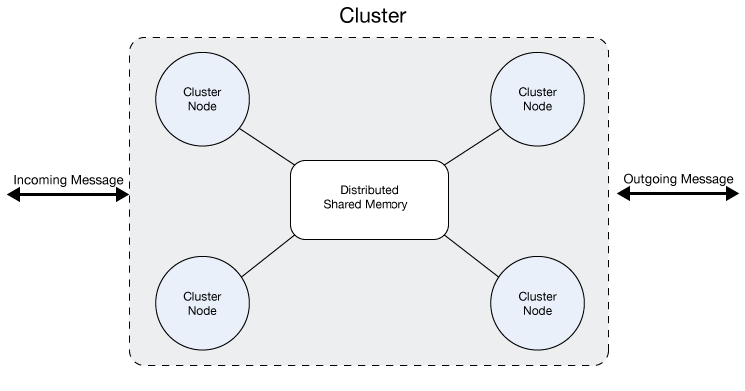
A cluster is a set of Mule runtime engines that acts as a unit. In other words, a cluster is a
virtual server composed of multiple nodes (Mule runtime engines). The nodes in a cluster communicate
and share information through a distributed shared memory grid. This means that the data is
replicated across memory in different machines.
> [!NOTE] Contact your customer service representative about pricing for this feature.
## Review Clustering Benefits
An on-premises Mule runtime cluster does not create a virtual IP. An on-premises cluster does not
include a built-in load balancer. You supply a third-party load balancer or client-side failover for
HTTP and TCP traffic. Clusters do not distribute application artifacts to nodes; you deploy the same
application to each node or through Runtime Manager.
By default, clustering Mule runtime engines ensures high system availability. If a Mule runtime
engine node becomes unavailable due to failure or planned downtime, another node in the cluster can
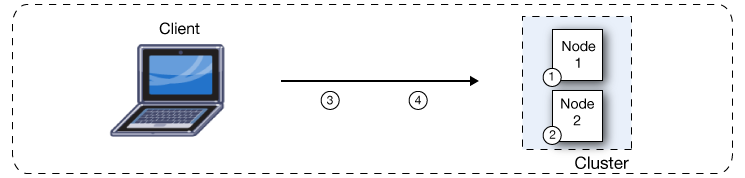
assume the workload and continue to process existing events and messages. The following figure
illustrates the processing of incoming messages by a cluster of two nodes. Notice that the
processing load is balanced across nodes: Node 1 processes message 1 while Node 2 simultaneously
processes message 2.
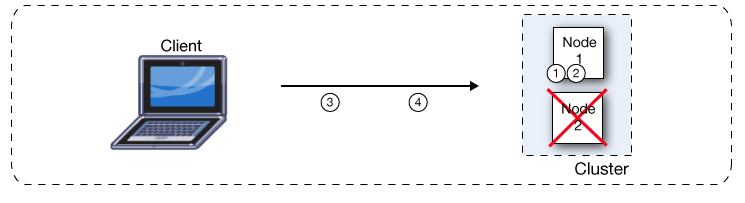
If one node fails, the other available nodes pick up the work of the failing node. As shown in the
following figure, if Node 2 fails, Node 1 processes both message 1 and message 2.
Because all nodes in a cluster of Mule runtime engines process messages simultaneously, clusters can
also improve performance and scalability. Compared to a single node instance, clusters can support
more users or improve application performance by sharing the workload across multiple nodes or by
adding nodes to the cluster.
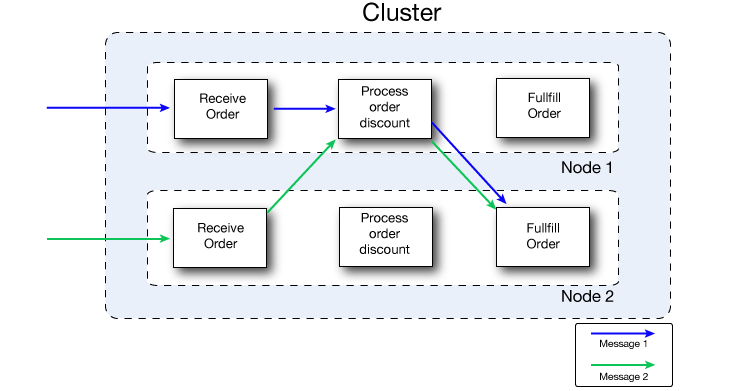
The following figure illustrates workload sharing in more detail. Both nodes process messages
related to order fulfillment. However, when one node is heavily loaded, it can move the processing
for one or more steps in the process to another node. Here, processing of the Process order discount
step is moved to Node 1, and processing of the Fulfill order step is moved to Node 2.
Beyond benefits such as high availability through automatic failover, improved performance, and
enhanced scalability, clustering Mule runtime engines offers the following benefits:
- Automatic coordination of access to resources, such as files, databases, and FTP sources.
The Mule runtime engine cluster automatically manages which node (Mule runtime engine) will handle
communication from a data source.
- Automatic load balancing of processing within a cluster.
If you divide your flows into a series of steps and connect these steps with a connector such as
VM, each step is put in a queue, making it cluster-enabled. The cluster of Mule runtime engines
can then process each step in any node to better balance the load across nodes.
- Raised alerts.
You can set up an alert to appear when a node goes down and when a node comes back up.
> [!NOTE] All Mule runtime engines in a cluster actively process messages. Note that each Mule node
> is also internally scalable – a single node can scale by taking advantage of multiple cores. Mule
> operates as a single node in a cluster, even when it uses multiple cores.
### Resolve Concurrency Issues with Clusters
The following problems might exist when you have a server group composed of multiple servers that
aren’t bound as a cluster. You don’t have to worry about any of them if you group your servers as a
cluster:
- File based connectors.
All Mule instances access the same Mule file folders concurrently, which can lead to duplicate
file processing and possible failures if a file is deleted or modified by the Mule application.
- Multicast connector.
All Mule instances get the same TCP requests and then process duplicate messages.
- JMS topics.
All Mule instances connect to the same JMS topic, which might lead to the repeated processing of
messages when scaling the non-clustered Mule instance horizontally.
- JMS request-reply/request-response.
All Mule instances are listening for messages in the same response queue. This implies that a Mule
instance might obtain a response that isn’t correlated to the request it sent and might result in
incorrect responses or make a flow fail with timeout.
- Idempotent Redelivery Policy.
Idempotency doesn’t work if the same request is received by different Mule instances. Duplicated
messages aren’t possible.
- Salesforce streaming API.
If multiple instances of the same application are deployed, they will fail because the API only
supports a single consumer. There is no failover support if the instance connected is stopped or
crashes.
## Meet Cluster Prerequisites
- A cluster requires at least two Mule runtime engine instances, each one running on different
machines.
- Mule high availability (HA) requires a reliable network connection between servers to maintain
synchronization between the nodes in the cluster.
- Keep the ports configured for the Mule cluster open.
- If you configure your cluster through Runtime Manager and you use the default ports, keep TCP
ports `5701`, `5702`, and `5703` open.
- If you configure custom ports instead, keep the custom ports open.
- Ensure communication between nodes is open through port `5701`.
Verify the firewall rules in your network to ensure that two-way communication between nodes is
enabled.
If you enable multicast for your cluster, the following requirements also apply in addition to the
previous prerequisites:
- Keep UDP port `54327` open.
- Enable the multicast IP address: `224.2.2.3`.
## Understand High Availability
High Availability is a method of designing a computer system to prevent any downtime for the
applications that run on it. Some systems use multiple servers so that if one server experiences
downtime, the application can continue to run smoothly on the others, without interrupting service
for the application’s end users.
## Design and Manage a Cluster
Anypoint Runtime Manager enables you to set up a cluster of Mule instances, and then deploy an
application to run on the cluster. You can also monitor the status information for clusters and
individual nodes. When clustered, you can easily manage several servers as one.
> [!NOTE] For more detailed information about cluster management, see
> [Managing Servers](https://docs.mulesoft.com/runtime-manager/managing-servers) in Runtime Manager.
A Mule Cluster consists of two or more Mule runtime engines, or nodes, grouped together and treated
as a single unit. With the initial configuration, MuleSoft recommends that you scale a cluster to no
more than eight Mule runtime engines.
With Anypoint Runtime Manager, you can deploy, monitor, or stop all the Mule runtime engines in a
cluster as if they were a single Mule runtime engine.
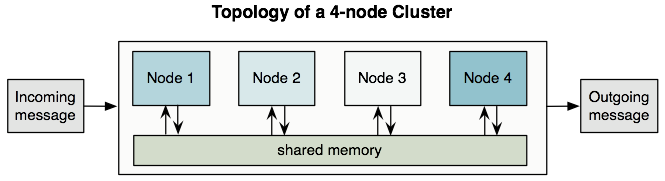
All the nodes in a cluster share memory as illustrated below:
> [!NOTE] To ensure operational performance, Mule uses an active-active model to cluster Mule
> runtime engines. The benefit of this model over an active-passive approach is that your
> application runs in all nodes, splitting message processing with the other nodes in your cluster,
> which expedites processing.
### Understand the Primary Node
In an active-active model, there is no primary node. However, one of the nodes acts as the primary
polling node. This means that sources can be configured to only be used by the primary polling node
so that no other node reads messages from that source.
This feature works differently depending on the source type:
- Scheduler source: only runs in the primary polling node.
- Any other source: defined by the `primaryNodeOnly` attribute. Check each connector’s documentation
to know which is the default value for `primaryNodeOnly` in that connector.
Example configuration for JMS:
```xml
```
## Use VM Queues in a Cluster
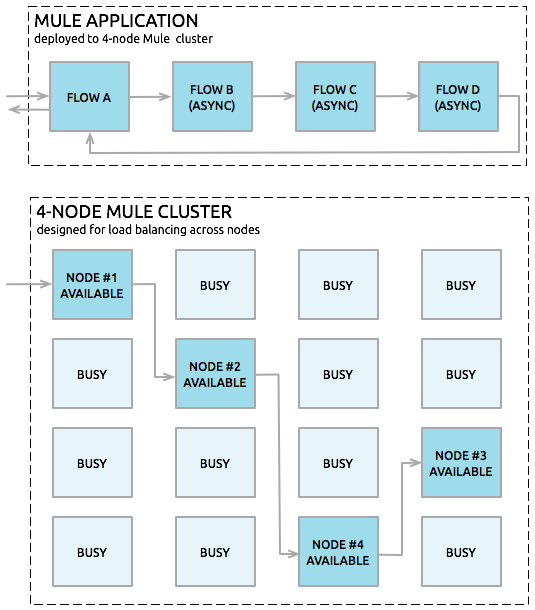
You can set up a VM queue explicitly to load balance across Mule runtime engines (nodes). Thus, if
your entire application flow contains a sequence of child flows, the cluster can assign each
successive child flow to whichever Mule runtime engine happens to be available at the time. The
cluster can potentially process a single message on multiple nodes as it passes through the VM
endpoints in the application flow, as illustrated below:
## Build High-Reliability Applications
A high-reliability application must meet the following requirements:
1. Zero tolerance for message loss
2. A reliable integration engine (Mule)
3. Highly reliable individual connections
The feature known as transactionality tracks application event sequences to ensure that each
message-processing step completes successfully, and therefore, no messages get lost or processed
incorrectly. If a step fails for some reason, the transactional mechanism rolls back all previous
processing events, then restarts the message-processing sequence.
Connectors such as JMS, VM, and JDBC provide built-in transactional support, thus ensuring that
messages get processed reliably. For example, you can configure a transaction on an inbound JMS
connection endpoint to remove messages from the JMS server only after the transaction has been
committed. This practice ensures that the original message remains available for reprocessing if an
error occurs during the processing flow.
You must use XA transactions to move messages between dissimilar connectors that support
transactions. This ensures that the Mule runtime engine commits associated transactions from all the
dissimilar connectors as a single unit.
## Use Connectors in a Cluster
All Mule connectors are supported within a cluster. Because of differences in the way different
connectors access inbound traffic, the details of this support vary. In general, outbound traffic
acts the same way inside and outside a cluster. Mule runtimes support three basic types of
connectors:
### Use Socket-Based Connectors
Socket-based connectors read input sent to network sockets that Mule owns. Examples include TCP,
UDP, and HTTP\[S\].
Socket-based connectors are supported in clusters as described below:
- Since each clustered Mule runtime runs on a different network node, each instance receives only
the socket-based traffic sent to its node. Incoming socket-based traffic should be
[Add a Load Balancer](#clustering-and-load-balancing) to distribute it among the clustered
instances.
- Output to socket-based connectors is written to a specific host/port combination. If the host/port
combination is an external host, no special considerations apply. If it is a port on the local
host, consider using that port on the load balancer instead to better distribute traffic among the
cluster.
### Use Listener-Based Connectors
Listener-based connectors read data using a protocol that fully supports concurrent multiple
accessors. Examples include JMS and VM.
Listener-based connectors are supported in clusters as described below:
- Listener-based connectors fully support multiple readers and writers. No special considerations
apply either to input or to output.
- Note that, in a cluster, VM connector queues are a shared, cluster-wide resource. The cluster will
automatically synchronize access to the VM connector queues. Because of this, any cluster node can
process a message written to a VM queue. This makes VM ideal for sharing work among cluster nodes.
### Use Resource-Based Connectors
Resource-based connectors read data from a resource that allows multiple concurrent accessors, but
doesn’t natively coordinate their use of the resource. Examples of resource-based connectors include
File, FTP, SFTP, E-mail, and JDBC.
Resource-based connectors are supported in clusters as described below:
- Mule HA Clustering automatically coordinates access to each resource only for nodes within the
cluster, ensuring that only one clustered instance accesses each resource at a time. Because of
this, it is generally a good idea to immediately write messages read from a resource-based
connector to VM queues. This allows the other cluster nodes to take part in processing the
messages.
> [!NOTE] If you run other applications (either Mule applications outside the cluster or non-Mule
> applications) that access the same resources as the nodes in the cluster, you must implement
> logic to lock those resources.
>
> For example, if multiple programs are processing files in the same shared directory by reading,
> modifying, and then deleting the files. These programs must use an explicit, application-level
> locking strategy to prevent the same file from being processed more than once.
- There are no special considerations in writing to resource-based clustered connectors:
- When writing to file-based connectors (File, FTP, SFTP), Mule will generate unique file names.
- When writing to JDBC, Mule can generate unique keys.
- Writing e-mail is effectively listener-based rather than resource-based.
## Build Reliable Applications in a Cluster
High-reliability applications must have zero tolerance for message loss. This means that both the
underlying Mule and its individual connections need to be reliable. You can find tools to build
fully reliable applications in your clusters in
[Reliability Patterns](https://docs.mulesoft.com/mule-runtime/latest/reliability-patterns).
If your application uses a non-transactional connector, follow the reliability pattern. These
patterns ensure that a message is accepted and successfully processed or that it generates an
"unsuccessful" response, allowing the client to retry.
If your application uses transactional connectors, such as JMS, VM, and JDBC, use transactions.
Mule’s built-in support for transactional connectors enables reliable messaging for applications
that use these connectors.
These actions can also apply to non-clustered applications.
## Network an On-Premises Cluster
### Cluster in a Single Data Center
To ensure reliable connectivity between cluster nodes, all nodes of a cluster must be located on the
same LAN. Implementing a cluster with nodes across geographically separated locations, such as
different data centers that are connected through a VPN, is possible but not recommended.
Ensuring that all cluster nodes reside on the same LAN is the best practice to lower the possibility
of network interruptions and unintended consequences, such as duplicated messages.
### Cluster Across Data Centers
Linking cluster nodes through a WAN network introduces many possible points of failure, such as
external routers and firewalls, which can prevent proper synchronization between cluster nodes. This
not only affects performance but also requires you to plan for possible side effects in your app.
For example, when two cluster nodes reconnect after getting cut off by a failed network link, the
ensuing synchronization process can cause messages to be processed twice, which creates duplicates
that must be handled in your application logic.
Note that it is possible to use nodes of a cluster located in different data centers and not
necessarily located on the same LAN, but some restrictions apply.
To prevent this behavior, it is necessary to enable the Quorum Protocol. This protocol is used to
allow one set of nodes to continue processing data while other sets do nothing with the shared data
until they reconnect. Basically, when a disconnection occurs, only the portion with the most nodes
will continue to function. For instance, assume two data centers, one with three nodes and another
with two nodes. If a connectivity problem occurs in the data center with two nodes, then the data
center with three nodes will continue to function, and the second data center will not. If the
three-node data center goes offline, none of your nodes will function. To prevent this outage, you
must create the cluster in at least three data centers with the same number of nodes. It is unlikely
for two data centers to crash, so if just one data center goes offline, the cluster will always be
functional.
> [!IMPORTANT] A cluster partition that doesn’t have enough nodes to function will continue reacting
> to external system calls, but all operations over the object stores will fail, preventing data
> generation.
#### Limitations
- Quorum is only supported in Object Store-related operations.
- Distributed locking isn’t supported, which affects:
- File/FTP connector polling for files concurrent
- Idempotent Redelivery Policy component
- Idempotent Message Filter component
- In-memory messaging isn’t supported, which affects:
- VM connector
- The Quorum feature can only be configured manually.
- Batch jobs don’t use high availability features.
## Add a Load Balancer
When Mule clusters are used to serve TCP requests (where TCP includes SSL/TLS, UDP, Multicast, HTTP,
and HTTPS), some load balancing is needed to distribute the requests among the clustered instances.
There are various software load balancers available, two of them are:
- NGINX, an open-source HTTP server and reverse proxy. You can use NGINX’s `HttpUpstreamModule` for
HTTP(S) load balancing.
- The Apache web server, which can also be used as an HTTP(S) load balancer.
Many hardware load balancers can also route both TCP and HTTP or HTTPS traffic
## Configure a Cluster for High Performance
This section applies only for on-premises deployments. High performance is implemented differently
on CloudHub and Pivotal Cloud Foundry.
See [Deployment Strategies](https://docs.mulesoft.com/runtime-manager/deployment-strategies) for more information about
each of these deployments.
If high performance is your primary goal (rather than reliability), you can configure a Mule cluster
or an individual application for maximum performance using a performance profile. By implementing
the performance profile for specific applications within a cluster, you can maximize the scalability
of your deployments while deploying applications with different performance and reliability
requirements in the same cluster. Performance profiles that you configure at the container level
apply to all applications within the container. Application-level configuration overrides
container-level configuration.
### Review Performance Profile Considerations
Setting the performance profile has two effects:
- It disables distributed queues, using local queues instead to prevent data
serialization/deserialization and distribution in the shared data grid.
- It implements the object store without backups, to avoid replication.
> [!WARNING] When one node goes down, the data associated to it is lost.
Setting the performance profile doesn’t affect memory sharing. In cluster mode, Mule always
distributes and shares the object stores between nodes.
### Configure the Performance Profile
To configure the performance profile at the _container_ level, add the following to
`mule-cluster.properties`, to the system properties (from the command line), or to `wrapper.conf`:
`mule.cluster.storeprofile=performance`
To configure the performance profile at the _individual application_ level, add the profile inside a
configuration wrapper, as shown below.
- Performance Store Profile
```xml
```
Remember that an application-level configuration overrides a container-level configuration. If you
want to configure the container for high performance but make one or more individual applications
within that container prioritize reliability, include the following code in those applications:
- Reliable Store Profile
```xml
```
> [!WARNING] In cases of high load with endpoints that don’t support load balancing, applying the
> performance profile might degrade performance. If you are using a File-based connector with an
> asynchronous processing strategy, JMS topics, multicasting, or HTTP connectors without a load
> balancer, the high volume of messages entering a single node can cause bottlenecks, and thus it
> can be better for performance to turn off the performance profile for these applications.
You can also choose to define the minimum number of machines that a cluster requires to remain in an
operational state. This configuration grants you a consistency improvement in the overall
performance.
## Encrypt Communication Between Cluster Nodes
You can encrypt traffic between cluster nodes by defining the `mule.cluster.network.encryption.key`
property, either in the `wrapper.conf` file, or as a system property.
When you define an encryption key, all communication between cluster nodes is encrypted using the
defined key and the AES encryption algorithm.
## Enable Clustering in FIPS Mode
To enable clustering in FIPS mode, complete the following tasks:
- Run Mule runtime engine in FIPS mode.
See [FIPS-Compliant Support](https://docs.mulesoft.com/mule-runtime/latest/fips-140-2-compliance-support) for
configuration instructions.
- Encrypt communication between cluster nodes.
Define the `mule.cluster.network.encryption.key` property, either in the `wrapper.conf` file or as
a system property.
### Review FIPS Clustering Warnings
- If you don’t define the encryption key, the application fails to deploy with the message
`Cluster key must be defined in FIPS mode.`.
- If you don’t use the same encryption key for all the clustered nodes, this feature won’t work.
- Running a clustered environment in FIPS mode causes a negative impact in performance, because all
the communication between nodes is encrypted (and decrypted).
## Follow Clustering Best Practices
There are a number of recommended practices related to clustering. These include:
- As much as possible, organize your application into a series of steps where each step moves the
message from one transactional store to another.
- If your application processes messages from a non-transactional connector, use a
[reliability pattern](https://docs.mulesoft.com/mule-runtime/latest/reliability-patterns) to move them to a
transactional store such as a VM or JMS store.
- Use transactions to process messages from a transactional connector. This ensures that if an error
is encountered, the message reprocesses.
- Use distributed stores such as those used with the VM or JMS connector – these stores are
available to an entire cluster. This is preferable to the non-distributed stores used with
connectors such as File, FTP, and JDBC – these stores are read by a single node at a time.
- Use the VM connector to get optimal performance. Use the JMS connector for applications where data
needs to be saved after the entire cluster exits.
- Implement reliability patterns to create high reliability applications.
- In HA cluster mode, all Object Store content, both in-memory and persistent (as defined by the
`persistent` parameter), is stored in the distributed memory grid. As long as the cluster
maintains quorum, this data survives application redeploys or restarts. To fully clear the Object
Store content, all cluster nodes must be stopped before restarting. For scenarios where data
persistence is required even after a full cluster shutdown, configure the Object Store to use a
JDBC-based store instead of the memory grid. See
[Object Store Persistence](https://docs.mulesoft.com/on-premises/4.3/creating-and-managing-a-cluster-manually#object-store-persistence).
## Troubleshoot Common Error Messages
### `Invalid cluster configuration: Node failed to start`
The node rejected `mule-cluster.properties` or could not join the Hazelcast cluster. Confirm every
node uses the same Mule runtime engine version, Java version, and Runtime Manager agent version, and
that TCP port `5701` (and `5702`/`5703` if you use the Runtime Manager defaults) is open between
nodes.
### `NoDataMemberInClusterException`
Hazelcast has no data member that can serve a partition. This occurs after node loss, split brain,
or a quorum that is no longer met. Restore enough nodes or reduce `mule.cluster.quorumsize` only if
you accept weaker consistency.
## See Also
- [On-Premises Runtimes Overview](https://docs.mulesoft.com/on-premises/4.3/)
- [Cluster On-Premises Mule Runtime Instances](https://docs.mulesoft.com/on-premises/4.3/choosing-the-right-clustering-topology)
- [Create and Manage an On-Premises Mule Runtime Cluster Manually](https://docs.mulesoft.com/on-premises/4.3/creating-and-managing-a-cluster-manually)
- [High Availability and Disaster Recovery for On-Premises Mule Runtime Engine](https://docs.mulesoft.com/on-premises/4.3/on-premises-hadr)
- [Install an Enterprise License on On-Premises Mule Runtime Engine](https://docs.mulesoft.com/on-premises/4.3/installing-an-enterprise-license)
- [Hybrid Standalone Runtimes](https://docs.mulesoft.com/hybrid-standalone/)
- [Managing Servers](https://docs.mulesoft.com/runtime-manager/managing-servers#create-a-cluster)
- [Clustering in CloudHub 2.0](https://docs.mulesoft.com/cloudhub-2/ch2-clustering)
- [Transaction Management](https://docs.mulesoft.com/mule-runtime/latest/transaction-management)