---
schema_version: "1"
id: 1eebef217ce0015d74de2c484fede14e70ea321dbe86db8bfdb6fcb6e9ddefa1
title: High Availability and Disaster Recovery for On-Premises Mule Runtime Engine
collection: mulesoft
version: current
locale: en-us
portal_url: https://docs.salesforce.com/mulesoft/current/en-us/on-premises/4.12/on-premises-hadr.md
canonical_url: https://docs.mulesoft.com/on-premises/4.12/on-premises-hadr
source_site: docs.mulesoft.com
content_type: documentation
content_hash: 272cd3ff59ff31c45514cbdf76ca070dfdc8ac9cea429aeff118b0301d00a45e
description: MuleSoft Documentation Site
release: "4.12"
latest: false
---
---
product: On-premises Runtimes
version: 4.12
keywords: high availability, disaster recovery, failover, RTO, RPO, backup, active-active, active-passive, data center, on-premises, on-prem, standalone
---

# High Availability and Disaster Recovery for On-Premises Mule Runtime Engine

> For the full documentation index, see: https://docs.mulesoft.com/llms.txt

When you run Mule runtime engine on servers that you manage, you build high availability (HA) and
disaster recovery (DR) yourself. You achieve HA by clustering Mule runtime instances so that another
node takes over when one fails, and you choose a standby topology that matches your SLA. You own DR
under a shared-responsibility model: because you control the infrastructure, you back up, restore,
and recover it with your own tooling, while MuleSoft provides the runtime clustering capabilities
and control-plane availability through Anypoint Platform.

HA clustering is optional and requires an [Enterprise license](https://docs.mulesoft.com/on-premises/4.12/installing-an-enterprise-license).
Choose a topology in
[Cluster On-Premises Mule Runtime Instances](https://docs.mulesoft.com/on-premises/4.12/choosing-the-right-clustering-topology) before you size
standby capacity. See the Cluster stage in [On-Premises Runtimes Overview](https://docs.mulesoft.com/on-premises/4.12/).

For an overview of HA and DR across all Mule deployment models, see
[High Availability and Disaster Recovery](https://docs.mulesoft.com/hosting-home/hadr-guide).

## Compare High Availability and Disaster Recovery

High availability (HA) measures a system’s ability to remain accessible when a component fails. On
on-premises servers, you achieve HA by clustering and load balancing Mule runtime nodes, so that
another node takes over when one fails.

Disaster recovery (DR) restores a system to an acceptable previous state after a natural or man-made
disaster, such as flooding, power failures, server failures, or misconfigurations.

Both strategies increase availability but differ in scope: on-premises, HA keeps your application
serving requests when a node in the cluster fails with no loss of service, whereas DR restores
service and data after an infrastructure disaster and usually incurs a brief loss of service while
the DR plan runs.

Two measurable objectives drive your DR plan:

Recovery Time Objective (RTO)

The maximum downtime a business tolerates. RTO is the time the system takes to recover after a
disruption.

Recovery Point Objective (RPO)

The maximum data loss a business accepts after a disaster. RPO drives how often you back up data.

## Achieve High Availability On-Premises

You achieve high availability on on-premises servers by clustering and load balancing Mule runtime
nodes. Depending on your SLA, you choose a standby topology and a deployment architecture that meet
your availability and fault-tolerance requirements.

Clustering and failover

You can deploy Mule runtime engine in many topologies to support your HA and DR strategies. One
common method, high-availability clustering, gives Mule basic failover capability. When the primary
Mule runtime becomes unavailable—because of a fatal JVM or hardware failure, or because you take it
offline for maintenance—a backup Mule runtime immediately takes over as the primary node and resumes
processing where the failed instance stopped. After you recover the failed Mule runtime server and
bring it back online, that server automatically becomes the backup node.

Distributed memory

A distributed memory store makes seamless failover possible by sharing all transient state across
clustered Mule runtimes, including SEDA service event queues and in-memory message queues.

![A clustered server environment handling incoming and outgoing messages](/mulesoft/current/en-us/on-premises/4.12/_images/hadr-cluster.png)

As you build your Mule application, think critically about how to architect it for the availability,
fault tolerance, and performance you need.

### Choose a High Availability Option

You achieve high availability by clustering and load balancing nodes. Depending on your SLA, Mule
supports four HA options:

- [Cold Standby](#cold-standby)

- [Warm Standby](#warm-standby)

- [Hot Standby - Active-Passive](#hot-standby-active-passive)

- [Active-Active](#active-active)

> [!NOTE] These options often pair with a disaster recovery strategy.

#### Cold Standby

<table><colgroup><col> <col> <col></colgroup><thead><tr><th>Diagram</th><th>Description</th><th>Downtime</th></tr></thead><tbody><tr><td><p><span><img src="https://docs.mulesoft.com/on-premises/4.12/_images/hadr-cold-standby.png" alt="A cold standby configuration in a server setup"></span></p></td><td><p>You install and configure the Mule environment but leave one or more operating systems stopped—for example, as a backup of a production system or virtual machine. You start the operating system and the Mule runtime after you detect an outage.</p></td><td><p>Some. Covers the time to start the environment and route traffic.</p></td></tr></tbody></table>

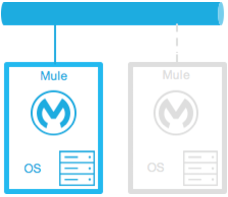
#### Warm Standby

<table><colgroup><col> <col> <col></colgroup><thead><tr><th>Diagram</th><th>Description</th><th>Downtime</th></tr></thead><tbody><tr><td><p><span><img src="https://docs.mulesoft.com/on-premises/4.12/_images/hadr-warm-standby.png" alt="A warm standby setup for server redundancy"></span></p></td><td><p>You install and configure the Mule environment and run the operating systems but leave the Mule runtimes stopped. You start the Mule runtime after you detect an outage.</p></td><td><p>Little. Covers the time for the Mule runtime instances to start and route traffic to the environment.</p></td></tr></tbody></table>

#### Hot Standby - Active-Passive

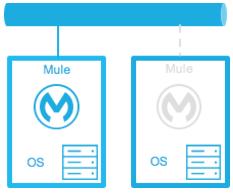
<table><colgroup><col> <col> <col></colgroup><thead><tr><th>Diagram</th><th>Description</th><th>Downtime</th></tr></thead><tbody><tr><td><p><span><img src="https://docs.mulesoft.com/on-premises/4.12/_images/hadr-active-passive.png" alt="An active-passive server setup in a high-availability configuration"></span></p></td><td><p>You install, configure, and fully run the Mule environment, but it doesn’t process requests until you detect an outage.</p></td><td><p>Minimal to none. Covers the time to route traffic to the environment.</p></td></tr></tbody></table>

#### Active-Active

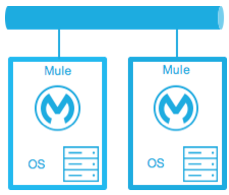
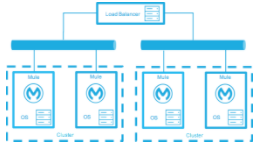
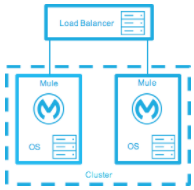
<table><colgroup><col> <col> <col></colgroup><thead><tr><th>Diagram</th><th>Description</th><th>Downtime</th></tr></thead><tbody><tr><td><p><span><img src="https://docs.mulesoft.com/on-premises/4.12/_images/hadr-active-active1.png" alt="A load balancer distributing traffic to a cluster of Mule instances in an active-active configuration"></span></p></td><td><p>Load-balanced clustered environments: Two or more fully operational Mule environments run at the same time, each with its own cluster, and the load balancer distributes traffic across all of them.</p></td><td><p>None. The service experiences no downtime.</p></td></tr><tr><td><p><span><img src="https://docs.mulesoft.com/on-premises/4.12/_images/hadr-active-active2.png" alt="An active-active server configuration with a load balancer and clustering"></span></p></td><td><p>Load-balanced single clustered environment: Two or more Mule environments belong to the same cluster. This scenario requires network latency between environments to stay below 10 ms.</p></td><td><p>None. The service experiences no downtime.</p></td></tr></tbody></table>

### Choose an On-Premises Deployment Model

You size your on-premises architecture to meet your SLA. Mule supports three common deployment
models:

- [Active-Active Clustering Deployment Model](#active-active-clustering-deployment-model)

- [Active-Active Clustering Fault Tolerance Deployment Model](#active-active-clustering-fault-tolerance-deployment-model)

- [Zero Downtime Deployment Model](#zero-downtime-deployment-model)

#### Active-Active Clustering Deployment Model

Two nodes in a clustered or load-balanced environment can plausibly support 1,500 TPS with 1-second
responses, which meets the normal SLA. If one node fails, the service degrades but still handles 700
TPS with 1-second responses—well above the agreed acceptable impact—so the failure doesn’t breach
the SLA.

![An active-active clustering setup with load balancers and multiple servers](/mulesoft/current/en-us/on-premises/4.12/_images/hadr-aa-clustering.png)

Distribute the load evenly across multiple Mule nodes:

- All nodes offer the same capabilities.

- All nodes stay active at the same time.

**Costs**

Costs vary with your SLA requirements. This model needs two nodes to meet the SLA. If the acceptable
service impact rises to match normal operations, the environment needs at least three nodes to
absorb a single node failure. High-probability failure scenarios can require even more nodes.

#### Active-Active Clustering Fault Tolerance Deployment Model

Fault tolerance means a failure within the system doesn’t affect the service at all. It differs from
high availability, which tolerates some service impact and downtime.

![A fault-tolerant system with redundant nodes and a load balancer](/mulesoft/current/en-us/on-premises/4.12/_images/hadr-fault-tolerant.png)

Fault tolerance differs from high availability by adding resources that let an application keep
running—without interruption—after a component fails. Fault-tolerant environments cost more than
highly available environments.

The degree of fault tolerance you need depends on the probability of system failures. Take the
earlier SLA example and raise the minimum acceptable service impact to match the normal operation
requirement.

The new SLA now requires the system to handle 1,000 transactions per second with 1-second response
times, zero downtime, and zero service impact.

If the probability of losing more than one node stays low, the architecture needs just three nodes.
If that probability rises above what you accept, the architecture needs more than three nodes to
absorb multiple failures.

**Costs**

This model costs more because it requires the redundancy to meet the defined SLA.

#### Zero Downtime Deployment Model

This model lets you change the environment—including upgrading the infrastructure and the Mule
applications that run on it—without breaching your SLAs. Zero-downtime deployments typically use a
side-by-side approach, where the old and new environments coexist briefly. An in-place deployment,
by contrast, can reduce capacity or cause complete downtime.

[Gartner](https://www.gartner.com/en/information-technology/glossary/continuous-operations) defines
continuous operations as "those characteristics of a data-processing system that reduce or eliminate
the need for planned downtime, such as scheduled maintenance. One element of 24-hour-a-day,
seven-day-a-week operation".

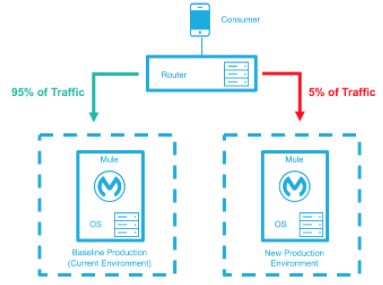
The baseline production environment is your current operating environment. You create a new
environment with the changes—upgraded runtimes, new configurations, and new Mule applications. A
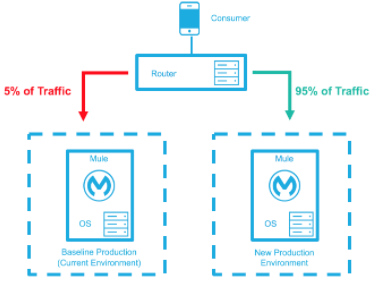
small percentage of traffic flows to the new environment and increases as your confidence grows. The
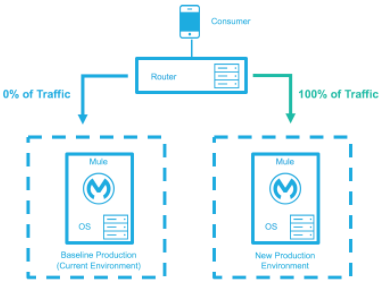
baseline environment keeps serving traffic until the new environment handles 100 percent of the
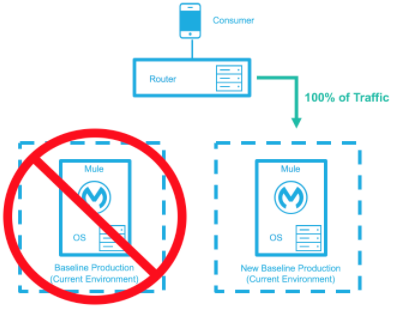
traffic. After the new environment accepts all traffic, it becomes the new baseline production
environment, and the previous baseline terminates.

This example assumes that each environment uses the same number of Mule runtimes and cores, but the
new environment can use more or fewer.

<table><colgroup><col> <col></colgroup><thead><tr><th>Deployment Step</th><th>Diagram</th></tr></thead><tbody><tr><td><div><div><p>You deploy the new production environment and route a small percentage of traffic to it.</p></div></div></td><td><div><div><p><span><img src="https://docs.mulesoft.com/on-premises/4.12/_images/hadr-zero-downtime-1.png" alt="A traffic distribution in a smaller percentage from current to new production environments in a high-availability deployment"></span></p></div></div></td></tr><tr><td><div><div><p>Your confidence in the new environment grows, and you route more traffic to it.</p></div></div></td><td><div><div><p><span><img src="https://docs.mulesoft.com/on-premises/4.12/_images/hadr-zero-downtime-2.png" alt="A traffic distribution in a higher percentage from current to new production environment in a high-availability deployment"></span></p></div></div></td></tr><tr><td><div><div><p>You route all traffic to the new environment.</p></div></div></td><td><div><div><p><span><img src="https://docs.mulesoft.com/on-premises/4.12/_images/hadr-zero-downtime-3.png" alt="A zero-downtime deployment with traffic shifting from an current to a new environment"></span></p></div></div></td></tr><tr><td><div><div><p>You promote the new environment to baseline production and terminate the previous baseline.</p></div></div></td><td><div><div><p><span><img src="https://docs.mulesoft.com/on-premises/4.12/_images/hadr-zero-downtime-4.png" alt="A traffic routing to a new production environment completed in a high-availability environment"></span></p></div></div></td></tr></tbody></table>

**Costs**

This method can temporarily add capacity to the service for a few minutes, hours, or days.

## Plan Disaster Recovery

Because you control the infrastructure, you own disaster recovery for on-premises deployments. You
back up your servers, Mule applications, and data, and you bring backup infrastructure online to
meet your recovery objectives when your primary environment fails.

Standby topologies

Use a cold, warm, or hot standby topology to meet your RTO and RPO. A hot standby minimizes downtime
but costs the most, whereas a cold standby costs the least but takes longest to recover.

Backups

Back up Mule applications, runtime configurations, and application data to external storage outside
your primary environment. Schedule backups often enough to meet your RPO.

Anypoint configuration

Back up your platform configurations—such as connections and properties—with the Anypoint CLI or
Anypoint Platform APIs.

MuleSoft responsibility

MuleSoft keeps the Anypoint Platform control plane available across multiple availability zones. The
control plane stores only operational metadata and configuration, not your business data.

## Review Considerations and Limitations

Account for these factors when you design a clustered on-premises topology:

Network latency

Clustering across availability zones or regions can degrade performance because of network latency.
A single clustered environment that spans locations requires network latency between nodes to stay
below 10 ms. Where possible, place cluster nodes on the same subnet or availability zone.

Simultaneous node restarts

Don’t restart multiple cluster nodes at the same time, such as during operating system patching.
Concurrent restarts can trigger cluster-membership eviction and take Mule applications offline.

Sequential deployment staging

When you deploy an application to an on-premises Mule cluster through Runtime Manager, Runtime
Manager stages deployment artifacts to cluster nodes sequentially. Sequential staging doesn’t
guarantee that the application starts on one node before startup begins on another. Application
startup and readiness across cluster nodes follow no fixed order and can overlap.

Cost trade-offs

Higher availability and fault tolerance require more nodes and infrastructure. Size your
architecture to the SLA you must meet, rather than to the maximum possible resilience.

## Follow High Availability and Disaster Recovery Best Practices

Follow these design principles for high availability and disaster recovery on on-premises servers:

- Keep your integrations stateless, and externalize state to an external store, such as a database
  or a messaging queue.

- Run identical Mule runtime, Runtime Manager agent, and Java versions on all cluster nodes.

- Choose a standby topology and node count that meet your SLA rather than the maximum possible
  resilience.

- Schedule cluster changes during maintenance windows.

- Test your failover and restore procedures regularly.

## See Also

- [On-Premises Runtimes Overview](https://docs.mulesoft.com/on-premises/4.12/)

- [Cluster On-Premises Mule Runtime Instances](https://docs.mulesoft.com/on-premises/4.12/choosing-the-right-clustering-topology)

- [High Availability and Disaster Recovery](https://docs.mulesoft.com/hosting-home/hadr-guide)

- [On-Premises Mule Runtime High Availability Cluster Overview](https://docs.mulesoft.com/on-premises/4.12/mule-high-availability-ha-clusters)

- [Create and Manage an On-Premises Mule Runtime Cluster Manually](https://docs.mulesoft.com/on-premises/4.12/creating-and-managing-a-cluster-manually)

- [Install an Enterprise License on On-Premises Mule Runtime Engine](https://docs.mulesoft.com/on-premises/4.12/installing-an-enterprise-license)