---
schema_version: "1"
id: 5b4c62d6416df3cda4f7061c380dcb900222470b970426b7ef4ed313c3a94880
title: Patching the Embedded Mule Runtime Engine Version
collection: mulesoft
version: current
locale: en-us
portal_url: https://docs.salesforce.com/mulesoft/current/en-us/munit/3.6/runtime-patching.md
canonical_url: https://docs.mulesoft.com/munit/3.6/runtime-patching
source_site: docs.mulesoft.com
content_type: documentation
content_hash: 27f887e93fd5d701ff5e0fec686bf640324bd47e38da1a273d15b27d2a473f6e
description: MuleSoft Documentation Site
release: "3.6"
latest: false
---
---
product: MUnit
version: 3.6
---
# Patching the Embedded Mule Runtime Engine Version
> For the full documentation index, see: https://docs.mulesoft.com/llms.txt
Anypoint Code
Builder
Anypoint Studio
Patching in MUnit is different from patching in Mule runtime engine. MUnit runs using an embedded
Mule container, which downloads all required dependencies to start Mule based on a given version. To
use a patched Mule version (for example, `4.3.0-20200727`), you must point MUnit to run specifically
against it. You can do this from either Maven or Anypoint Studio.
## Patch MUnit Using Maven
By default, MUnit runs against the Mule version corresponding to the `minMuleVersion` defined in the
`mule-artifact.json` file. You can override this version by using the `runtimeVersion` attribute of
the `munit-maven-plugin` artifact configuration:
```xml
com.mulesoft.munit.toolsmunit-maven-plugin${munit.version}testtesttest4.3.0-20200727 (1)
```
1
Be sure to replace the placeholder version in this example with your version, as provided by MuleSoft.
## Patch MUnit Using Studio
By default, MUnit runs in Anypoint Studio with the Mule runtime engine version of the project
server. You can override this version by specifying the patched Mule version in the MUnit run
configuration menu:
1. In the menu bar, select **Run** and **Run Configurations**.
2. Under **MUnit**, select your MUnit test file.
3. In the **Mule Runtime Version** field under **Advanced Settings**, type the Mule patched version
to use.
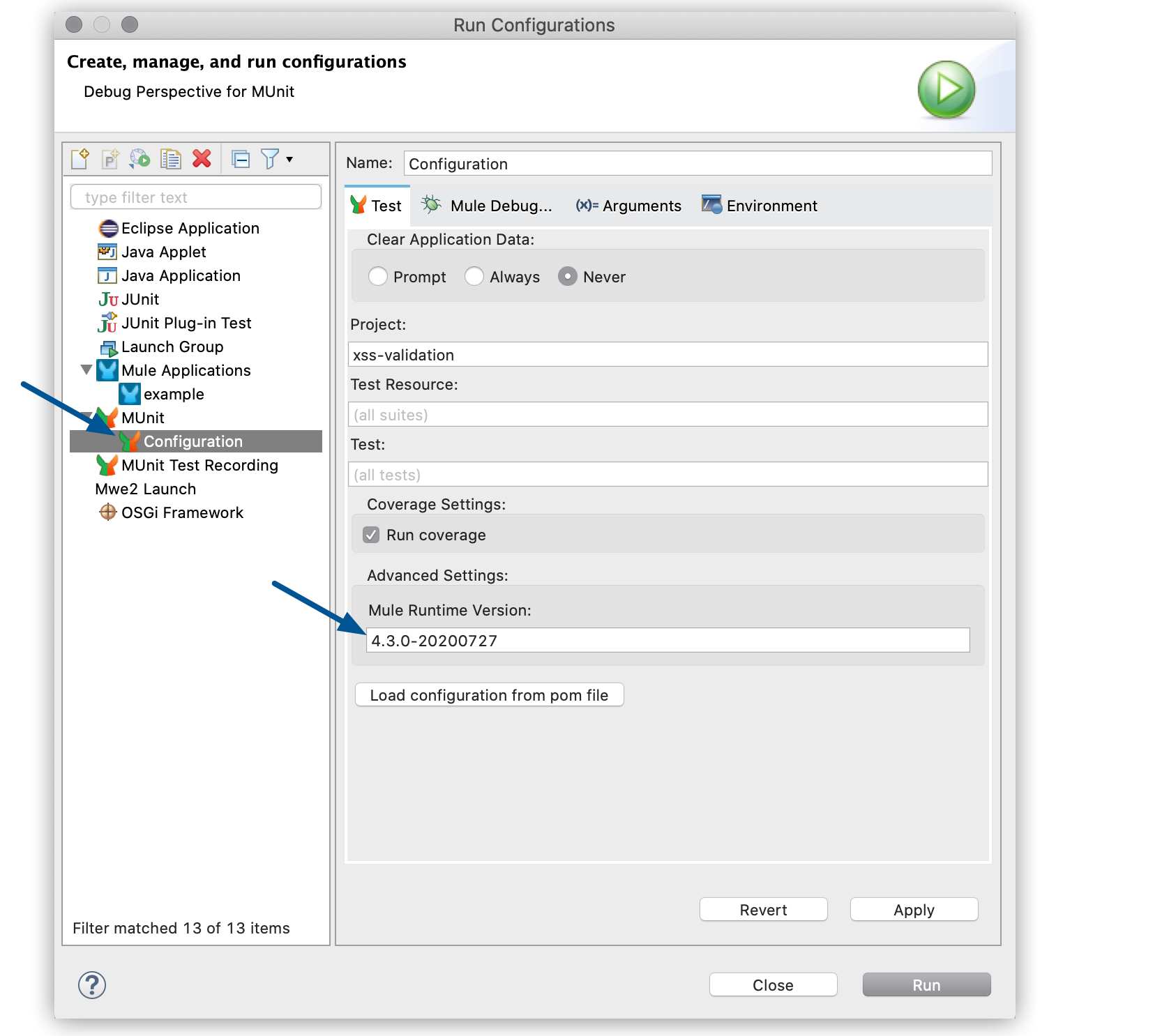
If you already set the `runtimeVersion` attribute in the POM file of your project, click **Load
configuration from POM file** to automatically load this version into the **Mule Runtime Version**
field.
## See Also
- [Mule Runtime Release Notes](https://docs.mulesoft.com/release-notes/mule-runtime/mule-esb)
- [MUnit Maven Plugin](https://docs.mulesoft.com/munit/3.6/munit-maven-plugin)