---
schema_version: "1"
id: 34f2b145aa3393d14885b366832afc34bb4d16ac98b70b05ee50fbab46807d16
title: Writing Your First Test Case
collection: mulesoft
version: current
locale: en-us
portal_url: https://docs.salesforce.com/mulesoft/current/en-us/mule-sdk/latest/testing-writing-your-first-test-case.md
canonical_url: https://docs.mulesoft.com/mule-sdk/latest/testing-writing-your-first-test-case
source_site: docs.mulesoft.com
content_type: documentation
content_hash: 8832ac1e1e6225651402ce51f3dd0deddaa12299eb666ed361fde95d95743165
description: MuleSoft Documentation Site
release: "1.13"
latest: true
---
---
product: Mule SDK
version: 1.13
is-latest-version: true
---
# Writing Your First Test Case
> For the full documentation index, see: https://docs.mulesoft.com/llms.txt
This section provides a step-by-step introduction to testing a module’s operation. It explains the
basics of test cases that you must perform.
## First Concepts
Every test case for a module contains these basic items:
- Test Case Class: A Java class containing the test logic. Call flows and assert the results.
- Mule App XML: A Mule app that makes use of the Module to test.
Note that this documentation is based on the module project generated with the Mule Extension
Archetype
([Creating Your First SDK Project](https://docs.mulesoft.com/mule-sdk/latest/getting-started#generating-a-project-using-the-maven-archetype-directly)).
Learn how to test a module using this example and refer to that documentation for the parent
dependency, which includes all the dependencies required to build the test case. To export packages,
refer to [Export Resources](https://docs.mulesoft.com/mule-runtime/latest/how-to-export-resources).
## 1\. Creating the Test Case Class
Your Test Case Class must inherit from `MuleArtifactFunctionalTestCase`, which enables the testing
of modules inside a Mule app.
```java
public class BasicOperationsTestCase extends MuleArtifactFunctionalTestCase {
}
```
You must include the following tag in your pom.xml file:
```xml
org.mule.extensionsmule-modules-parent1.6.0
```
> [!NOTE] If you want to compile connectors with Java 17, use version 1.9.0.
## 2\. Writing Your Mule App
You test a module by running Mule app that uses the module, executing its flows and making
assertions about the result of these executions.
The Mule app XML must be placed inside the `src/test/resources` folder of the module project.
```xml
```
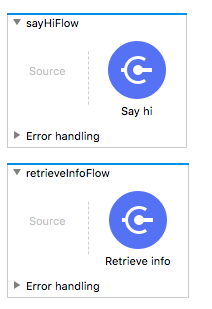
Tip: An easy way to write Mule apps is to create them in Anypoint Studio, copy the generated XML,
and paste it inside the Module project.
## 3\. Importing Your Mule App into the Test Case
After creating the test case class and Mule app XML, you bind the two components, identifying the
Mule app that will execute the test case. You do this by overriding the `getConfigFile()` method and
returning a `String` containing a relative path of the Mule app XML.
> [!WARNING] The config file path is relative to the `module-project/src/test/resources` folder. For
> example, if the XML file is located in
> `module-project/src/test/resources/test-connector-mule-app.xml`, the `getConfigFile()` method must
> return `test-connector-mule-app.xml`.
```java
public class ModuleTestCase extends MuleArtifactFunctionalTestCase {
@Override
protected String getConfigFile() {
return "test-connector-mule-app.xml";
}
}
```
## 4\. Writing Your First Test Case
At this stage, everything is set up to start writing the module test cases. The first test to write
tests a simple operation that executes the flow, retrieves the output, and makes an assertion over
it.
### 4.1 Executing a flow
You use the `flowRunner("flowName")` utility method to create an instance of `FlowRunner`, a utility
that can execute flows. The `FlowRunner` instance is configured to run the flow identified in the
parameter.
Then you use `run()` on the `FlowRunner` instance, for example:
```java
Event event = flowRunner("sayHiFlow").run();
```
Execution of the flow returns an `Event` that contains the `payload`, `attributes`, `vars`, and all
the available information about the execution of the flow.
> [!NOTE] If your flow returns a stream, you must call the keepStreamsOpen() method to prevent the
> runtime from closing streams (which is the normal behavior when a flow ends). If you do not call
> the keepStreamsOpen() method, you receive a `CursorProviderAlreadyClosedException` error when
> consuming a stream. The following example shows how to call the keepStreamsOpen() method:
>
> ```java
> Event event = flowRunner("streamFlow").keepStreamsOpen().run();
> ```
### 4.2 Retrieving the Payload Value
After executing the flow, you have an `event` variable that contains the result of the flow
execution. This variable is required for obtaining the value of the payload and make the required
assertions:
```java
Object payloadValue = event.getMessage()
.getPayload()
.getValue();
assertThat(payloadValue, is("Hello Mariano Gonzales!!!"))
```
### 4.3 Summary
This example puts the preceding steps of the test case together:
```java
@Test
public void executeSayHiOperation() throws Exception {
Event sayHiFlow = flowRunner("sayHiFlow").run(); (1)
String payloadValue = ((String) sayHiFlow
.getMessage()
.getPayload()
.getValue()); (2)
assertThat(payloadValue, is("Hello Mariano Gonzales!!!")); (3)
}
```