---
schema_version: "1"
id: 261ceb352a122ef67fc9904893c5eea6cb2a6244e0c1166294eff48c493f6199
title: Parameters
collection: mulesoft
version: current
locale: en-us
portal_url: https://docs.salesforce.com/mulesoft/current/en-us/mule-sdk/latest/parameters.md
canonical_url: https://docs.mulesoft.com/mule-sdk/latest/parameters
source_site: docs.mulesoft.com
content_type: documentation
content_hash: 2ea868061566f611290df351cc7179865637761bdb1c5b6ecf5aeb90b6e87f1f
description: MuleSoft Documentation Site
release: "1.13"
latest: true
---
---
product: Mule SDK
version: 1.13
is-latest-version: true
keywords: mule, sdk, parameter
---
# Parameters
> For the full documentation index, see: https://docs.mulesoft.com/llms.txt
Parameters are configurable arguments that belong to a given component. [Configurations](https://docs.mulesoft.com/mule-sdk/latest/configs),
[Components](https://docs.mulesoft.com/mule-sdk/latest/module-structure#components), and [Connection Providers](https://docs.mulesoft.com/mule-sdk/latest/connections) are called
_parameterizables_ because they can be configured through their parameters.
Parameters provide the information that the component needs so that it can be configured to work
properly. Each parameter contains the following information:
- A type that restricts the kind of value the parameter can have.
- A name that uniquely identifies it.
Here is a simple example:
```java
@Parameter
private String foo;
```
A parameter can be defined as a field of a class or as a method’s argument, depending on the kind of
component you are dealing with.
For example, an [operation](https://docs.mulesoft.com/mule-sdk/latest/operations) parameter is defined like any argument of the method that
declares the operation. It does not need to be annotated with `@Parameter`.
Take a look at `foo` below.
```java
public void method(String foo){}
```
## Using Complex Types
This example uses more complex parameters instead of simple types like strings and integers.
```java
@Parameter
@Optional
private Options options;
```
Where `Options` is a `POJO Object` defined as:
```java
public class Options {
@Parameter
public String color;
@Parameter
@Optional
public String mode;
public String getColor(){
return color;
}
public void setColor(String color){
this.color = color;
}
public String getMode(){
return mode;
}
public void setMode(String mode){
this.mode = mode;
}
}
```
A few notes about this example:
- The entire parameter `Options` is used as an optional parameter, so if you decide to use it, you
need to ensure that all the required parameters inside `Options` have been set.
- If `Options` is not configured, its value will be `null` (see [NullSafe](https://docs.mulesoft.com/mule-sdk/latest/null-safe) for altering
this behavior).
- `Options` parameters must be Java bean properties (that is, they need to have setters and getters
that match the fields names).
### Complex Type DSL
Complex types should be separated from regular parameters. It does not make sense to merge all the
complex type attributes with the element-specific parameters.
That is why a child definition is created for Complex Types. This example shows the complex
`Options` type in a [Configuration](https://docs.mulesoft.com/mule-sdk/latest/configs):
```xml
```
Note that `module:options` is separated from the parameters `name` and `someConfigAttribute`.
## Modifiers
Parameters are highly customizable. This section identifies a few modifiers you can use when
defining a parameter to specify behavior or restrictions.
### Expression Support
An `ExpressionSupport` describes the parameter’s behavior when the configured value is a DataWeave
expression.
There are three possible values:
- `REQUIRED`: The parameter only accepts expressions.
- `SUPPORTED` (default): The parameter can handle both expressions and simple values.
- `NOT_SUPPORTED`: The parameter requires static values. Expressions are not supported.
These values can be configured simply by adding the `@Expression` annotation.
```java
@Parameter
@Expression(SUPPORTED)
private String foo;
```
The example above defines a parameter named `foo` of type `String` that can have either a static
value (such as `"bar"`) or an expression (such as `"\#[vars.foo]"`).
### Optionality
Parameters can be required or optional.
Sometimes a parameter specifies information that is so crucial to what you are trying to do (for
example, the host name for an HTTP Request) that there is no way to continue without setting it.
Other times, you can operate without that information or simply use a default value (for example,
where a port is 80 in an HTTP listener).
A parameter is required by default unless you annotate it with `@Optional`, for example:
```java
@Parameter
@Optional(defaultValue="80")
private Integer port;
```
Optional parameters can have a default value.
Note that `@Optional` only accepts `String` values, but the SDK will auto-convert it to your
parameter’s type. Additionally, if the parameter supports expressions, you can use one as the
default value.
### Using @Alias
The name of each parameter will be the name given to the field in which it is defined. You can
override this name by using the `@Alias` annotation.
```java
@Parameter
@Optional
@Alias("class")
private String clazz;
```
Notice that the use of `@Alias` makes it possible to use a Java reserved term (such as `class`) to
name the parameter. You cannot use a reserved term to name the field.
### Customizing the Parameter DSL
It is possible to customize how the Parameter looks and behaves in the DSL using the `@ParameterDsl`
annotation. This annotation allows you to set directives regarding syntax and semantics of the
generated XML DSL, and it can be applied to any Parameter in the model.
The `@ParameterDsl` annotation has two configurable elements:
- `allowInlineDefinition`:
Indicates whether the associated Parameter should support inline definition as child element or
not. This is used for customizing the DSL of Complex Type Parameters, especially when you need to
avoid the inline definition because it has illegal fields (like a `name` field) or because the
structure is so complex that makes no sense to represent it inline.
For example, if you use the `Options` type in a [Configuration](https://docs.mulesoft.com/mule-sdk/latest/configs) and declare the Parameter
with `@ParameterDsl(allowInlineDefinition=false)`, you no longer have the child element:
```xml
```
- `allowReferences`:
Indicates whether the associated Parameter should support registry references when receiving an
`String`. This is useful for controlling how the Parameter will behave upon configuration if the
type of the Parameter doesn’t provide enough information to automatically configure the references
support.
For example, in the JMS Connector, if you want to avoid making users inject an object from the
registry as a `ConsumerType` configuration, you declare it as not supporting references:
```java
@Parameter
@Optional
@Expression(NOT_SUPPORTED)
@ParameterDsl(allowReferences = false)
private ConsumerType consumerType;
```
## Parameter Groups
The `@ParameterGroup` annotation allows you to define a group of parameters that share some kind of
special relationship where it makes sense for them to belong to the same group.
How do you spot them? Parameters that should go inside a `@ParameterGroup` are the ones that
**travel together** all the times.
Using `@ParameterGroup` also makes a UI contribution rendering all the `@Parameters` inside the
group together in a box, separating them from other `@Parameters` that don’t belong to that group,
for example:
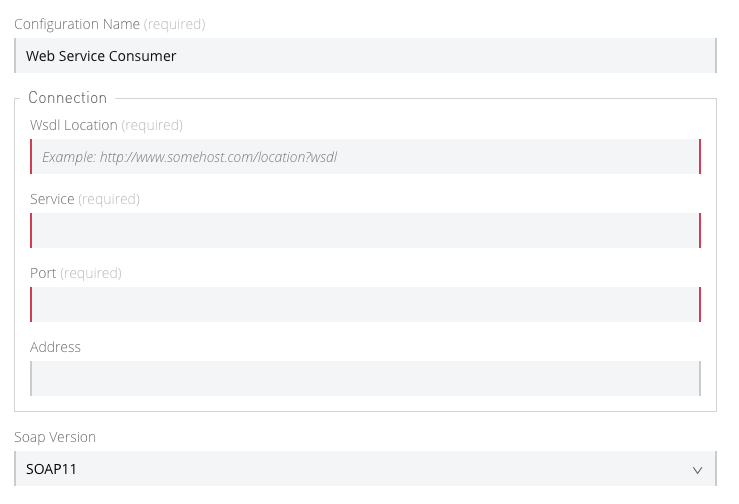
As you can see in the image above, the `Connection` group contains 4 parameters, and there are
others like `Soap Version` that are not in that group. That is a nice way to separate the concerns
of the `Parameters`.
An simple example could be a parameter group defined as follows:
```java
public class ConnectionProperties {
@Parameter
public String host;
@Parameter
@Optional(defaultValue="80")
public Integer port;
public String getHost(){
return host;
}
public void setHost(String host){
this.host = host;
}
public Integer getPort(){
return port;
}
public void setPort(Integer port){
this.port = port;
}
}
```
The example above could be used like this:
```java
@ParameterGroup("Connection")
private ConnectionProperties properties;
```
`"Connection"` is the name of the `@ParameterGroup` and is the name that will be used in the UI.
The class defining the `properties` `@ParameterGroup` will not have a parameter named `properties`.
Instead, it will contain the parameters that are defined inside `ConnectionProperties`:
- A required parameter named `host`.
- An optional parameter named `port`.
In other words, the class defining the parameter group is augmented with these extra parameters and
will contain the parameters defined inside of `ConnectionProperties` plus all the other parameters
it has declared.
Note that each field annotated with `@ParameterGroup` must be a Java bean property (that is, it
needs to have setters and getters matching the field name).
## POJO vs Parameter Group
`@ParameterGroup` can be configured so it can be written as a child element in the DSL instead of
being spread around the component that declared it.
In other words, assume an operation like this:
```java
public void execute(@ParameterGroup ConnectionProperties properties) { ... }
```
This is the DSL for the operation above:
```xml
```
However, if you configure the parameter group using `@ParameterGroup(showInDsl=true)` instead, the
DSL now looks like:
```xml
```
When a POJO `@Parameter` is defined, you get the same DSL, so you might ask when to use a POJO
instead of using a POJO annotated with `@ParameterGroup`?
There are some subtle differences between these two concepts. You should definitely use a POJO if
you care about the type as a whole and the structure it provides.
For example, `ConnectionProperties` (above) keeps two parameters together because they are always
configured together. In this case, the parameters do not represent an entity in the module’s domain.
The `@ParameterGroup` is simply a handy way of keeping things that are related together and showing
them together in the UI.
However, the `Options` POJO defined above concerns the object itself, not just the parameters it
contains. For instance, it would make sense to have a list of `Options` because each object is
something on its own (in the OOP sense). On the other hand, if you are using a class simply for the
sake of grouping things together, without any particular meaning for your module’s domain, then it
makes sense to have a parameter group.
## Parameter Type Restrictions
You cannot add parameters or POJOs with types `org.mule.runtime.core.api.source.scheduler.Scheduler`
or `org.mule.runtime.api.scheduler.SchedulingStrategy`.