---
schema_version: "1"
id: d7e486c164517b28ddc8d546e1fcc907045fada86b8bb8f80af49c38d8ae6cec
title: Defining Parameters
collection: mulesoft
version: current
locale: en-us
portal_url: https://docs.salesforce.com/mulesoft/current/en-us/mule-sdk/latest/define-parameters.md
canonical_url: https://docs.mulesoft.com/mule-sdk/latest/define-parameters
source_site: docs.mulesoft.com
content_type: documentation
content_hash: 066cff7c372140dd4d25e41b5bc39ff4be8392744f3a8d89125df976fb433ce9
description: MuleSoft Documentation Site
release: "1.13"
latest: true
---
# Defining Parameters
Defining parameters well is a key aspect of the usability of any component. Even if the components provides awesome functionality, the user is not going to have a great experience if the component is not easy and intuitive to configure. Handling JSON and XML Parameters
Some operations expose parameters that expect values in the form of JSON or XML documents.
- Java types
The JSON and XML parameters **must** be received in the form of an InputStream. None of the usual Java types for representing these types (Reader, Sax objects, Document, Node, JsonNode, and so on) are allowed.
- DataSense resolution
Users need tooling support to make sure that they feed these parameters with documents that conformed to the expected schemas. Therefore, these parameters **must** clearly define the expected schema.
- Static DataSense
Sometimes, the schema is fixed and well known. If the schema is well known and static, the problem **must not** be resolved through the use of dynamic DataSense resolvers. The connector **must** specify that schema through either of the following instead:
- @InputJsonType annotation
Allows you to define the expected type by pointing to a JSON schema that’s part of the module’s resources:
```java
public void createPerson(@InputJsonType(schema = "person-schema.json") @Content InputStream person) {
...
}
```
- @InputXmlType annotation
Similar to @InputJsonType, but for XML schemas:
```java
public void createOrder(@InputXmlType(schema = "order.xsd", qname = "shiporder") @Content InputStream order) {
...
}
```
- InputStaticTypeResolver
Another option is the use of an InputStaticTypeResolver to define the type programmatically:
```java
public void createOrder(@TypeResolver(OrderTypeResolver.class) @Content InputStream order) {
...
}
```
More information about [handling static DataSense](https://docs.mulesoft.com/mule-sdk/latest/static-metadata).
- Dynamic DataSense
If the schemas are dynamic, then a dynamic resolver is needed. This is done by implementing the InputTypeResolver interface.
The key rule is that the module **must** resolve to a specific schema that the user can follow. The dynamic resolver cannot return a generic ANY type.
```java
public void createOrder(@TypeResolver(DynamicOrderTypeResolver.class) @Content InputStream order) {
...
}
```
## [](#dynamic-java-type-parameters)Dynamic Java Type Parameters
It’s very common for connectors to work with dynamic types. For example, services like Salesforce, NetSuite, or SAP define a set of core entities (Person, Order, and so on) which have a base structure that the user can customize.
Other services go further and allow for a completely custom type set, such as an OData service.
All parameters using these dynamic types **must** have an associated @TypeResolver that provides the actual type definition to be used for the current configuration.
Prior sections discussed the need for @TypeResolver for parameters communicated in the form of JSON or XML documents. The same applies for parameters represented as Java types, such as Map or custom POJOs. A well defined, non-trivial TypeResolver **must** exist for all other dynamic types, regardless of which Java class is used to represent them.
## [](#streaming)Streaming
Streaming is a key aspect of Mule 4. It’s important to define operations in a way that allows to leverage that.
- Don’t use byte\[\] array parameters
Parameters **must not** be of byte\[\] type. Use InputStream instead. Mule automatically transforms any byte\[\] parameter value into an InputStream.
- Avoid large String parameters
String parameters are perfectly fine, but always consider what are the odds of the assigned values to become larger than 4 KB. If that’s a possibility, then the parameter **must** be an InputStream instead and use an InputTypeResolver to provide metadata on the media type that’s expected.
## [](#layout)Layout
The MuleSoft layout mechanism comprises two organizational concepts: groups and tabs.
Although you are free to define your own groups and tabs, there’s a set of standard names for them.
Default groups:
- General
- Advanced
- Connection
Default tabs:
- Default
- Advanced
- Security
- Connection
If a given parameter does not fit these categories, define a new one that can be defined. That decision needs to be made explicit and documented in the extension’s design spec.
- Required Parameters
Required parameters **must** always be in the default group and tab, and **must** be the first to appear in the generated UI.
Required parameters **must** be placed on the main group and tabs so that the end user can see at all of them at first glance.
- Optional Parameters
Optional parameters **should not** be placed in the main view. This is to not overload the view with too much content that in most cases won’t be configured by the average customer.
Exceptions:
- Some optional parameters are not required to be configured, but are used very frequently.
- The parameter is optional because it has a default value, but it’s still key to the component’s behavior (for example, the method parameter of the http:request operation).
- Default Values
Expressions **should** never be used as default values. This includes expressions that access the event (such as `[vars]`, `[attributes]`, or `[payload]`), and expressions that obtain dynamic values (such as `[now()]`) or create default empty structures (such as `#[[]]`).
- @NullSafe
Optional parameters of Collection or Map types **must** be annotated with @NullSafe to guarantee that null values are avoided by automatically providing empty instances instead.
- Security parameters
When talking about security parameters, it’s important to distinguish between actual security parameters and connection parameters. For example, username and password could be thought of as security parameters because they’re used for access control. But in reality, you can’t establish a connection without those in the first place, so they are also required connection parameters.
- Therefore, optional security parameters like tlsContext, or hashing algorithms **must** go into a security tab, except when they are required.
- Required security parameters, **must** go in general as any other required parameter.
- Parameter ordering
As explained earlier, required parameters **must** also be shown first, but in which order **should** they be listed? The same thing applies to optional parameters: we know they go after the required ones, but in which order?
Parameter ordering considerations:
- There’s a strong and known relevance ranking
In some cases, the developer knows that some parameters are more relevant than others. That relevance might be given based on how frequently they are used or by how relevant they are to the particular domain of the connector. For example: when talking about the http:listener, the path is by far the most relevant parameter, even if other required parameters exist. The same applies to the optional parameters: the allowed-methods parameter is more relevant than the keep alive settings.
The problem with this case is that relevance might be subjectively biases. People might not agree on what’s relevant or not and the person making the call could simply be wrong. In these cases, the case for that relevance sorting **must** be made explicit in the extension’s design document and justified. Reviewers **must** also have the chance to challenge that decision.
- Metadata Keys order:
This scenario applies only for operations. If the operation has a metadata key hierarchy, parameters that match with metadata keys **should** follow the same order.
- There’s no usage or relevance ranking
- Mixed
There might be a strong relevance among some group or subgroup of parameters, but another group (for example advanced or security) might not be.
For cases with no explicit relevance, alphabetic sorting **should** be used.
- Parameter Types
When working on Java based connectors, the connector **must not** expose types from external libraries.
For example: if is being used the MongoDB Library to create a MongoDB Connector, the result of the queries are represented as BSON objects. This could never be the output or input of an operation because of many reasons:
- The connector gets coupled to implementations that are not managed by the connector developer.
- The type is difficult or impossible to consume or create from DataWeave.
- The internal library gets shared on the application classloader and could cause class clashing.
## [](#parameter-hints)Parameter Hints:
- @Example
For optional parameters that don’t specify a default, the @Example annotation **should** provide an example of a valid value. This increases the UX of Mule developers to be more sure about the kind and structure of data that they **should** configure.
This applies to parameters of simple types only. It doesn’t include POJOs, lists or maps.
- Display Name
The SDK and Studio makes a best effort at transforming the parameter’s name to what is shown in the UI, but sometimes this is not enough. A name that makes sense on the connector’s DSL maybe doesn’t make sense in the UI and vice versa. For these cases, you **should** use the @DisplayName feature.
Also because the parameter name used on the extension is also the one used for the DSL (XML) and the display name, once the connector is released, this name can’t change since that would break backwards compatibility. The @DisplayName annotation is also useful in those cases to change the name shown in the UI without affecting backwards compatibility. Lastly, keep in mind that unlike Java or the Mule DSL, the @DisplayName does accept spaces.
- Expression Support
By default, parameters accept expressions. There are some cases in which this default **should** be changed.
Disable expression support when it doesn’t make sense to support expressions in the context of a configuration or connection provider parameter, for example, the port number in which to place an http listener. It doesn’t make sense for the port of an inbound listener to be changing each time mule processes a message.
Make the use of expression mandatory when there’s no use case in which that parameter is to take a fixed value. For example, an aggregator’s group identifier.
- Summary
All parameters have a matching Javadoc that explains the purpose of that parameter and its semantics. Sometimes, that explanation can be quite lengthy. For those cases, it’s a good practice to use the @Summary annotation to provide a one liner description of the parameter. It’s ok if this summary doesn’t fully cover its meaning and purpose. It’s just intended to be a quick one liner that the UI can turn into a tooltip.
- Configuration Overrides
Sometimes a configuration object defines a parameter that **should** globally affect a connector. However, some components might want to override that parameter.
The canonical example of this is a charset encoding. A file connector could define the encoding to use at a configuration level. However, in the context of an application, one might have one specific flow in which a different encoding **should** be used (even though the rest of the application might still use the one specified in the config). The @ConfigOverride annotation **must** be used in these cases. This is not only a matter of simplifying your own code (as opposed to manually checking for an override and defaulting to the config one instead). The @ConfigOverride not only does that automatically, but in Studio also overrides the config parameter allowing the UI to surface this accordingly.
[Configuration Overrides](https://docs.mulesoft.com/mule-sdk/latest/config-override) are explained at length in this article.
- Putting the pieces together
Here’s an example of how the hinting features can interact together
```java
@Parameter
@Optional
@Summary("The sender 'From' address. If not provided, it defaults to the address specified in the config")
@Example("example@company.com")
private String fromAddress;
```
## [](#enum-versus-value-provider)Enum Versus Value Provider
There are use cases in which certain parameters are exposed to the user as a list of predefined values.
Sometimes that list is fixed, meaning that all possible values to select from are already defined at compilation time and never change. An example of this is the protocol of an SFTP proxy. Possible values are HTTP, SOCKS4, and SOCKS5. That list is fixed and unaltered by any other condition.
For cases like this, modules **must** use a [Java Enum](https://docs.mulesoft.com/mule-sdk/latest/value-providers#java_enum) as the parameter type. The Enum lists all the possible values and the SDK automatically generates the proper experience at design time.
Alternatively, the list of possible values can be dynamic and depends on other conditions.
For example, the Slack connectors allow users to send messages to different channels. The list of available channels actually depends on the logged user. Therefore, the list is dynamic.
To include values that are not known or dynamic, such as custom values, you **should** use [Value Providers](https://docs.mulesoft.com/mule-sdk/latest/value-providers#value_providers), instead.
When to use an Enum?
- When the values Set is well known
- When the value set is limited
- When the value set is not context dependant
- When the value set is closed
- When the required a combo inside a POJO (Value Providers are not supported inside POJOs)
When to use a Value Provider?
- When the values are not well known
- When the value set is context dependent depending on the Connection or Configuration or other parameters
- When the value set is open such that the connector can suggest some values, but other ones can also be valid
- When the value set is dynamic
## [](#exclusive-parameters)Exclusive Parameters
If parameters values are invalid, modules **should not** fail at startup time or execution time. For example, the scripting module executes user scripts that can be provided either inline or referenced from a file. This module provides two parameters: one called script for the inlining option, and another called scriptFile. The user can use only one of these at a time, which means that they’re both optional.
To provide a good user experience, the UI **should** provide hints to a user at design time when:
- The two parameters are provided at the same time
- No parameter is provided
Use cases like this **must** leverage the [Exclusive Optionals](https://docs.mulesoft.com/mule-sdk/latest/exclusive-optionals) feature to provide a good experience at design time.
## [](#using-pojo-parameters)Using POJO Parameters
Sometimes, you need to define parameters of POJO types. Depending on the scenario, that practice might be advised or simply discouraged.
- Using POJOs for parameter grouping
One use case for a POJO parameter is when the same set of parameters constantly repeat across several components (either operations or sources). The Java good practice would be to put those together into a single reusable class.
For example, consider the Aggregators module, in which all group-based aggregators require a set of common parameters. This example creates the GroupBasedAggregatorParameterGroup class:
```java
public class GroupBasedAggregatorParameterGroup extends TimeoutContainingAggregatorParameterGroup {
/**
* An expression that determines the aggregation group unique ID.
* This ID determines which events *must* be aggregated together.
*/
@Parameter
@Expression(REQUIRED)
@Optional(defaultValue = "#[correlationId]")
private String groupId;
/**
* The size of the expected group to aggregate. All messages with
* the same correlation ID *must* have the same groupSize.
* If not, only the first message groupSize is considered and
* a warning is logged.
*/
@Parameter
@Expression(SUPPORTED)
@Optional
private Integer groupSize;
/**
* The time to remember a group ID once it was completed or timed out.
* 0 means, don't remember, -1 remember forever
*/
@Parameter
@Expression(NOT_SUPPORTED)
@Optional(defaultValue = "180")
private int evictionTime;
/**
* The unit for the evictionTime attribute
*/
@Parameter
@Expression(NOT_SUPPORTED)
@Optional(defaultValue = "SECONDS")
private TimeUnit evictionTimeUnit;
}
```
This object would then be used as follows:
```java
@Alias("groupBasedAggregator")
@Throws(GroupBasedAggregatorErrorProvider.class)
public void aggregateByGroup(
GroupBasedAggregatorParameterGroup aggregatorParameters,
@Alias("incrementalAggregation") @Optional IncrementalAggregationRoute incrementalAggregationRoute,
@Alias("aggregationComplete") AggregationCompleteRoute onAggregationCompleteRoute,
RouterCompletionCallback completionCallback)
throws ModuleException {
// impl...
}
```
This approach however introduces some problems:
- The GroupBasedAggregatorParameterGroup object defines a complex type in the module’s type catalog, even though this type has no real semantic meaning for the module’s domain model.
This is just a convenience internal type, derived from good practices of the programming language used to write the module. There would be no sense for this type to appear in the catalog.
- Because the type appears in the catalog, it becomes part of the module’s API.
Therefore, modifications to it, or even the decision to replace it with something else, results in a backwards compatibility problem.
- Complex objects are hard to translate into a good user experience in Studio.
All of the these issues can be traced to one root cause: the module’s structure **should not** reflect nor be affected by the nuances of the programming language being used (notice that we wouldn’t be having this discussion if the XML SDK would be used here instead).
To be able to still maintain parameters in a POJO without generating the side effects in the generated module, use the @ParameterGroup annotation:
```java
public void aggregateByGroup(
@ParameterGroup(
name = "Aggregator config") GroupBasedAggregatorParameterGroup aggregatorParameters,
@Alias("incrementalAggregation") @Optional IncrementalAggregationRoute incrementalAggregationRoute,
@Alias("aggregationComplete") AggregationCompleteRoute onAggregationCompleteRoute,
RouterCompletionCallback completionCallback)
throws ModuleException {
// implemented as privileged operation in GroupBasedAggregatorOperationsExecutor
}
```
This annotation opens the POJO and exposes its inner parameters, as if they had been inlined as method arguments. As far as the user and the type catalog know, there’s no GroupBasedAggregatorParameterGroup and the operation simply defines multiple String parameters. However, the developer still needs to leverage the Java POJO.
- Forcing child elements in the Mule DSL
Another use case for POJO parameters is forcing certain parameters to appear as child elements in the Mule DSL. For instance, consider this example from the email connector:
```xml
Email Content
```
The is a POJO that contains the content and contentType parameters. Because the email connector is quite complex, we want the body to appear as a child element in the Mule DSL, for increased readability.
To use a POJO just for this has the same drawbacks as in the prior example, but again, you can use the @ParameterGroup annotation to overcome them:
```java
@Summary("Sends an email message")
@Throws(SendErrorTypeProvider.class)
public void send(@Connection SenderConnection connection,
@Config SMTPConfiguration configuration,
@Placement(order = 1) @ParameterGroup(name = "Settings") EmailSettings settings,
@Placement(order = 2) @ParameterGroup(name = "Body", showInDsl = true) EmailBody body,
@Placement(order = 3) @ParameterGroup(name = "Attachments") AttachmentsGroup attachments) {
```
As you can see, the @ParameterGroup annotation has a showInDsl attribute that can be used to force the DSL to put the inner parameters as a child element.
- Defining Global Elements
Another use case is the ability to define a global element (which is not a Configuration) to referenced from another component.
For example, the File connector has the concept of a matcher, which is a set of rules that are used to decide whether a file **should** be processed or ignored. Matchers can be used in either the operation or in any of the message sources defined in the connector.
Because the exact same matcher might be needed in different flows, the connector provides the ability to define global matchers than can be later referenced. For example:
```xml
```
For these cases, it makes sense to define the matcher parameter as a POJO, without the use of the @ParameterGroup annotation. Notice that in this case, having the concept of a matcher being listed in the connector’s type catalog makes sense, since this is not an implementation detail but a core piece of functionality.
There’s one caveat though: for this to work, the class in which the matcher is implemented needs to declare that it is to be used as a global element:
```java
@Alias("matcher")
@TypeDsl(allowTopLevelDefinition = true)
public class LocalFileMatcher {
/**
* Files created before this date are rejected.
*/
@Parameter
@Summary("Files created before this date are rejected.")
@Optional
private LocalDateTime createdSince;
/**
* Files created after this date are rejected
*/
@Parameter
@Summary("Files created after this date are rejected")
@Optional
private LocalDateTime createdUntil;
...
}
```
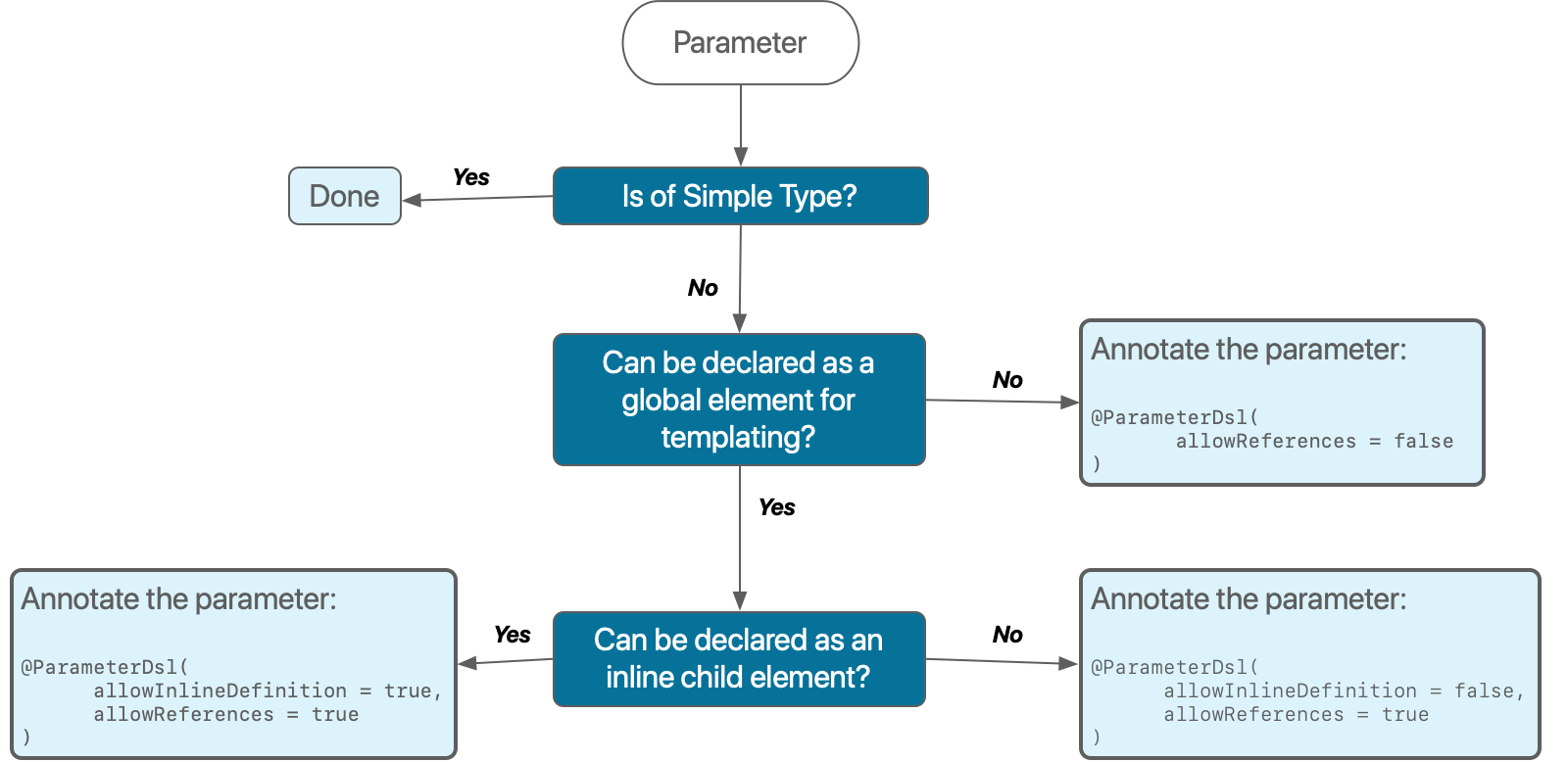
- DSL Decision Making
As a summary, here’s a simple flow chart to aid with the decision process of how to use POJOs and parameter groups.
- Implementing `equals` and `hashCode` methods
Java classes used for POJO parameters or Parameter Groups must implement the `equals` and `hashCode` methods for [Dynamic Configurations](https://docs.mulesoft.com/mule-sdk/latest/static-dynamic-configs#Dynamic-Configuration-Lifecycle) to function correctly. Even if existing configurations do not have POJO parameters, the configurations need `equals` and `hashCode` methods because future runtime functionality may depend on it. The following example from a class in the Database Connector that illustrates the implementation of `equals` and `hashcode` methods:
```java
/**
* Pooling configuration for JDBC Data Sources capable of pooling connections
*
* @since 1.0
*/
@Alias("pooling-profile")
public class DbPoolingProfile implements DatabasePoolingProfile {
/**
* Maximum number of connections a pool maintains at any given time
*/
@Parameter
@Optional(defaultValue = "5")
@Placement(order = 1)
@Expression(NOT_SUPPORTED)
private int maxPoolSize = 5;
/**
* Minimum number of connections a pool maintains at any given time
*/
@Parameter
@Optional(defaultValue = "0")
@Placement(order = 2)
@Expression(NOT_SUPPORTED)
private int minPoolSize = 0;
/**
* Determines how many connections at a time to try to acquire when the pool is exhausted
*/
@Parameter
@Optional(defaultValue = "1")
@Placement(order = 3)
@Expression(NOT_SUPPORTED)
private int acquireIncrement = 1;
/**
* Determines how many statements are cached per pooled connection. Setting this to zero will disable statement caching
*/
@Parameter
@Optional(defaultValue = "5")
@Placement(order = 4)
@Expression(NOT_SUPPORTED)
private int preparedStatementCacheSize = 5;
/**
* The amount of time a client trying to obtain a connection waits for it to be acquired when the pool is
* exhausted. Zero (default) means wait indefinitely
*/
@Parameter
@Optional(defaultValue = "0")
@Placement(order = 5)
@Expression(NOT_SUPPORTED)
private int maxWait = 0;
/**
* A {@link TimeUnit} which qualifies the {@link #maxWait}.
*/
@Parameter
@Optional(defaultValue = "SECONDS")
@Placement(order = 6)
@Expression(NOT_SUPPORTED)
private TimeUnit maxWaitUnit;
/**
* Determines how many seconds a Connection can remain pooled but unused before being discarded.
* Zero means idle connections never expire.
*/
@Parameter
@Optional(defaultValue = "0")
@Placement(order = 7)
@Expression(NOT_SUPPORTED)
private int maxIdleTime;
@Parameter
@Optional
@Placement(tab = ADVANCED_TAB, order = 8)
@Expression(NOT_SUPPORTED)
@Summary("Additional properties used to configure pooling profile.")
private Map additionalProperties = emptyMap();
//getters...
@Override
public int hashCode() {
return Objects.hash(minPoolSize, maxPoolSize, acquireIncrement, preparedStatementCacheSize, maxWaitUnit, maxWait);
}
@Override
public boolean equals(Object obj) {
if (this == obj) {
return true;
}
if (!(obj instanceof DbPoolingProfile)) {
return false;
}
DbPoolingProfile that = (DbPoolingProfile) obj;
return maxPoolSize == that.maxPoolSize &&
minPoolSize == that.minPoolSize &&
acquireIncrement == that.acquireIncrement &&
preparedStatementCacheSize == that.preparedStatementCacheSize &&
maxWait == that.maxWait &&
maxWaitUnit == that.maxWaitUnit;
}
}
```
## [](#parameter-type-restrictions)Parameter Type Restrictions
You cannot add parameters or POJOs with types `org.mule.runtime.core.api.source.scheduler.Scheduler` or `org.mule.runtime.api.scheduler.SchedulingStrategy`. Mule runtime engine and the SDK add parameters of these types, for example, in polling sources.
## [](#see-also)See Also
- [Salesforce Help](https://help.salesforce.com)
- [Mule SDK Development Best Practices](https://docs.mulesoft.com/mule-sdk/latest/best-practices)