---
schema_version: "1"
id: 25c2bed8e96a326763c2b3b092587fdb398624536ec14805363fc8c5751e2128
title: Custom Configuration Properties Provider
collection: mulesoft
version: current
locale: en-us
portal_url: https://docs.salesforce.com/mulesoft/current/en-us/mule-runtime/4.9/custom-configuration-properties-provider.md
canonical_url: https://docs.mulesoft.com/mule-runtime/4.9/custom-configuration-properties-provider
source_site: docs.mulesoft.com
content_type: documentation
content_hash: 5c1feda5b5812af92742225e86bac44c4670ac1573f4d7c26b625c12f00bbbe1
description: MuleSoft Documentation Site
release: "4.9"
latest: false
---
---
product: Mule Runtime
version: 4.9
keywords: anypoint, studio, on premises, on premise, properties, custom configuration properties, configuration properties provider
---
# Custom Configuration Properties Provider
> For the full documentation index, see: https://docs.mulesoft.com/llms.txt
You can use the Mule SDK and Mule API to create a custom configuration properties provider that
enables an app to discover configuration properties values.
## Mule API
The main interfaces of the API are:
- `ConfigurationPropertiesProviderFactory`
This interface is used to discover custom implementations of configuration properties providers.
When Mule runtime engine (Mule) finds a configuration element that matches the namespace and name
provided by the `getSupportedComponentIdentifier()` method, Mule requests the factory to create a
`ConfigurationPropertiesProvider` using the configuration you define with the `createProvider(..)`
method. Mule discovers instances of `ConfigurationPropertiesProviderFactory` by using SPI.
- `ConfigurationPropertiesProvider`
When Mule finds a configuration property, Mule invokes this interface to resolve the property’s
value.
## Example: Secure Configuration Properties Provider
The Security module uses the API to implement `ConfigurationPropertiesProviderFactory`:
```java
import static org.mule.runtime.api.component.ComponentIdentifier.builder;
import org.mule.runtime.properties.api.ConfigurationPropertiesProviderFactory;
public class SecureConfigurationPropertiesProviderFactory implements ConfigurationPropertiesProviderFactory {
public static final String EXTENSION_NAMESPACE = "secure-properties";
public static final String SECURE_CONFIGURATION_PROPERTIES_ELEMENT = "config";
public static final ComponentIdentifier SECURE_CONFIGURATION_PROPERTIES =
builder().namespace(EXTENSION_NAMESPACE).name(SECURE_CONFIGURATION_PROPERTIES_ELEMENT).build();
...
@Override
public ComponentIdentifier getSupportedComponentIdentifier() {
return SECURE_CONFIGURATION_PROPERTIES;
}
@Override
public SecureConfigurationPropertiesProvider createProvider(ConfigurationParameters parameters,
ResourceProvider externalResourceProvider) {
String file = parameters.getStringParameter("file");
..
String key = parameters.getStringParameter("key");
...
return new SecureConfigurationPropertiesProvider(..);
}
}
```
The `ComponentIdentifier` returned by `getSupportedComponentIdentifier()` matches against the
following configuration component:
```xml
```
When processing the configuration, Mule finds the `secure-properties:config` component, and then
invokes the `SecureConfigurationPropertiesProvider.createProvider(..)` method to create an instance
of `SecureConfigurationPropertiesProvider` to resolve configuration properties.
```java
public class SecureConfigurationPropertiesProvider extends DefaultConfigurationPropertiesProvider {
private final static String SECURE_PREFIX = "secure::";
private final static Pattern SECURE_PATTERN = Pattern.compile("\\$\\{" + SECURE_PREFIX + "[^}]*}");
private final EncryptionAlgorithm algorithm;
private final EncryptionMode mode;
private final boolean fileLevelEncryption;
private final SecurePropertyPlaceholderModule securePropertyPlaceholderModule = new SecurePropertyPlaceholderModule();
public SecureConfigurationPropertiesProvider(ResourceProvider resourceProvider, String file, EncryptionAlgorithm algorithm,
String key, EncryptionMode mode, String encoding, boolean fileLevelEncryption) {
...
}
@Override
public Optional getConfigurationProperty(String configurationAttributeKey) {
if (configurationAttributeKey.startsWith(SECURE_PREFIX)) {
String effectiveKey = configurationAttributeKey.substring(SECURE_PREFIX.length());
ConfigurationProperty originalConfigurationProperty = configurationAttributes.get(effectiveKey);
if (originalConfigurationProperty == null) {
return empty();
}
String originalString = ((String) originalConfigurationProperty.getRawValue());
String encryptedValue = originalString.substring(originalConfigurationProperty.getKey().length() + 1,
originalString.length() - algorithm.name().length() - mode.name().length()
- 2);
final String decryptedValue = resolveInnerProperties(securePropertyPlaceholderModule.convertPropertyValue(encryptedValue));
return of(new ConfigurationProperty() {
@Override
public Object getSource() {
return originalConfigurationProperty.getSource();
}
@Override
public Object getRawValue() {
return decryptedValue;
}
@Override
public String getKey() {
return originalConfigurationProperty.getKey();
}
});
} else {
return empty();
}
}
@Override
public String getDescription() {
ComponentLocation location = (ComponentLocation) getAnnotation(LOCATION_KEY);
return format(" - file: %s, line number: %s", fileLocation,
location.getFileName().orElse(UNKNOWN),
location.getLineInFile().map(String::valueOf).orElse("unknown"));
}
...
}
```
Define a prefix (with the format `PREFIX::`) that is unique to this resolver. The prefix enables the
user to target a specific resolver. This is implemented in `SecureConfigurationPropertiesProvider`
by using the prefix defined by `SECURE_PREFIX`.
In the configuration, the prefix must be used in the following way:
```xml
```
Notice how the `value` attribute of `set-payload` is using the resolver for secure properties by
using the `secure::` prefix.
## Example: Mule SDK Module
To create a configuration element that enables the custom configuration properties provider within
Studio, you must create a Mule SDK module.
You can download or checkout the
[sample project](https://github.com/mulesoft/mule-custom-properties-providers-module-example), which
contains all the infrastructure code to get started implementing your custom configuration
properties resolver extension.
The sample project is a Mule SDK module. See
[Getting started with the Mule SDK](https://docs.mulesoft.com/mule-sdk/latest/getting-started) for additional
information.
### Customizing the Module to Access Your Custom Properties Source
Follow these steps to customize the Mule SDK Module:
1. Import the
[sample project](https://github.com/mulesoft/mule-custom-properties-providers-module-example)
into your favorite IDE.
2. Open the `pom.xml` file:
1. Define the GAV (`groupId`, `artifactId`, and `version`) of your module.
2. Define the `name` of your module.
3. Review the minimum Mule version you want your properties provider to require. This example
is compatible with Mule 4.1.1 and later to cover all possible scenarios. See
[Choosing the SDK Version](https://docs.mulesoft.com/mule-sdk/latest/choosing-version).
3. Change the package name (`com.my.company.custom.provider.api`) of your code.
4. Open
`resources/META-INF/services/org.mule.runtime.config.api.dsl.model.properties.ConfigurationPropertiesProviderFactory`,
and change the content to match the package name you changed previously.
5. Open the `CustomConfigurationPropertiesExtension` class:
1. Change the `EXTENSION_NAME` constant to the name of your module.
2. Change the `vendor` method parameter on the `@Extension` annotation to your company name.
3. Customize the section at the end to define the parameters that can be configured in the
`config` element of your module.
6. Open the `CustomConfigurationPropertiesProviderFactory` class:
1. Change the `CUSTOM_PROPERTIES_PREFIX` value to a meaningful prefix for the configuration
properties that your module must resolve.
2. Change the class implementation to look up the properties from your custom source.
7. Update the MUnit test cases in `test/munit` with more test cases to cover your new module
functionality.
Once your module is ready, you can install it locally using `mvn clean install` to make the module
accessible from Studio.
## Using the Custom Properties Provider in a Mule Application
To use the custom properties provider:
1. Create an application in Studio.
2. Add the dependency to you new module:
1. Open the `pom.xml` file.
2. Within the `` tag, add a new dependency using the GAV that you put in your
module.
3. Remember to add `mule-plugin` because it is a Mule module.
4. Save your changes.
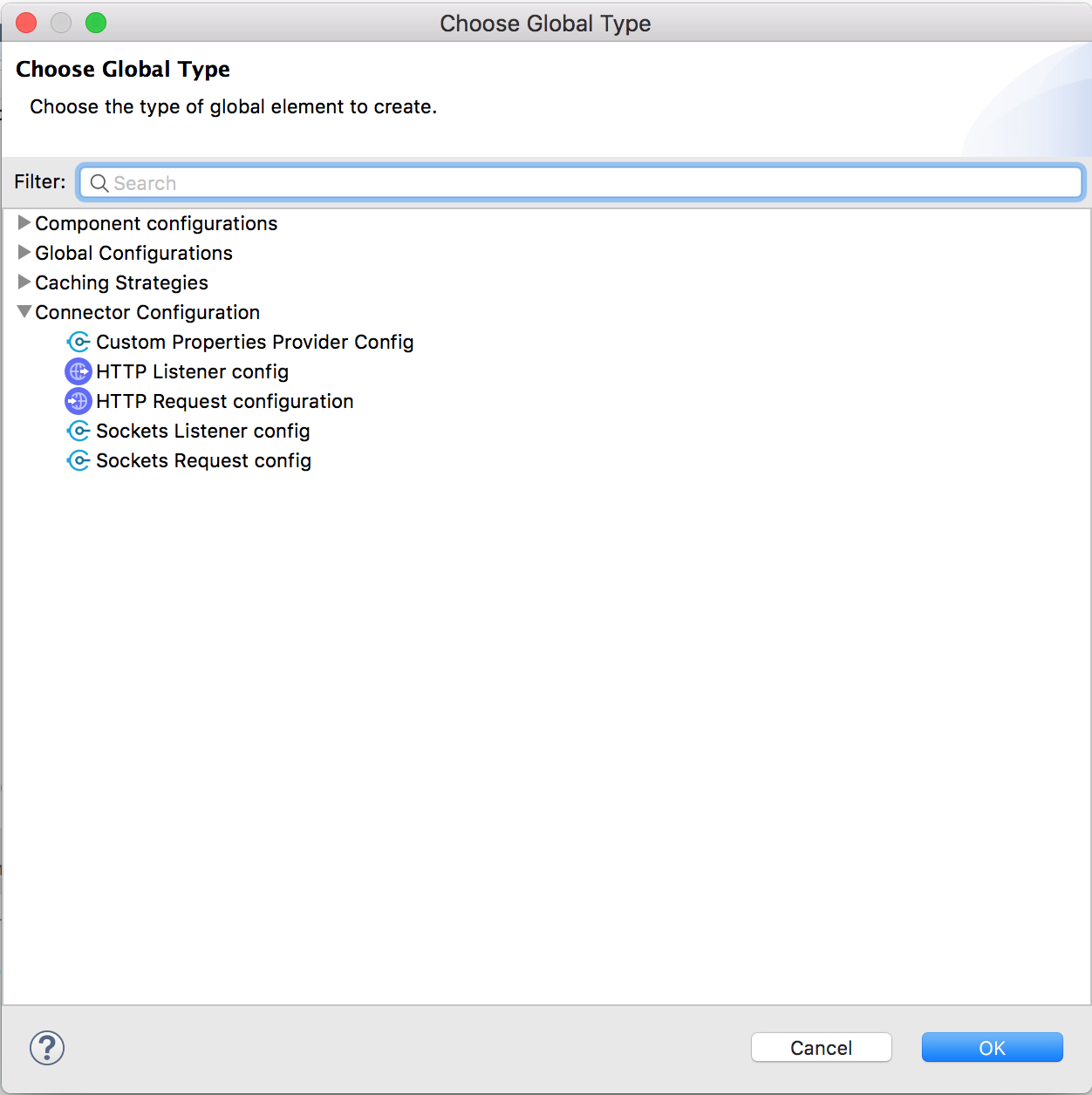
Now, open the application XML file and in the **Global Elements** tab and click **Create**. Under
**Connector Configuration**, you should see an option for selecting the configuration from your
custom module, for example:
You can now configure your new component and start using properties with the prefix defined in your
module.
## Using Custom Configuration Properties Provider versus a Connector
For static properties, use the properties provider approach, because static properties don’t change
during runtime. If your properties might change during runtime, create a connector that can provide
the value as one of its operations.
> [!NOTE] Although the [Mule SDK for Java](https://docs.mulesoft.com/mule-sdk/latest/getting-started) is used to
> implement a custom configuration properties provider, you can’t use
> [ConnectionProviders](https://docs.mulesoft.com/mule-sdk/latest/connections) to connect to external sources. This is
> because `ConnectionProviders` are managed by Mule runtime and are initialized at a later stage,
> after the static properties are resolved. Consequently, connectivity testing isn’t supported for
> custom properties providers.