---
schema_version: "1"
id: e66f60b4548e03f9f9e03ebc0cfc53ea2d4ebcfd4565e9b6058c312ed38cfd91
title: Parse Template Reference
collection: mulesoft
version: current
locale: en-us
portal_url: https://docs.salesforce.com/mulesoft/current/en-us/mule-runtime/4.6/parse-template-reference.md
canonical_url: https://docs.mulesoft.com/mule-runtime/4.6/parse-template-reference
source_site: docs.mulesoft.com
content_type: documentation
content_hash: fcf2f8903696147fc097c72c6cf94e15f2ad0fc6458fc9c3cf585e32800563ac
description: MuleSoft Documentation Site
release: "4.6"
latest: false
---
---
product: Mule Runtime
version: 4.6
keywords: anypoint studio, parse
---
# Parse Template Reference
> For the full documentation index, see: https://docs.mulesoft.com/llms.txt
Parse Template is the Mule component to use for processing a template and obtaining a result. A
template is defined as text with embedded Mule expressions that are evaluated and replaced with
their result.
You can configure template through an external file reference, or you can embed it in the component
definition itself.
[Examples](#code_example)
## Configuring a Parse Template
1. In Studio, drag a Parse Template message processor from the palette onto the canvas.
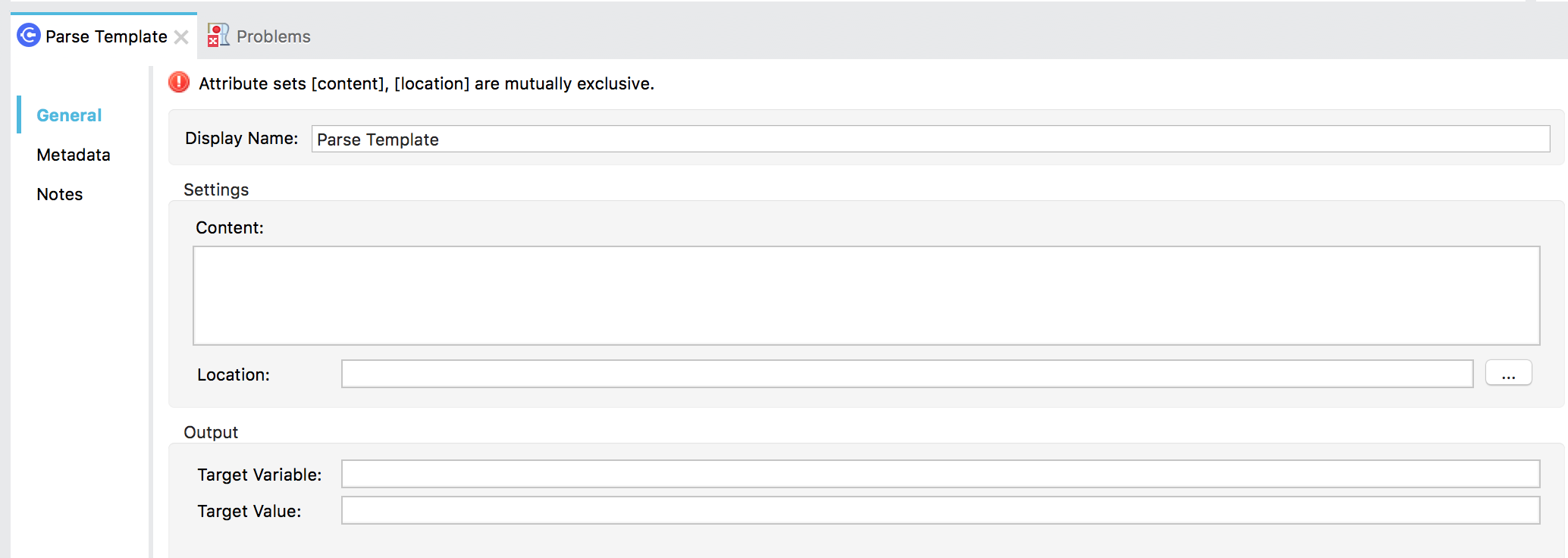
2. Configure the fields described in this table:
| Field | Value | Description |
|---|
| | A string to use as a template. Instead of defining the template in an external file, you can use this field to write it inline. It can contain embedded expressions to be evaluated and replaced with their results. |
| | Customize to display a unique name for the transformer in your application. |
| | Define the location of the file that Mule uses as a template into which to insert values extracted from the message properties or variables. |
| | The name of a variable that stores the result of evaluating the expression defined in Target Value. |
| | Mule Expression to be evaluated after executing Parse Template. The result of this expression is stored in a variable with the name defined in the Target Variable field. |
If you are using the XML editor in Studio or a Standalone Mule instance:
- Add a `parse-template` element to your flow, then configure it according to the tables below.
```xml
```
Attributes of the `parse-template` element:
| Element Attributes | Value |
|---|
| A string representing the template to be used where the embedded expressions will be evaluated and replaced by their results. |
| Filepath which defines the location of the file that Mule uses as a template into which to insert values extracted from the message properties or variables. |
| Customize to display a unique name for the transformer in your application. (Note: Not needed in Mule standalone.) |
| The name of a variable where the result of the expression defined in targetValue will be stored after the Parse Template is executed. |
| A Mule Expression that will be evaluated after the Parse Template is executed and which result will be stored in a variable with name as defined in the target attribute. |
## Examples
The following examples use Parse Template to load data dynamically into HTML:
- [Processing Results of a Database Query Dynamically](#ex_1)
- [Dynamically Generating Data in HTML Rows](#ex_2)
### Processing Results of a Database Query Dynamically
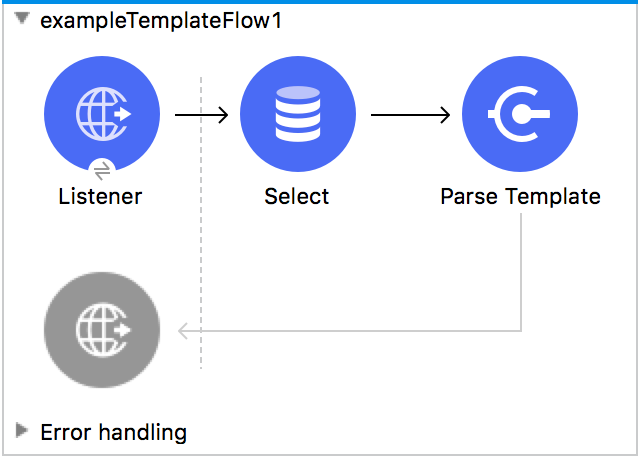
This example uses Parse Template in a Mule application that loads employee data from a database into
an HTML template. The flow returns the template-built output to the caller.
#### Input to Parse Template
Assume that you start the flow with a URI that contains a query parameter that identifies the ID of
an employee, such as `http://localhost:8081/getEmployee?id=1234`, and that the Select operation
returns the following input to Parse Template:
```html
{ "first_name": "Melba", "last_name": "Roy Mouton", "department": "Computers", "job_title":
"Assistant Chief of Research Programs", "start_date": "01/01/2021", "employee_type": "mathematician"
}
```
#### Template Content
The template selects fields containing name, department, job title, start date, and employee type
values from the input payload.
```html
| First Name |
Last Name |
Department |
Job Title |
Start Date |
Employee Type |
| #[payload['first_name']] |
#[payload['last_name']] |
#[payload['department']] |
#[payload['job_title']] |
#[payload['start_date']] |
#[payload['employee_type']] |
```
#### Configuration XML
In the Mule configuration XML for the example, Parse Template loads the template file through the
setting `location="src/main/resources/responseHtml.template"`.
```xml
SELECT * FROM Employees WHERE id=#[attributes.queryParams['id']]
```
#### Output of the Template
The [example](#template) returns template-built output. The output is HTML with the selected
employee data.
```xml
| First Name |
Last Name |
Department |
Job Title |
Start Date |
Employee Type |
| "Melba" |
"Roy Mouton" |
"Computers" |
"Assistant Chief of Research Programs" |
"01/01/2021" |
"mathematician" |
```
### Dynamically Generating Data in HTML Rows
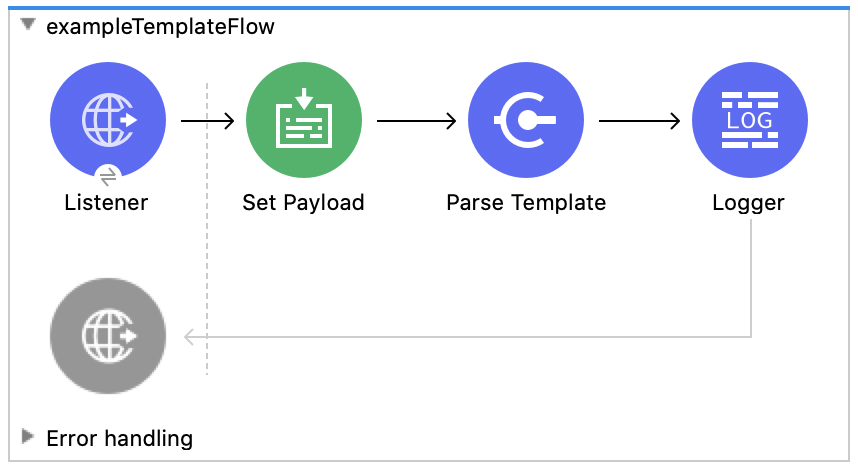
The example uses Parse Template on employee records that are represented as an array of objects.
#### Input to Parse Template
Assume that Parse Template component receives the following payload from Set Payload:
```html
{ Employee: [ { "first_name" : "Melba", "last_name" : "Roy Mouton", "department" : "Computers",
"job_title" : "Assistant Chief of Research Programs", "start_date" : "01/01/2021", "employee_type" :
"mathematician" }, { "first_name" : "Annie", "last_name" : "Easley", "department" : "Software
Development", "job_title" : "Technical Lead", "start_date" : "06/02/2020", "employee_type" : "Rocket
Scientist" } ] }
```
#### Template Content
The following template uses a DataWeave script to iterate over the input array and construct an HTML
row for each object in the array:
```html
| First Name |
Last Name |
Department |
Job Title |
Start Date |
Employee Type |
#[%dw 2.0 output application/java --- payload.*Employee[0] map ((item) -> "
| " ++ (item.first_name default "") ++ " |
" ++ (item.last_name default "") ++ " |
" ++ (item.department default "") ++ " |
" ++ (item.job_title default "") ++ " |
" ++ (item.start_date default "") ++ " |
" ++ (item.employee_type default "") ++ " |
") joinBy ""]
```
#### Configuration XML
In the Mule configuration XML, Parse Template loads the template file through the setting,
`location="/path/to/my.template"`.
```xml
```
#### Output of the Template
The [example](#template2) returns template-built output. The output is HTML with the dynamically
produced rows and data from the objects in the array.
```xml
| First Name |
Last Name |
Department |
Job Title |
Start Date |
Employee Type |
| Melba |
Roy Mouton |
Computers |
Assistant Chief of Research Programs |
01/01/2021 |
mathematician |
| Annie |
Easley |
Software Development |
Technical Lead |
06/02/2020 |
Rocket Scientist |
```
## Special Characters
Parse Template supports the use of expressions within a template and the use of literals within
these expressions. The template recognizes certain special characters, such as the sequence `\#[`
and quotations marks. You can escape such characters to treat them as regular characters.
- `#[an-expression]`:
Within a template, use the characters `#[]` to designate an expression. For example, a template
can contain expressions within HTML elements, such as `#[upper("mulesoft")] | `, which
resolves to `MULESOFT | `. Empty expressions (`#[]`) return an error, but empty strings,
such as `#['']` or `#[""]` are valid expressions.
- Sub-expressions:
To resolve a sub-expression that is surrounded by quotation marks, surround the sub-expression
with another `#[]`. For example, the four elements in the template snippet below contain the same
sub-expression (`upper("world")`), either inside or outside of quotation marks. The first two
return the same results. The last two do not process `upper("world")` because the sub-expression
is inside the quotation marks but not surrounded by another `#[]`.
Parse Template Snippet:
```XML
#['hello #[upper("world")]'] |
#['hello ' ++ upper("world")] |
#['hello upper("world")'] |
#['hello ++ upper("world")'] |
```
Output Values:
```XML
hello WORLD |
hello WORLD |
hello upper("world") |
hello ++ upper("world") |
```
- Escape character (`\`):
Parse Template uses the character sequence `#[` to identify where an expression begins. To avoid
this behavior and treat that sequence as literal characters, escape it with `\`. For example,
`#[ | ` returns `#[ | `.
In addition, expressions can contain strings with special characters that you want to treat as
regular characters. To escape any special characters within a string that is embedded inside an
expression, append `\` to the character. Examples of special characters include the sequence `#[`,
quotations marks (`'` or `"`), apostrophes (`'`), and `$`. It is not necessary to escape `\#` or
`[` unless they are adjacent to one another in the string, with the `\#` preceding the `[`.
Parse Template Snippet:
```XML
\#[ |
#['abcd\#[-1234' ++ now() as String ++ '.log'] |
'abc'def' |
#['abc\'def'] |
"xyz"xyz" |
#["xyz\"xyz"] |
#["abc\$DEF\#ghi\[JKL]"] |
```
Output Values:
```XML
#[ |
abcd#[-12342020-07-06T17:20:10.683-07:00.log |
'abc'def' |
abc'def |
"xyz"xyz" |
xyz"xyz |
abc$DEF#ghi[JKL] |
```
For more information, see
[Escape Special Characters](https://docs.mulesoft.com/dataweave/latest/dataweave-language-introduction#escape-special-characters).
## See Also
[Set Variable Transformer](https://docs.mulesoft.com/mule-runtime/4.6/variable-transformer-reference)