---
schema_version: "1"
id: 331783b8c4f2f5c18ca7621bff7c9ec033aefe112fd84c6c62c3739c469f9afa
title: Flow Reference Component
collection: mulesoft
version: current
locale: en-us
portal_url: https://docs.salesforce.com/mulesoft/current/en-us/mule-runtime/4.6/flowref-about.md
canonical_url: https://docs.mulesoft.com/mule-runtime/4.6/flowref-about
source_site: docs.mulesoft.com
content_type: documentation
content_hash: 35261e1c503a8ce3467be536f3ac1a993642777ffde074293b1f9103c85b6856
description: MuleSoft Documentation Site
release: "4.6"
latest: false
---
---
product: Mule Runtime
version: 4.6
keywords: email, connector, send, retrieve, manage, match, matcher, smtp, pop3, imap
---
# Flow Reference Component
> For the full documentation index, see: https://docs.mulesoft.com/llms.txt
Flow Reference routes the Mule event to another flow or subflow, executes all processors in the
referenced flow, and then routes the event back within the same Mule application. The following
diagram shows the order of processing when one flow references another:
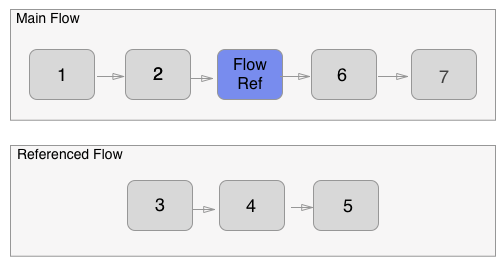
When the main flow is triggered, the Mule event travels through and executes the flow until the
event reaches the Flow Reference. The event then travels through and executes the referenced flow
from beginning to end, and then returns to the main flow.
This process enables you to treat the entire referenced flow like a single component in your current
flow.
Flow Reference breaks the Mule application into discrete and reusable units. For example, a flow
that lists files on a regular basis might reference another flow that processes the output of the
List operation. Instead of appending all the processing steps to the flow that lists the files, you
can append a Flow Reference that points to the processing flow.
## Configure a Flow Reference
To configure a Flow Reference component, follow these steps in Anypoint Studio:
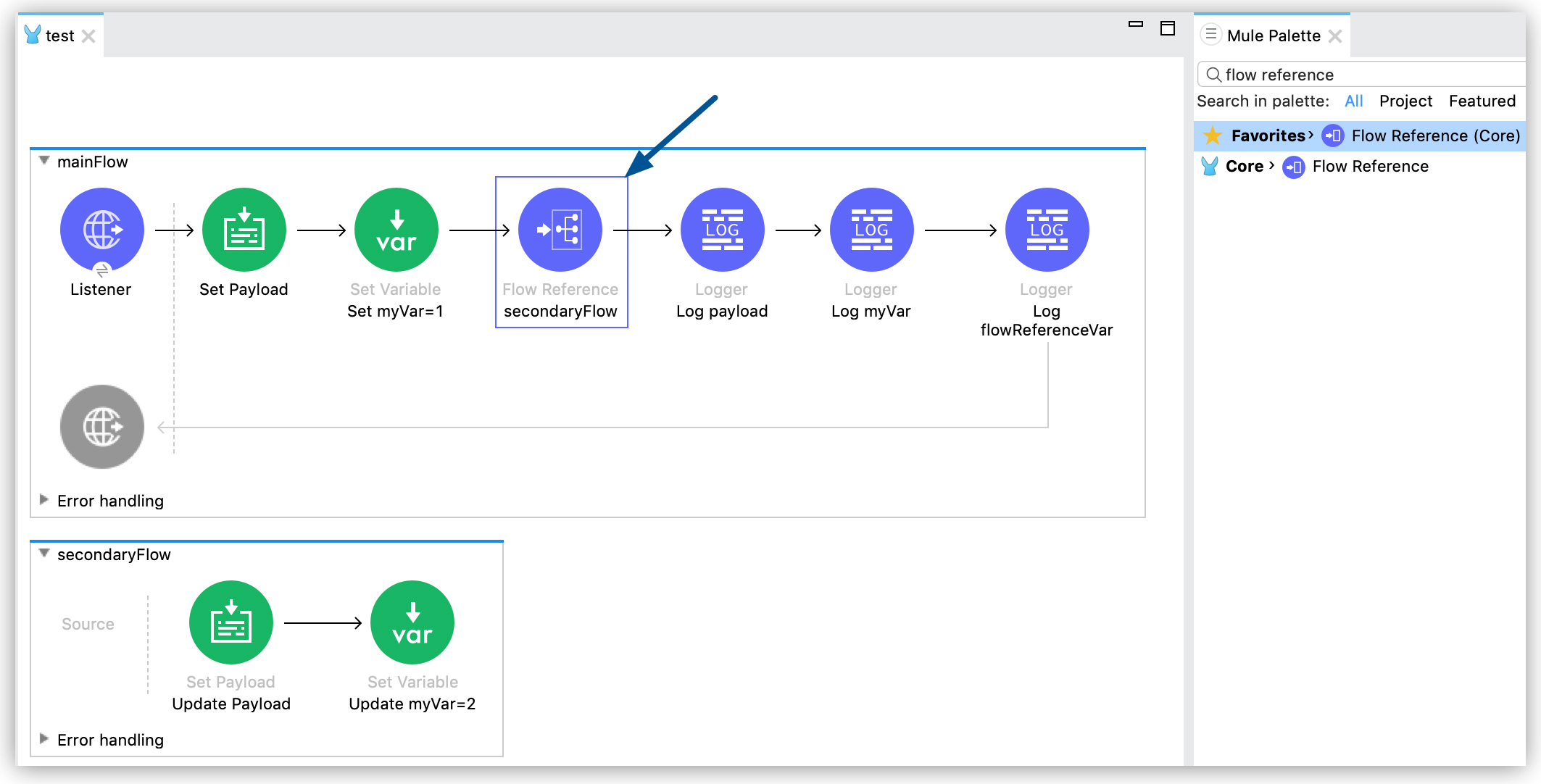
1. Drag the Flow Reference component from **Mule Palette** to the point in your flow where you want
to create the call to the referenced flow:
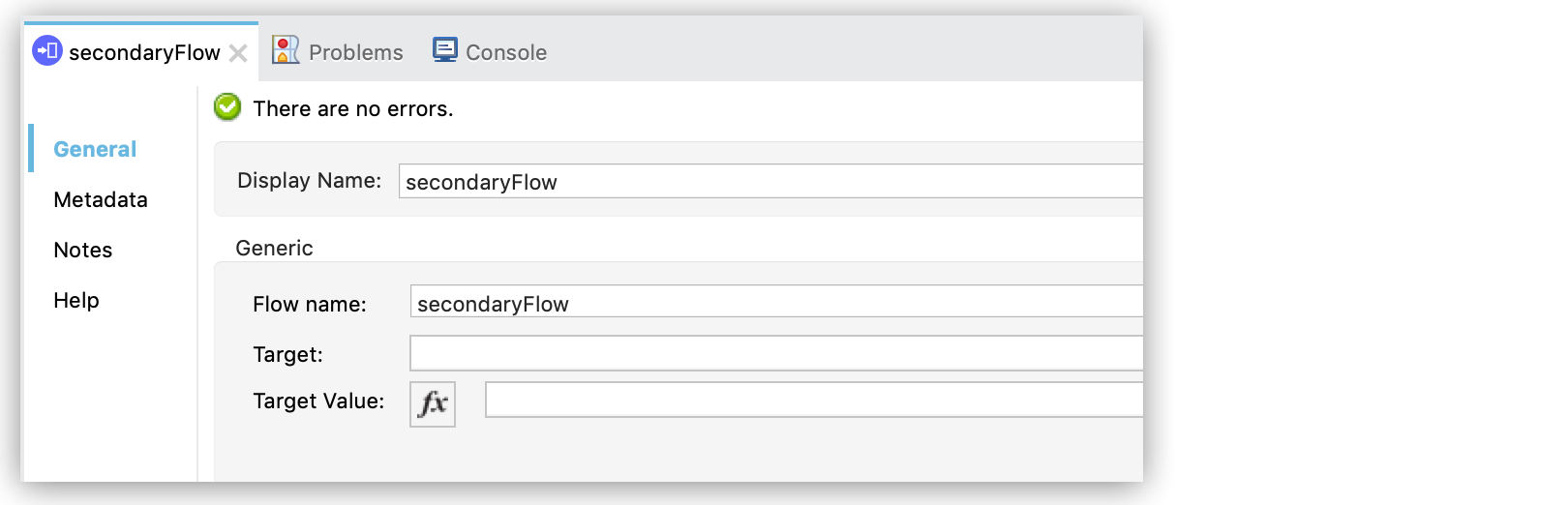
2. Open the Flow Reference properties and specify the flow you want to reference in **Flow name**:
> [!WARNING] Use actual flow names to define the **Flow name** (`name`) attribute. Using dynamic
> values (DataWeave expressions, variables) to specify the referenced flow negatively affects
> performance. Also, MUnit tests and application analyzing tools cannot work on dynamic references.
## Enrich Content with a Flow Reference Target Variable
Sometimes you need to execute a flow that uses the current payload and variables, but you want the
Mule message to remain unchanged after such process. In this case, you can use a target variable to
store the results of the referenced flow processing without changing the original message.
You can store the result of a Flow Reference call in a target variable by configuring the following
fields in your Flow Reference properties:
- **Target**: Name of the variable that the Flow Reference creates to store the result of the
processed message.
- **Target Value**: An expression that evaluates against the operation’s output. The result of this
evaluation is stored in the defined target variable.
### Considerations when Using a Target Variable
Setting the `target` variable in a Flow Reference component causes the original message to remain
unchanged. This means that any modification to the payload or to the variables that occur in the
referenced flow revert after the referenced flow finishes executing its processors, returning the
payload and variables to their original values.
Alternatively, if you do not define a `target` variable, any modification that occurs to the payload
or to the variables in the referenced flow persist after the referenced flow finishes its execution,
changing the original value of the payload or variables.
## Error Handling Behavior in Referenced Flows
When an error occurs inside a flow that is referenced by a Flow Reference component, the execution
of the referenced flow stops and the process transfers to the referenced flow’s error handler. If
the referenced flow does not have a configured error handler, the error is propagated to the flow
that contains the Flow Reference call so this flow’s configured Error Handler component processes
the error.
Target variables are not set when an error occurs because the execution of the flow stops and does
not end successfully.
## XML Example of Flow Reference
The following XML code represents the project created in
[Configure a Flow Reference](#configure-flow-ref), adding the target variable `flowReferenceVar,`
which stores the result of the secondary flow called by the Flow Reference component. This variable
is then used in the main flow by logging `vars.flowReferenceVar`:
```xml
```
The following log represents the output of the example application after its execution:
INFO LoggerMessageProcessor: Payload = Original payload INFO LoggerMessageProcessor: myVar = 1 INFO
LoggerMessageProcessor: flowReferenceVar = Modified payload
If you remove `target="flowReferenceVar"` from the Flow Reference component, the application returns
the following output:
INFO LoggerMessageProcessor: Payload = Modified payload INFO LoggerMessageProcessor: myVar = 2 INFO
LoggerMessageProcessor: flowReferenceVar = null
The logs are shortened to improve readability.
## See Also
- [Mule Events](https://docs.mulesoft.com/mule-runtime/4.6/about-mule-event)
- [Enrich Data with Target Variables](https://docs.mulesoft.com/mule-runtime/4.6/target-variables)
- [How Transactions Affect Scopes and Routers](https://docs.mulesoft.com/mule-runtime/4.6/transaction-management#tx_scopes_routers)