---
schema_version: "1"
id: 3ef9acfc4e34aceba227afb78dc9914036420583a4898f70a97fb5ad4856bd49
title: Streaming in Mule Apps
collection: mulesoft
version: current
locale: en-us
portal_url: https://docs.salesforce.com/mulesoft/current/en-us/mule-runtime/4.4/streaming-about.md
canonical_url: https://docs.mulesoft.com/mule-runtime/4.4/streaming-about
source_site: docs.mulesoft.com
content_type: documentation
content_hash: 82eae13d9722f9aa5a9aa6b91e505b47ed1b76fd01fd37fbef5cfb59fef9eb93
description: MuleSoft Documentation Site
release: "4.4"
latest: false
---
---
product: Mule Runtime
version: 4.4
---
# Streaming in Mule Apps
> For the full documentation index, see: https://docs.mulesoft.com/llms.txt
Mule 4 introduces a framework to work with streamed data. To understand the changes introduced in
Mule 4, it is necessary to understand how traditional data streams are consumed:
- Data streams cannot be consumed more than once
In the following example, the flow shows the HTTP Listener source that receives a POST method with
a body payload to write to the files. The flow writes the first file correctly, while the second
file is created with empty content because each component that consumes a stream expects to
receive a new stream. After the first File Write operation consumes the stream, the second File
Write operation receives an empty stream. Thereby, the second operation has no content to write to
a file.
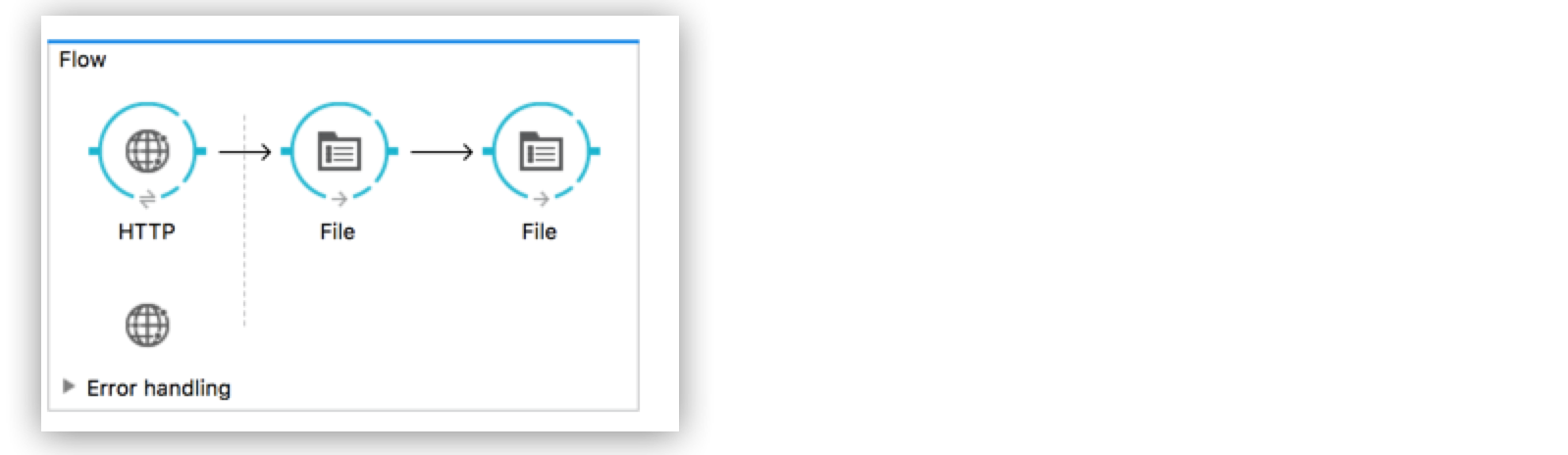
Figure 1. Mule 3 Streaming: Writing a File
In the following example, something similar happens when you try to log the payload after a
DataWeave transformation. The HTTP Listener operation receives the payload stream, and then when
the stream gets to the Transform Message component, it is available in memory, so the component
consumes the stream. After the Transform Message component consumes the content, the second Logger
receives an empty stream.
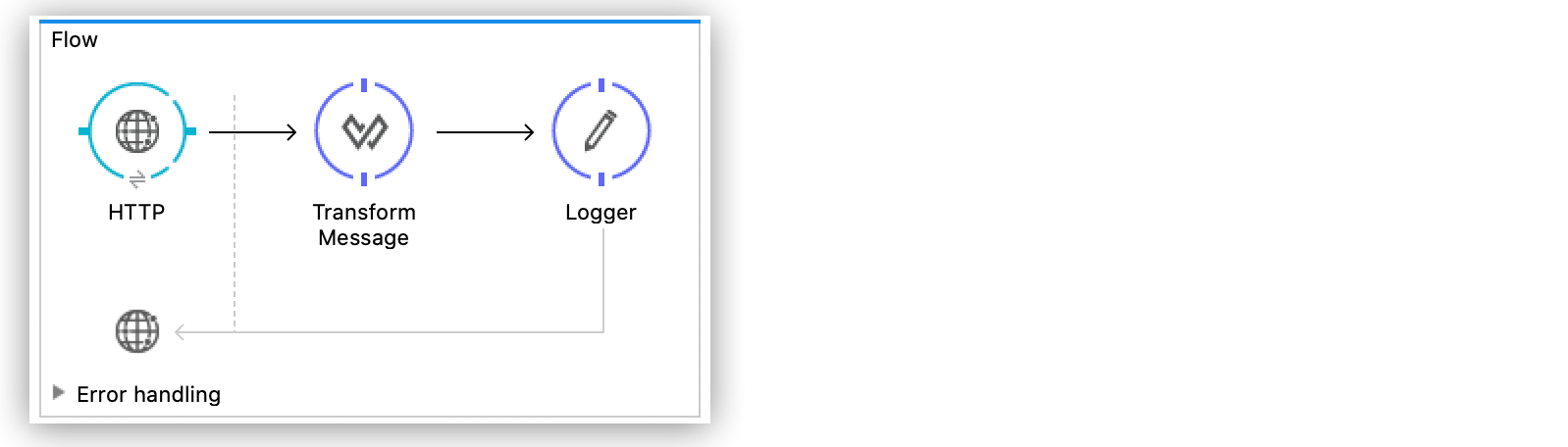
Figure 2. Mule 3 Streaming: Logging a Payload
- Data streams cannot be consumed at the same time
In the following example, the flow uses a Scatter-Gather router to split a data stream and
simultaneously log and write the payload to a file. The application get some parts of the stream
in the file and the rest on the log because different processor chains can not process the data
stream content simultaneously.
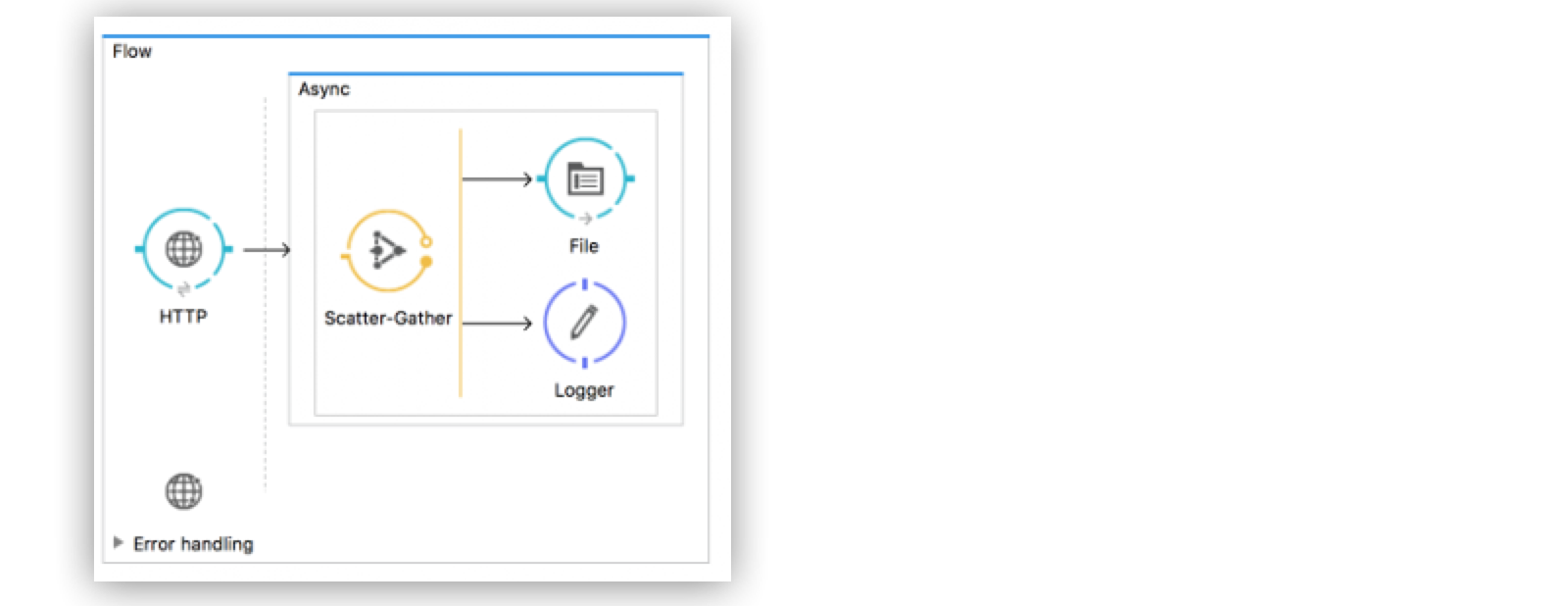
Figure 3. Mule 3 Streaming: Consuming Data Streams
## Repeatable Streams
Mule 4 introduces repeatable streams as its default framework for handling streams. Repeatable
streams enable you to:
- Read a stream more than once.
- Have concurrent access to the stream.
As a component consumes the stream, Mule saves its content into a temporary buffer. The runtime then
feeds the component from the temporary buffer, ensuring that each component receives the full
stream, regardless of how much of the stream was already consumed by any prior component. This
happens automatically and requires no special configuration by you, which prevents the need to find
workarounds to save the stream elsewhere so you can access it again. This configuration
automatically fixes the first two Mule 3 examples outlined above.
All repeatable streams support parallel access, which means that you don’t need to worry about
whether two components are trying to read the same stream when each component is running on a
different thread. Mule automatically ensures that when component `A` reads the stream it doesn’t
generate any side effects in component `B`. This behavior enables you to perform tasks like the one
described in the [third example](#example_3).
## Streaming Strategies
You can configure how Mule handles streams with streaming strategies.
### File-Stored Repeatable Stream
File storage is the default streaming strategy in Mule 4.
> [!NOTE] File storage is only available in Mule Enterprise Edition (Mule EE).
This strategy initially uses an in-memory buffer size of 512 KB. For larger streams, the strategy
creates a temporary file to the disk to store the contents, without overflowing your memory.
If you need to handle large or small files, you can change the buffer size (`inMemorySize`) to
optimize performance:
- Configuring a larger buffer size increases performance by avoiding the number of times the runtime
needs to write the buffer to your disk, but it also limits the number of concurrent requests your
application can process.
- Configuring a smaller buffer size saves memory load.
You can also set the buffer’s unit of measurement (`bufferUnit`).
For example, if you know that you are going to read a file that is always about 1 MB, you can
configure a 1 MB buffer:
```xml
```
Alternatively, if you know you are always processing a file no larger than 10 KB, you can save
memory:
```xml
```
Based on performance testing, the default 512 KB buffer size configuration through this strategy
does not significantly impact performance in most scenarios. However, you need to run tests to find
the proper buffer size configuration for your needs.
### In-Memory Repeatable Stream
The in-memory strategy is the default configuration for the Mule Kernel (formerly called Mule
Runtime Community Edition).
This strategy defaults to a buffer size of 512 KB. For larger streams, the buffer is expanded by a
default increment size of 512 KB until it reaches the configured maximum buffer size. If the stream
exceeds this limit, the application fails.
You can customize this behavior by setting the initial size of the buffer (`initialBufferSize`), the
rate at which the buffer increases (`bufferSizeIncrement`), the maximum buffer size
(`maxInMemorySize`), and the unit of measurement for the buffer size value (`bufferUnit`).
For example, these settings configure an in-memory repeatable stream with a 512 KB initial size,
which grows at a rate of 256 KB and allows up to 2000 KB (2 MB) of content in memory:
```xml
```
Based on performance testing, the default 512 KB buffer size, and the 512 KB increment size
configuration of this strategy does not significantly impact performance in most scenarios. However,
you need to run tests and find the proper buffer size and size increment configuration for your
needs.
Every component in Mule 4 that returns an `InputStream` or a `Streamable` collection supports
repeatable streams. These components include:
- File connector
- FTP connector
- Database connector
- HTTP connector
- Sockets connector
- SalesForce connector
## Streaming Objects
When an Anypoint Connector is configured to use auto-paging, Mule 4 automatically handles the paged
output of the connector using a repeatable auto-paging framework. This framework is similar to
repeatable streams because the connector receives the object, and Mule sets a configurable in-memory
buffer to save the object. However, while repeatable streams measure the buffer size in byte
measurements, the runtime measures the buffer size using instance counts when handling objects.
> [!IMPORTANT] When streaming objects, the in-memory buffer size is measured in instance counts.
When calculating the in-memory buffer size for repeatable auto-paging, you need to estimate the
amount of memory each instance takes to avoid running out of memory.
As with repeatable streams, you can use different strategies to configure how Mule handles the
repeatable auto paging.
### Repeatable File Store (Iterable)
This configuration is the default for Mule Enterprise Edition. This strategy uses a default
configured in-memory buffer of 500 objects. If your query returns more results than the buffer size,
Mule serializes those objects and writes them to your disk. You can configure the number of objects
Mule stores in the in-memory buffer. The more objects you save in-memory, the better performance you
get from avoiding writes to disk.
For example, you can set a buffer size of 100 objects in-memory for a query from the SalesForce
Connector:
Repeatable File Store (Iterable):
```xml
```
Note that MuleSoft uses the Kryo framework for serialization because standard Java serialization
requires the serialized object (and all its referenced objects) to implement the `Serializable`
interface. The Kryo serializer, which does not have this limitation, is capable of serializing some
objects that standard Java serialization cannot. However, Kryo cannot serialize everything. For
example, instances of `org.apache.xerces.jaxp.datatype.XMLGregorianCalendarImpl` are not
serializable, even through Kryo. MuleSoft recommends keeping your objects simple.
> [!NOTE] This option is only available on Mule EE.
### Repeatable In-Memory (Iterable)
This configuration, which is the default for the Mule Kernel, configures a default buffer size of
500 Objects. If the query result is larger than that, the buffer expands to a default increment size
of 100 objects until it reaches the configured maximum buffer size. If the stream exceeds this
limit, the app fails. You can customize the initial size of the buffer (`initialBufferSize`), the
rate at which the buffer increases (`bufferSizeIncrement`), and the maximum buffer size
(`maxBufferSize`).
For example, this configuration sets an in-memory buffer of 100 objects that increments at 100
objects per increment and allows a maximum buffer size of 500 objects.
Repeatable In-Memory (Iterable):
```xml
```
## Disabling Repeatable Streaming
You can disable repeatable streaming through the `non-repeatable-stream` and
`non-repeatable-iterable` strategies. The strategy to use depends on the type of stream.
Use this option only if you are certain that there is no need to consume the stream several times
and only if you need a very tight optimization for performance and resource consumption.
When making that decision, consider the following:
- Although disabling repeatable streaming improves performance, the significance of that gain is
proportional to the size of the streams. Unless you are working with large streams, it is likely
that you can do something else in your app to provide a better optimization.
- Disabling repeatable streaming means that the stream can only be read once. Keep in mind that your
flow might contain components that require consumption of the full stream even if you do not
explicitly specify that requirement. Examples include the Cache component (``), some
transformations through the Transform Message component (``), the For Each component
(``) when iterating through a JSON array, and any other component that accesses the
stream directly or through an expression.
## See Also
- [Streaming Strategies Reference](https://docs.mulesoft.com/mule-runtime/4.4/streaming-strategies-reference)