---
schema_version: "1"
id: 76e2e1bd7c681230f4699aa43da8ee51ea66bc82194c510776351fbfcc94ae4a
title: Migrate Applications Managed by API Manager
collection: mulesoft
version: current
locale: en-us
portal_url: https://docs.salesforce.com/mulesoft/current/en-us/mule-runtime/4.4/migrate-mule3-apimanager.md
canonical_url: https://docs.mulesoft.com/mule-runtime/4.4/migrate-mule3-apimanager
source_site: docs.mulesoft.com
content_type: documentation
content_hash: 2dc43b19c029838e2ee2b85322e995211539ad2c786f1bbe24dd19ddc2a7bddf
description: MuleSoft Documentation Site
release: "4.4"
latest: false
---
---
product: Mule Runtime
version: 4.4
---
# Migrate Applications Managed by API Manager
> For the full documentation index, see: https://docs.mulesoft.com/llms.txt
You migrate your existing Mule 3 applications that are managed by API Manager to Mule 4 using the
following steps:
1. [Prepare for your migration](#prepare-migration)
Based on how your existing Mule 3 application is configured, carefully review the prerequisites
to prepare for your migration.
2. [Determine your migration approach](#determine-migration-approach)
Based on several factors, such as whether the migration requires taking downtime, removing
applied policies, migrating contracts, or creating an instance for the migration.
3. [Perform the migration](#perform-migration)
Migrate your application.
## Prepare to Migrate Your Mule 3 Applications
Before you migrate your existing API-managed Mule 3 applications to Mule 4, carefully review the
following guidelines and determine:
- How your Mule 3 application is managed: basic endpoint, integration application, or complex proxy
To migrate your application in this scenario, first
[review how to migrate API gateways](https://docs.mulesoft.com/mule-runtime/latest/) to prepare, and then
[migrate to Mule 4](https://docs.mulesoft.com/mule-runtime/latest/).
- How your application is secured: default or custom policies
If you applied custom policies to your Mule 3 API, follow [Migrating API Policies](https://docs.mulesoft.com/mule-runtime/latest/). If
you have applied an out-of-the-box proxy, you can recreate the proxy by using the API Manager UI.
- Whether you have classified your API
If you have not classified your API, first
[classify an API Instance into an Environment](https://docs.mulesoft.com/api-manager/latest/classify-api-task).
## Determine Your Migration Approach
You migrate your API Manager-managed Mule 3 application by creating a new API instance. Before
migrating to Mule 4, carefully consider the following factors to determine the approach that best
suits your requirements:
Migration Factor
Create API Instance
Requires downtime
No
Requires removing applied policies
No
Requires migrating contracts
Yes
Provides API metrics continuity on API Instance
No
## Perform the Migration
You can migrate your Mule 3 application using:
- [A New API Instance](#migrate-with-new-api)
### Migrate Using a New API Instance
Use the high-level proposal illustrated in the following diagram to use a new API instance for
configuring an independent Mule runtime instance on Mule 4:
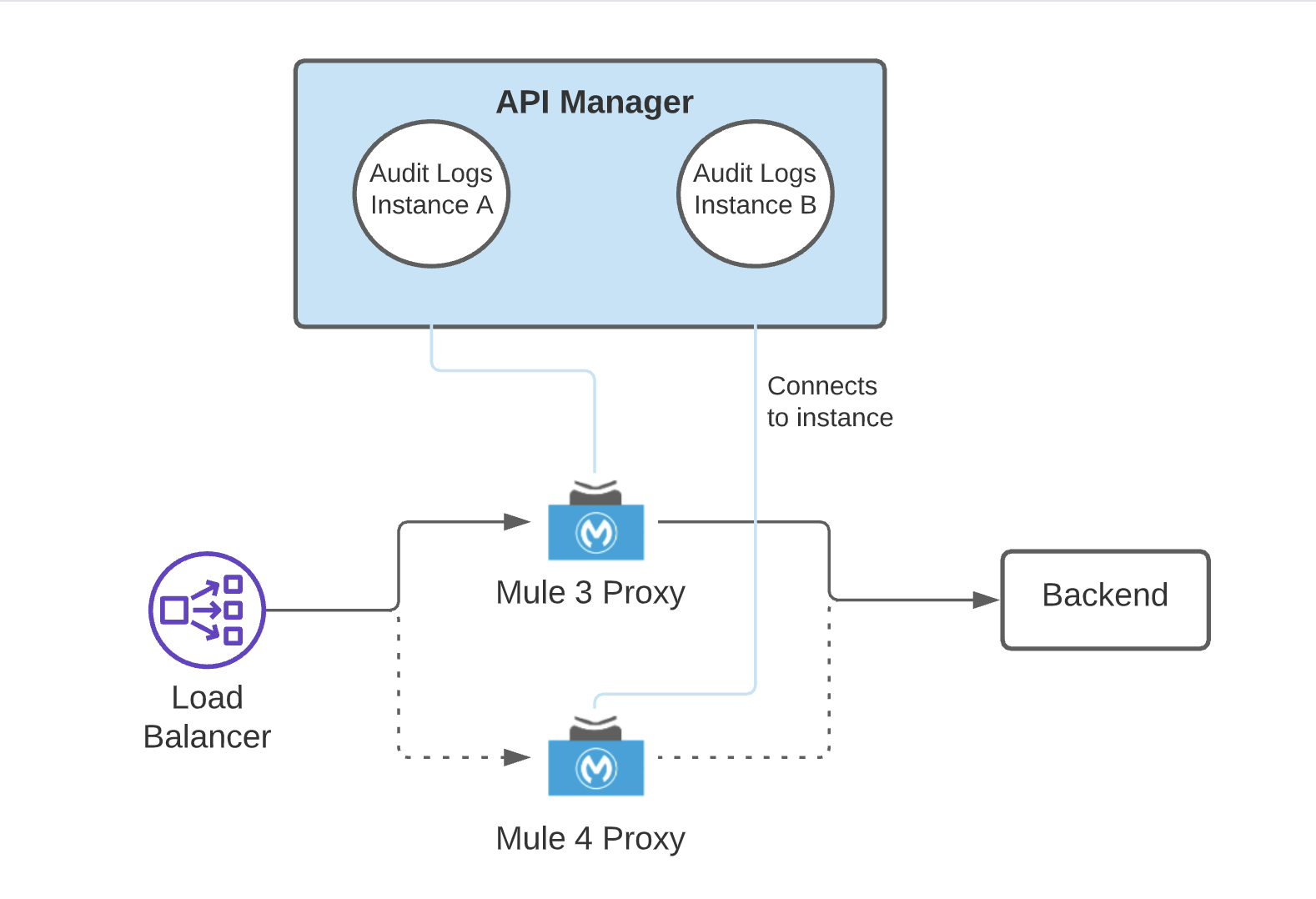
If your Mule application is not a proxy, this same proposal applies to your migration procedure,
without the backend component.
To migrate your Mule 3 API to Mule 4 using a new API instance:
1. From the **API Administration** page in API Manager, select **Manage API** > **Create new API**.
Use an instance label to identify this new API instance.
2. On the **Endpoint Configuration** window, select `Mule 4` in **Mule version** and save.
3. From the left navigation pane in API Manager, apply alerts, SLA tiers, and policies to your API.
4. If your API uses contract-based policies, for example Client ID Enforcement policy,
[migrate the contracts](#migrate-contracts) of the API instance.
5. If you completed configuring your API, start your Mule 4 application and try sending it
requests.
6. After successfully validating your application, undeploy your Mule 3 application.
### Migrate Contracts
Before migrating your application by creating a new API instance, migrate existing API contracts to
your new Mule 4 environment.
**Task Prerequisite**
Before you migrate your contracts, ensure that you have the following roles:
- Organization Administrator of the root organization
- Application Owner of every application that has a contract with the source API
To migrate contracts using the Anypoint Platform UI:
1. Go to **API Manager** > **Client Applications** and select the application.
Ensure that the `API` option is selected in the **Contracts** field.
2. On the right navigation, scroll down to the **Owners** field and add your name.
3. From **Exchange**, select your API instance and request access.
4. From **API Manager**, grant yourself the access.
To automate the request approval process:
1. Add owners for the application:
```text
curl 'https://anypoint.mulesoft.com/apiplatform/repository/v2/organizations//applications//owners' \
-H 'Content-Type: application/json;charset=UTF-8' \
-H 'Authorization: Bearer ' \
--data-raw '{"id":"/applications//contracts' \
-H 'authorization: bearer ' \
-H 'content-type: application/json' \
--data-raw '{"apiId":"","environmentId":"","instanceType":"api","acceptedTerms":true,"organizationId":"","groupId":"","assetId":"","version":"","versionGroup":""}'
```
3. Approve contracts:
```text
curl 'https://anypoint.mulesoft.com/apimanager/xapi/v1/organizations//environments//apis//contracts//approve' \
-H 'Authorization: Bearer ' \
-H 'Content-Type: application/json;charset=UTF-8' \
--data-raw '{}'
```
## Migrating to the Latest Mule 3 Version
If you are not ready to migrate to Mule 4 and you need to migrate to the latest version of Mule 3,
see
[Upgrading Mule Runtime Engine(Versions 3.x to 3.n)](https://docs.mulesoft.com/release-notes/mule-runtime/updating-mule-versions).
Carefully review the release notes for the Mule version to which you are migrating. When you start
the new Mule runtime with the same application pointing to the same API instance, your existent API
is instantly managed with the latest Mule 3.x version. You do not need to perform any additional
steps in API Manager.