---
schema_version: "1"
id: a5c9b721e956eac8fe7866e6c7f925f8d02a7edda6fb104ae5c7d30a10e61a5c
title: Batch Processing
collection: mulesoft
version: current
locale: en-us
portal_url: https://docs.salesforce.com/mulesoft/current/en-us/mule-runtime/4.4/batch-processing-concept.md
canonical_url: https://docs.mulesoft.com/mule-runtime/4.4/batch-processing-concept
source_site: docs.mulesoft.com
content_type: documentation
content_hash: 81be14acf0d9853efb0d7b088436124f11cfd87b0984b828916bbf4b42cd75ea
description: MuleSoft Documentation Site
release: "4.4"
latest: false
---
---
product: Mule Runtime
version: 4.4
keywords: connectors, anypoint, studio, batch, batch processing
---
# Batch Processing
> For the full documentation index, see: https://docs.mulesoft.com/llms.txt
Mule batch processing components are designed for reliable, asynchronous processing of
larger-than-memory data sets. The components are the Batch Job, Batch Step, and Batch Aggregator.
The Batch Job component automatically splits source data and stores it into persistent queues, which
makes it possible to process large data sets while providing reliability. In the event that the
application is redeployed or Mule crashes, the job execution is able to resume at the point it
stopped.
> [!NOTE] Mule batch processing components are exclusive to the Enterprise Edition (EE) version of
> Mule. The components are not available through the open source Mule kernel.
>
> If you are familiar with batch processing in Mule 3.x, see
> [Migrating the Batch Module](https://docs.mulesoft.com/mule-runtime/4.4/migration-core-batch) for an overview of batch processing differences
> in Mule 4.x.
Common use cases for batch processing include:
- Synchronizing data sets between business applications, such as syncing contacts between NetSuite
and Salesforce.
- Extracting, transforming and loading (ETL) information into a target system, such as uploading
data from a flat file (CSV) to Hadoop.
- Handling large quantities of incoming data from an API to a legacy system.
See [Configuring Batch Components](https://docs.mulesoft.com/mule-runtime/4.4/batch-filters-and-batch-aggregator) and
[Handling Errors During Batch Job](https://docs.mulesoft.com/mule-runtime/4.4/batch-error-handling-faq) for examples.
## Architecture
Mule batch processing components prepare records for processing in batches, run processors on those
records, and issue a report on the results of the processing. Record preparation and reporting take
place within the Batch Job component. Processing takes place within one or more Batch Step
components and, optionally, a Batch Aggregator component within a Batch Step component.
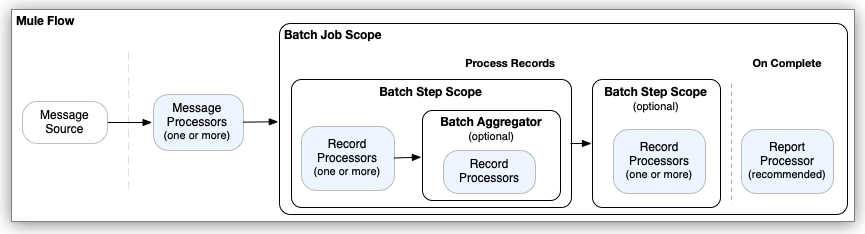
The processors you place within batch processing components act on records. Each record is similar
to a Mule event: Processors can access, modify, and route each record payload using the `payload`
keyword, and they can work on Mule variables using `vars`. However, they _cannot_ access or modify
Mule attributes (`attributes`) from the input to the Batch Job component.
The following example outlines the XML structure of a Mule flow that performs batch processing and
returns a report with the results of that processing:
```xml
(1)
(2)
(3)
(4)
(5)
(6)
(7)
(8)
```
Note that the various `placeholder` entries in the example, such as ``,
illustrate the location of real processors, such as connector operations, Mule core components, and
so on, which process Mule messages, records, and the batch processing report. They are _not real
processors_.
1. The Mule event source triggers the Mule flow. Common event sources are listeners, such as an
HTTP listener from Anypoint Connector for HTTP (HTTP Connector), a Scheduler component, or a
connector operation that polls for new files.
2. Processors located upstream of the Batch Job component typically retrieve and, if necessary,
prepare a message for the Batch Job component to consume. For example, an HTTP request operation
might retrieve the data to process, and a DataWeave script in a Transform Message component
might transform the data into a [valid format](#valid_input) for the Batch Job component to
receive.
3. When the Batch Job component receives a message from an upstream processor in the flow, the
[Load and Dispatch phase](https://docs.mulesoft.com/mule-runtime/4.4/batch-phases#phase_load_dispatch) begins. In this phase, the component
prepares the input for processing as records, which includes creating a batch job instance in
which processing takes place.
4. The batch job instance executes when the batch job instance reaches ``. At
this point, the [Process phase](https://docs.mulesoft.com/mule-runtime/4.4/batch-phases#phase_process) begins. All record processing takes
place during this phase.
5. Each Batch Step component contains one or more processors that act upon a record to transform,
route, enrich, or modify data in the records. For example, you might configure a connector
operation to pass processed records one-by-one to an external server.
6. A Batch Aggregator component is optional. You can add only one to a Batch Step component. The
initial processor within a Batch Aggregator must be able to accept an array of records as input.
Batch aggregation is useful for loading an array of processed records to an external server. It
is also possible to use components, such as For Each, that iterate over the array so that other
processors can process the records individually. The Batch Aggregator component requires a
[`streaming` or `size`](https://docs.mulesoft.com/mule-runtime/4.4/batch-reference#ref_batch_aggregator_component) setting to indicate how
to process records.
7. Additional Batch Step components are optional. This example does not contain a Batch Aggregator
component.
8. After records pass through all Batch Step components, Mule completes the batch job instance and
reports the results in an object that indicates which records succeed and which failed during
processing. You can retrieve or log the result with a Logger or other processor within
``.
The Batch Job component consumes records in the
[On Complete phase](https://docs.mulesoft.com/mule-runtime/4.4/batch-phases#phase_on_complete), which occurs after all record processing in
a batch job instance finishes, and does not propagate the processed records to external
components, outside of the Batch Job component. However, like many Mule components, the Batch
Job component provides a way to set a [target variable](https://docs.mulesoft.com/mule-runtime/4.4/batch-reference#ref_batch_job_component)
(`target`) property that a downstream component, outside Batch Job use to gain access to the
_pre-processed payload_ that the Batch Job component receives.
For more detail, see [Batch Job Phases](https://docs.mulesoft.com/mule-runtime/4.4/batch-phases).
## Valid Input to the Batch Job Component
When triggered by an upstream event in the flow, the Batch Job component performs an implicit split
operation on the Mule message input. The operation accepts any Java Iterables, Iterators, or Arrays,
as well as JSON and XML payloads. The component cannot split any other data format.
If you are working with a data format that is not compatible with the splitting process, transform
the payload to a supported format before it enters the Batch Job component.
## Mule Variable Propagation
Each record in a batch job instance inherits Mule event variables from the input to the Batch Job
component. You can access and change the value of these variables in the Batch Step and Batch
Aggregator components, which run during the Process phase, and you can create new variables within
these components. For each record within this phase, the variables (and modifications to them) are
propagated through each Batch Step and Aggregator component within a Batch Job component. For
example, if record R1 sets the Mule variable `varName` to `"hello"`, record R2 sets `varName` to
`"world"`, and record R3 does not set this variable, then in the next Batch Step component, R1 has
the value `"hello"`, R2 the value `"world"`, and R3 returns `null` for that variable.
In a similar scenario, if `varName` is set in the flow _before_ the Batch Job component and record 3
(R3) does not change the value of `varName`, R3 inherits that value. To illustrate this point,
assume a Mule flow that sends the Batch Job component a `payload` of the array `[1,2,3,4]` and a
Mule variable `varName` with the value `"my variable before batch job"`. The following example uses
the Choice router (`choice`) to set a new value for `varName` in the first and second records but
not the third. Subsequent records also set a new `varName` value.
```xml
```
The logs print the following messages for a batch job instance (edited for readability):
```logs
...
INFO ...PRINT VARIABLE BEFORE BATCH: "my variable before batch job"
...
INFO ...PRINT VARIABLE VALUES AFTER BATCH JOB: "my variable before batch job"
INFO ...PRINT RECORD NUMBER: 1
INFO ...R1: PRINT VARIABLE for PAYLOAD is 1: "hello"
INFO ...PRINT RECORD NUMBER: 2
INFO ...R2: PRINT VARIABLE for PAYLOAD is 2: "world"
INFO ...PRINT RECORD NUMBER: 3
INFO ...R3: PRINT VARIABLE for PAYLOAD is 3: "my variable before batch job"
INFO ...PRINT RECORD NUMBER: 4
INFO ...Rn: PRINT DEFAULT VARIABLE: "some other value"
...
INFO ...PRINT VARIABLES IN SECOND STEP: {payload 1="hello"}
INFO ...PRINT VARIABLES IN SECOND STEP: {payload 2="world"}
INFO ...PRINT VARIABLES IN SECOND STEP: {payload 3="my variable before batch job"}
INFO ...PRINT VARIABLES IN SECOND STEP: {payload 4="some other value"}
...
```
Notice that the third record (R3) inherits the value of the `varName` set before the Batch Job
component. Any records after R3 set the variable to `"some other value"`. Records logged in the
second Batch Step inherit the values of the variables from the first Batch Step. The Logger _after_
the Batch Job component, which is processed asynchronously, _before_ the batch job instance finishes
processing, also receives the value of `varName` _before_ the Batch Job executes,
`"my variable before batch job"`.
Changes and additions to Mule variables during the [Process phase](https://docs.mulesoft.com/mule-runtime/4.4/batch-phases#phase_process) do
not propagate to the [On Complete phase](https://docs.mulesoft.com/mule-runtime/4.4/batch-phases#phase_on_complete). Only variables inherited
from the triggering event to the Batch Job component propagate to the On Complete phase, and
standard variables that are part of the batch job report, such as `batchJobInstanceId`, are also
present in this phase. It is possible to create a variable in the On Complete phase that persists
through the phase but not after the On Complete ends.
For example, assume that the On Complete phase sets a new variable (`myOnCompleteVar`) and logs all
variables (`vars`) found in this phase.
```xml
```
In the On Complete report, you find the final set variables for a batch job instance, for example:
INFO ... PRINT ON COMPLETE VARIABLES: { varName=TypedValue\[value: '"my variable before batch job"',
dataType: 'SimpleDataType{type=java.lang.String, mimeType='\*/\*; charset=UTF-8'}'\],
batchJobInstanceId=TypedValue\[value: '869ae510-5c84-11ed-bc38-147ddaaf4f97', dataType:
'SimpleDataType{type=java.lang.String, mimeType='\*/\*'}'\], myOnCompleteVar=TypedValue\[value:
'Hello On Complete Variable', dataType: 'SimpleDataType{type=java.lang.String, mimeType='\*/\*;
charset=UTF-8'}'\]}
Variables in the report object example follow:
- `varName` is an example of a variable created before reaching the Batch Job component. This
variable retains the value it had when it entered the component. Any changes to the value during
the Process phase are not retained in the On Complete phase.
- `batchJobInstanceId` is a standard variable that identifies a batch job instance.
- `myOnCompleteVar` is an example of a variable created within the On Complete phase. It appears in
the report but does not persist after the On Complete phase ends.
Downstream from the Batch Job component, only `varName` persists. Like the records and their
attributes, the variables of the records are completely consumed within the Batch Job component. The
batch job instance executes asynchronously from the rest of the flow, so no variable created within
the Process or On Complete phases persists outside of the Batch Job component.
## Error Handling
To prevent the failure of an entire batch job, the Batch Job component can handle any record-level
failure that occurs. Further, you can set or remove variables on individual records so that during
batch processing, Mule can route or otherwise act upon records in a batch job instance according to
a variable. See [Handling Errors During Batch Job](https://docs.mulesoft.com/mule-runtime/4.4/batch-error-handling-faq) for more information.
## See Also
- [Batch Job Phases](https://docs.mulesoft.com/mule-runtime/4.4/batch-phases)
- [Configuring Batch Components](https://docs.mulesoft.com/mule-runtime/4.4/batch-filters-and-batch-aggregator)
- [Batch Process Tuning](https://docs.mulesoft.com/mule-runtime/4.4/tuning-batch-processing)
- [How Transactions Affect Components and Routers](https://docs.mulesoft.com/mule-runtime/4.4/transaction-management#tx_components_routers)
- [Migrating the Batch Module](https://docs.mulesoft.com/mule-runtime/4.4/migration-core-batch)
- [Persistent Queues for Applications Containing Batch Jobs](https://docs.mulesoft.com/cloudhub/cloudhub-fabric#persistent-queues-for-applications-containing-batch-jobs.adoc)