---
schema_version: "1"
id: e24e9b6c470410ca73c48fc103f94be36fb7a563973f70cce095310db4c3e832
title: Enrich Data with Target Variables
collection: mulesoft
version: current
locale: en-us
portal_url: https://docs.salesforce.com/mulesoft/current/en-us/mule-runtime/4.3/target-variables.md
canonical_url: https://docs.mulesoft.com/mule-runtime/4.3/target-variables
source_site: docs.mulesoft.com
content_type: documentation
content_hash: 87f1678ade6e2bac86dd8c9f526399dfa44d9146171c027e17388ecd214960f6
description: MuleSoft Documentation Site
release: "4.3"
latest: false
---
---
product: Mule Runtime
version: 4.3
---
# Enrich Data with Target Variables
> For the full documentation index, see: https://docs.mulesoft.com/llms.txt
When creating a flow in a Mule app, you might need to store data in a variable so that any component
in the flow can use it. Non-void operations (such as the Read operation to the File connector) can
store the message data that they return in a variable. Once defined, variables created with the
Target (`target`) parameter are available for use within the flow, and you can access them like you
access any other variable.
You often define variables through these parameters:
- Target (`target`): Name of the variable in which you want to store message data. Names can only
include numbers, characters, and underscores. For example, hyphens are not allowed in the name.
- Target Value (`targetValue`): Value of the data to store in the target variable. By default, the
value is the message payload (`payload`). The field accepts any value that a variable accepts: any
supported data type, DataWeave expressions, the keywords `payload`, `attributes`, and `message`,
but _not_ the keyword `vars`.
## Considerations
Setting a target variable changes the typical course of the message through the flow. Normally, an
operation outputs a different message than it receives as input:

However, when you set a variable from an operation, the operation outputs to the _next_ component in
the flow the same message that it received as input. For example, assume you have a flow consisting
of component A, followed by component B with a target value of `myMessage`, and then component C. In
this case, component C receives the same message that B received from A:

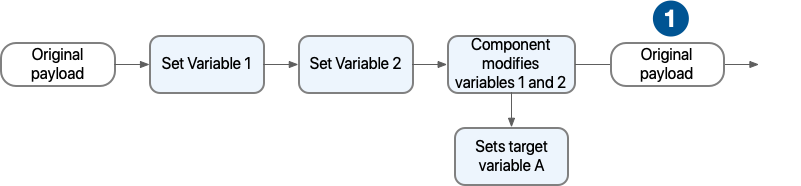
Configuring target variables also affects the behavior of existing variables, which retain their
original values after an operation with a target variable finishes processing. For example, consider
a flow where you set variables 1 and 2, and then an operation modifies variables 1 and 2 and also
outputs a target variable A. In this case, after the execution of the operation, variables 1 and 2
return to their previous values:
1
Because the component sets a target variable, variable 1 and 2 revert to their previous values after the execution of the component.
## Target Variable Configuration Examples
The following example configures a Read operation that stores the payload of `readme.txt` in
`myVar`:
```xml
```
Note that the target variable `myVar` stores the complete payload by default. You only need to
specify a Target Value (`targetValue`) if you want to store a value different than the payload.
In this example, the entire message is stored in `myVar`:
```xml
```
In this case, the variable `myVar` contains the content of the file and also all the metadata
related.
- Expression to access the file content: `#[myVar.payload]`
- Expression to access the file metadata: `#[myVar.attributes]`
In this example, only the file size is stored in `myVar`:
```xml
```
The following scenarios describe some cases where you might use target variables.
## Scenario: Setting a Target Variable from within an Operation
Assume that you want to log the entire message (payload and attributes) returned by a Database
connector operation, such as Insert. Instead of using a Set Variable component after the operation,
you can instead capture the message data by adding a target variable directly to the operation:
```xml
INSERT INTO PLANET(POSITION, NAME, DESCRIPTION) VALUES (777, 'Pluto', :description)
#[{'description' : payload}]
```
- Target Variable for the Insert operation: `result`
- Target Value: `message` in Design Center, `#[message]` in Anypoint Studio.
Then you might retrieve the result from the Logger like this:
```xml
```
- Message: `Payload is: #[vars.result.payload] and attributes are: #[vars.result.attributes]`
Assume that you want to log the name of the first entry in a planet database. You can define a
target variable like this one through the Select operation of the Database connector:
```xml
select * from PLANET order by ID
```
- Target Variable for the Select operation: `planetName`
- Target Value: `payload[0].name` in Design Center, `#[payload[0].name]` in Anypoint Studio.
Then you might retrieve the result from the Logger like this:
```xml
```
- Message: `'Planet name is: ' ++ vars.planetName`
## Scenario: Using the Stored Value as Input to an Operation
Assume that you want to access all planets discovered after a given planet was discovered. You might
create a target variable called `discoveryDate` within a select operation to capture the a planet’s
discovery date.
```xml
select discoveryDate from PLANET where name = :name
#[{'name' : 'pluto'}]
```
- Target Variable for the Retrieve operation: `discoveryDate`
Then you can use the Input parameter of another operation in your flow (such as the Select operation
to the Database connector) to make the variable available for use in your query, for example:
```xml
select * from PLANET where discoveryDate > :discoveryDate
#[{'discoveryDate' : vars.discoveryDate}]
```
- Input Parameter definition for the Select operation:
- Key: `discoveryDate`
- Value: `vars.discoveryDate` in Design Center, `#[vars.discoveryDate]` in Anypoint Studio.
## Scenario: Bypassing the Normal Message Flow
Assume that you want to insert a number of records into a database that are located in the
messages’s payload, then pass those same records on for further processing by the next component in
your flow. Though you want to use the Bulk Insert operation to the Database connector to insert the
records, the operation returns a success message that replaces the current payload, which makes the
records inaccessible. So, to pass on the records to the next component instead of replacing the
payload with the Bulk Insert result, you can store the success message in a target variable, for
example:
- Target Variable: `bulkInsertResult`
Then the next operation in your flow can process the records located in the payload.
## See Also
- [Testing a Processor That Stores Data in a Target Variable](https://docs.mulesoft.com/munit/latest/test-processor-that-uses-target-variable)
- [Mule 4 Programming Model](https://docs.mulesoft.com/mule-runtime/4.3/intro-programming-model)
- [Mule Events](https://docs.mulesoft.com/mule-runtime/4.3/about-mule-event)
- [Variables in Mule Events](https://docs.mulesoft.com/mule-runtime/4.3/about-mule-variables)