---
schema_version: "1"
id: e5846cc6293da8e49411dc7eafe8f60470e9fdaaadfbb3e09719cfda0c8cbcbd
title: Error Handlers
collection: mulesoft
version: current
locale: en-us
portal_url: https://docs.salesforce.com/mulesoft/current/en-us/mule-runtime/4.3/error-handling.md
canonical_url: https://docs.mulesoft.com/mule-runtime/4.3/error-handling
source_site: docs.mulesoft.com
content_type: documentation
content_hash: d9d20932debe80252d5a8f132f4fe9cc555c126e653948aa7bf4ab1e03337325
description: MuleSoft Documentation Site
release: "4.3"
latest: false
---
---
product: Mule Runtime
version: 4.3
keywords: error handling, exceptions, exception catching, exceptions
---
# Error Handlers
> For the full documentation index, see: https://docs.mulesoft.com/llms.txt
Errors that occur in Mule belong to one of two major categories:
- [System Errors](#system_errors)
- [Messaging Errors](#messaging_errors)
## System Errors
Mule throws a system error when an exception occurs at the system level and no Mule event is
involved. A system error handler manages exceptions that occur:
- During application startup.
- When a connection to an external system fails.
When a system error occurs, Mule sends an error notification to registered listeners, logs the
error, and if the error is caused by a connection failure, executes a reconnection strategy.
System error handlers are not configurable in Mule.
## Messaging Errors
Mule throws a messaging error (a [Mule error](https://docs.mulesoft.com/mule-runtime/4.3/mule-error-concept)) whenever a problem occurs within
a flow of a Mule app, where Mule events and the messages they contain are processed.
You can handle Mule messaging errors in more than one way:
- You can rely on the [default error handling](#default_error_handling) mechanism.
- Within a flow, you can set up [On-Error components](https://docs.mulesoft.com/mule-runtime/4.3/on-error-scope-concept) (On Error Continue and
On Error Propagate) inside the flow’s built-in Error Handler component. These components can
contain any number of components to process the error.
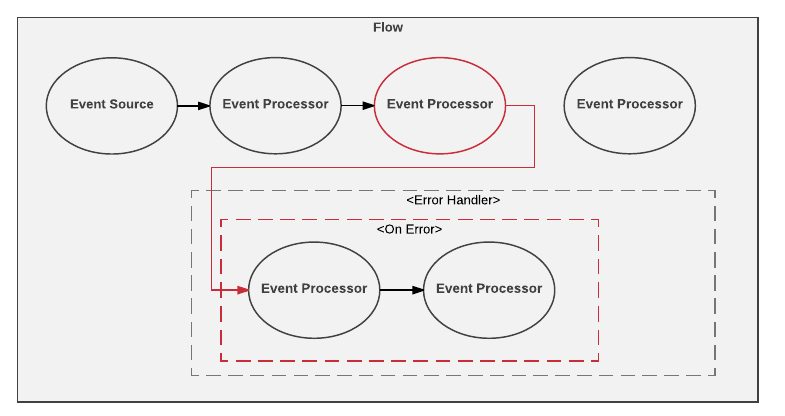
The following figure shows what happens when an event processor, such as an HTTP request or
database operation, throws an error:
- Outside a flow, you can set up an [Error Handler](#global_error_handler) component and reference
it from other Error Handler configurations. The global Error Handler can also contain On-Error
components and their contents.
- It is also possible to set up error handling from within a [Try scope](https://docs.mulesoft.com/mule-runtime/4.3/try-scope-concept) that
resides in a flow. The scope contains a built-in Error Handler in which you can configure On-Error
components and their contents.
### Using Default Error Handling for Messages
By default, unhandled messaging errors are logged and propagated. When a flow is processing a Mule
message that raises an error, the normal execution of the flow stops, and the process transfers to
the flow’s default error handler, which propagates the error.
The following example shows a simple Mule app configuration that relies on default error handling
instead of using explicitly configured error handling components to manage the error.
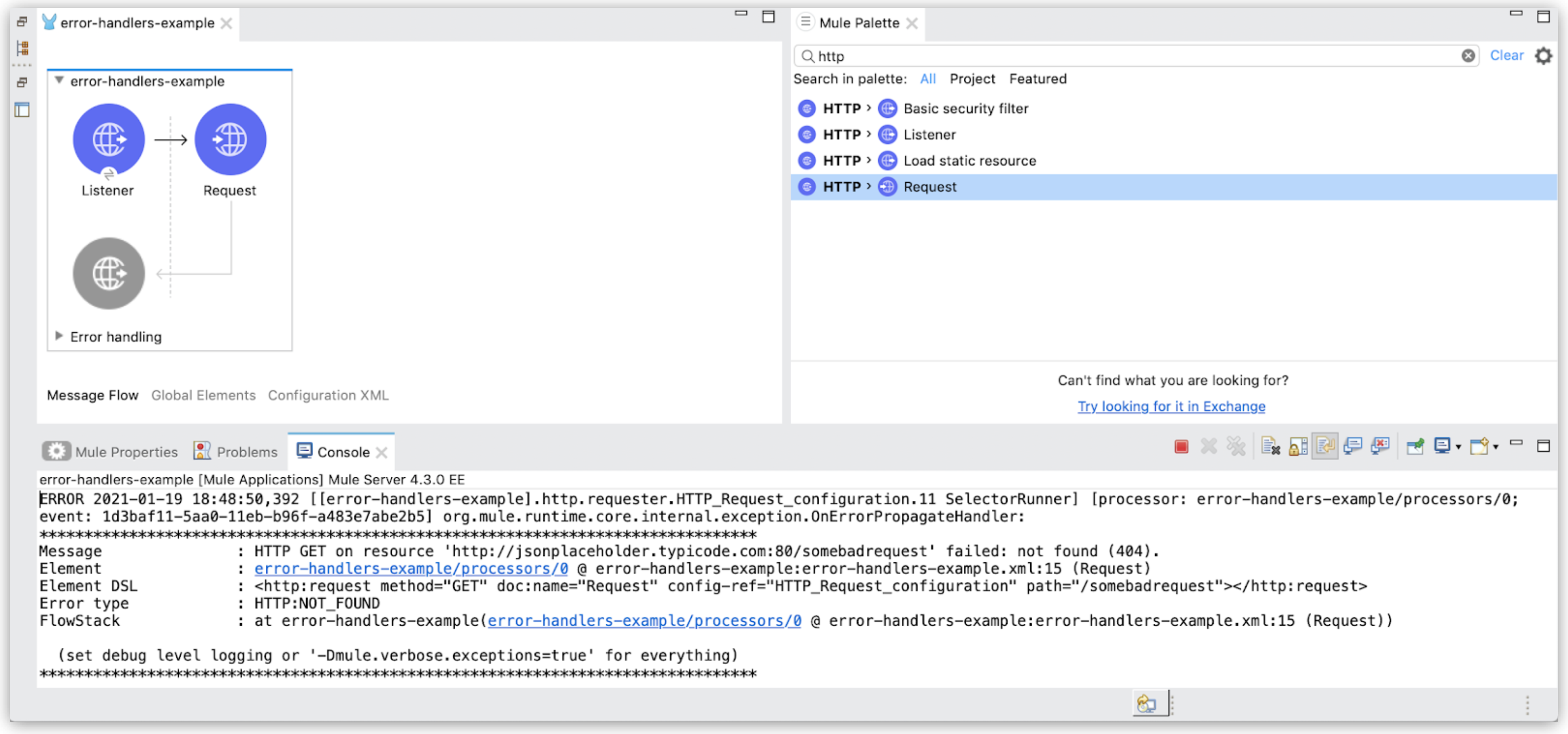
The XML for the default error handling example looks like this:
```xml
```
After you start a Mule app with this configuration and trigger the HTTP listener by loading
`[http://0.0.0.0:8081/users](http://0.0.0.0:8081/users)` (for example, into a browser), the flow
makes an HTTP request (`http://jsonplaceholder.typicode.com:80/somebadrequest`) for a file that does
not exist. As a result, the Anypoint Studio console logs and propagates the error to the web
browser.
- Anypoint Studio Console Log
The Studio console prints an error message. The message indicates that the default handler,
`OnErrorPropagateHandler`, propagates a 404 error returned from the HTTP GET request. Mule
identifies this error as HTTP:NOT\_FOUND.
```txt
ERROR 2021-01-19 18:48:50,392
[[error-handlers-example].http.requester.HTTP_Request_configuration.11 SelectorRunner]
[processor: error-handlers-example/processors/0; event: 1d3baf11-5aa0-11eb-b96f-a483e7abe2b5] org.mule.runtime.core.internal.exception.OnErrorPropagateHandler:
********************************************************************************
Message : HTTP GET on resource 'http://jsonplaceholder.typicode.com:80/somebadrequest' failed: not found (404).
Element : error-handlers-example/processors/0 @ error-handlers-example:error-handlers-example.xml:15 (Request)
Element DSL :
Error type : HTTP:NOT_FOUND
FlowStack : at error-handlers-example(error-handlers-example/processors/0 @ error-handlers-example:error-handlers-example.xml:15 (Request))
(set debug level logging or '-Dmule.verbose.exceptions=true' for everything)
********************************************************************************
```
The error logs in the Studio console present the following information:
- **Message**: Description of the error
- **Element**: XML element that failed execution and caused the error
- **Element DSL**: XML element that failed execution and caused the error, expressed in DSL
- **Error type**: Type of Mule error raised by the Mule app
- **Flowstack**: Flowstack trace error log
This field lists an entry for each flow that processed the Mule event and the processor that
sent the event to the next flow. The last entry shows the flow and the processor that failed
during the processing of the event.
Starting with Mule 4.3.0, the Flowstack entry is enabled by default. You can disable Flowstack
logging by setting the `mule.flowTrace` configuration property to `false`.
- Error Propagation to the Web Browser
A description of the HTTP:NOT\_FOUND error appears in the browser tab you use to trigger the
listener:
```txt
HTTP GET on resource 'http://jsonplaceholder.typicode.com:80/somebadrequest'
failed: not found (404).
```
This Mule error description appears in the browser for two reasons:
- The default error handler uses an On Error Propagate process (`OnErrorPropagateHandler`).
The On Error Propagate component causes the flow to fail and the HTTP listener to prepare an
error response for the `404` error associated with the file not found.
- The HTTP listener is using default error (`error.description`) and success (`payload`) responses
to return the message body.
Because no custom responses are configured, the browser shows the description of the error.
### Using On-Error Components to Handle Messaging Errors
Instead of relying on the default error-handling mechanism, you can use
[On-Error components](https://docs.mulesoft.com/mule-runtime/4.3/on-error-scope-concept) (On Error Continue and On Error Propagate) inside a
built-in or external Error Handler component.
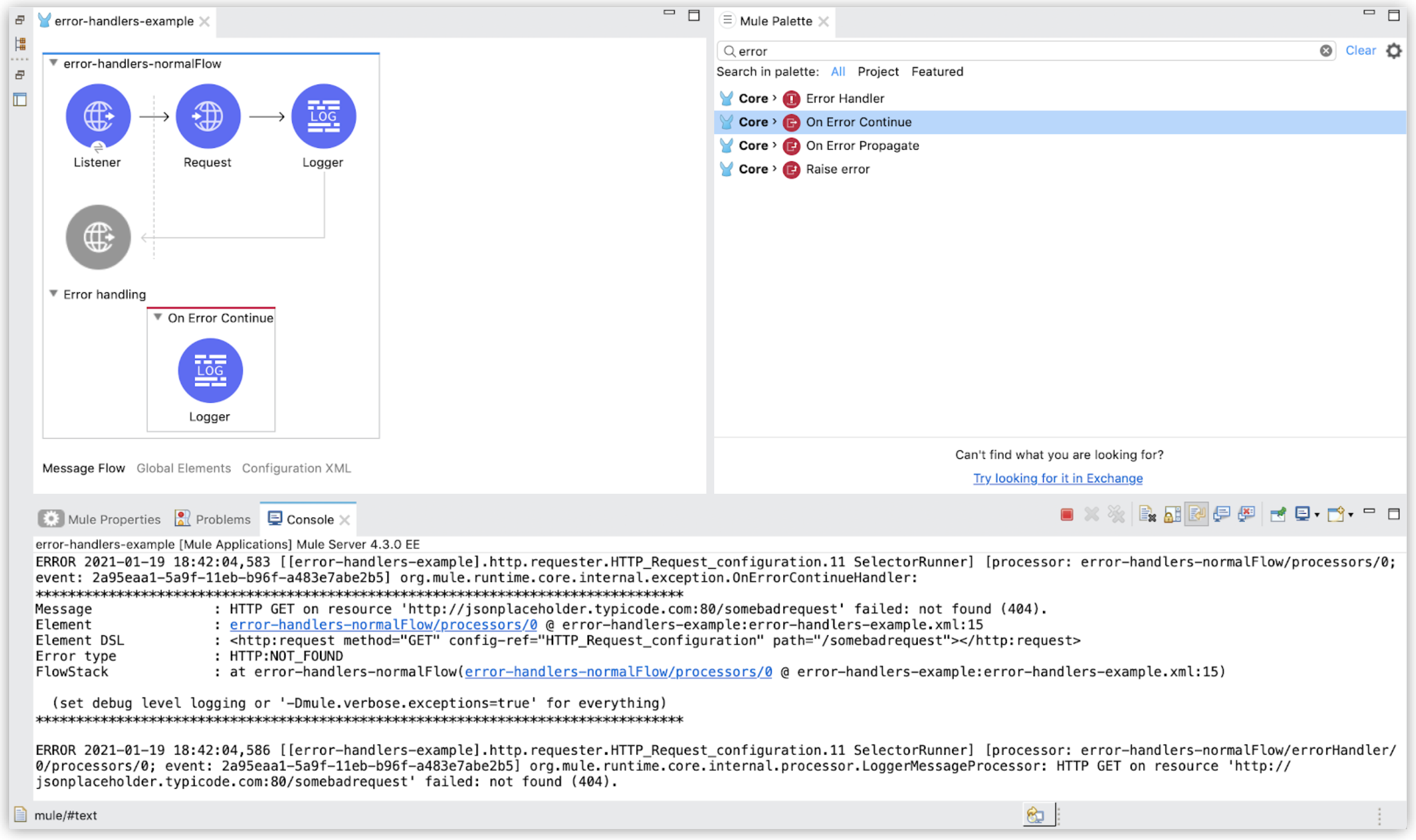
The following example shows a simple flow that is configured in Studio to return the results of an
HTTP request when the HTTP listener is triggered. Unlike the
[default error-handling example](#default_error_handling), this example configures On Error Continue
(`on-error-continue`) inside the flow’s built-in Error Handler (`error-handler`) component, and On
Error Continue contains a Logger that writes a description of the error.
The XML for the example looks like this:
```xml
```
As in the default error-handling example, the requested page is not found, so the flow returns a 404
error that Mule identifies as an HTTP:NOT\_FOUND error. However, in this case, the tab of the
browser used to trigger the HTTP listener is blank because the error is not propagated. With On
Error Continue, the flow in the example is treated as though it ends successfully with a 200 for the
GET request, even though the page is not found. The HTTP listener executes the behavior for the
default success response (returning `payload` content as the message body). Because the page was not
found, there is no content to display in the browser, so the browser tab is blank.
The Studio console also prints an error message (the first ERROR message below) indicating that
`OnErrorContinueHandler` is handling the error, and it prints an ERROR message from the logger (the
second ERROR below) that describes the Mule error (an `error.description`, see
[Selector Expressions for Mule Errors](https://docs.mulesoft.com/mule-runtime/4.3/mule-error-concept#selector_expressions)).
```txt
ERROR 2021-01-19 18:42:04,583
[[error-handlers-example].http.requester.HTTP_Request_configuration.11 SelectorRunner]
[processor: error-handlers-normalFlow/processors/0; event: 2a95eaa1-5a9f-11eb-b96f-a483e7abe2b5] org.mule.runtime.core.internal.exception.OnErrorContinueHandler:
********************************************************************************
Message : HTTP GET on resource 'http://jsonplaceholder.typicode.com:80/somebadrequest' failed: not found (404).
Element : error-handlers-normalFlow/processors/0 @ error-handlers-example:error-handlers-example.xml:15
Element DSL :
Error type : HTTP:NOT_FOUND
FlowStack : at error-handlers-normalFlow(error-handlers-normalFlow/processors/0 @ error-handlers-example:error-handlers-example.xml:15)
(set debug level logging or '-Dmule.verbose.exceptions=true' for everything)
********************************************************************************
ERROR 2021-01-19 18:42:04,586
[[error-handlers-example].http.requester.HTTP_Request_configuration.11 SelectorRunner]
[processor: error-handlers-normalFlow/errorHandler/0/processors/0; event: 2a95eaa1-5a9f-11eb-b96f-a483e7abe2b5] org.mule.runtime.core.internal.processor.LoggerMessageProcessor:
HTTP GET on resource 'http://jsonplaceholder.typicode.com:80/somebadrequest' failed: not found (404).
```
If you instead create the same Mule app using On Error Propagate (`on-error-propagate`) instead of
On Error Continue (`on-error-continue`), you receive the same error messages in the Studio console,
but you also see the logged error message in your browser. This behavior is identical to the default
error handling behavior because both use On Error Propagate.
Note that within each On-Error component, the error path you define can incorporate any number of
event processors to handle specific error types as precisely as you want. You can select specific
Mule errors for the On-Error component to handle. The Error Handler component routes an error to the
first On-Error component that matches the error.
For more complex error handling configurations at the flow level, see
[Introduction to Mule 4: Error Handlers](https://docs.mulesoft.com/mule-runtime/4.3/intro-error-handlers). For more information about On Error
Continue and On Error Propagate, see [On-Error components](https://docs.mulesoft.com/mule-runtime/4.3/on-error-scope-concept).
### Referencing a Global Error Handler
A global error handler can be useful if you want more than one flow or Try scope to handle errors in
the same way. You can create reuse configurations by providing a reference to an error handler:
- [Setting a Global Error-Handling Configuration](#global_error_config_set)
- [Referencing an Error-Handling Configuration from a Flow](#global_error_config_ref)
#### Setting a Global Error-Handling Configuration
The following XML configuration defines a default error-handling configuration that uses
`` to reference
the `` configuration.
```xml
```
In the Studio UI, the global error-handling example looks like this:
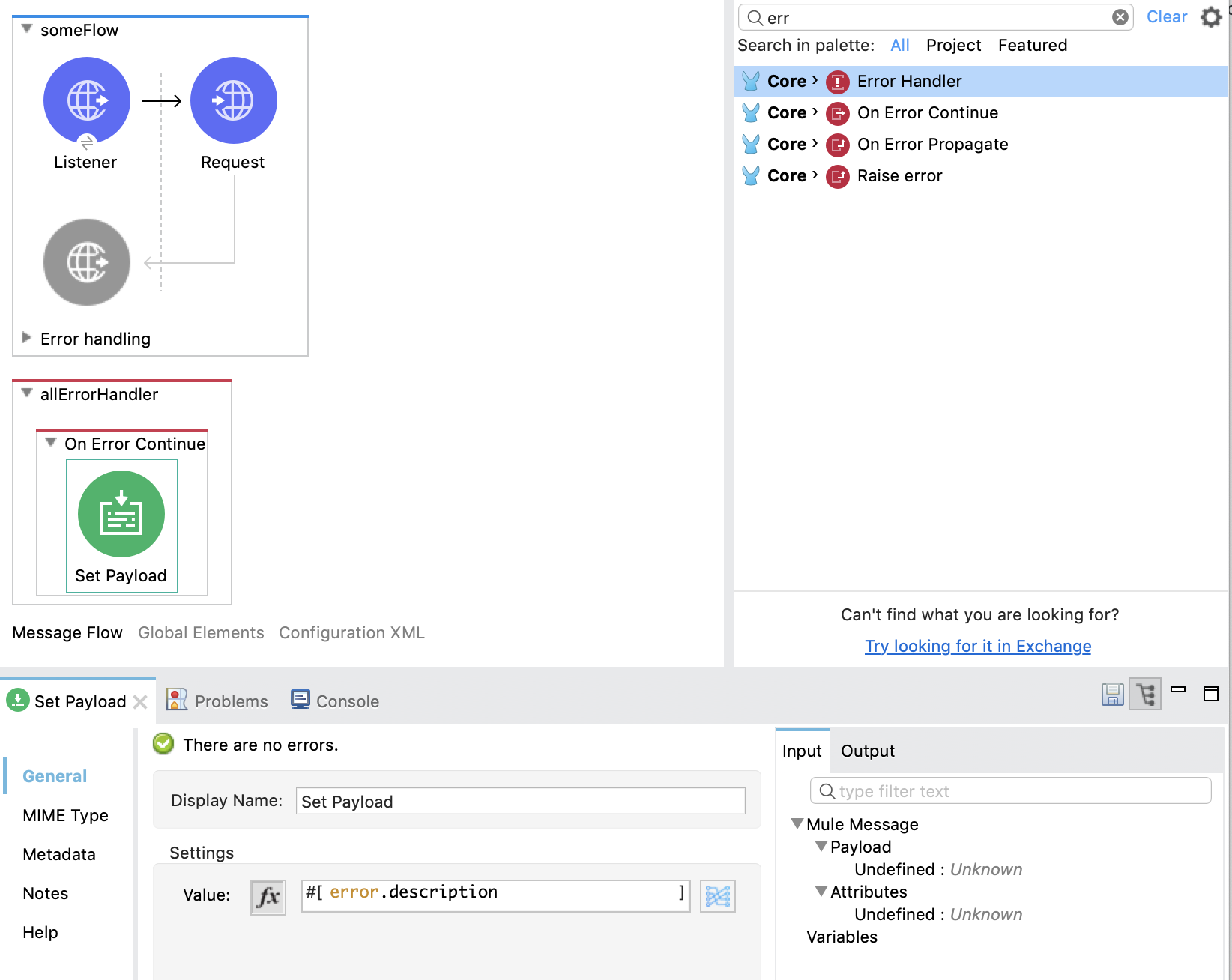
The example includes two main components for handling errors, an Error Handler (`error-handler`)
with embedded components that are visible in the Studio canvas and a global error-handling
configuration, which is not visible in the canvas. The flow (**someFlow**) in the UI example
illustrates that the Error Handler component lies outside any flow in the Mule app.
Because the request produces an HTTP:NOT\_FOUND error, the Studio console prints an error message
indicating that `OnErrorContinueHandler` is handling the error. On Error Continue configurations do
not propagate the errors they handle (see
[Using On-Error Components to Handle Messaging Errors](#on_error_continue)).
To set up the global error-handling example through the Studio UI instead of writing the
configuration in XML markup:
1. Drag the Error Handler component from the **Mule Palette** to the Studio canvas, and name it
**allErrorHandler**.
Notice that the component is not part of any flow.
2. Drag the On Error Continue component into the Error Handler component.
3. Drag a Set Payload component into the On Error Continue component.
Note that the Set Payload component is an example. You can use other components, such as a
Logger, and you can write your own error message inside that component. The Set Payload example
uses a Mule variable for the error description (see the `error` variable in
[Predefined Variables](https://docs.mulesoft.com/dataweave/2.3/dataweave-variables-context) for details).
4. Create a global error-handling reference in Studio:
1. Click **Global Elements** to open **Global Configuration Elements**.
**Global Elements** is located below the Studio canvas.
2. In **Global Configuration Elements**, click **Create** to open the **Choose Global Type**
dialog.

3. From the dialog, select **Global Configuration** -→ **Configuration**, and then click **OK**
to open the **Configuration** dialog.
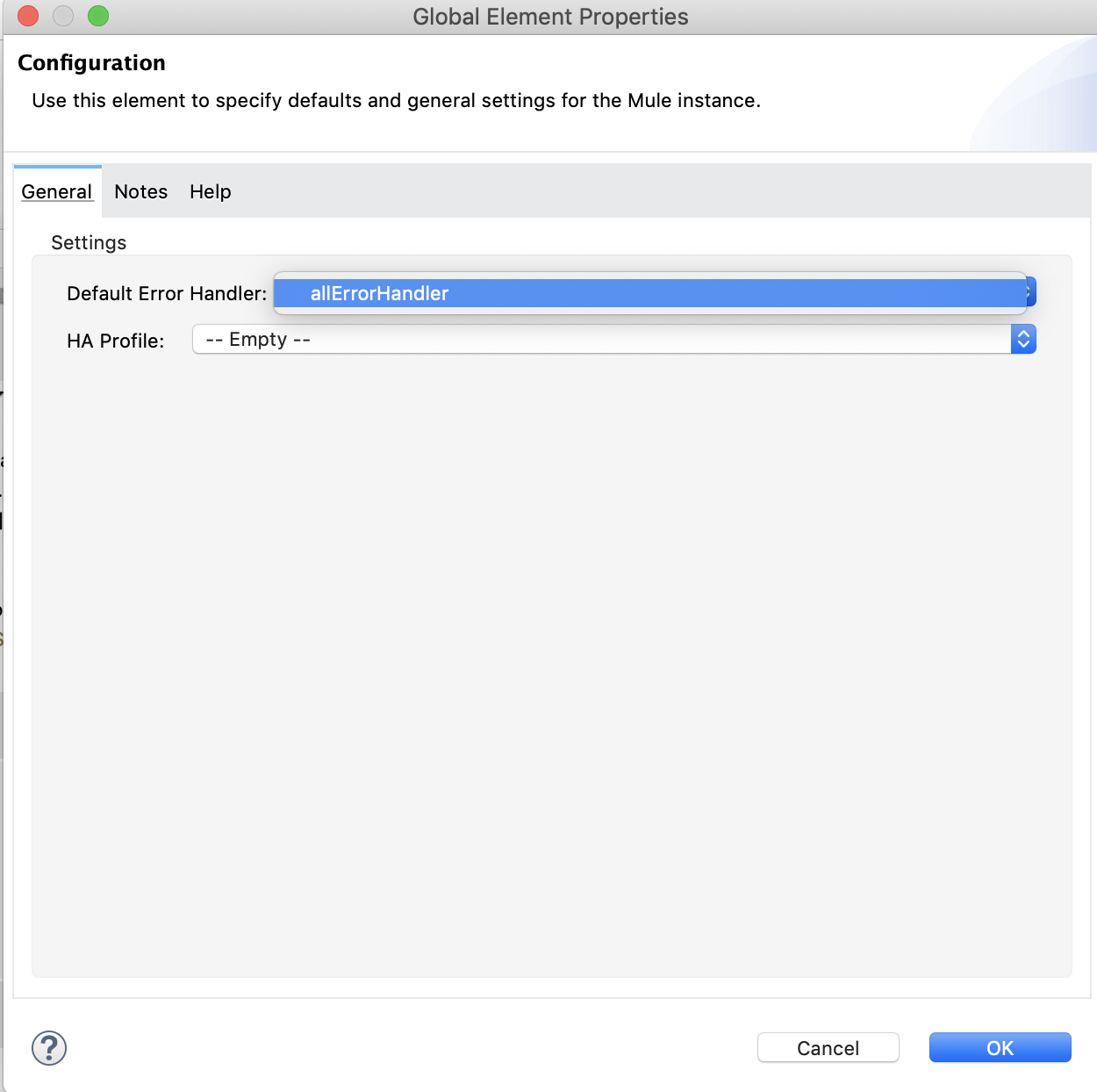
4. From the select **Configuration** dialog, select **allErrorHandler** for the **Default Error
Handler** field, and click **OK**.
5. Set up the HTTP listener and HTTP request components using the values described in the XML.
6. Check that the XML configuration looks correct by clicking **Configuration XML** (located below
the Studio canvas).
### Referencing an Error-Handling Configuration from a Flow
> [!NOTE] The configuration of some elements in these examples is XML-only.
A flow can reference a global error handler that resides outside the flow. The flow logs all its
errors through a reference.
Example: XML Configuration for the App
```xml
```
In this XML example, the global error handler is configured through an `` element
named `loggingErrorHandler`. The flow references the error handler with
``.
To reference a global error handler configuration from a flow in Studio:
1. From Studio, drag an **Error Handler** component from the **Mule Palette** to the canvas, and
configure it components through the UI.
2. In the Mule app, click **Configuration XML** (located below the Studio canvas).
3. (XML-only configuration) Within your `` element, type the XML for the reference, for
example, ``.
The following example references a global On Error Continue element (``) using
`` within an `` element. Both require manual
configuration through the **Configuration XML**, rather than the UI.
```xml
```
## See Also
- [Mule Errors](https://docs.mulesoft.com/mule-runtime/4.3/mule-error-concept)
- [On-Error Components](https://docs.mulesoft.com/mule-runtime/4.3/on-error-scope-concept)
- [Try Scope](https://docs.mulesoft.com/mule-runtime/4.3/try-scope-concept)
- [Raise Error Component](https://docs.mulesoft.com/mule-runtime/4.3/raise-error-component-reference)
- [Introduction to Mule 4: Error Handlers](https://docs.mulesoft.com/mule-runtime/4.3/intro-error-handlers)
- [Migrating Exception Strategies to Mule Error Handlers](https://docs.mulesoft.com/mule-runtime/4.3/migration-core-exception-strategies)