---
schema_version: "1"
id: fef2088f73b9a8987be5c71517426eadde70e5ceac7ab84a29e4ecc68d27491a
title: Try Scope
collection: mulesoft
version: current
locale: en-us
portal_url: https://docs.salesforce.com/mulesoft/current/en-us/mule-runtime/4.11/try-scope-concept.md
canonical_url: https://docs.mulesoft.com/mule-runtime/4.11/try-scope-concept
source_site: docs.mulesoft.com
content_type: documentation
content_hash: 45b8081dcb0410151f45cf7d10f66025053580b2600072e31e53faa566bf30b1
description: MuleSoft Documentation Site
release: "4.11"
latest: false
---
---
product: Mule Runtime
version: 4.11
---
# Try Scope
> For the full documentation index, see: https://docs.mulesoft.com/llms.txt
The Try scope enables you to handle errors that may occur when attempting to execute any of the
components inside the Try scope. It also supports transactions. A Try scope wraps one or more
operations, then catches and handles any exceptions that might be thrown by any of these enclosed
operations. The behavior is as if you extracted those enclosed event components into a separate flow
with its own error handling strategy, but inline, without having to actually define a new flow.
## Error Handling with the Try Scope
When designing your flow, try to group those operations that are likely to experience errors inside
a Try scope. The Try scope enables you to isolate potentially troublesome operations in your flow
and assign them an error-handling method. You can also configure the operations inside the Try scope
to be processed as a transaction.
The Try scope has an error handling strategy that you configure in the same way you configure error
handling for a flow.
The Try scope can distinguish among various error type conditions and apply different behaviors. If
an error is raised by a component inside a Try scope, then the Try scope’s error handler is
executed. At this point, the error is available for inspection, so the handlers can execute and act
accordingly:
- On Error Continue
Executes and sends the result of the execution to its container Try scope, which uses that result
to complete the execution successfully. Any transactions at this point are also committed.
- On Error Propagate
Rolls back any transactions, then executes and uses that result to re-throw the existing error,
causing its container Try scope’s execution to fail.
Example Try Scope Configuration
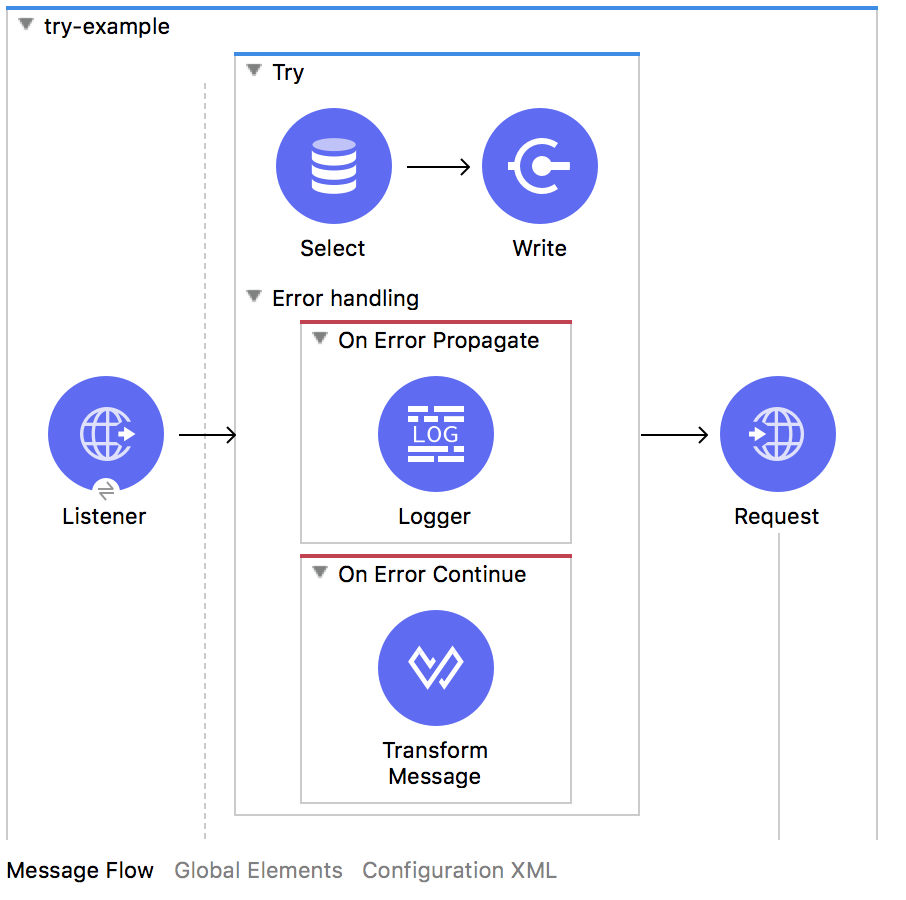
In the previous example, any database connection errors (`DB:CONNECTIVITY`) are propagated because
of the On Error Propagate (`on-error-propagate`) error handler. Propagation of this error causes the
Try scope’s execution to fail and the flow’s error handler to execute. Other errors are handled
through the On Error Continue (`on-error-continue`) error handler, so the Try scope’s execution is
treated as successful when they occur, meaning that the next operation, an HTTP request, continues
its execution.
If the Try scope has several components, then after a component raises an exception, subsequent
components in the Try scope are not executed, regardless of the type of error handler that catches
the exception. In the case of On Error Propagate, the error is propagated to the flow’s error
handler, as if the Try scope did not exist. In the case of On Error Continue, processing continues
outside the Try scope at the next flow component, as if the Try scope never threw an exception.
## Handling Transactions
A transaction is a series of actions that should never be partially executed. Configure a Try scope
so that it is a set of operations that are considered one unit that either succeeds or fails,
depending on whether errors are propagated and the transaction rolled back, or handled and the
transaction committed. In either case, the process flow in which the Try scope resides continues.
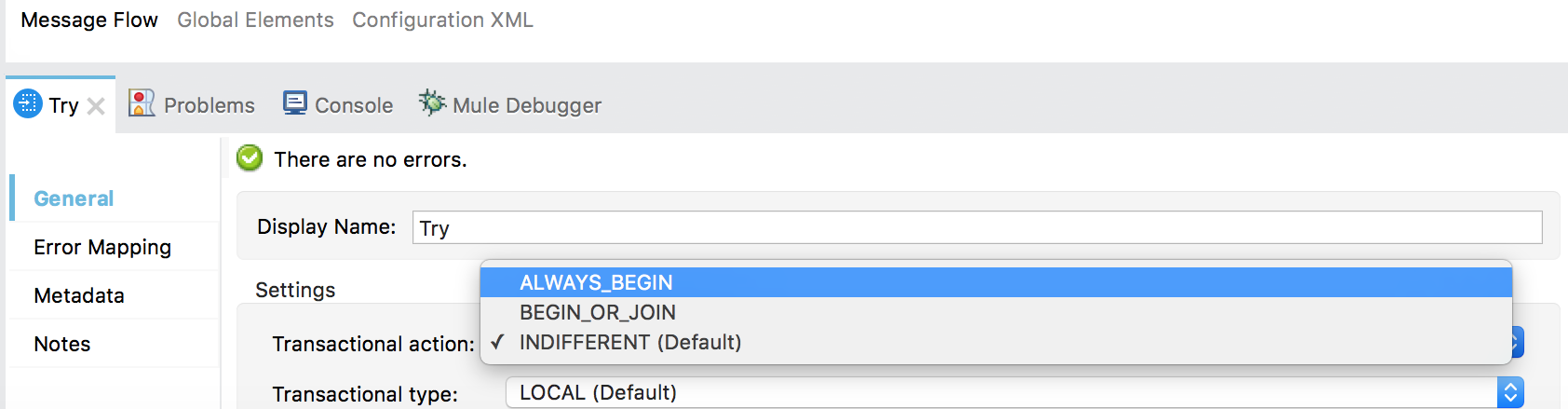
The Try scope treats child operations as a transaction when the Transactional Action
(`transactionalAction`) is set to `ALWAYS_BEGIN` or `BEGIN_OR_JOIN`. It can be configured in the
following ways:
- Ignore (`INDIFFERENT`)
Default. If a transaction is active, the scope joins it. If not, the scope does not create a
transaction.
- Always Begin (`ALWAYS_BEGIN`)
A new transaction is started every time the scope is executed.
- Begin or Join (`BEGIN_OR_JOIN`)
Relevant only when execution order might vary (for example, due to asynchronous actions occurring
outside the flow). If current flow processing has already started a transaction, the scope joins
it. If not, the scope initiates a new transaction.
### Analyzing Different Transactional Actions in Try Scope
The following example shows a `jms:listener` operation configured to initiate a transaction at flow
level, a Try scope that tries to initiate or join the transaction (depending on its configuration),
and a `jms:publish` operation configured to run outside of the transaction:
```xml
```
If the operations within the Try scope do not produce an error, the scope finishes the execution and
commits the transaction, independently of the configured `transactionalAction` value.
The transaction and the messages are handled differently when a `` component is added,
depending on the `transactionalAction` of the Try scope:
- Ignore (`INDIFFERENT`)
In this case, the transaction continues while executing the operations inside the Try scope. When
the error is raised, it is propagated to the source (which does not handle it with an
`` error handler). The transaction is rolled back, and the message is available
again in the JMS queue. This rollback does not affect the completed `jms:publish` operation, which
was outside of the transaction scope because `transactionAction` was set to its default,
`NOT_SUPPORTED`.
Had `transactionAction` been set to `JOIN_IF_POSSIBLE`, the `jms:publish` operation would have
been rolled back.
- Always Begin (`ALWAYS_BEGIN`)
This raises an error because an active transaction already exists.
- Begin or Join (`BEGIN_OR_JOIN`)
In this case, a transaction was already initiated so the scope joins the active transaction. The
result is the same as in `INDIFFERENT`.
#### Error Handler at Flow Level
In the following example, an error handler is added at flow level:
```xml
```
The behavior in this example is:
- Ignore (`INDIFFERENT`)
The transaction continues. Because the error is handled by an `on-error-continue` error handler,
the transaction is committed. The message read from the `jms:listener` source is consumed, and the
message processed by the `jms:publish` operation is actually sent.
- Always Begin (`ALWAYS_BEGIN`)
Raises an error because an active transaction already exists.
- Begin or Join (`BEGIN_OR_JOIN`)
Displays the same behavior as `INDIFFERENT`.
#### Error Handler Inside the Try Scope
In this case, the error handler is inside the Try scope and the error occurs after the execution of
the scope:
```xml
```
Depending on the configured `transactionalAction`, the behavior in the Try scope is one of the
following:
- Ignore (`INDIFFERENT`)
The transaction continues but the error is not handled by an `on-error-continue` at the flow
level, causing the transaction to be rolled back, and the message to not be sent.
- Always Begin (`ALWAYS_BEGIN`)
Raises an error because an active transaction already exists.
- Begin or Join (`BEGIN_OR_JOIN`)
Displays the same behavior as `INDIFFERENT`.
### Configuring Local or XA Transactions
In addition to configuring the Transactional Action, you can also configure the Transaction Type to
be Local (single Resource) or XA Transaction.
The Try scope uses the Transaction Type configuration only when a new transaction is created. The
type cannot change while a transaction executes.
For each Transactional Action, the behavior changes:
- Ignore (`INDIFFERENT`)
The Transaction used is the one already created (if there is one). This means that setting the
Transactional Type makes no difference for this Transactional Action.
- Always Begin (`ALWAYS_BEGIN`)
The Transaction created is of the type set in the Transaction Type configuration. Remember that
`ALWAYS_BEGIN` is an invalid configuration when already running within a Single Resource
transaction.
- Begin or Join (`BEGIN_OR_JOIN`)
If there is a Transaction already created, then the Transactional Type makes no difference, as in
the case of `INDIFFERENT`. If there is no Transaction, it creates one of the Type configured in
Transaction Type, as in the case of `ALWAYS_BEGIN`.
## Variable and Payload Propagation
Every payload modification or variable addition, modification, or removal is propagated through the
rest of the execution. This propagation includes modifications that take place inside the error
handlers.
## See Also
- [Try Scope XML Reference](https://docs.mulesoft.com/mule-runtime/4.11/try-scope-xml-reference)
- [Error Handling](https://docs.mulesoft.com/mule-runtime/4.11/error-handling)
- [Transaction Management](https://docs.mulesoft.com/mule-runtime/4.11/transaction-management)