
The Anypoint Platform audit logging service logs Anypoint MQ actions on queues, exchanges, and client applications.
With the Organization Administrator or Audit Log Viewer role, you can access the audit logs relevant to your business group from the Audit Log page in Access Management or using the Audit Log REST API.
For example, you might use the audit logs to determine:
-
All Anypoint MQ actions of a user
-
All Anypoint MQ actions on an object, such as a queue or exchange
|
The audit logging service doesn’t record these actions as auditable:
|
Access Anypoint MQ Audit Logs
To access Anypoint MQ audit logs:
-
In Anypoint Platform, go to Access Management.
-
From the Access Management navigation menu, select Audit Logs.
-
Select filters and click Apply filters:
- Products
-
Anypoint MQ
- Types
-
Binding, Client, Exchange, Queue
- Actions
-
-
Binding: Create binding, Delete binding
-
Client: Create client, Delete client, Regenerate client
-
Exchange: Create exchange, Delete exchange, Modify exchange
-
Queue: Create queue, Delete queue, Modify queue, Purge queue
-
You can also search by environment, object name, or user.
The Audit logs page displays the logs:
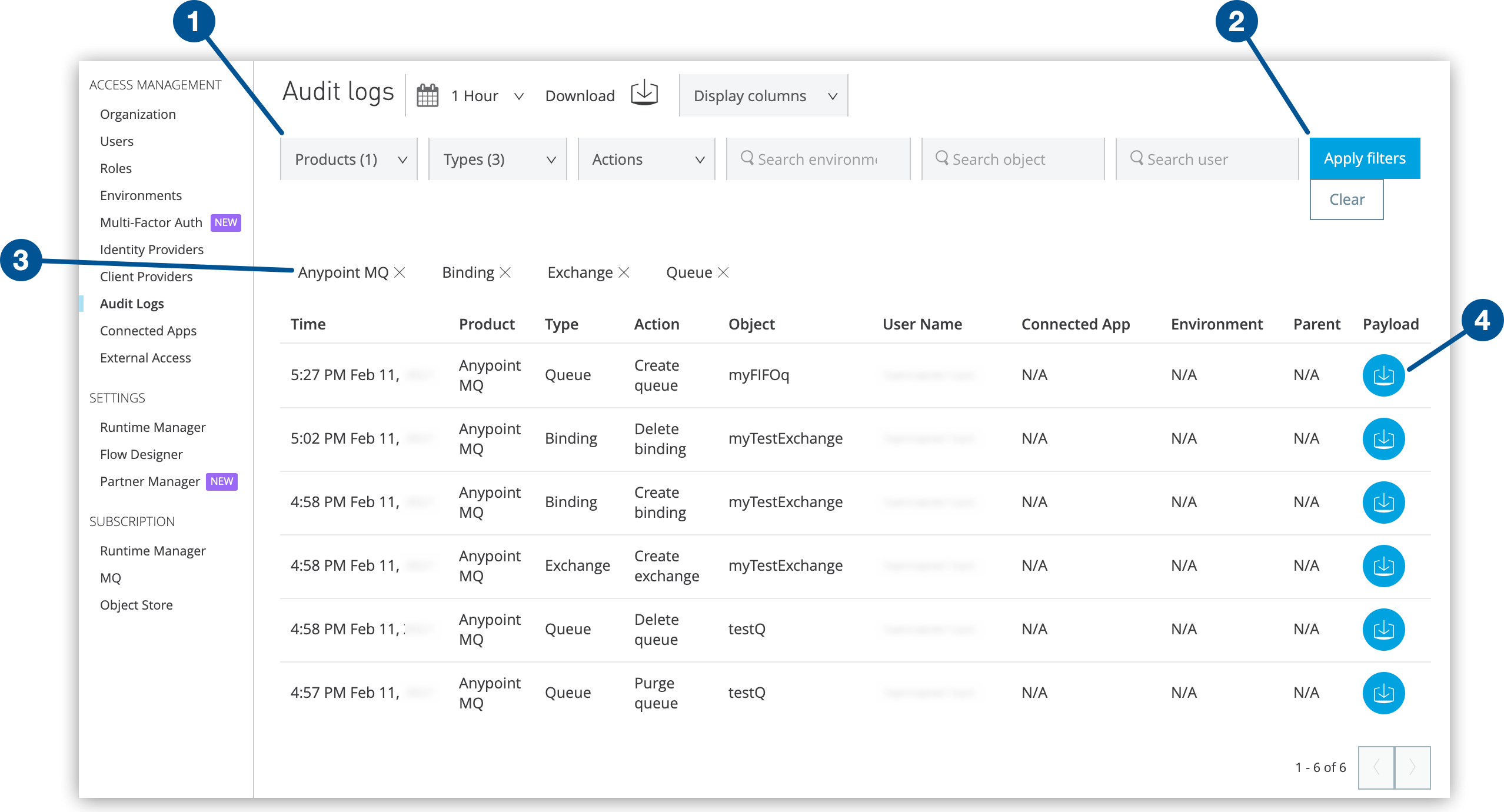
1 Select filters. 2 Apply filters. 3 View current filters. 4 Download payload.
Payloads
A payload is a JSON-formatted text file that lists the Anypoint MQ settings in place when the action occurs.
For each action on the Audit Log page, click the Download payload icon ( )
to download a payload file (
)
to download a payload file (payload.txt).
This example shows a formatted version of the
contents of payload.txt after creating a queue:
{
    "organizationId":"<organizationID>",
    "environmentId":"<enviromentID",
    "objectName":"testQ",
    "userName":"myUserName",
    "objectId":"testQ",
    "regionId":"us-east-1",
    "defaultTtlMillis":604800000,
    "defaultLockTtlMillis":180000,
    "encrypted":true,
    "deadLetterQueueId":"myDLQ",
    "maxDeliveries":10,
    "fifo":false
}
The possible fields in payload.txt are:
| Field | Description | ||
|---|---|---|---|
|
Organization ID for the current Anypoint Platform account You can use the organization ID to access Anypoint MQ REST APIs. |
||
|
Environment ID for the current Anypoint Platform account You can use the environment ID to access Anypoint MQ REST APIs. |
||
|
Name of the queue, exchange, or client application |
||
|
Username for the Anypoint Platform account |
||
|
Name of the queue, exchange, or client application The |
||
|
Region location where you process your Anypoint MQ connections |
||
|
Default time to live (in milliseconds) This value specifies how long unprocessed messages persist before being deleted. |
||
|
Default lock time to live (in milliseconds) for the queue or exchange you create This value specifies the duration that a message is unavailable to other applications before being put back into the queue. |
||
|
Whether the queue or message exchange is encrypted If you configure Anypoint MQ queues for encryption at rest, the payloads are encrypted with the AES-256 GCM algorithm on the server side. Anypoint MQ encrypts only the message body.
Anypoint MQ does not encrypt the |
||
|
Name of the dead letter queue to which the current object is associated |
||
|
How many times Anypoint MQ tries to deliver messages in the queue before rerouting the message to the dead letter queue |
||
|
Whether the queue is a FIFO queue (
|