---
schema_version: "1"
id: 1ea898dc78e598093c1c2e9e014cc098894932b903a63b7ff1e080bc6e61b2e3
title: Upgrading and Migrating Microsoft Dynamics NAV Connector to Version 4.0
collection: mulesoft
version: current
locale: en-us
portal_url: https://docs.salesforce.com/mulesoft/current/en-us/microsoft-dynamics-nav-connector/latest/ms-dynamics-nav-connector-upgrade-migrate.md
canonical_url: https://docs.mulesoft.com/microsoft-dynamics-nav-connector/latest/ms-dynamics-nav-connector-upgrade-migrate
source_site: docs.mulesoft.com
content_type: documentation
content_hash: a4348123d14535df8f00572ab6426dfc6ff8d5eb056ee3599d8faeed9d9f5f52
description: MuleSoft Documentation Site
release: "4.0"
latest: true
---
---
product: Microsoft Dynamics NAV Connector
version: 4.0
is-latest-version: true
---
# Upgrading and Migrating Microsoft Dynamics NAV Connector to Version 4.0
> For the full documentation index, see: https://docs.mulesoft.com/llms.txt
Upgrade Anypoint Connector for Microsoft Dynamics NAV (Microsoft Dynamics NAV Connector) from
version 3.x to version 4.x.
## Supported Upgrade Paths
## Changes in This Release
### 4.0
- This connector is now compatible with Java 17 only.
- The SOAP stack now uses Apache CXF 4.2.4 and the Jakarta XML Bind, XML Web Services, JWS, and SOAP
APIs. Applications that depend on Apache CXF 3 or the Java EE JAXB, JAX-WS, JWS, or SAAJ packages
must be re-verified. Operation names and the `nav` configuration prefix are unchanged.
- The NTLM and OAuth connection types now include optional **Response Timeout** and **Response
Timeout Unit** fields on the Advanced tab. The default response timeout is 5000 milliseconds.
Expressions aren’t supported for these fields.
For more information, see [NTLM Connection Type](https://docs.mulesoft.com/microsoft-dynamics-nav-connector/latest/ms-dynamics-nav-connector-reference#ntlm) and
[OAuth Connection Type](https://docs.mulesoft.com/microsoft-dynamics-nav-connector/latest/ms-dynamics-nav-connector-reference#dynamics-nav-config_oauth).
- The JAXB-XJC external library for the NTLM and OAuth connection types is now
`org.glassfish.jaxb:jaxb-xjc:4.0.9`. Version 3.x used `com.sun.xml.bind:jaxb-xjc:2.3.9`.
- These libraries are upgraded to address reported security vulnerabilities:
- The Apache CXF library is upgraded to version 4.2.4.
- The JAXB runtime and XJC libraries are upgraded to version 4.0.9.
- The Jakarta XML Bind API is upgraded to version 4.0.5.
- The Apache Commons Lang library is upgraded to version 3.21.0.
- These libraries are added to address reported security vulnerabilities:
- The Jakarta XML Web Services API is added at version 4.0.3.
- The Jakarta XML SOAP API is added at version 3.0.2.
- The Jakarta JWS API is added at version 3.0.0.
- The SAAJ implementation is added at version 3.0.6.
- The Bouncy Castle libraries are added at version 1.86.
## Requirements
Ensure your system meets the following compatibility requirements before you perform the upgrade:
| Application/Service | Version |
|---|
Mule runtime | 4.9.0 and later |
Java | 17 |
Microsoft Dynamics NAV | |
## Upgrade Prerequisites
Before you perform the upgrade, you must:
1. Create a backup of your files, data, and configuration in case you need to restore to the
previous version.
2. Ensure that your environment meets the version 4.x requirements, including Java 17 and Mule
runtime 4.9.0 or later.
3. Re-verify applications that depend on Apache CXF 3 or the Java EE JAXB, JAX-WS, JWS, or SAAJ
packages.
4. Update the JAXB-XJC external library to `org.glassfish.jaxb:jaxb-xjc:4.0.9` for the NTLM and
OAuth connection types.
5. Install Microsoft Dynamics NAV Connector 4.x to replace the connector operations that were
previously included in version 3.x.
## Upgrade Steps
Follow these steps to perform the upgrade from Microsoft Dynamics NAV Connector 3.x to Microsoft
Dynamics NAV Connector 4.x:
1. In Anypoint Studio, create a Mule project.
2. In the Mule Palette view, click **Search in Exchange**.
3. In the **Add Dependencies to Project** window, enter `dynamics nav` in the search field.
4. In the **Available modules** section, select **Microsoft Dynamics NAV** and click **Add**.
5. Click **Finish**.
6. Verify that the `mule-microsoft-dynamics-nav-connector` dependency version is `4.x.x` in the
`pom.xml` file, where `x.x` is the minor release and patch version number. For example, if you
are upgrading to version 4.0, the dependency version in the `pom.xml` file should be `4.0.0`.
Studio upgrades the connector automatically.
## Verify the Upgrade
After you install the latest version of the connector, follow these steps to verify the upgrade:
1. In Studio, verify that there are no errors in the **Problems** or **Console** views.
2. Check the project `pom.xml` file and verify that there are no problems.
3. Test the connection and verify that the operations work.
## Troubleshooting
If there are problems with caching the parameters and caching the metadata, try restarting Studio.
## Revert the Upgrade
If it is necessary to revert to the previous version of Microsoft Dynamics NAV Connector, change the
`mule-microsoft-dynamics-nav-connector` dependency version in the project’s `pom.xml` file to the
previous version.
You must update the project’s `pom.xml` file in Anypoint Studio.
## Send SOAP Requests in XML Format
To support Microsoft Dynamics NAV Connector in CloudHub 2.0, the client must provide SOAP requests
in raw XML format instead of using Plain Old Java Objects (POJOs).
Follow these steps to send or receive SOAP requests in raw XML format:
1. Make sure you have the prerequisites, such as Mule 4.9.0 or later, and obtain the WSDL file.
2. Identify all Mule flows that use Microsoft Dynamics NAV SOAP operations.
3. For the request body, update the content type to `application/xml` and provide SOAP requests in
raw XML format instead of using POJOs.
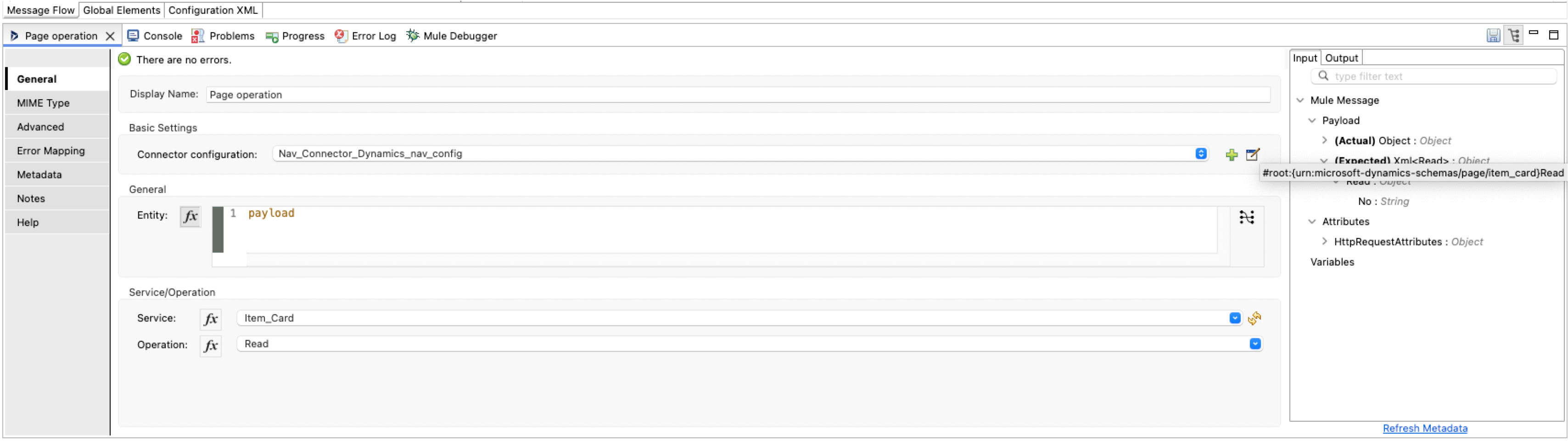
XML for sending SOAP requests directly:
```xml
1000
```
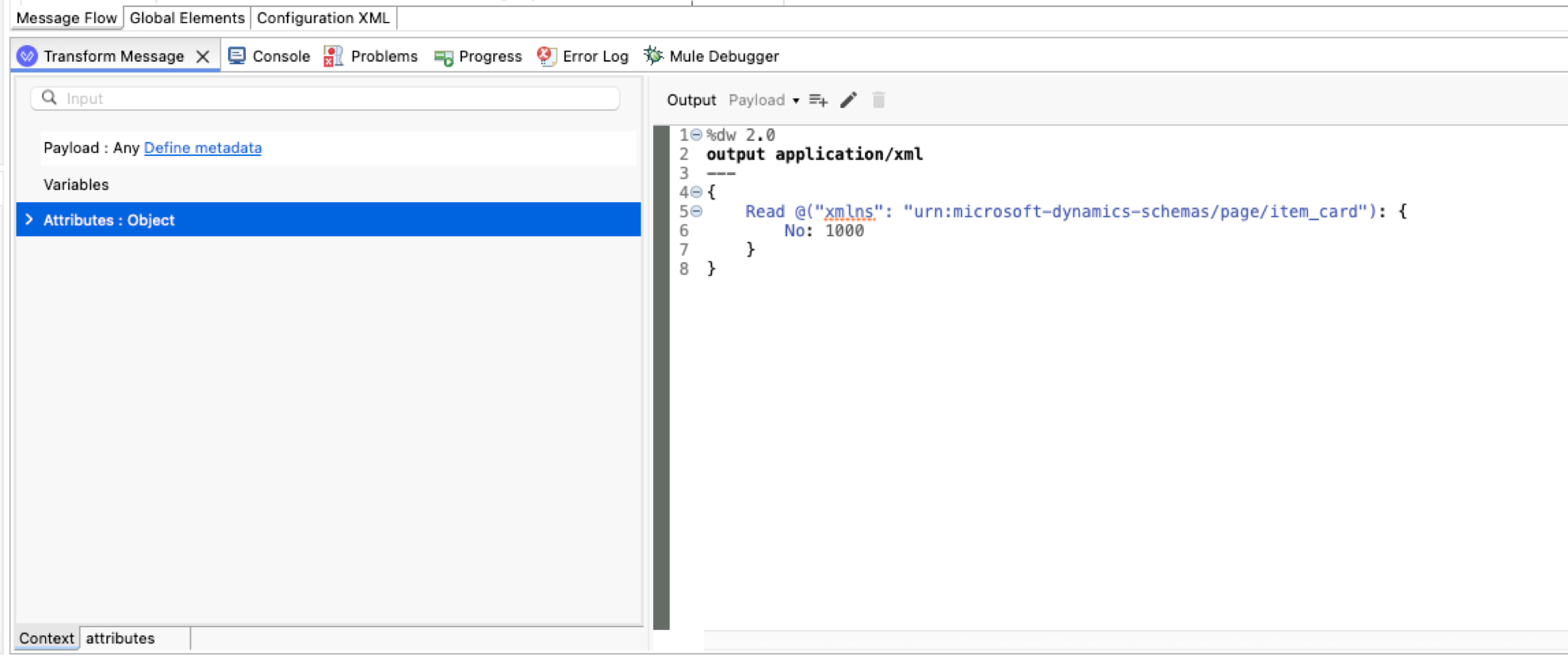
XML for using the DataWeave transform method to convert JSON to XML payload:
```xml
```
4. For the response body, you will receive SOAP responses in raw XML format and must handle these
responses accordingly.
XML of a SOAP response:
```xml
Returned_1000
Returned_Awesome_Product
100.00
```
XML for using the DataWeave method to transform XML payload:
```xml
```
## See Also
- [Introduction to Anypoint Connectors](https://docs.mulesoft.com/connectors/introduction/introduction-to-anypoint-connectors)
- [Microsoft Dynamics NAV Connector Reference](https://docs.mulesoft.com/microsoft-dynamics-nav-connector/latest/ms-dynamics-nav-connector-reference)
- [Salesforce Help](https://help.salesforce.com)