---
schema_version: "1"
id: 97166996b540f0213cb8d75f490ee4bcfbc69caad21d2a6f3c839ef9dc73915f
title: Configuring an ActiveMQ Connection
collection: mulesoft
version: current
locale: en-us
portal_url: https://docs.salesforce.com/mulesoft/current/en-us/jms-connector/1.2/jms-activemq-configuration.md
canonical_url: https://docs.mulesoft.com/jms-connector/1.2/jms-activemq-configuration
source_site: docs.mulesoft.com
content_type: documentation
content_hash: 2d11f62d7328254f374c3cf9ed452e3330fa353778ff5dfa917c7957a67fc760
description: MuleSoft Documentation Site
release: "1.2"
latest: false
---
---
product: JMS Connector
version: 1.2
keywords: jms, connector, jms_1.0.2b, jms_1.1, jms_2.0, activemq
---
# Configuring an ActiveMQ Connection
> For the full documentation index, see: https://docs.mulesoft.com/llms.txt
Anypoint Connector for JMS (JMS Connector) includes an ActiveMQ connection configuration, which
provides out-of-the-box support for ActiveMQ 5. With this connection, you can use JMS 1.1 (default),
JMS 1.0.2b, or JMS 2.0 specifications, and you can configure not only all of the general connection
parameters for JMS but also the custom parameters that are present only in ActiveMQ.
## Connecting to ActiveMQ
After you declare `active-mq-connection`, all you need to do is set up the connection factory with
your custom configuration. Every parameter in the connection comes with a default value, meaning
that you are required to configure only the parameters relevant for your use case. The ActiveMQ
connection also exposes parameters that are exclusive to ActiveMQ implementation, like
`initialRedeliveryDelay`.
The following example shows a simple configuration of an ActiveMQ connection:
```xml
```
## In-Memory Broker
By default, Anypoint Connector for ActiveMQ (ActiveMQ Connector) uses an in-memory broker, which
makes it easy to start building an application without configuring a connection against an external
broker.
Default URL: `vm://localhost?broker.persistent=false&broker.useJmx=false`
The in-memory broker is required to configure both the [ActiveMQ Client](#activemq-client-lib) and
[ActiveMQ Broker](#activemq-broker-lib) libraries.
## SSL Connections
This information applies to JMS Connector version 1.3.0 and later.
You can configure ActiveMQ connections with SSL configurations to enable the connector to establish
secure and encrypted connections against the ActiveMQ broker:
```xml
```
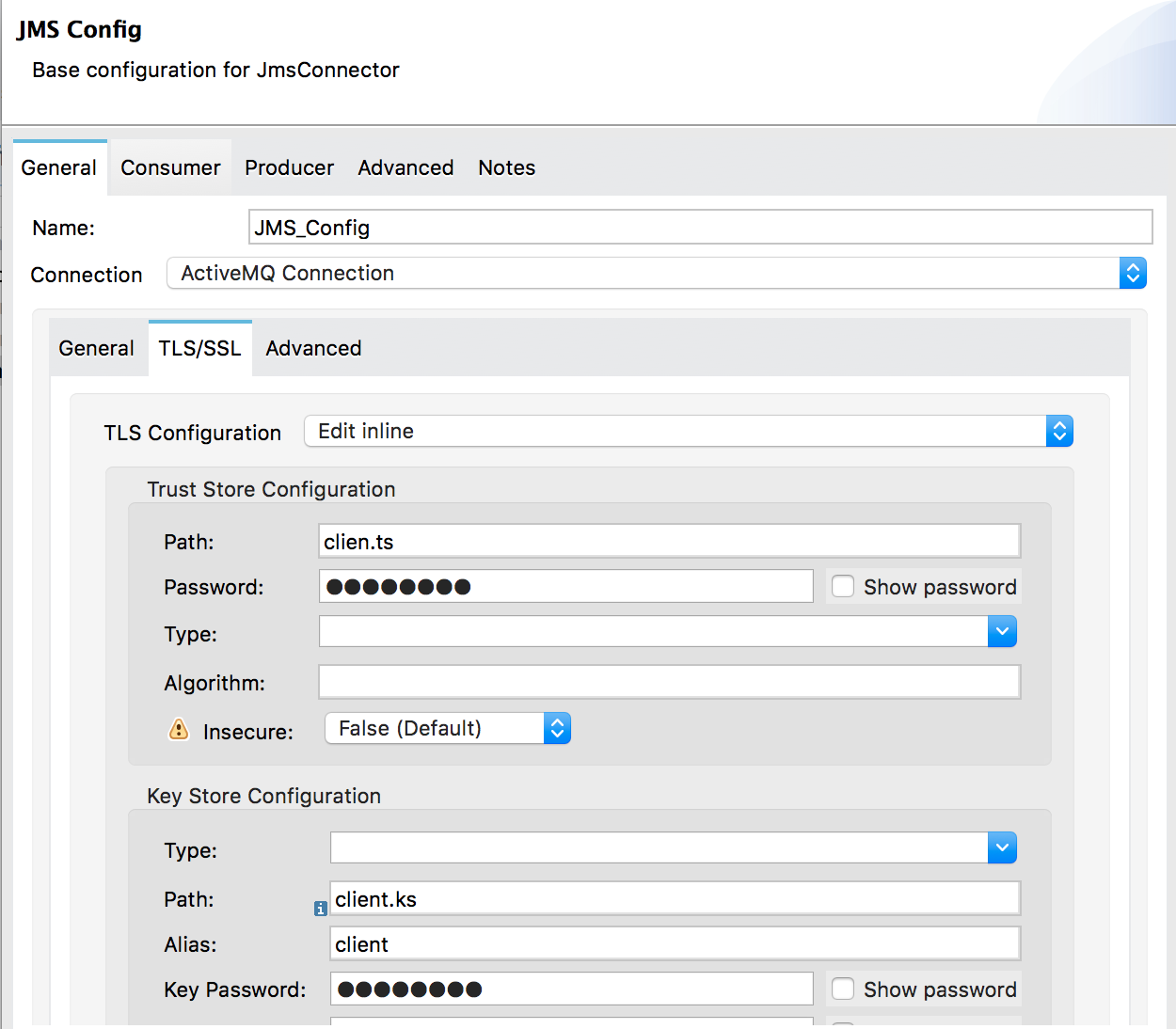
The connector can also reference global TLS context configurations, so you can reuse and share the
same TLS context between connectors as shown in the following example with Anypoint Connector for
HTTP (HTTP Connector):
```xml
```
## Delivery Handling
### Avoiding Poison Messages
When a message cannot be processed correctly, it’s not acknowledged. The message is then redelivered
and probably again not processed correctly, which can cause the cycle to execute indefinitely.
To prevent a message that can’t be properly handled from endlessly redelivering ("poison messages"),
you can configure the `maxRedelivery` parameter to set a maximum number of times that a message can
be delivered to the application.
In this example a message is redelivered a maximum of 10 times:
```xml
```
By default, JMS Connector uses a `maxRedelivery` of `0`, which means that messages won’t be
redelivered, and it doesn’t matter if the message is recovered or rolled back from a transaction.
If the message has persistent delivery set, ActiveMQ sends the message to `DLQ.QUEUE` (dead letter
queue).
### Advanced Redelivery
ActiveMQ enables users to have a client-side redelivery configuration. You can also configure the
[maximum times that a message is redelivered](#poison-messages) and how fast the connector is
required to redeliver the message.
`initialRedeliveryDelay`: In milliseconds, how much time to wait for the message to be redelivered
the first time. `redeliveryDelay`: In milliseconds, how much time to wait until the message is
subsequently redelivered after the first redelivery.
```xml
```
## Object Serialization
ActiveMQ 5.12.2, 5.13.0, and later restricts the classes that can be serialized and deserialized to
prevent the execution of a malicious payload that can exploit the host system.
### Trusted Packages
For ActiveMQ, JMS Connector allows only the JDK and JRE provided classes by default, so if you need
to exchange object messages, you must add the packages your applications are using:
```xml
```
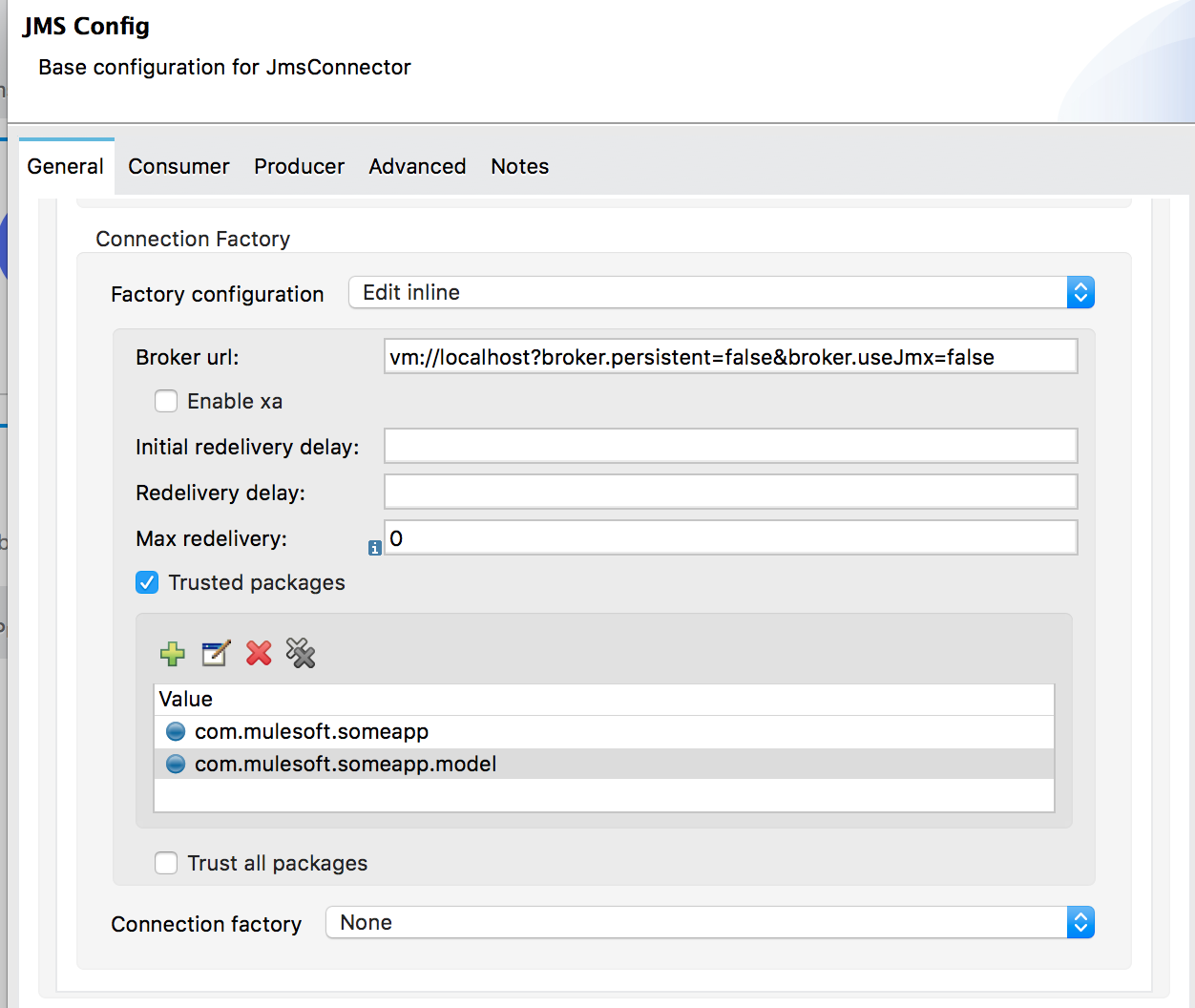
In the previous example, JMS Connector allows only users who are compliant with the
`com.mulesoft.someapp` and `com.mulesoft.someapp.model` packages to consume and produce
ObjectMessages.
### Trust All Packages
Even though you can enable the **Trust All Packages** parameter to allow the serialization of more
classes by allowing any object to be serialized and deserialized, this is not as secure as leaving
it disabled in most cases. Keep this parameter disabled (`false`) to improve security and help
prevent malicious attacks.
```xml
```
## Configuring Required Libraries
### ActiveMQ Client
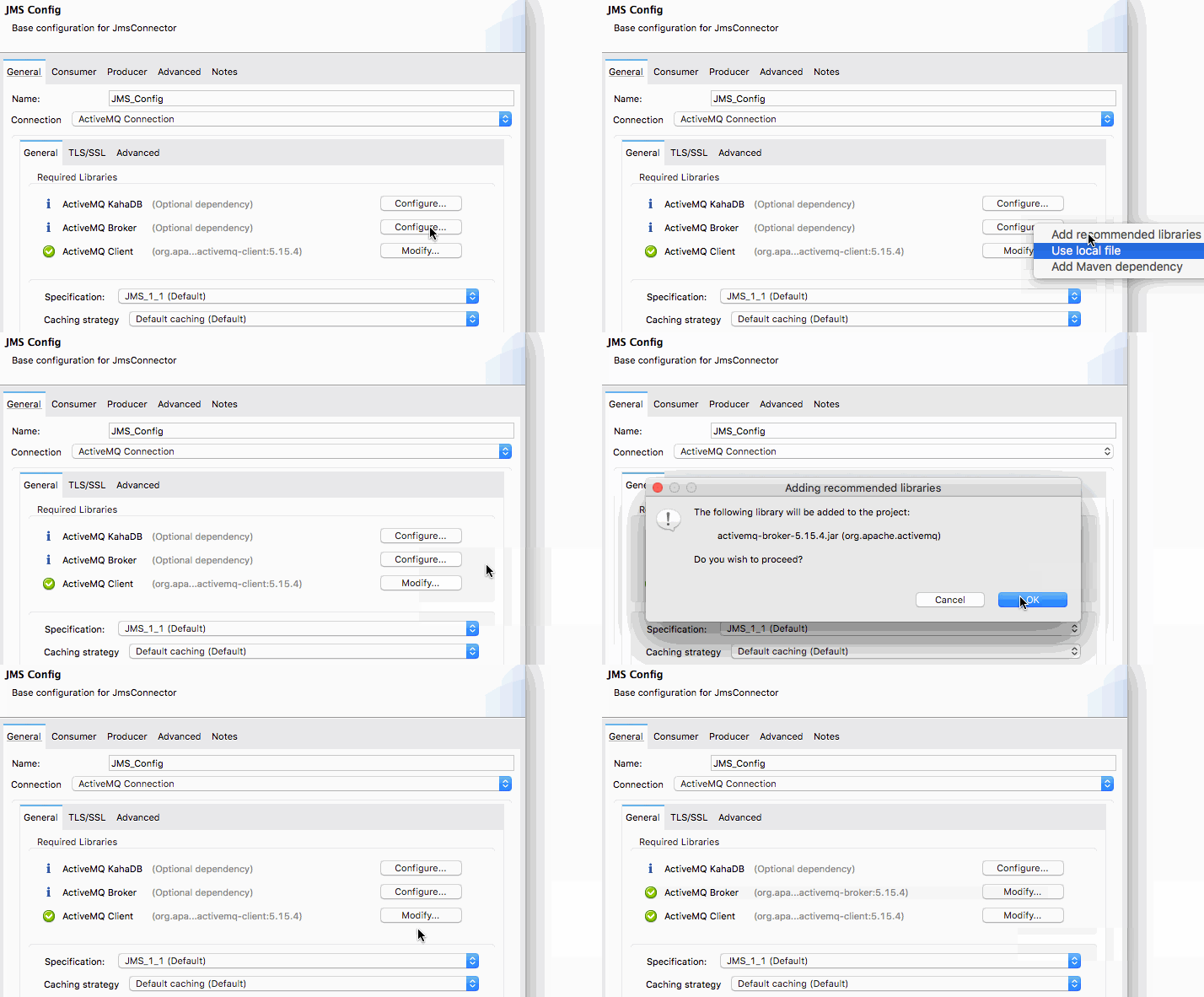
The ActiveMQ client library is the only library that is required to use ActiveMQ connections. The
ActiveMQ client library is also needed to connect to a broker.
```xml
org.apache.activemq
activemq-client
5.15.4
```
### ActiveMQ Broker
The ActiveMQ broker can create an [In Memory Broker](#in-memory-broker):
```xml
org.apache.activemq
activemq-broker
5.15.4
```
### ActiveMQ KahaDB
The ActiveMQ KahaDB is required when using an [In Memory Broker](#in-memory-broker) and is also
required for persistent message delivery.
```xml
org.apache.activemq
activemq-kahadb-store
5.15.4
```
## See Also
- [How to Consume Messages](https://docs.mulesoft.com/jms-connector/1.2/jms-consume)
- [How to Publish Messages](https://docs.mulesoft.com/jms-connector/1.2/jms-publish)
- [How to Listen For New Messages](https://docs.mulesoft.com/jms-connector/1.2/jms-listener)
- [How to Listen For A Reply](https://docs.mulesoft.com/jms-connector/1.2/jms-publish-consume)
- [Handling Message Acknowledgement](https://docs.mulesoft.com/jms-connector/1.2/jms-ack)
- [Handling Transactions in JMS](https://docs.mulesoft.com/jms-connector/1.2/jms-transactions)
- [JMS Tuning For Performance](https://docs.mulesoft.com/jms-connector/1.2/jms-performance)