---
schema_version: "1"
id: 8e61a82cf56dc6ebbaf87275874f31d35b4f9da7988bc85253b2f650ac51e50f
title: Create an Instance of a Class
collection: mulesoft
version: current
locale: en-us
portal_url: https://docs.salesforce.com/mulesoft/current/en-us/java-module/latest/java-create-instance.md
canonical_url: https://docs.mulesoft.com/java-module/latest/java-create-instance
source_site: docs.mulesoft.com
content_type: documentation
content_hash: c8503da733c8cea0e4310c99f4533daf0e357e3c73011b08dceb3468ca944d87
description: MuleSoft Documentation Site
release: "2.0"
latest: true
---
---
product: Java Module
version: 2.0
is-latest-version: true
---
# Create an Instance of a Class
> For the full documentation index, see: https://docs.mulesoft.com/llms.txt
## Call a Java Constructor
The examples on this page are based on the `Person` Java class, which belongs to the `com.me`
package:
```java
package com.me;
public class Person {
private String name;
private Integer age;
public Person() {
this.name = "Max Mule";
this.age = 10;
}
public Person(String name, Integer age) {
this.name = name;
this.age = age;
}
}
```
> [!IMPORTANT] The classes used with the Java module must be exported (unless they belong to the
> default package). If not exported, execution fails with a JAVA:CLASS\_NOT\_FOUND error. See
> [how to export resources](https://docs.mulesoft.com/mule-runtime/latest/how-to-export-resources).
The constructors for this class can be called using the `new` operation of the Java module. This
example shows how to create an instance of `Person` using the constructor that does not require
parameters:
```xml
```
To create a `Person` object using a constructor that does require parameters:
```xml
#[{
name: 'John Doe',
age: 30
}]
```
For the constructor parameters, the full package name can be specified, for example
`constructor="Person(java.lang.String, java.lang.Integer)"`. This is not needed, but it can be
useful to add more clarity in the code or if there are clashing class names in the Java code.
> [!IMPORTANT] When configuring the constructor arguments in the `args` parameter, the keys of the
> map determine how the parameters are passed to the constructor.
>
> To reference the parameters by name (`firstName`, `age`, etc.), the Java class containing the
> method or constructor has to be compiled using the
> [`-parameters`](https://docs.oracle.com/javase/tutorial/reflect/member/methodparameterreflection.html)
> compiler flag.
>
> If the class is not compiled with the `-parameters` flag, the same parameters must be referenced
> in the declared order and with the canonical names (`arg0`, `arg1`, etc.):
>
> ```xml
> #[{
> arg0: 'John Doe',
> arg1: 30
> }]
> ```
>
> If the Java classes are defined in a Studio Project, the Maven compiler plugin must be configured
> in the `pom.xml` to compile Java classes with the `-parameters` flag:
>
> ```xml
>
> org.apache.maven.plugins
> maven-compiler-plugin
> x.x.x
>
>
> -parameters
>
>
>
> ```
## DataSense Support in Studio
One of the advantages of using the Java module is the [DataSense](https://docs.mulesoft.com/studio/datasense-concept)
support, which can help build the `args` map, which serves as input for the `new` operation.
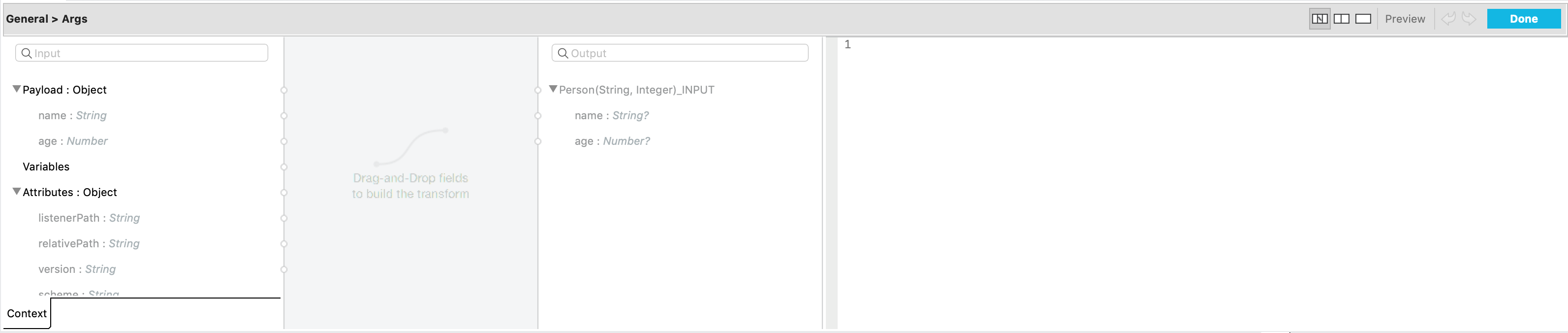
Continuing the previous example, where the `new` operation calls the `Person(String, Integer)`
constructor of the `com.me.Person` class, clicking the Show Graphical View icon
 shows a view to match fields. Assuming that the previous component
in the flow outputs a map with `name` and `age` keys (like the
[Set Payload](https://docs.mulesoft.com/mule-runtime/latest/set-payload-transformer-reference) component can do), the
view looks like this:
The fields can be matched by dragging and dropping from the left to the right. Doing so produces:
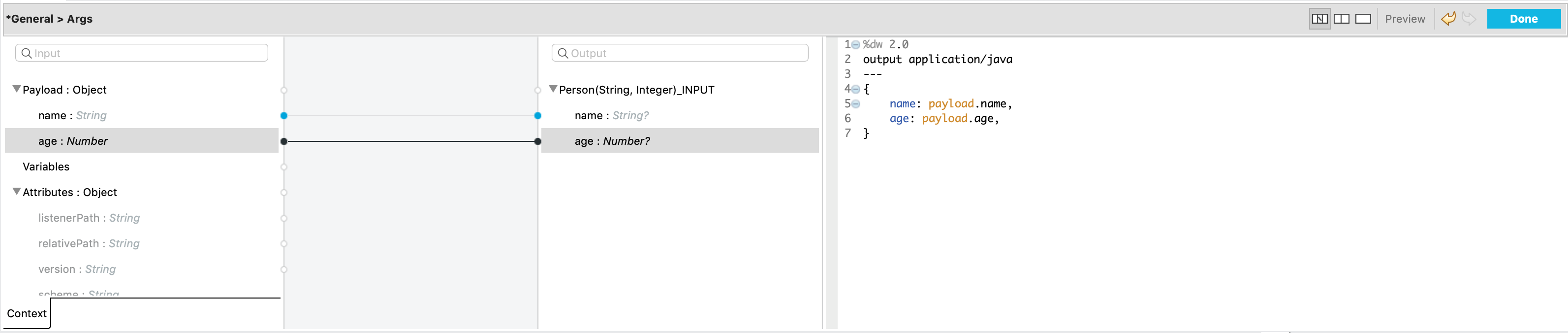
The `new` operation is configured and ready.
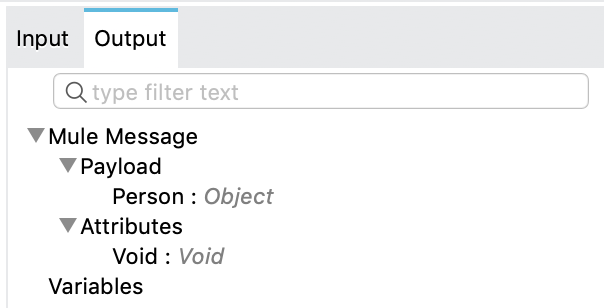
DataSense also provides metadata for the operation’s output. The `new` operation places the `Person`
object in the payload of the output message, as can be observed:
## Target Parameters
Instead of placing the output object in the payload, you can save the output object to a variable as
the `new` operation supports [target parameters](https://docs.mulesoft.com/mule-runtime/latest/target-variables).
For example:
```xml
#[{
name: 'John Doe',
age: 30
}]
```
The output object is saved in a variable and can be accessed later as `"#[vars.john]"`.
## See Also
- [Invoke Methods](https://docs.mulesoft.com/java-module/latest/java-invoke-method)
- [Test for an Instance of a Class](https://docs.mulesoft.com/java-module/latest/java-instanceof)
- [Work With Throwables](https://docs.mulesoft.com/java-module/latest/java-throwable)