---
schema_version: "1"
id: 13b4cbf172b0b940a628700443caf05206bbf178a4006edc33f0ddede68ae567
title: Configuring Basic Security Filter for HTTP Connector
collection: mulesoft
version: current
locale: en-us
portal_url: https://docs.salesforce.com/mulesoft/current/en-us/http-connector/1.11/http-connector-basic-security.md
canonical_url: https://docs.mulesoft.com/http-connector/1.11/http-connector-basic-security
source_site: docs.mulesoft.com
content_type: documentation
content_hash: 79c5aff2ea69792a53911aaf57f2ed1643f366c36083e21fda79519c91b992c4
description: MuleSoft Documentation Site
release: "1.11"
latest: false
---
---
product: HTTP Connector
version: 1.11
---
# Configuring Basic Security Filter for HTTP Connector
> For the full documentation index, see: https://docs.mulesoft.com/llms.txt
Consider a Mule app that exposes an API for accessing sensitive customer information, such as
personal details and order history. To secure this API, you want to implement basic security using a
username and password combination. The Anypoint Platform for HTTP (HTTP Connector) **Basic Security
Filter** operation enables you to enforce basic authentication.
The following example illustrates how to configure the **Basic Security Filter** operation to ensure
that only authorized users can access the protected API.
1. In Anypoint Studio, add an **HTTP Listener** source to your flow. This serves as the entry point
for incoming API requests.
2. Drag the **Basic Security Filter** operation after the **HTTP Listener**. The operation
validates the username and password provided in the request headers.
3. Select the **Basic Security Filter** operation from your flow.
4. Configure the **Basic Security Filter** operation with the authentication **Realm** and
**Security providers**.
5. Continue building your Mule flow by adding the logic for handling API requests, retrieving
customer information, or performing other operations.
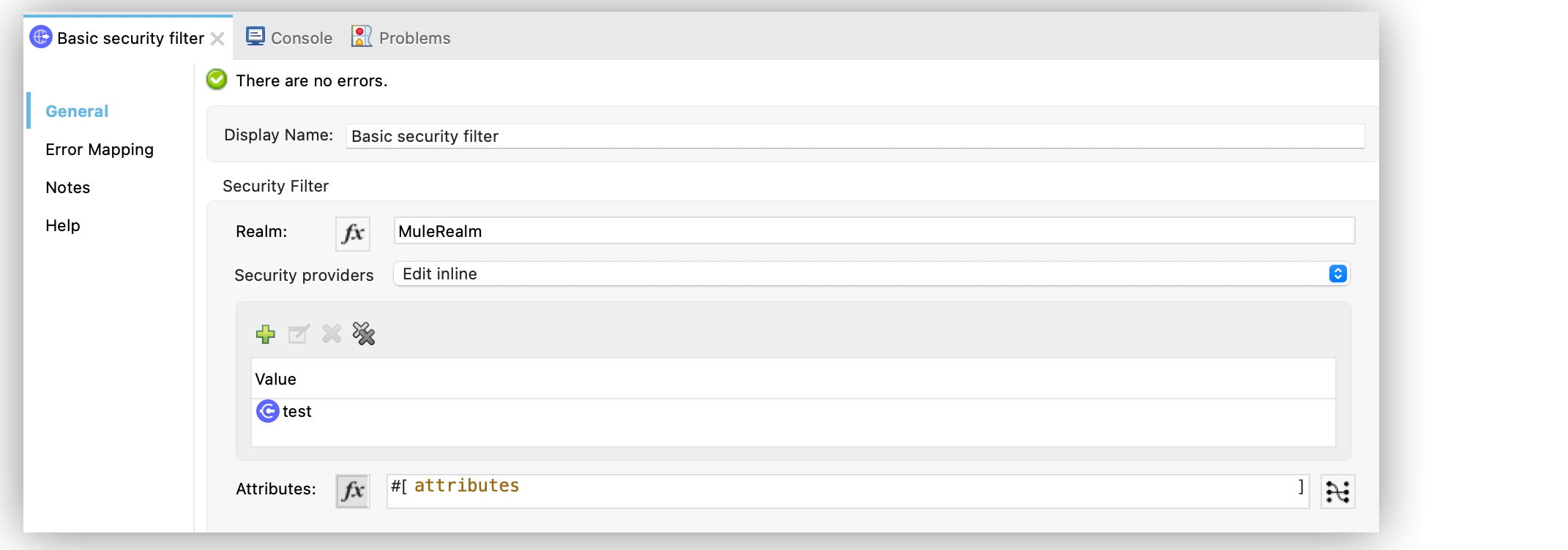
In the **Configuration XML**, the configuration looks like this:
```xml
```
## See Also
- [HTTP Connector Examples](https://docs.mulesoft.com/http-connector/1.11/http-connector-examples)
- [HTTP Connector Reference](https://docs.mulesoft.com/http-connector/1.11/http-documentation)