---
schema_version: "1"
id: 82d250ae32b202eb86e271eba72ddd527d43c570db6fa698507ddec307c96bfb
title: EDIFACT EDI Connector 3.0 Batch Outbound EDIFACT Messages
collection: mulesoft
version: current
locale: en-us
portal_url: https://docs.salesforce.com/mulesoft/current/en-us/edifact-edi-connector/latest/edifact-edi-connector-batching.md
canonical_url: https://docs.mulesoft.com/edifact-edi-connector/latest/edifact-edi-connector-batching
source_site: docs.mulesoft.com
content_type: documentation
content_hash: 16b2c3f685cc1653a9b8c2bf558ae27a30ee6ffb893cfe17de0a54555d9aba02
description: MuleSoft Documentation Site
release: "3.0"
latest: true
---
---
product: EDIFACT EDI Connector
version: 3.0
is-latest-version: true
---
# EDIFACT EDI Connector 3.0 Batch Outbound EDIFACT Messages
> For the full documentation index, see: https://docs.mulesoft.com/llms.txt
For EDI messages that are not time-sensitive, such as invoice and payment remittances, use the Write
batch operation to merge multiple individual messages into a single interchange to send to your
trading partners.
## Batching Stages
Use the Anypoint Connector for EDIFACT EDI (EDIFACT EDI Connector) Write batch operation to merge
individual EDIFACT messages into a single transmission to send to your trading partners.
> [!NOTE] The EDIFACT Write batch operation does not support merging CONTRL acknowledgment messages.
You implement a batch in two stages:
1. Accumulate the transactions.
2. Release the batch.
### Accumulate the Transactions
To accumulate transactions for a batch:
1. Transform the payloads into EDIFACT messages using DataWeave and EDIFACT as you receive
application messages (such as a JSON invoice) from the backend systems.
2. Create EDIFACT payloads using temporary control number keys in the EDIFACT Write operation.
This enables sending the accumulated EDIFACT as a batch later. The batch is created using
control numbers that are not used in the final batch sent to the trading partner, for example,
``.
3. Store the intermediate EDIFACT message payloads in your choice of storage, such as a database
table:
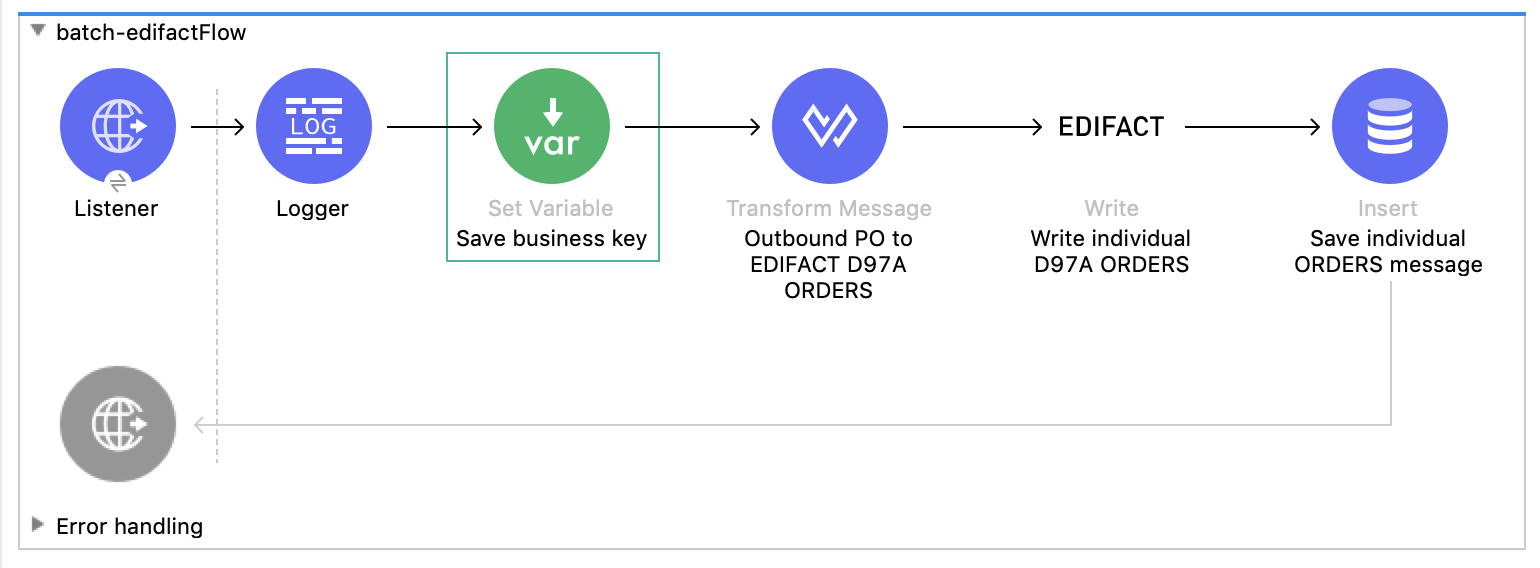
For example, this implementation of a Mule flow:
- Receives JSON payloads from the backend systems.
- Transforms to an `EDIFACT D97A ORDERS` message.
- Generates the intermediate EDIFACT message payload using the EDIFACT Write operation.
- Stores the EDIFACT payload in a database table.
### Release the Batch
Trading partners have varying criteria for how they want transactions batched:
- Release the batch at a specific time interval or a specific time of the day.
- Release the batch when a specific number of transactions are accumulated.
- Release the batch when the total size of the accumulated transactions is near a specified
threshold.
To release the batch:
1. Implement the logic or module to monitor the transactions accumulated in the temporary storage
and determine when a particular batch is released.
2. Retrieve the accumulated intermediate EDIFACT messages from the temporary storage based on the
batch criteria, group the transactions together, and then send the appended payload to the
EDIFACT Write batch operation.
You can either use the control number key on the Write batch operation or leave the control
number key fields empty at the time of Write batch operation execution, allowing the EDIFACT EDI
Connector to generate the control number sequence automatically based on the sender and receiver
identifier combination:
` `.
3. Ensure that the input payload sent to the Write batch operation contains EDI transactions with
data elements in the UNB envelope segments, such as `Sender ID`, `Receiver ID`, and
`Version number`:
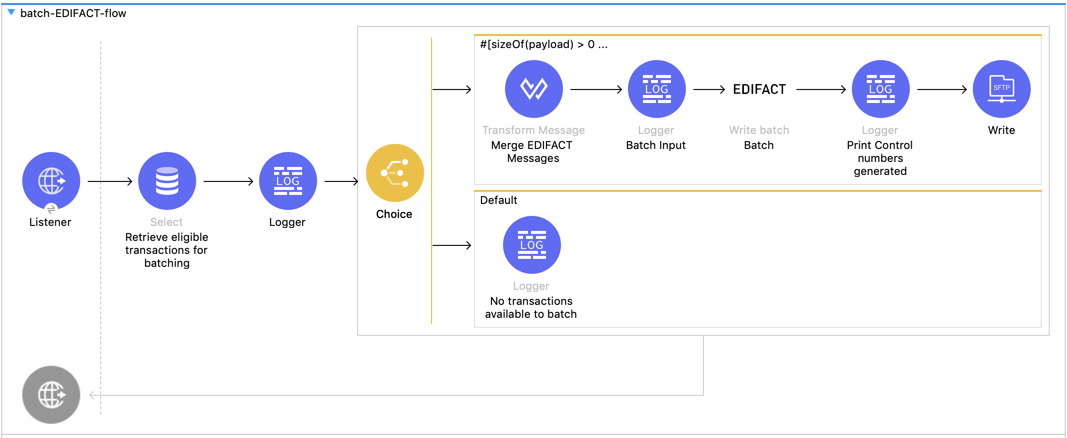
For example, this implementation of a Mule flow:
- Receives an HTTP request to release accumulated EDIFACT messages transactions for a specific
partner. The request is triggered after the batch release criteria are met.
- Retrieves the intermediate EDIFACT messages from the database table.
- Applies a transformation to group the individual EDIFACT messages.
- Sends the appended payload through the EDIFACT Write batch operation to merge the messages into a
single transaction.
- Prints the generated control numbers, which reconcile the inbound functional acknowledgments
received from the partners.
- Delivers the batched EDIFACT transaction to the trading partner’s SFTP site.
If the input payload contains EDI transactions with non-matching data elements in the envelope
segments, the Write batch operation throws an exception.