---
schema_version: "1"
id: 3c733f9f2eeedd9a2d7528a10984f3f4cf3b8f14e4ee4e92e2d3545205bea24b
title: Configuring Input and Output Parameters for Stored Procedures
collection: mulesoft
version: current
locale: en-us
portal_url: https://docs.salesforce.com/mulesoft/current/en-us/db-connector/1.15/database-connector-input-output-parameters.md
canonical_url: https://docs.mulesoft.com/db-connector/1.15/database-connector-input-output-parameters
source_site: docs.mulesoft.com
content_type: documentation
content_hash: 0475acc3648dd352bcf9abe38e1be823e3d66f261dede17c4554ce0ae9879f8d
description: MuleSoft Documentation Site
release: "1.15"
latest: false
---
---
product: Database Connector
version: 1.15
---
# Configuring Input and Output Parameters for Stored Procedures
> For the full documentation index, see: https://docs.mulesoft.com/llms.txt
Configure input or output parameters for the **Stored procedure** operation of Anypoint Connector
for Database (Database Connector) to specify the parameters that a stored procedure uses. There are
input parameters (values passed into the procedure), output parameters (values returned by the
procedure), or in out parameters, which are a combination of both.
In Anypoint Studio, you can configure the parameters for the **Stored procedure** operation by using
the following fields:
- **Input parameters**
Parameters for which values are provided as inputs to the stored procedure.
You typically pass values from your Mule app to the stored procedure through these parameters.
- **Output parameters**
Parameters used to return values from the stored procedure back to your Mule app.
After executing the stored procedure, you can retrieve the values assigned to these parameters.
- **In out parameters**
Parameters that act as both input and output parameters.
You can pass a value into the stored procedure through these parameters.
## Configure Input Parameters
Consider a scenario in which you develop a Mule app to manage customer orders. In this case, you
retrieve order information from a database by using a stored procedure that takes parameters such as
the customer ID and order status.
The following example illustrates how to configure the **Input parameters** field of the **Stored
procedure** operation to dynamically fetch order details based on specific criteria:
1. In Studio, add a **Database Configuration** element to your Mule app project and configure it
with the necessary MySQL database connection details.
2. Drag the **Stored procedure** operation to your canvas to retrieve the order information.
3. Select the operation from your flow.
4. In the **SQL Query text** field, enter `{call GetOrderDetails(:customerId, :orderStatus)}`.
This defines the SQL statement for calling the stored procedure `GetOrderDetails` with the named
parameters `customerId` and `orderStatus`.
5. In the **Input parameters** field, enter the following expression to fetch the order details:
```xml
{
"name": "customerId",
"type": "INTEGER",
"value": #[flowVars.customerId]
},
{
"name": "orderStatus",
"type": "VARCHAR",
"value": #[message.inboundProperties['orderStatus']]
}
```
- `name`
Name of the input parameter.
- `type`
Data type of the input parameter.
- `value`
Value of the input parameter, specified using Mule expression syntax.
In the **Configuration XML** editor, the configuration looks like this:
```xml
```
## Configure Output Parameters
Consider a scenario in which you develop a Mule app for an online retail system. The Mule app
manages order processing, and you want to use a stored procedure to implement a feature that
retrieves order details and calculates the total amount of an order from a MySQL database. In this
scenario, the stored procedure returns details such as the order items, order quantities, and the
total amount as an output parameter.
The following example demonstrates how to configure the **Output parameters** field of the **Stored
procedure** operation to fetch order details and the total amount dynamically.
1. In Studio, add a **Database Configuration** element to your MuleSoft app project and configure
it with the necessary MySQL database connection details.
2. Drag the **Stored procedure** operation to your canvas to retrieve the order information.
3. Select the operation from your flow.
4. In the **SQL Query text** field, enter
`{call GetOrderDetails(:orderId, :totalAmount, :orderDetails)}`.
This defines the SQL statement for calling the stored procedure `GetOrderDetails` and retrieving
output parameters such as `orderId`, `totalAmount`, and `orderDetails`.
5. Set **Output parameters** to **Edit inline**.
6. Click the plus icon to open the &Output parameter\* window.
7. In the **Output parameter** window, set the following parameters:
| Key | Type Value |
|---|
orderId | INTEGER |
totalAmount | Decimal |
orderDetails | ARRAY |
8. Click **Finish**.
In the **Configuration XML** editor, the configuration looks like this:
```xml
```
## Configure In Out Parameters
Consider a scenario in which you develop a Mule app for an inventory management system to handle the
process of updating the stock levels for specific products. In this scenario, the Mule app interacts
with a stored procedure named `UpdateStockLevel` in a PostgreSQL database, which requires both input
and output parameters.
This following example illustrates how to configure the **In out parameters** field of the **Stored
procedure** operation to manage the stock level updates, including both the input data (product ID
and quantity) and the output data (updated stock level).
1. In Studio, add a **Database Configuration** element to your MuleSoft app project and configure
it with the necessary PostgreSQL database connection details.
2. Drag the **Stored procedure** operation to your canvas to retrieve the order information.
3. Select the operation from your flow.
4. In the **SQL Query text** field, enter
`{call UpdateStockLevel(:productId, :quantity, :updatedStockLevel)}`.
This creates an SQL statement that calls a stored procedure named `UpdateStockLevel` with the
`productId` and `quantity` input parameters and the\`updatedStockLevel\` output parameter.
5. Set **In out parameters** to **Edit inline**.
6. Click the plus icon to open the **In out parameter** window.
7. In the **In out parameter** window, assign values to the following parameters:
| Key | Value |
|---|
productId | #[payload.productId] |
quantity | #[payload.quantity] |
updatedStockLevel | (empty) |
8. Click **Finish**.
In the **Configuration XML** editor, the configuration looks like this:
```xml
```
## Configure Custom Types
The ability to use custom types as parameters in stored procedures depends on the database system
you are using and the capabilities of the Database Connector or framework you are working with.
Exercise caution when you work with an Oracle database vendor by using the **Stored procedure**
operation with custom database types.
\+ When you define the stored procedure within a package, set the column type of a custom type
parameter in the connector connection settings:
1. In Studio, open the **Database Config Global Element Properties** window.
2. Click the **Advanced** tab.
3. Set **Column types** to **Edit inline**.
4. Click the plus sign to open the **Column types** window.
5. In the **Column types** window, set the **Id** and **Type name** fields with your desired
values.
6. Click **OK**.
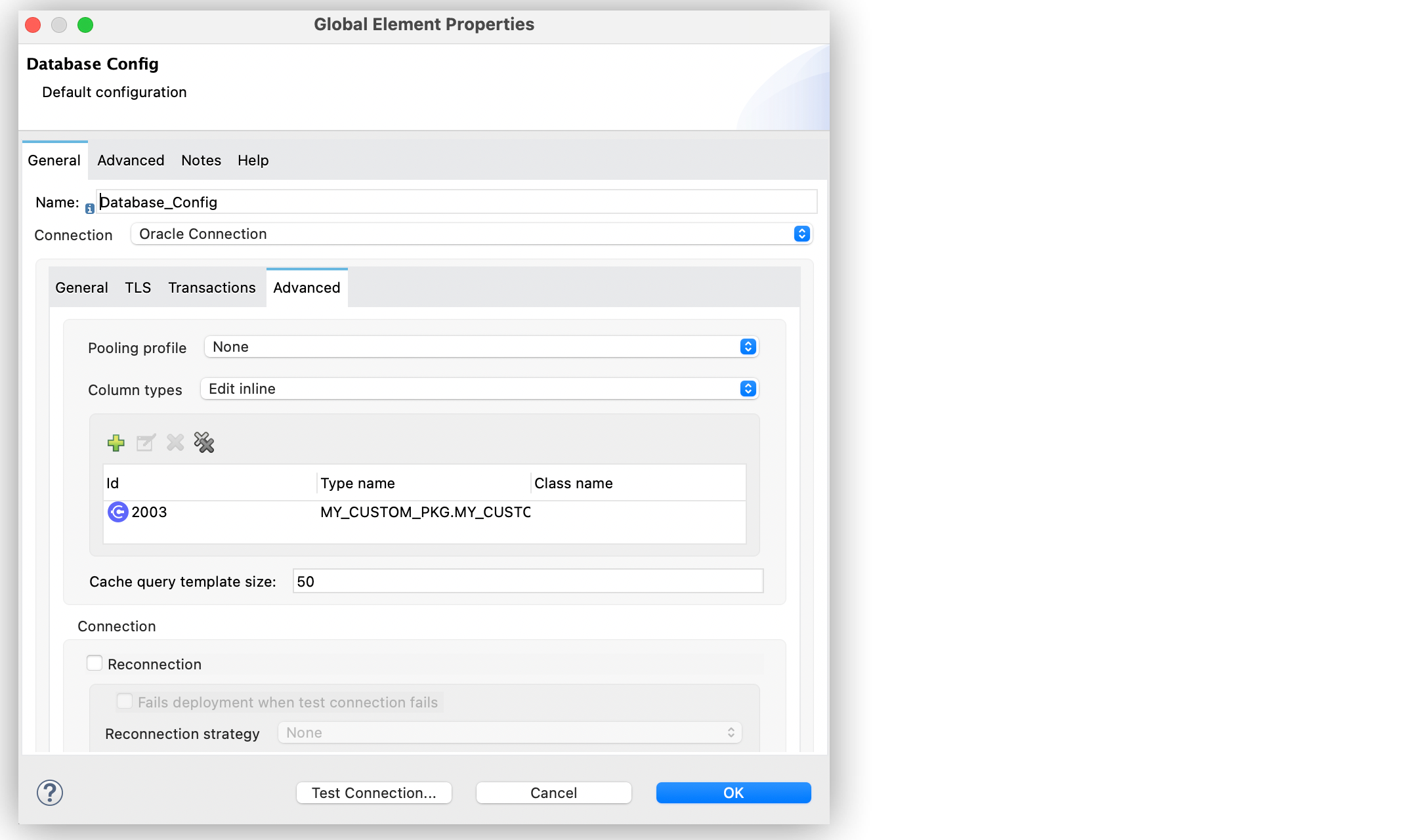
In the **Configuration XML** editor window, the configuration looks like this:
```xml
```
It is a good practice to define the **Column types** of a custom type parameter, even if the stored
procedure is not part of a package.
## Configuration Considerations
Review the following considerations when you configure **In out parameters**.
### Variable Values in Stored Procedures
The following consideration applies to all database vendors. In Mule runtime engine (Mule), if you
pass a variable with a given set of values to a stored procedure as **In out parameters**, the
variable cannot contain modified values after the operation completes. The modified values are part
of the operation’s payload, instead.
To illustrate this behavior, consider the following scenario:
A parameter registered as **In out parameters** has a value stored in a variable named `foo`. If
`vars.foo` is passed to the stored procedure, `vars.foo`, it retains its original value after the
operation is invoked. When you chain stored procedures, you might expect that when you call stored
procedure `A`, the value of `vars.foo` would change, allowing you to subsequently call stored
procedure `B` with the already modified values.
However, the modified data is returned as an entry in the payload after the operation executes. The
payload contains modified values that the stored procedure can create. Consequently, chaining stored
procedures is feasible by invoking only one stored procedure per operation.
Use the
[`prepareArray` and `prepareStruct` functions](https://docs.mulesoft.com/db-connector/1.15/database-connector-udt-stored-procedure#using-preparestruct-and-preparearray-functions)
to properly format the data for the **Stored procedure** operation.
### Data Format for Returned Data
A **Stored procedure** operation returns data in a format that differs from what it expects. The
limitation applies to all database vendors.
To illustrate this behavior, consider the following scenario:
The **Stored procedure** operation expects an SQL array or SQL struct on the input, which is
correctly resolved by using the `prepareArray` and `prepareStruct` functions. However, when Mule
performs the operation, a Java object containing the modified values is returned. As a result, the
operation returns data in a different format than the expected one, which can become an issue when
chaining stored procedures.
Use the
[`prepareArray` and `prepareStruct` functions](https://docs.mulesoft.com/db-connector/1.15/database-connector-udt-stored-procedure#using-preparestruct-and-preparearray-functions)
to properly format the data for the **Stored procedure** operation.