---
schema_version: "1"
id: 48dbc27cd0b6d2f0719343487f917f578a9b3715fc5f51234ca11d03db315739
title: Compressing and Decompressing a Single File
collection: mulesoft
version: current
locale: en-us
portal_url: https://docs.salesforce.com/mulesoft/current/en-us/compression-module/latest/compression-module-compress-decompress.md
canonical_url: https://docs.mulesoft.com/compression-module/latest/compression-module-compress-decompress
source_site: docs.mulesoft.com
content_type: documentation
content_hash: 47e5af758c2439e7ef00a19d461afa0ab8e73a17b01334f43cdca17a769c17d6
description: MuleSoft Documentation Site
release: "2.2"
latest: true
---
---
product: Compression Module
version: 2.2
is-latest-version: true
---
# Compressing and Decompressing a Single File
> For the full documentation index, see: https://docs.mulesoft.com/llms.txt
The Compression module provides the **Compress** and **Decompress** operations that enable you to
compress or decompress a single file in the configured Gzip or Zip format.
## Configure Compress Operation
Given an input stream payload, the **Compress** operation enables you to compress the stream and
return a new compressed stream of bits. You can then store the compressed stream of bits in a file
system or transfer it to another system.
1. In Studio, drag the **Compress** operation to your flow.
2. Set **Content** to your input stream payload to compress.
3. Set **Compressor** to **Gzip compressor** or **Zip compressor** strategy.
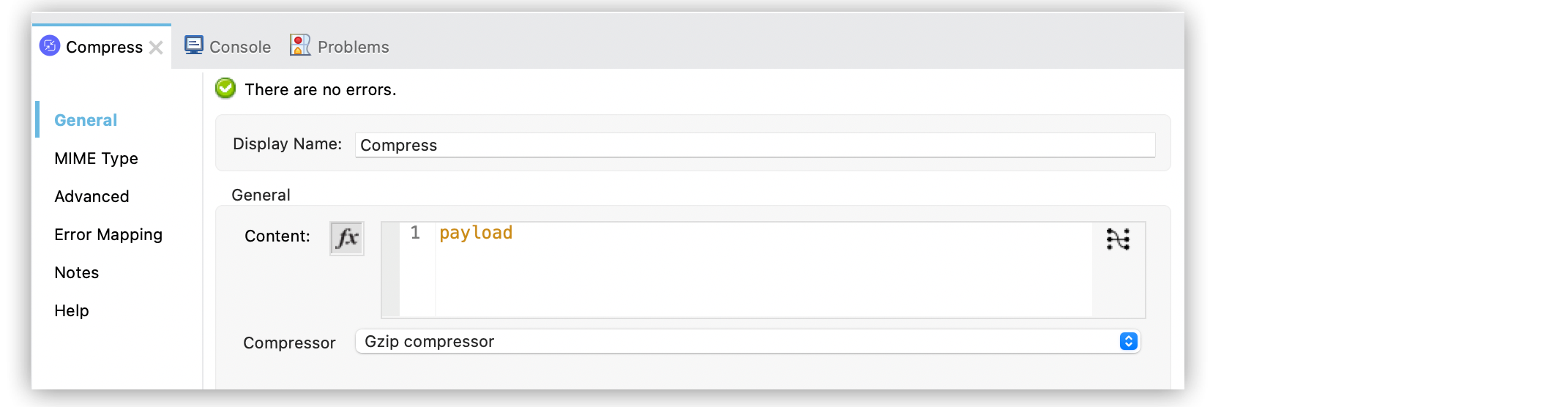
In the **Configuration XML** editor, the configuration looks like this:
```xml
#[payload.data]
```
## Configure GZip Compressor Strategy
A compressor strategy compresses a file or a single-entry archive. The **Gzip compressor** strategy
declares that the content must be compressed in the Gzip format.
1. In Studio, select the **Compress** operation from your flow.
2. Set **Compressor** to **Gzip compressor**.
In the **Configuration XML** editor, the configuration looks like this:
```xml
```
## Configure Zip Compressor Strategy
The **Zip compressor** \*strategy declares that the content must be compressed in the Zip format.
1. In Studio, select the **Compress** operation from your flow.
2. Set **Compressor** to **Zip compressor**.
3. Select **Force ZIP64** to compress files and byte arrays greater than 4 GBs.
In the **Configuration XML** editor, the configuration looks like this:
```xml
```
## Configure Decompress Operation
The **Decompress** operation enables you to decompress a single-entry compressed content, which is
an archive in a specified compression format. Compressed archives can have multiple entries, but
this operation manages only single entry archives because if the archive contains more than one
entry, the operation does not know which to return. For multiple entry archives, use the **Extract**
operation, which enables you to choose only formats that accept multiple entries.
1. In Studio, drag the **Decompress** operation to your flow.
2. Set **Compressed** to your input stream payload to decompress.
3. Set **Decompressor** to **Gzip decompressor** or **Zip decompressor** strategy.

In the **Configuration XML** editor, the configuration looks like this:
```xml
#[payload]
```
## Configure GZip Decompressor Strategy
A decompressor strategy decompress a file or a single-entry archive. The **Gzip decompressor**
strategy declares that the content must be decompressed with the Gzip format.
1. In Studio, select the **Decompress** operation from your flow.
2. Set **Decompressor** to **Gzip decompressor**.
In the **Configuration XML** editor, the configuration looks like this:
```xml
```
## Configure Zip Decompressor Strategy
The **Zip decompressor** strategy declares that the content must be decompressed with the Zip
format.
1. In Studio, select the **Decompress** operation from your flow.
2. Set **Decompressor** to **Zip decompressor**.
In the **Configuration XML** editor, the configuration looks like this:
```xml
```
## See Also
- [Compression Module Reference](https://docs.mulesoft.com/compression-module/latest/compression-documentation)
- [Salesforce Help](https://help.salesforce.com)